Skip to content

Softonic English

Just another Softonic Sites site

Innovation and Future Trends: Integrating Adobe Acrobat AI Assistant in Digital Transformation

Currently, artificial intelligence has revolutionized (and continues to revolutionize) the way we work, communicate, and manage information. However, keeping up with all the technological advancements can be challenging for many. Changes are constant, and we must be prepared; that’s why tools like Acrobat AI Assistant are here to make our lives easier and help us adapt to this new digital era.

Compare Acrobat Plans
Compare Acrobat Plans Free Download

Get instant answers

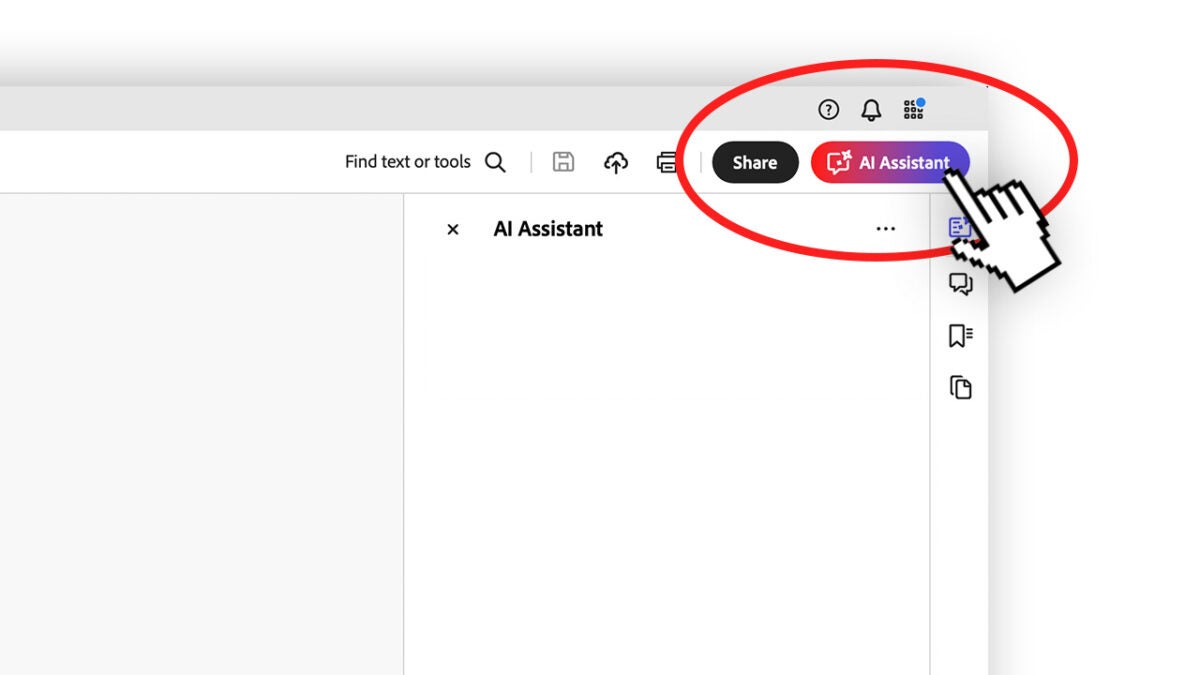
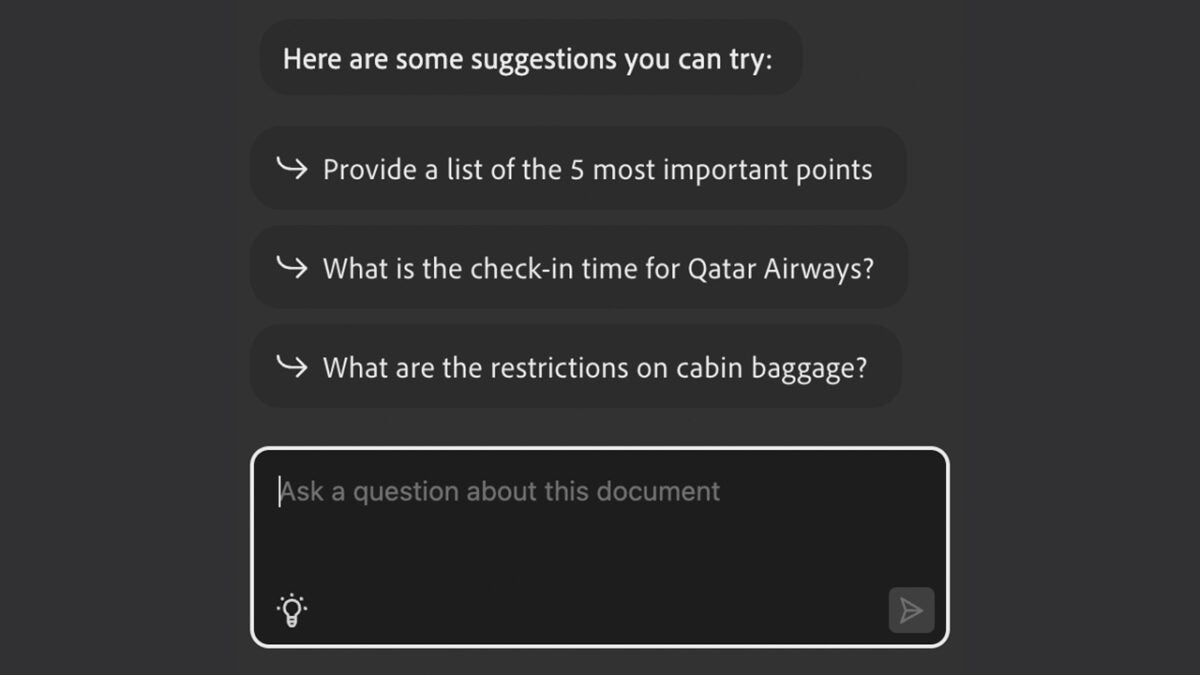
One of the most notable features of Acrobat AI Assistant is its ability to generate answers to questions based on the content of a document. In addition to providing us with the information, the assistant highlights the specific section of the document from which the answer was obtained to offer context. Acrobat AI Assistant also suggests other related additional questions connected to the original query, in case you want to delve deeper into the topic. If you want to know how to do it yourself, follow these steps:

  • Open a PDF with Adobe Acrobat. If you want, you can open multiple files within Adobe Acrobat by selecting the option Select files under Recommended tools for you.
  • Click on AI Assistant. 
  • Within the new panel, you will see a text box further down. That is where you will need to write your questions. 
  • You can copy the answers using the Copy button (for a specific section) or Copy the full chat (copies all the answers).
Summarize the content of your longer files

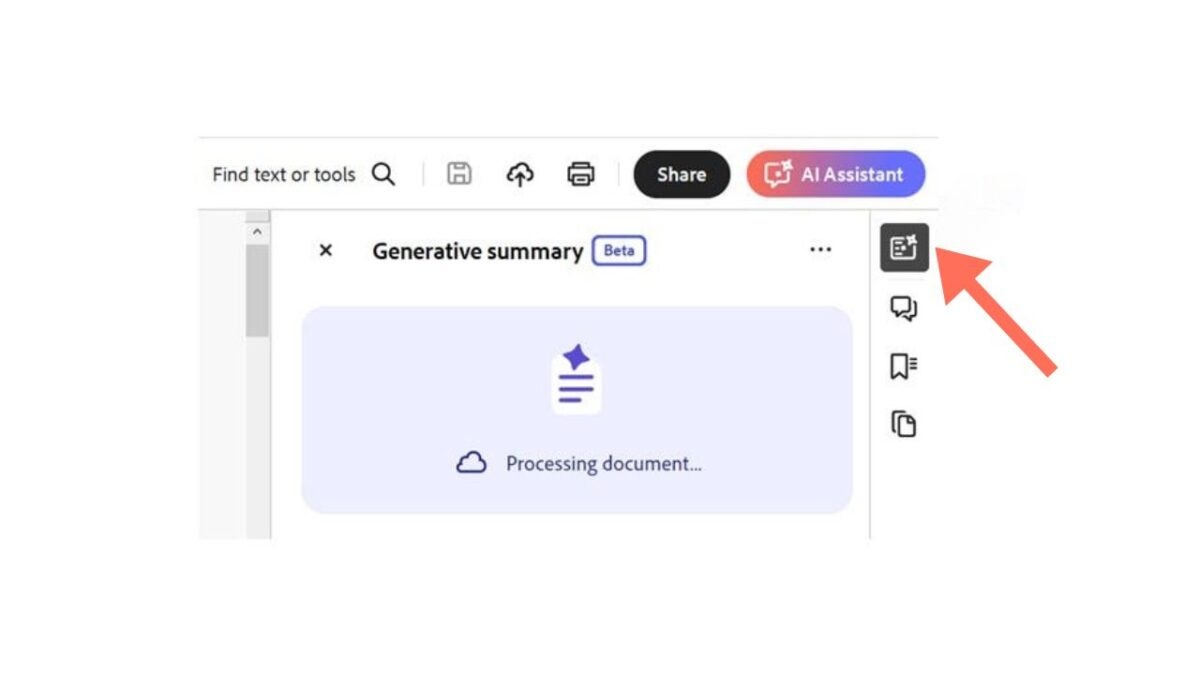
The Generative summary feature provides us with an overview of the content of a file and “creates” a small summary based on it. Whether you work as a researcher, analyst, or student, AI Assistant will make it easier for you to examine your documents and extract the most essential ideas and points from them. Generate your own summaries like this:

  • Open a PDF with Adobe Acrobat.
  • Select the icon for Generative summary. If you don’t see it, go to the All Tools panel and look for the Generative Summary option.
  • Click on Get started. 
  • A text will be generated with a general summary of the text divided by sections. Within the summary, you can choose specific parts for the assistant to direct you to the corresponding section of the document. 
Adobe Acrobat is even with the longest PDFs. In these cases, the assistant divides the content into sections and analyzes it in parts. This way, we can review the results instantly and without having to wait too long.

AI is also within reach of your mobile 

Although we have currently focused on the desktop version of Adobe Acrobat, the benefits of AI Assistant are also available in the mobile application. This means you can do things like “ask” the document and get answers from anywhere.

  • Open the document from the Adobe Acrobat application.
  • Click on AI Assistant.
  • Select Ask AI Assistant and to continue, click Agree. 
  • Type your question in the text box. You can also use voice commands to ask your questions. 
  • Now, you just have to wait for the answer to your question to be generated. 

If you regret the question, want to change it, or anything else, you can also stop the AI Assistant simply by selecting Stop. Just like in the desktop version, the assistant will suggest other additional questions to complement your main question. 

Security and Collaboration

Keeping files safe is one of the major concerns of users. Adobe Acrobat takes data protection very seriously; we can encrypt documents, set permissions, and add digital signatures to ensure that sensitive information remains protected and is only accessible to authorized individuals.

On the other hand, collaboration is also essential in the modern work environment. Adobe Acrobat facilitates teamwork and allows us to make comments, suggestions, and edits in real-time. This not only streamlines the workflow but also fosters greater collaboration and creativity among teams.

How many times can I use Acrobat AI Assistant?

AI Assistant has many capabilities, as well as great potential. Unfortunately, its use is currently limited. Both users of free plans and paid plans receive five usage requests. 

To have full access, we will need to purchase the AI Assistant plan. You will find all the information on its official website, which we will leave you here.

Compare Acrobat Plans
Compare Acrobat Plans Free Download

In summary, AI Assistant is a powerful and accessible tool that helps us face the new challenges of the digital age. Essentially, the assistant allows us to adapt and improve our workflows and studies, something more than necessary in a landscape where the digital realm predominates strongly. 

Author: María López

{ "de-DE": "Künstler aus Berufung und Technikliebhaber. Seit ich denken kann, habe ich gerne an allen möglichen Gadgets herumgebastelt.", "en-US": "Artist by vocation and technology lover. I have liked to tinker with all kinds of gadgets for as long as I can remember.", "es-ES": "Artista de vocación y amante de la tecnología. Me ha gustado cacharrear con todo tipo de gadgets desde que tengo uso de razón.", "fr-FR": "Artiste de vocation et amateur de technologie. J'aime bricoler avec toutes sortes de gadgets depuis que j'ai l'usage de la raison.", "it-IT": "", "ja-JP": "", "nl-NL": "", "pl-PL": "", "pt-BR": "", "social": { "email": "", "facebook": "", "twitter": "", "linkedin": "" } } View all posts by María López

Author María LópezPosted on March 19, 2025September 12, 2025Categories News

Post navigation

Previous Previous post: Google Pixel 9a vs Pixel 8a: Changes that are not immediately visible
Next Next post: Former Waymo CEO Raises Red Flags About Tesla’s Cybercab Design

Recent Posts

  • The creators of Dishonored were about to make Thief 4… and a Blade Runner game
  • Park Chan-wook has been the jury director of Cannes and did not want to award the Palme d'Or to anyone for a good reason
  • Epic Games showcases Unreal Engine 6 for the first time with the most unexpected game
  • Hideo Kojima has gone to see 'The Mandalorian and Grogu' and his opinion is more than clear. "Everything against everything"
  • Tatiana Maslany asked the audience to cancel Disney+, but she trusts that it won't affect the return of She-Hulk. "The internet will know before I do"

Archives

  • May 2026
  • April 2026
  • March 2026
  • February 2026
  • January 2026
  • December 2025
  • November 2025
  • October 2025
  • September 2025
  • August 2025
  • July 2025
  • June 2025
  • May 2025
  • April 2025
  • March 2025
  • February 2025
  • January 2025
  • December 2024
  • November 2024
  • October 2024
  • September 2024
  • August 2024
  • July 2024
  • June 2024
  • May 2024
  • April 2024
  • March 2024
  • February 2024
  • January 2024
  • December 2023
  • November 2023
  • October 2023
  • September 2023
  • August 2023
  • July 2023
  • June 2023
  • May 2023
  • April 2023
  • March 2023
  • February 2023
  • January 2023
  • December 2022
  • November 2022
  • October 2022
  • September 2022
  • August 2022
  • July 2022
  • June 2022
  • May 2022
  • April 2022
  • March 2022
  • February 2022
  • January 2022
  • December 2021
  • November 2021
  • October 2021
  • September 2021
  • August 2021
  • July 2021
  • June 2021
  • May 2021
  • April 2021
  • March 2021
  • February 2021
  • January 2021
  • December 2020
  • November 2020
  • October 2020
  • September 2020
  • August 2020
  • July 2020
  • June 2020
  • May 2020
  • April 2020
  • March 2020
  • February 2020
  • January 2020
  • December 2019
  • November 2019
  • October 2019
  • September 2019
  • August 2019
  • July 2019
  • June 2019
  • May 2019
  • April 2019
  • March 2019
  • February 2019
  • January 2019
  • December 2018
  • November 2018
  • October 2018
  • September 2018
  • August 2018
  • July 2018
  • June 2018
  • May 2018
  • April 2018
  • March 2018
  • February 2018
  • January 2018
  • December 2017
  • November 2017
  • October 2017
  • September 2017
  • August 2017
  • July 2017
  • June 2017
  • May 2017
  • April 2017
  • March 2017
  • February 2017
  • January 2017
  • December 2016
  • November 2016
  • October 2016
  • September 2016
  • August 2016
  • July 2016
  • June 2016
  • May 2016
  • April 2016
  • March 2016
  • February 2016
  • January 2016
  • December 2015
  • November 2015
  • October 2015
  • September 2015
  • August 2015
  • July 2015
  • June 2015
  • May 2015
  • April 2015
  • March 2015
  • February 2015
  • January 2015
  • December 2014
  • November 2014
  • October 2014
  • September 2014
  • August 2014
  • July 2014
  • June 2014
  • May 2014
  • April 2014
  • March 2014
  • February 2014
  • January 2014
  • December 2013
  • November 2013
  • October 2013
  • September 2013
  • August 2013
  • July 2013
  • June 2013
  • May 2013
  • April 2013
  • March 2013
  • February 2013
  • January 2013
  • December 2012
  • November 2012
  • October 2012
  • September 2012
  • August 2012
  • July 2012
  • June 2012
  • May 2012
  • April 2012
  • March 2012
  • February 2012
  • January 2012
  • December 2011
  • November 2011
  • October 2011
  • September 2011
  • August 2011
  • July 2011
  • June 2011
  • May 2011
  • April 2011
  • March 2011
  • February 2011
  • January 2011
  • December 2010
  • November 2010
  • October 2010
  • September 2010
  • August 2010
  • July 2010
  • June 2010
  • May 2010
  • April 2010
  • March 2010
  • February 2010
  • January 2010
  • December 2009
  • November 2009
  • October 2009
  • September 2009
  • August 2009
  • July 2009
  • June 2009
  • May 2009
  • April 2009
  • March 2009
  • February 2009
  • January 2009
  • December 2008
  • November 2008
  • October 2008
  • September 2008
  • August 2008
  • July 2008
  • June 2008
  • May 2008
  • April 2008
  • March 2008
  • February 2008
  • January 2008
  • December 2007
  • November 2007
  • October 2007
  • September 2007
  • August 2007
  • July 2007
  • June 2007
  • May 2007
  • April 2007
  • March 2007
  • February 2007
  • January 2007
  • December 2006
  • November 2006
  • September 2006
  • August 2006
  • June 2006
  • May 2006
  • July 2001
  • January 2001
  • November 2000
  • September 2000
  • August 2000
  • July 2000
  • April 2000
  • March 2000

Categories

  • Affiliate post
  • Expert Review
  • Gaming
  • Guides
  • How to
  • Legacy how To
  • News
  • Noticias
  • Software>Security
  • Sponsored
  • Trucos y Consejos
  • Uncategorized
  • Windows software

Meta

  • Log in
  • Entries feed
  • Comments feed
  • WordPress.org
Softonic English Proudly powered by WordPress