Skip to content

Softonic English

Just another Softonic Sites site

Interactive 3D Mockups: From Illustrator to AR

Although not many know it, Adobe Illustrator contains great design tools that go beyond vector graphics. Today we will focus on one of them, the creation of 3D shapes and their export in formats compatible with augmented reality (AR). Below, we explain step by step how to create a … Continue reading “”

Although not many know it, Adobe Illustrator contains great design tools that go beyond vector graphics. Today we will focus on one of them, 3D shape creation and its export in formats compatible with augmented reality (AR).

Next, we explain step by step how to create a 3D object inside Adobe Illustrator and how to export it correctly to view it in an AR viewer.

Adobe Illustrator
Adobe Illustrator DOWNLOAD

Before you start: prepare your design

Before converting your illustration into a 3D object, create or select the vector art that will serve as the base. It can be text, a geometric shape, or any path created with the classic tools of Adobe Illustrator.

It is advisable to keep the design clean and well-defined, without overlapping strokes or complex transparencies, as this will facilitate its conversion to volume.

Apply 3D effects

Once you have your shape ready, open the 3D and Materials panel through Effects > 3D and Materials > Extrude & Bevel. As you will see, you have a lot of 3D options at your disposal:

  • Extrude & Bevel: will help you add depth to a flat shape.
  • Revolve: with this you will create cylindrical shapes, such as a pipe.
  • Inflate: to give volume to objects in the style of a balloon.

Within the panel, you will see many different settings that will help you customize your object to the fullest, such as depth, rotation, etc.
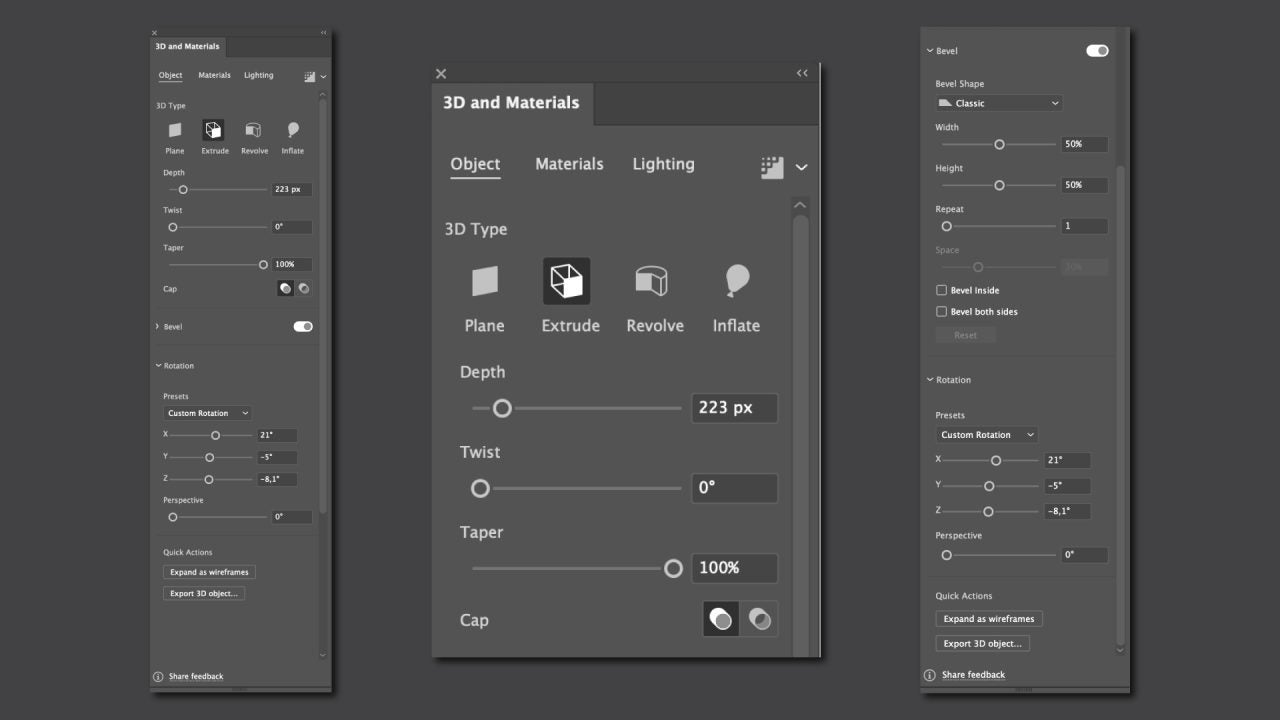
Illustrator allows you to use predefined materials (plastic, metal, wood, etc.) that you can access from the Materials tab, located in the 3D and Materials panel. From there, you can also add materials from the Adobe Substance resources.

On the left side, you will find the Lighting tab, from where you can modify the lighting. You can apply preconfigured effects such as Standard, Diffuse, Upper Left, or Right. Illustrator also has a Ray Tracing mode, which we advise you not to activate if you do not have a powerful PC. If you ultimately decide to activate it, you will experience higher response times, depending on the complexity of the object.

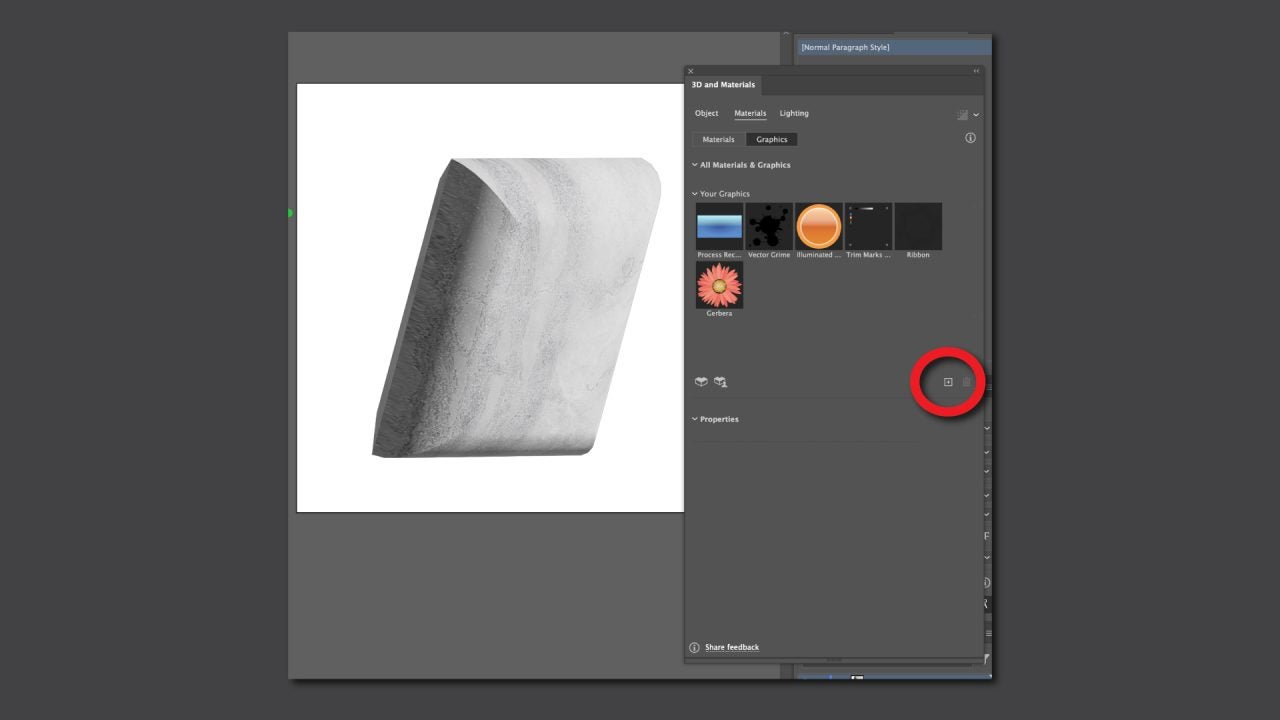
Additionally, you can also map illustrations onto the surface of any 3D object. To do this, return to the 3D and Materials panel and go to the Materials tab.

  • With your design open in Illustrator, keep it selected and go to the 3D and Materials panel again.
  • In Materials, click on the + button and select Add as a single graphic. You can also drag your design and drop it directly into the panel.
  • Select the 3D object you want to map and then click on your design, which you will find in the Your Graphics panel.
Export your 3D model

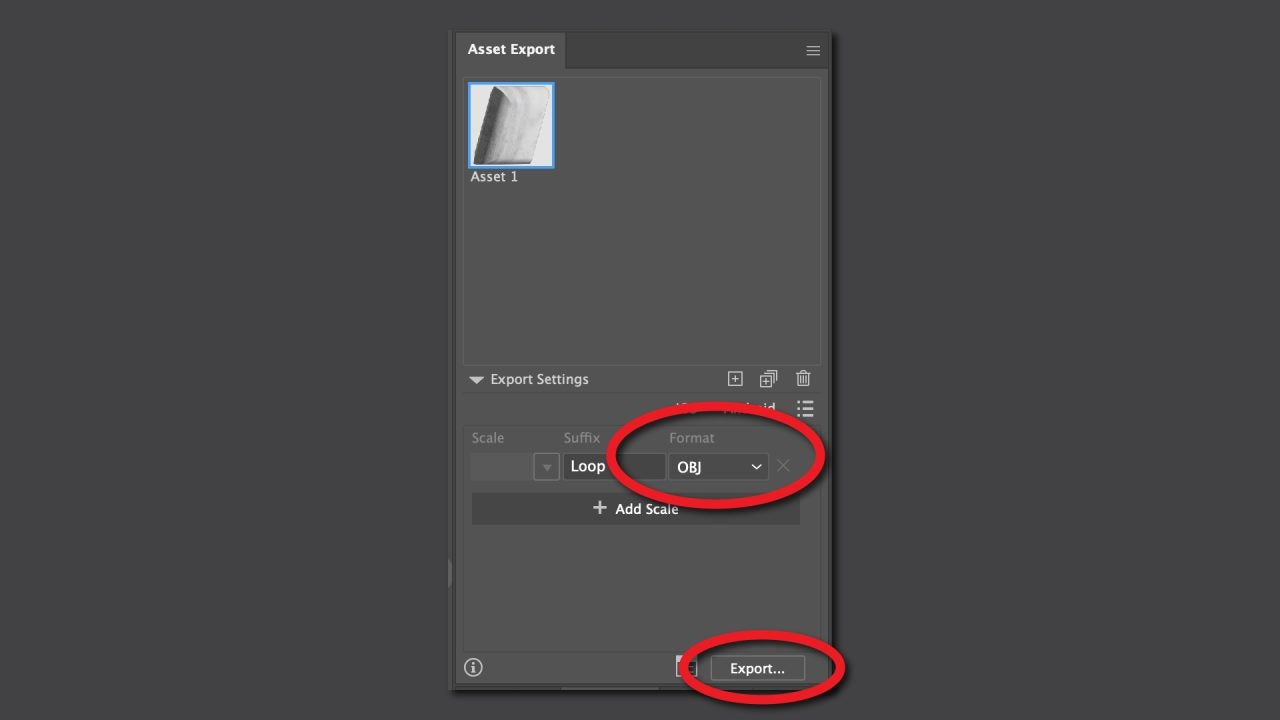
Once satisfied with the result, it’s time to export your creation in a format compatible with augmented reality. From the top menu, select Window > Asset Export.

  • Select the 3D object and drag and drop it into the Asset Export panel.
  • In the Format section, choose one of the following formats:
    • GLTF (.gltf / .glb): lightweight format ideal for AR visualization, web browsers, or mobile devices.
    • USDZ (.usd / .usdz): format developed by Apple and Pixar, especially useful if you are going to use iOS devices or apps like Adobe Aero.
    • OBJ: classic format compatible with most 3D programs, although it may not retain all materials.
  • Once you have chosen the format, select the object again in the Asset Export panel and click on Export.. to finish.
How to view your design in augmented reality

With the exported file, the next step is to view it in AR.
There are several options, depending on the device or platform you use.

Adobe Aero, for example, allows you to import 3D models (GLTF or USDZ) and place them directly in a real environment through the camera of your mobile phone or tablet. (Keep in mind that Adobe plans to withdraw support for Aero on November 6, 2025, so it is advisable to use it while it is available).

On the other hand, if you export in USDZ format, you can open the file directly from the browser or file manager and view it in AR without the need for additional applications. You also have WebAR platforms available, which are online viewers that allow you to load GLTF or GLB files to view them in augmented reality from any device with a camera.

When opening your model, you can adjust its scale, rotation, and position in the environment, and even capture images or videos of how it looks integrated into the real world.

Adobe Illustrator
Adobe Illustrator DOWNLOAD

Author: María López

{ "de-DE": "Künstler aus Berufung und Technikliebhaber. Seit ich denken kann, habe ich gerne an allen möglichen Gadgets herumgebastelt.", "en-US": "Artist by vocation and technology lover. I have liked to tinker with all kinds of gadgets for as long as I can remember.", "es-ES": "Artista de vocación y amante de la tecnología. Me ha gustado cacharrear con todo tipo de gadgets desde que tengo uso de razón.", "fr-FR": "Artiste de vocation et amateur de technologie. J'aime bricoler avec toutes sortes de gadgets depuis que j'ai l'usage de la raison.", "it-IT": "", "ja-JP": "", "nl-NL": "", "pl-PL": "", "pt-BR": "", "social": { "email": "", "facebook": "", "twitter": "", "linkedin": "" } } View all posts by María López

Author María LópezPosted on October 23, 2025October 24, 2025Categories News

Post navigation

Previous Previous post: The best game of The Lord of the Rings receives an expansion that adds 20 more hours of gameplay
Next Next post: The end of the season of the best superhero series returns to deliver its great surprises

Recent Posts

  • The Helldivers movie has a director who is known for being fast and furious
  • Batman’s most stubborn villain receives the first trailer for his imminent movie
  • Warner Bros. sets a release date for the sequel to La Llorona and the anticipated spin-off of Weapons
  • Dune: part three shows its first images
  • The first trailer for the new installment of the Evil Dead franchise is presented during CinemaCon

Archives

  • April 2026
  • March 2026
  • February 2026
  • January 2026
  • December 2025
  • November 2025
  • October 2025
  • September 2025
  • August 2025
  • July 2025
  • June 2025
  • May 2025
  • April 2025
  • March 2025
  • February 2025
  • January 2025
  • December 2024
  • November 2024
  • October 2024
  • September 2024
  • August 2024
  • July 2024
  • June 2024
  • May 2024
  • April 2024
  • March 2024
  • February 2024
  • January 2024
  • December 2023
  • November 2023
  • October 2023
  • September 2023
  • August 2023
  • July 2023
  • June 2023
  • May 2023
  • April 2023
  • March 2023
  • February 2023
  • January 2023
  • December 2022
  • November 2022
  • October 2022
  • September 2022
  • August 2022
  • July 2022
  • June 2022
  • May 2022
  • April 2022
  • March 2022
  • February 2022
  • January 2022
  • December 2021
  • November 2021
  • October 2021
  • September 2021
  • August 2021
  • July 2021
  • June 2021
  • May 2021
  • April 2021
  • March 2021
  • February 2021
  • January 2021
  • December 2020
  • November 2020
  • October 2020
  • September 2020
  • August 2020
  • July 2020
  • June 2020
  • May 2020
  • April 2020
  • March 2020
  • February 2020
  • January 2020
  • December 2019
  • November 2019
  • October 2019
  • September 2019
  • August 2019
  • July 2019
  • June 2019
  • May 2019
  • April 2019
  • March 2019
  • February 2019
  • January 2019
  • December 2018
  • November 2018
  • October 2018
  • September 2018
  • August 2018
  • July 2018
  • June 2018
  • May 2018
  • April 2018
  • March 2018
  • February 2018
  • January 2018
  • December 2017
  • November 2017
  • October 2017
  • September 2017
  • August 2017
  • July 2017
  • June 2017
  • May 2017
  • April 2017
  • March 2017
  • February 2017
  • January 2017
  • December 2016
  • November 2016
  • October 2016
  • September 2016
  • August 2016
  • July 2016
  • June 2016
  • May 2016
  • April 2016
  • March 2016
  • February 2016
  • January 2016
  • December 2015
  • November 2015
  • October 2015
  • September 2015
  • August 2015
  • July 2015
  • June 2015
  • May 2015
  • April 2015
  • March 2015
  • February 2015
  • January 2015
  • December 2014
  • November 2014
  • October 2014
  • September 2014
  • August 2014
  • July 2014
  • June 2014
  • May 2014
  • April 2014
  • March 2014
  • February 2014
  • January 2014
  • December 2013
  • November 2013
  • October 2013
  • September 2013
  • August 2013
  • July 2013
  • June 2013
  • May 2013
  • April 2013
  • March 2013
  • February 2013
  • January 2013
  • December 2012
  • November 2012
  • October 2012
  • September 2012
  • August 2012
  • July 2012
  • June 2012
  • May 2012
  • April 2012
  • March 2012
  • February 2012
  • January 2012
  • December 2011
  • November 2011
  • October 2011
  • September 2011
  • August 2011
  • July 2011
  • June 2011
  • May 2011
  • April 2011
  • March 2011
  • February 2011
  • January 2011
  • December 2010
  • November 2010
  • October 2010
  • September 2010
  • August 2010
  • July 2010
  • June 2010
  • May 2010
  • April 2010
  • March 2010
  • February 2010
  • January 2010
  • December 2009
  • November 2009
  • October 2009
  • September 2009
  • August 2009
  • July 2009
  • June 2009
  • May 2009
  • April 2009
  • March 2009
  • February 2009
  • January 2009
  • December 2008
  • November 2008
  • October 2008
  • September 2008
  • August 2008
  • July 2008
  • June 2008
  • May 2008
  • April 2008
  • March 2008
  • February 2008
  • January 2008
  • December 2007
  • November 2007
  • October 2007
  • September 2007
  • August 2007
  • July 2007
  • June 2007
  • May 2007
  • April 2007
  • March 2007
  • February 2007
  • January 2007
  • December 2006
  • November 2006
  • September 2006
  • August 2006
  • June 2006
  • May 2006
  • July 2001
  • January 2001
  • November 2000
  • September 2000
  • August 2000
  • July 2000
  • April 2000
  • March 2000

Categories

  • Affiliate post
  • Expert Review
  • Gaming
  • Guides
  • How to
  • Legacy how To
  • News
  • Noticias
  • Software>Security
  • Sponsored
  • Trucos y Consejos
  • Uncategorized
  • Windows software

Meta

  • Log in
  • Entries feed
  • Comments feed
  • WordPress.org
Softonic English Proudly powered by WordPress