Skip to content

Softonic English

Just another Softonic Sites site

Pencil Preview: Strokes and Effects in Real-Time while you Draw

Adobe Illustrator wants freehand drawing to be increasingly natural and fluid. That is why one of its latest features, Pencil Live Preview, is aimed precisely at that. This function is designed for those who draw or sketch ideas within Illustrator. From now on, those who use the Pencil tool will be able to see in real time how the stroke looks as they draw, making the entire process much more intuitive. Here we explain how it works and why this small improvement can make a big difference […]

Adobe Illustrator wants freehand drawing to be more natural and fluid. That is why one of its latest features, Pencil Live Preview, is aimed precisely at that.

This feature is designed for those who draw or sketch ideas within Illustrator. From now on, those who use the Pencil tool will be able to see in real time how the stroke looks as it is drawn, making the entire process much more intuitive.

Here we tell you how it works and why this small improvement can make a big difference in the way you work with Illustrator.

Adobe Illustrator
Adobe Illustrator DOWNLOAD

Drawing with Pencil step by step

As we mentioned before, the Pencil tool will be very useful for making sketches of ideas or for giving your designs a more “natural” finish, as if they were handmade. Using it is easier than you think:

  • Open Illustrator and select the Pencil tool. You can also press N, it’s the keyboard shortcut.
  • Go to Window and then Appearance. Click on the three horizontal lines symbol from the Appearance panel and uncheck the New Art Has Basic Appearance option.
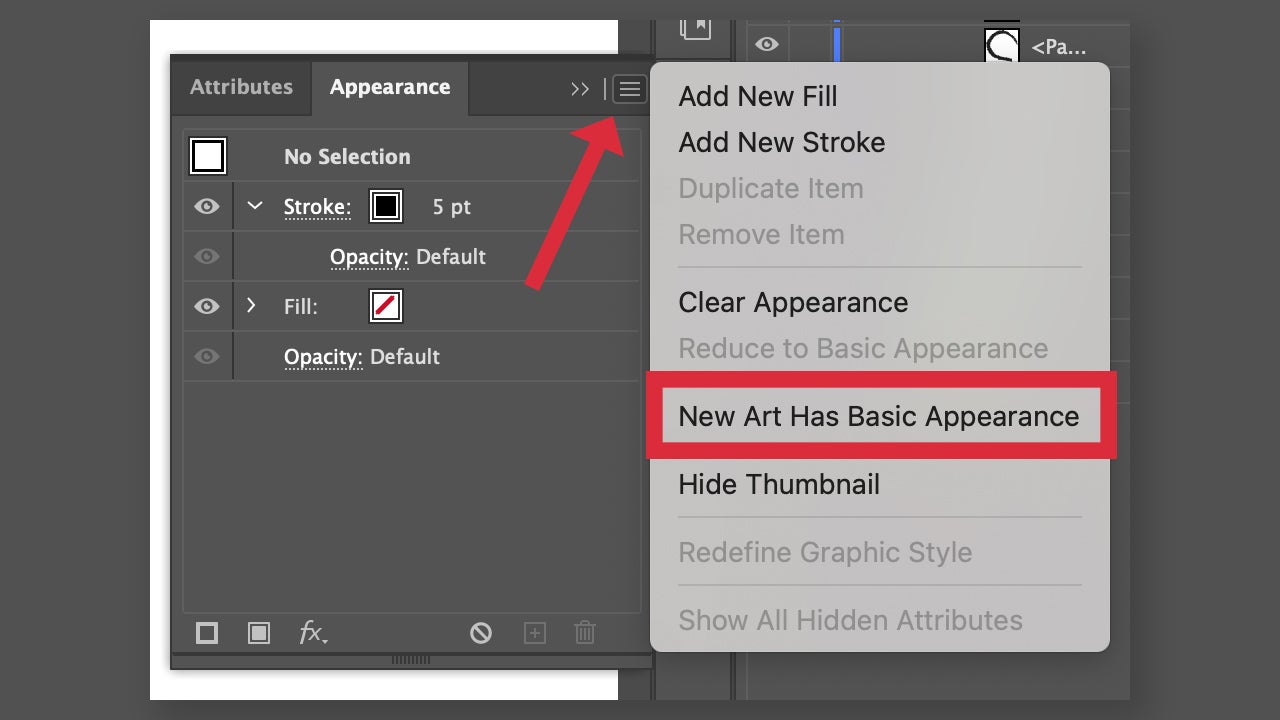
  • From the Appearance panel, select Stroke to adjust the stroke, its thickness, and more. In the top control bar, you can also change the stroke effect, opacity, and other sections.
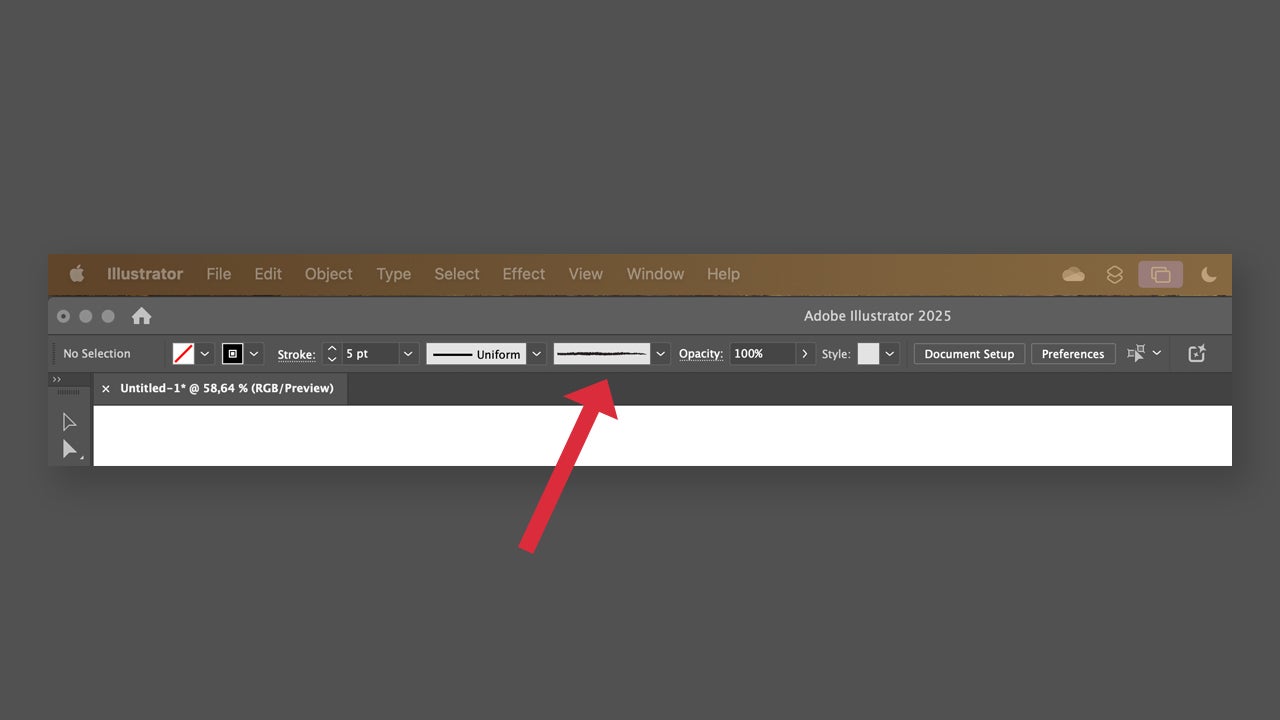
  • Finally, drag with the mouse over the canvas to draw and release to finish the stroke. You will see how your drawing takes shape.
  • If you want to apply any type of effect, just go to Effects and try the different options that Illustrator offers.

Pencil Live Preview: This is how you can activate it

Those users who use the Pencil tool in their daily routine will welcome the latest update of Adobe Illustrator with open arms. From now on, when using Pencil, we will be able to see what we are drawing in real time, which will provide us with more accurate results. Put it into practice with these guidelines:

  • As before, we will need to disable the option New Art Has Basic Appearance so that we can use Live preview.
  • Double click on Pencil from the toolbar. From the Pencil options, check the Live preview box to enable it. Right below you can also enable Live curve fitting.
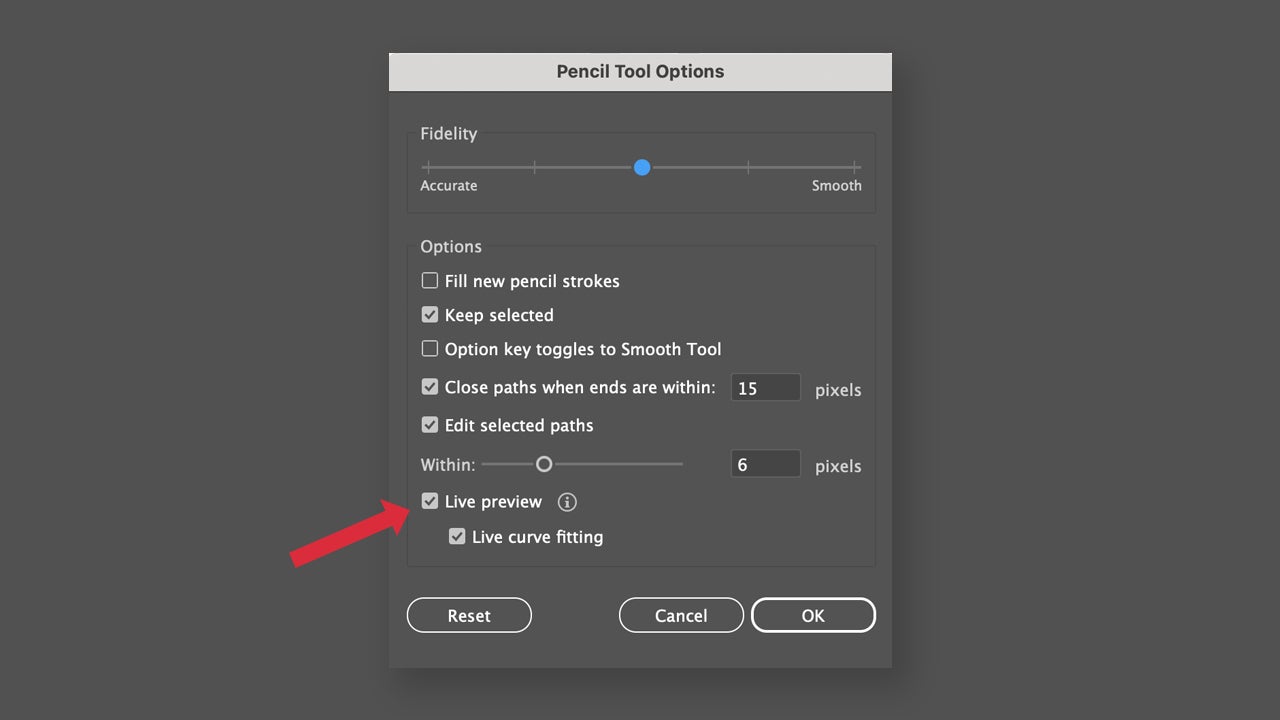
  • Drag with the mouse and draw the shape you want. If you want, you can hold down the Option key (macOS) or Alt key (Windows) while dragging to make straight lines.

If you still cannot activate Live preview after following these steps, go to Illustrator > Settings > Performance (macOS) or Edit > Preferences > Performance (Windows) to enable the Real-Time Drawing and Editing option.

Edit and change the shape of your paths

If you are not satisfied with the line you have drawn with Pencil, or simply want to change it, don’t worry: you can easily edit it.

  • To extend the stroke, use the Selection tool and select which part you want to extend. Then, select Pencil and hover the mouse over the endpoint of the path. When the continuation icon appears, drag to extend.
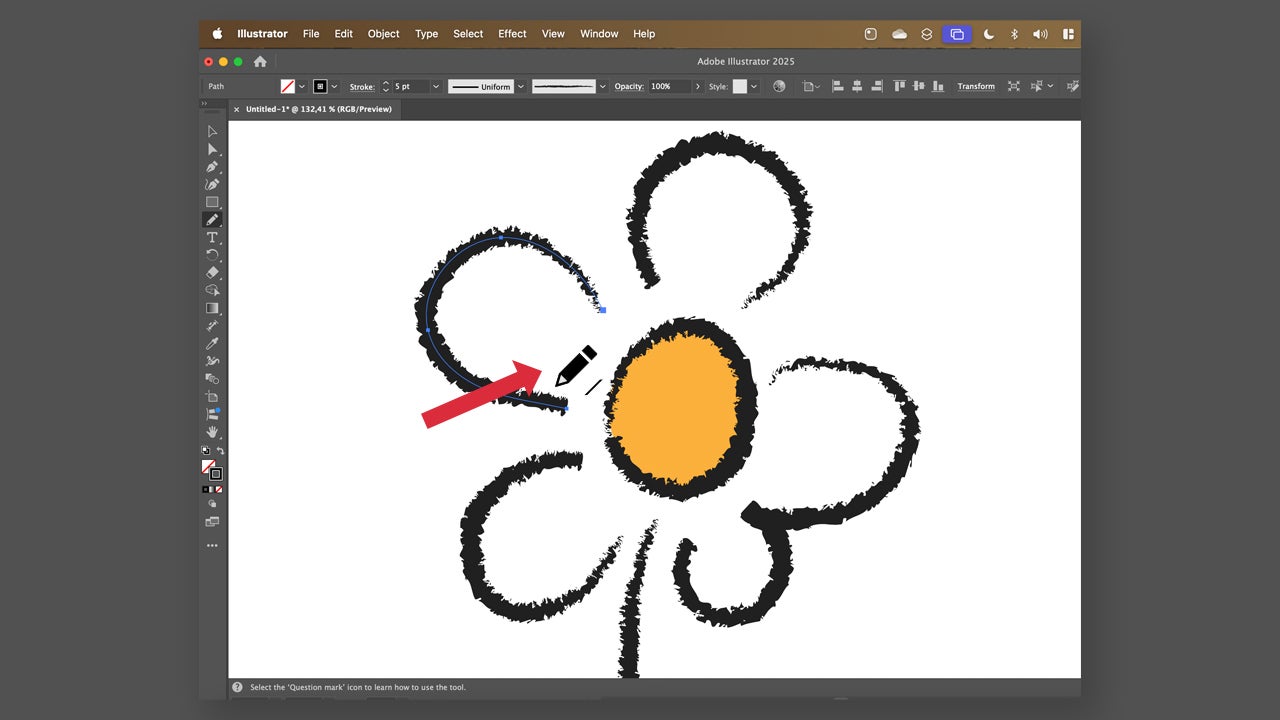
  • If you want to connect two different paths, click on Selection and hold down Shift while dragging around the paths to select them. Select Pencil and position the mouse over the anchor point at the end of one of the two paths. Drag the mouse to the point of the other path and release when the continuation icon (/) appears. You will see how both paths automatically join together.

If what you want is to change the shape of a path, you need to do the following:

  • Click on the Selection tool and select which stroke you want to change the shape of.
  • Then, go back to Pencil.
  • Hover the mouse pointer over the path you want to change. When the small star icon disappears, drag to alter the shape.

Discover other additional options for Pencil

If you double-click on the Pencil tool, you will see a list of sections that you can modify to configure its operation. You can enable or disable them as you wish:
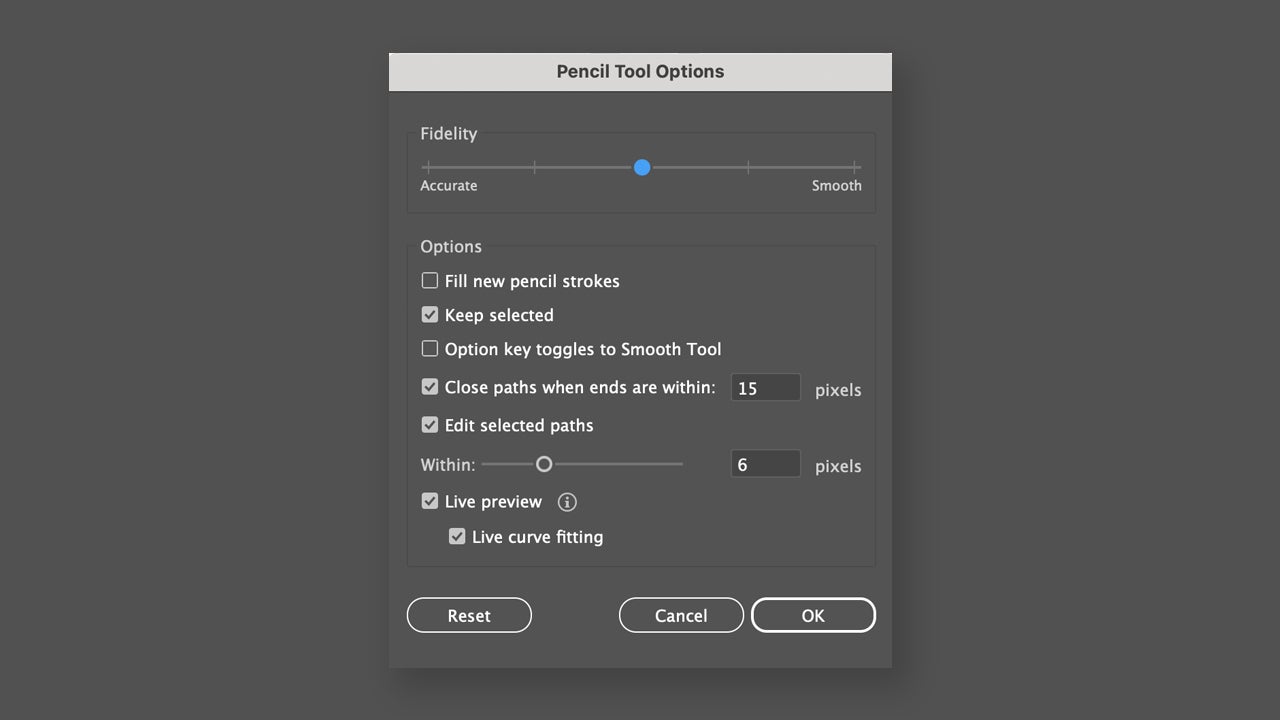
  • Fidelity: Controls the distance at which you must move the cursor to add a new anchor point in the path. You can adjust it to five levels.
  • Fill new pencil strokes: Used to apply a fill to the strokes drawn with Pencil.
  • Keep selected: Used to keep the selected stroke right after drawing it.
  • The Option/Alt key toggles to the Smooth Tool: When using Pencil, you can press Option (macOS) or Alt (Windows) to switch to the Smooth tool.
  • Close paths when ends are within (x) pixels: The path closing symbol is displayed when the endpoints of two different paths are very close.
  • Edit selected paths: This option allows you to define whether the selected path can be changed or merged when it is at a certain distance.
Adobe Illustrator
Adobe Illustrator DOWNLOAD

Author: María López

{ "de-DE": "Künstler aus Berufung und Technikliebhaber. Seit ich denken kann, habe ich gerne an allen möglichen Gadgets herumgebastelt.", "en-US": "Artist by vocation and technology lover. I have liked to tinker with all kinds of gadgets for as long as I can remember.", "es-ES": "Artista de vocación y amante de la tecnología. Me ha gustado cacharrear con todo tipo de gadgets desde que tengo uso de razón.", "fr-FR": "Artiste de vocation et amateur de technologie. J'aime bricoler avec toutes sortes de gadgets depuis que j'ai l'usage de la raison.", "it-IT": "", "ja-JP": "", "nl-NL": "", "pl-PL": "", "pt-BR": "", "social": { "email": "", "facebook": "", "twitter": "", "linkedin": "" } } View all posts by María López

Author María LópezPosted on July 17, 2025July 17, 2025Categories News

Post navigation

Previous Previous post: Disneyland has paid tribute to Walt Disney that you won't be able to believe
Next Next post: There is already a movie from 2025 that has earned over 1 billion dollars. Sadly, it is a remake

Recent Posts

  • DeepMind’s WeatherNext Cyclones is now open source: earlier hurricane warnings
  • Wardogs boss clarifies crunch stance: ‘I am not pro crunch’
  • Star Catcher targets a 2026 space power-beaming test: laser energy between satellites
  • Microsoft faces backlash over 1% demand: data center dispute grows
  • Godzilla Minus Zero is now rated R in the US: director defends the violence

Archives

  • September 2026
  • August 2026
  • July 2026
  • June 2026
  • May 2026
  • April 2026
  • March 2026
  • February 2026
  • January 2026
  • December 2025
  • November 2025
  • October 2025
  • September 2025
  • August 2025
  • July 2025
  • June 2025
  • May 2025
  • April 2025
  • March 2025
  • February 2025
  • January 2025
  • December 2024
  • November 2024
  • October 2024
  • September 2024
  • August 2024
  • July 2024
  • June 2024
  • May 2024
  • April 2024
  • March 2024
  • February 2024
  • January 2024
  • December 2023
  • November 2023
  • October 2023
  • September 2023
  • August 2023
  • July 2023
  • June 2023
  • May 2023
  • April 2023
  • March 2023
  • February 2023
  • January 2023
  • December 2022
  • November 2022
  • October 2022
  • September 2022
  • August 2022
  • July 2022
  • June 2022
  • May 2022
  • April 2022
  • March 2022
  • February 2022
  • January 2022
  • December 2021
  • November 2021
  • October 2021
  • September 2021
  • August 2021
  • July 2021
  • June 2021
  • May 2021
  • April 2021
  • March 2021
  • February 2021
  • January 2021
  • December 2020
  • November 2020
  • October 2020
  • September 2020
  • August 2020
  • July 2020
  • June 2020
  • May 2020
  • April 2020
  • March 2020
  • February 2020
  • January 2020
  • December 2019
  • November 2019
  • October 2019
  • September 2019
  • August 2019
  • July 2019
  • June 2019
  • May 2019
  • April 2019
  • March 2019
  • February 2019
  • January 2019
  • December 2018
  • November 2018
  • October 2018
  • September 2018
  • August 2018
  • July 2018
  • June 2018
  • May 2018
  • April 2018
  • March 2018
  • February 2018
  • January 2018
  • December 2017
  • November 2017
  • October 2017
  • September 2017
  • August 2017
  • July 2017
  • June 2017
  • May 2017
  • April 2017
  • March 2017
  • February 2017
  • January 2017
  • December 2016
  • November 2016
  • October 2016
  • September 2016
  • August 2016
  • July 2016
  • June 2016
  • May 2016
  • April 2016
  • March 2016
  • February 2016
  • January 2016
  • December 2015
  • November 2015
  • October 2015
  • September 2015
  • August 2015
  • July 2015
  • June 2015
  • May 2015
  • April 2015
  • March 2015
  • February 2015
  • January 2015
  • December 2014
  • November 2014
  • October 2014
  • September 2014
  • August 2014
  • July 2014
  • June 2014
  • May 2014
  • April 2014
  • March 2014
  • February 2014
  • January 2014
  • December 2013
  • November 2013
  • October 2013
  • September 2013
  • August 2013
  • July 2013
  • June 2013
  • May 2013
  • April 2013
  • March 2013
  • February 2013
  • January 2013
  • December 2012
  • November 2012
  • October 2012
  • September 2012
  • August 2012
  • July 2012
  • June 2012
  • May 2012
  • April 2012
  • March 2012
  • February 2012
  • January 2012
  • December 2011
  • November 2011
  • October 2011
  • September 2011
  • August 2011
  • July 2011
  • June 2011
  • May 2011
  • April 2011
  • March 2011
  • February 2011
  • January 2011
  • December 2010
  • November 2010
  • October 2010
  • September 2010
  • August 2010
  • July 2010
  • June 2010
  • May 2010
  • April 2010
  • March 2010
  • February 2010
  • January 2010
  • December 2009
  • November 2009
  • October 2009
  • September 2009
  • August 2009
  • July 2009
  • June 2009
  • May 2009
  • April 2009
  • March 2009
  • February 2009
  • January 2009
  • December 2008
  • November 2008
  • October 2008
  • September 2008
  • August 2008
  • July 2008
  • June 2008
  • May 2008
  • April 2008
  • March 2008
  • February 2008
  • January 2008
  • December 2007
  • November 2007
  • October 2007
  • September 2007
  • August 2007
  • July 2007
  • June 2007
  • May 2007
  • April 2007
  • March 2007
  • February 2007
  • January 2007
  • December 2006
  • November 2006
  • September 2006
  • August 2006
  • June 2006
  • May 2006
  • July 2001
  • January 2001
  • November 2000
  • September 2000
  • August 2000
  • July 2000
  • April 2000
  • March 2000

Categories

  • Affiliate post
  • Expert Review
  • Gaming
  • Guides
  • How to
  • Legacy how To
  • News
  • Noticias
  • Software>Security
  • Sponsored
  • Trucos y Consejos
  • Uncategorized
  • Windows software

Meta

  • Log in
  • Entries feed
  • Comments feed
  • WordPress.org
Softonic English Proudly powered by WordPress