Skip to content

Softonic English

Just another Softonic Sites site

Product photography on a tight budget: images for e-commerce with Photoshop + Firefly

Everything enters through the eyes. We can apply this phrase to many things in life, and especially to marketing. The images we use to sell our products go beyond aesthetics; they are a direct conversion factor. Here, Photoshop and Adobe Firefly can be of great help in our work. Product photography remains one of the biggest bottlenecks in a project, especially because of all the time it takes to create them until final approval. Integrating Photoshop and Adobe Firefly into your work will allow you to gain speed without compromising quality

Everything comes through the eyes. We can apply this phrase to many things in life, and to marketing in particular. The images we use to sell our products go beyond aesthetics; they are a direct conversion factor. Here, Photoshop and Adobe Firefly can be of great help in our work.

Product photography continues to be one of the biggest bottlenecks in a project, especially due to the time it takes to create them until final approval. Integrating Photoshop and Adobe Firefly into your work will allow you to gain speed without compromising quality.

Adobe Photoshop
Adobe Photoshop DOWNLOAD

Product photography, a bottleneck for many companies

Traditional product photography poses challenges that can be very difficult for smaller companies to tackle. The most significant is the high costs associated with professional photography productions.

Renting a studio, organizing logistics, making changes, touch-ups, etc. For growing catalogs, repeating a photoshoot every time a change is needed, for example, is practically unfeasible. Therefore, both Photoshop and Adobe Firefly can help you save time and money.

For an e-commerce, a good image does not have to be perfect. What really matters is that it is clean and clear, to showcase the product without distractions. It also needs to be consistent with other products in your catalog and be reliable, so that the customer knows exactly what they will receive.

How to use Photoshop and Adobe Firefly to take product photographs

The combination of both programs can help you improve your product photography and produce more without compromising the quality of the images. Photoshop will be where we do the foundation of our work, with Firefly acting as a kind of “extra enhancement”.

To demonstrate it, let’s go with an easy workflow that you can easily apply:

Part of a simple photo

We will start with a functional photo that we already have. This should meet a series of requirements, such as having even lighting, that the product is visible, and that it has a neutral background.

It doesn’t matter if the framing is tight or if the background doesn’t fill the entire canvas. This will be resolved later with Photoshop and Firefly. The better the photo, the better results you will get with AI.

Retouch with Photoshop

Now, we will edit the image within Photoshop. In this case, we will isolate the main object (the shoes) to place it in different environments. There are several ways to cut out an object, but the most common is with the Selection tool.

Fortunately, the background is very simple, something that will benefit us when cutting out the shoes. Choose the Magic Wand tool and click on Select Subject. To the right of Select Subject, you will see an arrow where you can switch between Device and Cloud. This is to choose where the image processing takes place, either on your own PC or from the cloud. You will get better results if you choose Cloud.

Once you click on Select Subject, Photoshop will automatically select the object. Next, press the keyboard shortcut CTRL + J (CMD + J on MacOS) to duplicate the selected part onto another additional layer.

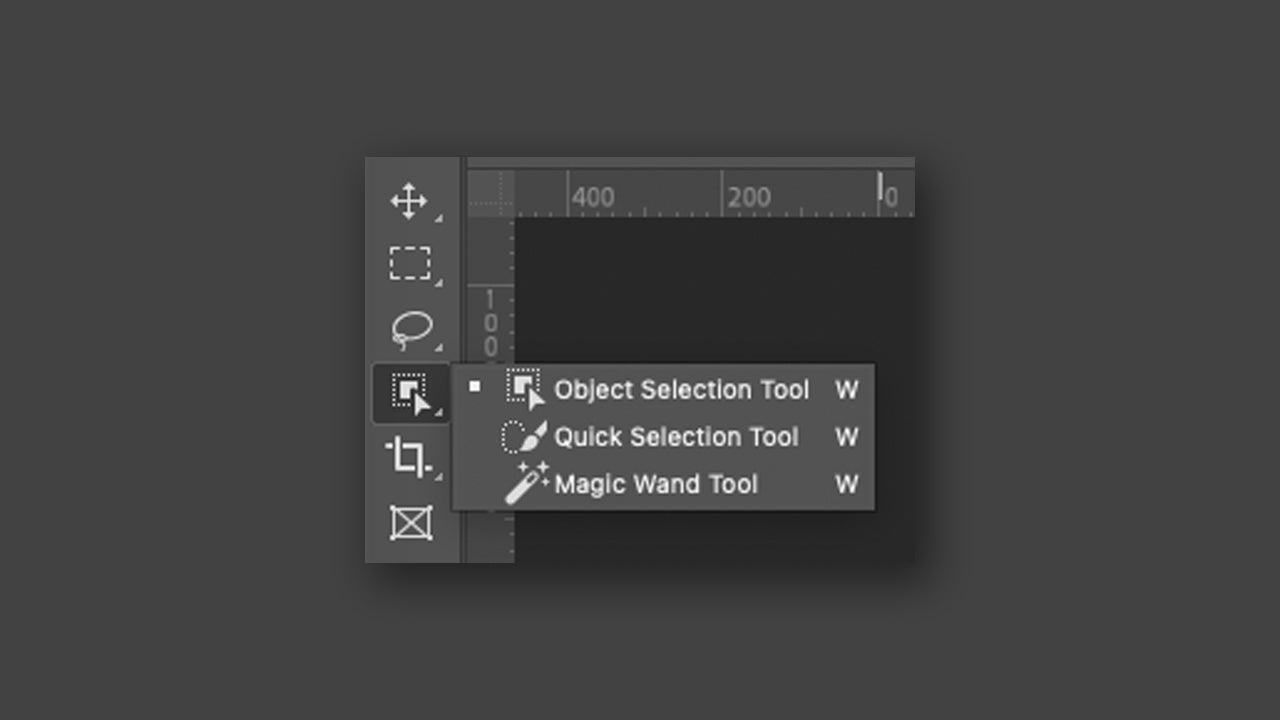
Another alternative would be to use the Object Selection Tool. To use it, you simply need to draw the area to be selected and then Photoshop will automatically detect the object that is within that area.
Adjust the canvas size

The most likely scenario is that the photo you are working with does not have the ideal size for publishing on social media or printed catalogs. From Photoshop, you will need to adjust it yourself in Image > Canvas Size. You will be able to enter the measurements in pixels, centimeters, and more.
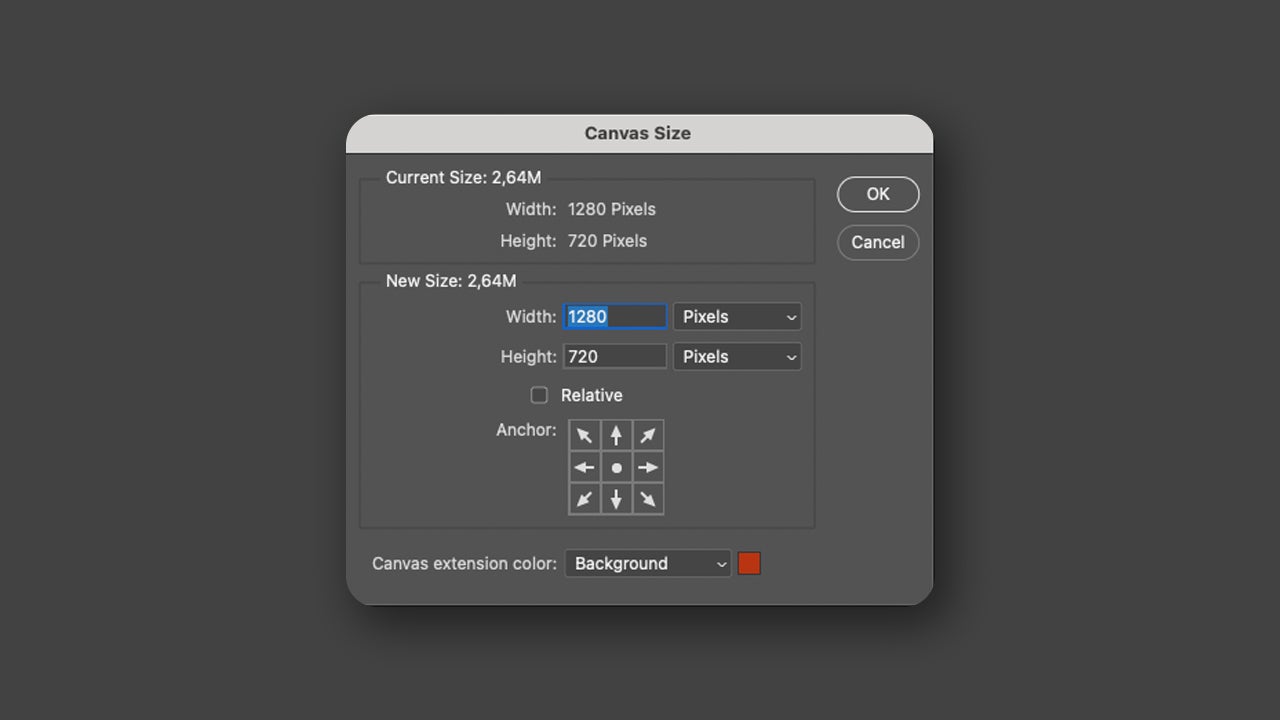
The most important thing is that you should never crop the product to fit the canvas: enlarge the image itself if necessary. You can fill the extra space if you want with the Generative Fill function. Using it is as easy as selecting the area you want to fill with the selection tools (lasso, rectangular selection, elliptical, etc.) and then selecting Generative Fill from the context menu.
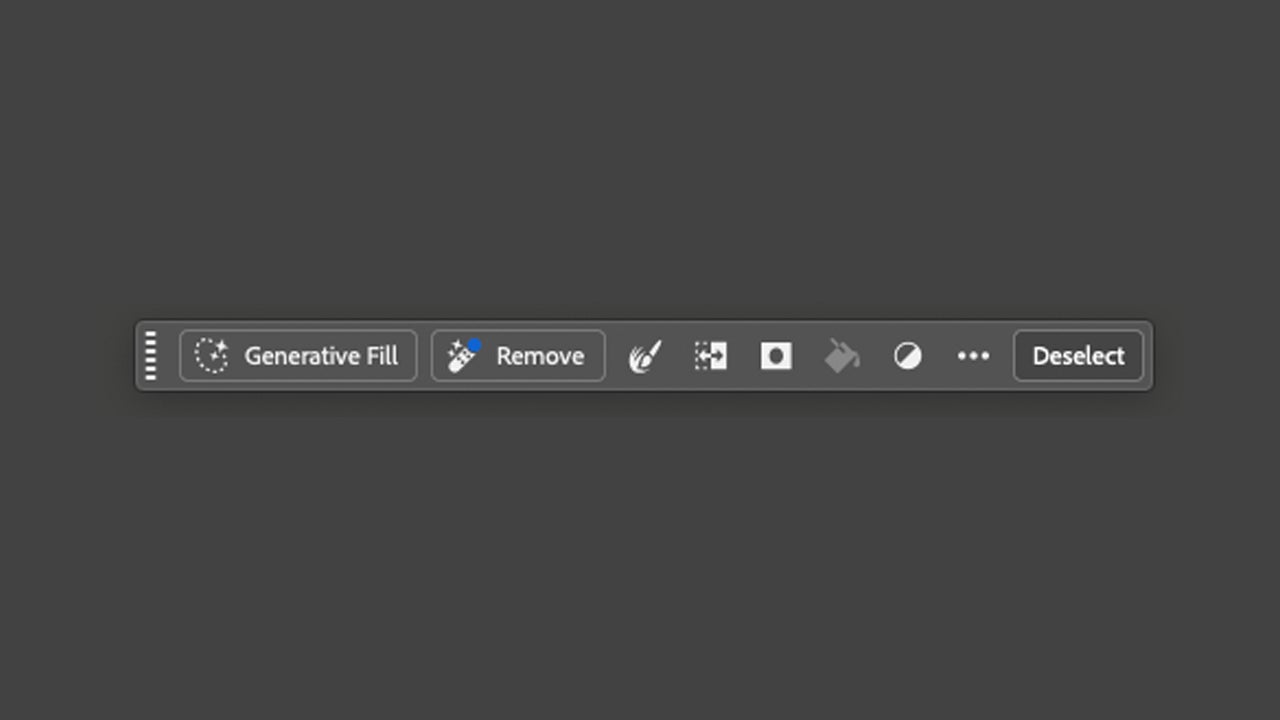
If that contextual menu does not appear, activate it from Window > Contextual Task Bar.

Adapt and generate a background with Adobe Firefly

Adobe Firefly e is the generative AI technology developed by Adobe. We can use it within programs like Photoshop or from its own standalone platform. Generative Fill is one of those tools powered by Adobe Firefly.

Through Generative Fill, you can create backgrounds and fill empty spaces within your product photographs. Select the product we had isolated (the shoes in our case) with the Quick Selection tool and invert the selection to select the background.

Then, click on Generative Fill and write a description for the background. In our case, what we put was object on top of a pink shelf, top view. Select Generate and wait to see the results. You will see three different options; choose the one you like the most. You can also repeat with new generations and descriptions if you want to refine further.
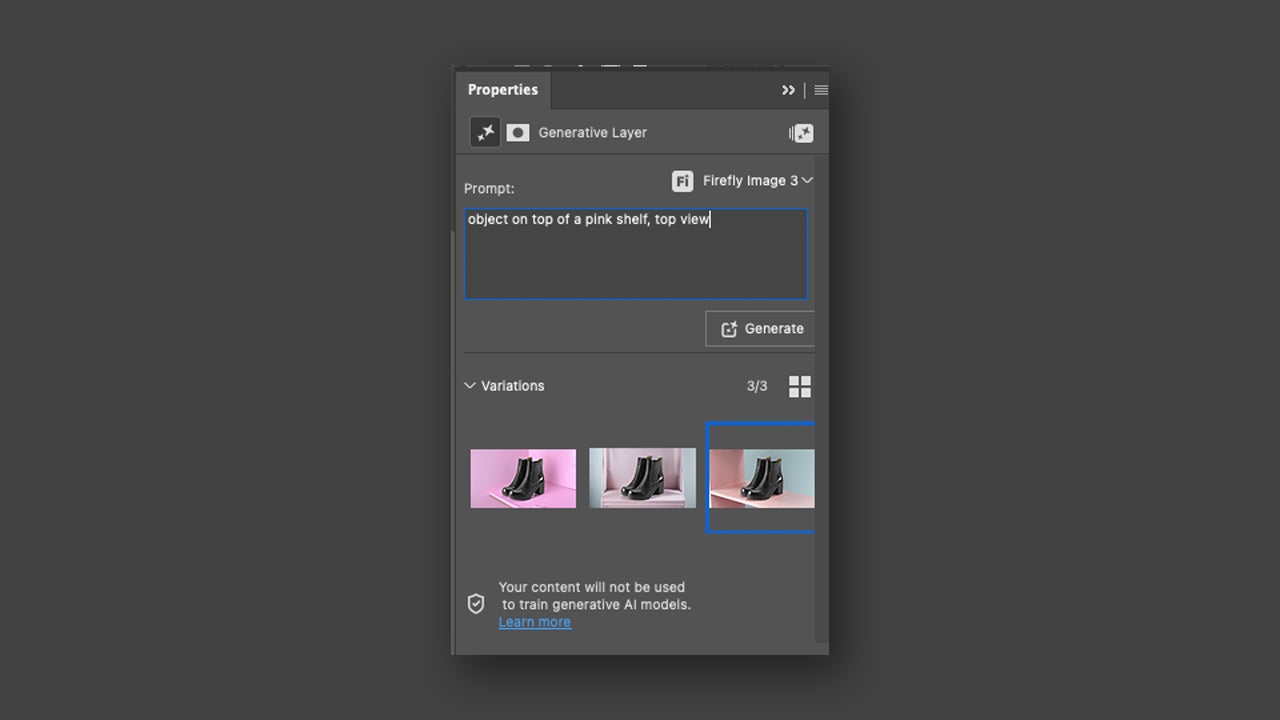
As a tip, it is important that you do not introduce overly complex or convoluted prompts; the best approach in these cases is to use simple descriptions. This way, you will achieve better results.

You can generate different variants to see other options or create versions adapted to the place where it will be published. Check that everything is correct and finish adjusting lights, colors, and more. With the base image ready, you can duplicate the file and create variations for any type of purpose.

Mistakes to Avoid and Tips

When writing prompts, it is very useful to use positional terms, such as “above,” “in front of,” “on a surface,” and similar. It will help generate much more precise backgrounds.

With the use of Remove Tool, you can easily remove any element that disrupts your composition without excessively altering the image. Above all, remember not to lose sight of your edits; maintaining your brand image takes precedence over any type of result.

Can I use Adobe Firefly in my work safely?

The short answer to this question is yes. Adobe only trains its models with content that it has permission or rights to use. According to Adobe itself, this prevents the creation of content with Firefly that infringes any type of copyright.

In addition, the content generated by Firefly automatically contains Content Credentials. These are a type of permanent metadata that act as a kind of digital label.

Adobe Firefly
Adobe Firefly DOWNLOAD

Author: María López

{ "de-DE": "Künstler aus Berufung und Technikliebhaber. Seit ich denken kann, habe ich gerne an allen möglichen Gadgets herumgebastelt.", "en-US": "Artist by vocation and technology lover. I have liked to tinker with all kinds of gadgets for as long as I can remember.", "es-ES": "Artista de vocación y amante de la tecnología. Me ha gustado cacharrear con todo tipo de gadgets desde que tengo uso de razón.", "fr-FR": "Artiste de vocation et amateur de technologie. J'aime bricoler avec toutes sortes de gadgets depuis que j'ai l'usage de la raison.", "it-IT": "", "ja-JP": "", "nl-NL": "", "pl-PL": "", "pt-BR": "", "social": { "email": "", "facebook": "", "twitter": "", "linkedin": "" } } View all posts by María López

Author María LópezPosted on January 18, 2026January 18, 2026Categories News

Post navigation

Previous Previous post: 2026 Cybersecurity Predictions: Navigating a New Era of Sophisticated Scams
Next Next post: Matt Damon claims that if movies seem dumber now, you're not crazy, they are, and the blame is on Netflix

Recent Posts

  • Xbox confirms that you’ll lose some of the benefits of your Game Pass starting in November
  • The sequel to one of the wildest Action RPGs of recent years has been announced
  • Nicolas Cage’s new movie debuts its trailer with controversy included: there’s a $105 million lawsuit behind it
  • PlayStation announces a new peripheral inspired by GTA 6
  • Ready or Not returns to Netflix in the US today

Archives

  • September 2026
  • August 2026
  • July 2026
  • June 2026
  • May 2026
  • April 2026
  • March 2026
  • February 2026
  • January 2026
  • December 2025
  • November 2025
  • October 2025
  • September 2025
  • August 2025
  • July 2025
  • June 2025
  • May 2025
  • April 2025
  • March 2025
  • February 2025
  • January 2025
  • December 2024
  • November 2024
  • October 2024
  • September 2024
  • August 2024
  • July 2024
  • June 2024
  • May 2024
  • April 2024
  • March 2024
  • February 2024
  • January 2024
  • December 2023
  • November 2023
  • October 2023
  • September 2023
  • August 2023
  • July 2023
  • June 2023
  • May 2023
  • April 2023
  • March 2023
  • February 2023
  • January 2023
  • December 2022
  • November 2022
  • October 2022
  • September 2022
  • August 2022
  • July 2022
  • June 2022
  • May 2022
  • April 2022
  • March 2022
  • February 2022
  • January 2022
  • December 2021
  • November 2021
  • October 2021
  • September 2021
  • August 2021
  • July 2021
  • June 2021
  • May 2021
  • April 2021
  • March 2021
  • February 2021
  • January 2021
  • December 2020
  • November 2020
  • October 2020
  • September 2020
  • August 2020
  • July 2020
  • June 2020
  • May 2020
  • April 2020
  • March 2020
  • February 2020
  • January 2020
  • December 2019
  • November 2019
  • October 2019
  • September 2019
  • August 2019
  • July 2019
  • June 2019
  • May 2019
  • April 2019
  • March 2019
  • February 2019
  • January 2019
  • December 2018
  • November 2018
  • October 2018
  • September 2018
  • August 2018
  • July 2018
  • June 2018
  • May 2018
  • April 2018
  • March 2018
  • February 2018
  • January 2018
  • December 2017
  • November 2017
  • October 2017
  • September 2017
  • August 2017
  • July 2017
  • June 2017
  • May 2017
  • April 2017
  • March 2017
  • February 2017
  • January 2017
  • December 2016
  • November 2016
  • October 2016
  • September 2016
  • August 2016
  • July 2016
  • June 2016
  • May 2016
  • April 2016
  • March 2016
  • February 2016
  • January 2016
  • December 2015
  • November 2015
  • October 2015
  • September 2015
  • August 2015
  • July 2015
  • June 2015
  • May 2015
  • April 2015
  • March 2015
  • February 2015
  • January 2015
  • December 2014
  • November 2014
  • October 2014
  • September 2014
  • August 2014
  • July 2014
  • June 2014
  • May 2014
  • April 2014
  • March 2014
  • February 2014
  • January 2014
  • December 2013
  • November 2013
  • October 2013
  • September 2013
  • August 2013
  • July 2013
  • June 2013
  • May 2013
  • April 2013
  • March 2013
  • February 2013
  • January 2013
  • December 2012
  • November 2012
  • October 2012
  • September 2012
  • August 2012
  • July 2012
  • June 2012
  • May 2012
  • April 2012
  • March 2012
  • February 2012
  • January 2012
  • December 2011
  • November 2011
  • October 2011
  • September 2011
  • August 2011
  • July 2011
  • June 2011
  • May 2011
  • April 2011
  • March 2011
  • February 2011
  • January 2011
  • December 2010
  • November 2010
  • October 2010
  • September 2010
  • August 2010
  • July 2010
  • June 2010
  • May 2010
  • April 2010
  • March 2010
  • February 2010
  • January 2010
  • December 2009
  • November 2009
  • October 2009
  • September 2009
  • August 2009
  • July 2009
  • June 2009
  • May 2009
  • April 2009
  • March 2009
  • February 2009
  • January 2009
  • December 2008
  • November 2008
  • October 2008
  • September 2008
  • August 2008
  • July 2008
  • June 2008
  • May 2008
  • April 2008
  • March 2008
  • February 2008
  • January 2008
  • December 2007
  • November 2007
  • October 2007
  • September 2007
  • August 2007
  • July 2007
  • June 2007
  • May 2007
  • April 2007
  • March 2007
  • February 2007
  • January 2007
  • December 2006
  • November 2006
  • September 2006
  • August 2006
  • June 2006
  • May 2006
  • July 2001
  • January 2001
  • November 2000
  • September 2000
  • August 2000
  • July 2000
  • April 2000
  • March 2000

Categories

  • Affiliate post
  • Expert Review
  • Gaming
  • Guides
  • How to
  • Legacy how To
  • News
  • Noticias
  • Software>Security
  • Sponsored
  • Trucos y Consejos
  • Uncategorized
  • Windows software

Meta

  • Log in
  • Entries feed
  • Comments feed
  • WordPress.org
Softonic English Proudly powered by WordPress