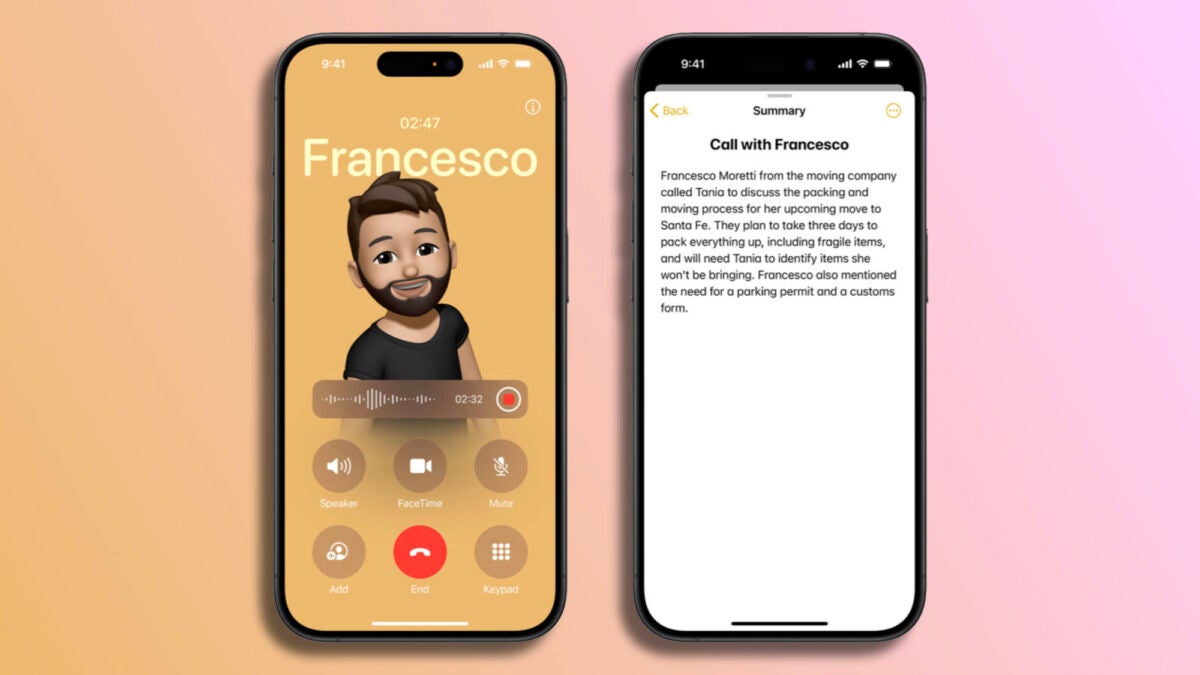
The latest beta version of iOS 18.1 for developers brings a highly anticipated feature. With the arrival of Apple Intelligence, we now have the ability to record phone calls and, if desired, transcribe them in a matter of seconds.

A notice and a recording in our Notes application
The process to activate recording is very simple: after starting a call, simply press the recording button located in the upper left corner of the screen. Once this is done, all call participants will receive an audio notification informing them that the conversation is being recorded. There is no confirmation dialogue; if any participant prefers not to be recorded, the only option they have is to hang up.
Once the call is in progress and recording is activated, the audio is automatically saved in the Notes app. From there, we can access the recording whenever we want. Just like with the rest of the recordings we can make from the Notes app, we can listen to the call again, but we can also request a complete transcription of the conversation through Apple Intelligence.
Once we have the text, we can process it in different ways, as Apple’s AI allows us to request a summary of the conversation, either by simplifying the text to keep the important information or through a bullet point list of the main ideas of the call.
On the other hand, if we decide to transfer the recording to the Voice Notes application, we can listen to its content, improve the audio quality, and at the same time, automatically reduce pauses and non-conversational fragments.
Currently, Apple Intelligence is only available in the beta versions of iOS 18.1, iPadOS 18.1 and macOS Sequoia 15.1, exclusively for developers. However, this fall, after the launch of the new operating system, since Apple Intelligence will not arrive with iOS 18, this function will be available to the general public.
A highly anticipated feature, as we were saying. There are several occasions where having a recording of a call, to be able to take notes later or review the conversation, is really interesting. Now, with iOS 18.1, it is possible and as easy as pressing a button, thanks to Apple Intelligence.
