
For years, our mobile devices have become the home of our personal and professional lives. From photos and videos of the most important moments to essential contacts and important messages, iPhones store an impressive amount of valuable data. We never usually realize this in such detail as when we seem to have lost something. Don’t worry, there is a solution: Stellar Data Recovery for iPhone.

The Importance of Data Recovery
Lost data can be more than an inconvenience; it can represent a significant emotional and financial loss. Our personal lives are on our iPhones, but so is our professional life. From family photos to work documents, important messages or business contacts, to files or emails we are legally required to keep, there are too many situations that can cause data loss.
Accidental deletion is one of the most common causes of data loss. Whether deleting photos to free up space or inadvertently deleting messages, these errors can have significant consequences. Stellar Data Recovery for iPhone allows us to act in this field, and it does so in a tailored way. Of course, a backup can help us, but too often it is a solution of too general a scope.
Restoring our entire iPhone, with the risk that some information is not available in the backup, is not a realistic solution if, for example, we have deleted some important photos or a thread of messages. This is where Stellar’s solution comes in to recover exactly what we need.
The same applies to updates. It is not common, fortunately, but sometimes an iOS update that didn’t install properly or was interrupted can cause data to disappear. The worst thing, in these circumstances and unlike the previous situation of accidental deletion, is that it can take weeks for us to realize it. By then, a backup with the necessary information is already out of our reach. The best solution is to recover the information directly from the iPhone in question, and this involves using Stellar iPhone Data Recovery, which can recover important files from iTunes or even iCloud backups.
Physical Damage and Data Recovery
Physical damage to iPhones can happen unexpectedly, whether from drops, water exposure, or other accidents. This damage can render the device inoperable and seemingly make data recovery impossible. For instance, the screen might not turn on even though the phone is still functioning, or the device may be partially damaged but retains access to internal storage. However, Stellar Data Recovery is designed to handle these scenarios as well. By connecting the damaged iPhone to a computer, we can utilize Stellar’s advanced algorithms to extract and recover valuable data from the device’s internal storage. This capability ensures that even in the case of severe physical damage, essential files, photos, and messages can still be retrieved, providing peace of mind and safeguarding against permanent data loss.
What is Stellar Data Recovery for iPhone?
Stellar Data Recovery for iPhone is a software specifically designed to recover lost or deleted data from an iPhone or iPad. An application that not only recovers photos and videos but also messages, contacts, notes, and much more. Compatible with all iOS versions 17, 16, 15, 14, 13, 12, and more, and with iPhones 15, 14, 13, 12, 11, X, and earlier, Stellar iPhone Data Recovery offers us a complete solution for various data loss situations that now have an easy solution.
What can I recover with Stellar? Practically anything. The list includes all of the following:
- Photos and Videos: Recover deleted media files from the camera app, Photos app, and third-party apps like WhatsApp, Kik, Viber, and Tango.
- Messages and Contacts: Recover text messages, iMessages from the Messages app, and deleted contacts from the Contacts app.
- Notes and Reminders: Recover content from the Notes app as well as the Reminders app.
- Call History and Voice Memos: Recover deleted call logs and voice memos.
- Safari Bookmarks: Recover lost bookmarks from the default iOS browser, including reading list content and favorites.
The list is long, as we can see, but this is not the best part. Much of the magic of the Stellar iPhone Data Recovery app lies in its ability to access iTunes and iCloud backups. The information we just listed is not always available on the phone in question. In these circumstances, a backup is very interesting, but do we have to restore it? No. The app takes care of accessing the backup and recovering exactly the data we need in a matter of minutes.
What about encrypted iTunes or Finder backups? Included. As long as we remember the password, the app manages to access the content and recover everything we need.
Recovery as Simple as Four Clicks
When we talk about content recovery, which falls within forensic computing, everything seems very complex. There are companies willing to charge us significant sums of money to physically search our phone to see what they can recover. But Stellar Data Recovery is an interesting alternative to all of this. An alternative that, far from the complexity of other solutions, is really simple to use.
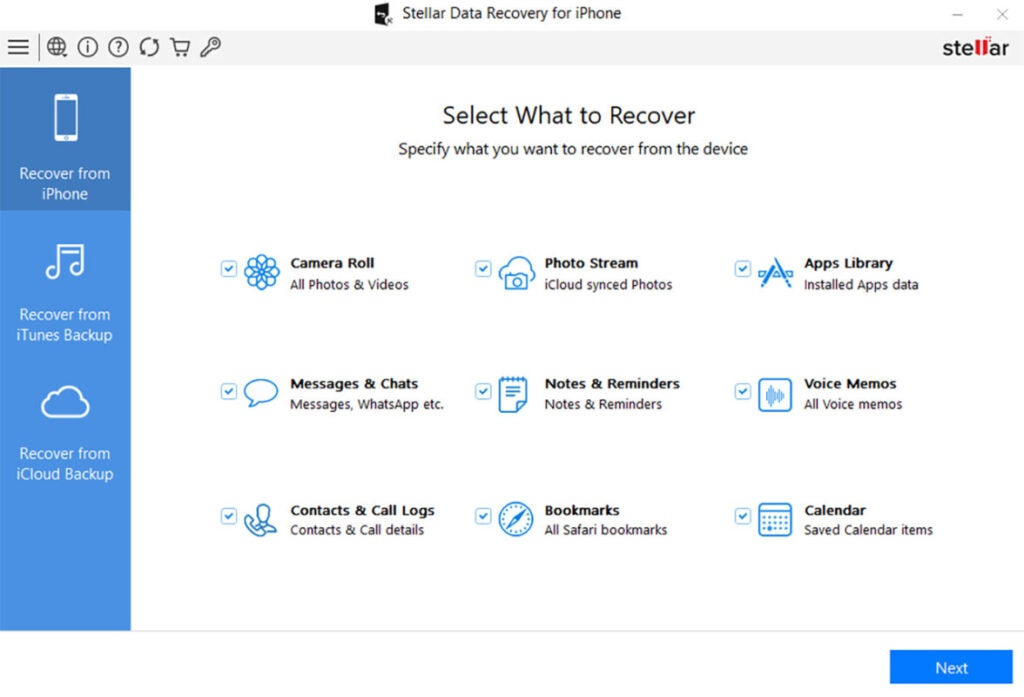
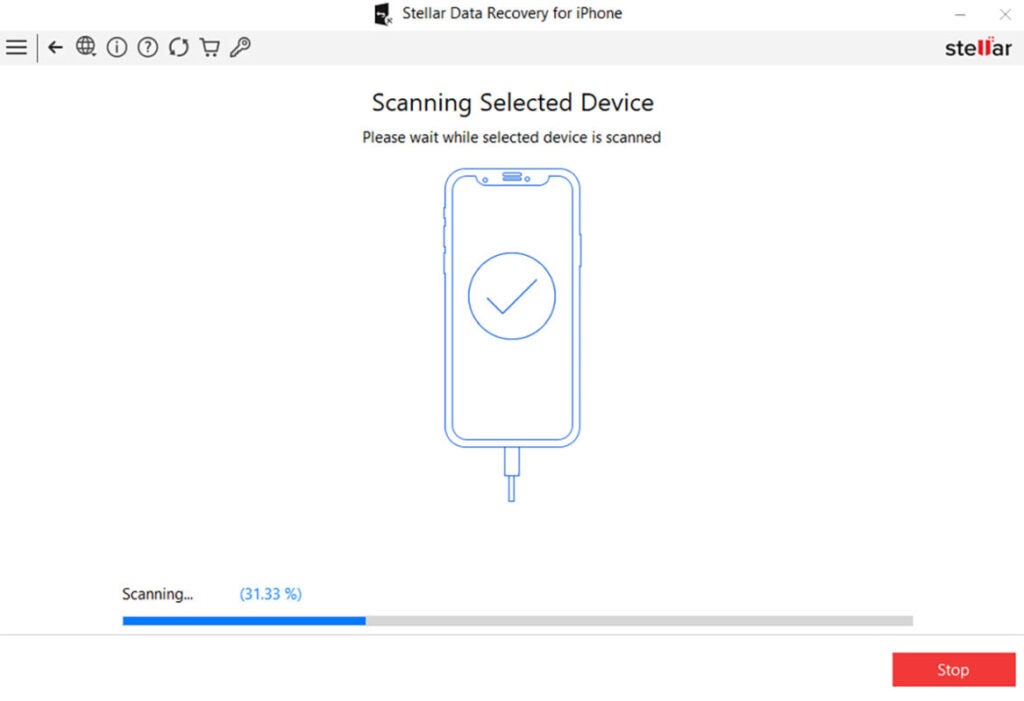
From the interface that welcomes us to the app, everything is designed with ease of use in mind. The recovery process is divided into simple steps: selecting the type of data to recover, scanning the device or backup for data, and previewing and saving the recovered files to a location of our choice.
The exact steps for a recovery, having installed Stellar Data Recovery for iPhone on our PC or Mac, are as simple as these:
- Connect our iPhone or iPad to the computer.
- On the software’s main screen, select “Recover from iPhone/iPad.”
- Select the data we want to recover. We can choose from Camera Roll, iCloud Photos, Installed Apps, Messages and Chats, Notes and Reminders, Voice Memos, Contacts and Call Logs, Bookmarks, and Calendar. Then click Next.
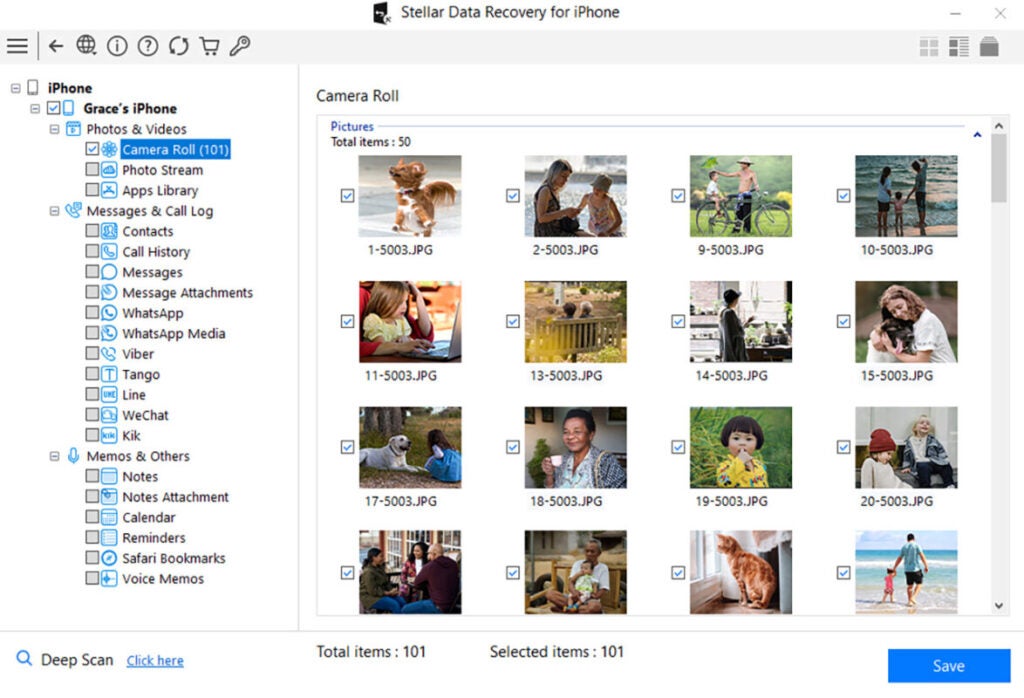
- Once the scan is complete, we can preview the data and select what interests us. We can navigate through the different sections on the left sidebar, marking the entire category or just some content within it.
- To finish, click Save and choose in which folder on our computer we want to back up the content.
Let’s pay attention to a couple of details. The most interesting is that Stellar Data Recovery for iPhone offers us two scanning modes: a ‘quick scan’ for an initial search and a ‘deep scan’ for a more exhaustive search in case the files are not found in the quick scan. Pay attention to this second scan, as while it is notably slower than the first, it can offer us better results.
The second detail to keep in mind is the export format. Before saving the content in question, let’s pay attention to the different formats. Recovering contacts in CSV is as easy as importing them into the iPhone, for example, while it is not the same if we save them as HTML. The same applies to other types of content. To avoid having to perform conversion tasks later, let Stellar Data Recovery deliver the results in the most convenient format.
Recover, Yes, but That’s Not All
Stellar Data Recovery for iPhone focuses on recovery, no doubt, but there are four really interesting features that we cannot overlook. The first is the option to erase all content from an iPhone or iPad.
The advanced version of the Toolkit not only recovers data but also securely erases all content and settings, including contacts, photos, videos, and other system data on any iOS device like iPhone and iPads. This permanent erasure ensures that the data is not recoverable by any recovery software, not even the same Stellar iOS Data Recovery, guaranteeing the privacy and security of our personal information when it’s time to sell or give away a device we are going to stop using.
Stellar Toolkit for iPhone also deletes data from third-party apps. The software erases data from apps like WhatsApp, WeChat, Line, Viber, Tango, and Kik, to name a few, as well as other system data or the ‘Other’ section of the iPhone Storage section, which often contains cache files and application data that we sometimes want to make disappear.
In case we cannot access the data on an iPhone because we have forgotten the Apple ID password, the Stellar Toolkit includes an ‘Apple ID removal’ module. A function that allows deleting the Apple ID configured on the iPhone without needing the password, allowing the creation of a new Apple account and resetting the password to reuse the device with great ease.
Lastly, the Toolkit version offers a function to repair common problems on iPhones and iPads. Always within the possibilities of the device, the software repairs errors that may cause the screen to stay black or the iPhone not to go past the Apple logo, synchronization errors with iTunes or Finder, and more. All without deleting existing data from the device.
Plans and Pricing
In line with the extra features we just mentioned, Stellar Data Recovery for iPhone offers us several plans to adapt as much as possible to our needs:
- Standard: Recovery of deleted files from iPhone, iPad, iCloud, and iTunes. Ideal for individual users who need to recover data occasionally.
- Toolkit: Includes all the features of the Standard plan, plus additional tools like iPhone data erasure, iOS system repair, and Apple ID removal.
- Toolkit Plus: The most complete plan offering support for multiple iOS devices, including iPhone, iPad, and iPod.
At a time when our phones contain all our personal information, losing access to the data stored on our mobile devices can have considerable consequences. When we use these devices in our work field, the consequences are even greater. Backups are essential in this scenario, but sometimes they are not enough.
For those situations where the only option is to recover the content directly, Stellar Data Recovery for iPhone offers us a very complete and reliable solution to recover lost or deleted data from Apple devices. With its ability to recover data from various sources and in multiple loss scenarios, its great ease of use, and the depth of scanning and recovery, Stellar stands out as an indispensable tool for any iPhone user. No matter the cause of data loss, Stellar Data Recovery for iPhone is designed so that we can recover our information quickly and safely.
