Skip to content

Softonic English

Just another Softonic Sites site

Style reference in Adobe Illustrator: Maintaining consistent design styles

Maintaining a consistent style throughout a project is one of the most common headaches among artists and creatives. Creating pieces under the same aesthetic can become complex, especially if we have to work with elements we are not very familiar with. Fortunately, Adobe Illustrator can help us a lot in lightening the workload. Next, we will teach you how to make the most of Adobe Illustrator to maintain the same style in the projects we undertake. Define a style before starting a project Having a clear idea of how your […]

Maintaining a consistent style throughout a project is one of the most common headaches among artists and creatives. Creating pieces under the same aesthetic can become complex, especially if we have to work with elements we are not familiar with. Fortunately, Adobe Illustrator can help us a lot in lightening the workload.

Next, we will teach you how to make the most of Adobe Illustrator to maintain a consistent style in the projects we undertake.

Adobe Illustrator
Adobe Illustrator DOWNLOAD

Define a style before starting a project

Having a clear idea about how your project will be will make our work much easier. It doesn’t matter if it’s minimalist, has bright colors, or uses bold strokes: defining these guidelines before starting will prevent our designs from appearing directionless.

If you don’t know where to start, you can always get inspired by visiting websites like Behance or Adobe Stock. On Behance, for example, you will find a multitude of projects created by great creatives from the world of advertising, poster design, or illustration, among others. You can use it for free with your Adobe user account and thus get inspired by the creations of other users.

On the other hand, Adobe Stock is an on-demand service where users can download resource files to use in their projects. The licenses for these resources can be purchased with credits, the currency used by Adobe.
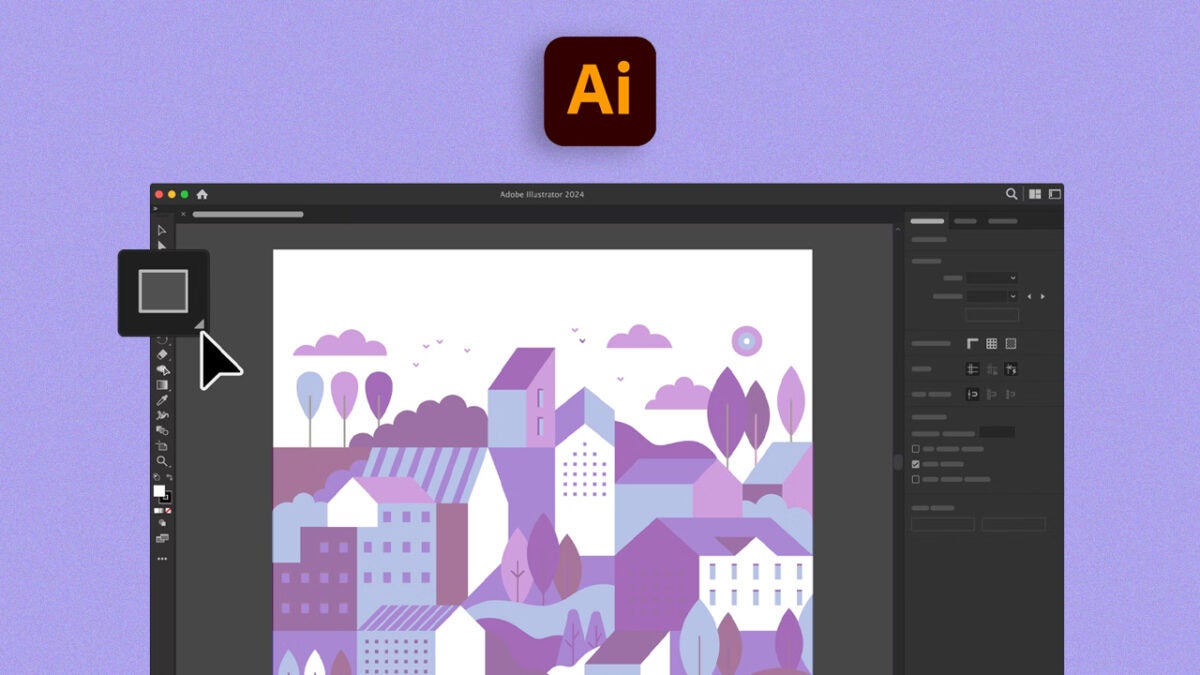
Create Your Own Color Palettes

To manage your own colors within Adobe Illustrator and always have them at hand, we will use Swatches. This includes solid colors, gradients, and also patterns.

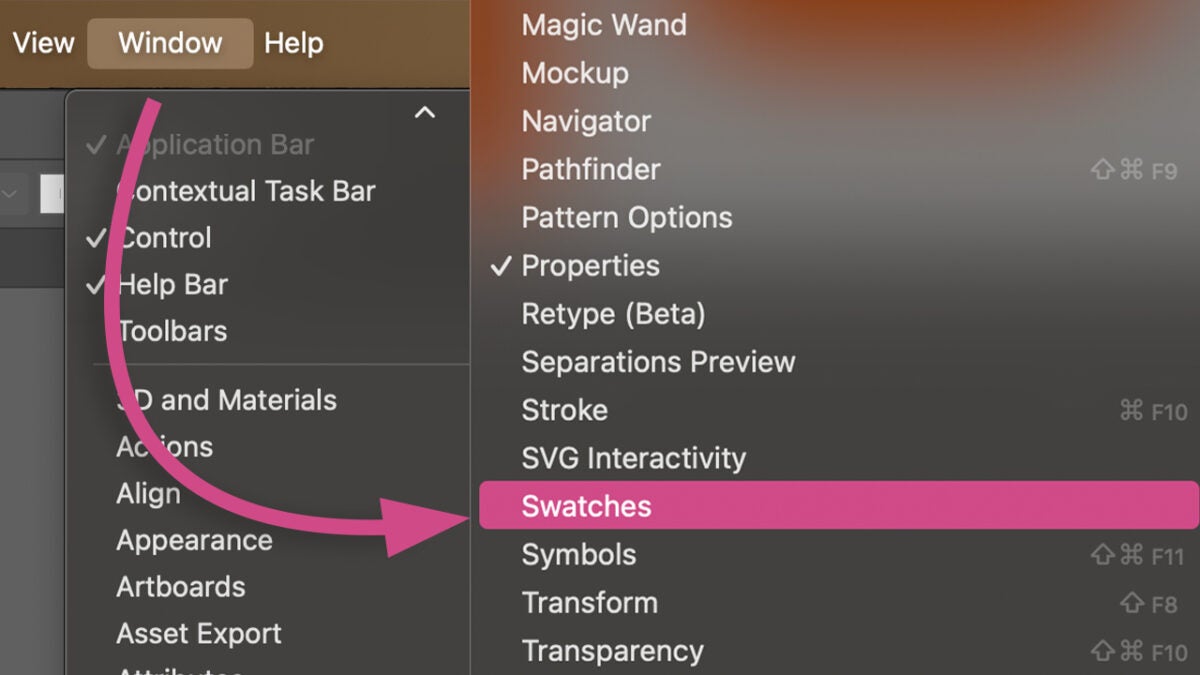
  • First, we will open the Swatches Panel. You will need to go to Window > Swatches.
  • By doing this, you will open a new panel where you will see the default colors that Illustrator shows you.
From here, we can create our own folders with the colors we like the most and have several palettes depending on the project we are working on. To add new colors, we will need to do the following:

  • Select an object on your canvas with the Selection tool that contains the color you want to save.
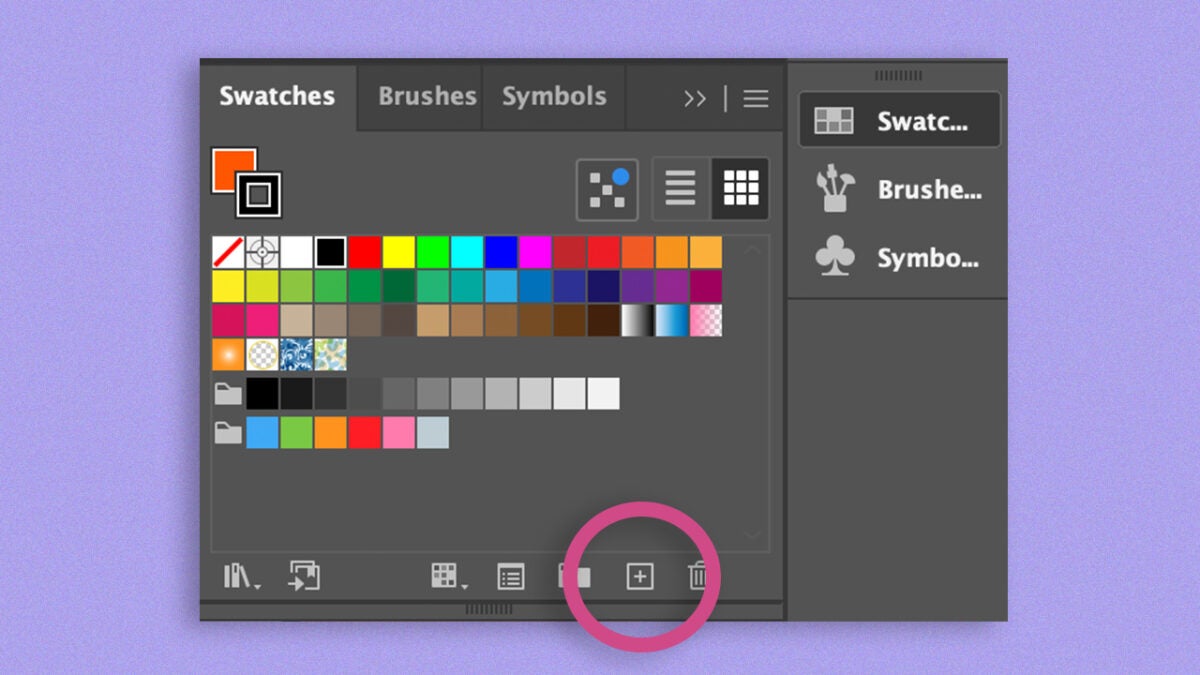
  • From the Swatches Panel, click on New Swatch.
  • A new options box will open where you will have to name the color (if you want) and select a Color Mode. You will have the option to choose between RGB, Grayscale, HSB, CMYK, Lab, and Web Safe RGB. In this case, we will keep it in RGB.
  • To finish, click on OK. Now, the color will appear in the general swatches.

For now, this will help us save specific colors in the swatches. However, now we will see how to create a custom color palette:

  • Select the colors you want to include in your new palette one by one with the Eyedropper tool and add them just as we did before.
  • From the Swatches Panel, click on the New Swatch Group icon.
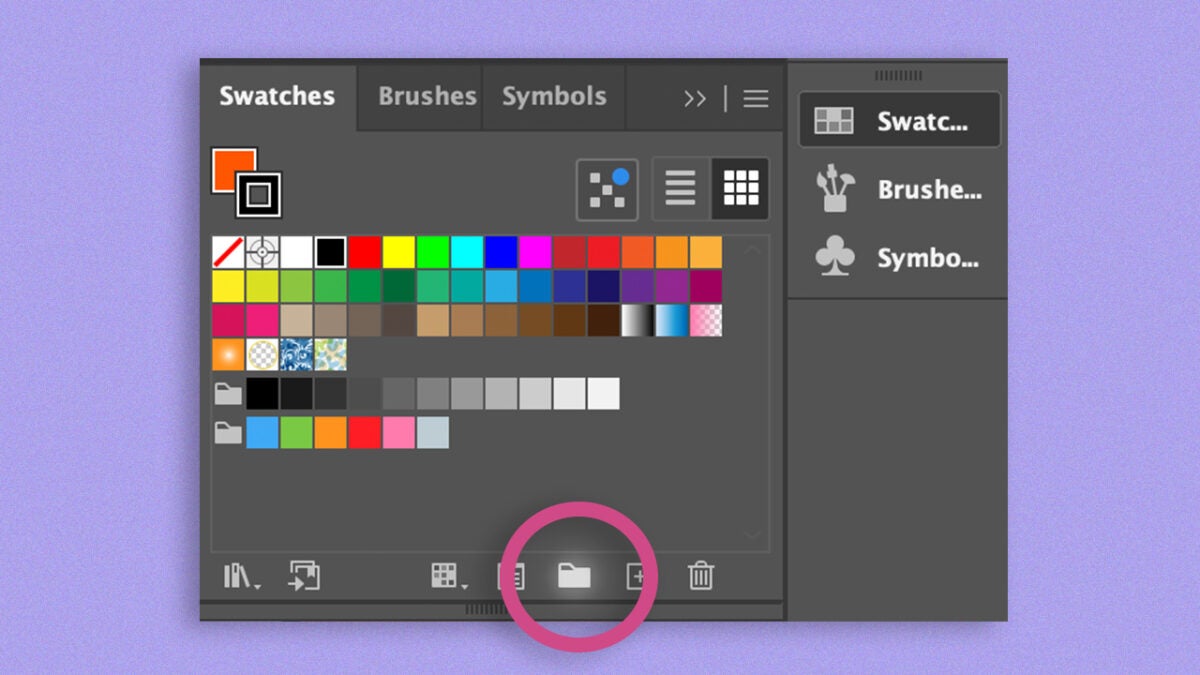
  • Drag your samples to the folder you just created.
  • Select the colors and save the palette with the option Add Selected Swatches and Swatch Groups to my current library.

You can import the colors as an external file by clicking on the library symbol and selecting Save Swatches. The file will be saved in .ai format, and you can import it into Adobe Illustrator.

Use graphic styles

Knowing how to manage graphic styles in Adobe Illustrator will save you a lot of time when creating cohesive designs. Just like with texts, Illustrator allows us to set graphic styles, a set of attributes that let us quickly change how objects look. When we apply a graphic style to a layer or a group, they change their appearance according to the parameters we have set.

From the Graphic Styles panel, which you can access through Window > Graphic Styles, you can see Illustrator’s default ones and add any you want. To create a graphic style from scratch, we need to do the following:

  • Create an object with the characteristics you want your graphic style to have and customize it to your liking: set a fill color, add gradients, effects, etc.
  • Use the Selection tool to select your creation. From the Graphic Styles panel, click on New Graphic Style to save the style.
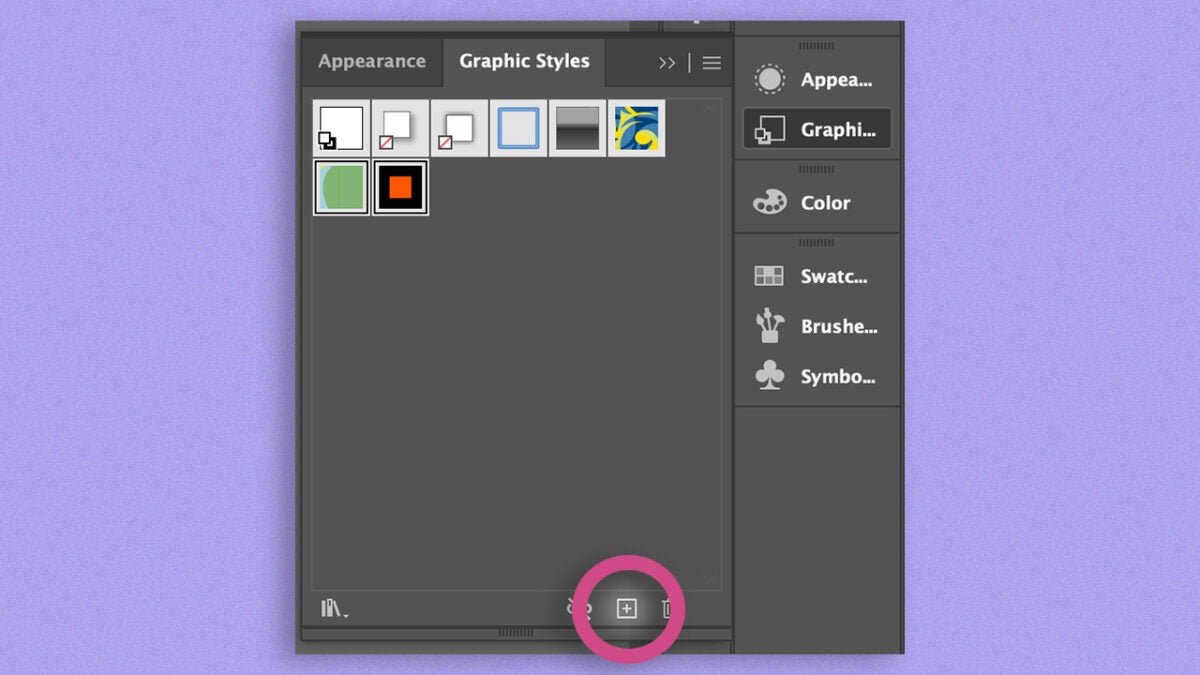
  • To apply it to other items, select them and click on the style you saved in the Graphic Styles panel. You will immediately see how the attributes are applied automatically.

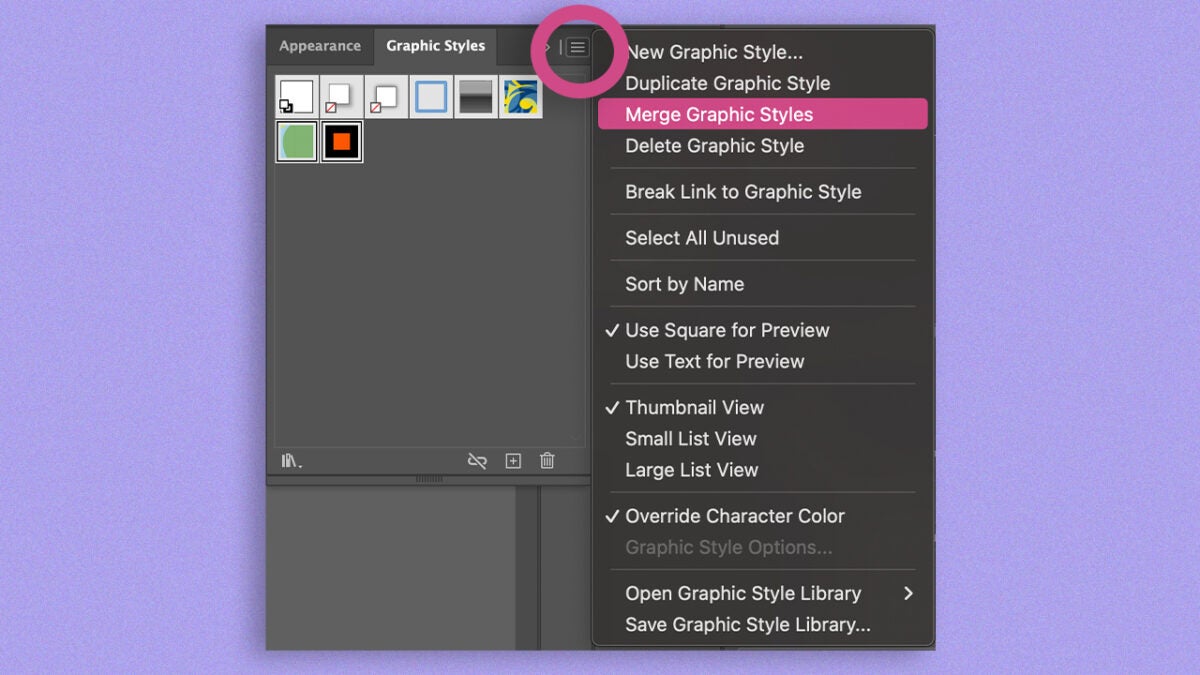
Illustrator also allows you to combine existing graphic styles. To do this, select the Merge Graphic Styles option, which you will find under the symbol of the three horizontal lines.
New Generative AI Features: This is How Text-to-Vector Graphic Works

In recent years, Adobe has integrated new AI-powered features into its creative suite. In Illustrator, for example, we can generate vectors from a description.

This feature, Text to Vector Graphic, will allow us to create icons, scenes, and complex shapes in a very short time, as you will see below:

  • Create a shape and select it.
  • By doing so, a contextual bar will appear with the option Generate Vectors. If this bar does not appear, go to Window > Contextual Task Bar.
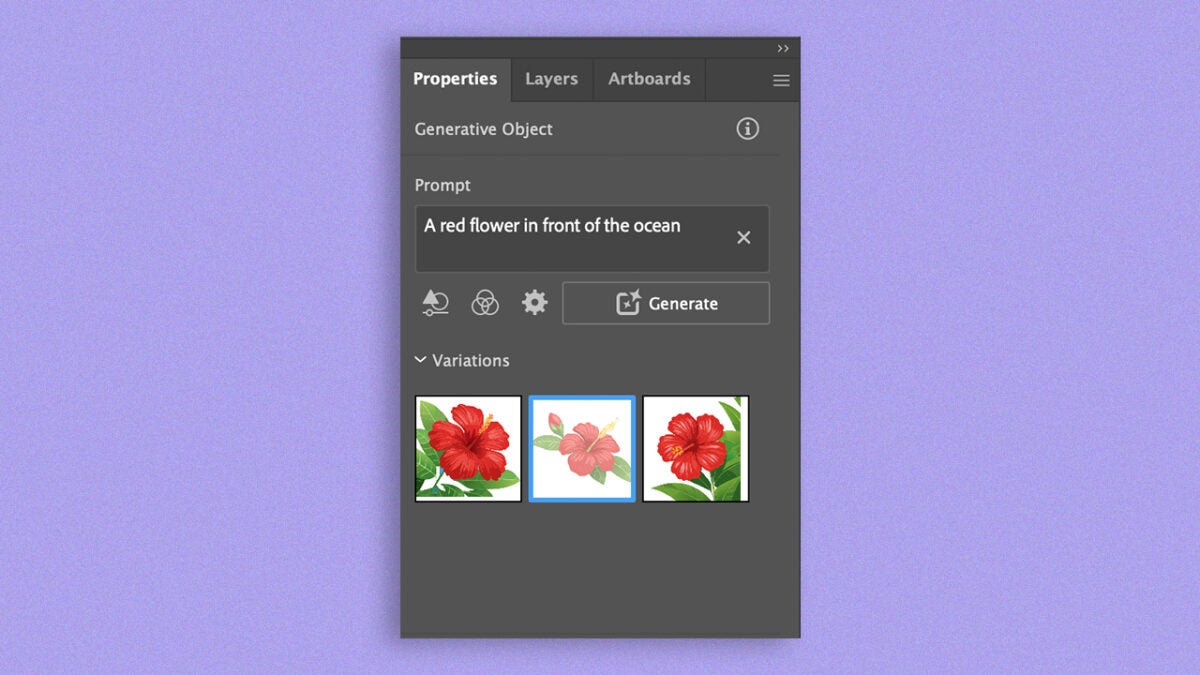
  • Clicking on Generate Vectors will bring up a new box where you will need to describe in writing what type of vector drawing you want.
  • Adobe will provide several results based on your request. Choose the one you like the most or continue refining with your description. You will find all this information under the Properties panel.
This type of function can help you follow a style path and apply it to your work.

Adobe Illustrator
Adobe Illustrator DOWNLOAD

Author: María López

{ "de-DE": "Künstler aus Berufung und Technikliebhaber. Seit ich denken kann, habe ich gerne an allen möglichen Gadgets herumgebastelt.", "en-US": "Artist by vocation and technology lover. I have liked to tinker with all kinds of gadgets for as long as I can remember.", "es-ES": "Artista de vocación y amante de la tecnología. Me ha gustado cacharrear con todo tipo de gadgets desde que tengo uso de razón.", "fr-FR": "Artiste de vocation et amateur de technologie. J'aime bricoler avec toutes sortes de gadgets depuis que j'ai l'usage de la raison.", "it-IT": "", "ja-JP": "", "nl-NL": "", "pl-PL": "", "pt-BR": "", "social": { "email": "", "facebook": "", "twitter": "", "linkedin": "" } } View all posts by María López

Author María LópezPosted on February 6, 2025July 1, 2025Categories News

Post navigation

Previous Previous post: Prime Video is preparing For the Win: NWSL, its series about women's soccer for the biggest fans
Next Next post: Call of Duty players are jumping ship. Activision offers a free trial of Black Ops 6

Recent Posts

  • The director of Final Fantasy VII Remake is clear: young people do not connect with Final Fantasy
  • The worst nightmare of parents will have a movie. Its voice cast is absolutely incredible
  • The studio behind Lies of P sees AI as the future of its games and fans are not responding well
  • George A. Romero will finish 'Night of the Living Dead' after his death, and we know who will star in it
  • "A festival of nods." The first opinions of the new 'Star Wars' movie are not exactly enthusiastic

Archives

  • May 2026
  • April 2026
  • March 2026
  • February 2026
  • January 2026
  • December 2025
  • November 2025
  • October 2025
  • September 2025
  • August 2025
  • July 2025
  • June 2025
  • May 2025
  • April 2025
  • March 2025
  • February 2025
  • January 2025
  • December 2024
  • November 2024
  • October 2024
  • September 2024
  • August 2024
  • July 2024
  • June 2024
  • May 2024
  • April 2024
  • March 2024
  • February 2024
  • January 2024
  • December 2023
  • November 2023
  • October 2023
  • September 2023
  • August 2023
  • July 2023
  • June 2023
  • May 2023
  • April 2023
  • March 2023
  • February 2023
  • January 2023
  • December 2022
  • November 2022
  • October 2022
  • September 2022
  • August 2022
  • July 2022
  • June 2022
  • May 2022
  • April 2022
  • March 2022
  • February 2022
  • January 2022
  • December 2021
  • November 2021
  • October 2021
  • September 2021
  • August 2021
  • July 2021
  • June 2021
  • May 2021
  • April 2021
  • March 2021
  • February 2021
  • January 2021
  • December 2020
  • November 2020
  • October 2020
  • September 2020
  • August 2020
  • July 2020
  • June 2020
  • May 2020
  • April 2020
  • March 2020
  • February 2020
  • January 2020
  • December 2019
  • November 2019
  • October 2019
  • September 2019
  • August 2019
  • July 2019
  • June 2019
  • May 2019
  • April 2019
  • March 2019
  • February 2019
  • January 2019
  • December 2018
  • November 2018
  • October 2018
  • September 2018
  • August 2018
  • July 2018
  • June 2018
  • May 2018
  • April 2018
  • March 2018
  • February 2018
  • January 2018
  • December 2017
  • November 2017
  • October 2017
  • September 2017
  • August 2017
  • July 2017
  • June 2017
  • May 2017
  • April 2017
  • March 2017
  • February 2017
  • January 2017
  • December 2016
  • November 2016
  • October 2016
  • September 2016
  • August 2016
  • July 2016
  • June 2016
  • May 2016
  • April 2016
  • March 2016
  • February 2016
  • January 2016
  • December 2015
  • November 2015
  • October 2015
  • September 2015
  • August 2015
  • July 2015
  • June 2015
  • May 2015
  • April 2015
  • March 2015
  • February 2015
  • January 2015
  • December 2014
  • November 2014
  • October 2014
  • September 2014
  • August 2014
  • July 2014
  • June 2014
  • May 2014
  • April 2014
  • March 2014
  • February 2014
  • January 2014
  • December 2013
  • November 2013
  • October 2013
  • September 2013
  • August 2013
  • July 2013
  • June 2013
  • May 2013
  • April 2013
  • March 2013
  • February 2013
  • January 2013
  • December 2012
  • November 2012
  • October 2012
  • September 2012
  • August 2012
  • July 2012
  • June 2012
  • May 2012
  • April 2012
  • March 2012
  • February 2012
  • January 2012
  • December 2011
  • November 2011
  • October 2011
  • September 2011
  • August 2011
  • July 2011
  • June 2011
  • May 2011
  • April 2011
  • March 2011
  • February 2011
  • January 2011
  • December 2010
  • November 2010
  • October 2010
  • September 2010
  • August 2010
  • July 2010
  • June 2010
  • May 2010
  • April 2010
  • March 2010
  • February 2010
  • January 2010
  • December 2009
  • November 2009
  • October 2009
  • September 2009
  • August 2009
  • July 2009
  • June 2009
  • May 2009
  • April 2009
  • March 2009
  • February 2009
  • January 2009
  • December 2008
  • November 2008
  • October 2008
  • September 2008
  • August 2008
  • July 2008
  • June 2008
  • May 2008
  • April 2008
  • March 2008
  • February 2008
  • January 2008
  • December 2007
  • November 2007
  • October 2007
  • September 2007
  • August 2007
  • July 2007
  • June 2007
  • May 2007
  • April 2007
  • March 2007
  • February 2007
  • January 2007
  • December 2006
  • November 2006
  • September 2006
  • August 2006
  • June 2006
  • May 2006
  • July 2001
  • January 2001
  • November 2000
  • September 2000
  • August 2000
  • July 2000
  • April 2000
  • March 2000

Categories

  • Affiliate post
  • Expert Review
  • Gaming
  • Guides
  • How to
  • Legacy how To
  • News
  • Noticias
  • Software>Security
  • Sponsored
  • Trucos y Consejos
  • Uncategorized
  • Windows software

Meta

  • Log in
  • Entries feed
  • Comments feed
  • WordPress.org
Softonic English Proudly powered by WordPress