How to search contacts in Adium

adium.pngAdium is the Instant Messenger client of choice for hundreds of thousands of Mac users. It’s simple, lightweight, easy to use and supports almost any IM network. However, it is severely lacking in certain areas. The lack of webcam support is one of the most glaringly obvious but perhaps most basic of all is the lack of a contacts search tool.

A search function has been slated to be added in a future release of Adium but as yet, we’re still waiting. Therefore, the only way I’ve found of searching contacts is to improvise.

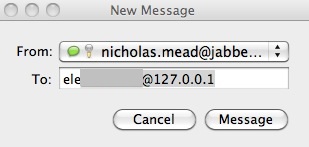
If you press CMD and the N key when Adium is active, a new chat window will open:
adium2.jpg

Start typing the name of the person you want to contact in the To: field and Adium will automatically predict the rest of the name of the contact.This is fine if your contacts all use their real names. However, if you’ve got hundreds of contacts with aliases such as “*STEVE25!***Helloall!***” it doesn’t make things much easier!

Let’s hope Adium introduce a decent powerful search tool that the client surely deserves.
How to stop Adium spam

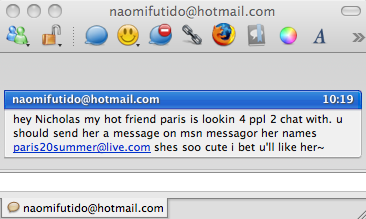
After many years of relatively problem free Adium use, in recent months I’ve been plagued by random contact requests and messages. It seems barely a day goes by now when a new spam contact requests permission to be added to my list when I open Adium or a spam conversation dialog suddenly opens.

Adium spam

Fortunately, the solution to this problem is very simple although you might need to go beyond Adium to fix it.

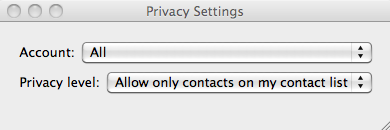
Firstly, check your Adium privacy settings by going to Adium then Privacy Settings in your top menu bar. Make sure that All Accounts is selected along with Allow only contacts on my contact list.

screen-capture.png

This should stop the majority of spam messages but if you’re finding that they’re still getting through, you’ll need to access the privacy settings in Microsoft Messenger for Mac and block all other users and deselect alerts from other senders. Continue reading “How to stop Adium spam”

Is Adium now officially the best IM client for Mac?

Adium iconIf you were to ask me to name one good reason to ditch MSN Messenger it wouldn’t be too difficult to come up with an answer. Adium. Time and time again, the open source chat client has proved to be the friendliest, more feature complete and flexible IM client for Mac. It looks good too and is heavily customizable. And did I fail to mention that the Adium developers very frequently deliver updates of the app?

The latest version, 1.3, comes with a number of significant improvements which should end up convincing you. The Contact Inspector, where all your contacts are stored, including those from your Apple Address Book, is fitted with a newly designed interface. Because Adium is a multi-protocol client, you could quickly drown in the endless lists of contacts. Luckily, there is now a search field in the contact list, making it easier to find contacts. Just press CMD+F to activate it. What you often get too is the same contacts but repeated in different networks. Their profiles are now shown in a uniformed way and you can easily expand them in the contact list to see their contents.

Facebook Chat, as expected, can now be used with Adium. Note though that logging into it will log you out of your Facebook account. MobileMe is also now handled by Adium.

In terms of user experience, you’ll now be able to see a ‘typing’ message when contacts are typing without a chat window open. Adium will also now let you drag and drop urls from your browser and tracks from your iTunes to send as file transfers.

There is now support for a number of AppleScripts relating to contact management, such as re-ordering, blocking or deleting.

These are but the most impressive of the new features, but a whole lot more have been added, not including all the bugs that have been fixed. Give it a try and see for yourself why I say it’s the best IM client for Mac.

Adium to offer Facebook support

facebook_chat.jpgGood news from the Adium blog, the free multi-protocol messaging client will soon let you use the Facebook Chat feature, which was only implemented on April 6. The new feature will display your contacts with their little thumbnail image, status update and an availability icon. You’ll obviously need to have a Facebook account, but the good thing is you won’t have to have the website opened up in your browser to use it.

In my opinion, this goes to show why Adium still remains by far the best messaging client on Mac for personal users. It works with almost all the protocols out there, its interface can be customized and the client is very regularly updated. I also find Adium to be on the whole very stable and enjoy its design.

Facebook Chat is a popular new feature on the social networking website, as you can interact directly with your friends. The question now is, will other messenger client offer support for Facebook Chat? If Adium is GPL, there’s no reason why other GPL clients Psi, Coccinella or Spark couldn’t offer it. But it also all depends on whether Facebook wants to have the Chat feature available everywhere or just on a limited few. Obviously, if you’re using Facebook Chat in Adium, it means you aren’t on the site, downloading applications or clicking on ads.