
Pandora introduced a sleep timer for its mobile apps back in August and now they’ve included an alarm function in their iOS app. The new feature allows users to set a Pandora radio station to play as an alarm clock.
The alarm feature can be found in the right navigation column by tapping on the menu button. At the bottom of the list, you’ll find the “Alarm Clock” feature with a toggle to turn it on or off. The alarm feature is very minimalist, showing the time at the top with your alarm time at the bottom. Users can set snooze durations of 5, 10, 15, or 20 minutes. When paused, the app will begin a countdown until your alarm will sound again. Users have the option of shaking their phone to snooze instead of tapping on the snooze button.
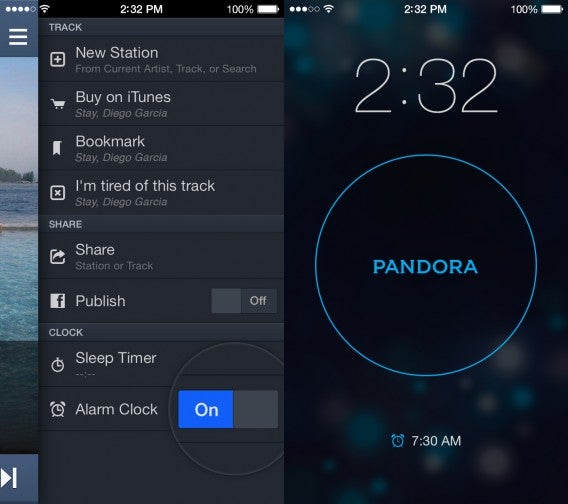
One downside of the Pandora Alarm is that it requires an internet connection (obviously) to be able to stream music to wake you. The app also requires you to leave your iPhone’s screen on and the app open for the alarm to work so make sure you’re plugged in.
Pandora is planning on bringing the alarm clock feature to Android but the company hasn’t specified when that would be.
Download Pandora for iOS
RELATED STORIES
Source: Pandora
 If you’re looking for an unobtrusive alarm clock and reminder for your Mac, Pester should probably do the job. The application, presented in an elegant and clear interface, allows you to set timely reminders and multiple alarms. Enter your reminder message, if you want it to repeat and when it pops up. You can choose what sound will play to alert you, even selecting a voice to speak the message out to you.