 Apple have released the Aperture 2.1 SDK, which will allow independent developers to create all sorts of plugins for Aperture. One of the main improvements in the new version of Aperture was specifically to open it up to programmers, in a clear bid to compete with Adobe and the wealth of plugins for Photoshop that already exist. With the Aperture SDK you can create two sorts of plugins: for Export and for Editing. The installer comes with three examples to get started and Xcode templates for both Export and Edit plugins. You will need to sign up as an ADC Member (which is free) to download the development kit.
Although probably not such a big announcement as the release of the iPhone SDK, the Aperture development kit is still pretty big news. Apple look to tighten their relationship with independent developers in what seems like a win-win situation. They get to benefit from all the great ideas out there that can bring more features to their products, and independent developers get to showcase their skills and most importantly make use of great applications like the iPhone or Aperture.
The indie development community hasn’t wasted its time and you can already check out some creations at Aperture Plugged In. You’ll see a large list of plugins including ApertureToFtp Pro, FlickrExport Lite, Lightbox XMP or Aperture Border FX. If you are an Aperture user, it’s well worth digging in and trying out some of these. If you know a little bit about coding, go on and download the SDK and try your hand at making your own plugin. All you need is a good idea and a bit of time.
 Apple’s star photo editing and management software has just been updated to version 2.
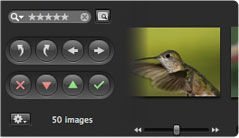 New editing features you’ll find include highlight recovery, color vibrancy, local contrast definition, soft-edged retouching, vignetting and RAW fine-tuning. Aperture 2 now also includes support for tethered shooting, which allows you to connect a camera to your Mac via USB or Firewire and shoot directly into Aperture. We also enjoyed the Loupe tool, which lets you zoom in up to 1600%.