
Top 3 Tips and Tricks for Baidu Browser

Baidu Browser is one of the most efficient browsers available on the Web, but with some tips and tricks, you can make it even more powerful. Read on to take your Baidu-powered browsing experience to the next level!

Use WhatsApp Directly in the Browser

WhatsApp is one of the world’s favorite chatting services, and while most people use it on mobile devices, you can also use it on a desktop PC. Thankfully, the experts at Baidu recognized this and incorporated WhatsApp directly into the browser.

To utilize this, click on the green phone icon in the top right of the screen. You can then scan the QR code that displays on the page that opens, allowing you to use WhatsApp immediately.
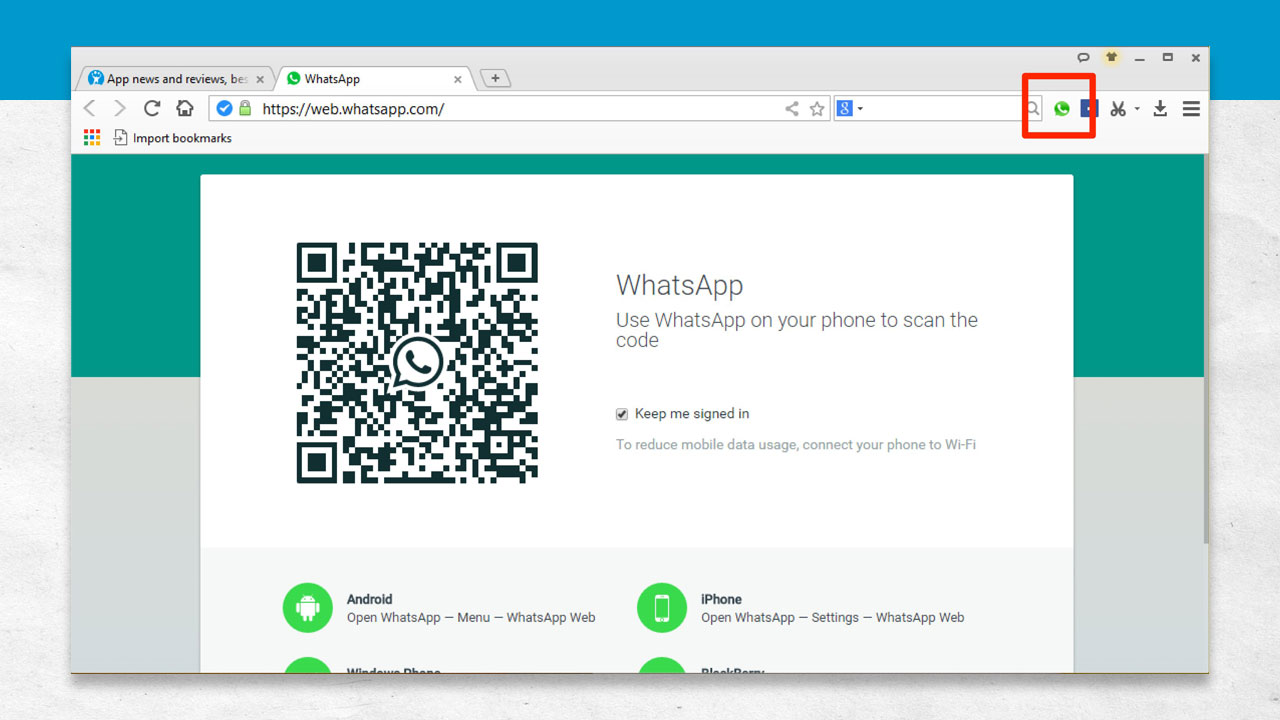
Baidu Browser - WhatsApp Integration

Use Facebook as an Extension

In Baidu Browser, like other browsers, you can visit Facebook directly by going to its homepage; however, in order to stay connected to Facebook, you have to stay on the homepage.

To get around this in Baidu Browser, click on the Facebook icon at the top right of the screen. This will open up a Facebook extension that stays connected once you log in with your information. Now, you’re able to browse the web while still having Facebook open with the click of a button.
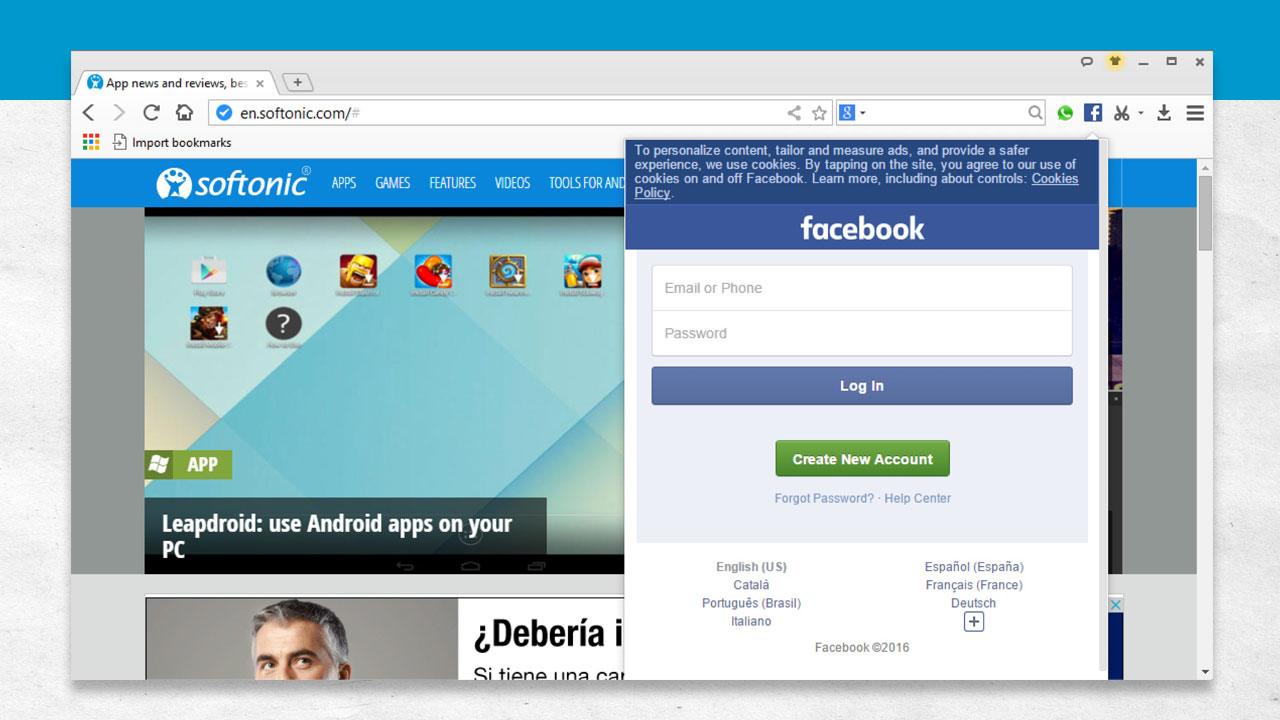
Baidu Browser - Facebook Extension

Download Videos and Watch in a Separate Screen

There are moments when you probably want to watch a YouTube video, but you just don’t have the time. In addition, there are likely times when you’d like to download a video and transfer it to a mobile device to watch later.

Baidu Browser seamlessly integrates a download function for online videos. To use this, open up the video you would like to download. Baidu Browser will automatically offer you the option to save the video. You can then select the video’s quality and determine where you would like the video to be saved on your hard drive.

In addition, you can open a video in a floating screen so that you can have it playing while you visit other sites.

To do this, simply click on the small square with the arrow on it in the top right of the video. This will pop the video out into a floating window that can be re-sized for convenience. Even when you visit other web pages, the video will stay on top. You can also control the video by using the floating window just as if you were watching it on its YouTube page.


Getting Started: The Features of Baidu Browser

Get the most out of Baidu Browser when you know about all of its exciting features. Below, you’ll get a better understanding of all that Baidu Browser has to offer:

Open Recently-Closed Tabs

While this feature is simple, it’s quite powerful. If you accidentally close a tab, it can be frustrating, especially if you had a lot of pages open on the tab. Thankfully, Baidu Browser allows you to easily re-open recently-closed tabs with the push of a button. Look for the clock icon in the menu bar and click it in order to see recently-closed tabs for retrieval. This is also beneficial if you can’t remember where you found information in a recent browsing session and you want to look back through the tabs you had open to find it.

Browser Doctor

The Browser Doctor in Baidu Browser can help you figure out what’s wrong if you start having trouble while browsing the Internet. The option to open this feature displays automatically when you hit an error online. You can tell Browser Doctor about the problems you’re experiencing, including when pages don’t display correctly or when videos won’t load. The Browser Doctor then assesses the situation and provides solutions. You can also let the Browser Doctor make corrections to your browsing experience by selecting which solution you would like to use.

Take Full-Page Screenshots

Screenshots are useful in many ways. For instance, you can take screenshots to share images with friends, but you can also take them to preserve important information online that could be deleted at a moment’s notice. With other browsers, you may have to install third-party software in order to take a screenshot from the browser itself, but with Baidu Browser, all you have to do is click on the scissors icon in your menu bar to take a screenshot. You can then go back and review all of your screenshots to find the one you need for the task at hand.

Drag and Drop Functionality

When you want to open files, like pictures and videos, in a browser, you often have to open a new tab or window and type in the location address of the file on your computer. This can be a hassle, especially if you don’t know the location address. With Baidu Browser, all you have to do is click on the file you want to open, drag it to a new tab, and drop. Baidu Browser will open the file in the new window or tab for you without any of the hassles of other browsers.

Get the protection you deserve with Baidu Antivirus!

Did You Know That Baidu Browser is Also Available for Android

Baidu Browser is great on desktop, but did you know you can also use it for your Android device? Baidu Browser for Android includes many features that come with the desktop version, but it also includes some mobile-specific features. If you love Baidu Browser for desktop, take a look at what you get with the mobile version:

Your Own Personal Homepage

Baidu Browser for Android offers you the ability to customize your very own homepage, allowing you to set things up how you would like. Aside from adding and editing bookmarks, you can also create shortcuts on your homepage for faster browsing. Your homepage also sports a search bar at the top for easy searching of the web, and you can receive an update on the latest weather conditions in your local area.

Discovery Section

You can also take advantage of Baidu Browser’s Discovery section. Here, you can receive updates about the latest in news, music, media, and more. You can also set this section up to deliver notifications when new stories become available, meaning you don’t have to keep checking the Discovery section to stay up to date.

Search By Voice

One convenient feature offered in Baidu Browser for Android is that you can search via voice or by scanning a QR code. A QR code is a black and white square that, when scanned using Baidu Browser, will take you to a specific website. Voice search is obviously a powerful feature, especially when you aren’t able to use your fingers to type out your query. Combined, these two search features can help you get where you want to go faster.

Customizable Display

For people who have difficulty with their vision, Baidu Browser for Android allows you to change the font size by pinching the screen. This is a big help when you visit a webpage that has very small font sizes. In addition, you can also enable night mode when using Baidu Browser for Android in dark spaces. This feature dims the background on webpages that feature large amounts of white space, and at the same time, it changes dark fonts into lighter ones. This prevents eye strain when using your Android device at night.

Floating Widget

Finally, you can use a floating widget on your home screen to have quick access to pages in Baidu Browser for Android. This widget sits on top of the home screen and functions like a wheel that contains the different pages you visit the most. This helps you to navigate more quickly and efficiently and reduces the need to manually navigate to different pages.

To learn more about the desktop version, see this video: How Does Baidu Browser Work?

NEXT:

Safer Video Downloading in Baidu Browser

Downloading these days can be dangerous, especially considering all of the malware and spyware available on the Internet. Thankfully, Baidu Browser keeps things safe by providing direct downloads through the browser itself.

How to Download Videos in Baidu Browser

On top of security, Baidu Browser makes it easy to download videos from the Internet straight through the browser itself. When you come across a source that you want to download from in Baidu Browser, you should receive a notification in the upper-right of the screen that prompts you to download the video content. If you choose to go ahead, simply click ok. Once your download is complete, you’ll receive a notification and you can quickly open your video.

How This Solves Problems

Downloading directly from the browser prevents problems in a couple of ways. First, it keeps you from having to download third-party software that is dedicated to downloading video. Also, some of these third-party programs can be a bit sketchy, but because you already trust Baidu Browser, you won’t have to worry about the potential for unwanted software being installed. Likewise, Baidu Browser’s downloading capability means that you can continue to surf the web while your video downloads in the background.

Downloading Safety Tips

Although Baidu Browser makes it easy and fast to download videos from the Internet, you need to be aware that some video content could be malicious. As a result, only download video from trusted sites that are known to be safe. It would be a good idea to scan any files that you download with an antivirus program. Also, you should never download illegal video content that is either owned by someone else or that is not in the public domain. Illegally downloading videos could get you into a lot of trouble and could lead to hefty fines.

Securing Your Downloaded Videos

Once you’ve safely downloaded video content through Baidu Browser, you can take things one step further and secure your files using password protection. In some operating systems, like Windows XP, you can do this by right-clicking on the file you want to protect and selecting the option to add a password. Unfortunately, this option isn’t available in all operating systems, but you could use a program like WinRAR to get around the problem. In WinRAR, all you have to do is create a new archive and add your downloaded files to it. When you do this, the program will provide you with the chance to add and confirm a password. Once added, only people who have the password will be able to access the files.

Scan your downloaded video files with Malwarebytes Anti-Malware for free!