How to download and install Google Chrome (64-bit)

Google Chrome is one of the most popular browsers, and it’s available for 64-bit Windows based operating systems. If you don’t know if you system is 32 or 64 bit you can discover it here.

In this video tutorial we will show you how to download and install Google Chrome (64 bit)

How to download and install Google Chrome 64 bit por softonic-en

1. To download Google Chrome visit Softonic and type Google Chrome 64 bit into the search box.

2. When the search results are shown, click on Google Chrome (64-bit) to see the program’s review. In the review you’ll find basic information about the program as well as detailed analysis, providing useful insights and tips.

3. Once you’re on the program page click on Free Download to access the Google Chrome website, where you will be able to download the program.

4. Click on Download Chrome to start the download. Take a look at the terms of service, mark or unmark the check boxes as you wish and click on Accept and Install to carry on with the download.

5. After this you will see the download window. Save the file on your computer, and once the download is completed double-click on the file to start the installation.

The installation process will begin automatically.

When the installation is finished, Google Chrome will open and you will be able to use it.

Did you like this article? Share your thoughts on the comment section below.

Chrome for Mac 64-bit finally goes stable

Mac users got a beta 64-bit Chrome back in August and today it’s reached its stable release. The browser has been fully optimized for 64-bit Macs and will take full advantage of your computer’s processor and graphics card.

Chrome 39 marks the introduction of 64-bit Chrome but also the death of 32-bit Chrome on Mac. You can only download the 64-bit version of Chrome for Mac now, which shouldn’t be a problem for most users running a fairly modern Mac.

64-bit Chrome boasts faster speeds and better utilization of your Mac’s hardware. This means your browsing will be snappier than ever, though you may see an increase in memory usage.

To get the update, click on the menu button inside of Chrome and select About Google Chrome. The update will appear and you can choose to download and install it. If you’re not seeing the update, you can download it yourself below.

Download Chrome for Mac

Source: Chrome Releases

Related Stories

Malware being spread through Steam chat

End to end user encryption coming to WhatsApp

OS X 10.10.1 update fixes Wi-Fi connection issues

Best free iPad games

Follow me on Twitter: @lewisleong

Chrome for Mac will be 64-bit only, older Macs out of luck

Chrome users on Windows received a 64-bit version just a few weeks ago and now new details have emerged about the 64-bit Mac version. Google says the updated browser will be coming out in November. Version 39 for Mac will be significant because it will be the only version available unlike Windows which has a 32-bit offering for older machines.

So why is Google switching to 64-bit for Chrome? Modern hardware is becoming more and more powerful an 64-bit apps can take full advantage of these powerful systems. 64-bit Chrome also promises heightened security and fewer crashes.

Most Mac users are already using 64-bit capable processors so it makes sense for Google to transition solely to 64-bit. Mac users will older machines will be out of luck, stuck using an unsupported version of 32-bit Chrome.

Switching to 64-bit also means extensions designed for 32-bit Chrome won’t work any more. Extension developers will have to update their extensions to in order for them to work with the new browser.

Chrome 39 is expected to arrive some time in November but you can try an experimental version of it now.

Source: Google Apps Update

Related Stories

How to protect private pictures on your phone

Not all iOS 8 features available at launch

Apple annoys users by pushing U2 album to their iTunes

How to make video calls with Viber on Android and iOS

Follow me on Twitter: @lewisleong

How to fix Chrome 64-bit Japanese & Korean unicode error

The release of Chrome 64-bit brought support for modern hardware and promises “fewer crashes, better performance, and security.” But with such a dramatic update, some things got broken, one of which is displaying unicode characters for Asian languages.

There is a bug within Chrome 64-bit Version 37.0.2062.94 that can change font settings and remove the ability to display Japanese and Korean text. This also affected some Chinese text, but is not as widespread. The bug isn’t easily reproduced on every computer, but you’ll know if you have it. I have Chrome 64-bit installed on different computers and I have the display error on one install of Chrome but not the other.

chrome facebook korean error

The major sites where people reported the problem is Facebook and popular Asian language sites. If you’re experiencing this bug, the steps below should get Japanese and Korean to display again in Chrome.

Auto detect encoding in Chrome

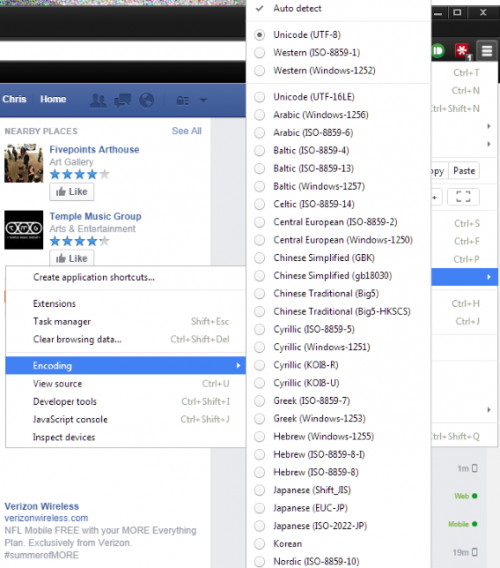
Open the Chrome menu (three bars) and locate Tools. In the menu, find Encoding and make sure that Auto detect is selected. This option will automatically check to make sure the page has the right encoding.

chrome tools encoding auto-detect

Font settings in Chrome

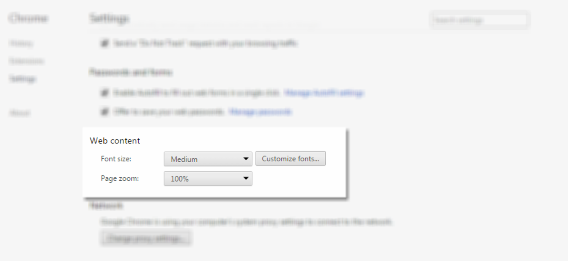
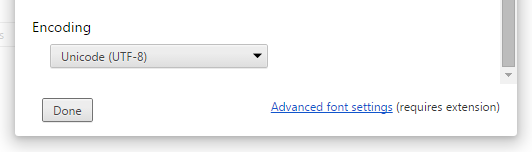
Another place to check is in Web content and the Customize fonts menu. Open the Chrome menu (three bars) and open the Settings menu. Web content is found by clicking on Show advanced settings. Open the menu and scroll to the bottom and make sure that Unicode (UTF-8) is selected. UTF-8 is the most common setting for websites.

chrome settings web contentchrome settings web content encoding

Disable DirectWrite

If the above options didn’t work or text is hit-or-miss, the best fix is to disable DirectWrite. To access this option, in the address bar type in chrome://flags. This will bring you to the experimental features within Chrome. It’s recommended you don’t mess with these options, but in this case, this is the best fix.

Click on Enable to disable DirectWrite in Chrome. To apply changes, click the Relaunch Now button at the bottom of the tab. Chrome will relaunch with all the same tabs that were previously open.

chrome disable directwrite

Disabling DirectWrite should solve any problems with displaying text. Now you can browse sites that contain a lot of Asian text without missing any important information.

chrome facebook korean

On the Chrome product forums, the development team is aware of the issue and there should be a fix coming soon, but there isn’t a release date. For right now, this is the only way to have a more permanent fix for the display error for unicode text.

Related Articles

Chrome update brings 64-bit for Windows, offers security and speed

16 must-have apps for every teacher

Stop ignoring Android app permissions

Follow me on Twitter: @chrislikesrobot

Chrome update brings 64-bit for Windows, offers security and speed

We knew a 64-bit version of Google Chrome for Windows was coming and now it’s finally here. This version promises fewer crashes, better performance and security. The 64-bit architecture allows Chrome to utilize modern hardware to its full potential.

According to Will Harris, a software engineer at Google, Chrome 64-bit offers a 15% improvement in video decoding performance. This means high definition YouTube videos will play smoother.

One of the biggest advantages of the 64-bit architecture is its stability, though I have managed to crash the browser already.

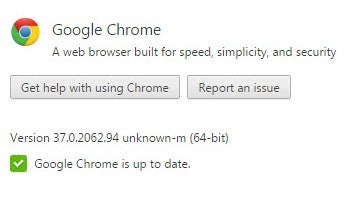
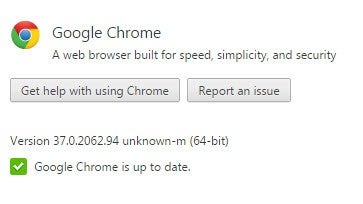
Chrome 64-bit about pageFor now, Chrome 64-bit is opt-in only, meaning you’ll have to manually download it. Google is not forcing Chrome users to upgrade to the new version yet. And don’t worry, Google will continue supporting the normal 32-bit version “for the foreseeable future.”

Before you upgrade, you should know that Chrome 64-bit doesn’t support 32-bit plugins. This shouldn’t be a problem as plugins like Adobe Flash and Microsoft Silverlight offer 64-bit versions. Sites like YouTube and Netflix worked fine for me after upgrading.

To try out Chrome 64-bit yourself, click on the download link here. Be sure to close Chrome before installing to avoid any conflicts.

Mac users still don’t have a 64-bit version of Chrome yet but Google is working on it.

Source: The Chromium Blog

Related Stories

Google is tracking your every move but you might want it to

Stop ignoring Android app permissions

Dropbox gets search for Word and Powerpoint docs on iOS

Google’s iOS productivity apps get native Office support, debuts Slides for iOS

Follow Lewis on Twitter: @lewisleong

Chrome 64-bit comes to the Mac

Last week, Windows users received the latest beta release of Chrome 64-bit. Today, Google is giving Mac users access to the experimental browser too.

There are few key advantages of a 64-bit version of Chrome. It allows the browser fully utilize your computer’s processor, giving you an estimated 25% performance bump. Chrome 64-bit is also more stable, crashing half as much as the 32-bit version.

If you want to give Chrome 64-bit for Mac a try, you can download it from Google’s Canary channel. It will install alongside your stable version of Chrome so it won’t mess with your settings.

Via: 9to5Mac

Related Stories

Shazam for Mac IDs songs and shows from the menu bar

OneNote update for iOS and Mac adds file attachments

iOS 8 will include an iPhoto to Photos migration tool

How to take a screenshot on Mac OS X

What’s new in iTunes 12

Follow Lewis on Twitter: @lewisleong

Google Chrome 64-bit for Windows is almost ready

Windows can try out the latest beta for 64-bit Chrome. The browser has been in development for a while, but is now stable enough for a beta release.

The browser offers three key advantages over the 32-bit version we’re using today: speed, security and stability. 64-bit software can utilize modern processors more effectively and Google claims you’ll see a performance increase of 25% on average.

The 64-bit version of Chrome is also more stable, claiming half as many crashes as the 32-bit version. Security is also increased by allowing the browser to use a randomization security technique that makes targeting key parts of the browser difficult.

Windows 7 and 8 users can try out the Chrome 64-bit beta without replacing their current installation of Chrome. The installer will also import your settings and bookmarks. Get it below.

Downloads

Google Chrome 64-bit beta for Windows 7 and 8

Source: Chrome Releases

Related Stories

Softonic’s Browser Comparison: Head-to-head with Chrome, Firefox, IE and Opera

Measuring browser speed for Softonic’s Browser Comparison

The Softonic Minute: Firefox 31, Modern Combat 5, The Sims 4 and Google Maps

Canvas fingerprinting web tracking tool isn’t the end of privacy

Firefox 31 brings new tab search bar, increased download security

Follow Lewis on Twitter: @lewisleong

Chrome 64-bit is faster and more secure

Google’s Chrome browser is already quick but is about to get quicker with 64-bit support. Google claims it is seeing a 25% average increase in performance.

Security will be tougher with a 64-bit version of Chrome too. Without getting too nerdy, 64-bit software allows more memory randomization, making it harder for hackers to steal information from your RAM.

If that’s not enough to get you excited, 64-bit Chrome claims to crash half as much as the current 32-bit version.

If you’re brave, you can install an experimental version of 64-bit Chrome from the Canary and Dev Channels below. The browser is currently only available on Windows 7 and Windows 8. Since the browser is still experimental, expect to see some bugs.

Download Chrome 64-bit for Windows 7 and 8

Source: The Chromium Blog

Via: Ars Technica

Follow Lewis on Twitter @lewisleong

RELATED STORIES