Has Google fixed the Drive bug that was deleting files?

Last week, we were discussing the annoying bug that’s affecting many Google Drive users, allegedly deleting their stored files under strange circumstances. Acknowledged by Google itself on November 27, the company claimed to be working on fixing the issue and eventually released a supposed solution a few days ago.

Google Drive DOWNLOAD

However much Google claims to have fixed this “sync issue,” Drive users differ greatly in their opinions about whether it’s resolved or if it’s truly a problem between cloud file synchronization and those existing on their PCs through the Google Drive desktop app.

Arstechnica has echoed messages from several users in a Google support forum thread where some assert that various documents and spreadsheets they had stored disappeared from their cloud drives via the web interface, not the desktop app. Furthermore, some users claim they’ve never used or installed this app at all.
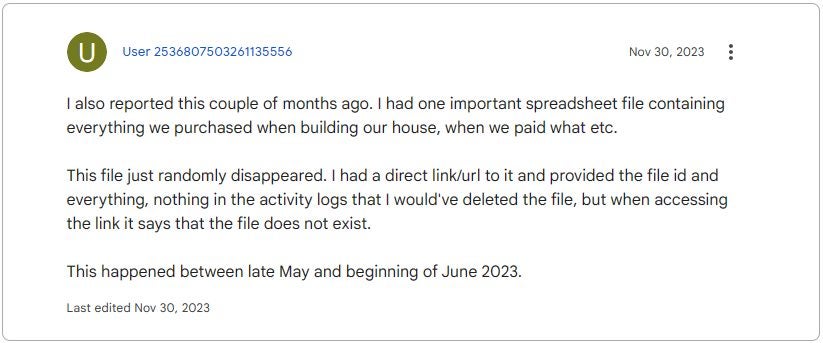
Google’s response to user comments has been to lock the main thread about the bug in the support forums (which had up to 170 replies) and also block new threads created about the same issue, labeling them as “duplicates.” Yes, it seems Google is more concerned about its image than apologizing, admitting fault, and actively working to fix the bug.

The issue here is that this approach negatively affects Google itself because user reports could actually assist in a quicker resolution of the problem. Moreover, Google’s published solution seems to have complicated matters for some users, with claims that Drive completely erased their files, leaving no chance for recovery. Will Google take a long time to address this serious problem? It’s hard to say, but the current handling doesn’t bode well for a swift resolution.

Google Drive DOWNLOAD

Have you lost files in Google Drive? Google investigates this strange event

If you’ve noticed that some of your Google Drive files have disappeared, you’re not alone. This week, several news websites like Android Authority echoed the mysterious disappearance of files from Google Drive for several app users.

Google Drive DOWNLOAD

After acknowledging the issue causing files to disappear for users on Google Drive, Google announced an investigation. Now, after extensive investigation, the company has identified the problem and is offering a series of recommendations on what to do until it’s definitively resolved. The Mountain View-based company confirmed the problem is specifically related to the Google Drive desktop app.

Before Google pinpointed the exact issue, several Google Drive users reported their deleted files problem on the company’s support forum.

One South Korean user claimed their Google Drive account had reverted back to May 2023, meaning they couldn’t find anything uploaded or created after that date. The user also stated they never synchronized or shared their files or drive with anyone.

Google states that the issue only affects a limited subgroup of users and mentions that they will send updates as soon as they have more information. While the tech giant continues working on a patch to fix this problem, it offers some suggestions to help users avoid file deletion.

If you don’t want to lose your files, follow these recommendations from Google:

  • Do not click on “Disconnect account” within Drive for Desktop.
  • Do not delete or move the application’s data folder:

Windows: %USERPROFILE%\AppData\Local\Google\DriveFS

macOS: ~/Library/Application Support/Google/DriveFS

Google Drive DOWNLOAD

Google Drive data loss did not just cause users to lose their files

They also lost their minds…

Google Drive is like a big digital box where we keep our files safe and can get them from any device using our Google account. It’s super popular for people and businesses. But lately, there’s been a problem. People are talking on Google’s support forums, saying they lost new files and changes they made to their folders. User experience and security are basically the whole point of this application, but currently, there are huge flaws in both areas.

Google Drive DOWNLOAD

People started looking for answers, and something weird came up. The records of what people did on their accounts didn’t show any recent changes. So, it’s not like people accidentally deleted their stuff. This hints at a problem with Google Drive.

  • No Mistakes by Users: The records show that people didn’t delete their files by accident.
  • Sync Issue: There’s a problem with Google Drive syncing the data between our devices and its big storage system.

In the middle of this mess, some volunteers who help out on Google’s support got a message from Google’s experts, says Bleeping Computer. They’re looking into the problem, which is a relief. But there’s no promise of when it’ll be fixed. So, we’re all waiting for Google to figure this out and hopefully bring back the files that unexpectedly disappeared.

Google’s upcoming purge of inactive accounts

Google is getting ready to wipe out all the inactive accounts on their database for security measures. Ruth Kricheli highlights the security angle. In the digital world, inactive accounts are like leaving your front door wide open. Google wants to shut these doors to keep your stuff safe. If you don’t have that extra layer of protection with 2-step verification, the risk of trouble gets bumped up.

As we approach the December 1 cleanup, consider it a friendly reminder from Google to not only save your digital memories but also to keep them under lock and key. A quick login can be your ticket to ensuring that your emails, photos, and cherished files continue to find their home in the Google cloud.

Google Drive on mobile will be much more smoother

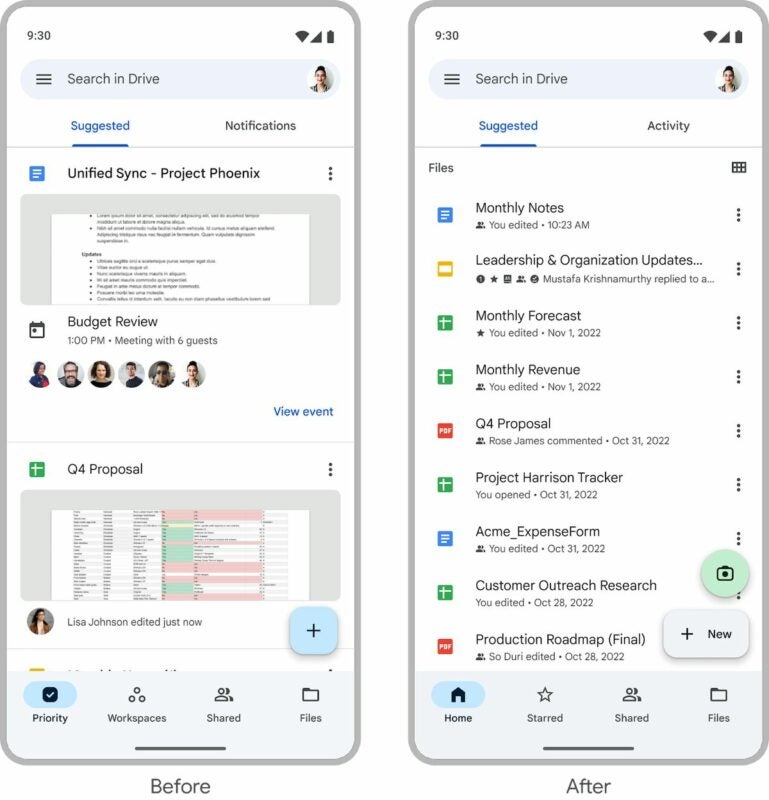
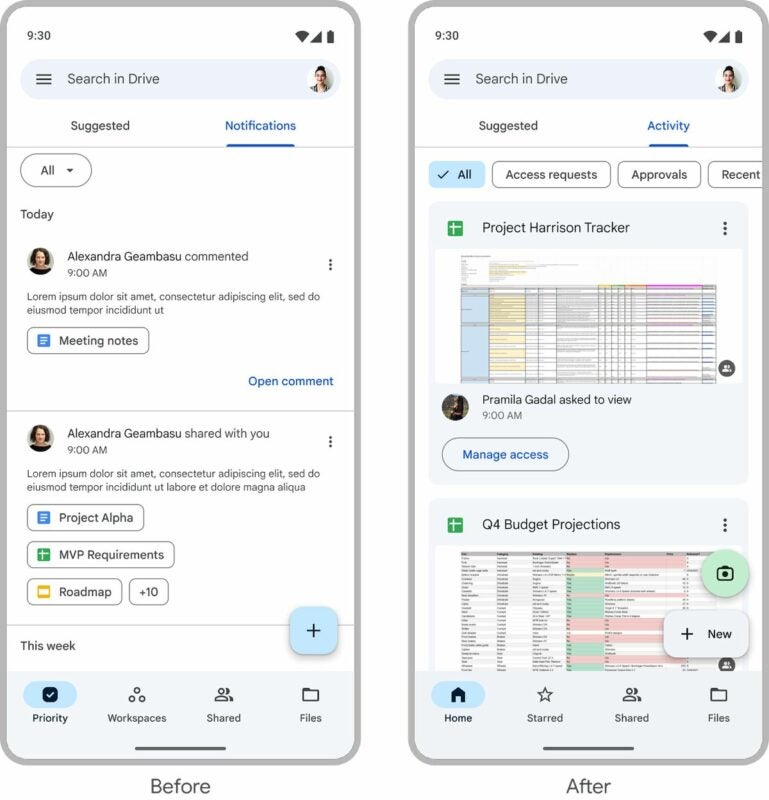
Google Drive is set for a significant update that promises to enhance the user experience, particularly for those accessing the service on the go. The tech giant has unveiled plans for a substantial redesign of its cloud storage platform, featuring a revamped homepage with an updated look and layout.

According to Google, this makeover is aimed at streamlining file navigation, allowing users to locate their desired files more quickly and efficiently.

Google Drive DOWNLOAD

Importantly, these improvements are not limited to a single platform; both Android and iOS users will benefit from the changes. This means that individuals in the business sector, as well as personal users, will enjoy a more seamless experience when using Google Drive, whether they are traveling, working remotely, or simply away from their office desks.

In a recent update shared on the Google Workspace blog, the company announced a series of notable enhancements to Google Drive, aimed at improving user interaction and file management. Central to these updates is the revamped suggested view, which now displays a broader range of files including those recently opened, shared, or edited. This expansion marks a significant improvement from the previous version, where visibility was limited to just a few icons and files. Users can now access a more comprehensive view of their work right from the homepage.

Additionally, Google Drive is undergoing a change in its Notifications menu, which will be transformed into an “activity” menu. This update, mirroring the feature already present in the web version of Google Drive, is designed to consolidate important file-related notifications. Users can expect to see all crucial updates in one place, including access requests, recent comments, and documents awaiting approval.

This refreshed mobile experience of Google Drive is being rolled out to all Google Workspace customers as well as individuals with personal Google Accounts. The update is currently available on both Android and iOS platforms, and users can easily upgrade without the need for any specific administrative controls. This roll-out marks a significant step in enhancing the functionality and user-friendliness of Google Drive, especially for those who rely on mobile access.

Google Drive’s latest update introduces a user-friendly feature for those who may not prefer using the new home tab. Now, the platform will automatically open to the last tab used by the user, such as Shared or Files. This enhancement is part of Google’s ongoing efforts to ensure that Google Drive remains an efficient and intuitive tool for its diverse customer base.

Alongside these navigational improvements, Google Drive has also streamlined the process of securing files. Users can now lock files with just a few simple clicks, enhancing document security with minimal effort. To lock a file, users simply need to right-click on the file, choose “File information”, and then click “Lock”. Once a file is locked, reviewers are restricted from making any changes; edits, comments, and suggestions cannot be added to locked documents. This feature is a significant step in ensuring the integrity and confidentiality of documents stored on Google Drive.

Screenshots courtesy of Google.

Google Drive adjusts sharing methods for user privacy

Google Drive, along with its suite of Workspace apps, has always been a go-to for many due to its user-friendly tools that simplify file sharing, whether it’s with colleagues or friends. Its seamless integration with Android phones and leading Chromebooks sets it apart from other cloud storage options.

But there’s a change on the horizon. Starting next year, Google Drive is introducing modifications that will alter the way you download and share files, all because it’s phasing out support for third-party cookies.

Google Drive for Desktop DOWNLOAD

Privacy over convenience?

Web browsers have been gradually distancing themselves from third-party cookies, and Google Drive is hopping on that bandwagon. Soon, when you pull a file from the cloud, it will only utilize first-party cookies.

This means your personal data or metadata stays away from third-party companies that might be trying to access it. It’s a move geared towards enhancing user privacy and security. This change is slated to kick in on January 2nd, 2024. But it’s worth noting that this new approach might disrupt the usual file-sharing routine for many regular Drive users.

Currently, sharing a file on Drive is a breeze. You can include collaborators from your workspace or any Google account holder. You also have the option to generate shareable links for specific files, deciding who gets access and what they can do with the file. Some external apps rely on these links to pull in files or integrate them into websites. However, this familiar process is set to evolve next year.

Gone are the days when sharing a file on Google Drive was as simple as a couple of clicks to get a URL. The upcoming changes mean users will have to navigate a more intricate process. For documents made in Docs, Slides, Sheets, and Forms, you’ll need what’s termed a Google Docs publishing URL.

To get this, you’ll first have to publish the file via its Share option. Once done, you’ll be provided with a URL to share. Additionally, if you’re looking to embed the file on a website or blog, you’ll find the necessary iframe code on the same page.

A new sharing paradigm

For those who’ve gotten comfortable with Drive’s current system, this new method might feel like a curveball. While adapting to this for newer files might be manageable, the real challenge lies in updating older integrations. Admins might find it a tad tedious to locate and update them in line with the new process.

Google Drive for Desktop DOWNLOAD

This change isn’t just limited to Workspace; even personal Google accounts will experience this shift soon. The silver lining? Users have a few months to identify and adjust any Drive setups that might be impacted. This initiative is part of Google’s broader strategy to bid adieu to third-party cookies, with Chrome’s Privacy Sandbox being a significant milestone towards this goal.

Google Drive UI gets an upgrade

Google Drive and its suite of productivity programs like Sheets, Docs, and Slides offer incredible features for free. If you don’t have the money to pay for a Microsoft 365 subscription, you can very easily move forward with your work projects using the Google offerings. Some features are quite rudimentary, however, with Google still having to play catch up in certain areas. This is exactly what Google is trying to do with new updates that are incoming.

Google Drive Download Now

A post from 9to5Google has outlined changes that are coming to the share prompt user interface (UI), that Google says will make sharing files much simpler.

The change will see all sharing options brought together into a single box that will appear when you click or tap the Share button found in the top-right corner of all Google documents. The first time you click the Share button after the update has rolled out Google will offer to walk you through the changes.

The first thing Google will show you is the People with Access area, which will include you as the owner of the document and everybody who you have given access to it, including their level of access. You will also be able to limit or allow general file access, based for example on having the link to the file.

The update also brings with it a settings button in the top-right corner of the Sharing box, which will allow users to set options like whether editors can change permissions and share the document or whether viewers and editors can download, print, and copy the document.

It looks like Google is currently in the process of rolling out this UI at the moment, so you should expect to see it sometime soon. All you will have to do to check if it is active on your version of Google Drive is hit the Share button.

All-in-all, this update does make the sharing experience much simpler and improves the usability of Google Drive’s productivity suite of programs. It is these small changes that add up over time and could see Google making a dent in Microsoft’s dominance of the sector.

If you are already a Google Drive user you should check out our in-depth Google Docs review to see exactly what the free word processor is capable of.

Google Drive is updating file locations

Cloud storage solutions like Google Drive and Microsoft OneDrive make it easier than ever before to work from anywhere, but they also offer protection against cybersecurity issues like ransomware. The more you keep on your cloud storage drive, the less you have to rely on that single hard drive that is stuck in a single location. Looking at Google Drive, there are some shortcomings, however, when compared to using say, File Explorer on Windows 11. A new update is attempting to address one of the functional issues, so let’s go through it now.

Google Drive Download Now

As it has become cheaper and cheaper to have faster and bigger hard drives and hold larger and drives in the cloud, we have ended up with more and more files saved on them. Many of these files have similar-sounding names, which means when we go to retrieve them, we can end up confused as to which is which. This is particularly the case if you use Google Drive’s Search function to do so. This new update will help us deal with that confusion by adding file locations to all files.

The new Google Drive feature works by showing up the location of a file when you hover over it. This means when you have searched for a file using its name you won’t have to right-click on every result to check its location until you find the one you are looking for. All you will have to do is simply move down one by one until you see the location where you remember that the file you are looking for is stored.

This feature is rolling out to all Google Workspace users now and will be turned out automatically for all users. Google expects it to be available for all users by the end of the month.

This might only seem like a small update, but it adds to a number of updates Google has been adding to Google Workspace over recent weeks. These have included improved collaboration features and AI-powered productivity upgrades. All these little features, and more, together will add up to significantly boost Google Workspace’s offering as Google attempts to muscle in on Microsoft 365’s dominance of the productivity suite market.

Google Drive security features spread to other Workspace apps

Workspace users have been working in fear that new malware would suddenly infect their files or hold their data hostage. One security feature that’s been working well for Google Drive is a warning label indicating that the contents of a file may be malicious. With it working so well, Google has decided to extend the tool to Google Sheets, Google Docs, and Google Slides.

Google Drive DOWNLOAD

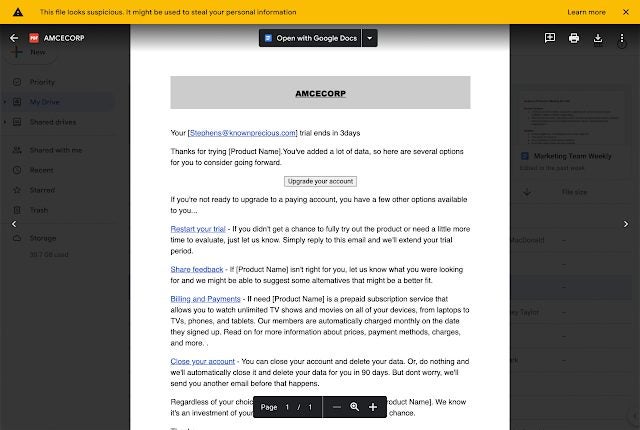
In effect, you’ll see this message appear if there’s a reason for concern: “This file looks suspicious. It might be used to steal your personal information.” Google is clearly not satisfied with only handly security on browsers and wants to take it deeper to the file’s level. It makes sense, as that’s where the malicious content usually resides when it infects your PC.

With more companies moving to remote work locally and internationally, they’re moving towards saving their files online for easier access. It also means that hackers have more opportunities to steal sensitive data and then hold it for ransom for massive sums of money. Last year is a prime example, when hackers used a common feature in Google Docs to send malicious content, specifically phishing. 

It’s not the first time we’ve seen security measures like these arising. As a matter of fact, it seems Google Drive protocols are taking the lead from Microsoft’s playbook. The tech giant restricted macros in Excel while also issuing warnings for unsafe files. With many companies focusing on increased productivity this year, it’s good to know there’s one less thing to worry about when working with online documents.

Google Drive issues security warnings for potentially unsafe files

With the Purple Fox Trojan malware going viral and Chrome having 26 new security flaws, it’s no wonder that you may see a new warning for your files in Google Drive. If you open any files that appear suspicious to the platform, a banner will appear warning that it may be unsafe to open. It also applies to other Google products, such as Slides, Sheets, and Docs.

Google put the new policy in place to protect its servers and your files and folders. The only issue is that some false reports have appeared. There seems to be poor judgment involved in which files are corrupt, which has led to files being blocked from sharing. So even if your content isn’t infected, you might still receive this warning.

Google Drive issues security warnings for potentially unsafe files

The block is only temporary, though. Account administrators and end-users on Google Drive and related platforms can have the block removed if they feel there is nothing to worry about. What’s hilarious about one of the reports is that the document only had one line of text, and yet it was deemed dangerous. So, while Google gets its ducks in a row, expect some warnings over the next couple of weeks.

The Workspace update mentions that the rollout of the new policy will be gradual, which started on January 20, 2022. It will also affect any companies that have businesses registered on G Suite, so keep an eye on your files on Google Drive. The message can also appear for any of your recipients with whom you share documents.

Top 6 Google Drive features you didn’t know about

Many Google Docs users know how useful it can be as an autosave browser-based text editor. However, few people know that Google Drive actually offers many other features that are unique among text editing software. Whether you’re already a frequent Google Docs user, or just looking for alternatives to Microsoft Word, you will absolutely be able to benefit from some of these unique features:

Google Drive Free Download
7

Voice typing

Some people can only work out their thoughts by speaking them, instead of actually writing. These people often make recordings of what they want to say. Well Google Docs takes it a step further; allowing you to simply speak to write. It can really cut down on the time you spend on a document, and it’s great for anyone who has a visual impairment, but plans to write through speech programs.

Commenting on unconverted .doc files

One problem people have with using Google Drive as a converter, is that it often does not properly convert formatting. If you  This isn’t necessarily Google’s fault, as they don’t have access to the formatting that other files have, such as Microsoft Office. However, Google Drive allows you to make comments on .doc files without any conversion. This can let you keep the formatting of the Microsoft document, but still allow you to make notes on it for later use.

Publishing files as public pages                

Many people know that you can use Google Drive programs to work on documents with a group of people at the same time. However, not everyone fully understands the benefit of the publish features. Published Google Drive files can be publicly viewed (if published this way) allowing for an easy way to create public documents. This can be used for personal and business use alike.

Smartphone document scanning

With the Google Drive app, you can scan documents to be immediately saved as PDFs to whatever folder you want. You can use this for anything from receipts to billing statements. This can be a great alternative place to keep all the important documents you have.

Auto-translation

Everyone knows that Google Translate isn’t 100% accurate all the time. However, it can help you get a better understanding for what a foreign sentence might be saying, without needing to find an actual translator. Google has also done a lot within the last few years to make their translation software more accurate. Google Docs and other Drive software come pre-prepared with this same translation feature. It can be really helpful when working on a document with a group of foreign language speakers.

Laser pointer mouse in Google Slides

While this is an easy trick to do in Google Slides, it is very uncommon in powerpoint programs. All you have to do is click the “pointer” button while on a published Slides document, and you get to have a unique pointer. This can not only be useful for professional presentation, but it can also be fun to change things up from the regular mouse button. 

Of course, these are only a few of the numerous features that Google Drive has to offer, and Google continues to update each of its programs with new features all the time.