Ransomware sounds terrifying. A hacker steals all of your data and then holds you ransom to either give it back or not release it out onto the internet. The truth is, however, that it is mostly big institutions that get held hostage rather than personal internet users as these institutions can’t afford the downtime that comes with losing access to all their data. Unfortunately, this reality is taking its toll on education institutions in the US, with ransomware attacks costing schools and colleges billions of dollars.

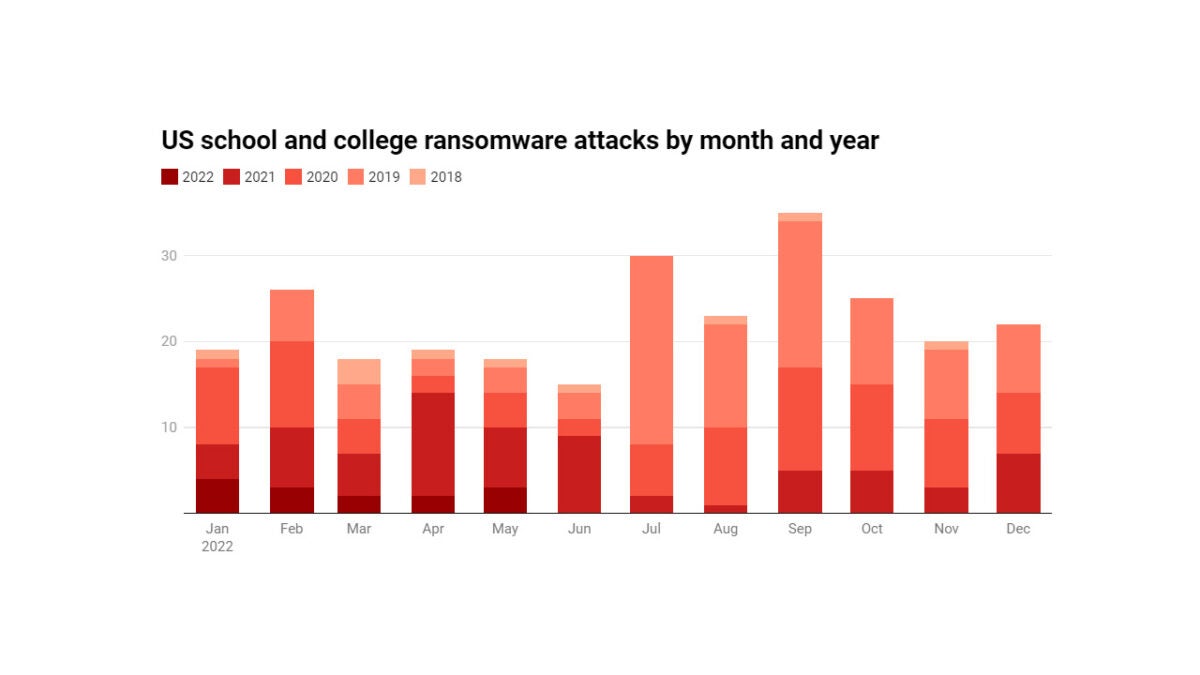
A report by Comparitech has brought to light that in 2021 there were 67 individual ransomware attacks affecting 954 schools and colleges. Interestingly, this represents a decrease in the number of attacks from the year before when 83 attacks affected 1,753 institutions. Unfortunately, however, the costs of these attacks remained astronomical with schools and colleges facing demands of between $100,000 and a staggering $40 million.
The analysis also shows the disruption these types of attacks cause too, with downtime ranging from a little time offline for the institutions that had adequate backups to up to months and months of working downtime for those without proper protections.
Cybersecurity specialists Kaspersky have also recently released a report into Ransomware but instead focused on the 8 most common ransomware groups who are pulling off the attacks. The Kaspersky researchers named the 8 most common ransomware groups as:
- Conti/Ryuk
- Pysa
- Clop (TA505)
- Hive
- Lockbit2.0
- RagnarLocker
- BlackByte
- BlackCat
The Kaspersky report is very in-depth and is aimed at, “SOC analysts, threat hunting teams, cyberthreat intelligence analysts, digital forensics specialists and cybersecurity specialists that are involved in the incident response process and/or want to protect the environment they are responsible for from targeted ransomware attacks.” The objective of the report is to help build an understanding of Ransomware and ultimately defend against it. That means that, ultimately, it would be very useful for the types of teams running security in the schools and colleges mentioned above. The report is available to download here.
This news clearly highlights the repercussions that come from falling foul of malware attacks such as Ransomware. Although Ransomware mostly target institutions there are plenty of personal-level user attacks and threats out there that you need to defend yourself against. You can use antivirus programs like Kaspersky to keep you ahead of the game but at the very least you need to know how to get the most out of Windows Defender.
Image via: Comparitech