Mountain Lion 10.8.2 integrated with Facebook

Apple released an update to OS X Mountain Lion today, which includes various bug fixes, as well as a great new feature fans of Facebook will appreciate.

Primary fixes included in this update are geared toward improving your Mac’s stability, as well as security.

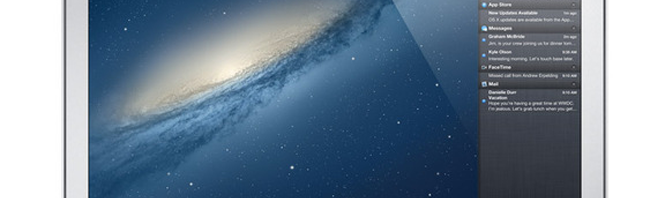
However Facebook integration is the biggest new feature to come out of 10.8.2. This newest version of Mountain Lion allows you to sign into Facebook and use it as an option when you want to share links and photos. You can also import your Facebook friends’ information and profile pictures into Contacts, as well as receive Facebook notifications now from your desktop.

Continue reading “Mountain Lion 10.8.2 integrated with Facebook”

New VMWare Fusion for Mountain Lion and W8

Using Mountain Lion and Windows 8 at the same time on your Mac has just got easier with the release of VMWare Fusion 5.0.

Windows 8 apps now appear in the OS X Launchpad and you receive notifications from Mountain Lion’s Notification Center in Windows 8. VMWare Fusion 5.0 has also been optimized for Retina displays, USB 3 connectivity although there’s no mention of Thunderbolt support.

Continue reading “New VMWare Fusion for Mountain Lion and W8”

Apple updates OS X Mountain Lion to 10.8.1

Today, Apple released an update for their recently released operating system OS X Mountain Lion. The fixes in the update are mainly for usability, but they are welcome for people running the OS.

The main fixes that users will notice are a fix for Migration Assistant, Microsoft Exchange, and iMessages. Also for those who adopted Thunderbolt displays will find a fix for playing audio.

10.8.1 also fixes some technical issues that most users won’t notice, but show that Apple is working on fixing errors.

If you haven’t upgraded to Mountain Lion yet, be sure to read Nick’s Don’t upgrade to Mountain Lion until you’ve read this to get more information about the requirements of the operating system.

Continue reading “Apple updates OS X Mountain Lion to 10.8.1”

How to disable Gatekeeper in Mountain Lion

If you want complete freedom to install apps that you’ve downloaded in Mountain Lion, you need to disable Gatekeeper.

Gatekeeper is Mountain Lion’s new security feature that ensures that only apps that have been downloaded from the Mac App Store or from Apple approved developers will install on your Mac.

Continue reading “How to disable Gatekeeper in Mountain Lion”

Mountain Lion released – 5 features not to miss

As expected, Apple has today released OS X 10.8 Mountain Lion. Mountain Lion costs just $19.99 to upgrade and brings OS X one step closer to the iOS experience found on the iPhone, iPad and iPod Touch.

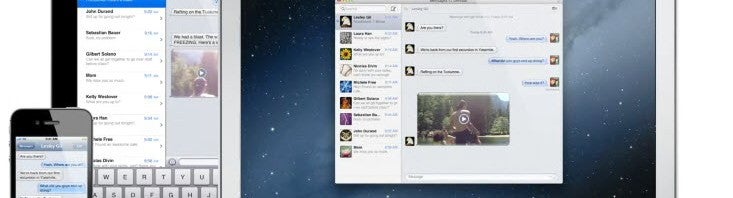
Mountain Lion introduces a number of new features familiar to iPhone and iPad users, such as Messages (iMessage for Mac), iCloud, Facebook and Twitter integration, Notification Center, Dictation, Game Center, Gatekeeper, AirPlay Mirroring via Apple TV, and an enhanced Safari browser.

Continue reading “Mountain Lion released – 5 features not to miss”

Don’t upgrade to Mountain Lion until you’ve read this

The recent release of the Golden Master version of Mountain Lion to developers means Mountain Lion OS X 10.8 will be officially released very soon. Before rushing into upgrading though, take a deep breath and consider some of the following to ensure you have no nasty surprises:

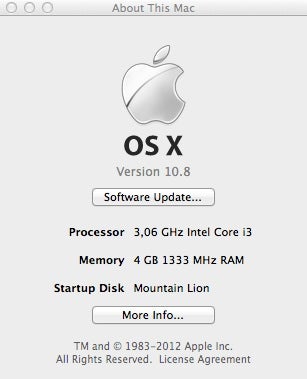
Mountain Lion will only upgrade if you’re running Lion OS X 10.7.x or the latest version of Snow Leopard OS X 10.6.8, and you must have at least 2GB of RAM

If you’re unsure about these 2 basic requirements, click on the Apple logo in the top left of your screen and select About This Mac:
If all of the above are correct then consider the following:

  • If you have an older Mac, you may not be able to install Mountain Lion. Apple lists the following models as compatible with it. Anything older will not work:

iMac (Mid 2007 or newer) MacBook (Late 2008 Aluminum, or Early 2009 or newer) MacBook Pro (Mid/Late 2007 or newer) MacBook Air (Late 2008 or newer) Mac mini (Early 2009 or newer) Mac Pro (Early 2008 or newer) Xserve (Early 2009)

  • You’ll need to obtain an Apple ID. If you’re an iTunes user, you’ll already have one but if you bought your Mac with Lion already installed, you’ll have to create one because Apple release new operating systems via the The Mac App Store.
  • Have a credit card ready. Mountain Lion is the cheapest OS X upgrade yet at just $19.99 ($10 cheaper than Lion). If you don’t have a credit card, you can use an iTunes gift voucher. Note that Apple Gift cards will not work in The Mac App Store.
  • Make sure you have at least 8GB of free hard drive space. If you’re need to clean some space but can’t quite identify which files are taking-up so much room, try DaisyDisk or OmniDiskSweeper.
  • Back up your hard drive. If something should go wrong with the installation of Mountain Lion, it’s essential that you have a backup of your data. Time Machine comes free with OS X and is ideal for this or alternatively, Super Duper! is another excellent backup tool.
  • Note that if you’re still on Snow Leopard, Mountain Lion doesn’t support PPC Macs so Rosetta Apps won’t work with it. If you’re running older versions (usually 6 years or more old) of any of the following and can’t afford to upgrade them to an Intel version, don’t install Mountain Lion as they either won’t work or you will experience problems with them: Creative Suite, Quicken 2007, Microsoft Office 2008, Rosetta Stone Language Software, Freehand and Appleworks. For a breakdown of which major apps are and aren’t compatible with Mountain Lion, check here.
  • Have some updated Printer Drivers handy. Since some older printer drivers require Rosetta to work, you may find that your printer doesn’t work with Mountain Lion. You should be able to find updated drivers on the developer website although if the printer is really old, you’ll be out of luck.
  • Be extra cautious if you use Apple Mail or Aperture. Both applications are particularly sensitive to OS changes as was illustrated with Mail when Snow Leopard arrived. It may be worth waiting at least a few weeks before upgrading to Mountain Lion if you rely on either or both and can’t afford to waste time re-configuring them.
  • Throw away your Magic Mouse and buy a Magic Trackpad (about $69). Well, you don’t have to throw away your Magic Mouse but you’ll probably feel like it if you’ve ever used a Magic Trackpad. Lion has been optimized to be more like using an iPhone so you’ll miss out on many gesture features if you don’t have a Magic Trackpad although it’s not essential.

If you are concerned about teething issues when upgrading, the best single piece of advice is simply wait! Most of the problems with Lion were ironed out within a month or so of the release and so if you’re not desperate to have Mountain Lion on your Mac immediately, take it easy.

There are bound to be issues that arise after upgrading, so if you discover any when Mountain Lion is released, let us know in the comments below.


In the meantime, don’t forgot to check out our lowdown on everything that’s new in Mountain Lion.

WWDC 2012: OS X Mountain Lion highlights

WWDC OS X mountain lionApple’s WWDC 2012 keynote wrapped and there were a lot of announcements made today. A majority of the keynote was spent showing off the new features of OS X Mountain Lion and iOS 6 (most of which weren’t on my wishlist).

Although Mountain Lion won’t be released until July for $19.99, the developer version released today is close to the final gold version. Without further ado, let’s cut the fat and take a look at the most interesting features of OS X Mountain Lion.

iCloud Documents

iCloud is getting some nice feature updates. One of the more substantial updates is document integration. Users will now be able to drag and drop documents into iCloud, which sync them between all of your iOS and Mac devices. This is a nice little update and brings it up to what Google is doing with Google Drive and Google Docs integration.

Continue reading “WWDC 2012: OS X Mountain Lion highlights”

OS X Mountain Lion wish list

mountain-lion-iconApple is set to announce a slew of new hardware and software changes during the World Wide Developers Conference (WWDC) in San Francisco on Monday. One of the biggest highlights is going to be OS X Mountain Lion.

Developers have had access to a preview build of Mountain Lion for months, but Apple can still pull out some surprises at the last minute.

Here’s a list of the features I want to see in Mountain Lion. Continue reading “OS X Mountain Lion wish list”

Mountain Lion review

On 16th of February, Apple surprised everyone with the sudden announcement of OS X 10.8 Mountain Lion which will replace OS X 10.7 Lion as the new Mac operating system this summer.

For those with access to a developer account, you can download a Developer Preview of OS X Mountain Lion. Almost everything that will feature in the final version of Mountain Lion, is in the Developer Preview.

We’ve already given you a lowdown on the most important changes in Mountain Lion most of which are features taken from iOS. He we take a more in-depth look at the key new features and changes.

Continue reading “Mountain Lion review”

What you should know about Mountain Lion

Apple has taken another step forward to transforming OS X into iOS with the developer release of OS X 10.8 Mountain Lion.

We’ll bring you a full review soon but in the meantime, here are some essential points to be aware of before Apple releases it on the App Store late this summer:

Continue reading “What you should know about Mountain Lion”