Skip to content

Softonic English

Just another Softonic Sites site

The most common editing mistakes that ruin a photo instantly

Do you think your edits look unrealistic or too artificial? Do you want to create some kind of effect but it just doesn’t come out right? These are very common problems, both for professionals and amateurs. Not everyone is born knowing, and many times we need to rely on trial and error to reach the goal we set for ourselves. Here we will try to save you time and steps by explaining what you should avoid from the start to achieve the best possible results without dying in the attempt. To do this, we will focus on Adobe Photoshop, one of the best image editing programs you will find […]

Do you think your edits look unreal or too artificial? Do you want to create some kind of effect, but it just doesn’t come out right? These are very common problems, both for professionals and amateurs. Not everyone is born knowing, and many times we need to rely on trial and error to reach the goal we set for ourselves.

Here we will try to save you time and steps by explaining what you should avoid from the start to achieve the best possible results without dying in the attempt. To do this, we will focus on Adobe Photoshop, one of the best image editing programs you will find today.

Adobe Photoshop
Adobe Photoshop DOWNLOAD

Use the right program for every moment

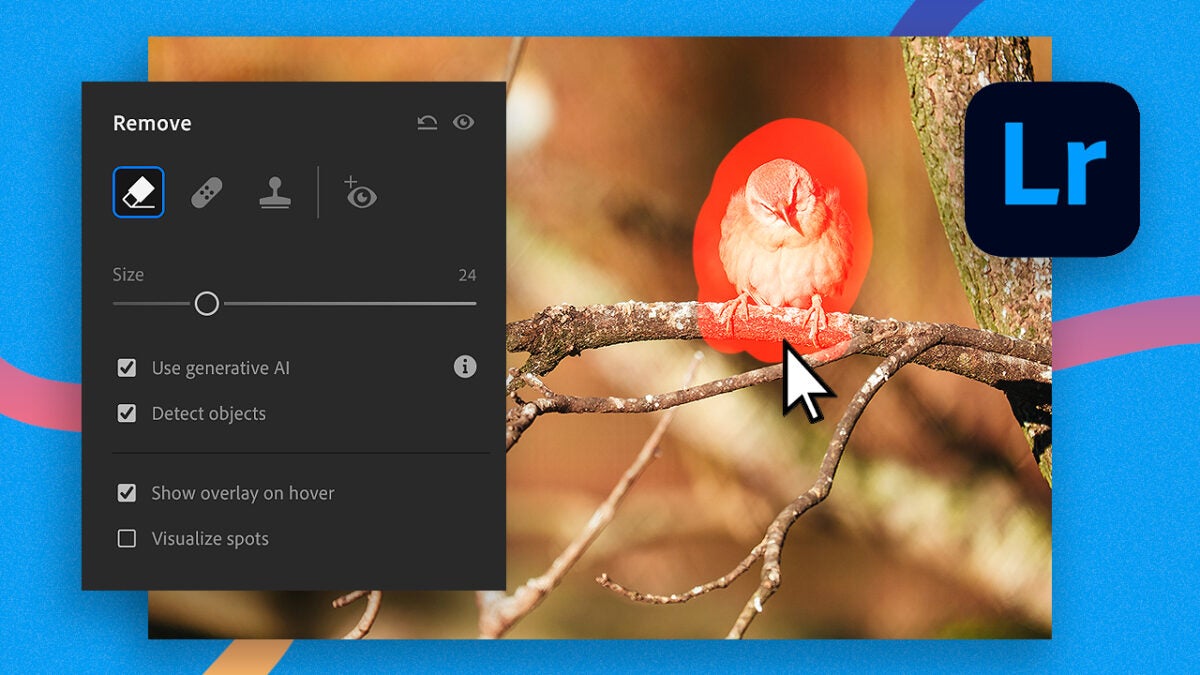
One of the most common mistakes is not being clear about which program to use depending on the moment. If we are purely editing photography, for example, it might be better to go to Adobe Lightroom first rather than Photoshop.

Yes, it is true that you can edit your photographs with Photoshop and achieve excellent results. However, Adobe Lightroom is purely focused on photo editing, with everything that entails in terms of tools and functions. Adjusting saturation levels, brightness, exposure, color grading… everything in Lightroom is designed for you to get the most out of your photographs.
Make sure you have a good monitor

This advice is useful for everyone, especially for those looking to be professionals. Having a calibrated screen will allow us to edit any type of image correctly and ensure that it looks good on other devices or when printed.

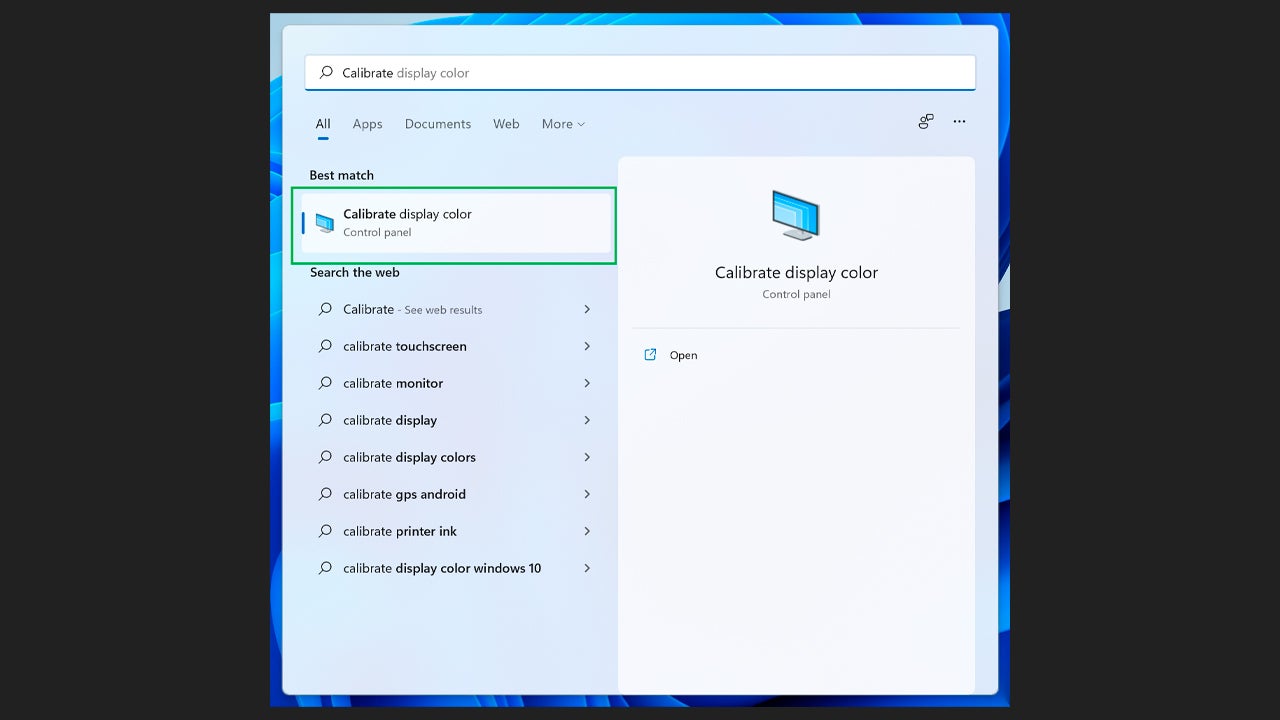
There are very specific (and expensive) tools that are designed specifically for calibrating screens. Fortunately, most current monitors have options for you to calibrate the color and brightness yourself. In case they don’t, you can also use free tools, such as the monitor test Lagom. Both Windows and MacOS also offer their own tools for calibrating monitors.
Use Photoshop Layers

If you have decided to use Photoshop to edit your images, it is imperative that you use layers. This allows us to perform a non-destructive editing, meaning we do not modify the original image, but rather work on top of it.
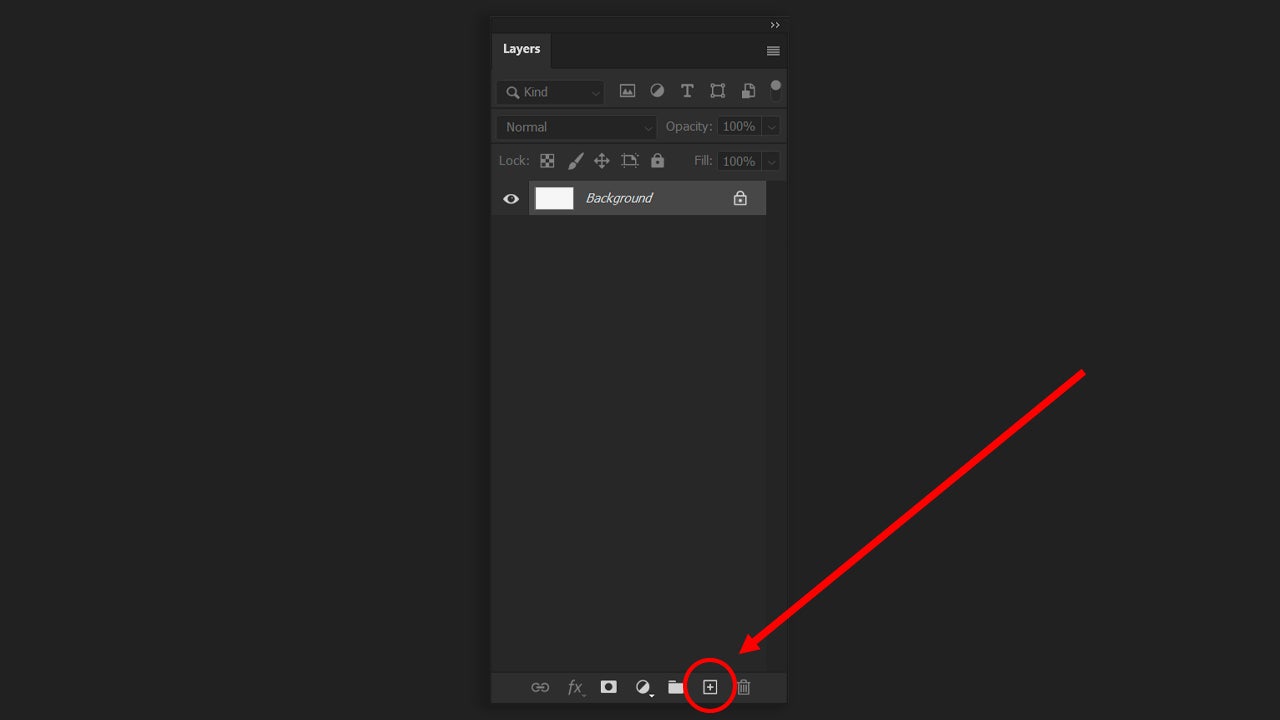
This will help us separate text, background, effects… and treat each section independently. We will be able to move the text around without problems, change colors without altering everything, and much more. As seen in the screenshot, to create a new layer in your project, you just need to go to the Layers section and click on the + symbol that you will see in the bottom area.

Do not abuse AI or its effects

Recently, Adobe Photoshop has integrated AI tools powered by Adobe Firefly within the program, with the aim of helping us edit better and faster. While AI is an excellent aid on many occasions, using it unchecked will lead to very artificial results.

One of the most useful features of Photoshop is Generative Fill. To use it, select any selection tool (Lasso, Magic Wand, etc.) and draw the area you want to replace or change.

After that, you will see a contextual bar with the option Generative Fill. If the bar does not appear, you can make it appear from Window > Contextual Task Bar.
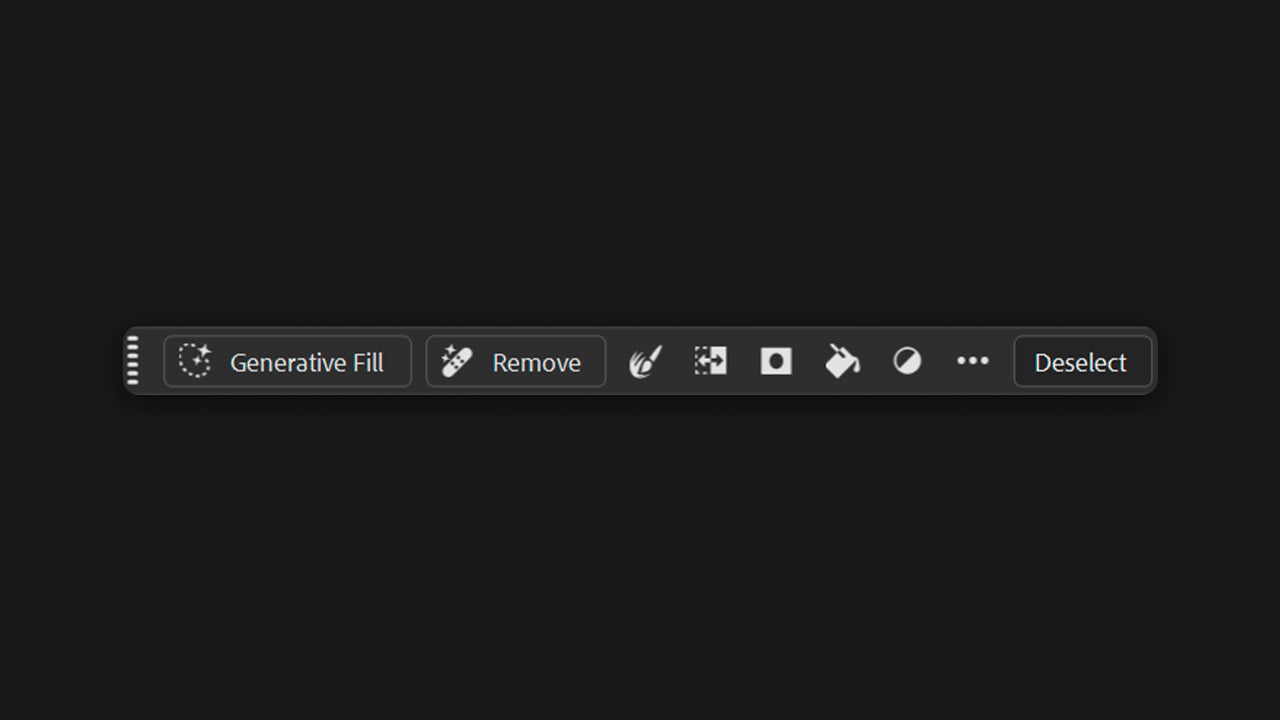
A text box will open where you will have to describe what you want to add (use a prompt). If you don’t write anything, Photoshop will interpret the environment and fill it in automatically. This is ideal if you would like to remove an object from the image, for example. The generated content will appear on a separate layer with a mask. From there, you can modify the opacity, erase parts, or do whatever you want.
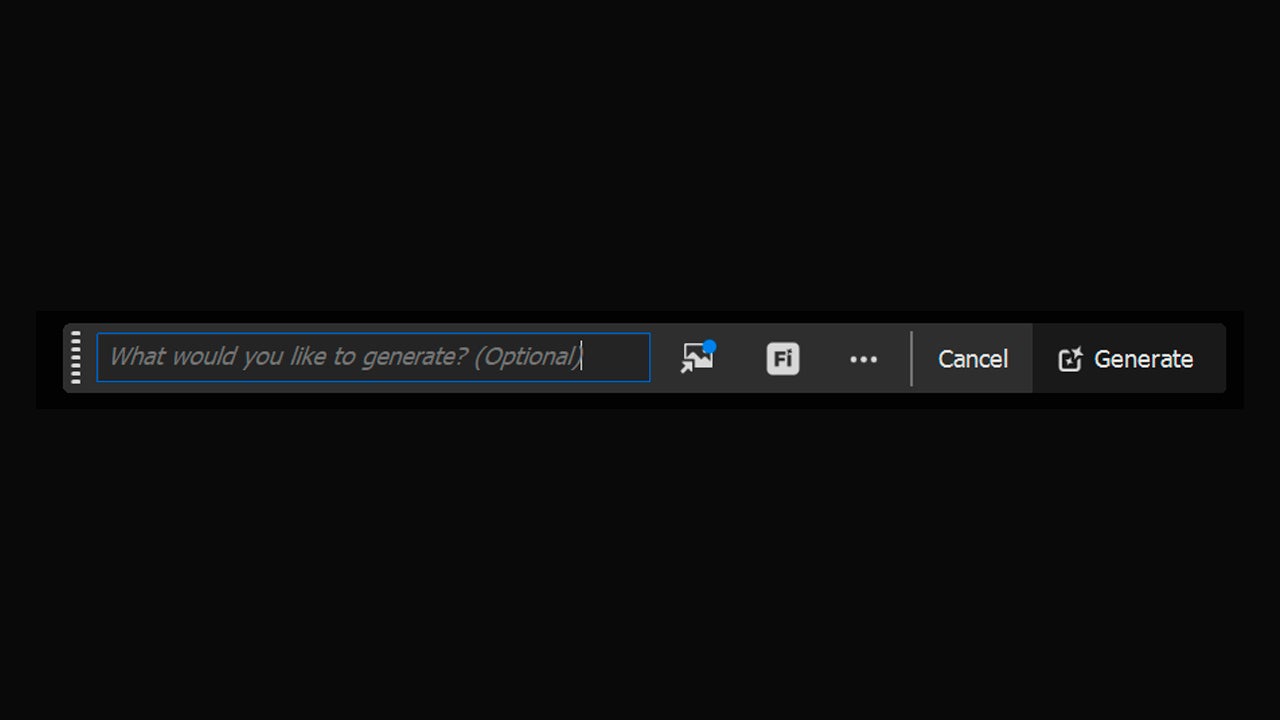
Generative Fill will work best if you use concise and clear descriptions, where you clearly explain what you want and how. From there, you can also manually modify the result to further tailor it to your needs.

Don’t abuse AI if you don’t need it. If you solve everything this way, you will set aside your visual judgment and worsen your technique. You must guide the tool and not let it drag you; that is what differentiates a professional from someone who is not.

Think before you act

Many of us jump in recklessly and start adding an effect here, an object there, which will increase the chances of ending up with a pastiche that doesn’t make much sense. Experimenting is great, but if that’s not your goal, take a moment.

Look at the image carefully. What do you want to improve? Where do you want to direct attention? What feelings do you want to evoke exactly? Asking yourself these types of questions before opening Photoshop will save you a lot of time and headaches.
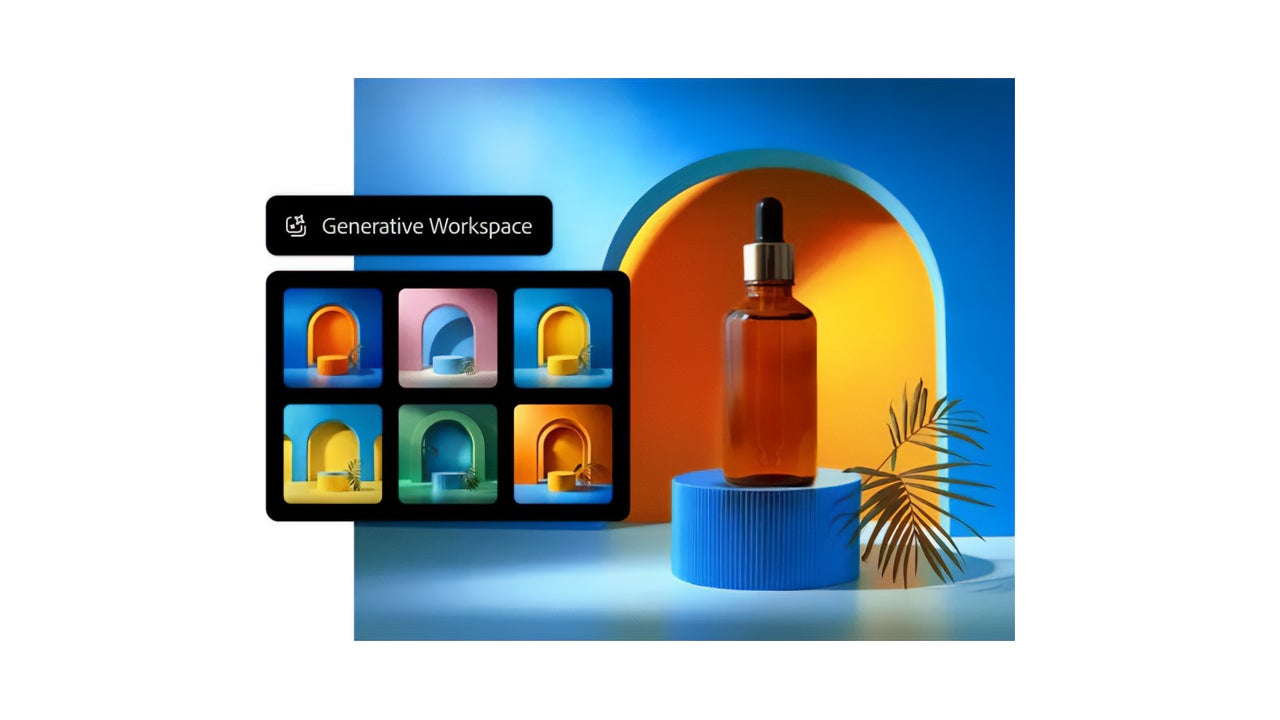
Composition and Control of Negative Spaces

Prioritizing a good composition will make an image look harmonious and pleasant to the eye. Knowing where to place certain elements will help us direct the viewer’s gaze and guide them where we want.
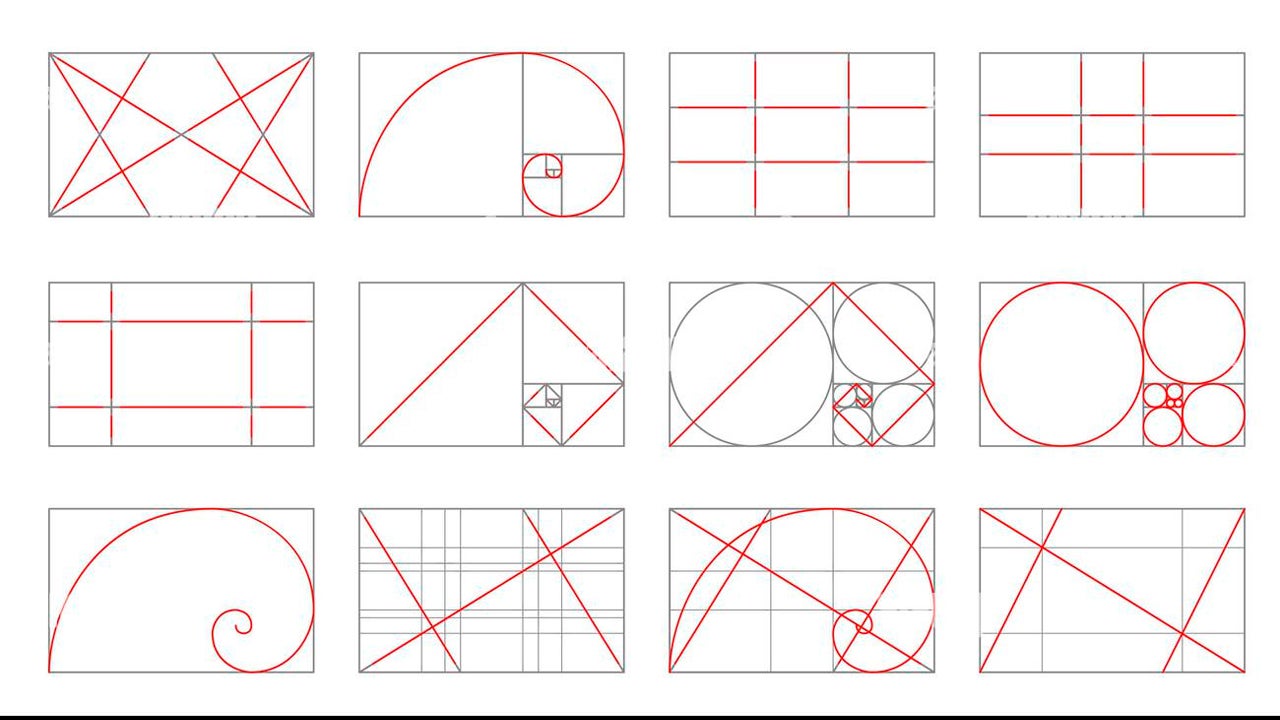
Examples of composition

On the other hand, we must understand negative space as a structure. It serves to isolate a subject, give it air, and avoid visual noise. When you leave space, our mind “breathes” and better understands what is happening in the image.

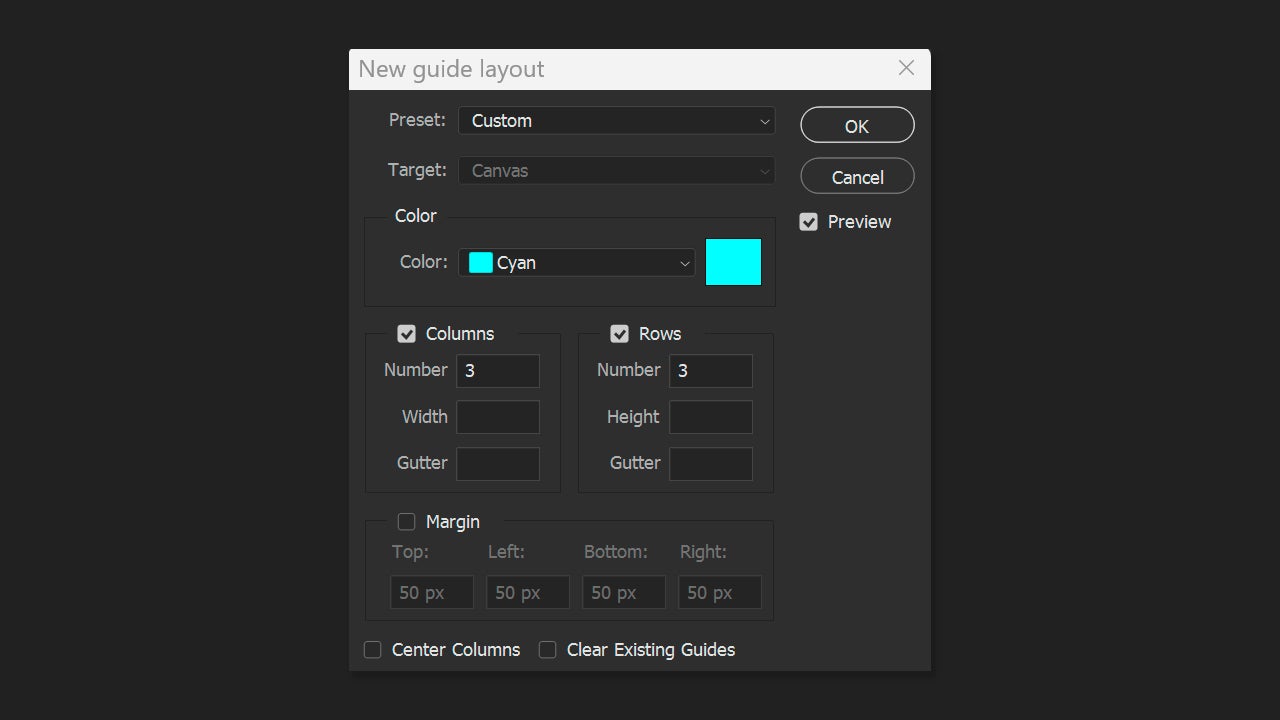
Within Photoshop, we can activate the rulers to help us. Go to View > Rulers to enable them. When they appear on the edges, we can place horizontal and vertical guides by clicking on the rulers and dragging them onto the canvas.

If you need more accuracy, you can also click on View > Guides > New Guide Layout. From there, you can automatically generate columns, rows, and margins. It is ideal for applying the rule of thirds (3 columns by 3 rows), as you can see in the image.
Adobe Photoshop
Adobe Photoshop DOWNLOAD

Author: María López

{ "de-DE": "Künstler aus Berufung und Technikliebhaber. Seit ich denken kann, habe ich gerne an allen möglichen Gadgets herumgebastelt.", "en-US": "Artist by vocation and technology lover. I have liked to tinker with all kinds of gadgets for as long as I can remember.", "es-ES": "Artista de vocación y amante de la tecnología. Me ha gustado cacharrear con todo tipo de gadgets desde que tengo uso de razón.", "fr-FR": "Artiste de vocation et amateur de technologie. J'aime bricoler avec toutes sortes de gadgets depuis que j'ai l'usage de la raison.", "it-IT": "", "ja-JP": "", "nl-NL": "", "pl-PL": "", "pt-BR": "", "social": { "email": "", "facebook": "", "twitter": "", "linkedin": "" } } View all posts by María López

Author María LópezPosted on April 24, 2026April 24, 2026Categories News

Post navigation

Previous Previous post: Julianne Moore will receive the Women In Motion award at the next Cannes Film Festival
Next Next post: The growing concern about indirect command injection attacks

Recent Posts

  • DC’s 10 Strongest Magic Users, Ranked: updated list now online
  • The X-Files’ “Home” is still terrifying nearly 30 years on
  • Peanuts’ Charlotte Braun resurfaces: one reader got her dropped
  • Exodus is announced for 2026: a new sci-fi epic
  • GTA: San Andreas gets a Twitch mod: viewers can call CJ live

Archives

  • September 2026
  • August 2026
  • July 2026
  • June 2026
  • May 2026
  • April 2026
  • March 2026
  • February 2026
  • January 2026
  • December 2025
  • November 2025
  • October 2025
  • September 2025
  • August 2025
  • July 2025
  • June 2025
  • May 2025
  • April 2025
  • March 2025
  • February 2025
  • January 2025
  • December 2024
  • November 2024
  • October 2024
  • September 2024
  • August 2024
  • July 2024
  • June 2024
  • May 2024
  • April 2024
  • March 2024
  • February 2024
  • January 2024
  • December 2023
  • November 2023
  • October 2023
  • September 2023
  • August 2023
  • July 2023
  • June 2023
  • May 2023
  • April 2023
  • March 2023
  • February 2023
  • January 2023
  • December 2022
  • November 2022
  • October 2022
  • September 2022
  • August 2022
  • July 2022
  • June 2022
  • May 2022
  • April 2022
  • March 2022
  • February 2022
  • January 2022
  • December 2021
  • November 2021
  • October 2021
  • September 2021
  • August 2021
  • July 2021
  • June 2021
  • May 2021
  • April 2021
  • March 2021
  • February 2021
  • January 2021
  • December 2020
  • November 2020
  • October 2020
  • September 2020
  • August 2020
  • July 2020
  • June 2020
  • May 2020
  • April 2020
  • March 2020
  • February 2020
  • January 2020
  • December 2019
  • November 2019
  • October 2019
  • September 2019
  • August 2019
  • July 2019
  • June 2019
  • May 2019
  • April 2019
  • March 2019
  • February 2019
  • January 2019
  • December 2018
  • November 2018
  • October 2018
  • September 2018
  • August 2018
  • July 2018
  • June 2018
  • May 2018
  • April 2018
  • March 2018
  • February 2018
  • January 2018
  • December 2017
  • November 2017
  • October 2017
  • September 2017
  • August 2017
  • July 2017
  • June 2017
  • May 2017
  • April 2017
  • March 2017
  • February 2017
  • January 2017
  • December 2016
  • November 2016
  • October 2016
  • September 2016
  • August 2016
  • July 2016
  • June 2016
  • May 2016
  • April 2016
  • March 2016
  • February 2016
  • January 2016
  • December 2015
  • November 2015
  • October 2015
  • September 2015
  • August 2015
  • July 2015
  • June 2015
  • May 2015
  • April 2015
  • March 2015
  • February 2015
  • January 2015
  • December 2014
  • November 2014
  • October 2014
  • September 2014
  • August 2014
  • July 2014
  • June 2014
  • May 2014
  • April 2014
  • March 2014
  • February 2014
  • January 2014
  • December 2013
  • November 2013
  • October 2013
  • September 2013
  • August 2013
  • July 2013
  • June 2013
  • May 2013
  • April 2013
  • March 2013
  • February 2013
  • January 2013
  • December 2012
  • November 2012
  • October 2012
  • September 2012
  • August 2012
  • July 2012
  • June 2012
  • May 2012
  • April 2012
  • March 2012
  • February 2012
  • January 2012
  • December 2011
  • November 2011
  • October 2011
  • September 2011
  • August 2011
  • July 2011
  • June 2011
  • May 2011
  • April 2011
  • March 2011
  • February 2011
  • January 2011
  • December 2010
  • November 2010
  • October 2010
  • September 2010
  • August 2010
  • July 2010
  • June 2010
  • May 2010
  • April 2010
  • March 2010
  • February 2010
  • January 2010
  • December 2009
  • November 2009
  • October 2009
  • September 2009
  • August 2009
  • July 2009
  • June 2009
  • May 2009
  • April 2009
  • March 2009
  • February 2009
  • January 2009
  • December 2008
  • November 2008
  • October 2008
  • September 2008
  • August 2008
  • July 2008
  • June 2008
  • May 2008
  • April 2008
  • March 2008
  • February 2008
  • January 2008
  • December 2007
  • November 2007
  • October 2007
  • September 2007
  • August 2007
  • July 2007
  • June 2007
  • May 2007
  • April 2007
  • March 2007
  • February 2007
  • January 2007
  • December 2006
  • November 2006
  • September 2006
  • August 2006
  • June 2006
  • May 2006
  • July 2001
  • January 2001
  • November 2000
  • September 2000
  • August 2000
  • July 2000
  • April 2000
  • March 2000

Categories

  • Affiliate post
  • Expert Review
  • Gaming
  • Guides
  • How to
  • Legacy how To
  • News
  • Noticias
  • Software>Security
  • Sponsored
  • Trucos y Consejos
  • Uncategorized
  • Windows software

Meta

  • Log in
  • Entries feed
  • Comments feed
  • WordPress.org
Softonic English Proudly powered by WordPress