Google is testing a new design for the Gemini app on Android, allowing for a more integrated and seamless experience. Previously, the virtual assistant appeared as a floating window that occupied the entire screen when making queries. However, in August, Google updated the interface to keep the assistant in a small, floating window, allowing users to interact with it without leaving the app they were using. Since then, the assistant has incorporated some improvements, such as a dark mode in October and the option to “ask about this video/screen.”

Subscribe to the Softonic newsletter and get the latest in tech, gaming, entertainment and deals right in your inbox.
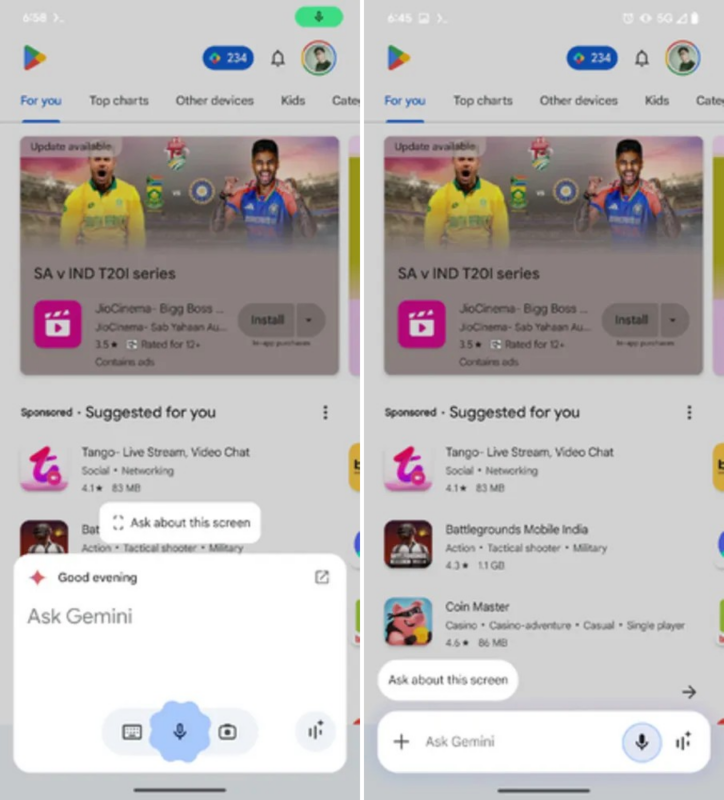
Subscribe (it's FREE) ►Now, Google plans a significant redesign that will turn the Gemini floating panel into a text box aligned at the bottom, similar to a chat window, as reported by AssembleDebug on Android Authority. This change would make the assistant look more compact and organized, including suggestions like “summarize,” “ask about this video,” or “ask about this screen” in the form of small capsules. The update also hides some buttons, such as the camera and keyboard, to simplify the interface.
Additionally, Google is preparing a revamp of the extensions page for Gemini. Instead of the current list, the extensions will be organized in a carousel by categories such as “Productivity” or “Communication,” making them easier to find and use.