Microsoft’s Windows 11 operating system is getting a new security feature later this year that improves resilience against brute force attacks.

Announced by David Weston, Microsoft’s VP for Enterprise and operating system security, the security feature is already available in recent Windows 11 Insider builds.
Malicious actors use brute force attacks to gain access to computer systems that they don’t have passwords or other means of authentication for.
These attack can be compared to users trying to sign in to a device they lost access to. Often, these users try different passwords to gain access.
Brute force attacks may use password lists to try commonly used passwords and variations.
Local brute force attacks are not common, but attacks that use remote desktop protocol connections are. Microsoft notes that Remote Desktop Protocol brute force attacks are commonly used by human-operated ransomware.
[Human-operated ransomware attacks] are known to take advantage of network configuration weaknesses and vulnerable services to deploy ransomware payloads. And while ransomware is the very visible action taken in these attacks, human operators also deliver other malicious payloads, steal credentials, and access and exfiltrate data from compromised networks.
Microsoft Security Blog
Brute force attacks explained
Brute force attacks attempt to guess account passwords, often by using password lists and variation. Variations may add a number or special character to the end of common words.
The attacks work well thanks to the use of weak passwords. Weak passwords are short, often reused and easy to guess. Leaked password lists, which are readily available on the Internet, contain tens of thousand of weak passwords that criminals may use in brute force attempts.
Computer users may protect their accounts with unique strong passwords. While these are more difficult or even impossible to remember, they do provide a good level of protection against brute force attacks. The use of two-factor authentication protections, if supported by a service or operating system, adds another layer of protection to the account.
Password managers such as KeePass, Last Pass, or Bitwarden store all passwords locally or in the cloud, and help with the generation of secure passwords.
Complex passwords may still be brute forced, but the chance of success becomes slimmer and slimmer because of time constraints and the chance of detection.
Windows 11’s Brute Force protection
One of the best protections against brute force attacks is to limit the number of invalid login attempts. Brute force attacks may check hundreds of passwords each minute if no limitation is in place.
Considering that password lists may contain tens of thousand of entries, or even more, limiting attempts will severely hinder attacks.
Low limits may lock accounts temporarily to prevent further attempts.
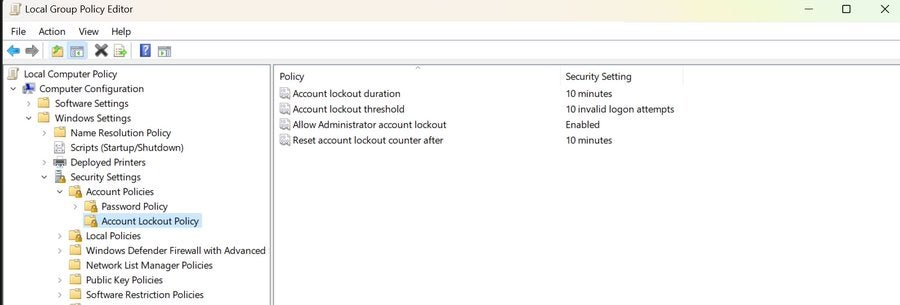
Microsoft added new default account lockout policies to mitigate “RDP and other brute force password vectors”. These are available in the latest Windows 11 development builds.
The following Account Lockout Policy settings are configured by default, according to Microsoft:
- Account lockout duration — Defines the lockout duration of attacked accounts.
- Account lockout threshold — The number of invalid login attempts before the account is locked temporarily.
- Allow Administrators account lockout — Whether administrator accounts will be locked as well if too many invalid login attempts are noticed by the system.
- Reset account lockout counter after — When to reset the invalid logon attempts counter.
Windows 11 administrators find the policies in the Group Policy Editor under Local Computer Policy > Computer Configuration > Windows Settings > Security Settings > Account Lockout Policy.
A check of the latest Insider build of Windows 11 confirmed the defaults for these policies.
Note that the policies are available only in development builds of Windows 11. Microsoft has not revealed a target release version yet. The most likely candidate is the upcoming Windows 11 version 22H2 feature update. The feature update is expected in the coming months.
Verdict
The new anti brute force policy improves protections against local and remote brute force attacks. Administrators may modify the defaults, to make them more or less restrictive.
Some Windows users, those who use passwordless authentication, may not require them.
All things considered, the new security policies will improve the security of Windows 11 user accounts.
