Touchscreen future?

I think anyone who’s played with an iPhone will agree that it’s a great toy, and has the “I want one” factor. Unsurprisingly, all the major mobile manufacturers are following suit and churning out touchscreen phones.

There’s no doubt that being able to browse the web wherever you are is useful, and a touchscreen is a good interface for this, but I’m not convinced it makes a good phone. Without a physical keypad of some sort you can no longer SMS by touch, whether they have haptic (vibrating) touch features or not. There is no way that a touchscreen keyboard will be as easy to use as a physical one: it will require human evolution for that to be the case. We shouldn’t have to wait for human evolution to catch up with touchscreens

My other criticism of this current generation of touch phones is size – I still don’t carry a ‘man bag’, so my phone goes in my pocket. Blackberry or iPhone – they’re too big. It’s surprising that the smallest phone I had (a Nokia 6210, if I remember correctly) was in 2003. They have been growing ever since. Do I have to start wearing clown trousers?

Looking through user reviews on Amazon, touch screens seem to get pretty average scores. The iPhone gets 3 or 4/5, and the Samsung Omnia and Blackberry Storm both manage 3 to 3.5/5. Maybe 3/5 isn’t a total disaster, but there are plenty of “old school” phones that get 5/5 reviews.

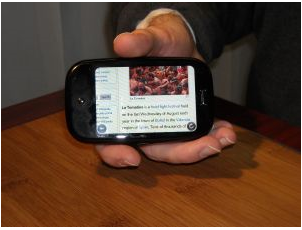
I’m not against touch screens particularly, but I think there’s some way to go before they are done right. The Android ‘Magic’ phone’s keyboard is OK, but I think a better compromise would be a touchscreen keyboard with a physical traditional keypad. Maybe the Palm Pre will be an improvement – though things are rarely perfect on a first generation machine. Until touchscreen technology can give some tactile responses so your fingers can feel their way around, I’m going to want a physical keypad.

Use your PC to help important research projects

Even when you’re not sitting in front of your computer, you can still use it for something productive. No, I’m not talking about leaving your favorite BitTorrent client on all night long: I mean collaborating on serious projects such as finding a cure for important diseases like cancer or AIDS, investigating climatic change and other environmental issues or looking for extraterrestrial life, among others.

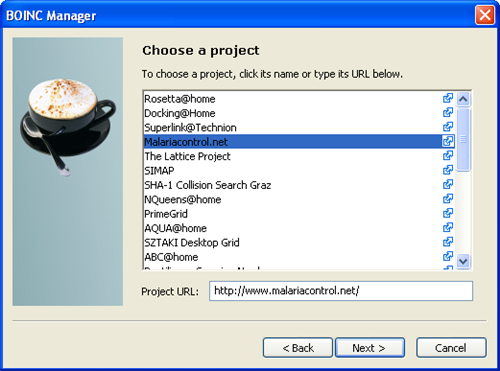
Doing your bit in any of these important projects is as easy as installing the BOINC software, a tool developed by the University of Berkeley, and choosing the project you want to help with. BOINC will enable you to join a massive network of computers all over the world and use the extraordinary power of thousands of processors working together in a collaborative computing system.

BOINC software

The BOINC client can be configured to work only at certain hours and also limited to use only a certain percentage of your disk space and processor power, so that your daily workflow is not affected. You can also access real-time statistics that show how your computer is performing. Oh, and by the way: BOINC works in most platforms – some of the projects are even available on the PS3 – so if you’ve always wanted to contribute in a project to improve society, this is your perfect chance.

Arnie lands at CeBit to promote rise of the machines

The real Arnie?It seems that in these hard economic times even the World’s biggest stars can’t expect the red carpet treatment. As you can see from this picture, Arnold Schwarzenegger’s arrival in Hannover to open CeBit 2009 was less than dignified. Looks like the tech event’s organizers couldn’t spare a limousine and a large entourage this year, and instead opted to drag the Governor of California out of a van on a bit of rope.

Schwazenegger appeared alongside German Chancellor Angela Merkel to lift the curtain on this year’s event. The unlikely pairing forged a show of strength between the USA and Europe, as the World’s biggest tech exhibition prepares to demonstrate how global innovation will steer the computing industry through the economic downturn.

OnSoftware is at CeBit 2009 to bring you all the latest software news and gossip from the show. If you’re a blogger at the show and want to come along for a chat about software (or anything else, for that matter) , you’ll find us on the Softonic stand on stand K35 in Hall 6. There will be a glass of Spanish wine and some delicious Serrano ham waiting for you!

[Filed by: Frank Martin Lauterwein @ OnSoftware DE] Continue reading “Arnie lands at CeBit to promote rise of the machines”

Today’s downloads for Windows, Mac and Mobile

Download Google ToolbarWindows: Even if you don’t like browser toolbars , you should definitely give Google Toolbar for Internet Explorer a try. It gives you instant access to all of Google’s services, plus other useful tools. The latest version, Google Toolbar 6 Beta, includes enhanced search suggestions, a handy new tab page with thumbnails to your favorite sites and an awesome desktop launcher.

Access Windows Live on your Pocket PCPocket PC: Microsoft has been busy of late ramping up its Windows Live offering, and now all of these communication tools are available in one place on your Pocket PC. Windows Live for Mobile provides you with instant access to Windows Live tools from within your device. It’s designed to make it easier for you to stay in touch with your contacts on Hotmail and Windows Live Spaces, as well as performing web searches and syncing your contacts.

Transmission logoMac: If you’re not a big fan of uTorrent then Transmission is one of the best alternative torrent clients on Mac thanks to a beautiful interface and a simple set of intuitive features. This new version brings many more improvements to an already solid release. You can set different priority levels for torrents, establish stall limit times, limit download speeds and much more.

Will Nimbuzz ring in the death of the phone call?

With so many different ways to contact people these days, phoning someone up is often the third or fourth option many of us think of when we want to get in touch with them. And as the mobile Internet gets faster and cheaper, more of us will be using our phones for email, instant messaging, VoIP, and accessing our social networks. This could mean that within just a few years, none of us will actually be making standard mobile calls, but rather using our handsets to send Facebook updates, post tweets to Twitter, chat on Google Talk, and talk via Skype.

The infrastructure to enable this to be done in a cost-effective way isn’t quite there yet, but the technology to do all of this certainly is. Recently, we’ve seen Skype announce that it will be bundled onto all new Nokia N-Series devices, and mobile IM apps such as qeep and Slick are growing in popularity. The leader in this field of multi-platform mobile communication is arguably Nimbuzz. This mobile social messenger, which I reviewed for Softonic a while back, is starting to attract some serious attention from both users and the mobile industry as a whole. Nimbuzz  already receives 20,000 new users every day, and has 12 language versions serving subscribers in more than 200 countries. It has been top of the iPhone App Store, won a Red Herring Global 100 award, and recently joined to the Research In Motion affiliate program.

I recently caught up with Geoff Casely, VP of Manufacture Markets at Nimbuzz, at the World Mobile Congress. Not only did he give me a demo (above) of the product in action on a Nokia N78, but he also outlined his vision for mobile social messaging and how it could spell the end of the mobile phone call: Continue reading “Will Nimbuzz ring in the death of the phone call?”

How to: Transform Windows XP into Windows 7

Now that the download period for the Windows 7 beta has expired, you may not be one of the lucky ones who managed to download the 2GB file on time. If that’s your case, don’t worry: you can still have a look at the new Microsoft’s operating system, even if it’s only by disguising your good ol’ Windows XP. The trick is using certain software apps that let you transform Windows XP into Windows 7. Here’s how:

Boot and logon screens

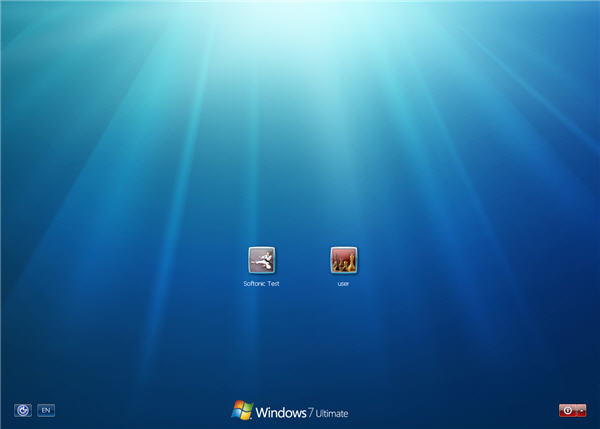
These will be the first two elements you’ll notice when you upgrade to the new Windows. In order to have Windows 7 boot and logon screens, you need to replace two file systems located in C:\Windows\System32: NToskrnl.exe and logonui.exe. The Windows 7 version of these two files is available from DeviantArt (Windows 7 Boot Screen and Windows 7 Logon) but replacing the original ones is not just a question of copy and paste. You’ll need a tool called Replacer to force Windows XP to use these new screens. Follow Replacer’s instructions, restart your system and you’ll immediately notice the change!

transform Windows XP into Windows 7

Windows Desktop

The next step in our transformation involves changing the whole desktop: background image, toolbar and window appearance. The easiest way to do it is probably using the SevenVG Refresh theme. Pay attention at the installation process: Continue reading “How to: Transform Windows XP into Windows 7”