Friday timewaster: Sweaty Boy

Keep Sweaty Boy warm

If you’ve ever been to Finland then you’ll know how cold it can get – especially if you’re walking around naked. Sweaty Boy finds himself in this predicament every day and in order to keep him from turning into an icicle he needs regular visits to the sauna. The trouble is, he’s too cold to even walk. This is where you come in. You need to get Sweaty Boy to the sauna by rolling him along the floor using a elaborate system of seesaws, ramps and falling blocks. Tap the white objects to remove them and watch what happens.

The presentation of Sweaty Boy has a decidedly menacing feel with bizarre graphics, dirty sound loops and some warped sound effects that combine to make you feel decidedly uneasy. Riveting logic problem-solving fun.

Ask OnSoftware: What is the Windows Logo test?

After reviewing the improved snapshot management functionality in the latest version of VirtualBox, OnSoftware reader Mark contacted us with an interesting question:

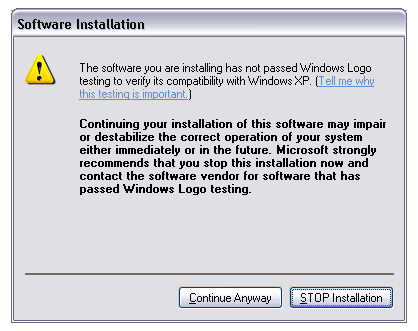
I’ve become an avid reader of your weekly newsletter and look forward each week to explore your recommendations. I was interested in VirtualBox after reading about it on your site. I’m running Windows XP. I tried downloading the file “VirtualBox 3.0.6 for Windows hosts x86/amd64” from www.virtualbox.org but during the installation a warning came up suggesting that I should not continue as the software  is not recognized as being approved with “Windows Logo” and went on  to say that completing the download could corrupt my system. Should I be concerned?

The Windows Logo testing error message Mark refers to is not something that just happens in VirtualBox. It may appear when installing other applications as well, but as long as you trust the software developers and the application you’re about to install, you don’t have anything to worry about.

Ask OnSoftware: What is the Windows Logo testing error?

This error means that some components – usually drivers –  inside the program you’re installing couldn’t be properly tested by Windows during installation. It doesn’t mean that the program is dangerous, or that it’s going to crash your system, erase your hard drive or any of those horrible things you may have thought about… well, not necessarily. It’s just that Windows wasn’t able to complete the test on those particular items. Our advice for Mark then, in this particular case of VirtualBox, is to ignore that message and go on with the installation. I did, and my Windows XP is perfectly fine!

Once again, this message should be ignored only in those cases when you’re installing a trustworthy application, coming from a reputable developer. In case of doubt, do some Google research. It may help you decide whether you should continue with the installation or not.

Don’t forget to keep on sending all your problems, questions and doubts to ask@onsoftware.com so that we can provide handy solutions for you and the rest of our readers!

5 alternatives to Firefox Gmail Manager plugin

Gmail Add OnOne Firefox plugin I’ve come to rely on is Gmail Manager Add-On for Firefox. This free plugin allows you to monitor as many Gmail accounts as you want in the Firefox status bar. It never worked perfectly – sometimes new mail wouldn’t register properly for example – but now unfortunately it seems to have stopped working completely.

The inbox counts don’t work at all and clicking on an account simply takes you to the Gmail login page instead of your inbox. According to one blogger, this is due to a security update in Firefox 3 which blocks the plugin and may have affected other Gmail plugins as well.

The only answer is to downgrade to Firefox 2 but that’s not exactly ideal. If like me, you’re lamenting the loss of a trusty Gmail add-on, here are some functioning alternatives to try.

Gmail Notifier Designed by Google, Gmail Notifier is all you need if you just need to check one account. It displays an icon in your system tray to let you know if you have unread Gmail messages, and shows you their subjects, senders and snippets, all without your having to open a web browser. A Mac version is also available. Note that it doesn’t work if you’ve got the Google Toolbar installed which leads me onto…

Google Toolbar
This is worth installing for several reasons of which one of them is the Gmail checker. It isn’t very sophisticated however. An open envelope notifies you when you’ve received new mail and clicking on the drop down arrow next to it reveals all the subject headings of mail in your inbox. Clicking on any one of them, or the envelope itself, takes you to your inbox. Shame their is no inbox count reading or customizable sounds for when new mail arrives though.

gmailnotifrGmail Notifr A Mac only extension which sits in your Menu bar and supports multiple accounts. Gmail Notfr displays in digits how many e-mails you have waiting for you. It conveniently supports Growl alerts and doesn’t install any daemon background processes unlike Google’s Gmail Notifier. However, you can’t define how frequently you want it to check for mail (so it might be a bit slow at notifying you of new mail).
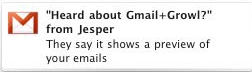
gmail+growlGmail+Growl This works with Gmail Notifier and as the name suggests, is a very simple plugin for Mac users that uses Growl alerts to notify you of new Gmail. Unfortunately, it only supports single accounts but the great thing about using Growl is that you can customize the alerts.

GmailAssistant A third party Windows only application which supports multiple accounts. If you want a Gmail checker that’s completely independent of your browser on Windows, then this is a good choice although the configuration is very limited. You can’t define the frequency you want it to check for new mail or save your preferences for each account.

Today’s downloads for Windows, Mac and Mobile

Blast some paper aliensiPhone: In my experience, if there’s anything worth than an invasion of aliens, it’s an invasion of paper aliens. And that’s exactly what happens in Inkvaders, an original and fun side-scrolling, Martian-blasting adventure game. The object of Inkvaders is to rid the World of aliens by blasting them with your gun. In order to help you, you also have a jet pack which lets you fly over the Martians.

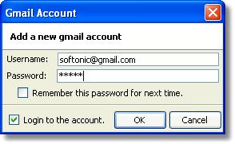
Notify logoMac: If you’ve got more than one Gmail account and can’t keep up with each one individually, then Notify is a handy menu bar extension. Notify allows you to keep track of several accounts at once within an elegant tabbed user interface. It allows easy access of your mail accounts – in a single click of the account you will be taken straight to your inbox and you’ll receive a Growl alert for newly received mail.

Download Paint.NETWindows: Massive graphic suites are not always the best option. Lighter, smaller image editors are the most adequate tool for quick image optimization and retouch. One of them is Paint.NET, a free photo editor with support for layers and a bunch of special filters and effects that includes all the key features you’ll need for quick image editing.

How to: Create Polaroids from your photos

There’s something special about Polaroid photos that make them still attractive these days – even after having been discontinued for more than a year now. Maybe this is why there are a few websites and software tools that let you create Polaroids from your digital photos, and keep that endearing look from last century alive. It may not be the same as the real thing, but it’s a quick, simple effect that can make any standard photo more attractive.

Rollip: Create Polaroids from your photos

  • Instantizer – Fill in a simple form with a photo from your hard drive, a custom message and an optional rotation degree, and you’ll get an instant Polaroid with a link that’s valid for 24 hours. Simple, yet effective.
  • Photo Notes –  Select a photo from your PC or a website and transform it into a Polaroid with a few extra options: custom text message, image position, rotation, text font, etc. You can also share it by email or publish it on a web gallery.
  • Rollip – A popular website that lets you create Polaroids with color effects, decorations and a custom message in three easy steps. The image is immediately available for download or sharing online in an email, IM or blog.
  • Poladroid – If you prefer using software, this is the tool you need. Drag and drop any image on Poladroid’s interface and the program will transform it into a Polaroid right away. You can even shake the file to make it appear faster, like the real Polaroids!

Last but not least, here are a couple of Photoshop tutorials I wrote a while ago that also let you apply the beauty of Polaroids to your photos: one tutorial to create a nice Polaroid collage with different images, and another one to transform a single photo into a bunch of Polaroids scattered all over the screen.