Thanks to this improvement in Gmail for Android, you won't send something you shouldn't to an acquaintance again

Google has introduced new features in Gmail for Android that make it easier to compose emails and optimize the use of “Connected Sheets for Looker.” Among the new features is the ability to drag and drop email addresses between the “To,” “CC,” and “BCC” fields. “When composing an email in the Gmail app on your Android device, you can now drag and drop contacts between recipient fields,” the company explains in a post on the Google Workspace blog. “This makes it easier to move addresses between ‘to,’ ‘cc,’ and ‘bcc’.” The new feature is now available […]

Google has introduced new features in Gmail for Android that make it easier to compose emails and optimize the use of “Connected Sheets for Looker”. Among the new features is the ability to drag and drop email addresses between the “To”, “CC”, and “BCC” fields.

Google Workspace GET STARTED

“When you draft an email in the Gmail app on your Android device, you can now drag and drop contacts between recipient fields,” the company explains in a post on the Google Workspace blog. “This makes it easier to move addresses between ‘to’, ‘cc’, and ‘bcc’.” The new feature is now available for all Google Workspace customers, individual Workspace subscribers, and users with personal Google accounts.

In Connected Sheets, the company has also expanded data analysis capabilities. Now, users can manage up to 100,000 rows of Looker results in pivot tables: “This year, we increased the maximum number of BigQuery result rows, and this week we are extending it to Connected Sheets for Looker.”

Google has also wanted to highlight the availability of the Gemini mobile app for Android and iOS, integrated as a central service of Workspace. Together, these are a series of updates focused on simplifying tasks and enhancing productivity for users of the Google ecosystem.
Google Workspace GET STARTED

This new Gmail feature will allow you to protect your identity and fight against spam

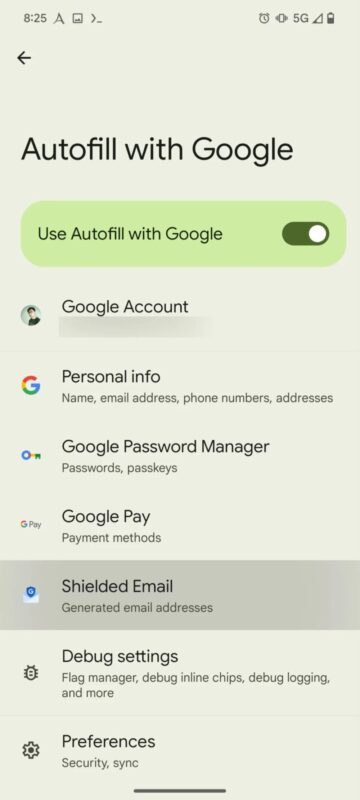
Google is reportedly developing a new feature called Shielded Email, which will allow users to create email aliases when signing up for online services, helping to combat spam more effectively. The feature was discovered in an analysis of the latest version of Google Play Services for Android conducted by Android Authority. The new tool would be able to generate unique, one-time-use email addresses that would forward messages to the user’s main email account. This would prevent sharing the real address when filling out forms or registering on websites. An innovative idea at Google, […]

Google is reportedly developing a new feature called Shielded Email, which will allow users to create email aliases when signing up for online services, helping to combat spam more effectively. The feature was discovered in an analysis of the latest version of Google Play Services for Android conducted by Android Authority.

Google Workspace GET STARTED

The new tool would be capable of generating unique, one-time-use email addresses that would forward messages to the user’s main email. This would prevent sharing the real address when filling out forms or registering on websites. A novel idea at Google, but not new in the industry.

Apple, for example, introduced the Hide My Email feature in 2021 for iCloud+ subscribers, allowing the creation of temporary emails in applications like Safari, Mail, and Apple Pay. Other services, such as Bitwarden and DuckDuckGo, have also adopted similar approaches.

In parallel, Google also recently launched the Android System Key Verifier app. This tool adds an additional layer of security by verifying that the encryption keys used in conversations are correct, something similar to the contact verification system in Apple’s iMessage.

Google Workspace GET STARTED

If you use Gmail on Android, you're in luck: Google adds one of the most anticipated features

Google has started rolling out a new feature in the Gmail app for Android that allows users to sort their emails by relevance or age. This new feature, previously discovered by Android Authority in an analysis of the Gmail APK, is already reaching some users, who will be able to organize their emails more efficiently. Artem Russakovskii, founder of Android Police and APKMirror, shared the discovery on Twitter along with a screenshot of this feature, which would allow Gmail users on Android to access a menu where they can choose between “Most recent” […]

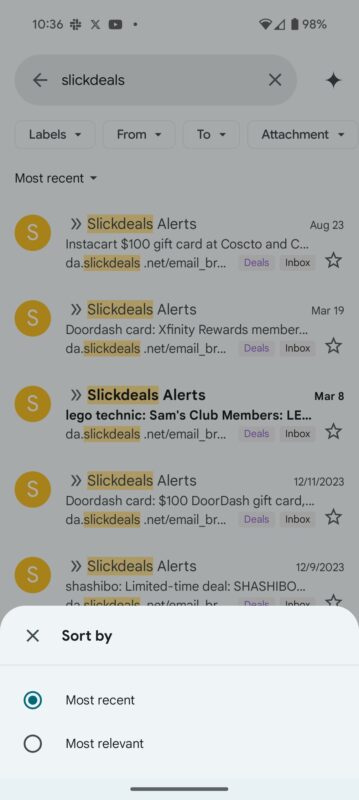
Google has started rolling out a new feature in the Gmail app for Android that allows users to sort their emails by relevance or age. This new feature, previously discovered by Android Authority in an analysis of the Gmail APK, is now reaching some users, who will be able to organize their emails more efficiently.

Artem Russakovskii, founder of Android Police and APKMirror, shared the discovery on Twitter along with a screenshot of this feature, which would allow Gmail users on Android to access a menu where they can choose between “Most recent” or “Most relevant.”

This new sorting system appears below the previous filter carousel, which already included various options for grouping emails. The new functionality replaces the “Results” and “Top Results” sections, optimizing the display and allowing for more precise email searches.

Users will see a pop-up notification explaining how the filter works when it becomes available. This tool is already present in the web version of Gmail, which suggests that it will soon be accessible in the mobile versions of the application for all users.

Gmail DOWNLOAD

Gemini, Google’s AI, arrives in Gmail to help you with your emails

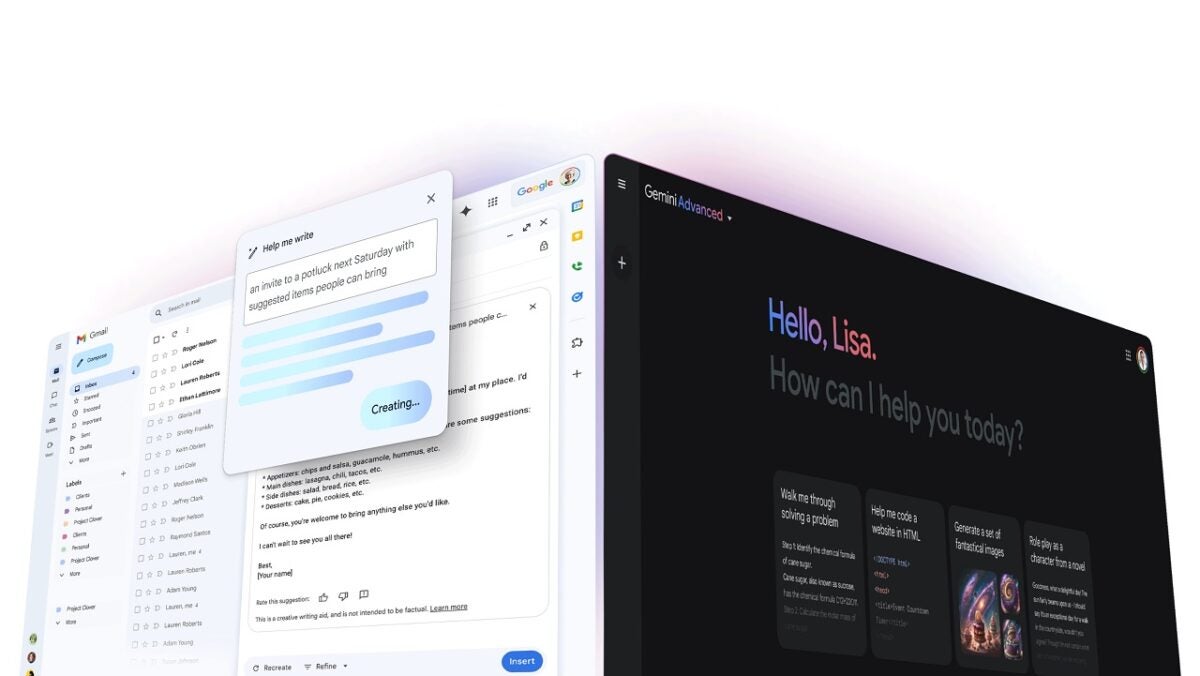
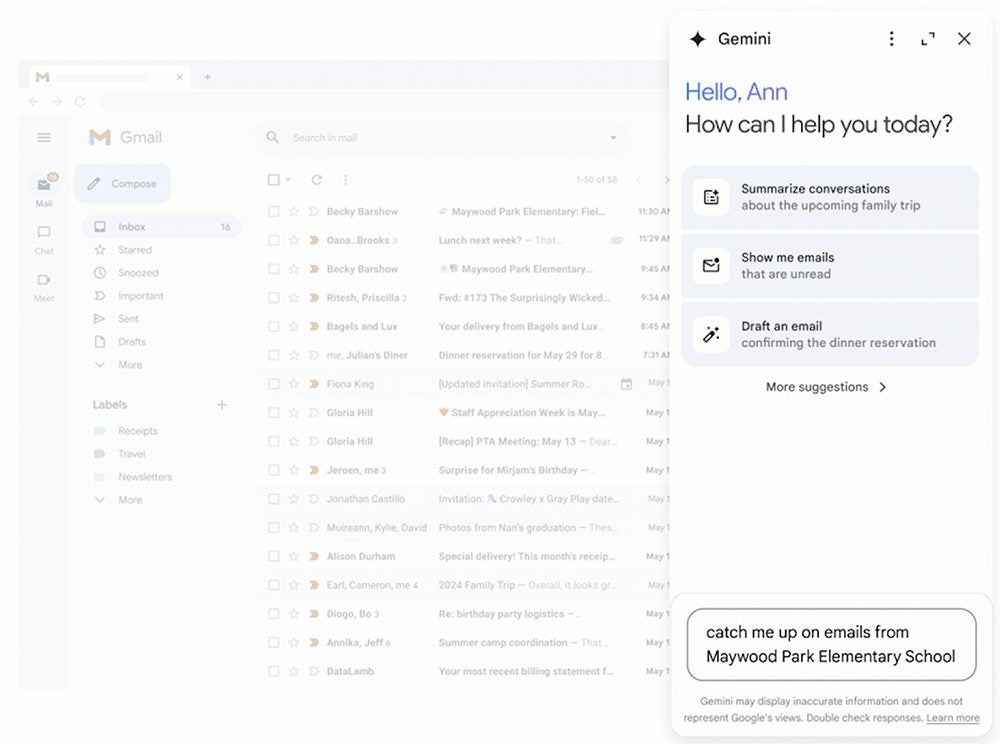
Google has started to integrate its AI Gemini into a new sidebar in Gmail, designed to assist in composing emails and summarizing message threads. This sidebar is also being integrated into other Google applications such as Docs, Sheets, Slides, and Drive.

Gmail DOWNLOAD

With this integration, Gemini in Gmail can offer assistance in drafting emails, suggesting replies, and searching for specific information within emails and Google Drive files. In a blog post, Google explains that while “Gemini in Gmail offers proactive suggestions to help you get started,” users can also ask their own questions, such as “What was the order number from my agency?” or “How much did the company spend on the last marketing event?”

In addition, users will also be able to use Gemini on the Gmail mobile apps for Android and iOS, which will allow them to “analyze email message threads and see a summarized view of the most important aspects,” just like with the sidebar on the web.

These features are available exclusively for Google Workspace customers with Gemini Business or Enterprise add-ons, Gemini Education or Education Premium, or a Google One AI Premium subscription. To access these features in Docs, Slides, Sheets, and Drive, a paid Gemini subscription is also required.

In Docs, the Gemini panel helps with writing, content refinement, information synthesis, and idea generation. In Slides, it facilitates slide creation and image customization, as well as presentation synthesis. In Sheets, Gemini organizes and manages data, creates tables, generates formulas, and assists with specific tasks. In Drive, it allows for summarizing documents and quickly retrieving project data.

Google is following the trend of technology giants incorporating generative AI features into their most popular applications. Earlier this year, Meta introduced its AI chatbot on Instagram and WhatsApp, while Apple has announced the inclusion of generative AI in Siri, Messages, Mail, and Notes.

Gmail DOWNLOAD

Do you have an inactive Google account with data and photos inside? Save them NOW

If you’ve left your Gmail alone for the past two years, listen up. Google’s cleaning house on December 1, and if you don’t log in, they might toss out your emails, photos, and other stuff. This isn’t just about Gmail; it’s everything tied to your account, like Drive, Docs, Meet, Calendar, Photos, and YouTube.

Starting December 1, Google’s on a mission to delete accounts that stayed silent for two years. Ruth Kricheli from Google said this is all about security. Inactive accounts are like open doors for bad stuff. Without 2-step verification, they’re ten times more likely to get into trouble.

Gmail DOWNLOAD

How to save your Google account

It’s super easy to save your account. Just log in once every two years. You can even read an email, watch a YouTube video, or search on Google while logged in. Google sent everyone an email in August, giving a heads-up about the cleanup. They promised more reminders before the cleanup day.

Google, why!?

Google says it’s all for safety. Inactive accounts are like magnets for spam, scams, and bad guys taking over. Deleting them is Google’s way of keeping trouble away.

“If an account hasn’t been used for an extended period of time, it is more likely to be compromised. This is because forgotten or unattended accounts often rely on old or re-used passwords that may have been compromised, haven’t had two factor authentication set up, and receive fewer security checks by the user. Our internal analysis shows abandoned accounts are at least 10x less likely than active accounts to have 2-step-verification set up. Meaning, these accounts are often vulnerable, and once an account is compromised, it can be used for anything from identity theft to a vector for unwanted or even malicious content, like spam.” Ruth Kricheli said in the official blog post. The company explained everything about the “purge” in this blog post.

So, if you don’t want to lose your digital memories, make sure your Gmail sees some action before December 1. It’s not just about data; it’s about saving your stories and moments online.

Goodbye to Writing Emails: Google is About to Make Our Lives Easier

Google already announced in June 2023 that its AI-based Help Me Write tool for Gmail would come to both Android and iOS. But today we talk…

Many of us have jobs that require us to spend the day writing, whether it’s articles, analyses, news, or emails. There’s no solution for the first three tasks, but as for the last one, writing emails, Google wants to make our lives easier. More pleasant.

Gmail DOWNLOAD

According to the 9to5Google news outlet, the email service is working on a “voice typing” feature that would allow users to compose messages using only their voice, with the help of AI to refine and finalize their messages before sending them.

This new feature could be part of an expansion of the “Help me write” tool, which is part of the company’s Duet AI platform, increasingly integrated into Google Workspace in recent months.

“Voice Typing” in Gmail, a Decade Later

The expansion of voice composition could be an incredibly useful tool for those who wish to send quick messages or replies while traveling, heading to a meeting, or appointment, with Duet AI picking up the pieces to craft their voice note into a formal message.

The 9to5Google team has also uncovered hints that the “Help me write” feature of Duet AI might also be undergoing a slight revision in terms of how it’s rolled out.

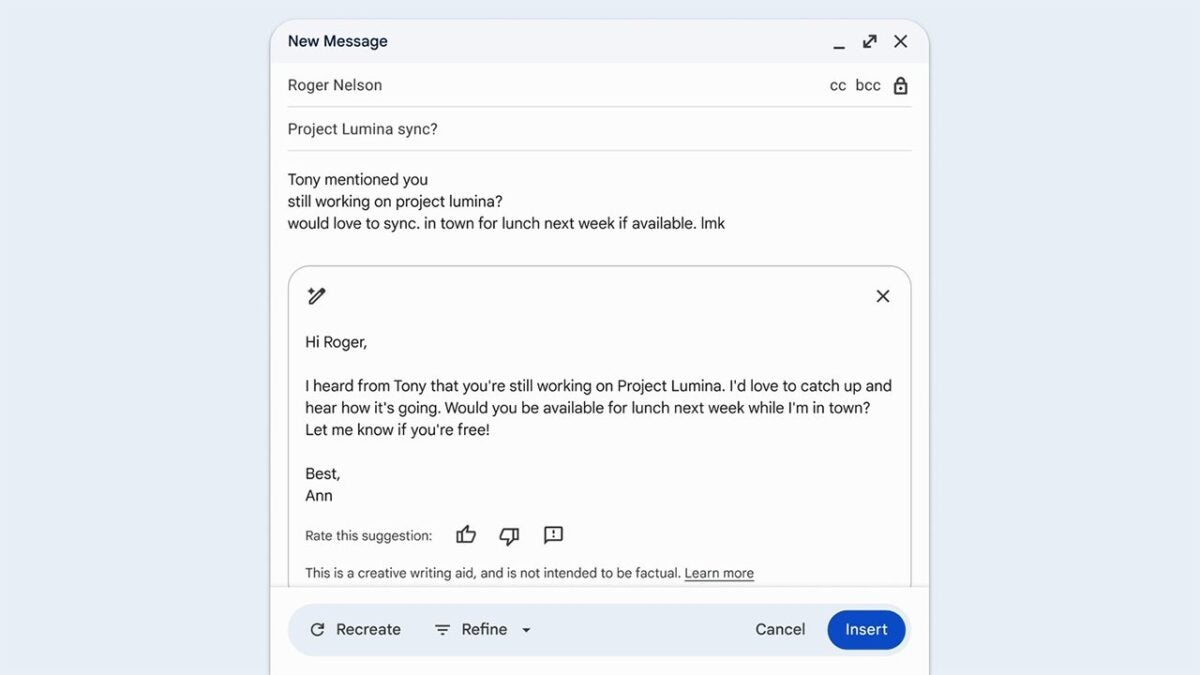
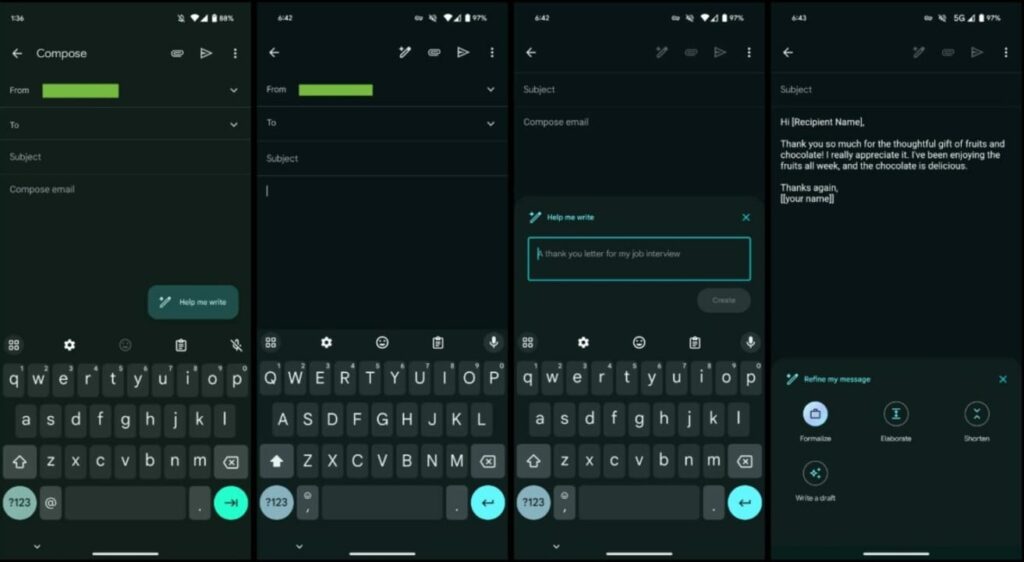
If your email message is blank, upon clicking Help me write, you’ll be offered a suggestion for the message. If you’ve already started writing, the “Refine my message” menu will appear, offering options like Formalize, Elaborate, and Shorten, alongside “Write a draft,” which will return you to the suggestion field.

The changes in “Help me write” have been rolled out today for Gmail on Android and iOS. However, as for “voice typing,” we’ll have to wait and see what happens, as although its presence in the APK is a good indication that Google is working on its introduction, it could still take some time.

Google announced in June 2023 that its AI-based Help Me Write tool for Gmail would be coming to both Android and iOS to assist users in composing email responses.

Gmail DOWNLOAD

Fed up with Gmail spam? Big changes are coming

Google has announced a series of important changes to the way Gmail handles spam emails.

Many of us are very tired of the spam we receive in our Gmail emails. Every day, users can receive dozens of spam emails from various sources, and in some cases, with malicious intentions behind them (scams, phishing, malware, etc.).

Gmail DOWNLOAD

A situation that also frustrates Google itself to the point that this week they have announced a series of significant changes in managing emails sent by so-called “mass senders,” with the aim of reducing spam and unwanted emails in general.

Starting from next year, those who send more than 5,000 emails to Gmail addresses in a day will have to verify their email addresses, provide an easy way to unsubscribe, and avoid receiving numerous spam complaints from users.

The new measures will require mass senders to properly authenticate their emails following a set of best practices outlined by Google before the next February.

They will also have to allow users to unsubscribe with a single click, and the process should be completed within a maximum of two days. Additionally, they will need to maintain a “low threshold of spam.” If many users mark their emails as spam, they will lose the ability to send emails to Gmail users.

The new measures to be implemented in 2024 will complement the existing ones, which already utilize AI technology to prevent over 99.9% of spam, phishing, and malware from reaching users’ inboxes, blocking a staggering 15 billion unwanted emails per day.

As if that wasn’t enough, Google also announces that they are working with industry partners, such as Yahoo, to widely implement these policies in other email services.

Gmail DOWNLOAD

“Regardless of their email provider, all users deserve the safest possible experience,” says Marcel Becker, Senior Product Director at Yahoo. “In the interconnected world of email, that requires all of us to work together. Yahoo looks forward to collaborating with Google and the rest of the email community to make these common-sense, high-impact changes the new industry standard.”

Your Gmail might look like LinkedIn soon, with emojis

Ever found yourself drafting an email in Gmail, wishing you could spice things up with emoji reaction choices for those on the receiving end? It appears that such an interactive feature is on the horizon. However, the groundwork for its seamless integration still requires a touch more fine-tuning.

Gmail DOWNLOAD

Gmail is bringing emojis in

As reported by 9to5Google, it seems that Google is earnestly diving into the realm of integrating emoji reactions within Gmail. It’s noteworthy to mention that competitors such as Apple Mail and Microsoft Outlook are already ahead in this game, offering their users the flair of emoji reactions in emails.

An interesting discovery surfaced on the Android-focused blog, TheSpAndroid. A vigilant user, AssembleDebug, noticed that emoji functionalities are somewhat already in motion on mobile Gmail. If you’re attentive, you’d spot an emoji reaction icon sitting snugly beside the reply button, offering a curated selection of reactions for the user’s choice.

In a seemingly user-friendly addition, when tapping the “+” icon next to the emojis, users can indulge in selecting any emoji they desire to use as a reaction. However, there’s a caveat: if you’re sending an emoji-fueled email to a non-Gmail user, they’ll be left in the dark. Instead of viewing your reactions directly in the email, they’ll get a separate email showcasing the larger-than-life emojis you enthusiastically sent.

Diving into the Gmail emoji dynamics, it seems the platform is subtly promoting a sense of exclusivity. These emoji reactions might not play well with emails coming from other service providers. AssembleDebug further sheds light on the limitations; you can’t sprinkle more than 20 emojis in a single email.

Also, if you’re hoping to use emojis to respond to bulk emails, you might want to reconsider. And for those discreetly included in the email via BCC? They’ll have to sit out on the emoji action as they can’t add reactions to the conversation.

Gmail DOWNLOAD

The anticipatory buzz is palpable, and soon enough, emoji reactions should grace the Gmail apps across both Android and iOS devices. While Google remains coy, not making an official announcement regarding this feature, their response to The Verge was a playful tease. They cheekily advised to “stay tuned,” punctuating their statement with emojis.