Spotify – better than iTunes for music purchases?

spotify-logo.pngSpotify continued adding to its service today by allowing users to download tracks directly from Spotify onto their hard drive. Of course, users have been able to purchase MP3 tracks for a few months now but only by right-clicking tracks and being taken to 7digital’s website. Now everything has been streamlined and can be done directly within the Spotify interface. From now on, users will see a “Buy” button (which annoyingly for many paid-up Premium members can’t be removed or deactivated) next to tracks which when clicked, allows you to enter card details.

Note that the new download purchase option will initially be available in the UK and Germany, France, Italy and Spain with Sweden, Norway and Finland following in a few weeks’ time. It’s not clear how much each track costs but Spotify say once purchased, you will be able to download them a further 3-5 times depending on the label. There is no DRM attached to tracks so they can be transferred to any external device and most tracks are in very high quality 256/320kpbs MP3 format. This all gives Spotify a distinct advantage over iTunes downloads which only allow 20 second previews and one download per song.

However, while I can see that this purchase option will appeal to free users of the service so that they can download the odd track they really like, it will surely appeal less to Premium users. Those that are already paying around $10 a month for ad-free listening will probably see no reason why they should stump-up extra cash just for the pleasure of owning tracks. Especially now that they can use Spotify on their iPhone or Android mobile and use the offline listening function to access music when no internet connection is available.

Blog Action Day: Fight climate change

October 15th is quickly becoming a popular date among bloggers all over the world. Why? Because it’s Blog Action Day, the one day when thousands of blogs join forces and write a post about the same topic, in order to raise awareness about a certain situation and encourage global debate about it. The first Blog Action Day, back in 2007, was about the environment; last year we wrote about poverty; and today the topic is climate change.

Unsurprisingly, technology bears much of the blame for climate change: gadgets that are permanently plugged – even when not in use, TV sets and stereos left on standby, computers running 24/7, oh and those airplanes… All these elements not only swell our electricity bill, but also mean an important waste of energy. But is there a way to  use technology and software in a more environmental-friendly way? Fortunately the answer is yes! Pay attention to these easy tips and learn how to do your bit to fight climate change:

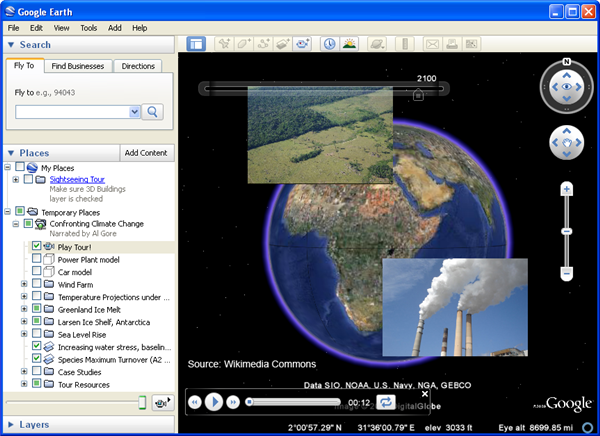
1. First of all, be informed. If you want to learn more about climate change, what possible impact it could have on our planet and how we can soften it, use Google Earth. There’s a section in the Google Earth website with information about the UN climate conference in Copenhagen, and a Google Earth layer to track the influence of climate change on Earth.

Blog Action Day: Fight climate change

2. Second, analyze the situation. How much are you contributing to climate change? Do you really care about environment in your daily life? Use a carbon calculator to determine your carbon footprint – that is, the amount of CO2 you produce – and learn tricks to lower this value. Continue reading “Blog Action Day: Fight climate change”

The last hurdle – financial literacy

last_ditch.pngWe’ve been talking about different types of literacy over the last month, taking a look at the best software to help you maximize your skills. There’s more to literacy than just reading and mathematics, however: knowing how to manage your money is just as important.

Most of us have made silly mistakes with our money from time to time. Maybe you’ve spent all of your salary (or pocket money!) before the month is out, or forgot to factor in interest when thinking about a loan. For some people though, these problems aren’t a once-off, they’re a fact of life. If you think this might apply to you, then keep reading.

The key to money management is planning, planning, planning. Everyone should keep a journal of their spending and record absolutely anything that comes in or goes out of their account. Nothing can escape, not even a sneaky latte or newspaper. Presuming that you’ve been keeping up with our series, your math skills should be steadily improving, and in conjunction with the free, reliable advice offered by many governments (Australia, Ireland, Singapore, UK and the US, just for starters), you’ll be well on your way to becoming the next Warren Buffet.

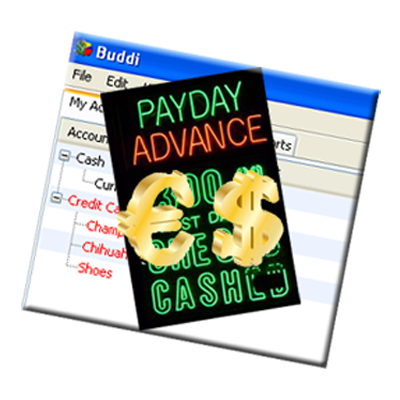
Luckily, the Internet abounds with programs that keep a track on your spending and I’m going to take a look at some of our most popular. There’s no way we could talk about personal finances without mentioning Buddi. This tool bills itself as ‘software for the rest of us’ and since its main aim is to make money management as easy as possible for people without financial experience, it sounds like the perfect program. One of the main things that beginners need to keep in mind is to keep your software simple, and Buddi certainly delivers.

untitled-1.png

I’ve noticed that some developers get over-excited and try to squash enough features into their programs to easily set up a gold trading company on the stock market. Exciting as that might be, if you’re still having problems making your paycheck last long enough to pay the electricity bill…well, you might be overreaching. HomeBank is a good option, a program that will give you the simplicity you need by offering only the most basic functions, without any complicated frills.

Now, I’ll be the first to admit that sometimes all those numbers are just plain BORING. I can’t make them any more fun, but I can suggest a program that will inject a bit of color – Personal Finances. This brightly colored application has all the features you’ll need, accompanied by jazzy colors and some cute illustrations. Hey, it won’t make you any richer, but it might just brighten up your number-crunching!

Part 1: Introduction

Part 2: Math

Part 3: Reading

New version of Ad-Aware (8.1) with improved design

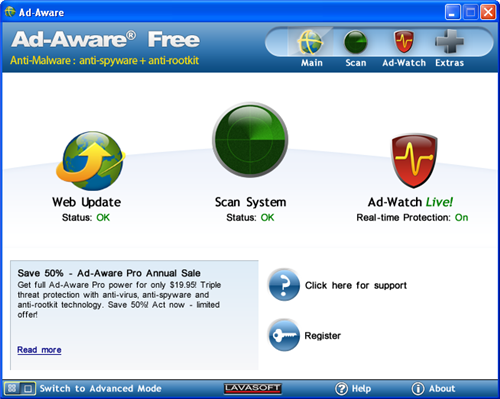
Ad-Aware has traditionally been a very popular anti-spyware utility for Windows. This is why every time they launch a new version, news spreads quickly over tech blogs across the Internet. Today Lavasoft announced the release of Ad-Aware 8.1 in three versions, two paid ones (Pro and Plus) and one for free, which doesn’t have as many features as the other two, but works perfectly well for basic on-demand malware scanning.

Ad-Aware 8.1

Ad-Aware 8.1 Free protects you from spyware and and rootkits. The program scans your system (with three varieties to choose from: Smart scan, Full scan or Profile scan) and quarantines, removes or repairs any suspicious elements. Scans must be started manually – that is, the Free version doesn’t support scheduling. Besides system scanning, Ad-Aware Free also includes the so called Ad-Watch Live!, which protects your computer in real time, focusing on three main areas: active processes, Windows Registry and Network. Continue reading “New version of Ad-Aware (8.1) with improved design”

Top soccer games for iPhone

It’s been a long time coming, but finally there’s now a clutch of decent soccer games to choose from on the iPhone. I recently tested FIFA 10, which brings the realism of the console game to the small screen with some aplomb. The great thing about the title is undoubtedly its vast licensing agreements, meaning you can play as real players in real teams in real leagues across the World. There’s even a management option that lets you take command of a team and guide them to success.

FIFA brings all the real players to your iPhone

While FIFA 10 has the plush presentation and full licenses, X2 Soccer 2009 has arguably the better gameplay. You could almost describe X2 as the Pro Evolution Soccer of the iPhone world. The game isn’t packaged quite as neatly but boy does it play well. The graphics and animation feel more fluid than FIFA, and the fact that there are three action buttons rather than two makes it feel like you have more control over the players. The sound effects and the commentary are also something to be admired in X2 Soccerl 2009. Continue reading “Top soccer games for iPhone”

Microsoft issues biggest ever security update

windows-update logoThey say 13 is unlucky for some and today will be a nightmare for those of you who dread lengthy Microsoft updates and the restarts they often involve.  Microsoft are issuing their biggest security update ever today involving 13 bulletins which will address 34 vulnerabilities. Six are listed by Microsoft as definitely requiring a restart while the rest “may require a restart”.

Reading through the Executive Summaries, it appears that eight of the updates are classed as critical and will close backdoor loopholes on Windows, Internet Explorer and Office. One of them includes a loophole caused by using Internet Explorer 8 with Windows 7. There are two critical updates relating to Service Pack 3 for Windows XP and Service Pack 3 for Office.

On the Microsoft Security Response Centre (MSRSC) blog, MSRSC’s Jerry Bryant explains:

Among the updates this month, we are closing out two current security advisories. Vulnerabilities in SMB Could Allow Remote Code Execution and vulnerabilities in the FTP Service in Internet Information Services. Usually we do not go into this level of detail in the advance notification but we felt that it is important guidance so customers can plan accordingly and deploy these updates as soon as possible.

Although the restarts are a pain, you’re advised to let Microsoft Windows Update install them as soon as possible as there are so many critical fixes in this latest batch.

Note that you can keep up-to date with details of the latest Windows updates by subscribing to Microsoft Technical Security Notifications. You can choose from Basic Alerts for general users, Comprehensive Alerts for IT managers, Security Advisory Alerts for those updates related to security issues and finally Microsoft Security Response Centre (MSRSC) Blog Alerts for first-hand explanations of the fixes and updates.

Friday timewaster: CycloManiacs

It’s Friday again and we’re celebrating it with our traditional time-waster. CycloManiacs is a fun bicycle racing game with an easy gameplay and many elements to make races more challenging and competitive.

Play CycloManiacs!

You start off by riding with a cute robot on a shabby bike, but as you progress through the game (and you have quite a handful of levels to beat) you can obtain new drivers, better bikes and hidden tracks. Each race charges you with a series of challenges – such as finishing in the top five places or gathering a minimum number of items – and if you complete them you’ll be rewarded with new unlockable stuff. Jumping is also important, because it’ll give you points to boost up your bike’s speed and overtake any other competitors.

CycloManiacs is controlled with the usual WASD or cursor keys combinations (plus the spacebar or X key to jump). The game is complemented by a nice background soundtrack.

How to: create a virtual machine in VMware Player

Here at Softonic we test hundreds of applications each week. In order to keep our computers safe from such an insane deluge of software, we use virtual machines, namely VirtualBox and VMware Player. Both of them are very good at their job, but VirtualBox always had one great advantage over VMware Player: the ability to create virtual systems. Well, that was until now. The next version of VMware Player has just launched its first Release Candidate and guess what: it lets you create virtual machines!

How to: create a virtual machine in VMware Player

For those of us who work with VMware Player on a daily basis, this is great news. Of course, I couldn’t help downloading the Release Candidate and testing this new feature by myself, and I thought I’d take the opportunity to write a tutorial about how to create virtual machines in VMware Player:

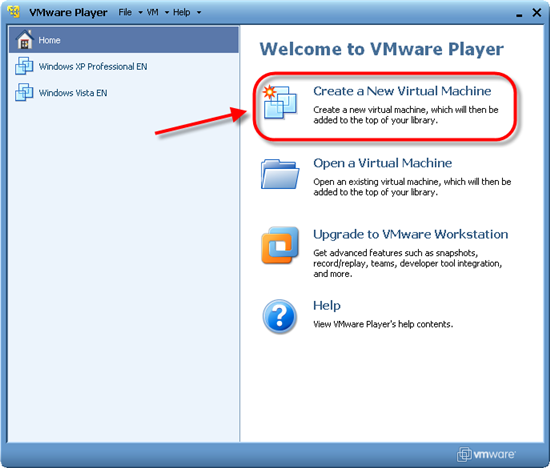
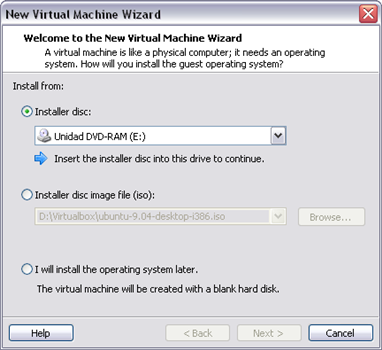
1. In the main screen, click Create a New Virtual Machine and you’ll launch the New Virtual Machine Wizard. This wizard lets you choose between a CD and an ISO file to start creating the virtual machine.

How to: create a virtual machine in VMware Player

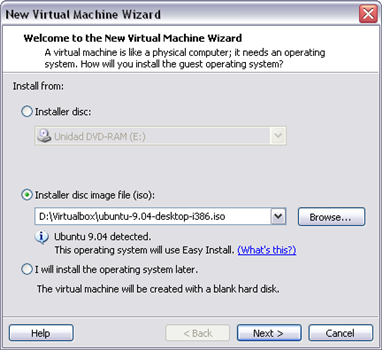
2. In my case, I’ve selected an ISO file with Ubuntu 9.04. As you can see, this virtual machine can be created using Easy Install, which means you can perform an unattended installation after completing the Wizard.

How to: create a virtual machine in VMware Player

Continue reading “How to: create a virtual machine in VMware Player”

YouTube for kids, music, books and more

YouTube, the most famous video sharing community in the world, was launched back in 2005. After four years it has become a clear point of reference in online business for other people, who have launched a bunch of websites following the same concept: gathering similar content and sharing it online. Sometimes these websites use the YouTube brand to explain their service, and you find expressions such as YouTube for music, YouTube for photos or Youtube for books.

This post aims at list all those different versions of YouTube, including of course the ones you share with us in comments.

YouTube for kids
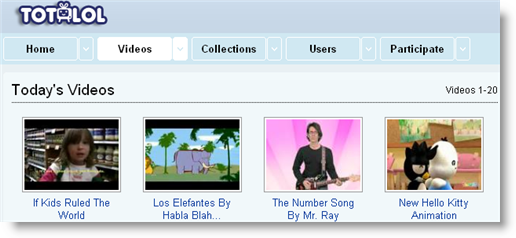
You may already know some of the many adult versions of YouTube, but you won’t probably be so familiar with this YouTube for kids. Totlol.com features standalone videos, and also collections: groups of similar videos categorized by topic.

YouTube for kids, music, books and more

Totlol.com is actually powered by YouTube and can adapt the interface and contents according to the age range we select. Parental control options let you block settings to prevent children from messing with them.

YouTube for books
If you had enough videos for today and fancy reading something instead, check out Scribd.com. This website features books and documents published by anyone, anywhere.

YouTube for kids, music, books and more

You can find almost anything on Scribd, from short papers about the French Revolution to an Excel Function Dictionary or a 500-page long work about Analytical Psychology.

All books and documents in Scribd are conveniently organized in categories and can be sorted by language, licence, length and file format. Continue reading “YouTube for kids, music, books and more”

6.5 things that could save Windows Mobile

The latest version of Windows Mobile rolls out today, as Microsoft tries to put a spring in the step of its aging mobile OS. Windows Mobile 6.5, which we previewed back in February, is designed to freshen up the hopelessly dated shell, making it more touch-friendly and improving on the browsing capabilities within the operating system. But can Microsoft really expect to make ground on its plusher, faster, and more functional rivals, such as iPhone, Android and BlackBerry? It’s a big ask, but there are a few new additions that might help. In fact, I’ve counted six and a half.

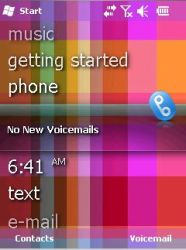
Today screen – It’s actually called a ‘Home’ screen now, but this is still the page where everything begins in Windows Mobile. Revamped to make it more touch-friendly, the screen consists only of text headings for the various apps and tools. The shortcuts on the Home screen are much neater and more intelligent than previous versions of the Today screen in WM. Now you can even launch individual Internet Explorer favorites directly from this screen.

The Home screen

Unlock specific tools – The phone unlocking capabilities are much improved in Windows Mobile 6.5, making them much more akin to the likes of the iPhone and Android systems. You can now slide to unlock specific items such as messages and missed calls.

Smart unlocking

Honeycomb interface – The new honeycomb-style Start menu interface is the flagship feature of the new Windows Mobile. It’s a vast improvement from the archaic-looking menu screens of the previous incarnations, and has been designed specifically for touchscreen use. Icons are spaced out much more, and can be scrolled up and down rather than having to fumble between different screens. Continue reading “6.5 things that could save Windows Mobile”