Watch a new trailer for Total War: Rome II

Creative Assembly’s Total War: ROME II has a new video, ‘Find a Way‘. It shows us the impressive scope of the campaign map, and the incredible detail of the game.

Find a Way shows us the many ways you can play the game using great military mind Hannibal as an example. As we hear Romans discussing the various ways Hannibal might attack, we fly in and out of the Mediterranean Sea in a way reminiscent of the Game of Thrones opening credits.

Default player


brightcove.createExperiences();

Our resident Total War expert Rutger Uittenbogaard got to play the game back in June at E3 in Los Angeles, and was very impressed. He says,

‘It is more immense and detailed than any other Total War game before, and war has never been so much fun.’

Total War: ROME II is due out in just over a month, on September 3rd for Windows PCs. We’ll have plenty more coverage and a full review as the release gets closer.
Viber for iOS updated with Doodles and more

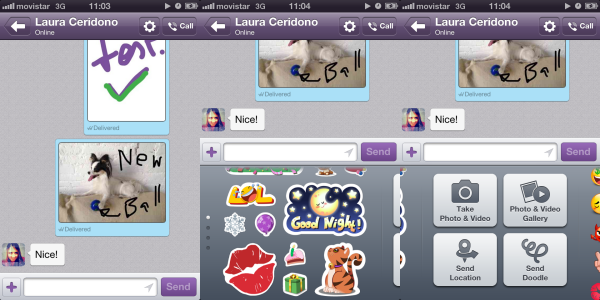
As promised on Tuesday, Viber for iOS has been updated with the new Doodle feature, so you can send drawings to your friends just like on the Android version.

Viber is being updated regularly, and really attacking the competition like Skype, LINE and WhatsApp. The app lets you call and text with friends for free, and now has even more features.

To send a Doodle on Viber, you can either tap the ‘Send Doodle’ button, and draw what you want, or you can use a photo, and then doodle on top of it. By default, any Doodles you send or receive are saved to your Camera Roll, but you can choose not to do this.

As well as Doodles, this latest update includes the following:

• “Seen” status lets you know when your messages have been seen
• Support for the Viber Desktop application on Windows and Mac
• Fun new emoticons
• Message performance improvements
• Bug fixes

Download Viber for iOS, Android, Windows and Mac.

iOS 7 will be updated to address threat of fake phone chargers

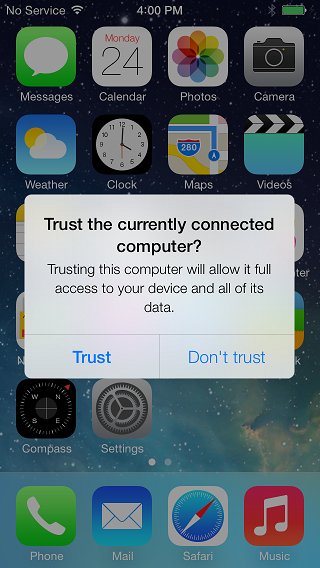
Apple is addressing new security threats to iOS by adding a warning when you connect to a computer. It was recently discovered that hackers could access your phone with ‘fake chargers‘ that had tiny Linux computers in them.

Security is a constant battle between hackers and developers, and fake chargers are another example of how creative the battle can get. In iOS 7, when you connect to a new computer, you will be asked if you trust this device or not. A normal charger will not activate the message, but if there is a computer in the charger, iOS 7 will detect it and require you to allow access to data on the device or not.

If you plug your phone into a charger and see this new warning, you will know there is something wrong. Until iOS 7 is released, you should be wary of what you are connecting your iOS device to.

[Source: TheNextWeb]