Viber updated with full iOS 8 support

Popular free messaging app Viber has been updated and now takes advantage of the new features in iOS 8.

With Viber 5.1, you now get interactive notifications. This means that you can reply to Viber messages from the notification you receive on your lock screen by swiping and choosing one of the options you are given.

The second development is Viber’s use of Share Extensions. This is less obvious, but it means that you can add Viber to the list of apps that appear whenever you tap a share button in another app in iOS.

To add Viber as a share option, tap share. Then in the second row, where you see Message, Mail and other icons, swipe left. Tap More, and you’ll see Viber in the list. Switching it to green means you’ll see Viber in the list of default apps for sharing from now on.

Download Viber for iOS

Viber is also available on Android, Windows Phone, Blackberry, Symbian, Windows desktop and Mac OS X.

Related Stories

Best free messaging apps

WhatsApp, Facebook Messenger, Skype? What are the most and least secure messaging services?

What’s changed in iOS 8?

Follow Jonathan on Twitter: @jonathanriggall

How to make video calls with Viber on Android and iOS

Viber, the popular VOIP calling service, now lets you make video calls on iOS and Android. I’ll take you through how to enable the feature on an Android device and start making the always important video calls with your friends.

Note: the process is exactly the same for the iOS version of Viber.

1. Download Viber

Download the latest version of Viber for Android or iOS.

2. Search for contacts

Type in the name of the contact you’re looking for and hit enter to search. Once you find their name, click on it. Viber Video Chat

3. Free call

You’ll see the option to either make a free call, or send a free text. Choose Free Call.

Viber Video Chat

4. Video call

Once the call has been connected, there’ll be an option on the screen to activate your camera. Press the Video Call button to start a video call.

Viber Video Chat

Take note, the person you’re calling will also have to activate their Video Call function in order for the video conference to work on both ends.

If you want to switch cameras from the front to back (or vice versa), simply click the button shown below.

Video Video Chat

As easy as that, you’ll be making Viber video calls in no time.

You can even connect with people using the Windows and Mac version of Viber, so get on your Android and iOS device and start making video some calls!

Related Articles:

9 surprising features in Google Hangouts

How to use Skype’s free group video call feature

The top 5 Skype voice changers

Follow me on Twitter: @SamSoftonic

Viber messaging app for Android and iOS gets video calling

Viber is the latest mutli-platform messaging app to get video calling. Before today, Viber already supported HD voice calls using Wi-Fi and mobile data. Today, it adds the ability to make video calls.

Viber also added new way to quickly snag someone’s contact information using QR codes. Now when you meet someone, all you have to do is pull up your QR code for them to scan. All your information will be input into a contact card automatically.

Android users can look forward to a new design that makes things easier to use. iOS users can now easily forward photo messages and sort their sticker packs.

Viber’s PC and Mac apps already support video calling so you can start chatting with them on your phone.

Download Viber 5.0 for Android

Download Viber 5.0 for iOS

Source: Market Watch

Related Stories

Apple annoys users by pushing U2 album to their iTunes

App of the Week: Pixlr

5 million internet passwords exposed (updated)

SwiftKey gesture keyboard will debut with iOS 8

Follow me on Twitter: @lewisleong

Viber on iOS updated with all new design

Viber for iOS has been updated to version 4.2 with a new design for iOS 7, and some new features.

As well as a new look, Viber now lets you send mulitple photos and videos at the same time, bringing it in line with WhatsApp. The length of video messages you can send has also been increased. More interestingly, you can now block any number or contact in Viber.

Viber is a free app that allows you to text, call and send photo/video messaged free on WiFi or mobile networks. Like Skype you can also buy credit to call non-Viber numbers, with the recently added ‘Viber Out’ feature.

Download Viber for iOS, Android, Windows 8, BlackBerry, Windows and Mac.

RELATED STORIES

Games could be coming to Viber after Rakuten deal

Viber has been bought by Rakuten, the ‘Japanese Amazon’, which also owns Play.com and Wuaki.tv.

The acquisition could mean significant changes for Viber, the free calls and messaging app. It has a huge user base already at 300 million, but if it was linked with Rakuten’s 225 million users in Japan, it could eclipse competitor LINE.

This is apparently what the company has in mind. Rakuten CEO Hiroshi Mikitani noted that Viber already has a great sticker market, and lots of potential as a gaming platform.

This puts Viber firmly in place as a competitor to LINE in Japan and worldwide. Stickers and games have been hugely successful for LINE, whereas Viber so far has focused more on being a good VOIP and messaging app. We can expect that to change, with more of a focus on games and other premium features that have been a huge success for LINE.

RELATED STORIES

[Source: TechCrunch]

Viber for Windows Phone 8 updated with better notifications and stickers

Viber for Windows Phone 8 has been updated with stickers and various notification improvements. Users will now be able to download the company’s free and paid stickers from the new Sticker Market, which is already available on other platforms like Android and iOS. Notifications have been improved as well, finally allowing Viber to use its own notification sounds for incoming push notifications. Users will also have the ability to disable notifications. As for performance of the app, Viber has improved the resume and loading speed of the app as well as the push notification system.

The latest update to Viber for Windows Phone 8 is out now in the Windows Phone store.

Download Viber for Windows Phone 8

Source: Windows Phone Store

Via: Engadget

RELATED STORIES

Viber Out reminds us that the world is far from being online

Viber ​Out lets you call any phone number, whether mobile or stationary. A bit retro? Not really. The newest addition to Viber‘s services show that we aren’t even close to global connectivity.

There are currently about 1.4 billion smartphones worldwide. It’s a massive number, but compared to the more than 7 billion people out there in the world, it pales in significance. In India, for example, over 80% of mobile phones are similar to the Nokia models that Westerners were using ten years ago, mobile phones without Internet access or apps. The battle between Android and iOS hasn’t even reached them yet.
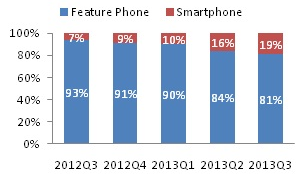
Proportion of smartphones to normal mobiles in India

Proportion of smartphones to normal mobiles in India (source)

In short, the vast majority of the world’s population doesn’t know about WhatsApp. SMS usage is heavy, and call traffic is far from being wiped out. Maybe Californians no longer call each other on the phone, but all you have to do is visit an African capital to realize that people are still connecting to each other from internet cafes and constantly sending texts, even if they do have smartphones with internet capabilities.
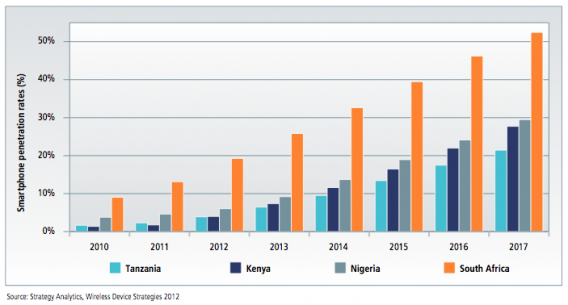
Percentage of smartphones as a proportion of the total population in four sub-Saharan countries

Percentage of smartphones as a proportion of the total population in four sub-Saharan countries (source)

Viber Out is both an intelligent and a humble app

Viber launched Out a month earlier than planned to support those affected by Typhoon Haiyan. In the Philippines, a nation of nearly one hundred million people, only 33% have access to the Internet, and the majority still use a residential connection. Where mobile networks fail or just haven’t been put in place, landlines are still the most reliable form of communication. Even in the best connected areas of the world, mobile networks can fail in an emergency.
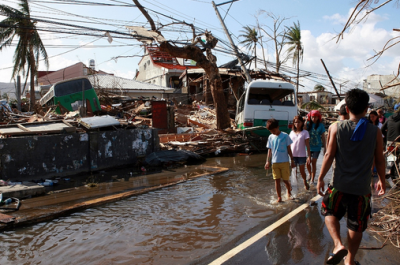
In an area devastated by disaster, there are many problems facing a fixed telephone network

In an area devastated by disaster, there are many problems facing a fixed telephone network

So, while launching a seemingly “retro” feature like SMS support for Google Hangouts, or the ability to make a call to any phone with Viber Out, may seem like a step back, it actually proves to be more of an act of humility. It means recognizing that the world is not confined to the fortunate few who can connect to the Internet from anywhere. At least, not until Google manages to connect the entire population in 2014 by using hot air balloons.

What do you think about the ability to call regular phones from Viber?

DOWNLOAD:

Viber 4.0 adds premium stickers and more new features

Viber 4.0 has been released for iOS and Android, with lots of new features including a premium Sticker Market, Instant Hold and Talk voice messages and ‘Viber Out‘ which allows you to call non Viber numbers by buying credit.

Viber is a free call and messaging app, a competitor of Microsoft’s Skype. It has been rapidly adding features over the last year, making it one of the most complete messaging and call apps available. It’s got desktop versions, unlike WhatsApp, and has a much better developed messaging service than Skype.

Viber’s Sticker Market now has premium packs, like LINE and Facebook. 4.0 adds 1000 new ones for you to download. Instant Hold and Talk means you friends can listen ‘live’ as you record your message if they want. Group conversations can now hold up to 100 people, and there’s a new gallery of backgrounds for your conversations.

Download Viber 4.0 for Android and iOS.


Viber offers free calls to non Viber numbers to aid Typhoon Haiyan victims

Call and messaging service Viber is offering free calls to non-Viber numbers to aid relief of the Typhoon Haiyan disaster in the Philippines. Users in the Philippines can use the service to contact family and loved ones in a range of countries with land-line and mobile phone numbers.

To call someone with Viber, simply open your contacts in Viber, and tap any of the numbers listed next to ‘Viber Out’.

Here are the countries you can call for free from the Philippines with Viber:

Landline and Mobile (all numbers):

  • USA & Canada
  • UK
  • China
  • Hong Kong
  • India
  • Indonesia
  • Korea
  • Malaysia
  • Singapore
  • Thailand

Landline Only (not mobile phones):

  • Argentina
  • Australia
  • Brazil
  • Croatia
  • Cyprus
  • Denmark
  • France
  • Germany
  • Greece
  • Hungary
  • Ireland
  • Israel
  • Italy
  • Lithuania
  • Luxembourg
  • Malta
  • Mexico
  • Netherlands
  • New Zealand
  • Norway
  • Peru
  • Poland
  • Portugal
  • Romania
  • Russia
  • Spain
  • Sweden
  • Switzerland
  • Venezuela

[Source: Viber]

Viber for iOS updated with Doodles and more

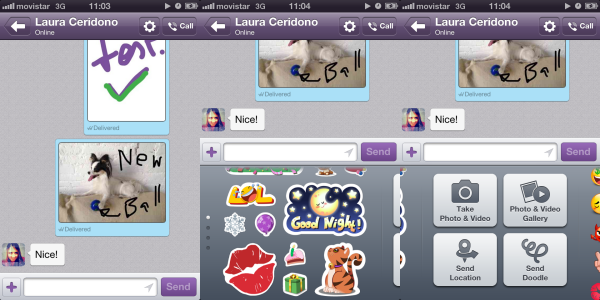
As promised on Tuesday, Viber for iOS has been updated with the new Doodle feature, so you can send drawings to your friends just like on the Android version.

Viber is being updated regularly, and really attacking the competition like Skype, LINE and WhatsApp. The app lets you call and text with friends for free, and now has even more features.

To send a Doodle on Viber, you can either tap the ‘Send Doodle’ button, and draw what you want, or you can use a photo, and then doodle on top of it. By default, any Doodles you send or receive are saved to your Camera Roll, but you can choose not to do this.

As well as Doodles, this latest update includes the following:

• “Seen” status lets you know when your messages have been seen
• Support for the Viber Desktop application on Windows and Mac
• Fun new emoticons
• Message performance improvements
• Bug fixes

Download Viber for iOS, Android, Windows and Mac.