What does the acquisition of Rockmelt mean for Yahoo!?

Yahoo! has announced its acquisition of Rockmelt, the social browser which was launched in 2010. At the time, Rockmelt, along with Flock seemed to be a new trend in browsers integrating social tools like Facebook to make sharing and discovering on the web easier.

But the trend for Social Browsers never really took off, and by this year it was clear that Rockmelt wasn’t the future of browsing the web anymore. So why is Yahoo! interested in it?

Yahoo! is unlikely to be releasing a browser, but the mobile, sharing and social technologies behind Rockmelt might help the Yahoo! homepage modernize. Better social integration and more personalization are a good fit for Yahoo! Its homepage is (maybe surprisingly) still very popular, ranked the fourth biggest site in the world, and unlike Yahoo! Mail and search it is still growing. Making their strongest product even better sounds sensible.

Do you use the Yahoo! homepage? Will better social integration, sharing and discovery features improve it?

[Source: Rockmelt blog]

Google announces Android Device Manager, finds your lost Android phone

Catching up to Apple’s Find My Phone feature, Google has announced it plans to release the Android Device Manager app to let you track your lost or stolen phone. If you’ve ever used Apple’s Find My Phone feature, you’ll feel right at home using Android Device Manager.

The new app and service will allow you to use the website or app on another Android device to locate your lost or stolen Android device. You can even enable the ringer on your device if you’ve misplaced it in your home. This means you’ll never have to worry about finding your phone that’s on silent.

In addition to locating your Android device, Android Device Manager also has the ability to wipe your phone of all personal data if you’ve had it stolen. Many times, the data on your phone is worth more than the device itself. Google has your back and will wipe your device and stop your information from getting into the wrong hands.

Google does not yet have a solid release date for the app or service, only saying that it “will be available later this month.” You’ll need an Android device running Android 2.2 and up so that shouldn’t be a problem for most people. Once the service rolls out, all you have to do is sign into your Google Account.

Source: Official Android Blog

The Softonic Minute: iOS 7, PES 2014, Google Views and BioShock Infinite

Google Maps presents Photo Spheres, BioShock Infinite gets new expansion packs, iOS 7 launches beta 4, and we play Pro Evo 2014.

This week’s top news stories, all in the Softonic Minute!

Default player

<!–
By use of this code snippet, I agree to the Brightcove Publisher T and C
found at https://accounts.brightcove.com/en/terms-and-conditions/.
–>

<!–
This script tag will cause the Brightcove Players defined above it to be created as soon
as the line is read by the browser. If you wish to have the player instantiated only after
the rest of the HTML is processed and the page load is complete, remove the line.
–>
brightcove.createExperiences();

Google Maps presents Views. The maps app has been updated, integrating Photo Spheres, 360 degree photos taken by the latest Android phones. You can now upload these spectacular photos to Google Maps and look at ones already uploaded by others. It’s a great new way of checking out some of the most beautiful places in the world.

BioShock Infinite shows off its DLC. The most interesting expansion pack will be called Burial at Sea, a two-part adventure. In the new story, Booker and Elizabeth visit Rapture, a city from the 1st BioShock, before crisis struck. The first pack is slated for the end of 2013.

iOS 7 launches beta number 4. The new version of the operating system for IPhone, iPad and iPod improves graphics, fixes bugs and adds some new interface features. Apple’s also keeping an eye on security – iOS 7 now includes warnings in the event you try to use a fake charger. Remember that this beta is primarily for developers – there’s still no date for the final version.

We check out the PES 2014 beta. The demo version of the new Pro Evolution Soccer has been delayed, so you’ll have to wait a while before you can check it out yourself. We’ve had a go here at Softonic, though, and since we love a bit of competition, we played a game to check out the quality and looks of Pro Evo 2014. Has Konami come good on its promises this time?

The Elder Scrolls Anthology coming to PCs in September

With The Elder Scrolls Online on the horizon, Bethesda will release The Elder Scrolls Anthology on PC in September.

The Elder Scrolls Anthology includes the whole series of Elder Scrolls games, right back to 1994’s Arena. Indeed, the first two games in the series will launch via a MS DOS emulator, as they are so old they are no longer compatible with modern Windows.

The Elder Scrolls V: Skyrim is included, and comes with the Dawnguard, Hearthfire, and Dragonborn DLC. The 2011 game set new standards for epic role playing games, and has also produced one of the most vibrant (and often bizarre) modding communities in the gaming community.

The Elder Scrolls Anthology is released on September 10th in the US, and the 13th in Europe. We will see more of The Elder Scrolls Online at this month’s Gamescom in Cologne, Germany.

Stay tuned to find out what we think of the highly anticipated MMORPG soon.

Screenshot Save for Snapchat available in App Store

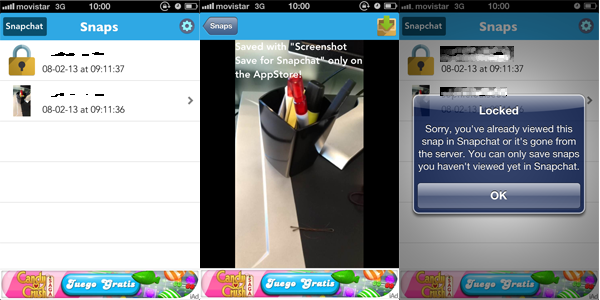
Developer Sepia Software has released an app called Screenshot Save for Snapchat, which as its name suggests, allows you to save the images people send you in SnapChat.

The point of SnapChat is sending your friends images and video that expire after a few seconds – saving these messages goes against that idea. SnapChat’s own terms of use state you should not use any ‘extraction methods in relation to the Services,’ nor, ‘interfere with or hinder the operation of the Services or any other individual’s use of the Services in any way.’

Screenshot Save for Snapchat pretty clearly does both of these things. To use the app, you have to log in with your SnapChat account (which automatically logs you out of the SnapChat app), and when a message comes in, you can choose to save it, unless it has already been viewed. The free version has pop up ads, and stores the images with a watermark within the app. Paying to upgrade the app lets you save messages to your Camera Roll at full size with no watermark.

Screenshot Save for Snapchat has been on the App Store since July 30th. We have reached out to developer Sepia Software and SnapChat for comment, but have so far not received a reply.

SnapChat is available for iOS and Android.

Facebook improves browsing security, enables https by default

The social network Facebook has taken a step toward improving its security by enabling https by default for all users. Https, or HTTP Secure, layers the hypertext transfer protocol (HTTP) on top of the Transport Layer Security (TLS), previously known as Secure Sockets Layer (SSL). What all this technical jargon means is that users will now be connected to Facebook through a secure channel, which makes it extremely difficult for hackers to intercept traffic coming and going to Facebook.

While https offers a security advantage, performance does take a bit of a hit. Facebook has minimized performance dips by sing “abbreviated handshakes” and customizing load balancers on their servers.

Mobile apps for Android and iOS also support the https protocol so mobile transmissions should be secure as well. Both Google and Facebook are using security measure that are far beyond what’s typical for companies. This comes after Edward Snowden leaked documents about the United States National Security Agency’s massive surveillance program, including the PRISM program that allows the government to access data from tech companies like Facebook, Google, Microsoft, and many more.

Facebook is working on even more technical security measures, which you can read about in the source link below.

Source: Facebook

Imgur arrives on iOS

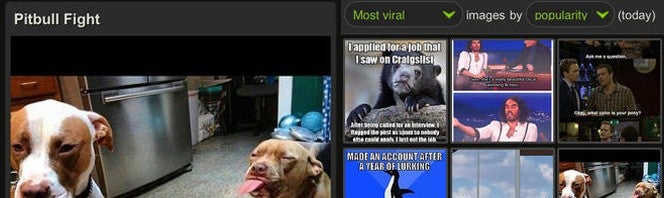
Android users have had an official Imgur app for a couple of weeks but now iOS users can join in on the photo sharing fun. Imgur for iOS is now available and offers the same experience as its Android counterpart, with a focus on “image discovery and engagement.”

Users will be able to upload, share, and comment on images from the image sharing site, known for hosting tons of internet memes. Imgur loves memes so much that they created their own meme generator after Quickmeme was banned from reddit.

To aid in photo discovery, the Imgur for iOS app includes a list of the “most viral” images where users can comment and vote. If you have an Imgur account, you can manage and easily share all of your photos from the app.

The app will work for both iPhone and iPad and is available to download at the link below.

Download: Imgur for iOS

Facebook for Android updated to support Cover Feed, no need for Home

Facebook for Android has been updated today with support for Cover Feed. This means you can get the Cover Feed feature without having to install Facebook Home.

Cover Feed works as a lock screen replacement for your Android device, allowing users to swipe around Facebook content without having to unlock the phone. This is also where notifications will show up so you will see the alerts you’ve missed.

The reason Facebook is integrating Cover Feed into the Android Facebook app is because the company noticed that many Home users were only using Cover Feed with the default Android launcher. This isn’t surprising as Facebook Home’s launcher is very basic. It was recently updated to support creating folders, a feature that should have been included from the beginning.

While Cover Feed is coming to the Android Facebook app, it will only work with devices that support Home. This includes a handful of HTC, Samsung, and LG devices. The Nexus 4 and Galaxy S4 are getting Facebook Home support today so users will can also enjoy Cover Feed if they update their Facebook apps.

Download Facebook for Android and Facebook Home

Source: Google Play

How to setup Google accounts on Android 4.3

After getting a new Android device, you’ll need to run through a few steps before you really get to use it. The main one is accessing Google’s ecosystem by signing into your Google account.

If you use Google’s services like Gmail, Google Maps, or Chrome and have sync enabled in your account, you’re already a step ahead.

Google makes it easy to sign into different devices and sync your settings, passwords, and information so you spend less time configuring and more time using the device.

The release of the second-generation Nexus 7 formally introduced Android 4.3 to the public with older Nexus devices receiving the OTA (over-the-air) update on a staggered release.

It’s very easy to start using the Android operating system, even with the small learning curve.

Start it up

After turning on the device, you should see a Google login screen. The easiest setup is to use your existing Google account.

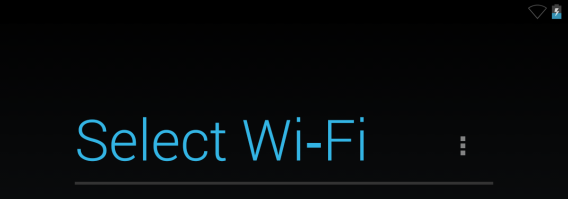
You need to log into a Wi-Fi network to connect to your account.
Review the Google Services screen. To make backup/restoring easier, it’s recommended that you allow Google to use your account to back up apps and settings.

If you are concerned with security, enable two-step verification to add another layer to your account.

The second backup option is to “Bring apps, settings and other data that you previously backup up to your Google account”. This is great if you’ve used Android before. It’s not necessary if you want to manually download each app that you will install to the device.
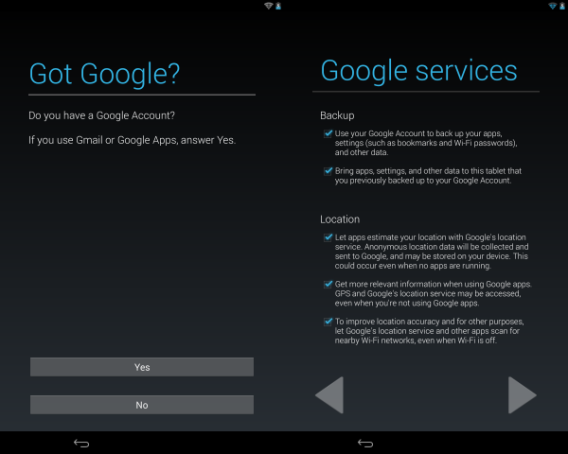
Allowing Google to send your location data information is up to you, but if you use Google Maps it’s good to opt-in to get better results.

Restore from backup

After entering your Google account information, Android 4.3 will begin to sync your account to the device. Depending on how much information you have saved in your account, the restore can take some time.
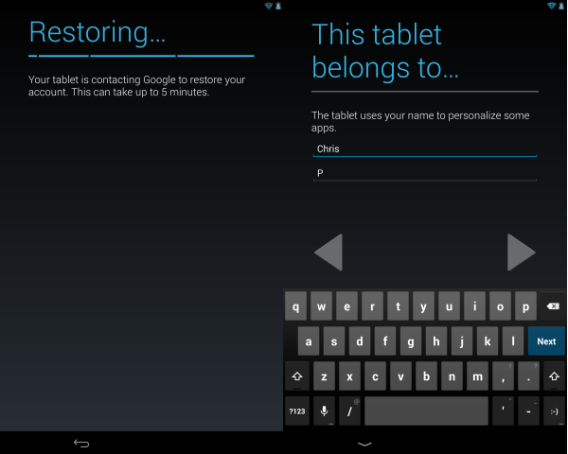
Once the device has finished restoring your settings, you can name the primary user of the device.

Ready to go

After you choose the primary user, Android 4.3 will start. The default homescreen shows all of Google’s first-party Android apps like Gmail, Chrome, and Hangouts. You can easily customize apps, folders, and widgets on each of the five home screens to your preference.
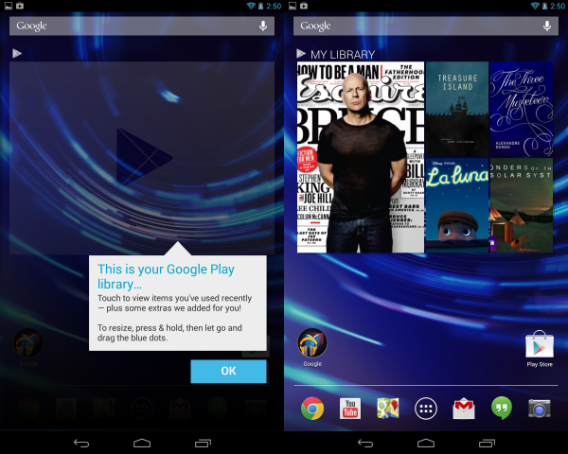
If you chose to allow Google to restore settings and apps from your Google account, the device will start installing apps from the Google Play Store to your device.

From my own restore, Android 4.3 only installed apps that I installed on my first generation Nexus 7. So if you use an Android smartphone, it shouldn’t install your phone apps.

The best solution is to let the device download and install apps before you start using it because, depending on how many apps you previously installed, it could take a while.
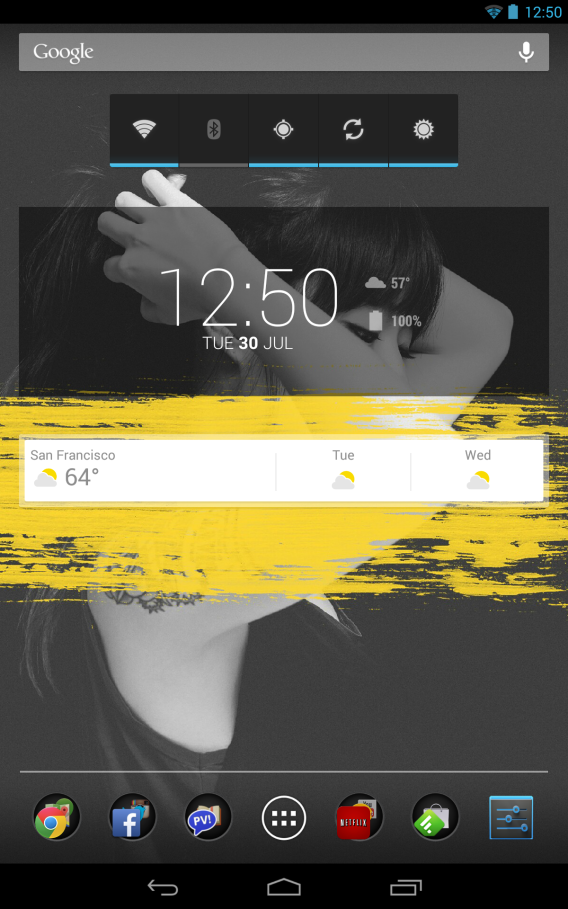
This is my customized Android 4.3 main homescreen tailored with DashClock and Google Now widgets, and folders of my most-used apps.

If you’re new to Android and confused about which apps that might be useful, check out my Starter apps for Android list.
Netflix finally gets user profiles

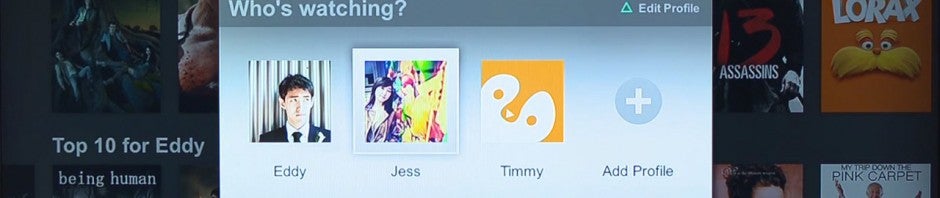
If you share your Netflix account with a friend, family member, or child, you’ll know the pains of having inaccurate recommendations. We reported that Netflix would be rolling out user profiles by the end of August but the company has beat this release date by a full month.

Previously, Netflix let users share their accounts with one other person, allowing for two simultaneous streams. Users will still be limited to two streams for the basic account but will now have the ability to create user profiles.

You can create up to 5 different user profiles for the different members of your household that share your Netflix account. Each account will then get personalized suggestions based on what the user watches and how he or she rates different shows and movies. Each user profile will also include a unique Recently Watched list as well as a unique Instant Queue.

If you link your user profile to Netflix, the service will automatically import your profile picture to use on Netflix. You’ll also enjoy the added benefit of getting recommendations based on what your friends are watching, if they’re sharing to Facebook.

Netflix profiles will be rolling out over the next few days and will be coming to the website, iPad, iPhone, PS3, Xbox 360, Apple TV, and even more up-to-date Smart TV’s/Blu-Ray players. You can only create profiles on the web or PS3 at the moment, but all the other listed devices give the ability to select different profiles. The company promises to bring support for Android and the Nintendo Wii in the future, though they did not provide a specific date.

Check out the video below for more information.

Source: Netflix