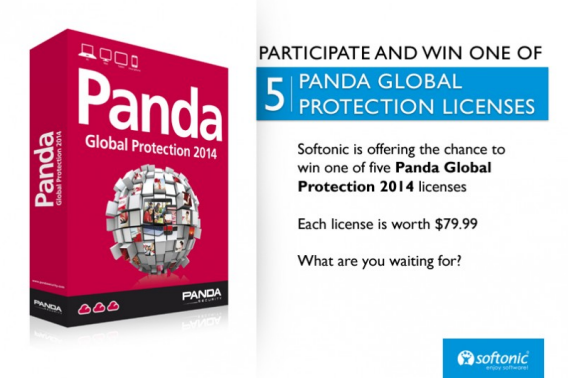
Panda Security is a distributor of Panda Global Protection 2014, an antivirus solution for PCs.
The updated Global Protection 2014 contains a powerful detection engine and protection model that uses a user-sourced cloud-based virus database that is continuously updated for the most up-to-date definitions. Also in the program are powerful features like: anti-spam, personal data protection, parental control, and a backup tool.
One of its best features is multi-device support to protect Windows, Mac, and Android devices.
Want a chance to win? Here’s how.
To win one license of Panda Global Protection 2014:
Or you can see all the previous Softonic Minutes here.
So what about you? If you had to pick the most important news to come out of this week, what would it be? Why not make your own Softonic Minute, then upload it to YouTube and share it with us? We’d love to see it!
Samsung recently introduced the Samsung Galaxy Gear, one of the first smartwatches to hit the market. The smart watch supplements the Samsung Galaxy smartphone and can manage functions like the music player and calling. It’s not just a remote control though; the watch will also have its own app eco-system.
At a press conference held at the IFA exhibition in Berlin, Samsung announced that there are more than 70 apps being offered for the Samsung Galaxy Gear to coordinate with the market launch. However, the Korean corporation named only a few. We did some research and selected some of the most important apps that will feature on the smartwatch. Check them out below.
In the era of Quantified Self, fitness apps may not be out of place in a smart watch. The Quantified Self Movement aims to promote measuring and recording various types of personal data, such as amount of sleep, sleep intensity, pulse, movement and nutrition, hopefully improving users’ health in the process.
Phigolf, a navigation app for golfers, is also available for the smartwatch.
Productivity
A watch that’s an extension of a smartphone is also meant to provide day-to-day support. At the top of the list is an app called S Voice, which was developed by Samsung. S Voice provides the same functions as Apple’s Siri or Google’s Google Now: Voice function for smartphones. The app reacts to voice commands and writes notes, creates calendar appointments or helps you navigate somewhere. Samsung has a summary of its functions on its website.
Other third-party apps for productivity include the popular note-taking service Evernote, as well as Pocket, a service that stores web pages so that you can read them later at your leisure.
The automation apps Atooma and Tripit Travel Organizerare also already available. With Atooma, you can create tasks that are automatically carried out by your smartphone.
Productivity apps that come with the smart watch are the calendar, the clock, the music manager and a phone function.
Social networks and communication services are a necessity on any digital device. In addition to a display that shows you messages that have been received on the Galaxy smartphone, some social networks have already announced their own apps. These include Banjo, Glympse, Life 360, Path and Pinterest.
In terms of communication services, Kakao Talk, Line and Snapchat plan to have native Samsung Galaxy Gear apps. Market leader WhatsApp has yet to comment on whether or not it will have an app for the smartwatch.
As well as the New York Times, the financial services company Bloomberg has already announced an app for the Samsung Galaxy Gear. Online auction house eBay will also have an app ready for the Samsung smartwatch at launch.
Another interesting app is Vivino, which uses the smart watch’s built-in camera to its advantage: Vivino can identify over a million wines from only a photo, delivering information about the wine directly to your wrist in the supermarket.
Apps for the Samsung Galaxy Gear smart watch can be installed via the Gear Manager on a compatible Samsung Galaxy smartphone. You can find a separate app store that shows all the optimized apps in Gear Manager.
The Galaxy Gear is compatible with Samsung smartphones starting from Android 4.3. So far, the smartwatch can only be used with the Galaxy Note 4 and the Galaxy Note 10.1. In October, updates for the Galaxy S III, Galaxy S4 and Galaxy Note II will follow. Samsung hasn’t commented on any other devices yet.
Everyone loves a good Instagram filter that can make even the most average photo look exciting, but the app’s stock filters can get a bit boring themselves after awhile.
If you feel like you want to get a bit more creative with your photos, we have alist of free apps forAndroid and iOS that will spice up your photo filtering in Instagram!
Instaplace is an app that adds fancy captions and photos related to your current location. It’s ideal for holiday trips – the photos look like postcards.
The app can add a photo using city name, the current time, greetings, and other phrases. Captions can’t be edited, but there are lots to choose from.
InstaWeather works like Instaplace, labeling photos with the weather condition in your area. The app is ideal for extreme temperatures, especially when you want to record the amazing heat or freezing cold you endured that one time.
Photogrid is a free app for making frames. You can frame a single shot or make a collage with multiple photos.
The app also lets you change image size, freely arrange compositions and offers a variety of colored templates for framing.
A ton of people also recommend another app for frames called Diptic (Android, iOS). It’s a paid app, but it has better options and a much simpler interface.
InstaFishEye is an app that gives your photos the appearance of having been taken with a wide angle lens. It bends the aspect of photographs to varying degrees depending on the chosen option, allowing you to obtain surprising results, like the fish-eye effect!
This apps lets you to put photos on Instagram that aren’t square. For example, if you have a great photo in landscape and don’t want to crop it into a square, InstaSquareMaker adds a frame in order to make it compatible with Instagram’s requirements.
InstaLomo HD is for fans of the retro photo. This app lets you take pictures with a LOMO camera’s distinctive style, but there are other effects to choose from too, like tilt-shift, or photos that look old enough to come from one of your grandma’s photo albums.
Adobe, the company behind Photoshop and Flash has been the victim of a hacker attack that resulted in the theft of 2.9 million users’ data. According to Adobe, this data includes ‘customer names, encrypted credit or debit card numbers, expiration dates, and other information relating to customer orders.’
This is quite a severe breach of Adobe’s security, and it is taking a number of measures to help affected users.
If your data was stolen, Adobe will contact you and reset your password, with information about how you can change it.
If your credit card details were stolen, you will be notified by email. Adobe is offering a free one year credit monitoring system to help ensure there are no bogus uses of your credit card details.
Adobe has contacted the banks that process its payments, so they can help protect customer accounts.
As well as customer data, the company also suffered ‘illegal access to source code of numerous Adobe products’. Adobe doesn’t believe this poses any threat to users, but it’s not clear what the criminals intend to do with this source code. Hackers could use it to find security holes in Adobe’s products, but the company says it is ‘not aware of any zero-day exploits targeting any Adobe products.’
Attacks like this will never be stopped completely, but they highlight how important it is for users not to use the same password across different services, as if one is discovered, a hacker would have access the other accounts too.
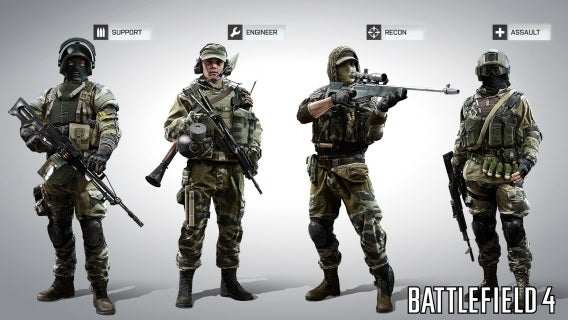
You can play the Battlefield 4 open beta free from today. The highly anticipated FPS will be released on October 29th, and until then if your PC is up to it, you can play the multiplayer online mode free, featuring the Siege of Shanghai map with Conquest mode.
To play the beta, you need to download Origin, which is EA’s PC gaming platform. It’s totally free, you just need to sign up for an account. Once installed, open Origin and search for Battlefield 4, then you’ll find the beta access.
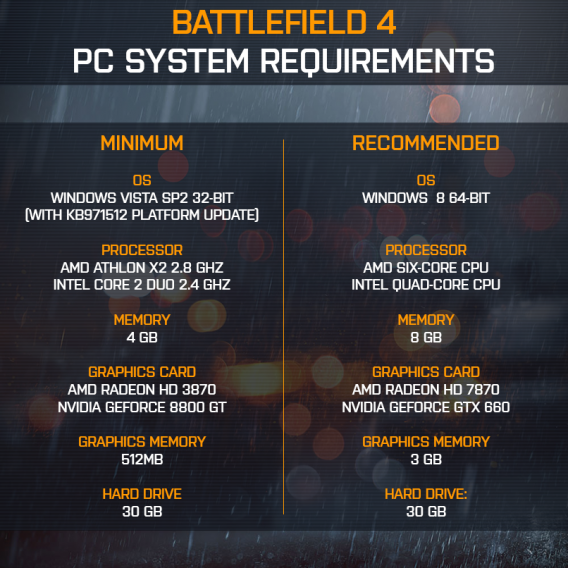
If you want to know if your PC has the power to run the Battlefield 4 open beta, here are the PC requirements released recently by developer DICE.
I’ve spent time playing the beta for Battlefield 4 on Playstation 3 during the “exclusive” closed beta before open beta on October 4. There were a smaller number of players on the PlayStation 3 servers, but that didn’t stop me from getting a sample of what the full multiplayer experience will be.
Battlefield 4 is releasing across all platforms and DICE launched a multiplayer beta to gather gameplay data before its official release.
First person shooters (FPS) are the equivalent of sports video games. They’re released on a regular schedule and provide the same core gameplay each time. The difference between FPS games is that they can focus on pseudo-realism or an arcade style gameplay experience.
During this current console generation, FPS shooters have become more focused on multiplayer than the single player campaign. It makes sense because normally the campaign can be completed within 6-8 hours.
The multiplayer mode has to offer tight and balanced gameplay along with a selection of compelling game modes. While Call of Duty has moved into more arcade and twitch-based combat, the Battlefield series has been focused on more realistic gameplay in multiplayer.
Siege of Shanghai
The map available in the beta is called “Siege of Shanghai,” the same map that DICE demoed during E3 and featured in videos talking about “Levolution.” The two gameplay modes were Conquest and Domination.
Conquest is a battle for capture points. Owning these different points open spawn points and supply a small amount of points as you maintain control. Domination is essentially the same, but with a much smaller map. The capture points are very close together and funnel opposing sides at each other within seconds.
Each mode uses the same countdown system. Each side is allocated points for respawns. As a player dies, the counter lowers and when one side has all points exhausted, the game is over.
Conquest
Matches can take up to 25 minutes in Conquest mode. This is the mode where 24 players fight 12-on-12, combing players from both the PlayStation 3 and Xbox 360.
PC, PlayStation 4, and Xbox One will get to experience Conquest with 64 players. On current generation consoles, the Siege of Shanghai map is a little too big for 12-on-12.
Squads can consist of five members, but the beta segmented players into teams of 4. Moving from the home base to the other side of the Siege of Shanghai map takes a long time. With a bridge connecting opposing sides as well as a capture point within a destructible skyscraper, a problem with Conquest is that the wide space in the map allows squads to move relatively unseen.
Combat can slow at random times until a capture point is taken where the game will notify you of an objective. Combined with the fact that Siege of Shanghai is built more for the sniper class rather than assault or support and you will encounter a lot of campers. Siege of Shanghai isn’t the best map to experience Battlefield 4 for the first time. There are also issues within rooftop areas that cater to campers who will wait outside an elevator and easily kill anyone inside.
The available vehicles are a tank, APC, and helicopter. Flying is still difficult as ever unless you have previous experience. But paired with a good pilot and you can get to important places on the map within seconds. The tank and APC are standard vehicles, with the tank being one of the most fun to control. Depending on how many players a vehicle supports, another player can use the secondary weapon to provide more support.
In one match, I took control of a tank and acted like a mobile shield as other squad members followed to a capture point. Conquest will likely be the most played mode. The limited number of players on current generation consoles make Siege of Shanghai a more difficult map to play because of the amount of open space.
Domination
Domination mode reminds me of Call of Duty: Black Ops 2‘s team deathmatch. Moving away from strategy, it’s a run-and-gun twitch mode. There isn’t any vehicle support and the map is tightly contained so it provides an insanely fast-paced match. Three capture points are still the main objective, but they switch sides very quickly.
Squads who work together can make a difference in Domination because focused fire will usually defeat solo players. I liked this mode more than Conquest because the action never stopped and it only took a few steps to get back into combat. This mode will be perfect for players coming from Call of Duty or just enjoy fast action.
Unlocks
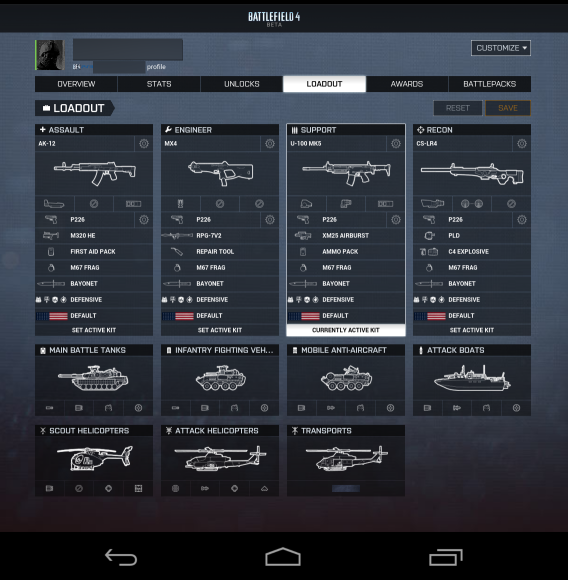
Battlefield 4 uses unlocks to gain new weapons, accessories, kits, and vehicles. Unlocking new weapons requires you to get a specific experience level (XP) to open the next one and this can get frustrating because unlocking parts are tied into the number of kills you get.
Overall unlocks are determined by earned experience, but in the beta it was much more difficult to gain experience when I spent so much time looking for enemies in Conquest. Different game modes will likely help you level faster, but you’re still going to need skill to be successful.
Battlelog
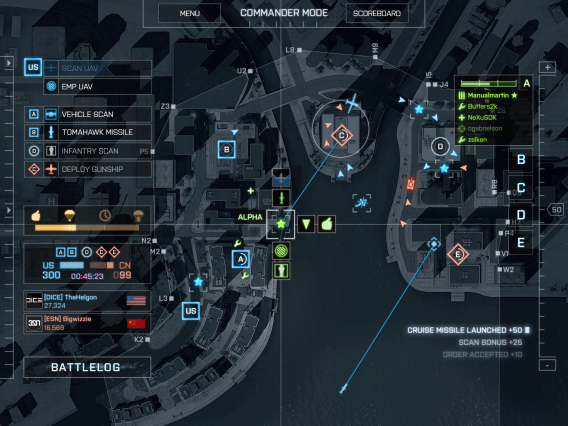
DICE previously debuted the updated Battlelog Android and iOS app that will connect to Commander mode in multiplayer. As of now, Battlelog lets you customize loadouts and see stats. Connected to the beta, it’s has connectivity bugs and selecting to see old stats like in Battlefield 3 load a different interface that’s not standardized across different mobile devices.
It looks like for current generation console players, it will be missing some features that PC, PS4, and Xbox One players will have. If you’ve used Battlelog before, there’s nothing different except that you should expect some lag between selections.
Beta means bugs
DICE was smart to beta test the multiplayer for Battlefield 4. There are a lot of noticeable issues within the game like weapon balancing, hit detection, and other smaller issues. It’s still fun to play the beta, but with the huge scope of the Siege of Shanghai map, there’s a lot of overall balancing that’s necessary before the game is finished.
The multiplayer in Battlefield 3 was difficult, but manageable and leveling wasn’t so difficult. In the Battlefield 4 beta, the difficulty is high even within the early XP levels. Obviously DICE is going to spend a lot of time fixing bugs within the game and while it might not be 100% when it launches on consoles and PC, there will be a lot of modes and gameplay to experience.
Battlefield 4’s multiplayer is promising a lot of things other than the improved visuals. It looks like multiplayer will survive on PlayStation 3 and Xbox 360, but the full experience will only exist on next generation consoles and PC, complete with 64 players which will make maps like Siege of Shanghai actually feel like a combat situation rather than hide-and-seek.
The FPS genre has been split between Call of Duty and Battlefield and both series are releasing a new titles soon. Each game caters to a different section of FPS fans, so it will be interesting to see how popular the new games are when they release.
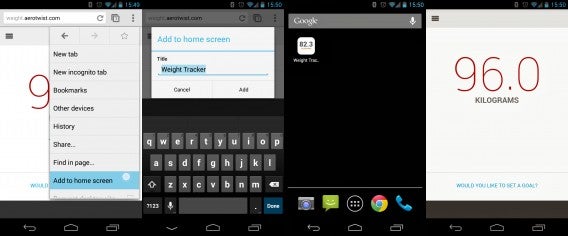
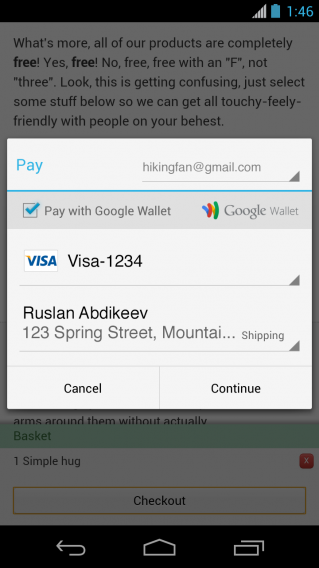
The latest Chrome beta from Google will integrate web payments and let users pin shortcuts and web apps to their home screens. Chrome 31 beta for Android introduces auto-fill for web payments, allowing users to quickly pay for something online after initial setup. The update also introduces the ability to pin web pages and web apps onto your home screen. Users can access this from the menu button and tapping on “Add to homescreen.”
Chrome 31 beta also includes the redesigned Chrome new tab page, featuring a large Google search bar, icons for most visited sites, and buttons for bookmarks and open tabs on other devices. Google claims the new page benefits from “a faster load time.”
The Chrome beta for desktop also features support for native code, which allows developers to create one app that will work across Chrome for desktop and Chrome OS without any installation.
The stable version of Chrome 31 is expected to ship some time in November. If you can’t wait, you can download the beta for Windows, Mac, and Android to test it out yourself.
Get ready to see ads in your Instagram feed. Facebook will begin monetizing its photo and video sharing service by placing ads within users’ feeds.
“Our aim is to make any advertisements you see feel as natural to Instagram as the photos and videos many of you already enjoy from your favorite brands,” says a blog post on Instagram. The team vows to make ads relevant, high-quality and unobtrusive.
Instagram is going to give users some control over what ads they see by letting users hide and provide feedback about ads. The company will rely on user feedback to improve Instagram’s ad experience. The company also states that the content you create will always be your own. “As always, you own your own photos and videos. The introduction of advertising won’t change this,” writes Instagram.
The roll out of ads in Instagram will be slow as the company obtains feedback from users. There’s no timeline beyond “the next couple of months” for the roll out of advertising.
Facebook Home gets a little more usable today as the launcher replacement for Androidintegrates content from Instagram, Tumblr, Pinterest, and Flickr. One of the biggest downfalls of Facebook Home was that it only offered up Facebook content. That’s fixed now with this latest update.
The update lets users view and interact with photos from their Facebook Home lock screen. Functionality is a bit limited as you can only post to and “like” photos from the lock screen. In addition to integrating new services, Facebook Home lets you block non-photo updates so you can just have a photo stream.
It’s clear that Facebook wants Home to replace the lock screen of every Android device. By adding more services, there’s definitely more of a value proposition for users but time will tell if that’s enough to help Facebook Home catch on. Hopefully Facebook will add more services in the future.
In order to get the update, you’ll have to be part Facebook Home’s beta program, which tests experimental builds before rolling out updates to everyone. You can sign up to be part of the Facebook Home beta program here.








 InstaWeather works like Instaplace, labeling photos with the weather condition in your area. The app is ideal for extreme temperatures, especially when you want to record the amazing heat or freezing cold you endured that one time.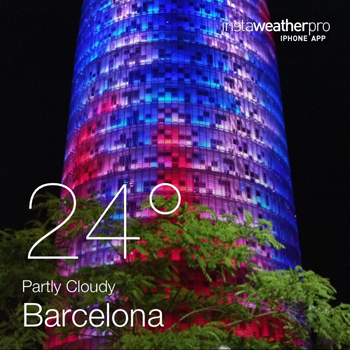


 InstaFishEye is an app that gives your photos the appearance of having been taken with a wide angle lens. It bends the aspect of photographs to varying degrees depending on the chosen option, allowing you to obtain surprising results, like the fish-eye effect!
 This apps lets you to put photos on Instagram that aren’t square. For example, if you have a great photo in landscape and don’t want to crop it into a square, InstaSquareMaker adds a frame in order to make it compatible with Instagram’s requirements.
 InstaLomo HD is for fans of the retro photo. This app lets you take pictures with a LOMO camera’s distinctive style, but there are other effects to choose from too, like tilt-shift, or photos that look old enough to come from one of your grandma’s photo albums.