MEGASync beta out now for Windows, syncs your computer with MEGA

MEGA, the cloud storage site created by the infamous Kim Dotcom, now has a Windows client out in beta. The application, called MEGASync, will allow users to sync their Windows machines with  MEGA’s servers.

megasync-windows

The application allows users to synchronize local files with those stored in their MEGA account. MEGASync works just like its competitors, Dropbox and Google Drive. MEGA has not officially released MEGASync, as the program is still in beta. Expect some bugs and an unintuitive interface since the application is not entirely stable yet. It shouldn’t be long until a final version of MEGASync appears.

MEGA plans to release applications on platforms like Android, iOS, and Windows but only an Android, and now a Windows client, has been release. There’s no word on when an iOS version will debut.

Download the MEGASync beta for Windows


RELATED STORIES


[Source: Ghacks]

Rdio mobile apps get free personalized radio

The streaming music wars are heating up as Rdio updates its Android and iOS apps to include free, personalized radio stations. Apple took the wraps off its iTunes Radio service a couple of weeks ago, launching with iOS 7. Google has its own streaming music service, Google Play Music, which also serves up personalized radio stations. Streaming music giant, Spotify also features customizable radio for free.

Rdio can create custom radio stations from artists, genres, songs, and using its “You FM” feature. Since Rdio’s streaming radio feature is free, you won’t be able to cache anything offline so an internet connection is required for it to work. If you want access to Rdio’s entire music library of 20 million songs and offline listening, you’ll have to pony up $9.99 a month for a subscription.

The updated Rdio apps will be rolling out to Google Play and the App Store today in the US, Canada and Australia.


RELATED STORIES


Download Rdio for Android and iOS

[Source: Rdio]

Rumor: Google Music app coming to iOS later this month

Google is planning on launching a native Google Music app for iOS later this month, according to Engadget. The music streaming service has been noticeably absent from iOS, while competitors like Rdio, Spotify, and Rhapsody have applications on multiple platforms. Currently, Google Music is only available on the web and Android.

Sources have revealed to Engadget that Google is already testing the iOS app internally and plans to launch the app later this month. There are bugs that the company needs to fix before rolling it out to the public. The app will still have the ability to create custom and intelligently generated radio stations like it does on Android.

Google Play Music All Access gives users an huge library of songs to stream or to download for a monthly fee. The service is competitive with Spotify and Rdio, though it lacks some of the more advanced features of its competitors, like social features.


RELATED STORIES


Note: The image above is only a render.

[Source: Engadget]

Snapchat launches Snapchat Stories

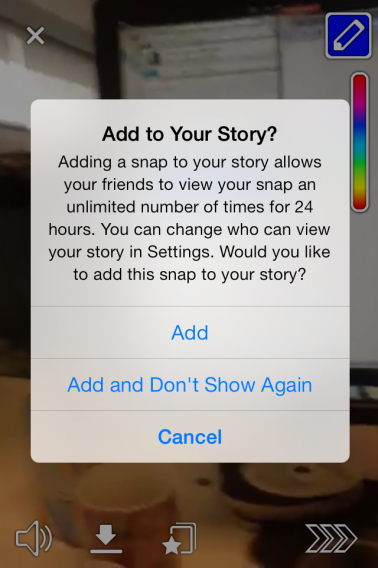
Snapchat now allows you to make your snaps into Snapchat Stories that can be viewed by all your friends for 24 hours, instead of the usual snaps that are deleted after being viewed once.

Snapchat has become extremely popular with young users, and with Snapchat Stories the service is making itself into something more like a social network. You can mark any snaps you take as part of your Story, and anyone of your Snapchat friends will be able to view them, in chronological order, as many times as they like for the next 24 hours. You can control who is allowed to see your story in Settings.

Tapping and holding any of your Snapchat friends wil start their Story stream. Tapping again with a second finger lets you skip ahead in their story. The 24 hour limit means Snapchat maintains its ephemeral nature, which is what makes it unique: none of the other social networks offer anything like Stories. If its successful, it’ll be interesting to see how other services like Vine and Instagram respond.

Download Snapchat for Android or iOS.

Basic tips for Android

Get the most out of your Android device by learning how to take care of basics. In this series, Basic Tips for Android, we’ll ensure that you know how to do the most useful, fundamental tasks quickly and easily. Want to make sure you have the best Android browser on the market? Want to transfer files to your Android even when you don’t have a cable? Want to save space by forcing your device to save apps to the SD card?

We’ve got mountains of super useful tips that will help everyone, from Android noobs to old hands who want to make sure they’re getting 110% from their phone. We’ve got tutorials, tips, comparisons, in-depth and opinion pieces. We really hope you find them useful!

Getting started with Android

7 essential tips to set up your new Android device

The top 5 file managers for Android

Control your Android device wirelessly

Everything you need to know about Google Play

Installing apps on your Android device

How to: Force Android to automatically install apps to SD card

10 essential games for your Android device

Film-based games for Android

Free djing apps for Android

5 essential apps for your new Android phone

Top 25 apps for your Android tablet

How to: install Android APKs with Google Drive

Getting the most from your Android

The best alternative keyboards for Android

Android: Everything you need to know – utilities

Getting the most from Facebook, Whatspp and Instagram for Android

Android: Everything you need to know – social media

FBI seizes and closes controversial Silk Road site

The controversial Silk Road website has been shut down by the FBI. Silk Road was a black market site where users could buy and sell often illegal goods and services, and it could only be accessed through the Tor anonymous browsing network.

Launched in February 2011, the site quickly became well known. Being only accessible through Tor and using BitCoin for transactions gave it an air of anonymity and secrecy that appeared to put it beyond the reach of the law. However, the FBI unsurprisingly took an interest in this activity, and after months of investigation have arrested Ross William Ulbricht, allegedly the face behind Silk Road.

The site administrator goes by the name Dread Pirate Roberts, who the FBI believe to be Ulbricht, and have siezed and closed Silk Road. According to Wikipedia, in March of this year Silk Road had 10,000 products on sale, of which 70% were drugs that are illegal in most places. The seizure of the site by the FBI could mean contact details of registered users are now in the hands of law enforcement agencies.

This case highlights how so called anonymous internet services like Tor and Bitcoin are not out of the reach of law enforcement agencies. The Deep Web’s current lawlessness is reminiscent of when Napster appeared in 1999, causing chaos for the music industry. Eventually the law began to catch up with the disruption caused by file sharing, and the same will no doubt happen to services evading the law, hidden on the Deep Web.

[Source: BBC, Wikipedia]

BlackBerry Messenger beta testing restarts for Android

BBM for Android and iOS were supposed to launch almost two weeks ago, but BlackBerry stopped it, citing technical issues caused by a widely leaked beta version of the Android app.

CrackBerry is now reporting that some Android beta testers have now got a new version of BBM, suggesting a launch could happen soon. This beta includes a new launch screen explaining notifications, you can disable the persistent notification in the status bar, and the user interface is more polished.

Adding polish and new features is surprising, as the reasons for pulling the app were supposed to be technical. Why is BlackBerry not solving those bugs and rushing the app back out to the market? There was lots of buzz and demand for BBM on both Android and iOS, with 1.1 million having downloaded the leaked version of the Android app. Is the delay somehow related to BlackBerry’s financial problems?

Read more about BBM for iOS and Android:

[Source: CrackBerry]

Accessible applications – Episode 2: Mac

What are accessible applications?

Accessible applications are programs that allow people with disabilities to use the computer, or to perform, via a PC or a smartphone, tasks that are usually impossible, or at least very difficult.

In recent years, a large number of programs have been created to help those who are blind, visually impaired, deaf or color blind, as well as people with physical and cognitive problems, and speech and language difficulties, making their lives a bit easier.

All platforms offer accessible programs, some by default with the operating system (such as VoiceOver for OS X) and others through third party software. In the last article, we explored the options available on Windows. Today, we’ll take a look at what’s available on Mac.

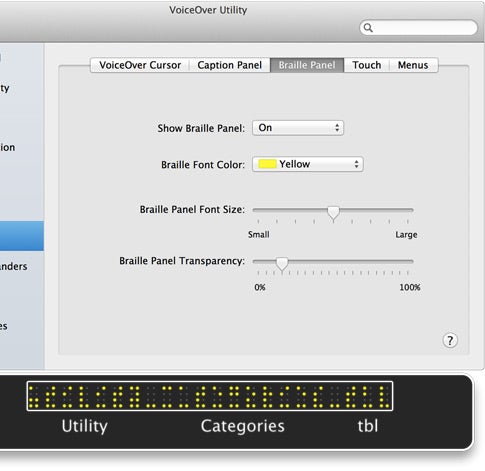
VoiceOverTells you what’s happening on your computer and walks you through steps. Designed specifically for people with visual impairments or dyslexia, it’s been integrated with OS X since version 10.4 (Tiger). As Apple itself states, it doesn’t just tell you what’s happening on your computer, it helps you make things happen by audibly walking you through steps. It also offers good support for braille.

To do this, it includes a screen reader (which reads what is written on the screen), a special zoom, simplified views of the monitor, and a flashing light that lights up the screen with a flash when a warning pops up. Each tool can be activated separately.
LumisonicSee sounds or to feel (and adjust) them through the use of your Wii console remote. Originally a music application, this program can also be helpful for those suffering from hearing loss.

Lumisonic graphic response and vibration is immediate, and the interaction with the graphical representation of the sound is impressive.

lumisonic

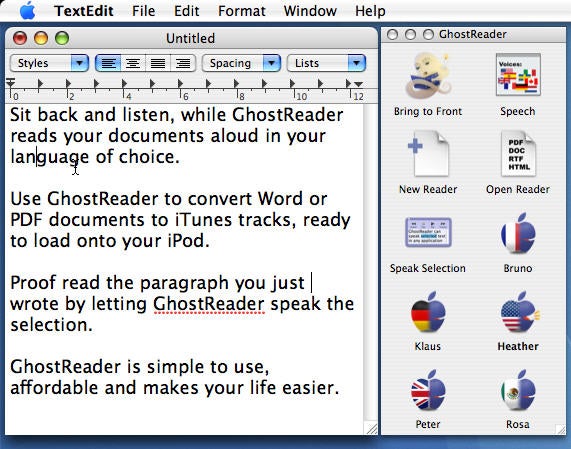
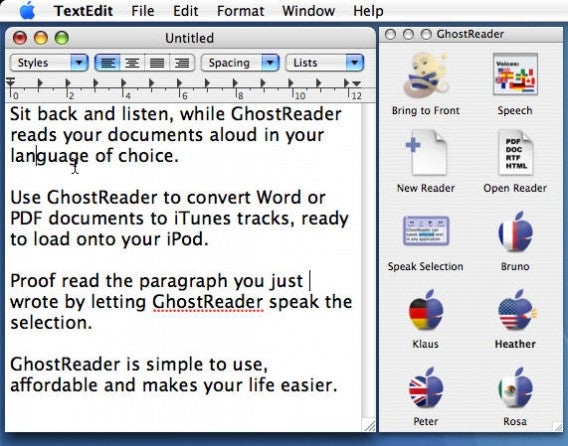
GhostReader – Reads texts on your computer out loud. This text-to-speech program is the best on the market, and is particularly useful for the visually impaired (although not exclusively).

It’s compatible with any application, the voices come in many languages and speech output is excellent. The functions are grouped into intuitive icons in a floating window, and you can export the texts the program reads to iTunes, in AAC, MP3, WAV, AIFF and Apple Lossless formats.
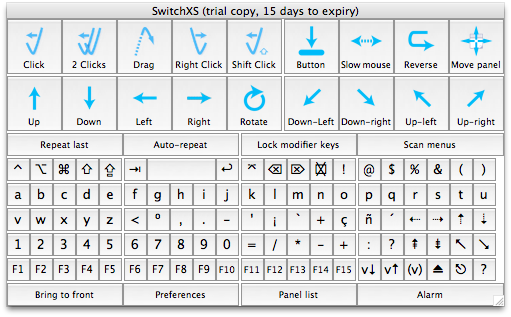
SwitchXSLets people with severe motor disabilities use their own Mac. It’s a virtual keyboard and mouse that you can use with any program to write, surf the internet and, in general, use software on your own.

The virtual keyboard, which you control with any hardware device, is divided into a grid of eight rows by four columns. The first command given (for example, the click of a button) starts the horizontal scan, and the application highlights the eight rows one at a time.
switchxs

Once you arrive at the one that contains the key you need, click again. SwitchXS scans the line vertically, highlighting the four “virtual columns” into which it is divided. A further touch is used to select the desired column. At this point the remaining keys are highlighted one by one, and a final touch will choose the one you need.

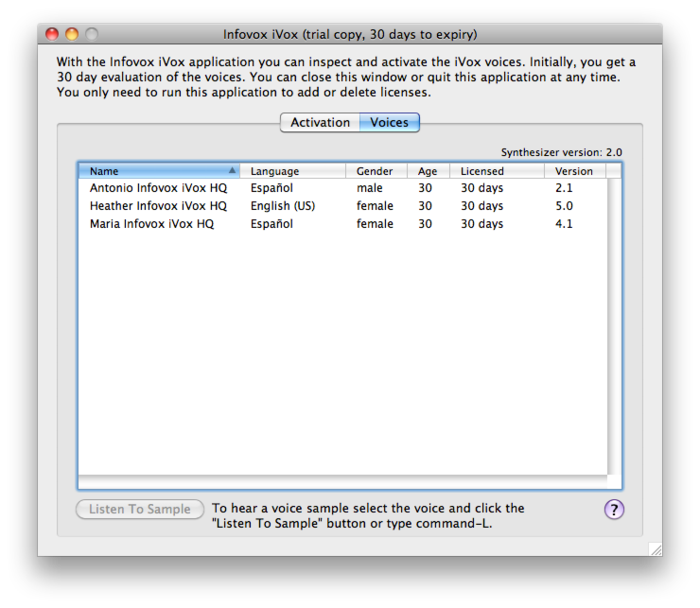
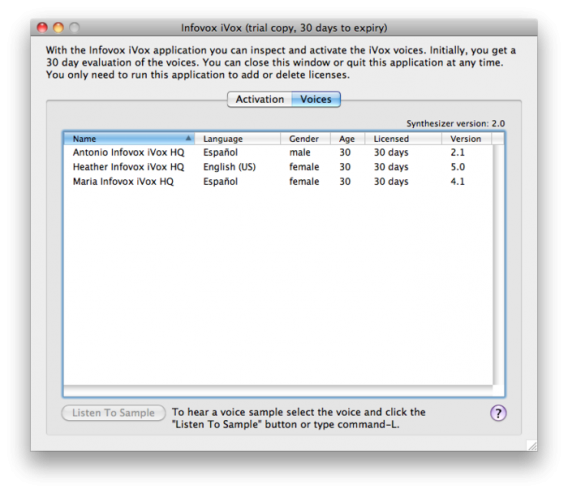
Infovox iVoxAdds new, high-quality voices to your computer. You can use it with all screen reading applications, including VoiceOver.

The Infovox iVox package expands the vocal potential of your Mac thanks to the voices of helpers like Victor, Clare and Heather. The product quality is very high, and the options allow you a great deal of customization. In all, it makes Infovox iVox a valuable addition to your Mac’s voices.
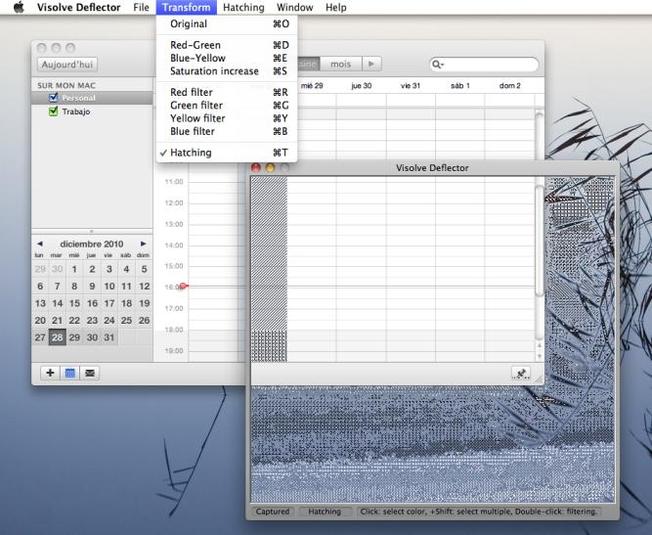
VisolveHelps colorblind people see images on their Mac’s screen more easily. The program applies a filter to the image shown on the screen, or selected portions of it, and makes it easier to read or navigate for colorblind people. It works with any type of image or text.

Visolve appears in a dialog box and can be superimposed on the image, on a portion of text or can be used to enlarge to full screen. The interface isn’t very intuitive, but the program offers lots of opportunities for customization, to suit every type and level of color blindness.
visolve

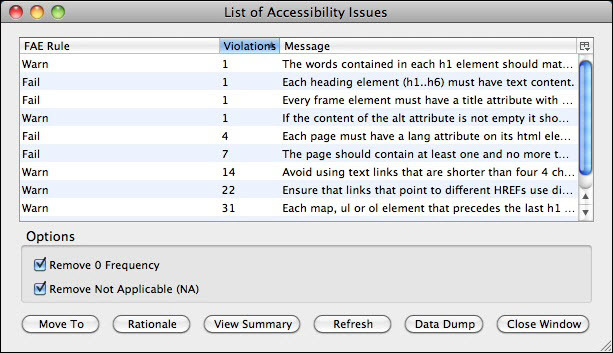
Accessibility Evaluation Toolbar – Check if a website is in accordance with iCITA – HTML Best Practices accessibility guidelines.

The test covers all aspects relating to graphic and audio content, and the detailed log clearly shows which issues have been met, which have been complied with partially, and which still have a long way to go. An excellent tool for those who want to create accessible web pages without mistakes or omissions.
accessibility-evaluation-toolbar

Read the other episodes in the accessible program guide:

Original article, written by Pier Francesco Piccolomini first published by Softonic IT.
GTA Online update fixes some server issues, temporarily disables in-game purchases

Rockstar has been scrambling since yesterday to elevate some issues gamers were having with Grand Theft Auto Online. Many players had trouble logging into the service at all or even had their single-player game saves erased. Today, Rockstar issued a patch for GTA Online, which fixes the following issues:

  • For PlayStation 3 users, a PlayStation Network server issue was detected that was limiting the amount of possible concurrent users. This was preventing most players from accessing GTA Online altogether and as of this morning, that problem was resolved.
  • There is an issue that is preventing some players from getting through the first tutorial mission across both platforms. Many players have been able to get through this with repeated retries, and we are working on unblocking this for everyone as soon as possible.
  • This morning, we experienced some instability across the GTA Online services which is affecting even people who have progressed beyond the tutorial mission. We are identifying these issues now and are working to restore stability for users as soon as possible.
  • For the time being and until we have been able to get everybody access to GTA Online and things are running smoothly, we have disabled the option of purchasable GTA$ cash packs. Players can however keep on earning GTA$ by pulling off Jobs and other profitable gameplay activities rather than purchasing cash packs.

Their last fix is particularly interesting as Rockstar has elected to disable in-game purchases altogether until it can get GTA Online stable enough. A number of server issues still exist. This means players will not be able to pay for in-game currency with real money. The only way to get money in the game for the time being is to complete missions and perform other activities within the game.

Rockstar acknowledges that GTA Online is off to a rough start but is actively working to fix all issues. “All of these initial technical issues will be ironed out as soon as we can. Please know that the entire team here at Rockstar and all of our relevant partners are and will continue to be working around the clock to get the experience to be as smooth as possible, as soon as possible,” writes Rockstar

The company recommends users submit issues to its support page as well as following its support post, which is updated with the latest issues. There are still a ton of bugs that Rockstar has to fix but the company has been active, working with players to get issues resolved.


RELATED STORIES


[Source: Rockstar]

Avira 2014 out now, drops firewall

The latest security suite from Avira is out today. The suite includes Avira Free Antivirus 2014, Avira Antivirus Suite 2014, and Avira Internet Security 2014. The suite functions and looks much the same as as its previous version. The free version of Avira drops the firewall feature in its suite of apps, which is just as well since modern versions of Windows have a firewall already built into the operating system.

You can still expand the functionality of your Avira suite by downloading additional services and products like its secure backup feature. This allows users to tailor their Avira security suite to suite his or her needs. Avira also has an Android application, which features an antivirus, anti-theft, and tracking abilities.

Avira 2014 hasn’t seen much change for this year, which won’t help sway users away from other antivirus and security suites like Avast! and AVG.

Download Avira Free Antivirus 2014 to try it out for yourself.

UPDATE: Article previously stated that the free version of Avira dropped its firewall feature but that was incorrect. The paid Avira suites actually dropped the firewall feature.


RELATED STORIES


[Source: Software Crew | Image credit: Avira]