Facebook beta for Windows Phone 8 updated

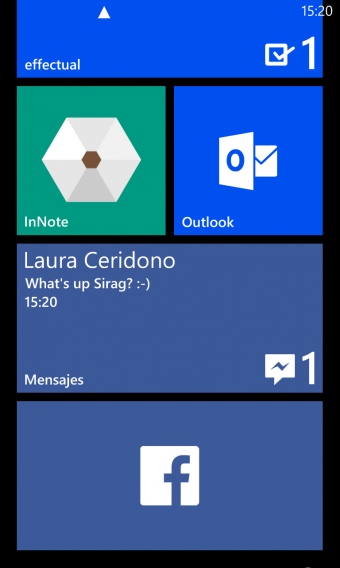
Facebook beta for Windows Phone 8 has been updated to version 5.2. The beta helps Facebook test new features and get user feedback. It’s a great way to see the future of Facebook on Windows Phone 8, although the app may be more buggy than the official release.

Facebook beta for Windows Phone 8

For Facebook beta 5.2, the social network has added the following features:

  • Faster and more reliable notifications
  • Toasts for Facebook chat
  • Redesigned primary tile
  • Redesigned secondary tiles for chat, events, groups, pages, and photo albums
  • Messaging improvements
  • Performance improvements
  • Support for additional languages

There’s still no word on when or if Chat Heads are coming to Facebook on Windows Phone 8. The app is still missing the incredibly popular Stickers that are found on the iOS, Android and web versions of Facebook. Many users still complain the app is slow compared to the iOS and Android apps. While messaging has been improved, it’s still not as instantaneous as on other platforms.

RELATED STORIES

Papa Pear Saga comes to iOS and Android

King, the developers of Candy Crush Saga have launched Papa Pear Saga worldwide on iOS and Android. It’s another casual, free to play game based around dropping Papa Pears through obstacles into barrels below.

Papa Pear Saga features 120 levels spread over eight episodes. On each level you have a limited number of Papa Pears, and you may have to reach a certain score, make other objects drop into the barrels, or light up each separate barrel. Unlike Candy Crush Saga, which is based on quick thinking and a bit of luck, Papa Pear Saga requires less thought. The Papa Pears bounce around the levels a lot as they hit the obstacles, giving the game more of a feeling of luck than skill.

The game is really well presented, with fun sound effects and bright, colorful graphics. You can buy in game currency, in packs of various sizes, which allows you to buy various boosters or pay to continue playing if you fail a level. From what we’ve seen so far, you can progress without buying gold bars, but they do make your life a lot easier, especially considering the amount of luck involved in playing.

It’s hard to have two hits as big as Candy Crush Saga, but Papa Pear has already made it big on Facebook, with almost 15 million players. The game is really easy to get into, and despite its simplicity, it’s compelling and fun to play.

Download Papa Pear for Android and iOS.

How to watch Thanksgiving Day football on your mobile device

Besides eating massive amounts of food, Thanksgiving Day is also know for an abundance of football. According to NFL.com, there will be three football games this Thanksgiving Day. Between getting second and third servings of turkey and grandma’s stuffing, you’ll be able to sit back and enjoy these games:

  • Packers vs Lions (12:30 PM ET on FOX)
  • Raiders vs Cowboys (4:30 PM ET on CBS)
  • Steelers vs Ravens (8:30 PM ET on NBC)

Each game will be broadcast on a different cable network, so theoretically, it should be easy to watch them on TV, but between talking to family and eating turkey, there’ll be moments when you’ll have to step away from the television set. Of course, you’ll still want to be kept up-to-date on scores and plays. This is where mobile apps come in.

There are apps for Android and iOS that, although may not let you watch each game in real-time, will keep you up-to-date on the status of each game.

NFL Mobile (Android/iOS)

NFL Mobile is the NFL’s official app. Providing a ton of info about each game, the app lets you follow your favorite team and receive updates of each team’s rankings. It’s probably the only app you really need to keep track of all the statistics of every NFL team, including scores and video highlights. If you’re big into fantasy football, you can also use NFL Mobile to take a look at how your team is doing.

NFL Mobile iOS

Unfortunately, the best feature of NFL Mobile is a premium one that’s only available through Version. The premium feature lets you stream live NFL games through the app, which is great if you aren’t at home but have Wi-Fi access through your mobile device. In short, NFL Mobile is a good option if want to stay on top of football games this Thanksgiving.

FOX Sports Mobile (Android/iOS)

The first football game this Thanksgiving season is between the Packers and Lions at 12.30PM ET. The FOX Sports app doesn’t show the game live, but it will have in-depth analysis of the game. There are scores and statistics that will be displayed in the app, and the FOX Sports app features a Live GameTrax which will keep you updated with the game.

FOX Sports Mobile iOS

CBS Sports (Android/iOS)

CBS is broadcasting the second game between the Raiders and the Cowboys at 4:30 PM ET. Like the FOX Sports app, CBS Sports doesn’t support actual live footage of the game, but it does support updated scores, stats, and news. You can also set up the app so that you get push notifications of game updates.

The app hosts more sports than just football, so if you want info on other leagues, this app will be a good addition to your app collection.

NBC Sports Live Extra (Android/iOS)

The final Thanksgiving Day football game is between the Steelers and the Ravens on NBC. NBC’s connected app NBC Sports Live Extra claims that you can watch games online for free, but the fine print actually indicates that you’ll need to have a cable provider account to access this feature. Basically, you have to have cable to watch anything through the app.

NBC Sports Live Extra iOS

In this case, watching the game through basic cable might be the best option, but kudos to you if you’re still awake after eating a huge meal and watching the previous two games.

Nothing beats the TV

Thanksgiving is a time to be with family, eat lots of food, and be lazy. Football is a great addition to the holiday, and with three games starting from the early afternoon, the typical Thanksgiving Day traditions will be complete.

The mobile apps work well to fill in gaps between plays, but without a premium account or cable subscription, you’ll be limited to updates without live streaming coverage.

Best case scenario, is that you can sit in front of the TV with your family to eat, have meaningful conversations, and of course, watch a lot of football.

RELATED ARTICLES

Facebook testing a ‘save for later’ function

As we reported a couple of weeks ago, more and more people get news from social networks. Now it appears Facebook is testing a ‘read later’ feature to encourage you to spend more time getting news from the site.

Like ‘Saved for later’ in Feedly, or Instapaper and Pocket, this new feature would allow you to save any link you see on Facebook for later. Facebook is increasingly a place where friends share interesting stories they’ve read, or video and photos. Currently, finding an article your friend shared a few days ago is really awkward, giving the social network a ‘blink and you’ll miss it’ feel. A saved for later list would solve this problem.

According to AllThingsD, Facebook could add a ‘Saved’ tab to the current side menu, where you would find all your saved links. Apparently this is the second version of the test: the first was deemed too confusing. The Wall Street Journal also reports Facebook is working on a Reader service, that would be like an RSS feed reader made up of content shared on Facebook. It’s clear that Facebook is aiming to be the prime source of news for its users.

RELATED STORIES

[Source: AllThingsD]

Public beta 1.7.2.1 released for Euro Truck Simulator 2

SCS Software’s massively popular Euro Truck Simulator 2 has a new public beta that anyone playing the game via Steam can test.

Euro Truck Simulator 2 Beta 1.7.2.1 is not a major update, and features only minor changes. SCS describes it as an ‘interim maintenance update’, but it does have the following:

  • Gearbox tweaking for some of the trucks
  • New exclusive Volvo FH 16 interior
  • Several tweaks and fixes of new Volvo tuning parts
  • Volvo FH cabin decal now customizable, works with backlight

If you can’t wait for these to come to the official release, you can access this beta by right clicking on ETS 2 in your Steam library. Click Properties, choose the ‘Betas’ tab and then click public_beta build. SCS says the beta is fully compatible with with the current version, and you won¡t lose any saved games or data by trying the beta.

RELATED STORIES

Xbox Video launched on the web, still no Windows Phone app

Microsoft’s Xbox Video service finally comes to the web. The movie and TV streaming service first appeared on the Xbox and Windows 8. Windows Phone users will have to wait a bit longer as Microsoft readies the app for release.

Xbox Video will run in most modern browsers and will require the Silverlight plug-in to work. Netflix, a Xbox Video competitor, also requires Silverlight to run. Curiously, the web version of Xbox Video does not support high definition streaming yet, something Netflix does support. Microsoft has also announced that the Windows Phone app will also lack HD support initially.

Check out Xbox Video at the source link below.

RELATED STORIES

Source: Xbox Video

YouTube for Android update hints at ‘Music Pass’ and offline playback

There have been plenty of rumors about YouTube‘s upcoming music streaming service and today we have a few more details. The sleuths over at Android Police have dug into the latest YouTube for Android update and found many references to the “Music Pass” subscription as well as a few details about how it will work.

Android Police found an XML file within the app that describes the benefits of subscribing to Music Pass. The file mentions offline playback of music as well as video, which we already knew was coming. There is also an emphasis put on the ability to listen to music in the background while using other apps. Currently, YouTube will stop playing any video if you jump into another app.

<string name=”music_pass”>Music Pass</string>

<string name=”offline_playback”>Offline playback</string>
<string name=”offline_playback_details”>Take your music everywhere</string>

<string name=”background_listening”>Background listening</string>
<string name=”background_listening_details”>Keep your music playing while using other apps</string>

<string name=”uninterrupted_music”>Uninterrupted music</string>
<string name=”uninterrupted_music_details”>No ads on millions of songs</string>

For offline video, the APK breakdown showed that videos could be downloaded in standard (360p) and high definition (720p).

It’s curious why Google is creating YouTube music subscription service since it already has Google Play Music All Access, which gives users unlimited access to millions of tracks and customized radio stations. We won’t know more about YouTube’s Music Pass subscription until Google is ready to reveal the service.

Would you use a YouTube music subscription? Let us know in the comments.

Download YouTube for Android

RELATED STORIES

Source: Android Police

Free app Xowa lets you download all of Wikipedia

A new free Windows, Mac and Linux app allows you to download the whole of Wikipedia, images included, onto your computer. Named Xowa, the developers claim you’ll need at least 80GB of space and around five hours to process the text after it’s been downloaded.

You can choose to download the full English Wikpedia or a much smaller Simple Wikipedia. The full version has an enormous 13.9+ million pages with 20.0+ GB of text, while the Simple version clocks in at only 180,000+ pages and 90,000+ images. You’ll be able to read Wikipedia normally almost exactly as you see it on the web once its set up.

Whichever you choose, once downloaded and processed, you’ll have Wikipedia available offline whenever you want. The development team say it’s ideal for keeping on a pen drive, so you can access it wherever you find a computer. You can also edit articles with Xowa – remove ‘vandalism’ or errors, or even rewrite the whole encylopedia giving yourself credit for inventing or discovering everything.

Download Xowa here.

RELATED STORIES

MEGA launches iOS cloud storage app

MEGA, the cloud storage service with 50GB of free space now has an iOS companion app.

MEGA for iOS lets you see what you have in your MEGA folder, share links to your files, view photos, read your MEGA messages and talk to your MEGA contacts.

In Settings, you can choose to store up to 1GB of your MEGA files on your device locally. A simple slider lets you set the maximum space you want to allocate for MEGA files. If you click on one of your files, MEGA will download it to local storage – you can then access the file on a computer by connecting to iTunes and viewing the File Sharing menu in Apps. This option is not available in Dropbox, but of course you can access any of your files from either app by using the standard sharing links.

Kim Dotcom announced the release on Twitter, saying only ‘OMG!!! #Mega’. He later teased the upcoming release of a Mega Sync client for Windows, Mac and Linux, that he claims will take down Dropbox.

RELATED STORIES

[Source: Twitter]

iOS 7: Third-party apps and the new interface

iOS apps are slowly being updated (with some controversy) to adapt to the changes ushered in by iOS 7. Some developers are using the opportunity to introduce substantial new features and improvements.

The new design of iOS 7 means developers must adapt their apps to a new graphics framework. Consequently, the end user must use an app that can often look radically different to the version they’re used to.

We’ve analyzed six of the biggest apps, comparing the old and new versions to see if this Apple-led revolution is bearing fruit or not.

Facebook

The definitive social app was immediately adapted to the new iOS look. It eliminated color nuances and has slightly changed some icons, simplifying them and making them a bit more angular.
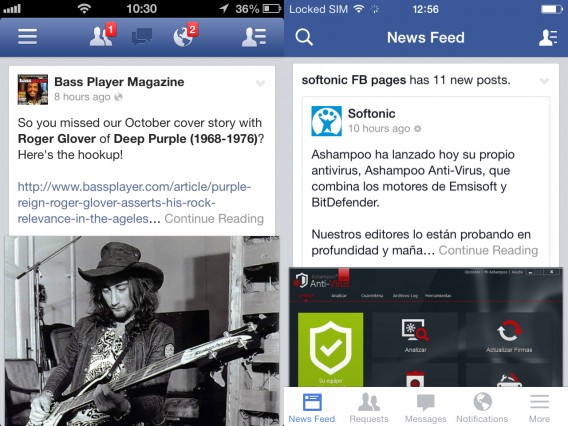
Facebook comparison

Moderate changes were a good bet for Facebook for iOS

The most common features are no longer hidden in the left menu (which was opened with the appropriate icon or with a flick of the finger from left to right on the screen), but always visible. Besides the usual friend requests, messages and notifications, you now have an even more handy search menu (which has assumed a predominant position in the upper left) and the newsfeed link to change your status, post a photo or check in.

The menu with the other tools has moved from the upper left to the lower right, and now sits on a pure white background.

Graphically, Facebook is perfectly suited to iOS 7. Whether the usability has improved is unclear, however, since the new, visible menu uses up valuable screen real estate. In terms of performance, we noticed a long boot time, but the updated app seems a bit more stable than the previous version. That’s definitely a good thing, because the performance of Facebook for iOS has always been mediocre.

Evernote

The king of digital notebooks has taken advantage of the introduction of iOS 7 to make significant changes. And these changes, are definitely for the better.

The old app wasn’t easy to navigate. It wasn’t that it was overly complicated, it’s just that there were a lot of features in a small space, and the oversized graphics of the app in iOS 6 weren’t clear. That meant that learning to use Evernote for iPhone took some effort and dedication.

The restyling for the iOS 7 release, however, has gone a long way toward improving usability. The results are positive.

Evernote comparison

Evernote took risks, and it paid off

The new Evernote offers a virtually perfect home screen, where everything is just a click away. The tabs are gone, and the last two notes you created are accessible directly from the home screen. The nice thing is that the organization interface is dynamic: the tools you use most often are shown and the others are hidden.

The Quicknote section (great idea!) lets you write a note, take a picture, create a reminder or make a to-do list of directly from the home page, thanks to the panel at the bottom of the screen.

Even the Notebooks and Tags screens have been improved and reorganized. Having been an Evernote user for several years now, kudos to Evernote for this wonderful new iOS 7 version. And the new emerald green background is beautiful!

Twitter

Twitter has undergone a couple of changes since the app received its first iOS 7 styling. The latest iteration features several redesigned elements: the header is a solid color now, navigation icons have shrunk a few points and fonts are a little lighter than before. The compose button has a new icon, too.

The biggest change is Twitter’s decision to include small buttons for interacting with tweets, always visible below each tweet. Previously, users had to slide a tweet to the left to access these features. Possibly, interaction levels were lower than desired in the previous edition. But overall, Twitter’s deign changes for iOS 7 are subtle and a little less radical than we’ve seen elsewhere.
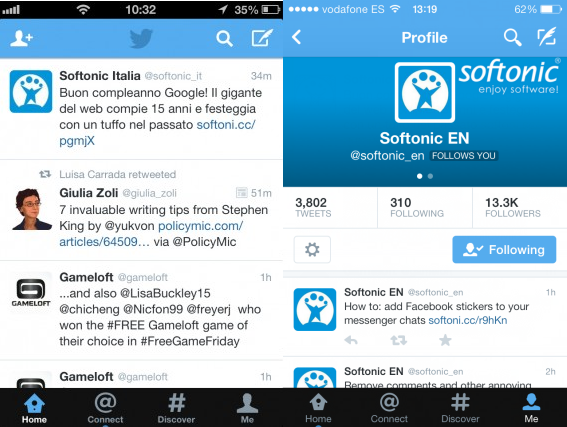
Twitter’s changes: a little more subtle

Foursquare

A fresh coat of paint and not much more. For the future, Foursquare Labs has promised a major update, but for now it’s changed very little. The interface is in line with iOS 7 and the icon is styled appropriately. The lines are thinner. But loyal users won’t notice much change. It’s still the same old Foursquare.
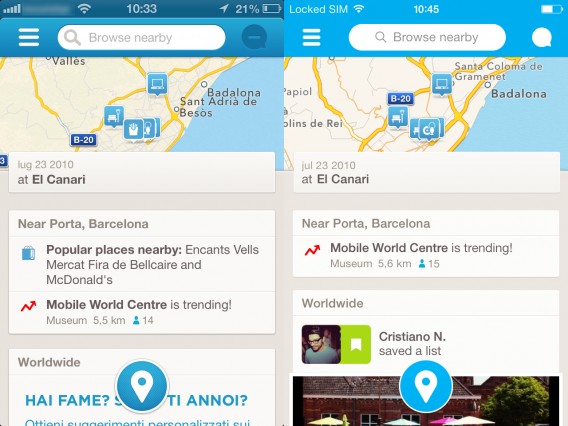
Foursquare comparison

We’re hoping Foursquare’s next update is a little more exciting

Instagram

The interface changed a few details, but they missed the mark. The space for displaying photos is slightly larger than in the previous version, which was swimming in frames. In general, the wasted space from before is now being used, but surprisingly this doesn’t weigh down the look.

The thumbnail of the profile picture for contacts has been rounded, and the results are aesthetically pleasing. The icons haven’t changed except on the profile page.

It’s a perfect example of how you can do a lot with relatively little.
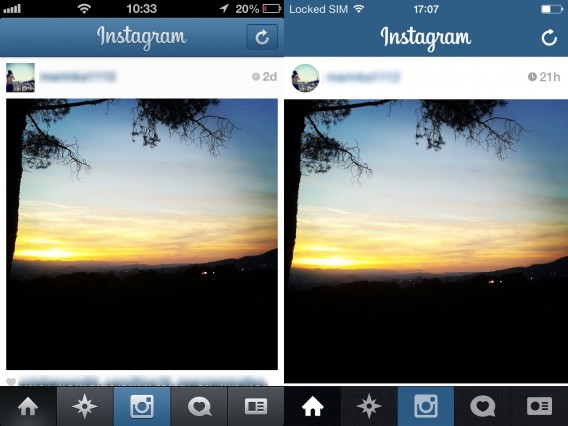
Instagram compared

Instagram got the most out of small tweaks

eBay

The icons have been adapted to the iOS 7 style, and now are gray and thin, with an off-white background instead of black. Even the fonts are consistent with the new operating system.

In this case, there’s also a feeling of greater space. From the point of view of features and organization, there’s been no major change, and the app works as well as it always has.
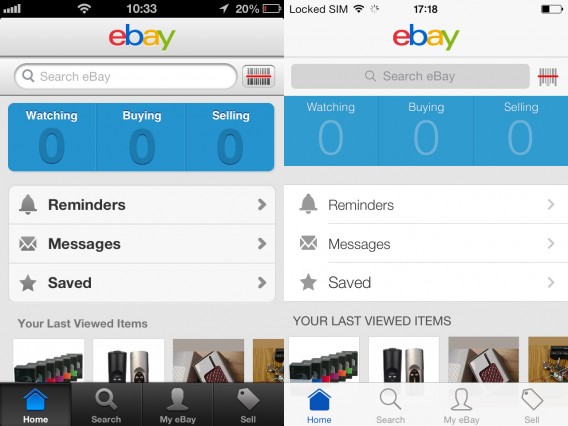
eBay comparison

Ebay feels lighter and more spacious

So far, the most popular applications have limited themselves to a few cosmetic changes to adapt the look of their apps to the new two-dimensional environment of iOS 7. Only a few apps like Evernote took more risk by venturing onto the slippery slope of changes to the user experience.

The next time these apps update, think we’ll see something more daring?

If you want to know more about iOS 7, take a look at the index with all the news, articles and videos about the new mobile operating system from Apple.

Original article written by Pier Francesco Piccolomini for Softonic IT.