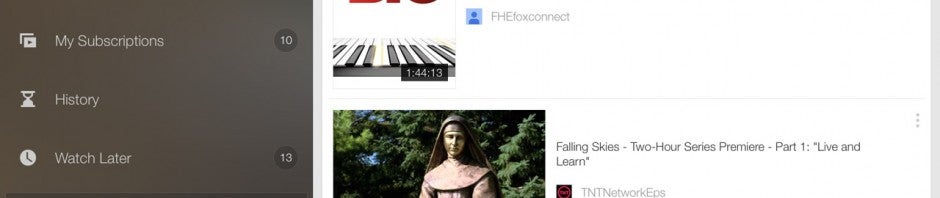
You can now watch your purchased Google Play Movies within YouTube. Google has added a new “Purchases” section in the slide-out menu which lists your purchases chronologically.
This move seems a bit redundant since it lists your content in two applications now but it’s good for people who don’t want to use Google Play Movies. Although iOS has a separate Google Play Movies app, you can’t actually buy video in the app, making it pointless. iOS users can purchase a movie from Google Play on the web and watch in YouTube now.
If you bought a ton of movies and TV shows from Google Play, the Google Play Movies app does a better job of sorting them. There are sections for movies and show unlike YouTube which just lists all video by date of purchase.
A minor iOS update is rolling out today which brings bug fixes and security updates. The update also improves the “connectivity and stability” of Apple’s iBeacon advertising platform.
The security update included in iOS 7.1.2 fixes the email encryption vulnerability discovered in May. The vulnerability allowed someone to access your email attachments if they had physical access to your phone.
To download the update, head over to your settings and check for a system update or check iTunes with your device connected.
Instagram just completed a major update of its apps for iPhone and Android. The goal? To make Instagram 6.0 your one and only photo editing app. Incidentally, the development team has pulled the rug out from under its most threatening rivals, VSCO Cam (Android, iPhone), Snapseed (Android, iPhone) or Pixlr Express (Android, iPhone). But was the latest Instagram update really necessary?
According to a recent study by the investment bank Piper Jaffrey, Instagram is the preferred social network of American teenagers. This result can be partially attributed to its ease of use, but with this update, things have gotten a bit more complicated, and I feel that version 6.0 loses some of Instagram’s intuitiveness. Will this latest update affect Instagram’s popularity?
New editing options
The Instagram update only effects one section of the application: the choice of filters. As you can see from the two shots below, the development team didn’t hesitate to modify the interface to integrate these new options.
Check out this video of the Instagram 6.0 features in action, installed on an iPhone 4S.
Default player
brightcove.createExperiences();
Instagram before and after the update on an iPhone 4S
The size of the filter icons have increased, while the option to blur, add a frame, and the ability to resize the image have disappeared from the screen. The Lux button, which allows you to increase the brightness and contrast of on image, remains in the same place. Beyond these changes, there are two important developments:
It’s now possible to double tap on the filter of your choice to control its intensity on a scale of 0 to 100. Here, you’ll also be able to choose whether or not you want a frame on your photo.
It’s now possible to change the intensity of Instagram filters
The wrench symbol covers a string of options for editing. From saturation to blur through to cropping, there are no less than 10 customizable sliders.
A series of options you’ll probably never use
With so many possibilities for modifying photos that eventually get compressed before being published, I need to ask, are they really necessary? Personally, I struggled to find my bearings with this new Instagram. It was much easier to crop an image or add a frame before this update, for example.
It’s now much more difficult to add a frame to a photo
Currently, I use very few of these 10 new editing options. Blur, photo frames, and filters were already more than enough, and I don’t intend to go through any extra steps to post media.
Even further, it seems like some features have virtually no effect. Has the Instagram team only added these options for the application to appear more professional? My guess is, yes.
Competing with VSCO Cam
I spend a lot of time testing all the photo apps for smartphone, and I’m certainly not the only one– experienced Instagram users have long been using third party apps to retouch their images before posting.
Professionals, on the other hand, opt for a more radical technique: they prepare their content on PC or Mac, import it to their smartphone, and then publish it on Instagram (see our tutorial on how to import media from your PC).
Will this Instagram update help people who use a third party app to edit images with native Instagram options? I highly doubt it. VSCO Cam, one of the most popular editing options for mobile, has long been recognized as the best utility to make the most striking pictures. This service has much better quality filters, and the photo capture options are more complete (I’m mainly thinking about the possibility of separating exposure and focus when taking a picture).
VSCO Cam, probably the best photo editing app on the market
What about users who aren’t familiar with all the other photo editing apps? They probably aren’t interested in venturing into the advanced settings of Instagram. The different filters already available correct the most common imperfections including brightness and contrast, just to name a few.
For these reasons, I’m not convinced that this Instagram update was really necessary. Why go directly to other photo editing apps when most of your users end up posting their photos or videos on your network afterwards?
The next version of Windows, code named “Threshold,” is expected to debut some time in 2015 but we’ll get a preview this fall according to sources speaking with ZDNet.
Windows 8.1 focused on improving the desktop experience and Windows Threshold will continue the trend. Threshold will adapt to the type of hardware you’re using. If it senses a mouse and keyboard, it will boot to the desktop by default. If you have a touch screen, it will boot to the live-tile interface.
Windows 8.1 already allows users to choose to boot to desktop by default, but Windows Threshold will automate the process.
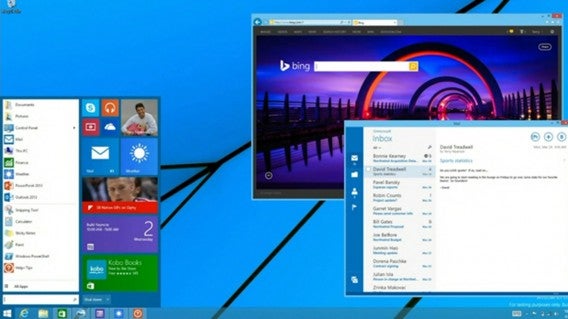
We also saw a preview of the revised Start Menu coming to Threshold. It’s a hybrid of the transitional Windows 7 Start Menu and Windows 8 live-tile interface.
Microsoft is also planning Windows 8.1 Update 2, which will provide minor usability improvements. This update is expected to roll out this August with a bunch of security updates.
There is still uncertainty whether Threshold will be an entirely new version of Windows or if it will be a point update. Microsoft may want to brand Threshold as Windows 9 to tempt users still clinging onto Windows 7. We’ve already seen evidence it will be named Windows 9 from a leaked image.
It’s undeniable that Google TV was a failure. The platform, launched in 2010, was too focused on creating an ecosystem built from an aged version of the Android operating system. Google attempted to bridge mobile and the living room with the Nexus Q, which was announced, but it was never officially released.
The release of Chromecast showed that Google realized that people wanted a simple way to connect apps and TVs with little friction. With that device, Google’s been successful. The price point is perfect given its function, streaming content from the internet and controlled by your smartphone of tablet. While supported apps are still lacking compared the amount of available Android apps, the platform does support many of the most popular apps.
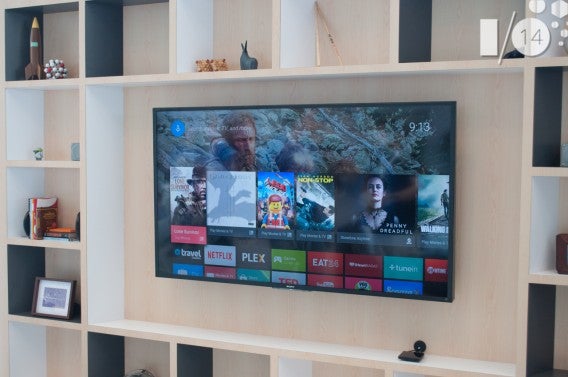
When Google officially announced Android TV at Google I/O 2014, it wasn’t a huge surprise. What is surprising is that Google is designing a device that is an evolution of Chromecast and a rethinking of Google TV, all under the Google Cast platform. At I/O, I had a chance to see the developers kit for Android TV in action, and from what I’ve seen, the platform is promising.
Android on your TV
The developer’s version was quick, responsive, and already expands far beyond Chromecast when it comes to the types of supported apps offered. In a way, Google has created product tiers for people, and Android TV is built to replace the huge fragmentation of operating systems in SmartTVs. Various manufacturers have included their own SmartTV OSes before, but they’ve always been locked in to a specific brand.
Android TV will rethink that factor, offering a unified experience. Now, people can use Android TV regardless of what brand of TV they have. But Google isn’t ignoring people with old TVs: it’s supplying the tools for third-party manufacturers to create their own set-top box for Android TV. As of now, Razer is the only company who’s officially announced an Android TV set-top box.
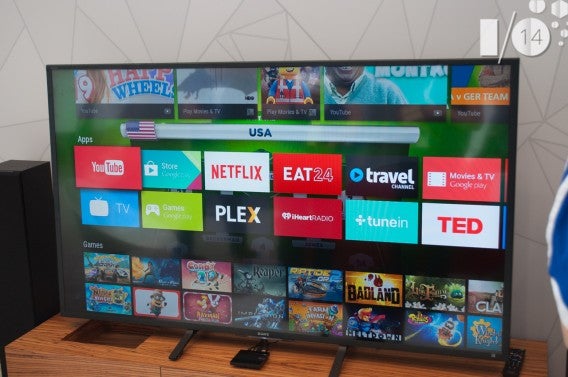
One of the biggest additions, not supported on Chromecast, is the ability to download and install games from Google Play. This is a huge advantage over other set-top boxes, and it looks like it’s aimed directly at Amazon’s Fire TV.
Talking with the rep demoing Android TV, I asked what the expected price for the TV would be. His response was that it would be up to the OEMs (original equipment manufacturers) to price their Android TVs. I pressed him further, asking if the price would be comparable to Fire TV; his response, along with a sly smile, was that it wouldn’t surprise him.
An untapped market
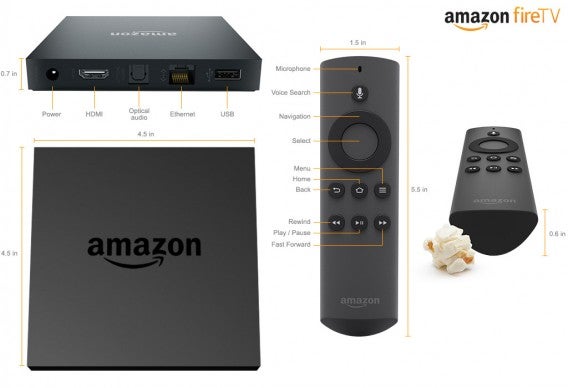
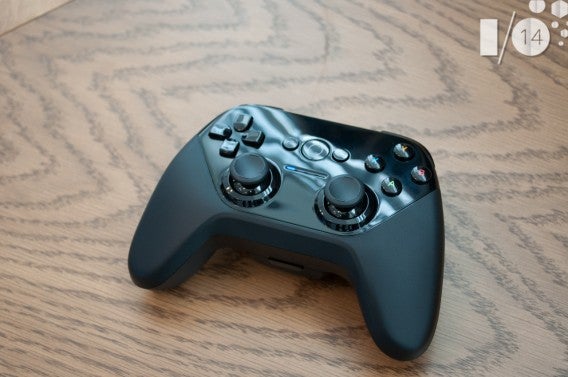
There are a couple of problems with Fire TV when it comes to games. The first is that the controller is an extra $40 on top of the $99 price for the Fire TV. The second is that games have to be in the Amazon App Store, which doesn’t have the amount of games that Google Play does. Add to this the fact that Fire TV only has 8 GB of storage (compared to the 16 GB that I saw on the developers kit for Android TV) and that means you’ll be uninstalling a lot of games.
The quick demo shown at Google I/O showed apps like Eat24 and TED talks, but games have a big place on Android TV, and I was told that any app that’s on the Google Play Store will be compatible; the only thing a developer will have to do is add support for the controller.
Filling the gaps
Android TV and Chromecast are part of the Google Cast Platform. They’re separate devices, and you won’t be able to have the same functionality on both platforms, but I think it’s smart of Google to control the software side of Android TV and leave manufacturers the decision on how to build a new device.
Google is smart to fill two gaps with Android TV. It’s attempting to solve SmartTV fragmentation, as well as re-enter the set-top box market with a lot less risk. Since Google is positioning Android to unify across all of its platforms, this also lets developers spend less time working on one platform at a time, creating one app for one ecosystem that will work on multiple platforms.