Minecraft Isn’t Just for Kids: Why Adult Gamers Love It Too

It’s a simple game. You build little constructions one 1×1 block at a time. The graphics are clunky at best.

Yet Minecraft has captured the imaginations of more than 100 million players around the world. What’s different is that the game has become a generation-spanning phenomenon. Adults, as well as children, are spending hours playing the game, participating in discussion groups, and attending conventions.

What is it about the game that has captivated its players?

Intuition matters

Minecraft is a deceptively simple game, and that’s intentional. You begin your adventures by learning how to master the basic tools and techniques. Time is of the essence, as nightfall in the game brings with it creepy critters, meaning you need to create a shelter quickly.

minecraft-windows-10

In mere minutes, you’ll be carving out a cave from a mountain to create some security and shelter. Need a bed and a torch? You learn to build them in minutes.

One of the beautiful features of the game is its focus on self-preservation. You really perceive the importance of learning skills, constructing new objects, and exploring the work of others. Keeping the zombies away may feel daunting, but it focuses you on skill acquisition.

Players move quickly from basic subsistence to creating the objects that provide more comforts: a storage chest and furnace are important. Food gathering is important (you slow down if you aren’t fed in most modes). Your choices range from gathering apples to killing a cow for its leather and steaks.

You can progress to planting and harvesting crops and collecting animals. Do it quickly because the zombies appear when the sun sets.

Immersive Impact

There is tremendous flexibility and creativity in the game. Players have so many choices to make, making multiple playing modes and an immersive experience limited only by the player’s creativity.

In response to an early 2016 query on reddit.com, user neewom put it well.
“I play because it’s an open world with a nearly infinite capacity to escape. Someone can start up the game and play custom-made maps with excellent stories (and impressive user-made programming of a sort) or build their own worlds,” neewom wrote.

Minecraft-videojuego-cualquier-construccion-tradicional_EDIIMA20150209_0589_4

“It’s…it’s just a lot of fun. Plus, the developers are incredibly involved with their user-base (fanbase? It’s a blurry line). It’s a big game that…we’ve been able to watch and help build with our input. They’ve taken ideas from the community and built them into the game.”

That community is another reason the game is popular with those of all ages. The user community allows players to participate and tap into a collaborative culture. Players eagerly share their builds, creating YouTube videos that teach others how to build things. Sharing has become a part of the Minecraft ethos, providing ample opportunities to learn from others.

For more gaming fun, check out LEGO Worlds!

7 Ways to Protect Your Privacy on Social Media

Let’s be honest, there are just two reasons for being on social media: To see what your friends are doing, what they bought, whom they’re dating and where they’re vacationing….

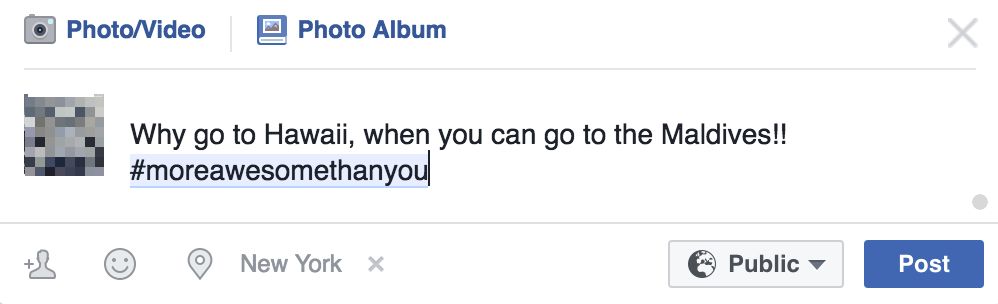
…and to show the world that you’re awesome(er) than they are.

More Awesome

And then there’s the boring stuff like keeping up with news and sharing our opinions, getting fashion ideas and artistic inspirations, or to share your vacation photos with your family.

Whatever you use social media for, you need to be aware of the risks and dangers that lurk under the surface.

1. The not-so-fine fine print

Yes, we’re referring to that thing you just clicked “I Accept” without reading. Facebook’s fine print has a line that says “We reserve the right to send your private pictures to your mom if it shows illegal activities”. Really??! No. We made that up. But the fact that it could be true should be enough to scare you.

Most of us don’t have the time to the fine print of every website we register on. Our trick is to pay attention to what the tech media (like us!) is reporting about, and trust them to raise the alarm when companies go over the line. Like the media storm when Whatsapp changed their privacy policy to allow your data to be shared with Facebook, or the Snapchat saga about whether they own the rights to your photos.

It’s not a surefire way, but let’s be real, are you going reading those 10,000 words in size 5 font?

2. Recommended not recommended

‘Recommended’ or ‘default’ settings doesn’t mean it’s the safest. Remember that social media websites want to get as many people seeing, liking and sharing your content as possible. Facebook gives you 3 levels of visibility: public, friends and only you, as does Linkedin and other sites.

Which should you choose? Do the grandma test. Would make grandma laugh – Public. Grandma will disapprove – Friends. NSFG (Not Safe for Grandma) – Only you.

19qz4f

3. Location

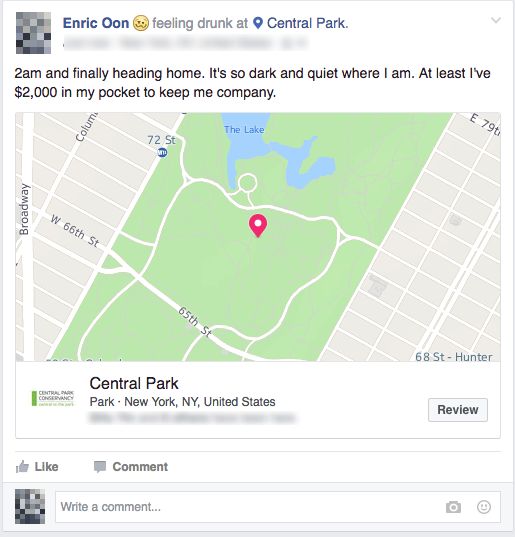
Missed the last train to get back to your hostel at 2am on your solo trip around Europe? Thanks to your public post on facebook, your family, friends, and even that kidnapper from Taken knows exactly where you are, and what has happened. Still sounds like a great idea?

Social Media

But it’s not always you that’s revealing your location information. Many sites now automatically attach your location to the pictures you upload, or the posts you make.

4. Personal Information

“Husband just bought us a cruise package! We’ll be away the whole of next week!”

That’ll probably get you a few likes (and plenty of envious hate) from your colleagues and friends, and it’ll also tell the guy in the neighborhood, who’s been eyeing your expensive watch collection, that it’s time to strike.

Keep your personal information, schedules, and travel plans to yourself, or among a trusted group of people. You never know who’s watching.

5. Contests

Free iPhone if you share this post, fill out a form and receive a new Playstation, win a trip to Las Vegas if you visit this site…. We could go on and on. Are you really buying this?

Granted, some contests could be legitimate marketing, but that doesn’t mean you should let your guard down. While most companies (like us!) respect and protect the private information you give us, criminals won’t and you could quickly find yourself on the receiving end of spam, hacks and other harmful intrusions.

Our tip? Make sure that the contest actually exists (a quick Google search), and make sure that the post is actually coming from the official account of a reputable company and not from Show-Me-Your-Money Inc. or Everybodywins LLC.

6. Romance scams

Extremely dashing guy from South Africa randomly messages you and introduces himself? Or a very friendly girl from Paris sends you a picture and says hi? Time to wake up. Life isn’t a Hollywood film.

And don’t try to convince yourself that this is different, scammers sometimes build their relationship and trust with their victims over many years, patiently waiting for that big payday when their “grandfather contracts a fatal disease and needs a $500,000 cure that has to be flown in from Argentina”.

7. Ads tracking

Not technically an invasion of your privacy… well, not a malicious one anyway. Although it can be unsettling, and bad for your wallet, to have ads pop up all over the place, reminding you about that brand new smartphone you were looking at on Amazon. On Facebook, go to the Ads section under Privacy settings to disable “Ads based on my use of websites and apps”

Do you have your own tips? Share your experience in the comments below!


Related Articles

All the Best Relationship Blog Websites

7 Tips to Enhance Your Linkedin Profile to Land Your Dream Job

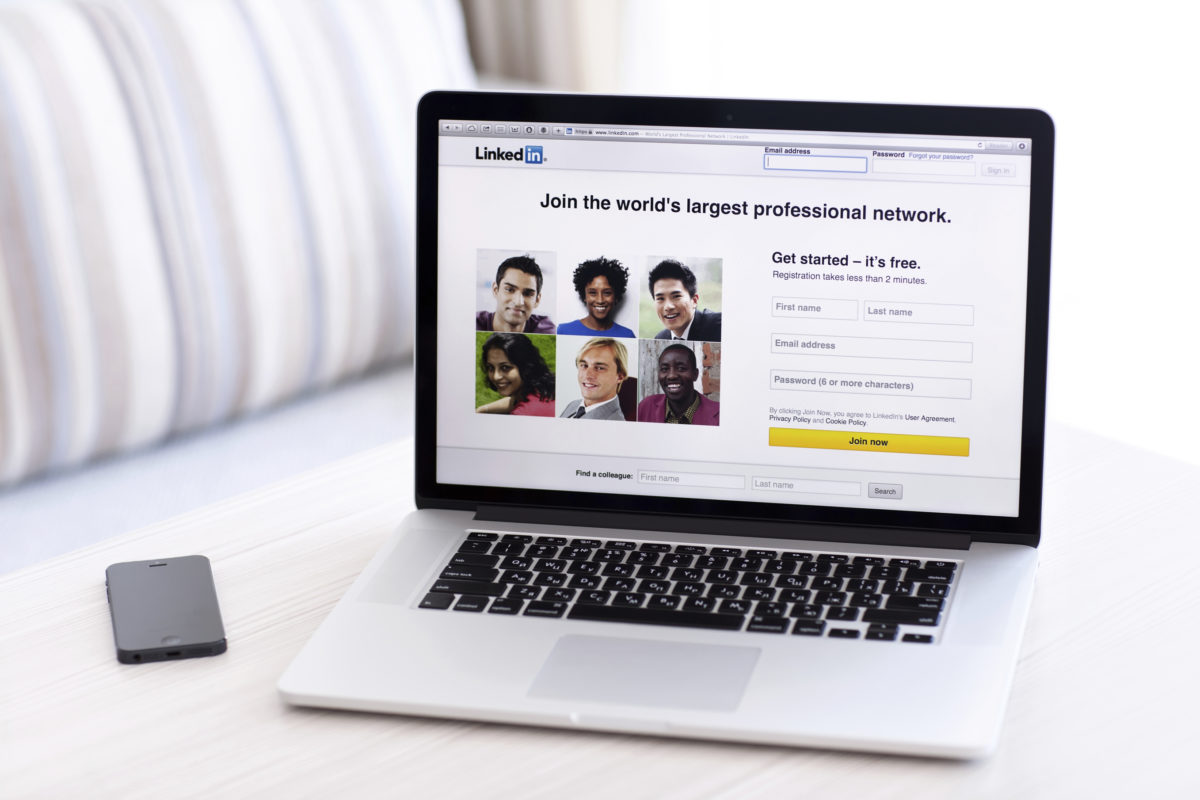
LinkedIn is the premier social network to find job offers, network with industry peers, get recommendations from your colleagues, and join professional groups. How your Linkedin profile looks and reads says a lot about the kind of person you are, and whether you might be a good fit for a job.

Here are a few tips to make your Linkedin profile stand out from the crowd.

1. Your photo says a thousand words

Profile pictures on LinkedIn are displayed in a relatively small size (200 x 200 pixels), so close-ups are highly recommended. This means that photos of you running a marathon, climbing a mountain or traveling to an exotic country will not work.

And also, most people seem to have the same boring picture of themselves in a suit. As long as you don’t go to the extremes, some originality and creativity won’t hurt.

Profile picture

2. Summarize your summary

The summary is where people turn to for a quick peek at who you are without having to look through your entire profile. This is a good place to show your personality and intangible qualities, since it isn’t structured into employment, education and projects categories like the rest of your profile. Use your summary to sell yourself!

Don’t make it too lengthy, and get rid of the cliches: “expert at teamwork”, “ability to adapt”, “hard worker” and the others. HR folks are tired of reading the same phrases over and over again, and you’ll look run of the mill instead of standing out.

3. Add (multimedia) samples of your work

One commonly overlooked feature is the ability to add links and upload samples of your work. Just click on the square with a plus sign in each section, and then Add link or Load file.

These work samples will help you make your profile look more visually attractive, and will break the monotony of text, after text, after more text that everyone else’s Linkedin profile has.

4.Skills are big deals

Skills recommendations show that you have a skill that others value. It is one thing to claim that you’re an expert and another to have 30 people endorsing that skill of yours.

But here’s our tip: Spend some time to list all your skills at one go. Otherwise, it’ll be difficult (and awkward) to go back to people who’ve already endorsed you for something, to endorse you for the new skill you later thought of adding to your profile.

Bonus tip: A good tactic to get endorsed is to endorse the skills of your connections and wait for them to return the favor. Don’t be too pushy about it, do not insist/ blackmail/ threaten to strangle their cat under any circumstance.

5. Will you recommend me?

The recommendations section is the most important part of your profile to a recruiter. But personally approaching someone for a recommendation can be an awkward affair. Unknown to most, there’s a hidden feature where you can send a (generic, computer-generated-looking) request for one. Go to “Edit Profile”, hover over the arrow beside the blue button that says “View profile as”, and select “Ask to be recommended”.

6. Speak the recruiter’s language

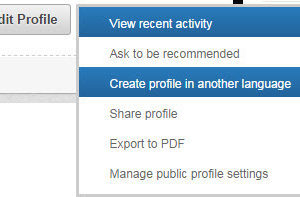
If you work in a multi-language environment or industry, then a LinkedIn profile in more than one language will definitely set you apart. You can create a copy of your profile in more than one language from the Edit Profile button> Create Profile in another language.

En-otro-idioma-300x197

7. Show you care

Be active on Linkedin. Share interesting (and relevant) news articles, infographics or achievements. Like and comment on posts by others on your feed, and don’t hesitate to drop a compliment or two.

And now, all you need to do is wait for that dream job to come calling. Good Luck!

Do you have other Linkedin tips? Tell us in the comments below.

Has Your Computer Been Hacked? Here Are 7 Tell-Tale Signs

Stop pretending. You don’t (really) know what “getting hacked” means. All you have in your head right now is a swirling mix of Harry Potter meets Star Trek with a dash of Deep Impact, a magical world with many buttons and where everything goes wrong – Fast.

But it is important to understand hacking, because week after week, the biggest companies, many of which you use and have accounts with, get hacked.

So what does “being hacked” actually mean, and how do you tell if your computer has been hacked?

Getting hacked means that someone has gained access to your computer or accounts, and that your personal and financial information might now be in the hands of someone other than you. While most modern computers have a certain level of protection, it’s us, the flawed humans, who cannot resist the temptation to open a mysterious file, visit a dubious website, or click on a link to claim a $5 million prize.

How do you tell?

So how do you know if you’ve been hacked or invaded? There are 3 levels of panic you should be aware of:

Level 1 – Just an itch.

The generally harmless, but not any less frustrating kind that requires a simple fix.

You constantly get redirected other websites when all you’re trying to do is check your email, or windows might pop up promoting everything from pornography to weight-loss pills to Harvard degrees.

Or, you might notice browser toolbars that mysteriously appear, or your default browser search engine and homepage might have been changed.

toolbars

These are generally harmless (albeit annoying) infections and can be cleaned up with a Malware-buster like Malwarebytes or SpyBot. Also, a decent anti-virus software like Norton (click for 30% discount) or Sophos, is highly recommended for general computer well-being.

Level 2 – I need an Aspirin

These are invasions that can be stopped by disconnecting from the internet and shutting down your computer, although it’s probably a good idea to take it to the repair shop soon.

Your computer starts throwing tantrums and programs may stop working. Your passwords may change, and you might see files you’ve never seen before.

Some hacks are very obvious, like your cursor moving around on its own and clicking on files. If that happens, disconnect from the internet and shut down your computer immediately. Until you get it resolved, do not use the computer to check your email, bank accounts or use other online services.

However, some attacks may not be all that obvious. They could sit silently in the background and collect your passwords and personal data without your knowledge. Watch for the little things, like a mysterious new app or an unexplained system slowdown.

Level 3 – The world is on fire. Run!

Now we’ve come to the nasty stuff that will not stop even if you shut down your computer.

If you haven’t protected yourself with a decent anti-virus program and practiced sensible computing habits, then you could fall prey to Ransomware – The biggest hell-storm that’s taking the world by…. well, storm.

It sounds horrifying, and it is. Ransomware silently sneaks into your computer, slowly and stealthily locks up your files, and when it’s ready, flips the switch and plunges you into digital darkness, unless you meet their demands for outrageous sums of money.

What can you do? Unfortunately, nothing.  You’ll have to decide if your information is worth what they’re asking, or quickly scramble to the bank, office, and police station and recreate a whole new digital life.

Also, checking your credit card statements could also reveal that you’ve been hacked. How many apps and websites have you trusted your credit card info with? Uber, PayPal, App Store, Amazon, Spotify? That’s an awful lot of doors to lock out a possible invasion. Make sure you use passwords that are tough to crack, regularly check your credit card bills, and keep an eye out for reports on companies that’s been hacked.

What other tips do you have to spot a hack or infection? Share it in the comments below!

6 Design Software Titles for Beginners

The world of graphic design can feel vast and overwhelming to newbies. It helps to have a software application that caters to your skill level so it will be intuitive to use. With the right software, you can advance your skills more quickly and cultivate your talent as a designer. Here are some of the best-rated beginner design software titles available.

1. Canva

If you’re still getting your feet wet with graphic design, Canva is a great place to start. It’s free software, so you have nothing to lose by trying it out.

canva

Despite being free, it offers tremendous value to beginners, helping you to design a variety of different graphics, while choosing from an array of templates. It’s ideal for creating simple social media designs for websites like Facebook and Instagram, and it can be a helpful tool for developing graphics to promote social media posts.

You can access to Canva in this URL

2. Pixlr

Pixlr is the ideal tool for photo editors and novice graphic designers. It simplifies photo editing, providing a variety of tools, filters, and effects, all without costing a dime. While it doesn’t possess the same functionality as some of the costlier software applications, it’s a great option for beginners who are wanting to get a better handle on photo editing.

You can know more about Pixlr here

3. Inkscape

Inkscape is a good alternative to Adobe Illustrator as it provides ample functionality without costing a thing. It has a variety of advanced features that can support photo editing, graphic design, logo design, web design, and more. The company also offers tutorials which can help beginners to learn functions quickly and establish themselves as designers.

You can download if you click here

4. PicMonkey

PicMonkey is a photo editing tool that allows you to easily crop, re-size, and edit photos. For beginner and hobbyist designers alike, this can be useful software that doesn’t cost money.

picmonkey-large

While the basic software is free, PicMonkey also has an upgraded version that can take your photo editing skills to the next level.

You can access to PicMonkey here

5. Piktochart

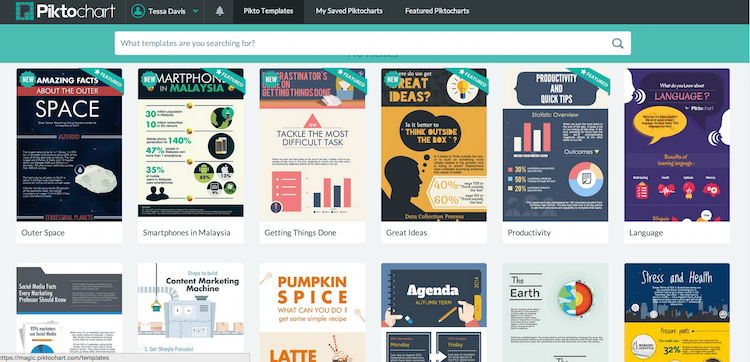
For designers looking to hone in on their infographic design, Piktochart is a great place to start. Infographics are an incredibly useful marketing tool as they cater to the visual nature of people while educating the audience in an engaging way.

Piktochart-1

With Piktochart, even novices can develop captivating infographics with ease. This software offers over 400 different templates and an endless variety of icons, so you can create customized infographics that pertain to virtually any niche.

Access here to Piktochart

6. Adobe Illustrator

Adobe Illustrator is a great choice for graphic designers who are just getting their foot in the door. While it’s more complex than the other software applications mentioned, it provides in-depth functionality that can dramatically improve your design potential and creativity. Adobe offers a variety of tutorial videos that can help beginners master the program’s functions and improve their designs so you can create eye-catching graphics easily.

Download Adobe Illustrator for Windows and for Mac

Graphic design is a complicated art, but that needn’t deter you from honing your skills. There are numerous graphic design software titles available that are perfect for beginners, allowing you to gradually improve upon your talent, while mastering the various effects and design schemes.

To learn more about improving your design and photo-diting skills, read Top 10 Tools for a Photo Retouch.

The 5 must-have apps for your PC

As you know, owning a PC can often mean so much more than simply pressing the on button. There are often occasions where we need to remove a virus, browse the internet, open files and even write the content of our own.

With this in mind, we have listed the 5 most important software programs for your PC. These tools have been selected based on the most popular products downloaded by Softonic users. So if you have a computer, we recommend that you consider these tools just like our users did!

MICROSOFT OFFICE Download Now
10
The new Microsoft Office is now on a pay monthly subscription model so no more huge entry costs to gain access to all of the classic tools such as Word, PowerPoint, Excel, Outlook, Publisher, Access and OneNote – all with new and dynamic features!
CCLEANER Download Now
9
CCleaner is a ultimate tool for finding and removing junk files and errors on PCs. Is your PC running slow? Well, with a few clicks, CCleaner helps you to recover disk space and makes your PC faster and more efficient.
HOTSPOT SHIELD Download Now
9
Hotspot Shield is a free VPN that allows you to secure your connection while surfing WiFi hotspots. It also allows you to change location in order to gain access to your favorite sites such as Pandora and Hulu when you’re not in the US. There is also a paid version that removes the ads!
OPERA Download Now
9
Opera is a free web browser that works in a similar way to Edge, Chrome or Firefox. However, the huge advantage with Opera is its built-in free VPN feature – handy for secure online browsing.
WINRAR Download Now
8
WinRAR is a program that can be used to open, create and decompress RAR, ZIP and other format files. The latest version also supports RAR5, the new compression algorithm. You can open any file with WinRAR!

WinX DVD Ripper Platinum New Year’s Giveaway

DVDs are great. If, however, you’d like to take your films with you, wherever you go, or you’d like to clean up your physical discs a DVD ripper is what you’re looking for.There is, however, plenty to consider when selecting a DVD ripper. File format and quality as well as the type of encoding you need all need to be taken into account.

Excellent features and lightning fast speeds

Fortunately WinX DVD Ripper Platinum, by Digiarty, offers a full suite of options and can rip DVDs 3 to 5 times faster than other leading DVD rippers.

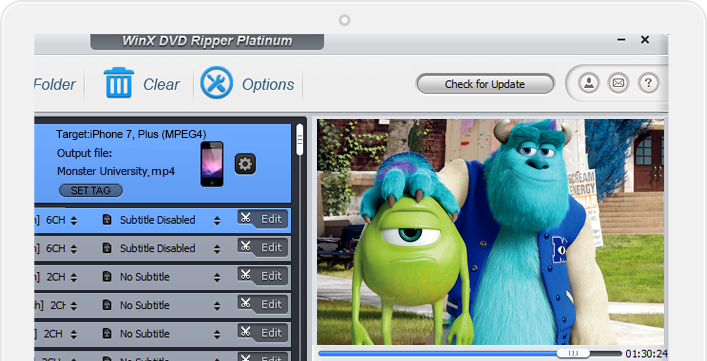
winxdrp-800-1122WinX DVD Ripper has over 350+ built-in profiles, which means it can rip any DVD flawlessly to video formats that are capable of playback on your mobile devices. Are you going on a long trip and want to put Harry Potter on your Android tablet for the kids? Not a problem. Want to watch The Big Bang Theory on your bus ride to work? Easy. There also 4 separate DVD copy modes meaning you can clone your DVDs to ISO image files.

button_get-winx-dvd-ripper-platinum-now

A New Year Giveaway

ripwin-fift-index

To celebrate the New Year, Digiarty are giving away 500 free copies of WinX DVD Ripper Platinum every day throuoghout January. That means if you’re one of the first 500 people to visit their site on any day during January you’ll be able to bag yourself a free licensed copy of WinX DVD Ripper Platinum, saving $59.99 in the process.

button_get-winx-dvd-ripper-platinum-now

Who could ask for more?

digiarty logo

Digiarty also offer other programs like DVD Copy Pro, which enables you to make copies and backups of your favorite DVDs and WinX HD Video Converter Deluxe.

Each program is useful in its own right and all are currently being sold in reduced rate bundle packs to go along with WinX DVD Ripper Platinum New Year giveaway. If you go for the WinX New Year Gift Pack, for example, you’ll get all 3 programs and a 5K video and music player whilst making a saving of $120.

c-fift

Head over to their website now to get your free licensed copy of WinX DVD Ripper Platinum and to find out more about the special offers their running on the software bundle packs until the end of January.

button_get-winx-dvd-ripper-platinum-now

Keep your New Years Resolutions with these Apps

Congratulations! You survived another New Year’s Eve. Hopefully you fared better than Mariah Carey.

Perhaps you partied a bit too hard and are feeling a little pain or maybe you just spent a quiet night at home with friends and family. Either way, chances are good that you have been thinking about New Year’s Resolutions and how you can keep them this year.

Good news: there are plenty of apps that can help you. With the help of Softonic’s ApplCrawlr app recommendation site, we’ve picked out some of the best apps to help you keep each of the most popular New Year’s Resolutions.

New Year’s Resolutions are a mixed bag. So many of us set them in an effort to start the New Year with the intent of becoming better people. There’s a lot of great intention there, but for most of us, New Year’s Resolutions are difficult to keep.

According to research from StatisticBrain.com, only 75% of us manage to keep our resolutions past a single week. As time goes on, it gets worse: only 39% of people in their twenties keep their resolutions for the year. Over 50? It drops down to only 14%

In order to keep you on the better side of those odds, we’ve put together some helpful suggestions for apps designed to help with some of the most common New Year’s Resolutions, as compiled from a variety of different sources, including Neilsen, NBC News, and Statista.

We’ll take a look at apps designed to help you with the following common but challenging New Year’s Resolutions:

  • Lose Weight
  • Get Organized
  • Spend Less, Save More
  • Stay Fit and Healthy
  • Learn Something Exciting
  • Quit Smoking

Apps to Help You Lose Weight

Losing weight is a very common New Year’s resolution, and the entire fitness industry depends on it. It’s also a notoriously difficult resolution to keep, or even to start!

On a recent podcast on NPR, it was revealed that half of the people who sign up for a membership at the popular Planet Fitness gym chain never actually show up.

Weight loss is at the top of our resolutions list, which isn’t surprising as many of us make this same promise to ourselves every year. But while January may see us buy a gym membership and start to diet, come February the pull of chocolate and chips – not together of course – can prove too much.

So how can you set yourself up for success if your goal this year is to shed some of those pounds? Fortunately, your choice in apps to keep you on-track and motivated is enormous. Here are some of our favorites.

Noom
Noom

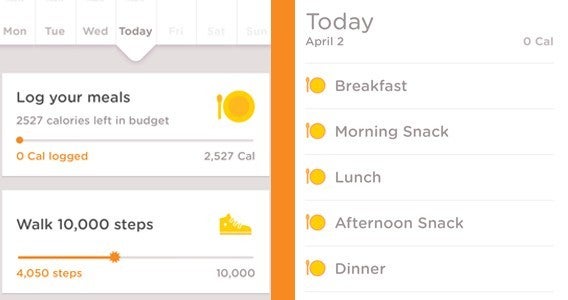
Noom is an easy to use app, which provides multiple convenient ways to track calorie intake against a recommended limit based on your size and how fast you want to lose weight. It also color codes for foods, to help you eat more healthily – another commonly broken resolution.

If you set realistic weight goals, then Noom is a great aid.

Download Noom for iOS

Download Noom for Android

MyFitnessPal
MyFitnessPal Screenshot

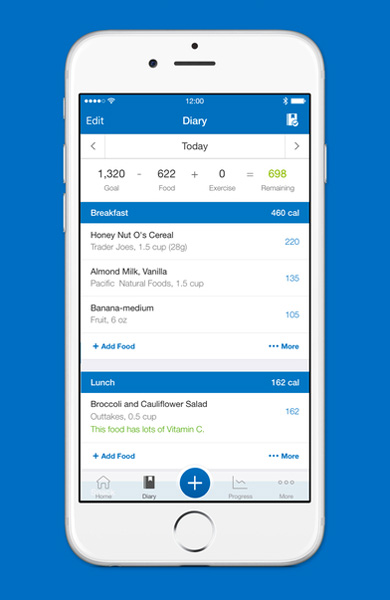
MyFitnessPal is the heavyweight of calorie counter apps and has built up giant community of users over the past several years. Now owned by athletic apparel maker Under Armor, MyFitnessPal boasts over 1 million ratings, a score of 9.0 for the Android version, and a stunning 9.9 score for the iOS version on AppCrawlr.

MyFitnessPal helps you track everything you eat and count the calories. It makes things simple and easy with a large database of foods (over 6 million) and the ability to quickly scan bar codes on packaged goods. It also integrates with several other fitness application to help track how you’re doing and burning those same calories.

Users rave about the product, calling it, “an awesome way to keep count of your caloric intake” and, “This app is the most useful health tool on the market.”

Get MyFitnessPal for iOS

Get MyFitnessPal for Android

FatSecret
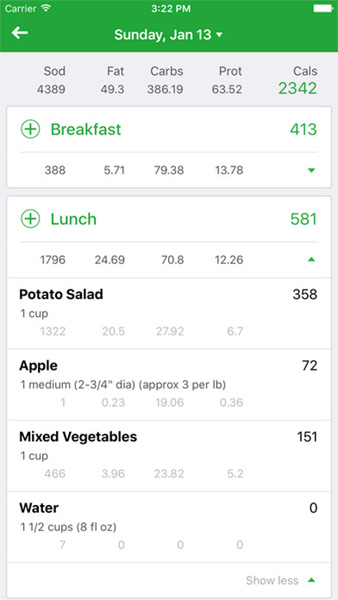
FatSecret Screenshot

Like MyFitnessPal, FatSecret helps you lose weight by tracking what you eat. It is first and foremost a calorie counter app. It also features a bar code scanner and even an image recognition feature that lets you simply take photos of the food your eating to count the calories.

The Android version of FatSecret has lower user-satisfaction ratings than some of its competitors on AppCrawlr due to technical challenges.

Get FatSecret for iOS

Get FatSecret for Android

Apps to Help You Get Organized

Another common New Year’s Resolution is to get organized. This one has appeared on our own personal lists several times, and many of us can attest to just how challenging it can be.

There’s no end to the advice you can find on the Web about getting organized. Everything from simple tips to complete organizational systems to implement.

Regardless of how far you need to go to get your professional and personal life organized there are a number of apps out there to help out. Here are some of the best to try.

Evernote
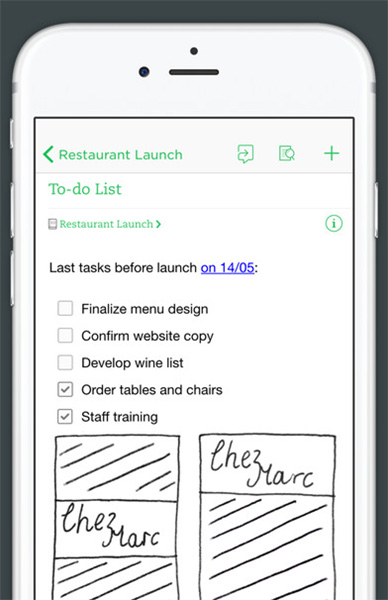
Evernote Screenshot

Over the past few years, Evernote has emerged as the leading note-taking and organizational app out there. With good reason. It’s the ideal app for collecting all of the information bouncing around in your head and keeping it organized in one safe place.

Evernote excels at collecting all sorts of different information — everything from written notes to images and even sound recordings. It also keeps everything synchronized across your devices, making it perfect for people who are often on the go. And these days, who isn’t?

Evernote has over 1 million ratings and the Android version has a rating of 9 on AppCrawlr (it fares slightly worse on iOS with an 8.5 rating). Users have called it a, “Very useful way to organize ideas and information.” and a, “Must have and life changing productivity app.”

Get Evernote for iOS

Get Evernote for Android

Wunderlist
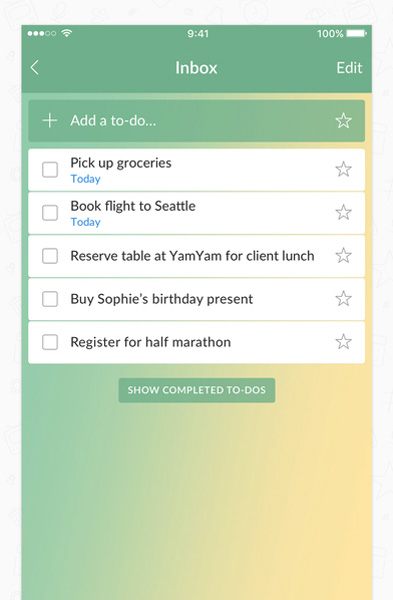
WunderList Screenshot

If you don’t need the complexity of Evernote and are just looking for an application that helps you create and manage to-do lists, then Wunderlist could be just the thing you’re looking for.

Maintaining lists is one of the most popular forms of organization, and with good reason. They’re simple and effective, and who can deny the quiet satisfaction that comes with ticking off each item as it is accomplished. Some people, such as organizational guru Stephanie Winston, have advocated maintaining multiple lists to stay truly on top of things.

Wunderlist brings it all together is a very easy-to-use format that helps you create and maintain multiple to-do lists. It syncs your list across devices and even lets you share lists with other users of the app.

The basic version is free to use. The Pro version, which requires a $4.99 per month subscription, adds several features including the ability to access Files and assign sub-tasks. It’s the complete solution for lovers of lists.

Get Wunderlist for Android

LectureNotes
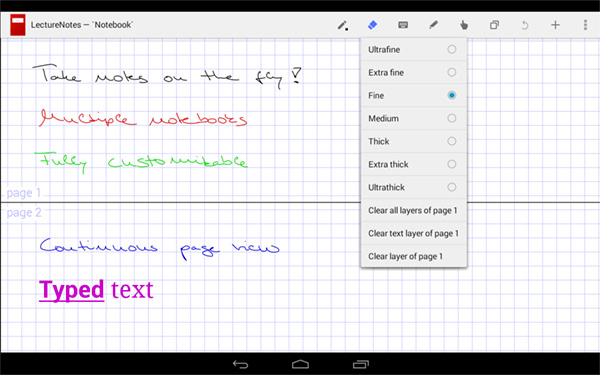
LectureNotes Screenshot

If you’re a student struggling to keep pace with your classes, then LectureNotes may just be the perfect app for you. It’s designed primarily for tablets and facilitates note-taking directly on-screen.

Although there are many options for note-taking out there, LectureNotes stands apart from the pack with extensive features and seamless integration with Dropbox for safe cloud storage of your notes. It also plays nice with more robust organizational apps like EverNote and OneNote.

LectureNotes is currently only available for Android devices. iPad users, don’t despair. There are several note-taking apps for iOS to choose from.

Get LectureNotes for Android

Apps to Help You Spend Less and Save More

Who doesn’t want to save money and find great deals? The urge, and often the need, to stretch your money further throughout the year is a familiar one. It hits home for many people immediately after the holidays following a significant increase in spending.

Once again, apps come to the rescue. There are several apps designed to help you save money on a variety of common purchases. You’ll also find great apps that help you get better about managing expenses and improving your saving habits.

RetailMeNot

Looking to save money with coupons? RetailMeNot is one of the most popular coupon apps on the market and features thousands of discounts, sales and promotions, all tailored to your current location.

You can get automatic notifications of nearby deals, and a bar code scanner for coupons so that you can simply show your phone at checkout.

RetailMeNot has a 9.3 rating on AppCrawlr with over 200,000 ratings.

Get RetailMeNot for iOS

Get RetailMeNot for Android

Mint
Mint Screenshot

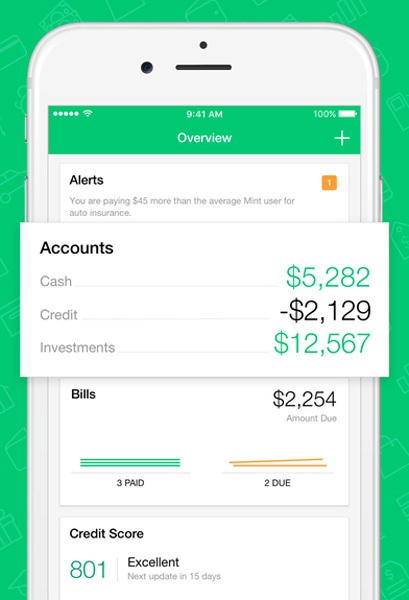
Is your New Year’s Resolution to finally get your financial life in order? Mint is one of the best apps for reining in all of your otherwise disconnected financial information.

It assists with everything from managing your checking accounts and paying bilsl to preparing detailed budgets to help you save money.

Mint is now part of the Intuit family of financial products, meaning that it integrates both with QuickBooks and with TurboTax.

The iOS version has a very high rating on AppCrawlr (9.1), but the Android version receives many complaints and Android users might want to look for alternatives (see below).

Get Mint for iOS

Get for Android

AndroMoney
AndroMoney Screenshot

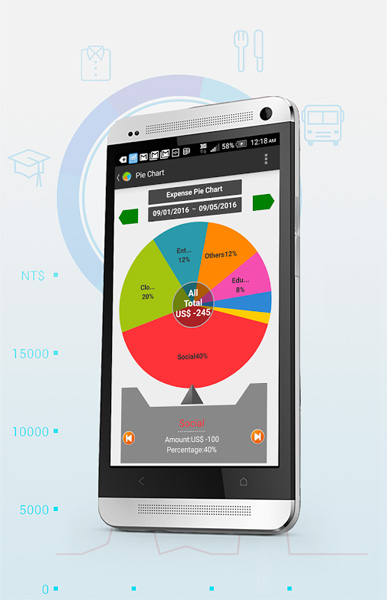
Using an Android device? Although Mint (see above) is the undisputed champion of personal finance apps, Android users have several alternatives to consider. One of the most popular is AndroMoney.

This app gets glowing recommendations from users and has an overall score of 9.7 on AppCrawlr. The app tracks all of your spending and provides detailed reporting by category.

Get AndroMoney for Android

Apps to Help You Stay Fit and Healthy

Losing weight is of course a popular resolution, but for many of us, it’s just a start. A very common resolution is to stay fit and healthy. This requires establishing commitment and good habits. These apps are here to help.

C25K – 5K Running Trainer
C25K

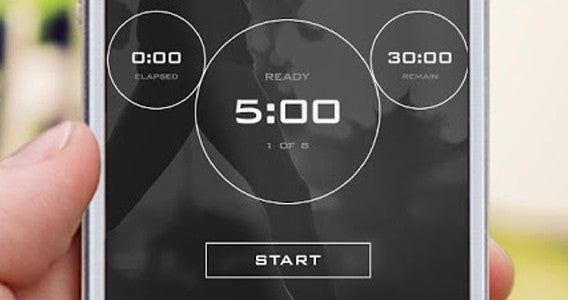
C25K – 5K Running Trainer is a free app that gets you up and running for 30 minutes three times a week, until – after eight weeks – you are comfortably running five kilometers at a time. By setting achievable goals, C25K gets you active and finding time to train, perhaps the hardest thing to get used to as you begin.

Download C25K – 5K Running Trainer for iOS

Download C25K – 5K Running Trainer for Android

If you are looking for more of a challenge, then Runtastic’s suite of apps are particularly good – specifically 6 Pack (iOS|Android) and vanilla While Zombies, Run! (iOS|Android) is a great way to spice up a run workout.

Runtastic, MapMyFitness and RunKeeper

Getting out and running more is a very popular New Year’s resolution. Running is easy to do — our bodies were built for it, after all.

Running is all about progression. You get stronger and faster slowly over time as you increase both your distance and time spent running. Of course, there are several apps to help you track and report on your progress.

The three top apps in this category, Runtastic, Runkeeper, and MapMyFitness all have roughly the same features and functionality, so it comes down to trying them out and seeing which one suits you the best.

Get Runtastic – (iOS | Android)

Get Runkeeper – (iOS | Android)

Get MapMyFitness – (iOS | Android)

Looking for more running resolution ideas for the New Year? Runners World has an article on New Year’s Resolutions specifically for running enthusiasts.

7 Minute Workout
7 Minute Workout Screenshot

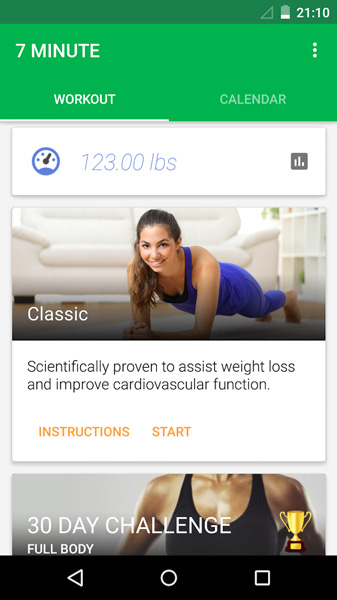
Can you get fit and in shape in just 7 minutes per day? Several years ago, the New York Times published an article highlighting the scientific benefits of a high-intensity 7-minute workout and then followed that up with a more advanced version of the workout, but still clocking in at 7 minutes.

There are several apps available that help you perform a 7-minute workout, including one that the New York Times created themselves. However, the most popular one by far is simply called the, 7 Minute Workout.

7 Minute Workout takes you through a cycle of 12 exercises performed for 30 seconds each and very short rest breaks. This is known as a High Intensity Circuit Training loop. It can be tough to perform at first, but hey, it’s all over in just 7 minutes.

Get 7-Minute Workout for iOS

Get 7-Minute Workout for Android

Apps to Help You Learn Something Exciting

The New Year often brings a sense of wonder and excitement at all the opportunities in front of us.

The arrival of the New Year creates the opportunity to learn new skills and embrace new experiences.

We all want to expand our knowledge, so it should be no surprise that learning something new is a regularly made – and broken – resolution. The problem is, when it comes time to study, our resolve dissolves faster than a Snowman vacationing in Hawaii.

Luckily, there are plenty of apps out there that improve the process to fool your brain into thinking you are having fun. And hey, maybe you actually will.

Duolingo
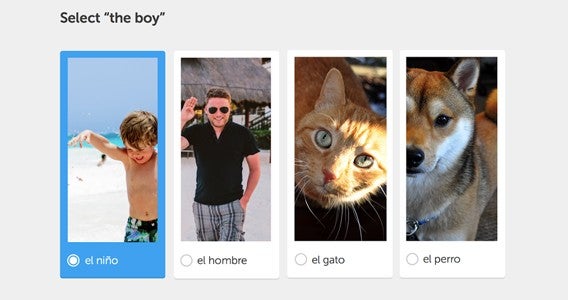
If you’re seeking to learn a new language this year, then Duolingo is a great starting point. Download the app, pick a language, and get to learning with its various touchscreen quizzes. In fact the app is more for homework than anything else, with the main learning happening on the website where you can login for full lessons that will prep you for fun learning on the app.

Get Duolingo for iOS

Get Duolingo for Android

Khan Academy

If language isn’t your focus, then Kahn Academy offers hundreds of lectures and seminars around dozens of subjects to expand your mind. From physics to art history, this completely free learning platform will make sure you are fully versed on every topic you are interested in.

Get Khan Academy for iOS

Get Khan Academy for Android

Apps to Help You Quit Smoking

Smoking is a tough habit to tackle, and that’s why quitting smoking shows up near the top of the list of New Year’s Resolutions every year. According to the CDC, cigarette smoking is the leading cause of preventable disease and death in the United States. It claims more than 480,000 lives every year.

It’s no wonder that so many people are motivated to quit. And once again, there are several apps that can help you out.

Quit Smoking Now with Max Kirsten
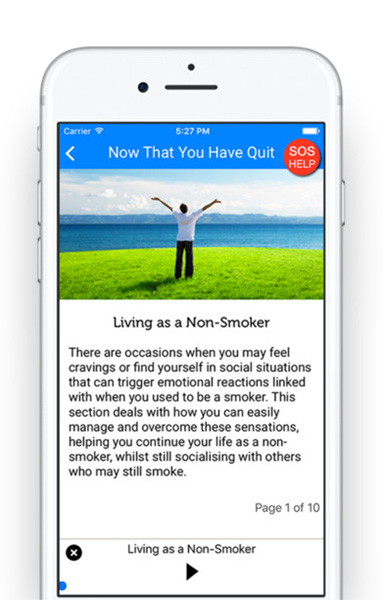
Quit Smoking Now Screenshot

Max Kirsten is a UK-based columnist and self-help expert who has built a loyal following, and most importantly, a long list of successful quitters that include celebrities like Ewan McGregor and Adele. This app remains steadily popular with over 480 ratings and a 9.9 score on AppCrawlr.

Users have called it, “life changing.” It sells in the App Store for $6.99.

Get Quit Smoking Now for iOS

Get Rich or Die Smoking

This insanely popular anti-smoking app for Android has over 10,000 ratings and a 9.8 score on AppCrawlr. Despite the quirky name, it has an almost cult-like following. Fans call it everything from, “Really inspiring and a great motivator” to “The best stop smoking app I could find.”

The app combines practical quitting advice along with a sophisticated rewards system to keep you motivated. Most importantly, the app recognizes that it’s tough to go it alone and brings together a solid community via a chat system where you can interact live with other real people trying to quit smoking.

Download Get Rich or Die Smoking for Android

LIVESTRONG MyQuit Coach

This popular iOS app from the health and fitness gurus at LIVESTRONG.com combines a physician-approved process and a personalized plan to set you up for greater success when trying to quit smoking. It features rewards and badges, motivational tips and even charts and graphs of your consumption history so that you can track your progress towards quitting.

The app is completely free to use and offers the ability to purchase an in-app item to remove advertisements.

Get LIVESTRONG MyQuit Coach for iOS

Smoke Free
smokefree

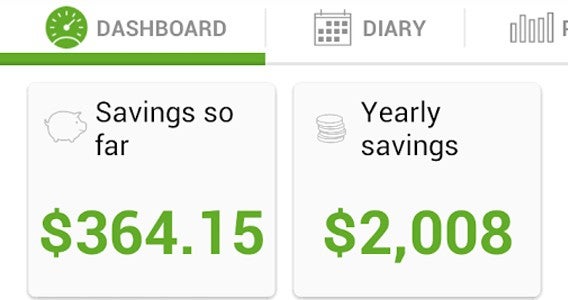
Much like the fitness focused apps we looked at previously, Smoke Free tracks multiple metrics to keep you focused and on track. These include the money you have saved, the hours of your life you have – in theory – reclaimed, and your general health.

Much of this is theoretical, but tracking things other than how many days you have gone without a cigarette is certainly a good way to stop you from fixating on what you are missing and focus on the benefits. Plus tracking it all on your phone keeps your hands busy.

Smoke Free has over 11,000 ratings and maintains a 9.1 overall score on AppCrawlr.

Get Smoke Free for iOS

Get Smoke Free for Android

Want to see more? Check out AppCrawlr’s complete list of apps for Quitting Smoking on Android and Quitting Smoking on iOS.

In Conclusion…

There you have it: an exhaustive list of apps that can help you get going and stay focused on achieving some of the most popular New Year’s Resolutions.

Remember that no matter what your resolutions might be, you’ll improve your chances of success if you set realistic goals and stay focused on achieving small wins. The apps we’ve highlighted in this article will help you get there.

Don’t forget to celebrate your many accomplishments along the way. And most of all, have a Happy New Year!