Android: How to Recover Deleted Photos and Files on your Phone or Tablet

Deleting a file unintentionally is something that happens to everyone. Sooner or later, you’ll end up mistakenly pressing that “Delete” button and deleting an important file. On Windows, this can be solved most of the time with a visit to the Recycle Bin and by restoring the item you wrongfully deleted, but things are a little more complicated on Android.

Google’s mobile operating system does not have a location where erased files are stored for recycling. Don’t panic though, there are some specific (and free) apps that you can turn to if you end up deleting that irreplaceable image.

One of the most famous tools is DiskDigger, which is compatible with any device equipped with Android 2.3 or higher. It scans all your system’s sectors for traces of deleted photos and lets you restore them to your device’s internal memory or send them directly to some cloud storage service (such as Google Drive and Dropbox).

It is necessary to mention that the software performs a limited verification if your cell phone hasn’t been rooted (checking only the cache and thumbnails). On rooted devices, the scanning is much deeper and able to find more results. If you prefer, you can invest $9.53 in the Pro version, which can also find other types of documents (MP4, 3GP, MP3, DOC, PPT, PDF, ZIP, EPUB and several others).

Android: How to Recover Deleted Photos and Files on your Phone or Tablet


On the PC

Applications installed on your mobile device are not always enough to recycle erroneously deleted files. Our second recommendation is a Windows desktop program that checks the memory of your smartphone or tablet whilst it is connected to the computer through a USB cable. Although it is not free, one of the best options within this segment is Kvisoft Data Recovery.

It was not made specifically for mobile phones – this can also find deleted files from hard disks, thumb drives and even CDs – but it works well here. You can download the trial version and test it for free for a couple of days, but after that you need to purchase a lifetime license to continue using the program. The price is $69.95.

Another cool alternative is the Wondershare Dr.Fone, which, unlike Kvisoft, was developed especially for smartphones. It can even retrieve contacts from your schedule, WhatsApp conversations and call history. Again, you can try the tool for a few days without spending anything but you have to spend out $149 to get all the utility’s features.

Android: How to Recover Deleted Photos and Files on your Phone or Tablet


Back things up regularly

As the old saying goes, prevention is the best cure. Therefore, it is important to take some measures to avoid getting these headaches in the first place, such as periodically backing up all the data stored on your mobile device. With this, you can expedite the recovery of important information if you accidentally erase something.

For example it is worth having Google Photos installed on your gadget. The application automatically makes a copy of all your photos on a cloud server, and the storage space is unlimited. This means you can save a lifetime of images in your Google account and view them anytime and anywhere as long as you’re connected to the internet. The best thing is: it’s totally for free.

10 Android 6.0 Marshmallow Features

Is it worth upgrading your Android mobile to get your hands on Android Marshmallow’s features? Check out the new features that came with Marshmallow and think about whether you want them in your life.

Now on Tap

https://www.tecmundo.com.br/android-marshmallow/87271-10-novidades-incriveis-android-6-0-marshmallow.htm

Google Now has always been a great tool for Android users, but now it comes even faster. Just hold the “Home” button on your device and wait a few seconds for a lot of information about what you’re doing – everything related to what you are reading, watching or listening to.

Faster sharing

Android has always been an operating system that makes it easy to share items between users. Now Google has applied a new system that can make it even faster. This is Direct Share, which adds people and applications more frequently in much simpler sharing options.

Unlock by touch

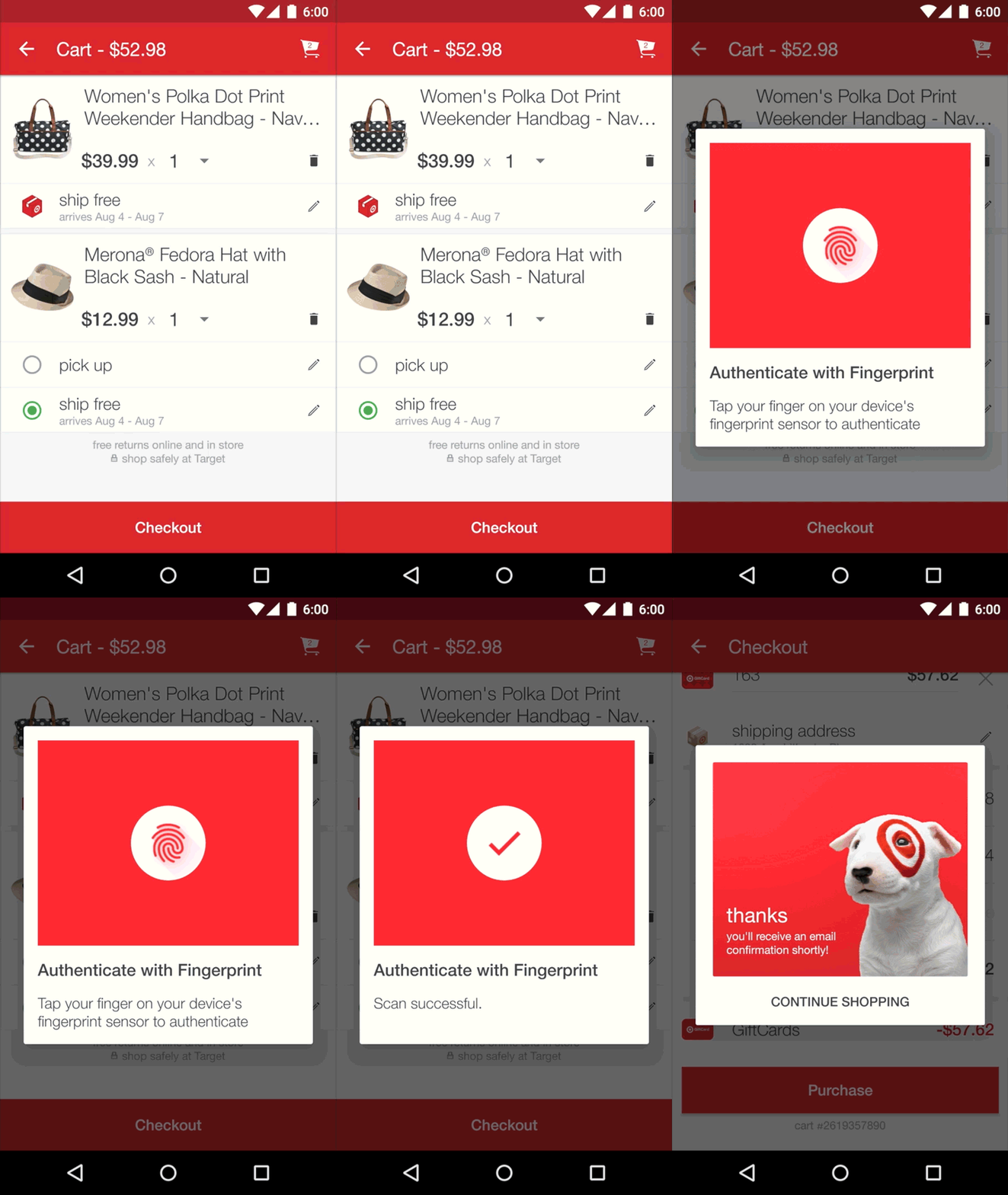
From now on, the support for biometric sensors will be native. It is worth mentioning that this feature depends on the hardware used by the manufacturers.

https://www.tecmundo.com.br/android-marshmallow/87271-10-novidades-incriveis-android-6-0-marshmallow.htm

Stronger security with a verified boot

When your device boots, the verified boot feature alerts you if the Android firmware and operating system are different from the factory version so that you know you are getting the pure Android experience.

New permissions

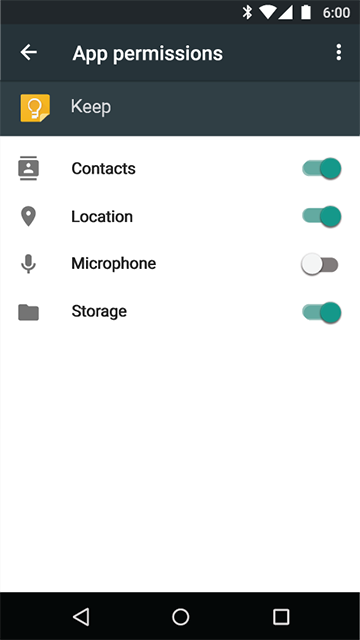
Unlike in previous versions, Android Marshmallow is much clearer about the permissions that each application requires before it can be used. Instead of all permissions being requested at the time of installation, they will be displayed gradually and according to the device’s needs at every given moment.

https://www.tecmundo.com.br/android-marshmallow/87271-10-novidades-incriveis-android-6-0-marshmallow.htm

Automatic Backup

A feature for those who love formatting or switching devices a lot is automatic backup. By enabling it, you can synchronize applications and settings much more quickly and securely.

Voice Features

From now on, voice recognition features are no longer restricted to Google’s own applications. Using new development kits, other apps can take advantage of voice recognition to integrate voice commands with the OS.

Smart battery

10 Android 6.0 Marshmallow Features

Intelligent battery usage can really help you manage your device’s power. It can stop background applications from consuming processes and suspend heavier tasks during idle periods. Both of these should help to prevent you from running out of battery when you need it the most.

USB Type C

By switching the connectors to the USB Type C standard, Google has added native support for the technology. Now the devices can transfer data much faster.

Flexible storage

With this new option, users can use external storage as part of internal memory. This means applications and games can be installed on an external drive. Flexible Storage encrypts applications and data on your SD card so that they become locked to your device. This feature depends on the hardware used by the manufacturers.

10 Scary Urban Legends that Own the Internet

Urban legends can be fun or terrifying, it depends on how much you believe in them. However, even the most unbelievable ones can leave anyone terrified, especially when they become so widespread that they begin to become almost undeniable. You must have heard some stories that this applies to, right? Of course you have, because the internet is the ideal place to tell a tale.

Would you be able to tell which urban legends frighten your friends the most? Today, we bring you a selection of 10 legends – or real stories – that can make even your most courageous friends have chills. Maybe they’ll even scare you!

The Choking Dobermann

Years ago, an Australian woman was coming home and realized that her Dobermann was lying on the floor and wasn’t breathing. Immediately the woman put the dog in the car to run it to the vet. After leaving the animal at the clinic, she decided to go home.

On the way home, she received a call from the vet. He said that the woman should leave the house immediately because the dog had choked on a person’s finger and the invader could still be in the house. The family then called the police, who went to the scene and found a burglar hiding in a closet. He was missing a finger and had fainted due to blood loss. Is it real?

Organ Thief Taxi Drivers

10 scary urban legends that own the internet

A few years ago, a story that conquered the world was the story of the taxi driver organ thieves. That is right: according to a Korean legend, some taxi drivers used to sedate their customers so they could steal kidneys and other easily removable organs. Apparently, scalpels were used and if the victims came to during the surgery, there was no anesthesia to help them deal with the pain. After the robbery, the bodies were dumped in fields or on the side of the road.

The White Death

Imagine a little Scottish girl who hated her life. Now imagine that she was able to erase all the traces of her life-burning documents, ripping photos and eliminating any evidence that she had ever existed. Finally, she committed suicide and her body was missing for days.

It took a few days before her body was found and little by little all her relatives died mysteriously. Do you want to know the worst thing? Once you’ve heard the story you’re on her list. The way she sees it anybody who knows about her needs to be taken out.

Beware of the Bathroom

10 scary urban legends that own the internet

Another urban legend from Korea. This one originated in scary high schools were young and depressed students took their own lives in the bathrooms due to the fact that they wouldn’t be bothered there. The legend says that they still haunt the bathrooms looking for other kids to kill and fill out there ghoulish ranks.

The Pokémon Phantom

Have you heard about “Lavender Town Syndrome”? This is a supposed illness that caused many Japanese children to kill themselves after playing too much Pokémon Red and Blue on the Game Boy. All the suicides apparently happened after an excessive exposure to the songs played in the city of Lavender – precisely the Pokémon’s ghost town.

Annie96

A young woman named Annie is alone at home and enjoys chatting with a friend over the internet – PC instant messengers still dominated the market back in the day. Suddenly, she notices that someone very much like her friend appears in the window and a frightening conversation continues.

Through the messenger, she asks him to stop scaring her. He says he cannot because he thinks about her too much. Suddenly, the tone of the conversation changes and she invites him to come and meet her. He asks how he can be sure that it’s really him that you’re chatting with. Annie goes offline. You can check the whole dialogue through this link.

The Experiment

A mad scientist decides to do a cruel experiment: test the effects of isolation on the human mind. For this, he imprisons several children for several years preventing them from interacting with other humans and having contact with any living.

Cruel? It could be worse. Few knew, but his real purpose was the search for eternal youth! He wanted to steal the mind of a child so that he could dominate the body and go back to being the child he no longer was.

More Pokémon

Another macabre story involving Pokémon, but this time it is the Silver version. One student finished the game and decided to play again to relive it all. The problem is that the more he plays, the more he realizes that the characters in the game are dying in the story. Do you know what is scary? Pokémon characters never die!

Laughing Jack

If you had a child and he told you that he just met an imaginary friend, would you be happy? A woman didn’t give much thought when her five-year-old son said he was amusing himself with his new colleague: Jack Laugh. It didn’t take long before the mother and boy’s relationship began to change. Several times, she realized that her son was acting strangely.

In the mornings, the boy’s action figures would all be arranged in the mother’s room. The boy acted aggressively and emptily, no longer resembling the boy he used to be. All of his strange behavior was justified in the same way: “Jack Laughing taught,” “Jack Laughing did,” “Jack Laughing gave.” The situation made the woman lose her mind and she ended up stabbing her son to death.

Squidward’s suicide

18173956691276

Few imagine, but SpongeBob is not as innocent a cartoon as it seems. In the early 2000s, a Nickelodeon trainee found a lost episode of the animation. In the episode, Squidward was tired of all of SpongeBob’s shenanigans. In desperation, he begins to cry blood and ends his life. The tape has since been destroyed and all we have today is the frame in which he appears crying.

Trello: How can it help you organize your life?

Trello is very well known for being an extremely versatile list management tool, which can be adjusted according to the user’s needs. You can use it to organize your work tasks, your travel plans and study schedule amongst other things.

Trello can also be used either by either a single individual or by a team. If you still do not know the features of this handy service, do not worry – we are going to go through almost everything you can do with this handy tool.

The Trello Interface

Trello: How can it help you organize your life?

Trello is a website that can be accessed from Google Chrome, Mozilla Firefox, Safari and Internet Explorer browsers – no previous installation is required. It is in English and free, although there is a more elaborate paid version. You can also access it through Google Play and iTunes – and even the Windows 8 app and Kindle Fire.

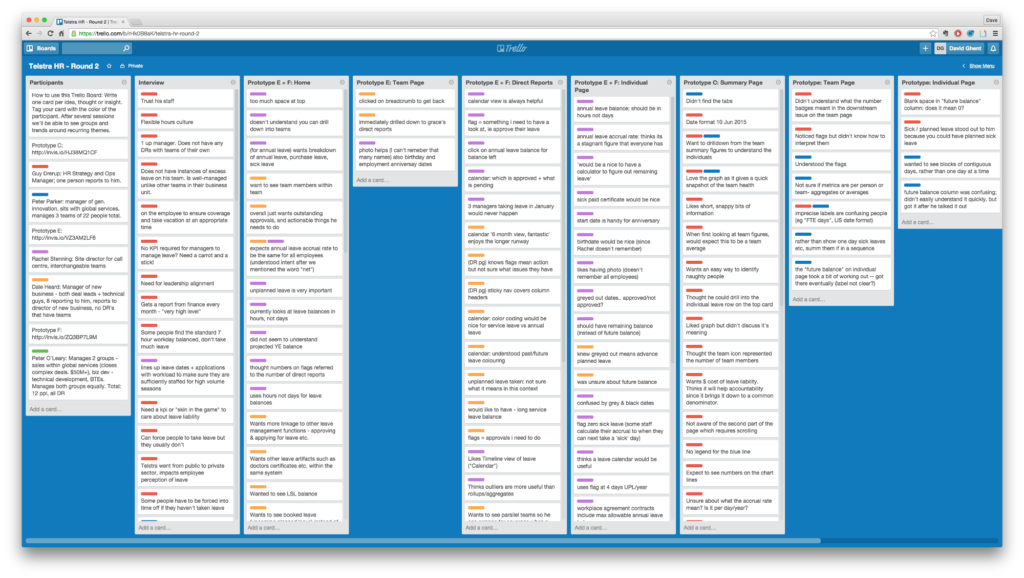
First, you need to understand Trello’s layout and how information is arranged. Trello is made up of different “Boards”, which are tables that gather many different lists and information. As soon as you login to the website, you come across all the Boards that you are part of, and you can create a few more – this is the Trello home screen.

Boards are characterized by having several columns of lists, all arranged horizontally – you can create the number of boards you’d like, all with their own subjects. These list columns contain the so-called “Cards”, which are cards that you can add to specific topics.

Customizing the “Board” for your goals

Within the cards, you are allowed to write comments, add links, save attachments, determine timelines and add images, specifying the subject of each one. These cards can be moved between the columns in the same frame, so you can make transitions of one topic to another column (by just dragging the card).

“Cards” are like small notes that can be dragged across the board, and snapping into the list columns according to context or status. The difference is that they are not simple notes, but cards that can actually receive more complex information, with all the items that have already been listed. In addition, you can add deadlines and checklists within the “Cards”, so you see the activity progress in percentage levels.

Teamwork

The Trello interface is especially useful for teamwork. Boards can be shared with anyone with a Trello membership and people can be tagged on multiple cards. For example, it is possible to determine the functions of each member in the team by marking it on a different “Card” so that all the people on that “Board” are aware of what each one is currently working on – a great way to monitor what everyone is doing.

In addition, there is a color “label” system. These are colored labels that can be used to signal the status of a particular project or activity. For example, you can name specific colors to flag items such as “Project in Progress”, “Ready”, “Delayed”. Depending on the context of the Board, they may acquire the meaning you wish. To mark someone on Trello so they receive a notification, type the user’s name preceded by the “@”.

A big thing about Trello is that it is a very visual tool because the cards are easy to locate (even more so when cataloged by the colored labels and separated in subject columns). Although services like Evernote and Wunderlist are interesting to create lists and checklists, they do not offer the same possibilities that Trello is able to provide – especially in terms of personal and professional versatility.

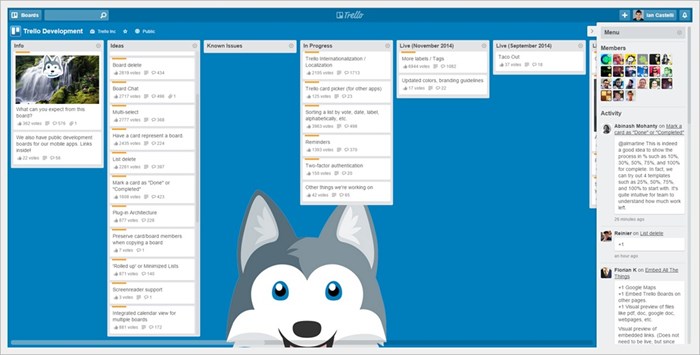
Trello itself has a public Board (with English content) where you can see the ideas and work in progress on the site, that way everyone can participate with suggestions, comments and votes on the Cards – giving a great weight and notoriety to topics. See below:

Trello: How can it help you organize your life?

Basic Information Management

Trello’s bread and butter is task management. As we mentioned earlier, you can create “Boards” to plan your trips, your work tasks, your annual goals and many other topics. Within each of these Boards, you can place specific columns to make it easier to use the tool.

Using Trello as a weekly organizer is something quite practical and easy to do. By separating the columns of lists by day, you can set deadlines for day-to-day tasks so you won’t get lost amidst your commitments, be they personal or professional. In addition, you can create an editorial calendar on the site to organize the tasks of the month days and meet your deadlines.

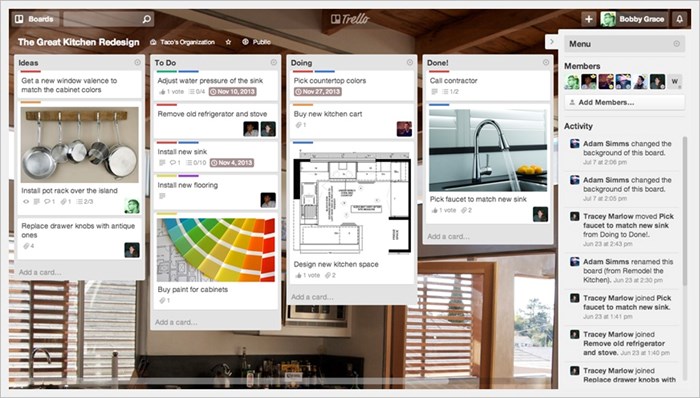
In the example below, you can see how the user rated the functions of the “Great Kitchen Redesign”. The four columns of lists represent “Ideas,” “To do,” “Items in Progress,” and “Completed Items.” You can see how colored labels were used and how different people were tagged on specific “Cards” responsible for a certain part of the project.

Trello: How can it help you organize your life?

With Trello, you can plan and organize ideas for work, weddings, book projects and weekly calendars – there are many possibilities. To navigate faster and more dynamically you will find a list of the many types of shortcuts that you can take in this service, performing several actions with just a few keyboard keys.


Trello Gold and Inspiration for your Organization

In order to have a more elegant look on Trello (with high-resolution wallpapers and even the possibility to upload your own images), you need to purchase the Trello Gold service for $5 a month. With it, you can also save up to 250 MB of files in your Boards, unlike the 10 MB you get with the free mode, and use stickers and emoticons in messages.

Trello Business is also another paid alternative that offers more elaborate resources for business use. In any case, it is possible to use Trello in companies without having to pay anything.

10 Programs to Help you Design the House of your Dreams

Buying a house or apartment is just the first step for anyone who wants their own place. After all the bureaucracy faced with the acquisition, it is time to plan the rooms and decorate the property (understand that decorating is not just decorating, but putting the furniture in a particular place).

Playing The Sims a little more seriously

To make things easier for those who need to design their home sweet home, countless free planning programs are available on the internet. And even better: they’re easy to use, can craft professional plans with 3D images and then offer “pics” of the planned environments, just like you see in the architects’ projections.

We have prepared a selection of ten programs for you to set up the house of your dreams.Those who have rented a property, want to renovate the house, or simply reformulate the decoration of the rooms can also play the architect. Planning your home has never been easier. Choose your program and have fun.

Programs to install

Installed programs still convey the idea of security and reliability – at least when it comes to applications running online. Check out our 4 options for anyone who wants a real estate planning software on their computer.

Sweet Home 3D

10 Programs to Help you Design the House of your Dreams

Straightforward

Planning programs were not only made for those who want to build or renovate a property. Those who just want to plan the distribution of furniture around the house can take advantage of the features of this type of program to revamp the home environment.

Sweet Home 3D may be the right choice for this task. The program has a basic catalog of furniture, separated by rooms and without much customizationm, which is perfect for anyone who wants to be practical.

In addition, Sweet Home displays a version of the plan in 3D whilst you are building the plan in 2D. This allows you to see in real time how your project will look.
The program creates 3D photos and videos of the rooms and renders them almost instantly. The only drawback is that the visual quality is not very good. Sweet Home 3D is a free program and can be used commercially.

Download Sweet Home 3D


MyVirtualHome

10 Programs to Help you Design the House of your Dreams

Easy to use

For the lazier of you MyVirtualHome will fit like a velvet glove when it comes to planning a property. The program only works with pre-made models of environments that already come with a standard decoration. Even so, walls and real estate can be customized easily.

It doesn’t lack options for filling the rooms and the collection of objects and real estate is quite complete. The program does not take screenshots and does not record videos but it is one of the easiest and most enjoyable to work with.

All MyVirtualHome plans are made directly in 3D as there is no less detailed version. The third dimension view is straightforward and has no advanced texture rendering options.

Download MyVirtualHome

PCon Planner

10 Programs to Help you Design the House of your Dreams

Very customizable professional program

PCon Planner is one of the most professional, and perhaps because of this, most difficult to work with. PCon.planner is best suitable for people who already have a notion of 3D modeling and planning because its tools are more complex and may seem confusing to a less experienced user.

The options of the objects of construction and decoration are very simple but the program counts on an internal navigator, in which it is possible to download pre-made models of rooms or objects to add to your plan.

The user interface is divided into four areas: an aerial view of the plan, the two sides and a 3D perspective.

Download PCon Planner


IKEA Home Planner
10 Programs to Help you Design the House of your Dreams

Professional program with lean functions

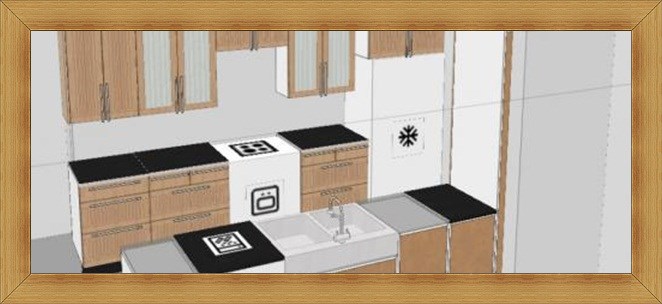
IKEA Home Planner is another advanced planning program. Indicated for professional use or for people who need to calculate measures and check spaces.

The plant’s visualization is very simple, even in the 3D version. The main difference of this program from the others is the level at which objects can be changed (for example, it is possible to change the handle of a piece of furniture).

The program has four main tabs: plan, plan with objects, 3D visualization and calculation of price of all objects and furniture in question. The latter is more geared towards IKEA’s online store, and prices (in dollars) are based on its online catalog.

Download Ikea Home Planner


Browser programs

Online programs have an advantage over installed programs: your files can be opened on any computer that is connected to the internet if you have your user login and password. This is one of the benefits of cloud computing. In addition, they all excel because of their ease of use. We tested six virtual applications for you to assemble and decorate your environments.


Roomle
10 Programs to Help you Design the House of your Dreams

For those in a hurry

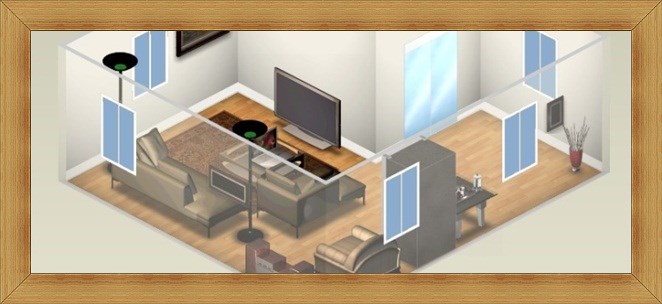
This program is made for the anxious. With Roomle, all functions are one click away. The program is simpler than some of its competitors, but has a more professional aura. Objects do not have many variations of the same type (for example, there is only one model of couch), but this is not a problem for those who just want to mark objects’ positions in the plan.

Roomle is extremely easy to use, both in modeling the plan and in positioning objects. It also has integration with social networks. By logging into the program, you can save the created plants and edit them on any PC connected to the web.

The program also has two versions of 3D visualization: a simpler one and a more advanced one. In the simplest, objects provide a “lighter” detail, not requiring too much browser rendering. The advanced version shows a character visiting your design and you can direct him through the house using the arrow keys.

Despite the seemingly more specialized 3D features, its texturing is slightly lower quality and has some flaws. It is necessary to download an additional plugin for the advanced 3D function. The program is very fast, however, beautiful and functional.


Floorplanner
10 Programs to Help you Design the House of your Dreams

Featured Interactivity

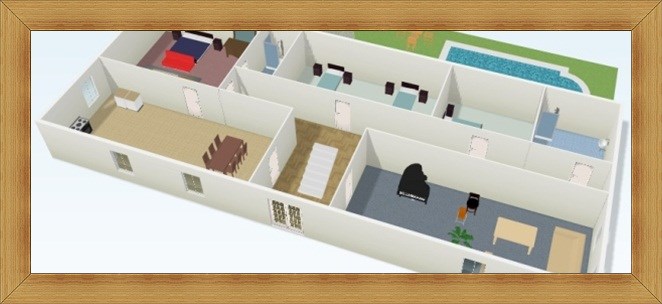
Floorplanner is quite easy to use and has a considerable collection of furniture and objects to insert into your plan. The program has a gallery of other users’ plans where you can navigate through all the saved projects and search for inspiration.

The application is one of the simplest that we tested and has a paid version and a free version. The free version allows you to create just one plan, displays advertising and has some limited functions: it does not export, it does not publish online, and it does not produce 3D videos and photos of the environments.

The 3D preview takes time to load, but the aesthetic quality is very good. The 2D plan images are also visually pleasing.


Autodesk Homestyler
10 Programs to Help you Design the House of your Dreams

The most complete

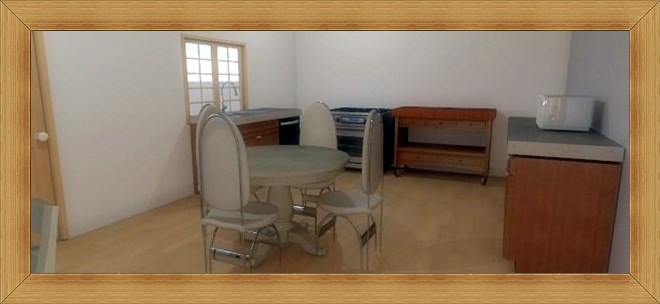
Autodesk (for products like AutoCAD and 3D Studio Max) has decided to launch its own homebuilder that runs directly on the internet – and it’s free. With this powerful seal, Autodesk Homestyler presents itself as one of the most complete programs to plan a home.

The program is easy to use and has a good set of tools. The construction is simple and you can choose to start from scratch or upload one of the gallery designs. There are several decor options to fill the environment with and the program integrates with social networks. Autodesk Homestyler makes a download list of all the products you have entered into the plant, and “takes pictures” of the environment, much like working professional architects.

On top of all that, Autodesk Homestyler creates a site to display project, with 3D environment photos and plan views. By creating an account you can save projects to open later on any computer connected to the internet.

The program can seem dazzling but it is intuitive. Editing the objects and structures of the residence is an easy task but not very fast. If you want to create and edit several plans you may prefer another program that is more agile.

MyDeco

10 Programs to Help you Design the House of your Dreams

The widest range of furniture and decorative objects

MyDeco is a site that helps users design their property. Breaking it down, you can view thousands of furniture and decorative objects to insert into the project and then purchase them (the latter only for users in the US and UK). Therefore, all objects inserted in user-designed environments are items that are for sale in the company’s virtual store.

The great focus of MyDeco is on the huge variety of products, because it counts on real objects. There are multitude options, far superior to any other competitor. Despite this, the program has a skillful low-floor plan projector with simple but very useful tools.

You can take pictures of the environments, but the process of rendering the image (done in the background) can take up to 2 hours. The application also has an online design competition, in which interior design challenges are proposed.


3Dream Basic
10 Programs to Help you Design the House of your Dreams

Great usability

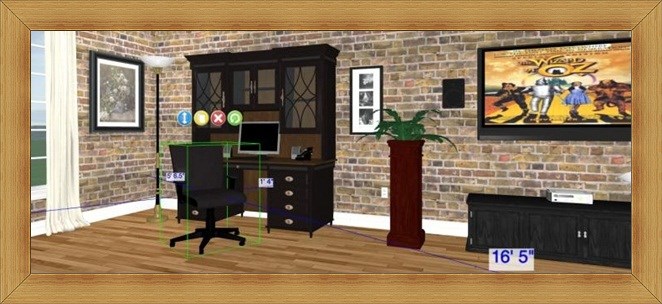
With a very friendly interface, 3Dream offers a very simple system to use system for designing the house of your dreams. All options are accessed quickly and you will not have the slightest difficulty learning to use the program.

3Dream has a good collection of objects, although there is no gallery: there is only one search engine. For example, if you type chair, the program will get you all the available chairs and that is the only way to find what you want to insert into the plant.

3Dream has four types of project visualization, ranging from the simplest (with only the structural features) to 3D rendering. The program takes photos of the environments, which are shareable via email.

The user can choose between a free version and other paid options. For free, the program is limited to the creation of: two projects, ten scenes, and 25 screen shots, in addition to accessing only 10% of the product’s catalog.


Space 3D Designer

10 Programs to Help you Design the House of your Dreams

Collaborative

Do you need a second opinion about your plan? Ask the designers with 3D Space Designer. You can send an email to a specialized team who will evaluate your plan and tell you what they think.

Space Designer objects and furniture have a 3D model that will light up your eyes. Unfortunately, it is not possible to take free “pictures” of the environments. If you want one, you can ask the producer. In addition to being able to rely on the opinion of designers, it is possible to request customized properties from them.

The program comes with limited structures, in which it is possible to build in three formats: square, “T” and “L”. Nearly no adjustments can be made, besides resizing the corners. One weakness of the program is that it does not have undo options.


What is a spoiler?

With the rise of the internet and the wave of TV series that the big broadcasters have provided, it has become very common to find the term “spoiler” all over the internet. Anyone who is a part of an online community may have seen this term a lot, but that does not mean you know exactly what it means. Well, understanding the term is very simple, so let’s give a quick explanation.

Spoiler is when a website or a person reveals facts about the content of a particular book, movie, series or game. The term is in English, more precisely it is related to the verb “To Spoil”, that means to spoil something. In a free translation, spoiler refers to the famous term “party pooper”.

Revealing facts

Many people like it, others do not. Revealing facts, spoiling pleasures and ending the joy of others are very common things on many websites and forums. Some sites at least are more sensible and allow the user to decide whether or not to see the spoiler. The “trick” used by some websites is to put the text that is the spoiler with the same color used at the bottom of the page, so that the reader can or cannot select the spoiler with the mouse, so that the text is visible.

Do you like spoilers?

Some people like to know everything, others prefer to check certain facts directly when reading or watching. Do you like spoilers? Do you like to tell everybody what has happened? Is “party pooper” your nickname? Tell us your stories.

PowerPoint: How to add free templates

PowerPoint is one of the most commonly used tools for students and professionals giving presentations and lectures. It has many excellent features, including the ability to download and add new templates to the slides.

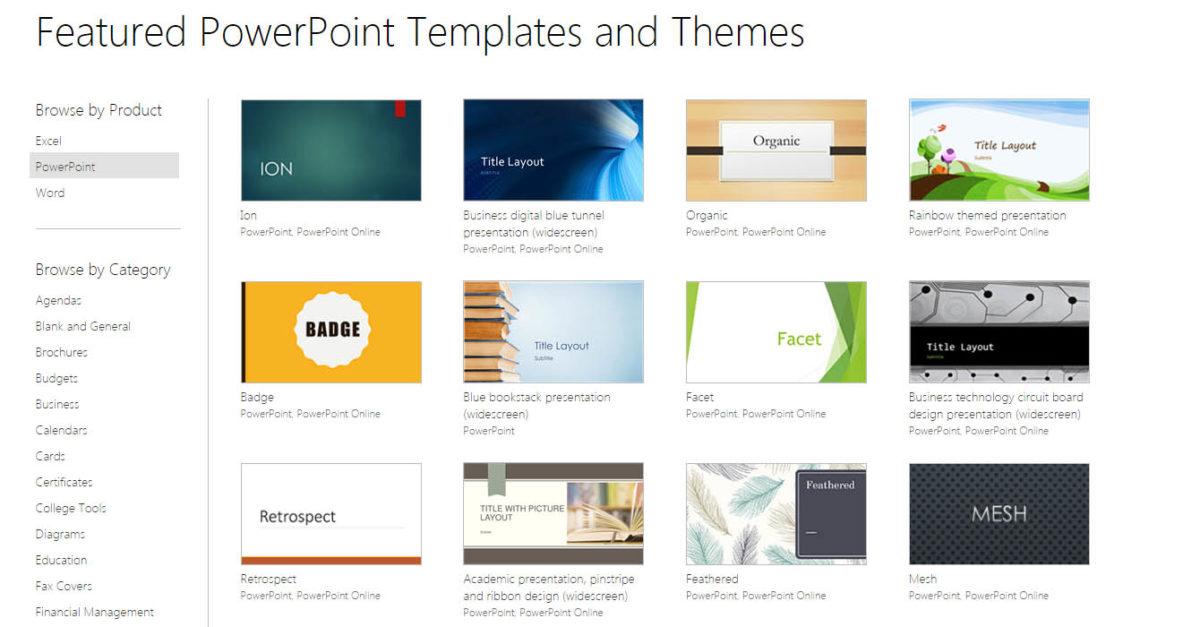
There are plenty of templates to choose form so let’s have a look at some of them

Individually Packaged

PowerPoint: How to add free templates

All templates available free of charge are from Microsoft can be found on the Office website. You’ll need to access the template gallery. Unfortunately, there is no package ready with all the themes for you to download. Therefore, it is necessary to download each of the models separately.

Downloading the themes is very simple. Click on the chosen template and wait until the page opens with the details about the template. Then click the “Download” button on the screen’s upper left corner.

Once clicked the theme download will start automatically. Sometimes it is possible that the file will not automatically download. If this happens, a screen will be displayed and it will show a second link so that you can download the template manually.

Time to work

After you have installed PowerPoint’s latest version and downloaded the desired templates, it is time to add them to the Microsoft application templates’ list. You may have noticed that there are two types of files, POTX and PPTX.

The way you install the two is different. While to use the first just double click on the file, the second requires a little more work so that they can be easily accessed in the quick access bar of PowerPoint.

To begin with, you need to open the Templates folder that your Office application uses to load the files. This can be done by opening the Windows “Run” window (use the Ctrl + R shortcut) and typing the following path:

C: \ Users \ USER \ AppData \ Roaming \ Microsoft \ Templates

Replace the word ‘USER’ with your computer’s username.

With PowerPoint closed, copy the POTX files into the directory above. You can rename the files to make it easier to identify the templates when accessing them.

How to use the templates

Powerpoint Templates2

Once the files are copied to the indicated folder, it is time to apply them to the presentations. To do this, click the “File” menu and choose the “New” option. Then, on the right screen, select “My Templates” and search for the template you want.

Search for the desired model

In some cases, you may need to enable the template for editing. A small alert bar will be displayed at the top of the screen, containing the “Enable for editing …” option. Just click the button and enjoy the new downloaded templates.

…..

Note that not all templates available have fonts, colors and effects like other templates presented by PowerPoint. So pay attention and see if the chosen model meets your needs before downloading it.

Bill Gates Admitted that Ctrl + Alt + Del was a mistake

A secure way to log in to a Windows system, especially adopted in older versions, is to configure it so that you’re forced to press Ctrl + Alt + Delete before choosing a user. The function has existed since the early days of IBM computers, and today it is mostly used to access restart commands or the Task Manager. Not everyone likes to have “so much” work just to be able to use their PC, however – and, surprisingly, Bill Gates is among these people.

The Microsoft co-founder participated in a chat at Harvard University, and admitted that adopting the shortcut “was a mistake.” It all started when the interviewer complained that he needs three fingers on the “Control”, “Alt” and “Delete” keys to turn on the machine, and asked why all the complication? In the answer, Gates said that he could have used only one button, but an IBM employee insisted that the sequence was adopted.

Before demonstrating regret, Gates explained that this is a way to activate the operating system in a tiny way, and only then secure access. It is worth remembering that a video that shows a speech by David Bradley of IBM shows a “right of reply” of the company.

15 Funny Easter eggs from Google

Easter eggs are secrets embedded in programs, websites, games, DVDs, among others, just for fun.

Of course, the internet giant, Google, has plenty of surprises scattered throughout its vast collection of applications. Many of them werre revealed on April Fool’s Day (April 1), but some get set aside on sites and programs until they are found by someone. We have gathered some of the best Easter eggs from Google for you. Check it.

Airplane for what?

Some humans have already done the deed of swimming across the Atlantic Ocean. Apparently that is what Google Maps expects from you. Challenge your boundaries by going from Chicago to London, completing a good stretch of the path with strokes.

The alternative is displayed when you plot the route between the two countries. There are “only” 5,571 kilometers to be beaten between Europe and America. This option has been removed from Maps, which may indicate a programming error or that it was sheer nonsense.

466453.com

Enter the address above in the address bar (or click here). The result is … But why? Well, the explanation is quite simple: When you type the word “Google” into an ordinary telephone keypad, you will use the letters where those numbers are. Look at your keyboard and see it for yourself.

Recipes with ham

Spam is a type of spicy ham whose name is an acronym derived from the words Spiced Ham. However, most people who surf the internet know spam by its most famous meaning: a mass email that was not requested. Gmail has a folder just for them, to where a very smart filter directs most of those unwanted messages.

Well, Gmail also has a top bar of ads and news, which displays the information according to the content of your emails. But, when you access the spam folder, you’ll check out real cooking recipes on this bar, many of them with the use of … Spiced ham. This function is no longer working.

Hunter in the Opera

Steve Irwin was the most famous crocodile hunter in the world. The Australian died in 2006, victim of a ray sting (the animal’s mechanism of defense present in the tail). A small tribute to the brave man is (almost) hidden in Google Earth at one of the most famous landmarks of the country of the kangaroos: the Sydney Opera House.

Access the structure through the Google program and turn it aside to find Irwin at his best: fighting a crocodile.

Did you mean …?

Google suggests some term in your search, depending on the word you type (the famous “did you mean …?”). The resource becomes a joke, due to its suggestions or just due to the creativity of Internet users.

However, if you search for “recursion”, Google will instead offer the searched word itself. That’s right, Google suggests “recursion” when you search for “recursion.” The loop has an explanation: the term means a process of repeating a similar object, called recursion, in Portuguese.

Google flight

15 Funny Easter eggs from Google flightsimulator_0

Ready to discover the planet aboard an airplane? Then board one of the flying machines in Google Earth. You can choose between an F-16, a very fast fighter aircraft, or the SR22, with high-performance propeller plane.

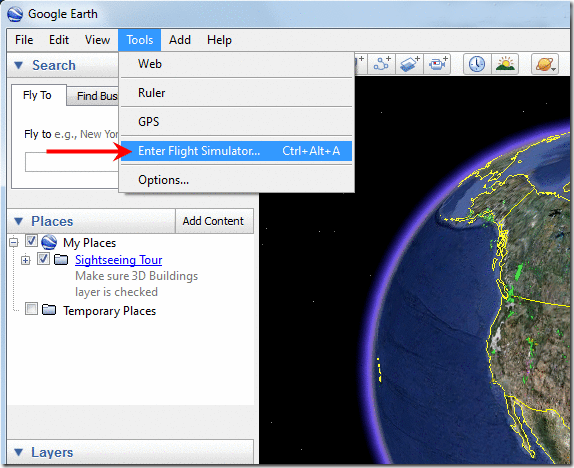
Press Ctrl + Alt + A to access the flight simulator of the program and go to this page to find out how to maneuver the plane. You can choose several airports as a starting point for your trip. The sky is the limit.

GoogleDaq ylnej *

Google conducts searches in 46 different languages, including Norwegian, Serbian, and Klingon. Wow, wait right there! Isn’t Klingon the language spoken in the Star Trek movies? Precisely. In addition to it, there is also the Pirate version (piratian, maybe?) and the one of Looney Tunes’ cartoon character, Elmer Fudd.

Research in the three eccentric languages works with the English search engine. Only the buttons and site structure are “translated”.

Ninja Secret

Square, Circle, R1, Triangle, Square. Anyone who has played video game knows that different combinations of buttons pressed on the control can give the player access to special powers. Google also has secret codes tucked away in the Reader’s gut, the company’s feed reader, accessed through a combination of keys.

To reveal the easter egg, simply press “up, up, down, down, left, right, left, right” arrows and the letters B and A, with the website open. A ninja on a blue background will appear in the side menu, just like one of the Gmail themes. The visual changes is a bit misaligned way, because the company redesigned Reader’s design, but “forgot” to do that with the little warrior.

Google Reader has since been discontinued

Cluttering the screen

Two of the company’s pranks recently hit the web. By typing “do a barrel roll” into Google search, the entire site rotates 360 °. The same thing happens if you type “z or r twice”. But, what do these two things have in common?

The two phrases make reference to the game Star Fox 64, a classic of Nintendo 64 in which you control the fox Fox piloting a ship. “Do a barrel roll” is a move used to dodge enemies. Already “z or r twice” are the two commands you perform to make the move.

Martian Pap

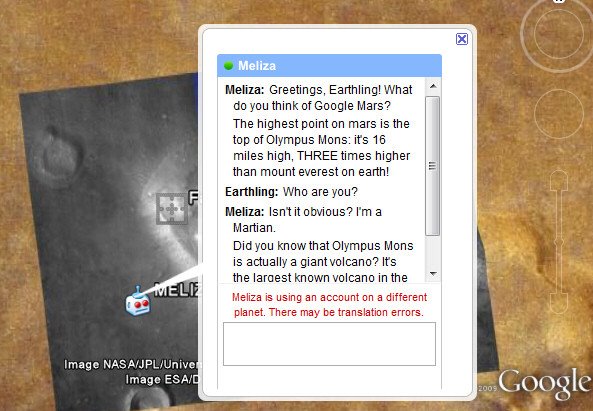
15 Funny Easter eggs from Google- meliza-chat

Some NASA robots have already placed their wheels on Mars, but found nothing of water or microscopic life. But Google has located intelligent life on the red planet. There is a Martian living there, willing to chat with anyone who discovers his secret location.

Access Google Earth and view Mars through the program. Type “Meliza” into the search box to be directed directly to the alien’s home. However, don’t expect heated debates about the meddling humans sending robots to the planet without his permission: ET’s dialogues are fueled by an artificial intelligence system called Eliza, which is meant to mimic human interaction, something at which it is not successful.

Research with the mind

Remove your hat and glasses. Fix your eyes on the circle (do not move your head). Design the mental image of what you want to find and click on the circle.

After these instructions, Google MentalPlex does the search without you typing anything. Google’s “new product” is actually one of the traditional April Fool’s day joke made by the company. This was created in the year 2000, but it is still out there. The results are “smarter and faster” because they are based on astrology, air pressure, humidity, mouse speed and brainwave activities.

That’s us on Street View!

Cameras attract the human being. All you have to do is show a TV reporter on the street and fame hunters will spring up everywhere, forcing the camera to close the frame on the journalist’s face. With Street View the same thing happens. Several pics of people who have decided to play with the service circulate through the internet.

But, the most unusual images were captured by one of the cars in front of Google’s headquarters in Mountain View. Several company employees gathered to demonstrate their love for Street View. Even Pegman, the “guide” of the app streets, appeared to give a hello.

Guru Google

15 Funny Easter eggs from Google - Deep_thought

A real nerd has read the Hitchhiker’s Guide to the Galaxy and it seems that Google employees are big fans of Douglas Adams’s book. A proof of this is that they have decided to give the “answer” to some of the most crucial “questions” of humanity contained in the book, through company research.

When you type “answer to life, the universe and everything” in the original translation of the book, the result that appears is “42”, as the book says.

Other researches also provide ready answers, such as “number of horns on a unicorn”, and “once in a blue moon”, which informs how often the natural phenomenon of the “blue moon” happens.

Gravitational power

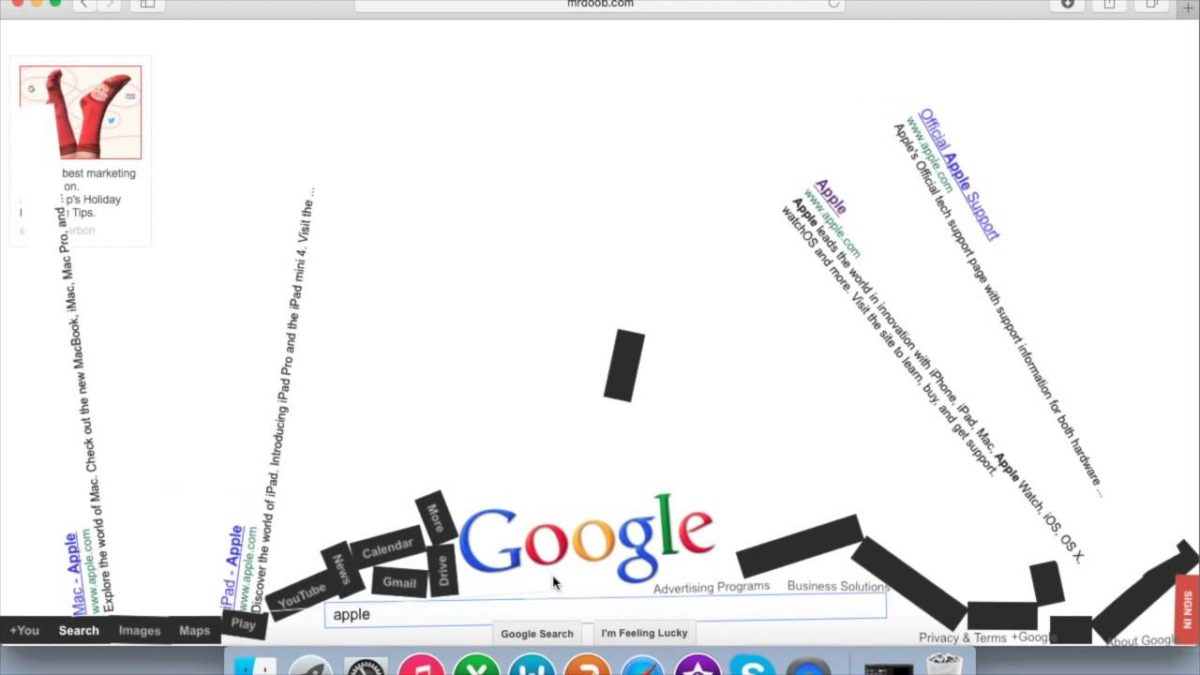
Gravity is a necessary evil for all humanity, otherwise we would not be “trapped” on the planet. This incredible force also came to Google’s search in yet another of the company’s Easter eggs. Google’s feature drops the site as if things were pulled down because of the gravity’s effect. Just type “Google Gravity” and then click “I’m in luck”. The joke works on all browsers.

Print your emails

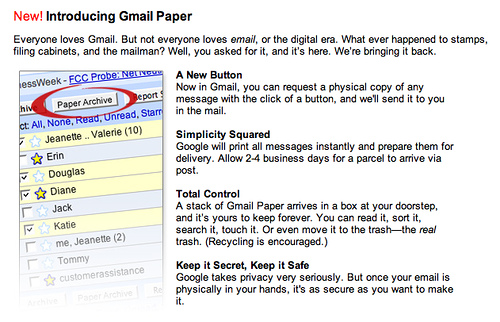
15 Funny Easter eggs from Google - gmail paper

Do you want to have the feeling of receiving letters again? Your problems are over. Use Gmail Paper, a revolutionary product that uses paper made from organic soy phyto, that is not harmful to the environment.

Now you can print all your emails and receive them directly in your home. The price of that? Printed advertising behind all sheets of paper, in bold red letters. At least it is not possible to print popup windows. The service is more of a play on April fool’s day.

5 Free Programs for Editing Videos

A good result when editing a video usually comes from the publisher’s talent and technique. Having the right editing tool is extremely important, however, and will contribute directly to the end-result.

The choice of software is quite personal, as each person adapts better to one program or another. Here we have five excellent free video editor options that can certainly help you with more complex tasks or faster and simpler videos.

Windows Movie Maker

The Microsoft video editor is probably the most used. Make your film just the way you want it with the Movie Maker editing tools. The program brings a movie studio to your PC and the edition’s quality gets professional features.

Windows Movie Maker Download Windows Movie Maker
7

Lightworks

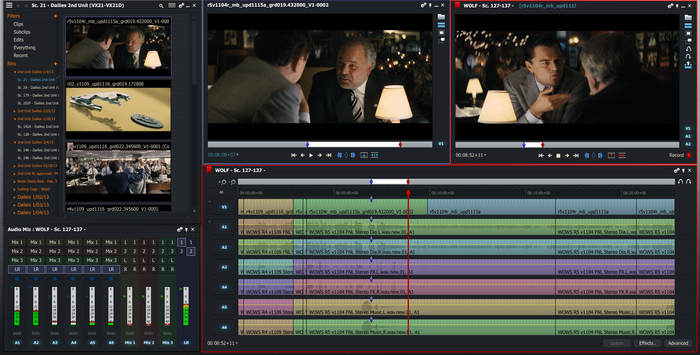
5 Free Programs for Editing Videos lightworks

This is a video editor used by professionals. With advanced features and countless possibilities, it is suitable for those who need good results without paying a lot for it. Download Lightworks and get a new editing experience.

Lightworks Download Lightworks
7

YouTube Video Editor

Yes, YouTube itself has an online video editor. You can join multiple videos, make cuts, add subtitles and publish content on YouTube without much ado. It does not offer effects features but it helps a lot with the quick editing.

VSDC Free Video Editor

5 Free Programs for Editing Videos - vsdc

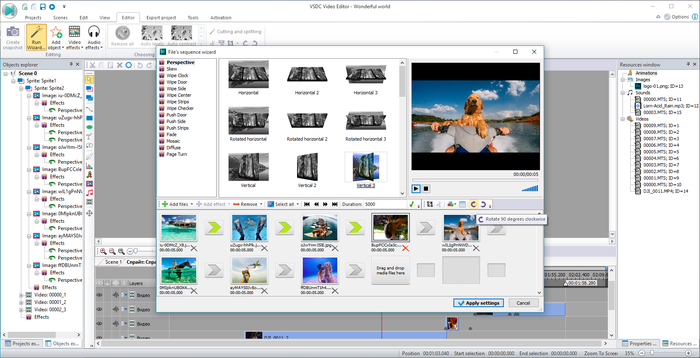
Here you will not have too hard a time editing your videos. VSDC Free Video Editor has great features and a wide range of pre-defined effects and filters that can be applied to one-click recording.

VSDC Free Video Editor Download VSDC
7


Free Video Editor

This is an improved version of VirtualDub. Free Video Editor provides mechanisms for editing videos, more specifically cutting off unnecessary or unwanted parts, without the need to recode it, which means the quality of the original content is preserved.

Free Video Editor Download Free Video Editor
8