Does your home have an Amazon Echo or a Google Home AI assistant? These devices are becoming increasingly popular these days as they have made real strides with voice recognition. Whether Star Trek enthusiast or an overworked parent the ability to bark a command at an AI assistant, designed to help you out, is not to be understated.
AI assistants are strictly auditory, however, with voice commands being met with a voice response or the desired action (be that turning off the lights or ordering a pizza) happening as if by magic. Amazon has announced the Echo Show, and there are rumblings of the Microsoft home hub offering full touchscreen capabilities, but these aren’t taking AI assistants anywhere special. In fact, they’re pretty safe moves along a development path that is well worn. They’re basically big smartphones or tablets with a decent speaker and a connection to the internet.
Now, what if your AI assistant had a face to go with that voice or even a body? Well, that is exactly what this concept video is showing. Untitled Network has taken the Cortana AI from the video game Halo (on which Microsoft’s own AI is based) and produced an entirely holographic AI assistant.
Now the device is just a concept and a DIY job at that, so we probably won’t be seeing anything like this coming to market anytime soon, but it is mesmerizing to see a little virtual assistant running around and doing your bidding. If the major AI assistant developers like Amazon, Microsoft and Google start looking into creating their holographic assistants the results could be something extraordinary.
Google’s Android mobile operating system was built to be an open and flexible platform. Nothing highlights this more than the Android Experiments initiative, which gives developer’s experiments playing around with the Android OS a platform for recognition. Android Experiments not only showcases the finished products of these experiments it also highlights the process that has gone into each of them in a bid to encourage more developers to submit experiments of their own.
All the tools are there and some of the results are fantastic. One experiment has seen the operating system being turned into a classic arcade game emulator with various widgets being used to position the control buttons. This is an extremely fun way of bringing a normally static background to life.
These experiments really are worth checking out even if you’re not a developer. It is inspiring to see just how much is possible. You can turn your phone into a wireless 3D mouse or a gamepad, for your PC. Another experiment allows you to link Android devices to display visual messages. How about throwing virtual paper planes or turning your own facial expressions into emojis? All of these cool options and more are there.
All in all Android Experiments is like an inspirational app store filled with cutting edge beta versions of the apps and OS features that will be found on the mobiles of tomorrow. Take the time to head over and you will not be disappointed.
Pokémon Go took the world by storm last summer as millions upon millions of players signed up to a game that saw them catching fictional characters in a real world setting. The game’s popularity has cooled considerably since then but there are still plenty of people, kids and adults, around the world trying to catch them all and an assistant professor at Iowa State University is looking into a novel new use for last summer’s big hit.
Emily Howell, from Iowa State, has always believed that education and technology go hand in hand. She has been working with teachers on ways to incorporate digital tools in the classroom and she believes that games like Pokémon Go can play an important role in a child’s educational development.
After playing Pokémon Go with her children, Howell began to see how the game could help students improve their writing and research skills. Rather than just engaging students by connecting their academic work to something many of them are already doing outside the classroom, Howell believes there can be other tangible benefits gained:
“It is important to give students authentic choices that really have meaning in their lives. We need to encourage them to develop questions, research the answers and then share that information in writing.”
There is so much that players need to learn when playing games like Pokémon Go
Games like Pokémon Go require players to learn a wealth of information that helps them advance further and increase their level within the game. This thirst for knowledge can generate a huge amount of questions, which foster communication amongst players. Howell believes that researching questions based on their own needs within the game and writing essays about the skills they learnt whilst playing will require much more research and structure than writing, for example, about how to make a peanut butter and jelly sandwich.
This method could give students an early insight into the academic rigors they’ll face later on in life. Giving young students the chance to develop and hone their research and written skills by reporting activities they’re doing in their free time seems like a no-brainer if it can be done well. Howell has been given a grant to look into these hypotheses and will be working with elementary teachers across Iowa to integrate technology into their writing lessons.
Good luck to her we say. We’ll be watching this one closely.
Do you let small children have access to smartphones or tablets? You should know that this can lead to a number of developmental problems. Two major institutes in North America – the Canadian Society of Pediatrics and the American Academy of Pediatrics – have done a number of very thorough studies on the subject.
The conclusion they came to is really interesting. According to the experts, there are several problems, in children up to 12 years old, which are caused by electronic devices. Are you curious to know what they are? If so, read on and we’ll go through them all.
Problems with Brain Development
Babies’ brains grow very fast. By age two, a child’s organs have tripled in size. In this period, environmental stimulation – or lack of it – are very important in determining how efficient brain development will be. Some studies show that overexposure to electronics in this period can be detrimental and cause attention deficit, cognitive delays, learning disorders, increased impulsivity and decreased ability to regulate their own emotions.
Obesity
You may have heard a statement similar to this: “children of the 21st Century are part of the first generation of people who will not live more than their own parents.” One of the biggest reasons for this is obesity, which can be linked to the overuse of electronics. It is estimated that children with devices in their own room are 30% more likely to be obese than others.
Sleeping problems
The constant use of the devices can end up generating dependency in a number of ways. One of the problems related to this is the fact that many children would rather play games, surf the internet or talk to friends on their devices than sleep. In addition to the psychological consequences caused by this, it is also necessary to remember that lack of nocturnal sleep can generate growth problems.
Emotional problems
There are studies from many parts of the world directly linking excessive use of technology to a range of emotional disturbances. Among the most cited by the researchers are: “childhood depression, anxiety, autism, bipolar disorder, psychosis and problematic behavior.” Children tend to repeat behaviors of adults and characters they consider as references. Therefore, exposure to games and movies with excessive violence can cause aggression problems for children up to 12 years old.
Digital Dementia
Psychologists and pediatricians mentioned, “Multimedia content at high speed can contribute to an increase in the deficit of attention”. In addition, exposure to this also causes concentration and memory problems. The reason for this would be the reduction of neuronal bands in the frontal cortex.
Radiation emission
The discussion on the relationship between cell phone use and the onset of brain cancer is still controversial – and hardly conclusive. Nevertheless, there is one thing scientists agree on: children are more sensitive to radioactive agents than adults. Because of this, Canadian researchers believe that cell phone radiation should be considered “probably carcinogenic” to children.
…..
Regardless of how much US doctors blame cell phones and tablets for a range of childhood problems, it is important to stay aware of each device’s use. Keeping electronics allied to children’s education can be a very interesting outlet, but always avoid overexposing to aggressive content.
YouTube is a monstrous platform for anyone who wants to share projects, ideas, news, information or just to make funny videos. Artists and a lot of other professionals have already relied on this Google owned solution to gain internet notoriety, reaching millions – or even billions – of viewers.
Such is the case of the following videos, the most viewed on YouTube since the platform went online. It is interesting to note that, barring one wild card, they are all music videos, showing that videos are a great way to promote a musician’s work. It is very likely that you have already watched several of the following videos. If you have not already seen them all, check them out below and become one in a couple of billion.
10. Maroon 5 – “Sugar” – 1.97 billion views
9. Major Lazer and DJ Snake – “Lean On” – 2.005 billion views
8. Taylor Swift – “Blank Space” – 2.03 billion views
7. Enrique Iglesias ft. Descemer Bueno and Gente de Zona – “Bailando” – 2.07 billion views
6. Masha and the Bear: Recipe for Disaster – 2.087 billion views
5. Taylor Swift – “Shake it Off” – 2.09 billion views
4. Mark Ronson ft. Bruno Mars – “Uptown Funk” – 2.39 billion views
3. Justin Bieber – “Sorry” – 2.46 billion views
2. Wiz Khalifa ft. Charlie Puth – “See You Again” – 2.68 billion views
These days it is common to think that there are no limits to what we know. After all, we can easily find the answer to any question that may arise in our heads, simply by accessing the internet.
The name of a strange city in a distant country, how to prepare that exotic food or the latest news about any female celebrity can be accessed quickly and easily.
However, there is much more information on the internet than most people realize. This is because most of us do not access the Deep Web, the part of the internet that is not indexed by search engines. The parts of the internet where only those who know the exact address can gain access.
If there are pages hidden in the Deep Web, you should also know that there are parts of the Deep Web that are even deeper and more mysterious. We are talking about the Mariana Web. Have you ever heard of the darkest part of the internet?
What is the Deep Web?
To understand Mariana Web you need to know a little about the Deep Web, and where it is found. As we’ll explain more comprehensively in this article, the content of Deep Web is one that brings together pages and documents not indexed by search websites, such as Google or Bing, for example.
This is the main definition of the term, which was created by Michael K. Bergman, CEO and co-founder of Structured Dynamics LLC. It refers to all content that cannot be indexed by search engines and is therefore not available directly to anyone browsing the internet.
These “secret” pages may only be accessed by specific applications, such as Tor, for example. It connects you to a network called “Onion” (Tor, in fact, is an acronym for “The Onion Router”) that manages access between your PC and these non-indexed sites. The question remains then, why are these pages hidden?
Simple: freedom of content. On the Deep Web, you will find all sorts of material, from relatively simple things like movies and books banned in certain countries, to heavier content such as forums for heavy image exchange, buying and selling drugs and many other things.
Many say in forums and amateur pages that most online data worldwide is on this network and is not viewed by most ordinary people. However, there are no specific or certified numbers to back the claim up.
The layers of Tor …
Even if you do not even know how to fry an egg or you are terrible in the kitchen, you’ve probably seen an onion up close, haven’t you? That way, you must remember that when this vegetable is pealed, in addition to making people cry a little, also separates into several different layers.
This is how Tor works. It works with several layers, each of which is a different router. At each step, the browser connects to one, which passes the connection information to the next, and so on. With that, the goal is to make the super-encrypted content “accessible” for you.
… And the layers of Deep Web
The term “layer” is not just about Tor’s browsing operation on the Deep Web. Some say that the “place” itself also has a layered division, bringing different levels of access – all according to the level of the user’s knowledge and what he might be looking for.
On the internet, there is not much precise information about such layers, so we’ve looked for some in the Deep Web itself. After several “comings and goings”, we have come to a kind of consensus, a pattern of divisions that appears in many forums and sites specialized in the subject.
In addition to the popular image of the iceberg depicting the Deep Web and all its hidden content, there are others also showing how this layering works. Some are even somewhat cryptic, displaying the user as a helpless person and surrounded by crazy and abstract layers of content.
The first three levels you should already know
The first three levels considered in this ranking are made by elements that are more “normal”, if you will. The first layer, called “0”, would be the Internet that we usually access today, the common sites and our daily routine, such as Facebook or Softonic itself, for example.
The internet as everbody sees it
By going to the first level, called “Surface Web”, you would find sites with more diverse content and some forums that admittedly appear with new and / or contradictory information, such as Reddit. Following the evolution, we arrive at layer number 2, the “Bergie Web”. Here you will find FTP servers that are further away from popular sites.
Finally, in the third layer, you reach the “Deep Web” itself. There are already very many different types of content here, such as sites with heavy video content, hacking forums, community scripting and virus studies amongst others. Although this layer can only be accessed by the use of a Proxy server, it contains only the most accessible material of the Deep Web.
Internet Underworld
There are many Deep Web sites that you can access without having Tor installed. This, however, restricts the scope of your navigation, leaving you stuck to the type of content mentioned above. Another problem is that you will probably end up with a PC full of of malware.
This means that anyone who ventures onto these sites should follow the advice of those who access the Deep Web regularly – many of which claim that Tor guarantees some degree of protection. As well as offering protection, it also allows you to access the other parts of this third layer.
With Tor you already gain access (if you can find the sites, of course) to several more advanced materials. There are those who say that there are extremely technical forums on the most diverse computational subjects, including data on cosmology.
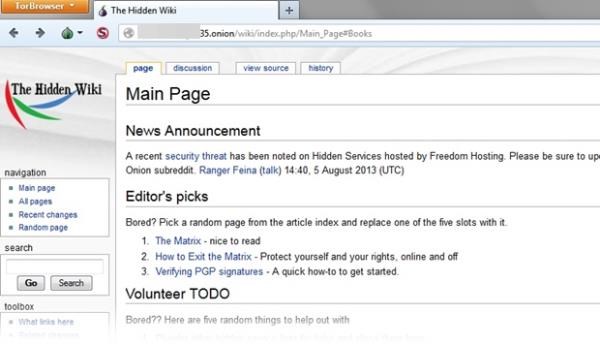
Layer 4, called “Charter Web”, is a more advanced version of the third layer. Here, however, access to illegal materials begins to grow dramatically. Drug sales sites, banned and extremely offensive videos and even the so-called “Hidden Wiki” are found on this level.
The Deepest Place
On the 5th layer, we find the so-called Mariana’s Web. The name is inspired by the “Mariana Trench”, which is known as the deepest place in the oceans of Planet Earth.
A popular infographic, found on the internet, shows this part of Deep Web speculations begin with the use of a tool called “Closed Shell Systems”, in addition to another one whose name is “Polymeric Falcighol Derivation”.
All this, however, could just be some fictitious names and tools, created out of nowhere and only for some curious new users to end up looking the fool. We could be in conspiracy theoryville here. Jokes aside, however, it is well known that many web pages need programs and settings far more advanced than Tor to be accessed.
These sites would shape the so-called Mariana’s Web. This level could also split into different categories making up the 5th, 6th and 7th layers of the web. Here, the rule would be the same; the higher the level you want to access, the more advanced tools you’ll need to go with your increasingly advanced skillset.
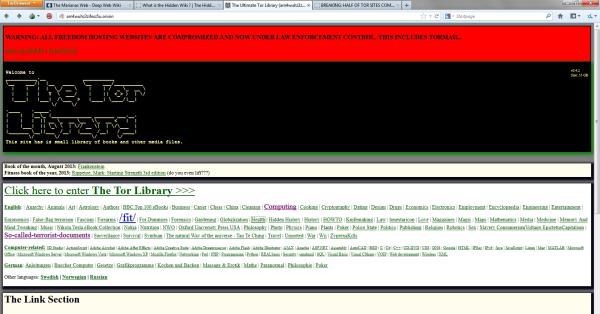
Extreme content of all kinds, including terrorist tutorials, pages with prohibited adult material, and unimaginable subject forums, for example, could be found in these layers. Even some legends and conspiracy theories can take shape in the confines of the internet.
The secret subjects of Mariana’s Web
But, what is so secretive about Mariana’s Web that it needs to be hidden in such a way? There is no 100% correct answer to this, so there is no way to pinpoint exactly what kind of information can be found there. What is known is based on reports from experienced Deep Web users and specialized forums.
According to them, several truly macabre sites can be accessed on the Mariana’s Web. As encryption levels are more advanced, some people feel more comfortable offering their services.
Some people point out sites that make hitmen available. Companies specializing in the sale of banned and strictly military weapons could also be found in these farthest layers of the network. In the most sinister reaches of the web there may even be the trade of human beings, rare animals and organs.
There are also “non-bizarre” parts within Mariana’s Web. Some sites and forums controlled by the Chinese Pirate Party, a group that advocates freedom of expression within the country, are supposedly active in these parts of the Internet.
The exchange of information from an army of hackers joining in the fight against online pedophilia, something very common within Deep Web, would also happen in these deeper layers with specially created forums built to deal with the subject.
There are those who believe that some of the most famous conspiracy theories on the internet may have been born on Mariana’s Web. Among the speculations are, for example, that Haarp would be a weapon of the United States Army able to control natural forces on our planet.
Others talk about the use of quantum computing by powerful governments across the globe, while there are those who say there are secret books written by Nikola Tesla that could bring information about incredible methods of obtaining and controlling electricity.
…..
For many, the whole concept of these hidden pages and all their mysteries are just internet legends … What do you think? Do not forget to comment!
One of the easiest and most familiar formats for exchanging text files is the PDF, created by Adobe. With it, you maintain the integrity of your text and layout whilst taking up less disk space.
It is good practice then to turn text created in editors like Microsoft Word into PDFs before sending them to friends, work contacts and others. There are a number of different ways to do this using online programs or simple tools installed on your computer. Let’s have a look at them now.
Online
Free PDF Converter
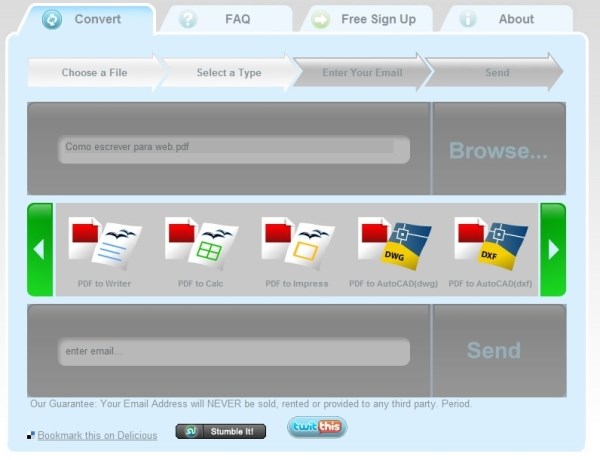
If you do not want to install anything on your computer then a good tip is to use online converters, which do not need installing on your computer. A great example is Free PDF Converter, which performs the task quickly.
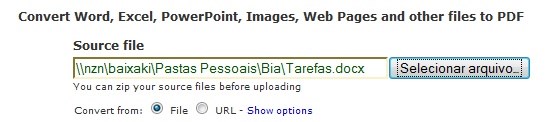
To convert to PDF go to the site and choose the file you want converting. The site converts not only Word documents, but also Excel spreadsheets and PowerPoint presentations whilst sticking to the original layout.
You are also able to convert web pages by entering the URL and selecting the option just below the file pathway box on your computer. If you want to PDF Converter can transform several files at a time.
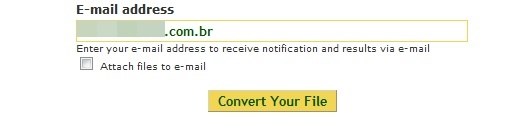
Next, fill in your email address so that you can receive notification when the conversion is complete. This email will include your PDF files if you click “Attach files to e-mail” before you press “Convert Your File”.
On the side of the page, you can also reverse the process; and transform PDFs into Word, Excel or RichText (RTF) files and even extract JPG and PNG images. Simply follow the same steps and enter the PDF password (if it has one).
The only limitation of Free PDF Converter is that you must wait 30 minutes for the transformation of each new file. This is to limit the strain on the system so it does not collapse.
CometDocs
Another useful option for those who need to convert files without installing anything on their computer is CometDocs, which brings a slightly more sophisticated interface whilst following the same style as the Free PDF Converter.
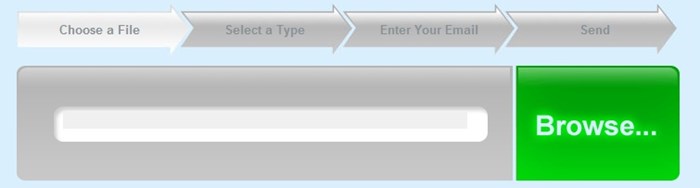
To convert simply go to the CometDocs site, click “Browse” and then choose the file you want to convert to PDF format.
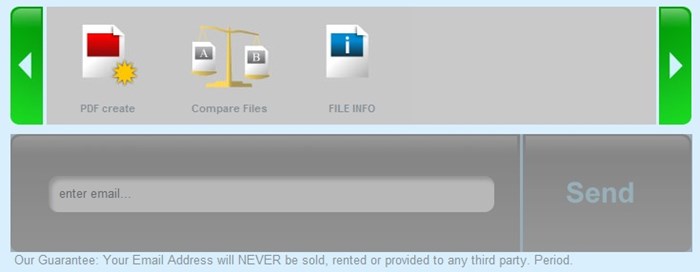
Next, choose the “PDF Create” option, which is the first one that appears in the listing. This is because CometDocs also shows the file comparison options and scans the file information in case you need both tasks.
The final step is to fill in your email and select “Send” so that it is sent quickly to the address provided. It will be available for 24 hours by the link sent, which means you can send the download address to friends without major problems. It is also possible to download the file directly.
The reverse direction also works with CometDocs. Accessing the site, you can choose PDF files to convert to not only Word, but also Excel, TXT, HTML, BMP, GIF, spreadsheets and presentations from BrOffice and even to AutoCad, DWG and DXF formats.
If you are looking for another simple option, but with immense format support, the Document Converter Express could be what you’re after. It is developed by the brand Neevia who are dedicated to developing applications for PDF. It allows the creation of watermarks and security by encryption and plenty of extra options when compared to the other two.
Programs to install
PDF 955
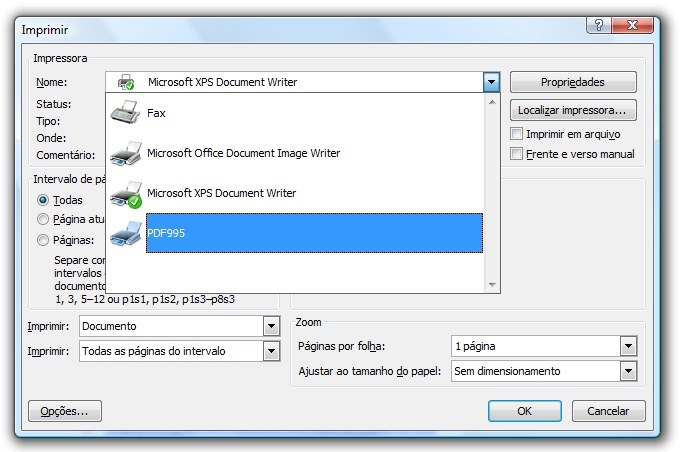
Now, if you are looking for a program to install on your computer for converting your files at any time, a great option is the PDF 955. It creates a new printer in your list, so you can easily send the file you are editing to be transformed directly in Word.
When you download the program, it will ask you to install PDF Converter, a system that allows the conversion of files by PDF 955. Download it and follow the installation instructions normally, until they are completed. Then download the PDF 955 and install it so that it creates the required drive in your list of active printers.
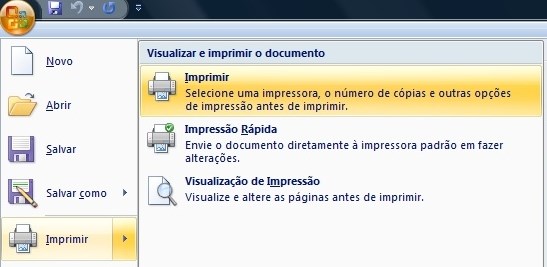
To convert Word files, open the text and click “Print” as if you were actually sending the information contained therein to the printer. In the list of names, you will see PDF955, the virtual printer that you should select to continue the conversion process.
When you click “OK”, a window opens where you can save the file to your system. Choose the location and name of the new file and save it, creating the desired PDF. As it is free, the program allows advertisements to be displayed, at the end of the conversion, which supports the project. Wait a few seconds and then close the new tabs to complete the process.
PDF 955 is not the only program that creates virtual printers. Programs such as PDF24, PrimoPDF, CutePDF Writer, or PDFCreator are equally fast and work in the same way by sending the file to “print”. However, these types of programs can’t reverse the work, they’re unable to convert PDFs to other formats.
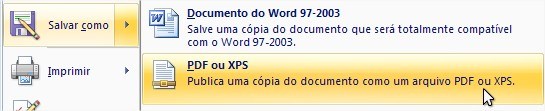
If you are looking for a simpler, lightweight option that does not need any virtual printers to work, Save as PDF is a good alternative. It is nothing more than an add-on for the entire Office suite (from the 2007 release on).
To convert, install the program and open any file you want to convert to both PDF and XML. Click “Save As” and choose the PDF or XPS option, selecting the location for the converted file and the format of your preference.
If your computer is running genuine Windows software and undergoes regular updates, this option may already exist, without having to download anything to activate it.
In addition to these options, it is worth checking out Free PDF to Word Converter, PDF to Word BETA and PDF2Word to perform the reverse operation by converting PDF files directly to Word.
. . .
All programs in this tutorial are free, so you do not have to worry about usage limitations or incomplete conversions. Choose the one that best suits your needs and quickly convert what you need without any major headaches.
Having control over the pages that open and close on your computer is both important and easier than it seems. What’s more, you don’t even need to download any special programs to do it. Just follow these simple steps.
What you Need to Do
In order to block a site, you must first access a system file called “host”. You can reach it in two different ways:
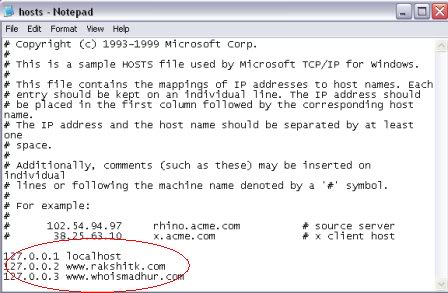
Opening the “Run” tool of your computer (press the Windows + R keys) and, in the blank field, inserting the text “notepad% windir% \ system32 \ drivers \ etc \ hosts” (without quotation marks);
Now open the file as a notepad text and create a new line at the end of the text. In it, you should enter the code “127.0.0.x”, followed by the address of the site you want to block. You have to replace the “x” of the above code with a number that isn’t already on the list.
By following the process correctly, you will get something similar to the image above. If everything is OK, the only thing left to do is to save the file and restart your browser.
This way, whenever someone tries to open a locked page, your browser will display a blank screen. There is no error or computer message that will display; the site simply will not open. To allow the address to open again, just delete the corresponding item from the list.
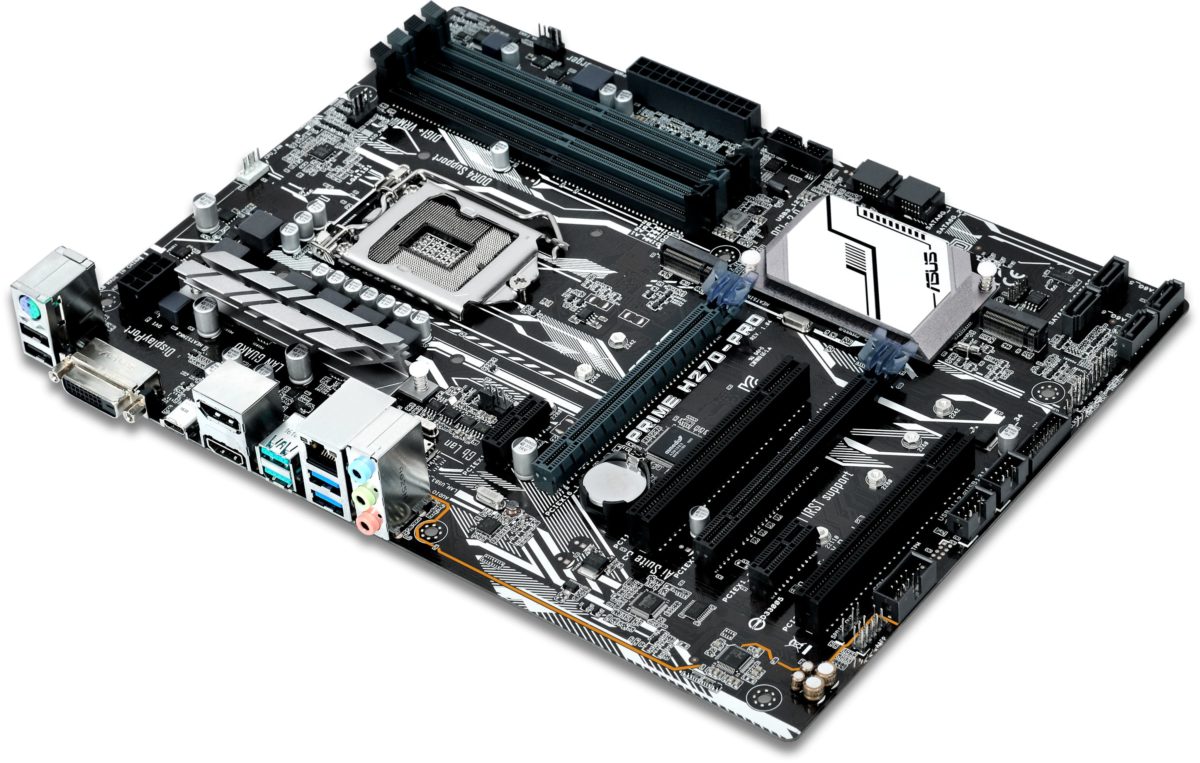
BIOS is a computer’s most basic system. Through BIOS the motherboard controls all of the machines’ hardware. BIOS is programmed by firmware and is able to save settings that have been inputted by the user.
When you access a computer BIOS, you check this data against the main components attached to the motherboard and customize several options relating to them – which requires quite an in-depth knowledge of the subject. It is also possible to update the BIOS, which we will go over in this article but first it is necessary to review some points before we get on to updates.
Why Update your BIOS?
If your computer meets all your needs and isn’t showing any type of failure or error then you probably shouldn’t bother updating the BIOS. We say this because playing around in the BIOS can be dangerous and any error could cause serious errors, which will only bring more headaches.
On the other hand, if you have problems with hardware compatibility, performance or any situation where a BIOS update could be the answer – it’ll be worth knowing how to move forward safely – this process may be the best way out.
Precautions
You should note some extremely important details when updating the BIOS. First, make sure that you use the exact BIOS template for the motherboard of your machine.
It is also important to make use of a UPS or, at least, a surge protector to avoid power fluctuations. This is important because a drop in power during the process can corrupt the BIOS, which will give you no end of grief whilst you try and fix it.
Know the BIOS Model
If you’ve decided to upgrade the BIOS, you should know the exact model you’re dealing with before you proceed. By purchasing pre-fabricated computers from well-known brands, there is a good chance you will find the links to the latest BIOS versions on their respective websites. Generally, you put your machine’s exact model and the file list appears ready to be downloaded.
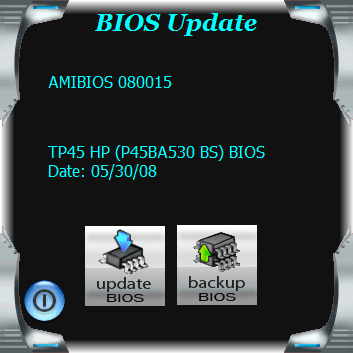
Some motherboard models also include an application that automatically searches for and updates the BIOS. This program usually comes with the motherboard drivers installation CD. If you have this then use it as it is the simplest and safest way to update the BIOS.
Nothing on those sites?
If you can’t find what you need on the manufacturers’ websites, you need to complete two more steps before you can move forward: find the BIOS version and the motherboard’s manufacturer.
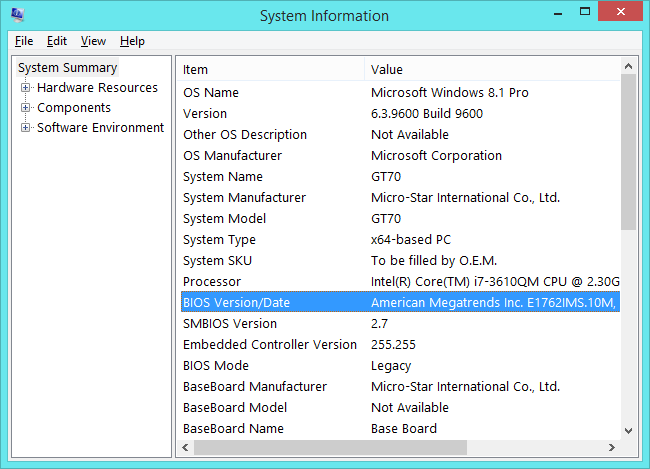
For finding the BIOS version, the best option is to use the msinfo32 command. In Windows 10, 7 and Vista type it into the Start Menu search gap. In Windows XP you must choose the “Run” function, also located in the Start Menu.
In the information window just look at the motherboard model and the BIOS version installed (as shown in the figure below). If the motherboard does not appear in the list and you do not have a box or CD containing the model, use a hardware diagnosis tool like Everest. When installing and running the program, access the initial summary or the “Motherboard” option to find the information.
You can now search for the correct BIOS update. When searching through the list of files in the specific site there will usually be a description of the improvements that the version will bring. If the items described are what you need, download the file and update the BIOS.
At this stage it becomes a bit complicated to explain the upgrade process, since depending on the model and year of your motherboard it may be totally different. These days, the BIOS update is usually done automatically, within the Windows interface itself.
On older motherboards, however, it may be necessary to copy the file to a USB or CD and boot the machine with the cd inserted, which requires a little more knowledge on the subject. If you feel insecure about doing this, the best option will be to ask for the help of a specialist.
Finalize the process
Once the BIOS is fully upgraded, a good tip is to turn your machine off and on again. Wait a few seconds for the machine to restart again and then check the changes in the exact same way you did to find out the BIOS version with the msinfo32 command.
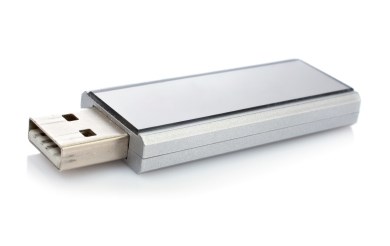
Everyone has already gone through the agonizing situation of having to use a USB stick to transfer some files, pass some photos, some songs etc and suddenly the Windows warning appears on the screen: “The disk is write-protected. Remove the protection or insert another disk “.
In these situations, you patiently remove the small device from the computer without forgetting to remove it before in the System Device Wizard, move the manual lock and insert it back into the computer. Everything is fine now.
Sometimes, however, the warning doesn’t go away. Alternatively, what about if your pendrive doesn’t even have the manual lock but the message that it is write protected appears? If this happens it may have been infected with a virus.
Unlocking the “unlockable”
We have prepared a tutorial to help you remove the write protection from your pendrive without any major complications, so you can get on with passing those songs to your friend or those pics to your mother.
Step 1
Insert the device into the USB port of your computer and make sure that it has been recognized successfully. A message in the lower right corner of the screen usually confirms this recognition.
Step 2
Click the following link to download the batch add.bat file. Then run it. Once it’s done, the key will be automatically added to Registry Editor.
Step 3
Open the “Run” window in the “Start Menu” and enter the regedit command. Once you do this the Windows Registry Editor will be opened. While navigating through the folders, find the following path: KEY_LOCAL_MACHINE> SYSTEM> CurrentControlSet> Control> StorageDevicePolicies.
Step 4
This is the most important step: double-click the “WriteProtect” key in the Registry Editor, and in the window that pops up, type “0” in the field “Value data”. Then press “OK”. Close the editor and restart your computer. Insert the pendrive again and test if the protection has been removed successfully.
Comments
It is important to remember that the above feature doesn’t only work on pendrives. It can also be used to remove write protection from memory cards, iPods, MP3 players and other devices connected via USB port.