
Adobe Stock has revolutionized the way designers and creatives access high-quality assets. With an expansive library that includes photographs, illustrations, videos, and now, customizable templates, Adobe Stock makes any design project easier and more efficient. This guide will walk you through the updated process of using Adobe Stock templates, highlighting the latest features and best practices to enhance your creative workflow.
Adobe Stock’s template library has been upgraded with new features designed to streamline the design process. Enhanced integration with Adobe Creative Cloud makes accessing and managing templates more seamless across all your devices and applications.
Adobe Stock offers a wide range of templates tailored for Adobe’s suite of products, including Photoshop, InDesign, Illustrator, Premiere Rush, and Premiere Pro. These templates are designed by top professionals and can be seamlessly integrated into your projects via Creative Cloud Libraries, ensuring you always have access to the resources you need.

Getting Started with Adobe Stock Templates
To begin using Adobe Stock templates, access the Adobe Stock website or the Creative Cloud Libraries directly from your Adobe application. Use the search function to browse thousands of templates based on your project requirements. The intuitive interface makes it easy to filter results by type, style, and application compatibility.

Licensing and Plans
Adobe Stock provides various licensing options to suit different needs:
- Standard License: Ideal for most personal and commercial projects.
- Extended License: Necessary for merchandise, templates, and unlimited print runs.
- Enhanced License: Offers additional rights for high-value projects.
- Editorial Use: For newsworthy or public interest content.
- Adobe Enterprise: Tailored for large organizations with extensive usage needs.
Subscription plans offer flexible options for accessing Adobe Stock assets. Whether you choose a monthly plan for ongoing access or purchase credits for occasional needs, Adobe Stock ensures you get the best value. Free assets are available, but premium templates might require a purchase.
Initiating a Project Using Templates
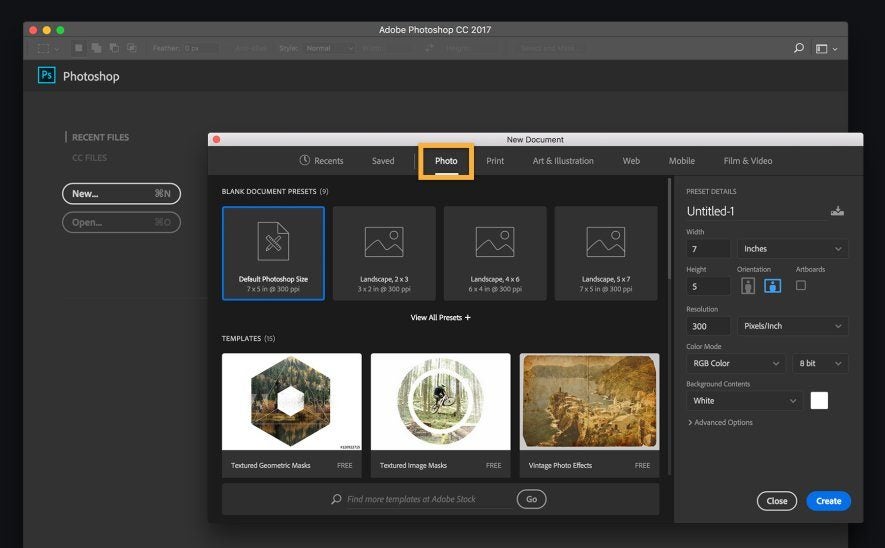
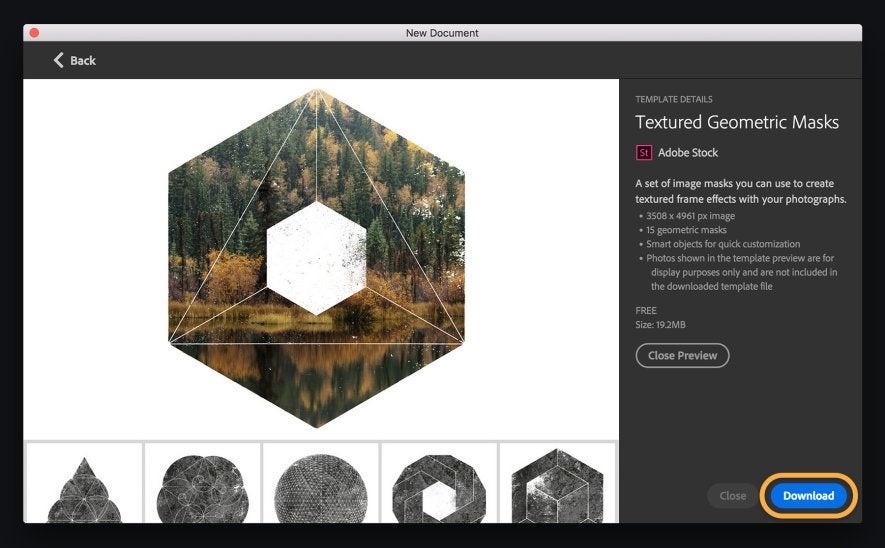
Starting a project with an Adobe Stock template is straightforward. In your Adobe application, go to File > New, then browse Adobe Stock for a template that matches your vision. Once you find the right template, open it and save it to your Creative Cloud Libraries for easy access across all your devices.
Customizing Templates
The true power of Adobe Stock templates lies in their customization capabilities. Each template is built in layers, allowing you to:
- Change colors and typefaces to align with your brand
- Swap out placeholder images with your own photos
- Adjust layout elements to better fit your content
Advanced users can delve deeper, modifying shapes, adding effects, and even combining multiple templates for a unique look.
Integrating Your Own Media
Adding your own photographs and media to an Adobe Stock template is simple. In the Layers panel, create a new layer for your media. Drag and drop your image into the designated area, resize it, and adjust it to fit perfectly within the template’s framework. This ensures your final product is both personalized and professional.

Finalizing and Exporting Your Work
Once you’ve customized your template, save your work regularly to avoid losing progress. Export options include saving as a PDF for print, or other formats suitable for web and social media use. Adobe’s export tools ensure your project maintains its quality across all platforms.

Maximizing Adobe Stock Resources
Adobe Stock’s vast library is a treasure trove for any creative professional. Utilize templates for a variety of projects—from social media graphics to promotional videos. Subscribing to Adobe Stock not only saves time but also enhances the quality and efficiency of your work.
Adobe Stock templates are a game-changer for anyone looking to streamline their design process. With a myriad of templates at your disposal, combined with the flexibility to customize them to your liking, Adobe Stock ensures that every project you undertake is both efficient and high-quality. Dive into Adobe Stock today and discover the endless possibilities to elevate your creative projects.
