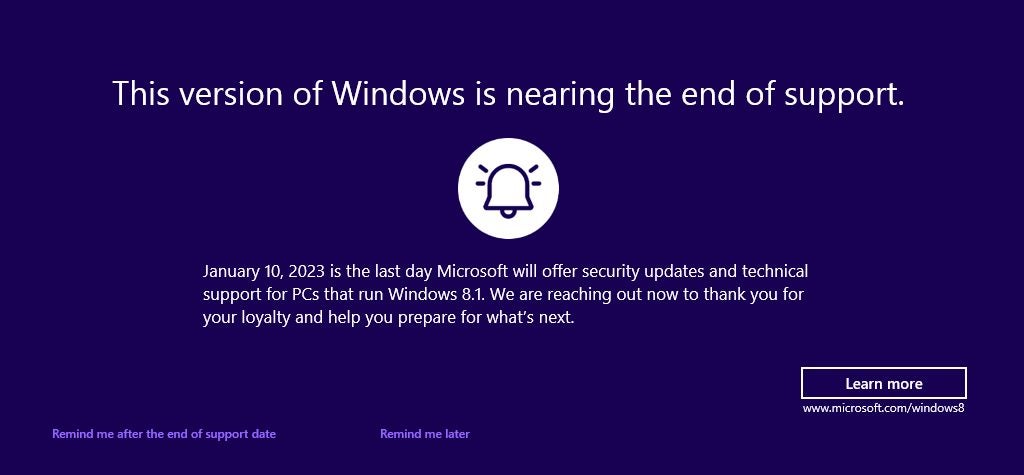
Windows 8.1 users who boot into the operating system may see a warning about the operating system’s upcoming end of support. The alert reminds users that the operating system will no longer be supported by Microsoft after January 10, 2023.
Users of Windows 8.1 began to notice the fullscreen warning this week after installation of the July 2023 cumulative update for the operating system; this update fixed several critical security issues in the operating system and addressed non-security issues. Important security updates are installed automatically on most Home systems running Windows.
This version of Windows is nearing the end of support
January 10, 2023 is the last day Microsoft will offer security updates and technical support for PCs that run Windows 8.1. We are reaching out now to thank you for your loyalty and help you prepare for what’s next.
Windows 8.1 End of Support notification
Microsoft included the notification as part of July’s Patch Day cumulative updates for the operating system.
Microsoft’s Windows 8.1 operating system reaches end of support in January 2023. A last round of security updates for the operating system will be released in January 2023 before support ends. Support end means that Microsoft won’t release security updates for the operating system anymore, nor offer any other form of support, including paid support.
Other products, including Microsoft 365 and products by third-party developers, may reach end of support as well.
Windows 8.1 users may select “remind me after the end of support date” to get another reminder in January 2023. Selecting “remind me later” will show the fullscreen warning again in 35 days. “Learn more”, finally, opens this support page on the Microsoft website. It includes a FAQ, but also advertises Microsoft’s Windows 11 operating system.
How to block the Windows 8.1 end of support warning
Windows 8.1 users who don’t want to see the fullscreen message repeatedly may select the “remind me after” option. Doing so displays the next warning after January 10, 2023 again on the system.
There is also an option to block it completely, but this requires editing the Registry.
Note: we recommend that you create a backup of the Windows Registry or the operating system before editing the Registry.
- Use the keyboard shortcut Windows-R to open the runbox.
- Type regedit.exe and select the ok-button to start the Registry Editor.
- Confirm the UAC prompt by selecting yes.
- Use the folder structure on the left to navigate to the following key: HKEY_CURRENT_USER\Software\Microsoft\Windows\CurrentVersion\EOSNotify
- Right-click on EOSNotify and select New > Dword (32-bit) Value.
- Name it DiscontinueEOS.
- Double-click on DiscontinueEOS and set the value to 1.
- Close the Registry Editor window and restart the PC.
The operating system won’t display end of support fullscreen warnings anymore afterwards.
Windows 8.1 Support End: your options
Windows 8.1 devices won’t receive security updates after January 10, 2023; this means, that security issues won’t be patched and that these issues may be exploited successfully.
Microsoft extended support of its Windows 7 operating system by three years when it reached end of support. The company announced already that it won’t offer extensions for Windows 8.1. Microsoft offered no explanation, but a look at the usage numbers highlights why. Windows 8.1 is not widely used, even when compared to Windows 7.
Microsoft recommends that users switch to the company’s Windows 10 or 11 operating systems. Windows 8.1 users who want to remain on Windows can only choose one of these systems, as these are the only two that Microsoft supports after January 2023.
Remaining on Windows 8.1 may look like an option, but running unsupported operating systems increases the risk of successful attacks.
Windows 10 is supported until October 14, 2025. While that is less than three years, it may be sufficient for many use cases. There is also a chance that Microsoft may extend the end of support date, considering that a percentage of devices can’t be upgraded to Windows 11.
The operating system has two advantages over Windows 11:
- A direct upgrade path from Windows 8.1 to Windows 10 exists.
- System requirements are identical.
Microsoft changed the system requirements of Windows 11 so that unsupported devices can’t be upgraded easily to the new operating system. A direct upgrade from Windows 8.1 to Windows 11 is not possible, even for devices that meet all requirements.
The only option is to upgrade from Windows 8.1 to 10, and then from Windows 10 to 11.
A new installation of Windows 11 is an option, but it would leave all files, settings and installed programs behind.
Other options
Switching to a Linux distribution may be another option. Certain distributions, such as Linux Mint or Ubuntu, provide similar user experiences. Many applications, including games, are available for Linux.
There is also the option of buying a new PC, one that runs Windows 11 or is compatible with the operating system. It is a valid option, especially if the Windows 8.1 PC is showing signs of age.
Windows 8.1 users have several options to deal with the upcoming support end, as shown above. Users who want to keep their files and programs may want to consider upgrading to Windows 10. All Windows 8.1 PCs should be compatible with Windows 10, and since there is a direct upgrade path, it is a straightforward process. Upgrades may still be free, even, in some cases.
