Microsoft nags Windows 8.1 users with fullscreen end of support warnings

Windows 8.1 users who boot into the operating system may see a warning about the operating system’s upcoming end of support. The alert reminds users that the operating system will no longer be supported by Microsoft after January 10, 2023.

Users of Windows 8.1 began to notice the fullscreen warning this week after installation of the July 2023 cumulative update for the operating system; this update fixed several critical security issues in the operating system and addressed non-security issues. Important security updates are installed automatically on most Home systems running Windows.

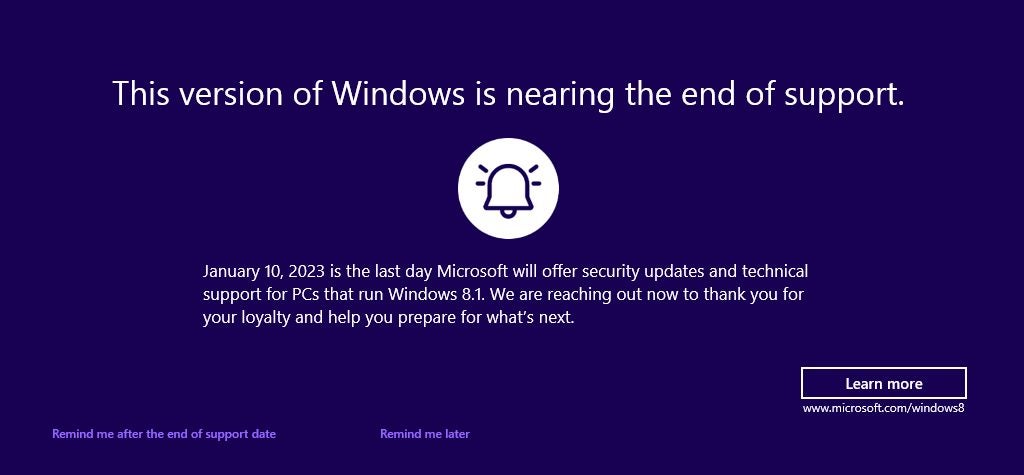
This version of Windows is nearing the end of support

January 10, 2023 is the last day Microsoft will offer security updates and technical support for PCs that run Windows 8.1. We are reaching out now to thank you for your loyalty and help you prepare for what’s next.

Windows 8.1 End of Support notification

Microsoft included the notification as part of July’s Patch Day cumulative updates for the operating system.

Microsoft’s Windows 8.1 operating system reaches end of support in January 2023. A last round of security updates for the operating system will be released in January 2023 before support ends. Support end means that Microsoft won’t release security updates for the operating system anymore, nor offer any other form of support, including paid support.

Other products, including Microsoft 365 and products by third-party developers, may reach end of support as well.

Windows 8.1 users may select “remind me after the end of support date” to get another reminder in January 2023. Selecting “remind me later” will show the fullscreen warning again in 35 days. “Learn more”, finally, opens this support page on the Microsoft website. It includes a FAQ, but also advertises Microsoft’s Windows 11 operating system.

How to block the Windows 8.1 end of support warning

Windows 8.1 users who don’t want to see the fullscreen message repeatedly may select the “remind me after” option. Doing so displays the next warning after January 10, 2023 again on the system.

There is also an option to block it completely, but this requires editing the Registry.

Note: we recommend that you create a backup of the Windows Registry or the operating system before editing the Registry.

  1. Use the keyboard shortcut Windows-R to open the runbox.
  2. Type regedit.exe and select the ok-button to start the Registry Editor.
  3. Confirm the UAC prompt by selecting yes.
  4. Use the folder structure on the left to navigate to the following key: HKEY_CURRENT_USER\Software\Microsoft\Windows\CurrentVersion\EOSNotify
  5. Right-click on EOSNotify and select New > Dword (32-bit) Value.
  6. Name it DiscontinueEOS.
  7. Double-click on DiscontinueEOS and set the value to 1.
  8. Close the Registry Editor window and restart the PC.

The operating system won’t display end of support fullscreen warnings anymore afterwards.

Windows 8.1 Support End: your options

Windows 8.1 devices won’t receive security updates after January 10, 2023; this means, that security issues won’t be patched and that these issues may be exploited successfully.

Microsoft extended support of its Windows 7 operating system by three years when it reached end of support. The company announced already that it won’t offer extensions for Windows 8.1. Microsoft offered no explanation, but a look at the usage numbers highlights why. Windows 8.1 is not widely used, even when compared to Windows 7.

Microsoft recommends that users switch to the company’s Windows 10 or 11 operating systems. Windows 8.1 users who want to remain on Windows can only choose one of these systems, as these are the only two that Microsoft supports after January 2023.

Remaining on Windows 8.1 may look like an option, but running unsupported operating systems increases the risk of successful attacks.

Windows 10 is supported until October 14, 2025. While that is less than three years, it may be sufficient for many use cases. There is also a chance that Microsoft may extend the end of support date, considering that a percentage of devices can’t be upgraded to Windows 11.

The operating system has two advantages over Windows 11:

  • A direct upgrade path from Windows 8.1 to Windows 10 exists.
  • System requirements are identical.

Microsoft changed the system requirements of Windows 11 so that unsupported devices can’t be upgraded easily to the new operating system. A direct upgrade from Windows 8.1 to Windows 11 is not possible, even for devices that meet all requirements.

The only option is to upgrade from Windows 8.1 to 10, and then from Windows 10 to 11.

A new installation of Windows 11 is an option, but it would leave all files, settings and installed programs behind.

Other options

Switching to a Linux distribution may be another option. Certain distributions, such as Linux Mint or Ubuntu, provide similar user experiences. Many applications, including games, are available for Linux.

There is also the option of buying a new PC, one that runs Windows 11 or is compatible with the operating system. It is a valid option, especially if the Windows 8.1 PC is showing signs of age.

Windows 8.1 users have several options to deal with the upcoming support end, as shown above. Users who want to keep their files and programs may want to consider upgrading to Windows 10. All Windows 8.1 PCs should be compatible with Windows 10, and since there is a direct upgrade path, it is a straightforward process. Upgrades may still be free, even, in some cases.
Windows 8 is one day closer to death

Microsoft is blocking new apps for Windows 8 and will even start blocking app updates for the soon to be obsolete operating system

Microsoft is blocking new apps for Windows 8 and will even start blocking app updates for the soon-to-be-obsolete operating system

Microsoft has published a roadmap for the future of Windows 8, 8.1, and Windows Phone 8.x and it is full of bad news for fans of Microsoft’s first touchscreen-enabled operating system. Come November of this year, Microsoft will no longer be accepting new Windows 8 apps. Published via the official Microsoft blog, the news pushed Windows 8 one day closer to death, which will come in 2023 when Microsoft will cease support for Windows 8 altogether. Windows 7 users will meet their end sooner, with Microsoft pulling support for the popular OS in 2020.

As well as stopping new apps coming to Windows 8, Microsoft is also planning to stop app updates for Windows Phone 8.x. After July 2019, app updates will only be available for Windows 10 devices.

Windows 10 is Microsoft’s big push towards a continuously evolving multi-device OS and it is in Microsoft’s interest to have all users working within the same ecosystem. In pursuit of this goal, Microsoft originally offered Windows 10 for free and then made its new web browser Edge a Windows 10 exclusive before releasing it on Android and iOS. Other efforts have included pulling support agents from Windows 7 and Windows 8.1 forums and limiting new processor support to Windows 10.

This latest move marks a shift in Microsoft’s strategy. Rather than focusing on pushing users to update to Windows 10, the software giants is now nudging developers towards focusing their efforts on apps for its flagship operating system.

The official timetable for the decommissioning of Windows 8 and the end of app submissions is:

“October 31, 2018, New app submissions will not be accepted anymore for Windows 8, Windows 8.1, or Windows Phone 8.x or earlier.

July 1, 2019, Microsoft will stop the distribution of application updates to Windows Phone 8.x or earlier devices.

July 1, 2023, Microsoft will stop the distribution of app updates to Windows 8 or Windows 8.1 devices.”

This means come October 31 there will be no new apps added to the official Windows Store, from July next year no Windows 8.x apps will receive updates and come July 2023 the same fate awaits apps for Windows 8 and 8.1.

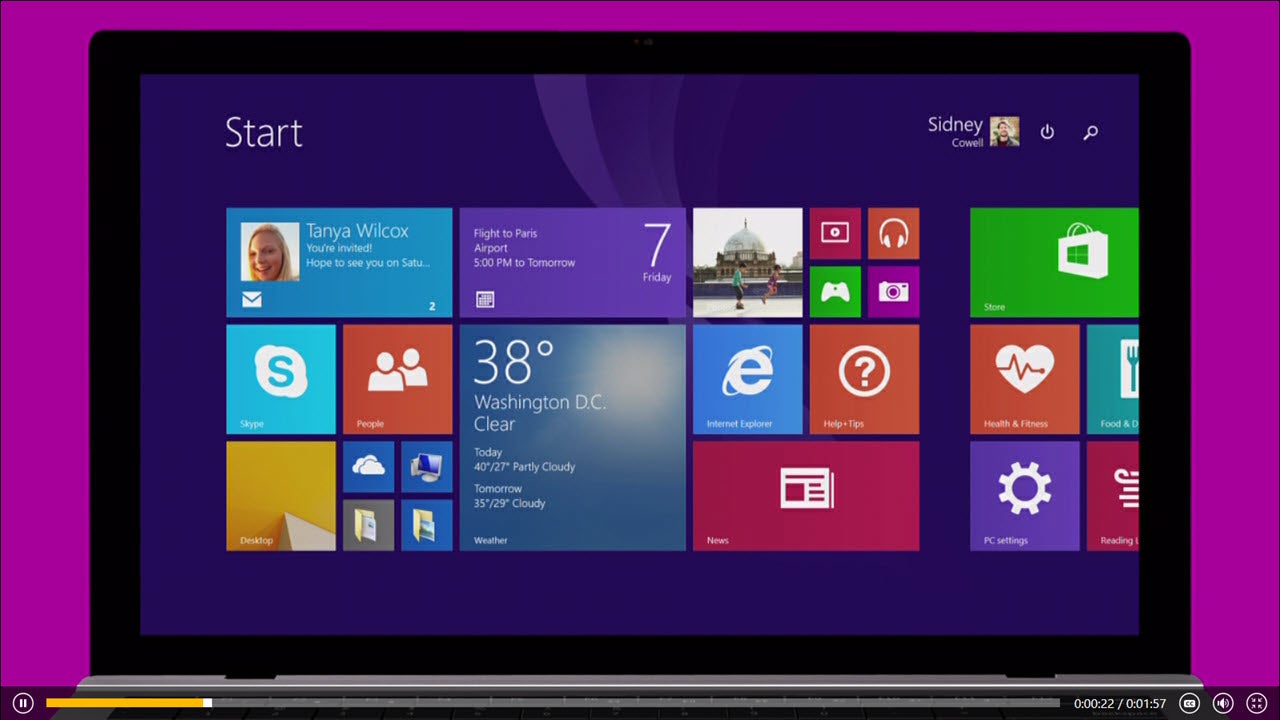
Windows 8.1 purple header
Microsoft has officially put Windows 8 on the chopping block

This all spells out a pretty stark future or Windows 8 as Microsoft continues to push users towards an app-centric way of doing things that will revolve around the official app Windows Store. Windows 10 users can still install and use .exe programs, but the latest iteration of the operating system, Windows 10S, which was developed for use on more mobile devices will only run official Windows Store apps. Desktop and Laptop computers are far from dead, but as the future looks increasingly mobile a lack of app support could spell the end for an operating system.

Windows 8 fans, be warned. Your days are officially numbered.

Microsoft will no longer fix or improve Windows 8

Today marked the end of Microsoft’s mainstream support for its Windows 8 and Windows 8.1 operating systems. This doesn’t mean Windows 8 and 8.1 are as dead as Windows XP just yet as users running Windows 8 or 8.1 will continue to receive security updates until January 10th 2023.

Of course, Windows 10 is still much better than Windows 8 and 8.1 in terms of features, usability, and security so if you really want the best operating system that Windows can offer it’d still be best to update to Windows 10, even if your Windows 8 operating system is still receiving security updates.

Windows 10 Get Windows 10
8
Microsoft's Windows 10 operating system (OS) marks a major turning point for the company. Microsoft hopes to make a fresh start and move on from the much-maligned Windows 8. There are a whole raft of major changes and minor tweaks in Windows 10, all designed to make the experience feel more complete - whether you are using it on a computer, tablet, or phone.

If you’re hesitant to update to Windows 10 due to the high price tag you should know that there are work arounds. Click here to learn how to get Windows 10 for free.

Do you still use Windows 8? Tell us why you haven’t already updated to Windows 10 in the comments below.

Follow me on Twitter: @PatrickDevaney_


Via: ONMSFT

Bye bye Windows 8

Today we are saying goodbye to one of Microsoft’s shortest-lived operating systems. Windows 8 will end its short three-year life cycle later today – Tuesday January 12, 2016 – when it receives one final security update.

Windows 8 users need not worry however, simply by downloading the free upgrade to Windows 8.1 – which Microsoft considers a service pack – you will still be able to receive ongoing support and security updates.

If you are happy with Windows 8, and are thinking of sticking with it, you should be aware that you are leaving yourself open to security breaches with Microsoft no longer supporting it. So, with vulnerabilities to any new threats going unpatched, considering the upgrade to Windows 8.1 or Windows 10 is seriously recommended.

That said, if you would truly H8 to give up 8, then a good antivirus is a must – as can be seen by users who are still using Windows XP as their primary OS. And, though we do not recommended, the desire to retain a vintage operating system does earn our respect.

Talking of vintage software, versions of Internet Explorer before Internet Explorer 11 (IE11) will also cease to receive security updates from today. If you are running Window 7 or later you can upgrade to IE11 for free, Vista and XP users should consider alternatives like Mozilla Firefox.

Source: Softpedia

200 million users for Windows 10

Just last week we received a press release from Microsoft in which the last article revealed that Windows 10 is now installed on in 200 million devices. This is thanks to a huge boost from Black Friday sales, with a whopping 40% of new devices running the OS.

It is true that the adoption rate is very high: 140% faster than Windows 7 and 400% faster than Windows 8 – an OS that was an important step towards Windows 10, but which was criticized by users.

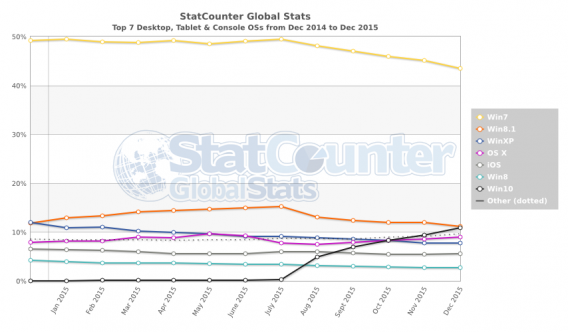
Looking at a chart from StatCounter, Windows 8 represents less than 3% of global operating systems worldwide. Note also that the steady growth of Windows 10 means it is already surpassing Windows 8, while Windows 7 is declining at the same rate – yeah, Microsoft ending its support for 8 is making a lot more sense suddenly.

We could say that we will miss Windows 8, but we all know that is not true. Long live Windows 10.

Related Stories

Internet Explorer is dying: a history of the world’s most hated browser

Which Windows 10 version should I get?

5 alternatives to Internet Explorer

Rumor: Windows 9 will be free for Windows 8 users

More rumors are circulating that Microsoft’s upcoming Windows 9 (or whatever it will be called) will be free, at least for Windows 8 users.

Microsoft has changed the way Windows is updated recently, offering regular monthly updates, instead of the old system of Service Packs that arrived every few years. Getting users to upgrade to Windows 8 has been an uphill struggle, so the company will want to make Windows 9 as painless as it can for as many users as possible. No mention has been made of what Windows 7 or Vista users will be offered– if anything– to encourage them to upgrade.

The latest rumor that the upgrade to Windows 9 will be free comes from an Indonesian site, Detik.com, quoting Microsoft’s Indonesian President Andreas Diantoro at a meeting on September 25th in Jakarta.

We expect to be able to confirm some of this on September 30th, when Microsoft holds an event to present the future of Windows and Enterprise.

Source: Detik.com

Related Stories

Windows 9 Technical Preview may not arrive until October

The Start Menu in Windows 9 will change color

Rumor: Windows Phone 9 developer preview released in January 2015

Follow Jonathan on Twitter: @jonathanriggall

Windows 8.1 ‘August Update’ available again, with problems fixed

Microsoft’s Windows 8.1 ‘August update’ is available once more, this time with fixes for the crashes and bugs that were reported after its original release last month.

In August, Microsoft released the first in its planned monthly updates for Windows 8.1, but users reported problems like fonts not being rendered properly to the famous ‘blue screen of death’ (BSOD). Now the company says all of those problems are fixed and the update is safe for everyone to download.

This update introduces the following to Windows 8.1:

– Precision touchpad improvements – three new end-user settings have been added: Leave touch pad on when a mouse is connected; allow right-clicks on the touchpad; double-tap and drag.
– Miracast Receive – exposes a set of Wi-Fi direct APIs for Independent Hardware Vendor (IHV) drivers or OEM drivers to develop Windows 32-bit applications that run on all supported x86-based or x64-based versions of Windows 8.1, enabling the computer as a Miracast receiver.
– Minimizing login prompts for SharePoint Online – reduces the number of prompts with federated use in accessing SharePoint Online sites. If you select the “Keep me signed in” check box when you log on for the first time, you will not see prompts for successive access to that SharePoint Online site.

Windows 8.1 users can choose to activate automatic updates by visiting the Microsoft Update website. In this case, you will receive updates gradually as they are rolled out. If you don’t use this feature, you can install the updates manually, and earlier, by visiting the same Microsoft Update site.

Source: NeoWin, Microsoft

Related Stories

Firefox 32 RC 1 released for desktop

Google Chrome blocks software designed to trick you

Adobe releases critical patches for Flash Player, Acrobat and Reader

Follow Jonathan on Twitter: @jonathanriggall

Windows 8 usage finally exceeds XP

During July and August, Windows 8 and 8.1 usage finally superseded Windows XP in worldwide operating system market share, according to statistics from StatCounter.

Persuading users to upgrade to Windows 8, and to at least stop using XP, has been an uphill struggle for Microsoft. Windows 8’s radical new design may have been off-putting to some, while XP is running on millions of old PCs around the world. It’s an important milestone for Windows 8 to have a bigger market share than its 14 year old predecessor.

XP still commands 14.7% of the OS market, but Windows 8 and 8.1 usage has now reached 15.22%. All of these are far behind Windows 7, which is the most popular operating system by far at 55%.

With Windows 9 expected in 2015, it looks like Windows 8/8.1 will be consigned to being one of Microsoft’s least successful releases. Rumors surrounding the development of Windows 9 suggest it will answer many of the criticisms of 8. Like Windows 7, which followed the disaster that was Vista, perhaps Windows 9 will have greater success.

Source: StatCounter

Related Stories

Rumor: ‘Modern UI’ disabled by default on Windows 9

Windows 9 to get simple, single-click updates?

Windows August updates causing ‘blue screen of death’

Microsoft responds to Windows Store fake app problem

Follow Jonathan on Twitter: @jonathanriggall

Age of Empires: Castle Siege coming to Windows 8 and Windows Phone

Microsoft has announced the upcoming release of Age of Empires: Castle Siege for Windows 8 and Windows Phone. The company says it “brings a fast-paced experience to touch-based screens while delivering all the strategy and combat Age of Empires is renowned for”. Watch the trailer below.

Age of Empires: Castle Siege gives you a few civilizations to choose from, like Teutons and Britons, and is being made specifically with touch control in mind. You will take on ten historical battles, like the Fall of Constantinople.

Default player


brightcove.createExperiences();

Microsoft says the game will include the strategy and combat Age of Empires is known for, but it’s impossible to look at the trailer and not be reminded of the massive Clash of Clans. Undoubtedly, Age of Empires: Castle Siege will be a more casual game than previous entries in the series, but will it really have that ‘Age of Empires’ DNA?

When EA announced it was bringing the Dungeon Keeper series back for touchscreen devices last year, many people were very excited, but the game EA release angered gamers and reviewers alike. Taking its cues from Clash of Clans, the new Dungeon Keeper was a shell of its former self, and was ruined with poorly implemented micro-transactions. We can only hope that in bringing Age of Empires to touchscreen and mobile devices, developer Smoking Gun interactive doesn’t make the same mistakes.

Age of Empires: Castle Siege will be released in September 2014.

Related Stories

Is Dungeon Keeper designed to manipulate Google Play ratings?

The Simpsons: Tapped Out spoofs Clash of Clans

E3 2014: Civilization: Beyond Earth, classic strategy has returned

E3 2014: low-gravity battles in Borderlands: The Pre-Sequel

Follow Jonathan on Twitter: @jonathanriggall

PSA: Windows 8.1 August updates available to download now

Microsoft’s latest bundle of updates for Windows 8.1 is now available to download. While the update isn’t critical, you’ll want to update if you have touchpad issues or use SharePoint.

Last week, Microsoft announced that today’s update wouldn’t be enough for a “point release,” meaning the update is too minor to be called Windows 8.2. Most of the updates this time are behind-the-scenes and generally improve the performance of your computer.

Of course, there are security updates galore. The August update is recommended, but not critical. This means it won’t install automatically so you’ll have to approve of the update.

Microsoft also announced it will update Windows on a regular basis instead of waiting on a bunch of fixes to release as a major update.

To get the update, run Windows Update by typing the name of the program from the Start interface. Alternatively, you can download the updates manually below.

Download Windows 8.1 August update: 32-bit | 64-bit

Related Stories

Road Not Taken made me feel like a horrible person

Group screen sharing now free for Skype on Windows and Mac

Cortana digital assistant coming to Windows 9

How to protect your online identity and why you should care

Microsoft will force Internet Explorer users to use latest version

Follow Lewis on Twitter: @lewisleong

Windows 8.1 August updates announced, too minor for ‘Update 2’

The next update package for Windows is coming next week, but it’s not the long rumored “Update 2.” Instead, the package will feature small usability updates including touchpad improvements, Miracast Receive support and easier login for SharePoint Online.

“Rather than waiting for months and bundling together a bunch of improvements into a larger update as we did for the Windows 8.1 Update, customers can expect that we’ll use our already existing monthly update process to deliver more frequent improvements along with the security updates normally provided as part of ‘Update Tuesday,’ wrote Microsoft Senior Marketing Communications Manager Brandon LeBlanc.

It makes sense to fix minor issues with the operating system quickly, instead of waiting to include them in a big version update. This may come as as disappointment for some Windows users since the updates aren’t as significant as Update 1, which included interface changes and more. But this frequent update cycle allows users to get updates more quickly.

Windows 8.1 and Windows Server 2012 users can expect to see the updates roll out next Tuesday, August 12th.

Source: Windows Blog

Related Stories

Software Clinic: “How do I permanently delete a file?”

The Sims 4 will avoid controversial ‘real life tragedies’

XBMC media software is now Kodi Entertainment Center

How to use old Windows programs on Windows 8

How to use Windows XP Mode in Windows 8 using VMLite

Follow Lewis on Twitter: @lewisleong