
Microsoft Word has taken a monumental step in addressing one of the most irritating problems for its users: the absolute chaos in formatting when copying and pasting text. For years, this simple task turned into a minefield, where the original format was lost in a mess of misaligned text and clashing fonts.

But all of this is now coming to an end, because, thanks to a recent update (previously available to Insiders), the option to merge formatting will be the default option when pasting text from other sources into a Word document. This magnificent improvement was announced by Ali Forelli, product manager for Microsoft Word, who was the first to acknowledge that a lot of time is usually wasted manually correcting the formatting of the texts we paste into documents.
With this update, text pasted from Word will retain the original “meaningful” formatting, such as bold, italics, lists, or tables. This feature is available in version 2405 or later for Word users on Windows.
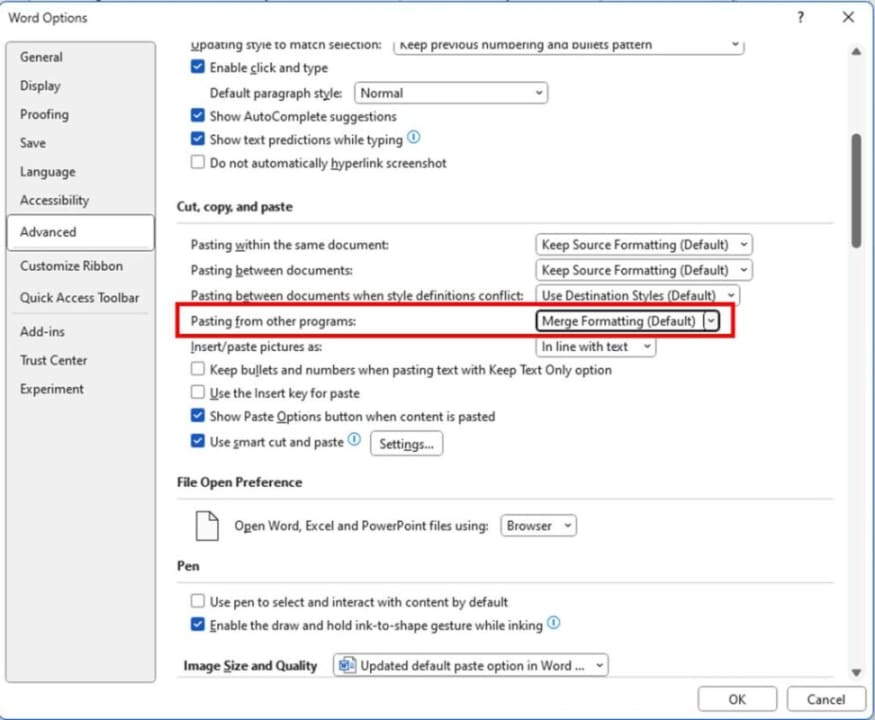
Although this update is a blessing for many, it is not yet available in Word for the web or Word for Mac. Those who can already enjoy it will see that the “Merge Formatting” option appears as the default in the paste options (File > Options > Advanced > Cut, copy, and paste).
