Microsoft is shifting its software strategy by introducing free versions of its Office applications, supported by ads, in a context where subscription models have proliferated in the tech industry. This new option allows users to access tools like Word, Excel, and PowerPoint at no cost, although with certain limitations that could discourage their use. According to reports, the free subscription is available after installing the desktop version of Microsoft 365, but it is not officially mentioned on the company’s website. Interested users can opt […]
Microsoft is shifting its software strategy by introducing free versions of its Office applications, supported by ads, in a context where subscription models have proliferated in the tech industry.
This new option allows users to access tools like Word, Excel, and PowerPoint at no cost, although with certain limitations that could discourage their use.
Microsoft is testing free Office for Windows apps with ads. The ads appear on the side of Word, Excel, and PowerPoint, and are part of "some limited testing", according to Microsoft. Full details ? https://t.co/XmwlIUaSBR
Uncomfortable ads in exchange for not paying for the license, Microsoft’s tactic
One of the main limitations is that users can only save their files on OneDrive, Microsoft’s cloud storage platform, and not locally on their devices. This can be inconvenient for those who prefer to have complete control over their documents.
Additionally, users will face restrictions on the functionalities available within Word, Excel, and PowerPoint, which could limit the user experience.
Additionally, the inclusion of ads is a factor that could be annoying, as they will appear in the form of videos that will be shown every hour and permanent banners on the interface of the applications. This could negatively affect the user experience, who must consider whether it is worth enduring the advertising in exchange for accessing a software package at no cost.
For the moment, it seems that this free version is in a testing phase. Microsoft has stated that it is conducting some limited tests and, although there are no immediate plans for an official release, it remains to be seen whether this initiative will lead to broader adoption in the future.
The specialized media outlet Neowin has reported that the tech giant Microsoft will change the user interface of its Microsoft 365 application at the beginning of next year. Additionally, the application will receive a new icon and a slight name change, becoming Microsoft 365 Copilot starting in mid-January 2025. The company made the announcement through its Microsoft 365 Message Center, with the following details for the upcoming user interface changes. All the changes coming to Microsoft 365 Copilot in 2025 In summary, among the numerous changes planned for Microsoft […]
The specialized media Neowin has reported that the tech giant Microsoft will change the user interface of its Microsoft 365 application early next year.
Subscribe to the Softonic newsletter and get the latest in tech, gaming, entertainment and deals right in your inbox.
Additionally, the application will receive a new icon and a slight name change, becoming Microsoft 365 Copilot starting mid-January 2025.
The company made the announcement through its Microsoft 365 Message Center, with the following details for the upcoming user interface changes.
All the changes coming to Microsoft 365 Copilot in 2025
The application will no longer have a top header. Instead, tools like user profile, settings, and comments will be moved to the lower left toolbar. The comments button will be available in the “Settings and more” section of the lower left toolbar.
The search box will now be presented on the home page so that users can find all their content across multiple file types and storage locations. Note: There is no change in the search experience, only in the location of the feature.
All applications in the left toolbar are aligned at the top and AI-rich experiences like Microsoft 365 Copilot Chat and Copilot Pages will be presented together to establish a correlation.
The organization logo, which was previously displayed in the top header under the Organization theme, will no longer be visible in the application. Note: This change does not affect other Microsoft 365 applications, where the organization logo will continue to appear in the header.
The “Back” button of the Windows Microsoft 365 Copilot application will not be available. Users will still be able to use the left AppBar to navigate between pages.
The “My Day” feature is being removed from the application experience, and users will no longer see the button to launch the calendar and to-do tasks in the Microsoft 365 Copilot application. Note: this change does not affect other Microsoft 365 applications where the My Day feature is available.
The “Help Me Create” feature will be retired from the Microsoft 365 Copilot application. Launched in February 2024, “Help Me Create” focused on assisting users in moving from their stated intent to document creation using an LLM. Now that the Microsoft 365 Copilot application is becoming the destination for Copilot, we will incorporate document creation through AI into the Copilot tab. Users will be able to brainstorm and draft new content based on a storyboard or script for an agenda or executive summary from Copilot Chat.
In summary, among the numerous changes planned for Microsoft 365 are: the removal of the header; the ability to access the profile, settings, and feedback through the toolbar in the bottom corner; the removal of the “Back” button and the “My Day” feature; and the organization’s logo will no longer be visible in the app.
Microsoft plans to roll out these changes in the Microsoft 365 application in mid-January 2025.
Microsoft Word has taken a monumental step in addressing one of the most irritating problems for its users: the absolute chaos in formatting when copying and pasting text. For years, this simple task turned into a minefield, where the original format was lost in a mess of misaligned text and clashing fonts.
But all of this is now coming to an end, because, thanks to a recent update (previously available to Insiders), the option to merge formatting will be the default option when pasting text from other sources into a Word document. This magnificent improvement was announced by Ali Forelli, product manager for Microsoft Word, who was the first to acknowledge that a lot of time is usually wasted manually correcting the formatting of the texts we paste into documents.
With this update, text pasted from Word will retain the original “meaningful” formatting, such as bold, italics, lists, or tables. This feature is available in version 2405 or later for Word users on Windows.
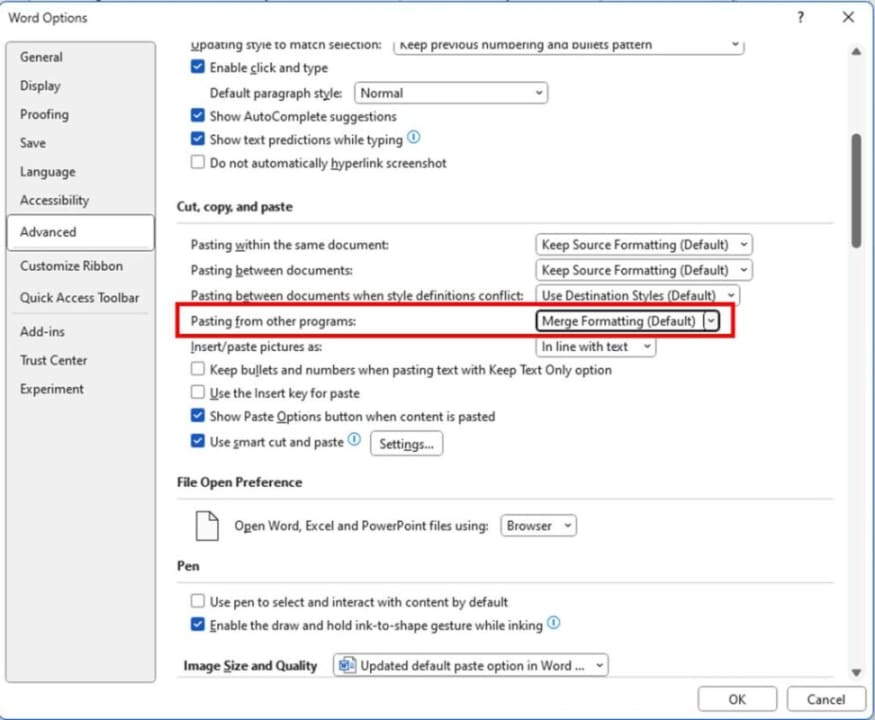
Although this update is a blessing for many, it is not yet available in Word for the web or Word for Mac. Those who can already enjoy it will see that the “Merge Formatting” option appears as the default in the paste options (File > Options > Advanced > Cut, copy, and paste).
Microsoft has reported a security advisory in Outlook that occurs after installing the security updates released in December. Known as CVE-2023-35636, this issue is classified as important and could allow the disclosure of NTLM hashes (which store passwords on devices), although its exploitation by cybercriminals is unlikely.
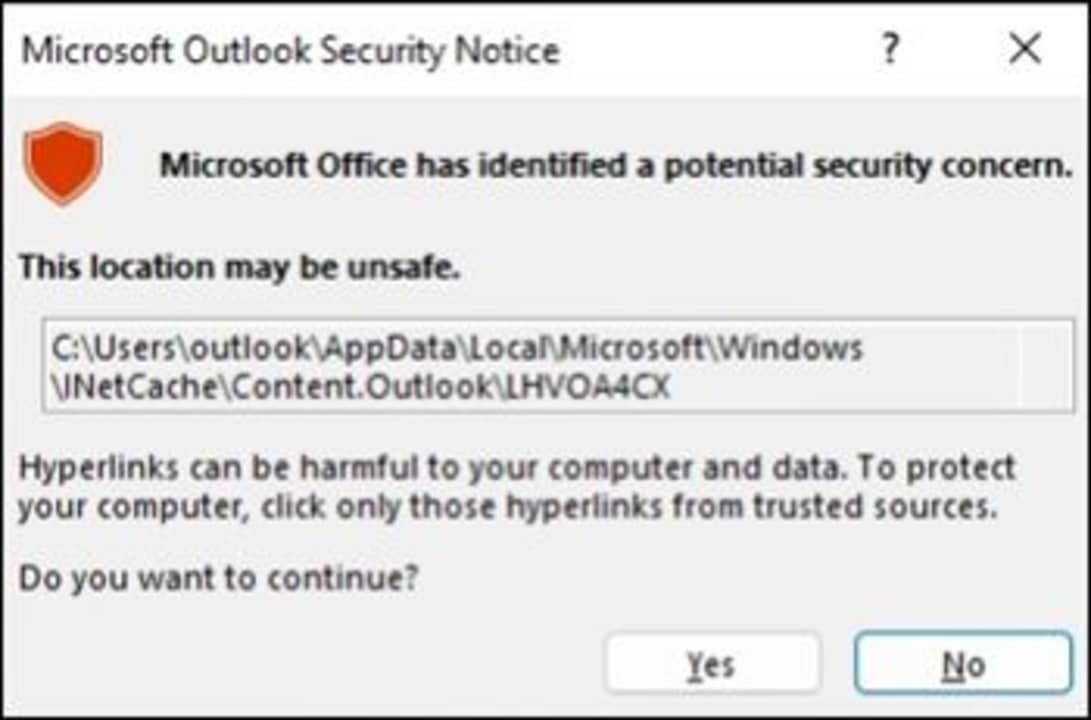
According to Windows Report, the error occurs when clicking on a .ICS file, displaying the following message: “Microsoft Office has identified a potential security concern. This location may not be safe.” However, the security warning or vulnerability itself does not pose a threat unless you open a specific file from an attacker.
Microsoft has also published a recommendation on how to stop receiving this message by changing a registry key. To do this, users must open the Registry Editor (by searching for it in the search bar) and go to the following path (without the quotes): “HKEY_CURRENT_USERsoftwarepoliciesmicrosoftoffice16.0commonsecurity”. Once there, we must look for the DWORD “DisableHyperlinkWarning” and change its value to 1.
However, it should be noted that by changing this DWORD in the registry, all security warnings from Microsoft Office will be disabled, not just those for .ICS files. Microsoft is aware of this issue and claims that it will be fixed in a future update.
Microsoft collects your browsing data to train Copilot so that it adapts to your usage needs.
There is a phrase that is constantly repeated, stating that data has become the new oil. User information is used as currency in major tech companies, either to enhance advertising campaigns, train artificial intelligences, or both. Microsoft is one of the many companies engaging in these practices, and now, it amplifies its commitment to AI through tools like Copilot and Bing Chat.
However, many of its users remain unaware that a significant portion of their browsing data is used to “inform” Copilot. When we talk about Copilot, we are referring to the artificial intelligence tool included in Microsoft 365 and Windows 11. Above all, Copilot is a digital assistant that provides personalized suggestions within programs like Word or Excel, for example. As you can imagine, this personalization is possible thanks to the use of our information.
In the end, data collection is necessary for Bing Chat and Copilot to offer, in return, an experience tailored to our usage. Nevertheless, the fact that these tools use this information without the user hardly noticing is something that could understandably concern many people.
Copilot is one of Microsoft’s major future investments.
The big question: Can I avoid data collection?
To give users more control, the latest Canary version of Microsoft Edge has included a new setting located within App and Notification Settings > Bing Chat. Here, explicit consent is requested from the user to utilize their browsing data, improving the responses and suggestions generated by AI in Copilot.
As for your works and projects, you can rest assured; Microsoft does not use them to train its generative models. Within the company’s support blog, it is clarified that “neither the content of the document nor the descriptions you write are used for machine learning.”
Microsoft warns: hackers are using artificial intelligence to make their attacks more effective.
Artificial intelligence has proven to bring us many benefits, but it also opens new battlefronts. In this case, Microsoft has stepped forward to warn us about what is already happening: hackers are using artificial intelligence to make their attacks more effective.
Tom Burt, a top executive at Microsoft focused on security, has confirmed that cybercriminals are developing more sophisticated and harmful strategies thanks to the use of artificial intelligence. As he explained to The Wall Street Journal, hackers are already employing AI-based tools to refine their tactics, such as in the case of phishing.
Phishing is one of the most commonly used tactics by hackers to gain access to our information. As the name suggests, attackers try to make the victim “take the bait” using fraudulent websites, fake emails, or even social engineering. In this case, AI is helping create increasingly believable “hooks,” in addition to enhancing the malicious programs used.
These “improvements” in hackers’ techniques have added a new level of difficulty for companies, making it increasingly challenging to defend against attacks. Not only that, but the quantity of attacks has also increased. If we observe the period between November 2022 and June 2023, we will see that the number of ransomware attacks has doubled.
Through ransomware, cybercriminals focus their strategies on stealing data and then blackmailing, demanding a ransom in exchange for not leaking the data online. To defend themselves, companies are also turning to AI to enhance their security barriers and “fight fire with fire,” as Lane Bess, CEO of AI Deep Instinct, points out.
On the other hand, U.S. cybersecurity and national security authorities have already warned about the danger this poses to government computer systems. Last month, top executives from technology companies such as Mark Zuckerberg, Elon Musk, and Bill Gates met in a closed-door session with U.S. senators to discuss AI and its increasingly necessary regulation.
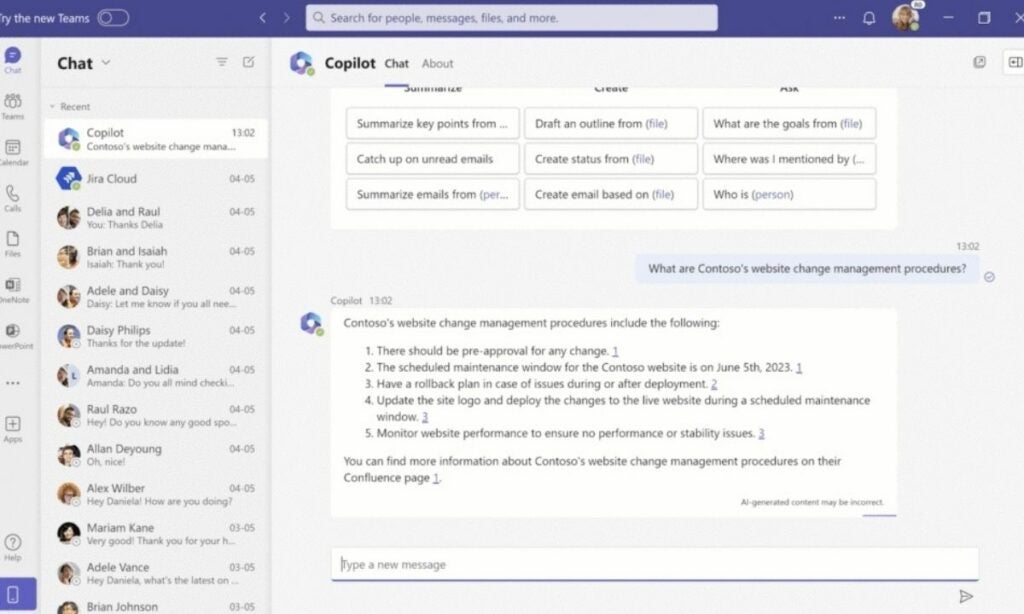
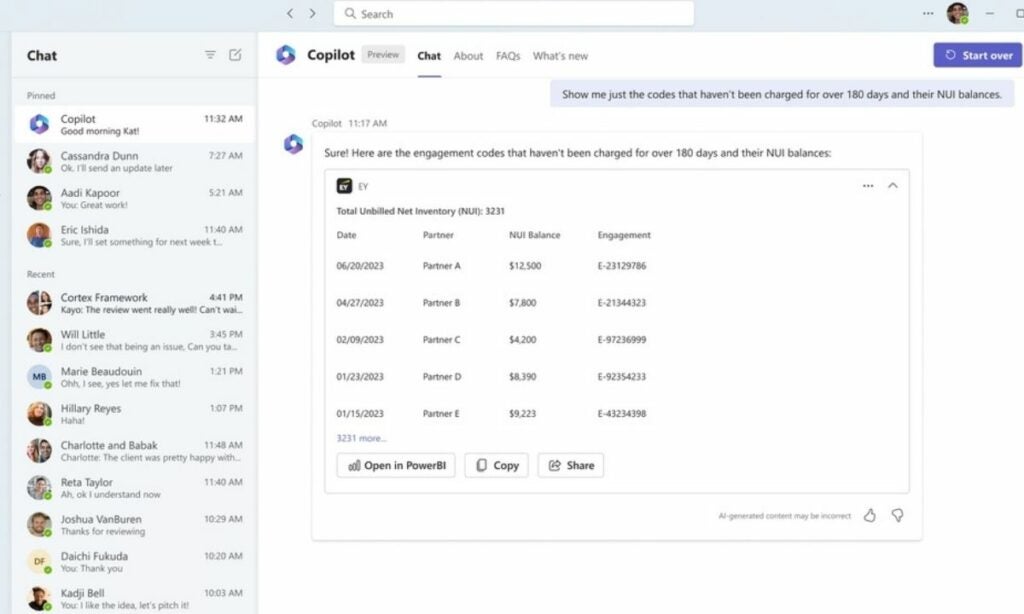
Microsoft 365 Copilot, the eagerly anticipated generative AI assistant tailored for Microsoft’s suite of productivity applications, is set to make its official debut on November 1, exclusively for enterprise users. This exciting development heralds a new era of enhanced functionality, as third-party plugins are gearing up to join the Copilot ecosystem, bringing a host of innovative features to businesses and their dedicated workforce.
In a recent blog post, Microsoft unveiled that businesses are actively crafting these plugins through the utilization of various tools, including Teams message extensions, Power Platform connectors, and Microsoft Graph connectors. Among the pioneers in this exciting venture is none other than Amadeus, the renowned travel company that has ingeniously devised a plugin for Microsoft 365 Copilot.
According to Neowin, these plugins, exemplified by Amadeus’ contribution, promise to revolutionize the way users interact with their productivity tools, significantly reducing the need to switch between disparate applications. The result? A tangible surge in productivity that will undoubtedly resonate with enterprises across the globe.
The journey towards a more streamlined and efficient work environment doesn’t stop with Amadeus. Other tech giants are also stepping up to the plate, ready to integrate their offerings with Microsoft 365 Copilot. For instance, Jira, a formidable software development and management tool, is diligently working on plugins designed to empower users to take swifter, more decisive actions while navigating complex projects.
Similarly, the project management aficionados at Mural have thrown their hat into the ring, introducing a plugin that facilitates seamless collaboration, content sharing, and easy retrieval of Mural boards through chat interfaces. These initiatives underscore the immense potential of Microsoft 365 Copilot in fostering collaborative and efficient work environments.
Even the financial sector is not untouched by the allure of Microsoft 365 Copilot. One of the United States’ major banking institutions, Wells Fargo, has crafted a specialized Copilot plugin to benefit both its employees and valued customers. This move further emphasizes the adaptability and versatility of Copilot, transcending industry boundaries to serve diverse user needs.
For those eager to dive into the world of Microsoft 365 Copilot plugin development, the Microsoft 365 Developer Technology Adoption Program (TAP) awaits. This program offers a comprehensive package, including access to invaluable resources such as product roadmaps and the opportunity to exchange insights and feedback with fellow developers. Microsoft has promised to unveil further details about its ambitious plans for Microsoft 365 Copilot during the upcoming Ignite conference, scheduled for November 14-17.
In conclusion, the impending launch of Microsoft 365 Copilot and the enthusiastic participation of businesses and developers through innovative plugins paint an optimistic picture for the future of workplace productivity. With Copilot, the sky is the limit, as it promises to usher in a new era of seamless, efficient, and collaborative work experiences for enterprises worldwide.
Staying updated about your daily tools can feel like a full-time job. But worry not, the Microsoft 365 roadmap is here to be your ultimate guide, offering a sneak peek into the future of Microsoft’s suite of apps and services.
Microsoft 365 roadmap overview
This week, the Microsoft 365 roadmap reveals an exciting update: soon you’ll be able to interact with your OneDrive files even when you’re offline. According to the listing, users will have the capability to “launch OneDrive in your browser and view, sort, rename, move, copy, delete and files even without internet access.”
But wait, there’s more! Mark your calendars because a preview of this offline OneDrive feature is set to make its debut in November, with a full-scale launch planned for December.
Outlook upgrades
And let’s not forget about Outlook. The Microsoft 365 roadmap indicates some nifty new features are on the horizon. One such update aims to make life easier for meeting organizers juggling attendees from multiple time zones.
“When scheduling a meeting with people in different time zones, the organizer will be prompted with additional insights regarding each participant’s respective time zone. The Scheduling Assistant will now help find a time that works for meeting participants across time zones.”
That feature will roll out later in September. Another feature, which is due out in October, is specifically for iOS Outlook users. They will soon be able to paste in plain text to get rid of any special formatting. Another update that’s coming in October will see Outlook’s Scheduling assistant moved over to the app’s toolbar. Microsoft says this will “reduce clicks” and create “a more seamless scheduling experience.
Teams Premium
First up, Teams Premium organizers, you’re in for a treat. Starting in October, you’ll be privy to a new feature that “enables meeting organizers to view meeting engagement data such as total reactions, raised hands, cameras turned on, and more in the ‘Attendance’ tab after a meeting.” Imagine knowing exactly how engaged your audience was during that last virtual meeting. It’s like having a crystal ball, but for productivity!
Also launching in October is a feature that’s a game-changer for those looking to add Large Language Models into Team-based apps. According to the listing:
“The Teams AI library offers developers a suite of code functionalities designed to ease the integration of Large Language Models, empowering them to build rich, conversational Teams apps. It simplifies the process of creating Bots and Message Extensions, as well as interactions with Adaptive Cards for conversational experiences. Additionally, the Teams AI library also aids the migration of existing Bots, Message Extensions, and Adaptive Card functionalities with seamless integration with Large Language Models.”
Microsoft Edge aficionados, your update alerts are getting a makeover. Starting in October, these notifications will be served up by Browser Essentials rather than the Settings page. The goal:
“Getting alerts on available Edge Updates will come from Browser Essentials instead of the Settings page for better visibility and experience.”
Also, the Microsoft 365 app for web and desktop commercial users will get a new tagging feature in September:
Now, for those of you using the Microsoft 365 app on web and desktop, especially our commercial users, get ready for a tagging revolution this September.
According to the Microsoft 365 roadmap, “Tagging in the Microsoft 365 and web and desktop apps is a new, intuitive way for commercial users to organize their work independent of where files are stored.” You’ll find this nifty ‘Tags’ feature in the ‘My Content’ section, but note that it’s only available if you have OneDrive provisioned. It’s like having a digital filing cabinet that you can access from anywhere.
Before you mark your calendars in permanent ink, though, remember that all these rollout and preview dates from the Microsoft 365 roadmap are subject to change.
Formerly known as Office 365, Microsoft 365 is the software giant’s flagship productivity suite that attempts to offer everything a business or personal user could ever need when working in an office. The 365 moniker represents the yearly subscription that is required to access the suite, which gives users access to rolling updates and feature upgrades. Well, in theory at least, as in an upcoming update it looks as though Microsoft Outlook and OneDrive, two Microsoft 365 apps will actually lose some functionality when it automatically rolls out to all users. Let’s check it out.
Microsoft has begun informing users of certain upcoming changes that they can expect to see in the near future. A part of the update will give Outlook an extra 50 GB of storage for one year but the bad news is that this year will act as a transition period toward the main phase of the update, which will see Outlook attachments officially being counted against your OneDrive storage allowance.
The move means that any and all attachments of any size will be deducted from your OneDrive storage allowance. Accordingly, if you are close to using all of your OneDrive allowance, you will likely come up against this new change when it rolls out. It is good that Microsoft is offering the transition year so users can better manage the flip to the new system. Our cloud storage allowances are becoming increasingly important these days as we move toward a more virtual future that isn’t necessarily restricted to access via a single device.
Another feature that Microsoft is cutting with the update, which should start to roll out on November 30, 2023, is that users will no longer be able to associate a new personalized email address with an Outlook mailbox. If you are already associating a personal email address with your Outlook mailbox before that date, it will continue to remain active. This will only prevent new email addresses from being linked.
We recently reported on Microsoft’s annual event, Ignite. Ignite 2022 brought a plethora of announcements from the tech giant, including the brand-new Microsoft 365 app. If you missed our previous news piece on the topic, Microsoft 365 will replace Office 365 as Microsoft’s dedicated productivity suite.
Now, in the previous article, we quoted Microsoft as saying that nothing major will change in the move from the Office app to the 365 app. However, the most recent information on the subject paints a very different picture. We joked in the last article that the only aspects that change between the two apps are a new icon and a new-look interface. As it turns out, a lot more changes are happening.
Microsoft released a video in which it explains the 365 app. The video is incredibly short, at only 55 seconds in length, so don’t expect terribly much information. However, it does highlight a few key elements of the app:
You’ll be able to search for files according to by whom they were shared
You’ll also be able to create new content easily with new pre-designed templates
The app will act as a hub for all your productivity apps, be they Microsoft, industry or company-specific, or general third-party apps
You’ll be able to prepare for meetings and see upcoming events and dates of importance with even more ease with the new Feed interface
The Feed interface will also show you updates from individuals you follow
You’ll have quick access to all your most important and recent files
All in all, this new app seems like the slingshot many of us have been looking for in an effort to create a more organized, productive, and intuitive professional environment. However, there’s a caveat. Even though the app is already listed on the Google Play Store, it seems to just be the old Office app. In fact, that’s exactly what it is. Office has now been renamed to Office (Microsoft 365), and, as yet, it features limited functionality compared to those we saw in the video.
Microsoft has said that the Office mobile app, the Office app for Windows, and Office.com will morph into the Microsoft 365 app on their respective devices ‘in the coming months.’ As amazing as the new functionality seems, we don’t have a release date as yet.