Google is driving the integration of its chatbot Gemini into its family of applications, and its latest update has now reached the Google Files app. Now, users who open PDF documents in this application can enjoy Gemini’s analysis directly. This new feature allows interaction with documents through questions, thanks to an integration that promises to simplify access to the information contained in the files.

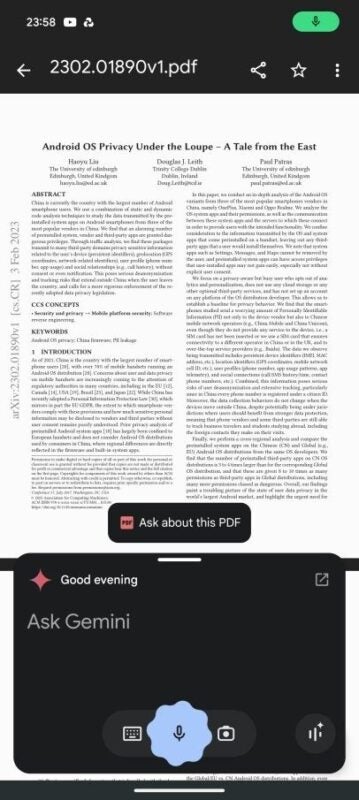
The feature, discovered by a user from the Reddit community r/Android, is available on devices with Android 15, such as the Pixel 9. When opening a PDF in the Files app, the message “Ask about this PDF” appears in the Gemini chatbot interface. With a simple tap, the document is processed and ready to answer questions in natural language.
The tool is even capable of analyzing complex documents, such as scientific research articles, showing impeccable performance. This approach eliminates the need to import PDFs into standalone applications, streamlining the workflow. Although the feature is not yet available in all versions of Files, users can use the Gemini mobile app to perform similar tasks; simply attach a PDF from local storage or Google Drive for Gemini to analyze it.
Gemini stands out for its ability to understand both text and multimedia content stored on the device. However, this advanced functionality is limited to devices with Android 15 and accounts with paid access to Gemini Advanced, which could be a drawback for those looking for free alternatives.
For those who do not wish to pay, Google offers NotebookLM, a powerful free tool that allows you to analyze information not only from files, but also from URLs and YouTube videos. Although Gemini remains an innovative solution, alternatives like NotebookLM stand out for their versatility and accessibility for various types of audiences.
