
Skip to content

Softonic English

Just another Softonic Sites site

Adobe Lightroom takes a new turn with its Artificial Intelligence with the "Select Landscape" tool

Adobe has become the most comprehensive suite when it comes to Artificial Intelligence. For the past couple of years, graphic designers, video editors, motion graphic artists, and audio editors have seen how their professional lives have been completely eased thanks to AI. Now, synchronizing a scene or cleaning up audio, cumbersome processes that used to take hours, can be resolved in a matter of seconds. And Adobe’s system keeps improving more and more. The latest program that has made a qualitative leap is Adobe Lightroom. Since the update last April, […]

Adobe has become the most comprehensive suite when it comes to Artificial Intelligence. For the past couple of years, graphic designers, video editors, motion graphic artists, and audio editors have seen how their professional lives have been completely eased thanks to AI. Now, synchronizing a scene or cleaning up audio, cumbersome processes that used to take hours, can be resolved in a matter of seconds. And Adobe’s system continues to improve more and more.

Adobe Lightroom
Adobe Lightroom DOWNLOAD

The latest program that has made a qualitative leap is Adobe Lightroom. Since the update last April, the software integrates the new “Select Landscape” feature that works with AI. The tool is already available in Lightroom (v8.3) and Lightroom Classic (v14.3) and turns both programs into true automatic landscape editing machines, radically simplifying the workflow.

What can you do with “Select Landscape”?

“Select landscape” is a feature that automatically recognizes different natural and artificial elements in a photograph, generating specific masks so you can edit everything accurately, quickly, and non-destructively. Up to seven components of the environment can be identified and isolated with a single click:

  • Sky. Separates clouds, sunsets, clear or stormy skies without the need for manual edge profiling.
  • Mountains. Distinguishes reliefs and mountain ranges, even when they are partially covered by fog or vegetation.
  • Architecture. Recognizes human constructions within the landscape, such as bridges, houses, ruins, or lighthouses.
  • Vegetation. Identifies trees, shrubs, grass, or leaves, allowing for adjustments to green tones or emphasizing textures.
  • Water. Isolates rivers, lakes, seas, or other water surfaces, facilitating color or clarity corrections.
  • Artificial ground. Distinguishes paved roads, paved paths, sidewalks, or urbanized areas.
  • Natural ground. Detects soil, sand, rocks, or surfaces without human intervention.

One of the most effective and practical aspects of this tool is its ability to adapt to the content of the image. Lightroom does not display all seven elements in every case, but only those it detects in the frame, which makes the interface more agile and clean. For example, if there is no water in the image, the option to mask it will not appear.
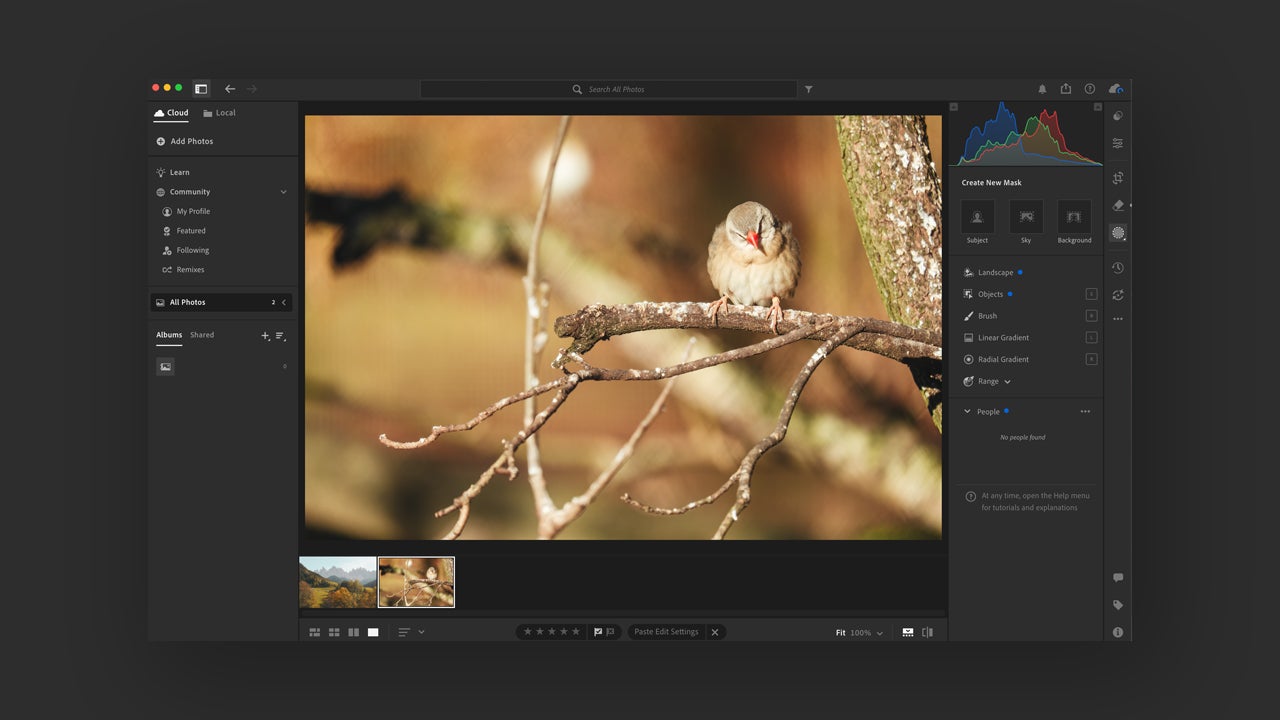
How can you use “Select Landscape”?

Even easier than its use is how to use the tool. The only thing you need to do, once you open the program and add the photo you want to edit, is to go to Masking ▸ Landscape. The Masking option is in the right-hand menu.
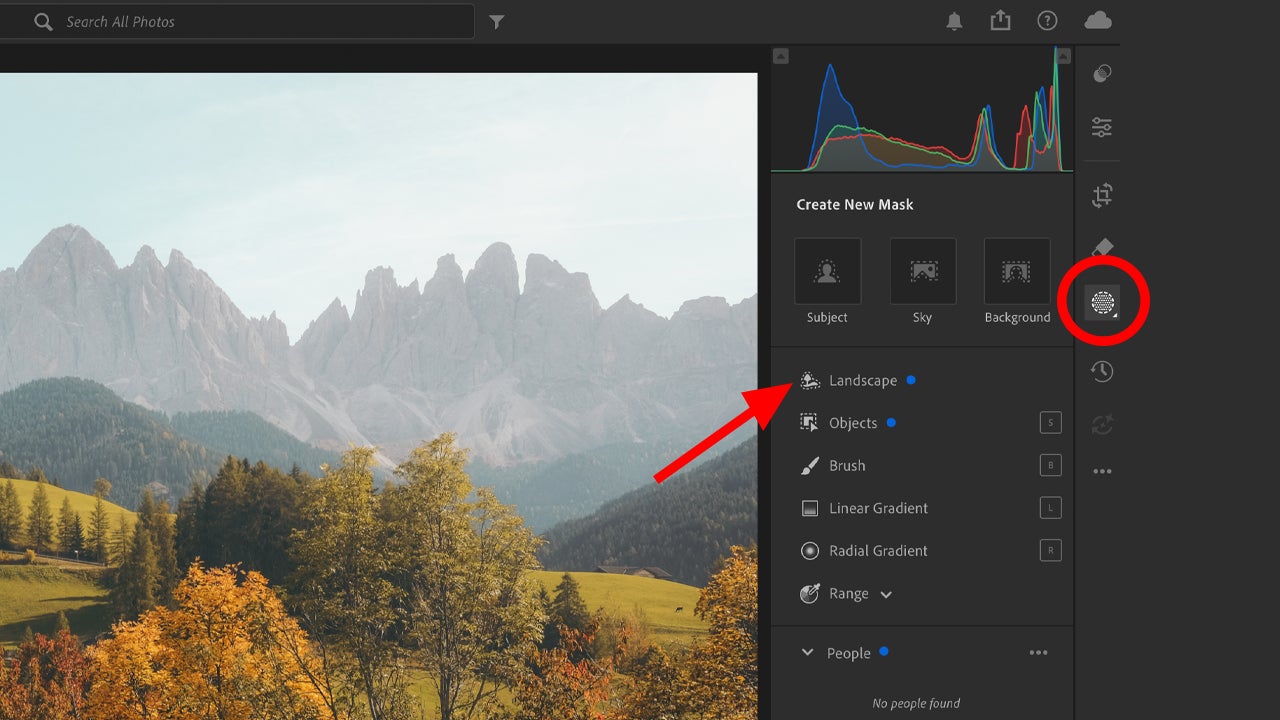
After that, you must check the boxes of the items you want to edit and then click on “Create“. You can refine the selections by clicking “Add” or “Remove“. With these simple steps, you will go from editing the sky and the foreground in 5 minutes to doing it in less than 30 seconds. A powerful advantage that will allow you to focus on what really matters: creativity.

Use cases for “Select Landscape”

The functions you can perform with this application are many. First of all, it allows for precise intervention in areas that were previously very difficult to delineate. For example, adjusting the exposure of the sky without altering the vegetation or the silhouette of a building no longer requires manual masks or selection tricks. The artificial intelligence detects and separates it in seconds, with a clarity that previously required experience and time.

In addition, it facilitates localized treatment with aesthetic criteria. It is possible to apply sharpness exclusively to mountain ranges in the background, increase warmth in earthy soils, or enhance the structure of a facade without affecting the natural environment.
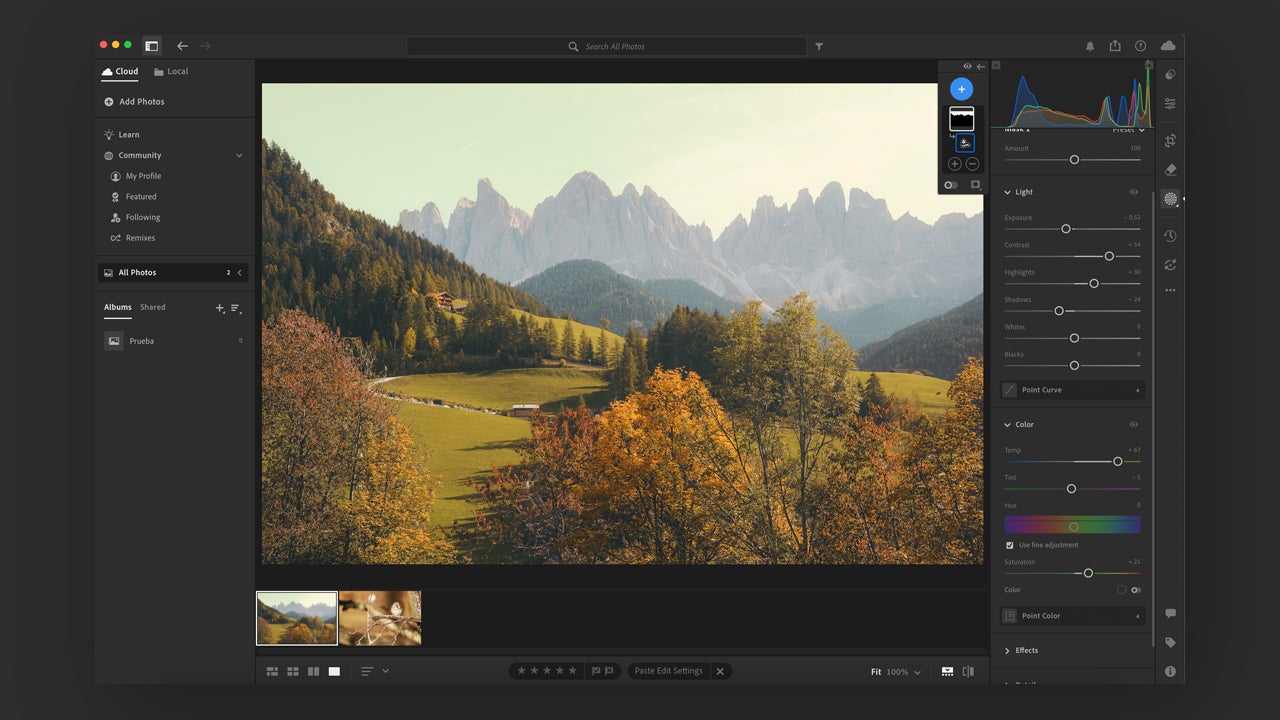
The tool also enhances the visual coherence of the final image, allowing each component of the landscape to be worked on separately, respecting its nature. And last but not least, it represents a drastic reduction in the time spent on repetitive tasks. It is no longer necessary to trace masks with brushes, use gradient filters, or rely on trial and error to isolate an area. The system detects, segments, and proposes with a speed and precision that redraw the margins between the technical and the creative.

With the introduction of “Select Landscape,” Adobe has not just added another feature to its editing suite, but has marked a turning point in the way AI is used in design. Now, photographers will be more freed from the more mechanical tasks and can focus on what is truly essential.

Adobe Lightroom
Adobe Lightroom DOWNLOAD

For this reason, this tool not only helps those looking to streamline their workflow, but it also challenges those who see photography as a form of language. With it, the editor stops being a software operator and becomes, with greater freedom, a visual storyteller.

Author: Juan Carlos Saloz

{ "de-DE": "", "en-US": "Cultural journalist specialized in film, series, comics, video games, and everything your parents tried to keep you away from during your childhood. Also an aspiring film director, screenwriter, and professional troublemaker.", "es-ES": "Periodista cultural especializado en cine, series, cómics, videojuegos y todo lo que tus padres intentaban que evitaras en tu infancia. También director de cine en ciernes, guionista y liante profesional.", "fr-FR": "Journaliste culturel spécialisé en cinéma, séries, bandes dessinées, jeux vidéo et tout ce que tes parents essayaient de te faire éviter dans ton enfance. Également réalisateur de cinéma en devenir, scénariste et fauteur de troubles professionnel.", "it-IT": "", "ja-JP": "", "nl-NL": "", "pl-PL": "", "pt-BR": "", "social": { "email": "", "facebook": "", "twitter": "", "linkedin": "" } } View all posts by Juan Carlos Saloz

Author Juan Carlos SalozPosted on June 30, 2025July 1, 2025Categories News

Post navigation

Previous Previous post: Brad Pitt dominates F1 on the first weekend of its release and leaves Megan in the dust
Next Next post: The creator of Squid Game confirms that it is not a coincidence that the villain resembles Elon Musk

Recent Posts

  • Netflix explores other streaming services: Peacock and Fox One discussed
  • iPhone 20 rumor resurfaces: Apple may get its biggest redesign in years
  • RayNeo launches iO and GT smart glasses: sales start September 4, 2026
  • PlayStation emails users: digital games are licensed, not owned
  • Modern Warfare 4 beta speculation: ISO Nightshade leads early meta talk

Archives

  • August 2026
  • July 2026
  • June 2026
  • May 2026
  • April 2026
  • March 2026
  • February 2026
  • January 2026
  • December 2025
  • November 2025
  • October 2025
  • September 2025
  • August 2025
  • July 2025
  • June 2025
  • May 2025
  • April 2025
  • March 2025
  • February 2025
  • January 2025
  • December 2024
  • November 2024
  • October 2024
  • September 2024
  • August 2024
  • July 2024
  • June 2024
  • May 2024
  • April 2024
  • March 2024
  • February 2024
  • January 2024
  • December 2023
  • November 2023
  • October 2023
  • September 2023
  • August 2023
  • July 2023
  • June 2023
  • May 2023
  • April 2023
  • March 2023
  • February 2023
  • January 2023
  • December 2022
  • November 2022
  • October 2022
  • September 2022
  • August 2022
  • July 2022
  • June 2022
  • May 2022
  • April 2022
  • March 2022
  • February 2022
  • January 2022
  • December 2021
  • November 2021
  • October 2021
  • September 2021
  • August 2021
  • July 2021
  • June 2021
  • May 2021
  • April 2021
  • March 2021
  • February 2021
  • January 2021
  • December 2020
  • November 2020
  • October 2020
  • September 2020
  • August 2020
  • July 2020
  • June 2020
  • May 2020
  • April 2020
  • March 2020
  • February 2020
  • January 2020
  • December 2019
  • November 2019
  • October 2019
  • September 2019
  • August 2019
  • July 2019
  • June 2019
  • May 2019
  • April 2019
  • March 2019
  • February 2019
  • January 2019
  • December 2018
  • November 2018
  • October 2018
  • September 2018
  • August 2018
  • July 2018
  • June 2018
  • May 2018
  • April 2018
  • March 2018
  • February 2018
  • January 2018
  • December 2017
  • November 2017
  • October 2017
  • September 2017
  • August 2017
  • July 2017
  • June 2017
  • May 2017
  • April 2017
  • March 2017
  • February 2017
  • January 2017
  • December 2016
  • November 2016
  • October 2016
  • September 2016
  • August 2016
  • July 2016
  • June 2016
  • May 2016
  • April 2016
  • March 2016
  • February 2016
  • January 2016
  • December 2015
  • November 2015
  • October 2015
  • September 2015
  • August 2015
  • July 2015
  • June 2015
  • May 2015
  • April 2015
  • March 2015
  • February 2015
  • January 2015
  • December 2014
  • November 2014
  • October 2014
  • September 2014
  • August 2014
  • July 2014
  • June 2014
  • May 2014
  • April 2014
  • March 2014
  • February 2014
  • January 2014
  • December 2013
  • November 2013
  • October 2013
  • September 2013
  • August 2013
  • July 2013
  • June 2013
  • May 2013
  • April 2013
  • March 2013
  • February 2013
  • January 2013
  • December 2012
  • November 2012
  • October 2012
  • September 2012
  • August 2012
  • July 2012
  • June 2012
  • May 2012
  • April 2012
  • March 2012
  • February 2012
  • January 2012
  • December 2011
  • November 2011
  • October 2011
  • September 2011
  • August 2011
  • July 2011
  • June 2011
  • May 2011
  • April 2011
  • March 2011
  • February 2011
  • January 2011
  • December 2010
  • November 2010
  • October 2010
  • September 2010
  • August 2010
  • July 2010
  • June 2010
  • May 2010
  • April 2010
  • March 2010
  • February 2010
  • January 2010
  • December 2009
  • November 2009
  • October 2009
  • September 2009
  • August 2009
  • July 2009
  • June 2009
  • May 2009
  • April 2009
  • March 2009
  • February 2009
  • January 2009
  • December 2008
  • November 2008
  • October 2008
  • September 2008
  • August 2008
  • July 2008
  • June 2008
  • May 2008
  • April 2008
  • March 2008
  • February 2008
  • January 2008
  • December 2007
  • November 2007
  • October 2007
  • September 2007
  • August 2007
  • July 2007
  • June 2007
  • May 2007
  • April 2007
  • March 2007
  • February 2007
  • January 2007
  • December 2006
  • November 2006
  • September 2006
  • August 2006
  • June 2006
  • May 2006
  • July 2001
  • January 2001
  • November 2000
  • September 2000
  • August 2000
  • July 2000
  • April 2000
  • March 2000

Categories

  • Affiliate post
  • Expert Review
  • Gaming
  • Guides
  • How to
  • Legacy how To
  • News
  • Noticias
  • Software>Security
  • Sponsored
  • Trucos y Consejos
  • Uncategorized
  • Windows software

Meta

  • Log in
  • Entries feed
  • Comments feed
  • WordPress.org
Softonic English Proudly powered by WordPress