
Skip to content

Softonic English

Just another Softonic Sites site

Smart Editing for Teams: Collaborating in Premiere Pro 2025

If you look at what is behind every audiovisual super production, there is a constant that keeps repeating: they all have a great team of professionals. However, even the most professional can encounter organizational problems, or rather the lack of it. Within cinema or television, many creative decisions need to be made in real time and for that, their tools must also be up to par, as is the case with Adobe Premiere Pro. In addition to being one of the best editing programs of the moment, it also has features that facilitate team editing […]

If you look at what is behind every audiovisual super production, there is a constant that keeps repeating: they all have a great team of professionals. However, even the most professional can encounter problems with organization, or rather the lack of it. Within cinema or television, many creative decisions need to be made in real time, and for that, their tools must also be up to the task, as is the case with Adobe Premiere Pro.

In addition to being one of the best editing programs at the moment, it also has features that facilitate team editing without complications or time loss. Below, we will explain what they consist of and how you can use them in your projects.

Adobe Premiere Pro
Adobe Premiere Pro DOWNLOAD
003245/adobe-premiere-Download-Adobe-Premiere-Pro.jpg” title=”Adobe Premiere Pro” link=”https://adobe-premiere.softonic.com/?_gl=1*yjt0y0*_gcl_au*NTMzODE5My4xNzU1NjA5MzYz” cta=”DOWNLOAD” ][/sc]

Create team projects within Adobe Premiere Pro

The function of Team Projects remains the center of collaborative work in Premiere Pro. By using it, we can edit simultaneously in the same project stored in the cloud, with automatic updates and integrated version control.

  • As soon as you open Adobe Premiere Pro, click below on New Team Project. You can also click on File > New > Team Project.
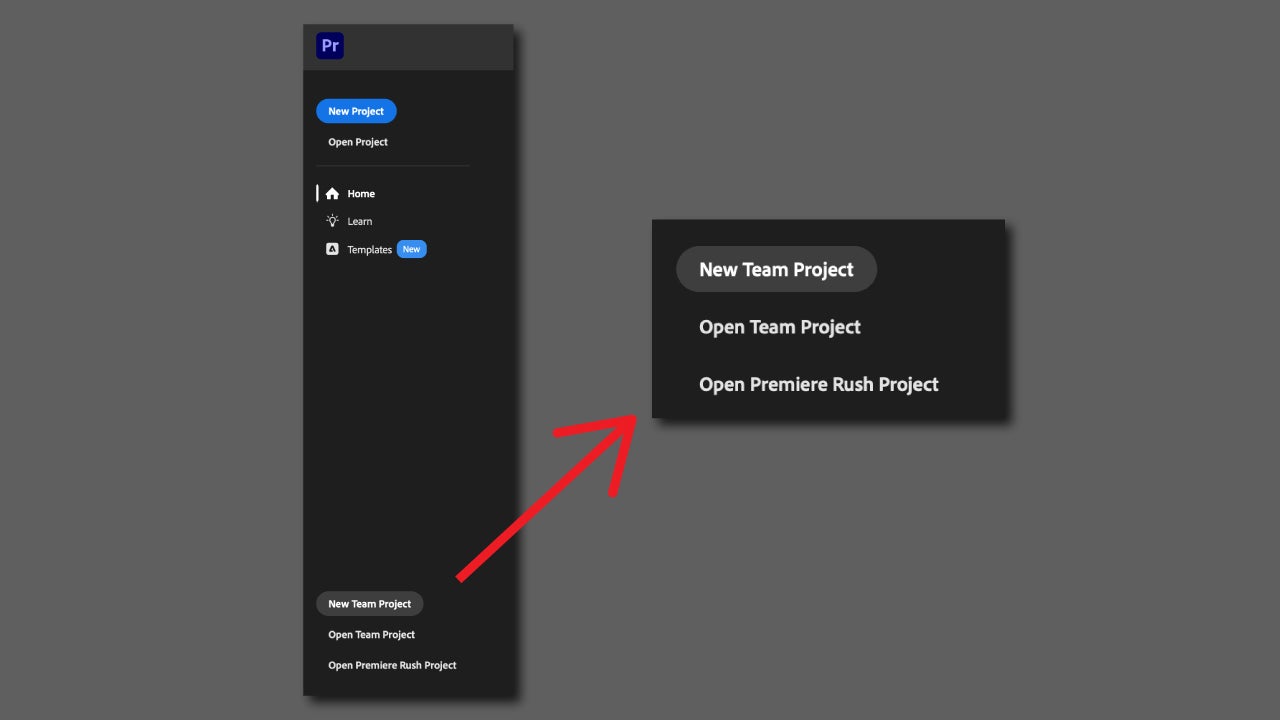
  • Assign a name to the project and select collaborators from your Creative Cloud account. To do this, you will need to click on Edit and add the emails of your collaborators. You will also be able to configure some video options, color, and more before starting.
  • Once created, all members will be able to import material, edit sequences, and save changes without interfering with each other.
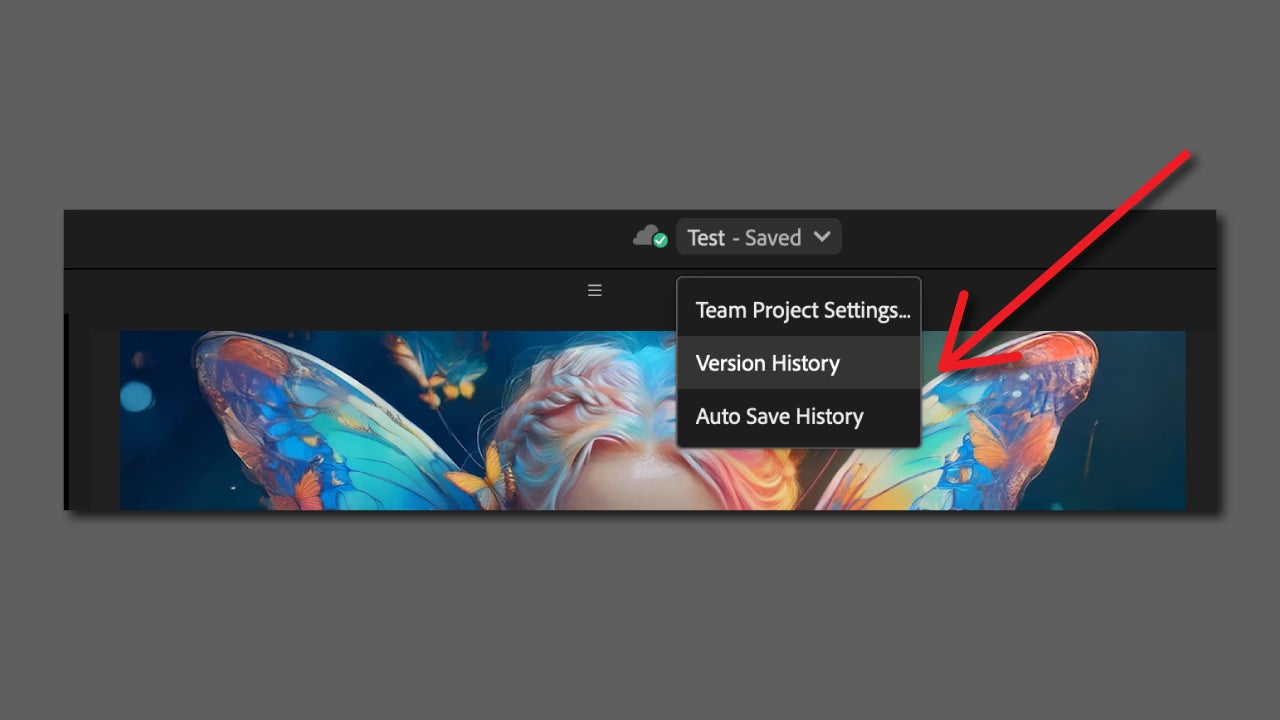
  • Auto-save will be enabled by default, so every change you make will be saved in the cloud. You can revert to previous versions of your project by clicking on the name that appears above and selecting Version History.
Sharing media with Adobe Frame.io

Frame.io is a video collaboration platform developed by Adobe that is fully integrated within Premiere Pro and After Effects. Essentially, it is an ideal program for teams that edit video remotely.

What makes it so ideal? Basically, any team editor can directly upload their sequences from the timeline to Frame.io and the rest can leave comments anchored to specific moments of the project. This makes reviews much faster and more agile.

If you want to try it, you will have to do the following:

  • Select Window > Workspaces > Review.
  • Log in to your Frame.io account from the Frame.io: Comments panel. Frame.io is already included in your Creative Cloud subscription.
  • To share the timeline on Frame.io, select Export & Share. Name it and check that the settings are correct. When you’re done, click on Export.

From now on, you will receive notifications within Premiere when there are new comments from project collaborators.

How to invite other users to collaborate in Adobe Premiere

From Frame.io you can add new collaborators without too much hassle. Here’s how to do it:

  • Log in with your Adobe account on the Frame.io page.
  • Click on your project. Once inside, select the user icon that you will find right next to the Share button.
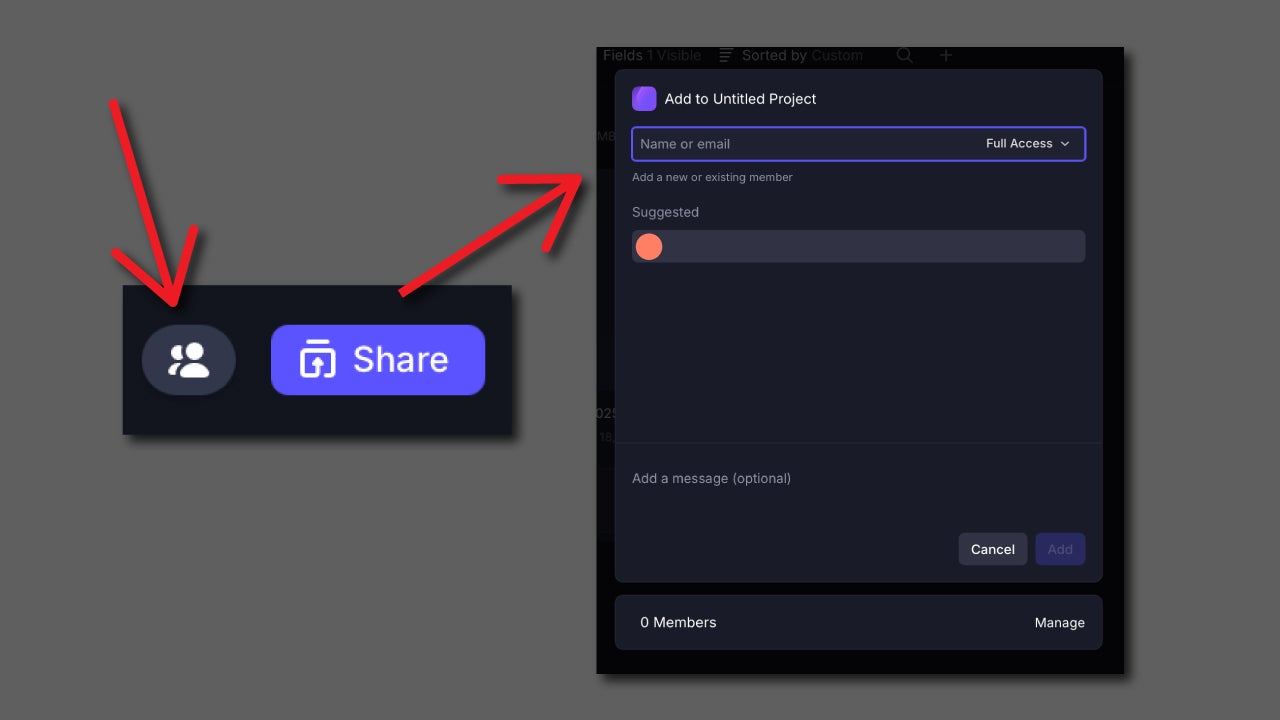
  • Enter the email of the user you want to invite to your project. You will be able to manage that user’s permissions from the dropdown on the right, where you will need to choose whether they can edit, comment, or have full access to the project.

Other tools that will help you: this is how Media Intelligence works

Editing together with your team will be much easier if you can also quickly access clips or other materials. Thanks to artificial intelligence, Adobe analyzes your resources so you can search for any image, conversation, or written content without wasting much time in the process.

  • Import your resources.
  • Let Premiere analyze the contents. Depending on the volume, it will take more or less time to process. You can check the progress from Window > Progress.
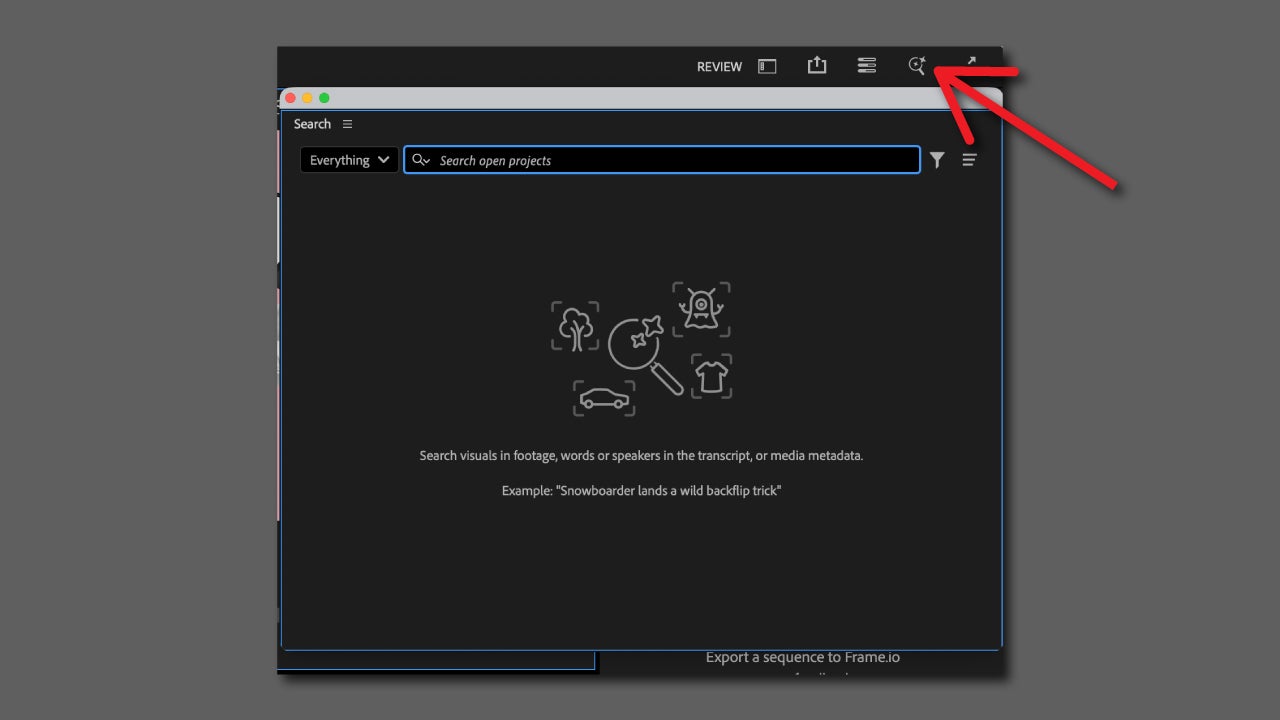
  • Select the magnifying glass icon, which is located at the top right of Premiere. This will open the Search panel.
  • Type what you want to search for. Visual search will yield better results the more specific you are in your description.
Here we emphasize again how important it is to be specific in your search. This will help you find what you’re looking for faster without having to try several different searches.

That said, you need to keep in mind an important limitation: for now, visual searches are only compatible with English. A small drawback that, most likely, Adobe will resolve in the not-too-distant future.

Adobe Premiere Pro
Adobe Premiere Pro DOWNLOAD
003245/adobe-premiere-Download-Adobe-Premiere-Pro.jpg” title=”Adobe Premiere Pro” link=”https://adobe-premiere.softonic.com/?_gl=1*yjt0y0*_gcl_au*NTMzODE5My4xNzU1NjA5MzYz” cta=”DOWNLOAD” ][/sc]

Author: María López

{ "de-DE": "Künstler aus Berufung und Technikliebhaber. Seit ich denken kann, habe ich gerne an allen möglichen Gadgets herumgebastelt.", "en-US": "Artist by vocation and technology lover. I have liked to tinker with all kinds of gadgets for as long as I can remember.", "es-ES": "Artista de vocación y amante de la tecnología. Me ha gustado cacharrear con todo tipo de gadgets desde que tengo uso de razón.", "fr-FR": "Artiste de vocation et amateur de technologie. J'aime bricoler avec toutes sortes de gadgets depuis que j'ai l'usage de la raison.", "it-IT": "", "ja-JP": "", "nl-NL": "", "pl-PL": "", "pt-BR": "", "social": { "email": "", "facebook": "", "twitter": "", "linkedin": "" } } View all posts by María López

Author María LópezPosted on October 27, 2025October 27, 2025Categories Affiliate post, Expert Review, News

Post navigation

Previous Previous post: 'Star Trek' would not exist if it weren't for the most iconic sitcom in television history
Next Next post: The Witcher returns with a fourth season promising the most intriguing changes

Recent Posts

  • Mortal Kombat II could be the movie of the summer and the proof is its first movie
  • The best adaptation of Hannibal Lecter is coming to streaming to whet our appetite again
  • A year later, Oblivion Remastered still has some bugs that make it "somewhat annoying and unplayable"
  • Xbox is a failure in Japan and, according to a Japanese developer, it's not just because they don't sell
  • Shigeru Miyamoto claims that finishing the first Super Mario was quite a challenge

Archives

  • May 2026
  • April 2026
  • March 2026
  • February 2026
  • January 2026
  • December 2025
  • November 2025
  • October 2025
  • September 2025
  • August 2025
  • July 2025
  • June 2025
  • May 2025
  • April 2025
  • March 2025
  • February 2025
  • January 2025
  • December 2024
  • November 2024
  • October 2024
  • September 2024
  • August 2024
  • July 2024
  • June 2024
  • May 2024
  • April 2024
  • March 2024
  • February 2024
  • January 2024
  • December 2023
  • November 2023
  • October 2023
  • September 2023
  • August 2023
  • July 2023
  • June 2023
  • May 2023
  • April 2023
  • March 2023
  • February 2023
  • January 2023
  • December 2022
  • November 2022
  • October 2022
  • September 2022
  • August 2022
  • July 2022
  • June 2022
  • May 2022
  • April 2022
  • March 2022
  • February 2022
  • January 2022
  • December 2021
  • November 2021
  • October 2021
  • September 2021
  • August 2021
  • July 2021
  • June 2021
  • May 2021
  • April 2021
  • March 2021
  • February 2021
  • January 2021
  • December 2020
  • November 2020
  • October 2020
  • September 2020
  • August 2020
  • July 2020
  • June 2020
  • May 2020
  • April 2020
  • March 2020
  • February 2020
  • January 2020
  • December 2019
  • November 2019
  • October 2019
  • September 2019
  • August 2019
  • July 2019
  • June 2019
  • May 2019
  • April 2019
  • March 2019
  • February 2019
  • January 2019
  • December 2018
  • November 2018
  • October 2018
  • September 2018
  • August 2018
  • July 2018
  • June 2018
  • May 2018
  • April 2018
  • March 2018
  • February 2018
  • January 2018
  • December 2017
  • November 2017
  • October 2017
  • September 2017
  • August 2017
  • July 2017
  • June 2017
  • May 2017
  • April 2017
  • March 2017
  • February 2017
  • January 2017
  • December 2016
  • November 2016
  • October 2016
  • September 2016
  • August 2016
  • July 2016
  • June 2016
  • May 2016
  • April 2016
  • March 2016
  • February 2016
  • January 2016
  • December 2015
  • November 2015
  • October 2015
  • September 2015
  • August 2015
  • July 2015
  • June 2015
  • May 2015
  • April 2015
  • March 2015
  • February 2015
  • January 2015
  • December 2014
  • November 2014
  • October 2014
  • September 2014
  • August 2014
  • July 2014
  • June 2014
  • May 2014
  • April 2014
  • March 2014
  • February 2014
  • January 2014
  • December 2013
  • November 2013
  • October 2013
  • September 2013
  • August 2013
  • July 2013
  • June 2013
  • May 2013
  • April 2013
  • March 2013
  • February 2013
  • January 2013
  • December 2012
  • November 2012
  • October 2012
  • September 2012
  • August 2012
  • July 2012
  • June 2012
  • May 2012
  • April 2012
  • March 2012
  • February 2012
  • January 2012
  • December 2011
  • November 2011
  • October 2011
  • September 2011
  • August 2011
  • July 2011
  • June 2011
  • May 2011
  • April 2011
  • March 2011
  • February 2011
  • January 2011
  • December 2010
  • November 2010
  • October 2010
  • September 2010
  • August 2010
  • July 2010
  • June 2010
  • May 2010
  • April 2010
  • March 2010
  • February 2010
  • January 2010
  • December 2009
  • November 2009
  • October 2009
  • September 2009
  • August 2009
  • July 2009
  • June 2009
  • May 2009
  • April 2009
  • March 2009
  • February 2009
  • January 2009
  • December 2008
  • November 2008
  • October 2008
  • September 2008
  • August 2008
  • July 2008
  • June 2008
  • May 2008
  • April 2008
  • March 2008
  • February 2008
  • January 2008
  • December 2007
  • November 2007
  • October 2007
  • September 2007
  • August 2007
  • July 2007
  • June 2007
  • May 2007
  • April 2007
  • March 2007
  • February 2007
  • January 2007
  • December 2006
  • November 2006
  • September 2006
  • August 2006
  • June 2006
  • May 2006
  • July 2001
  • January 2001
  • November 2000
  • September 2000
  • August 2000
  • July 2000
  • April 2000
  • March 2000

Categories

  • Affiliate post
  • Expert Review
  • Gaming
  • Guides
  • How to
  • Legacy how To
  • News
  • Noticias
  • Software>Security
  • Sponsored
  • Trucos y Consejos
  • Uncategorized
  • Windows software

Meta

  • Log in
  • Entries feed
  • Comments feed
  • WordPress.org
Softonic English Proudly powered by WordPress