
Skip to content

Softonic English

Just another Softonic Sites site

Are you running out of space? You probably have hundreds of duplicate files without realizing it

Running out of space? You probably have hundreds of duplicate files without knowing it

It’s a scene every Windows user (whether it was Windows 10 or W11) has lived through at least once. You’re about to download an important file, edit a video, install a program, or update the operating system when, suddenly, the dreaded alert appears on the taskbar: “You’re out of space, disk almost full”.

CCleaner Free
CCleaner Free Download

The instinctive reaction of most people is to assume that their computer has simply can’t keep up with today’s demands. We start weighing the possibility of spending money on an additional external hard drive or, worse still, assume that it’s about time to retire the PC and buy a new machine with more storage capacity. Luckily, in the vast majority of cases, reality is very different and much more promising.

Your disk isn’t full because you need more space; it’s maxed out because it’s packed with identical copies of files you don’t even know exist and CCleaner Free is the tool you need to free up gigabytes and gigabytes on your computer.

How clutter builds up in Windows

Over the years, the everyday use of a computer generates a great deal of “digital junk”. Unlike dust on the table, this junk can’t be seen with the naked eye, but its consequences are fatal: the system gets slower, searches take longer, and the available space shrinks at an alarming rate.

Where exactly do those hundreds of identical files come from? The buildup happens organically through small daily actions:

  • Repeated downloads: When downloading documents, PDF receipts, or web installers, it’s common to save them again weeks later without remembering they were already in the folder . The browser simply adds a (1) or a (2) to the end of the name and keeps piling up gigabytes.
  • Managing photographs and images: Importing photos from your mobile phone, copying them to a folder to edit them, and then exporting them again creates duplicate versions in different locations.
  • Manual backups: It’s common to create folders like “Backup_Documents_2024” or “Old_Photos” on several drives to avoid losing data, leaving exact copies scattered all over the system.
  • Attachments in email and messaging clients: Every time you open or save a file from email applications or work platforms, a copy is generated in a hidden temporary folder on your drive. The end result of these habits is a fragmented and inefficient storage layout where valuable gigabytes of your SSD or HDD end up occupied by useless data.

The problem with manual searching

Trying to solve this problem manually is a huge and risky task. Windows File Explorer doesn’t have a native tool capable of quickly comparing the signature or actual content of files.

Trying to search for duplicates by hand requires opening folder after folder, checking names, comparing sizes, and reviewing dates. Besides the time it demands, this method carries a high risk: it’s very easy to delete a relevant version or a critical system file by mistake if you go only by the folder name.

For this reason, the solution is to use optimized tools to audit the disk precisely and automatically.
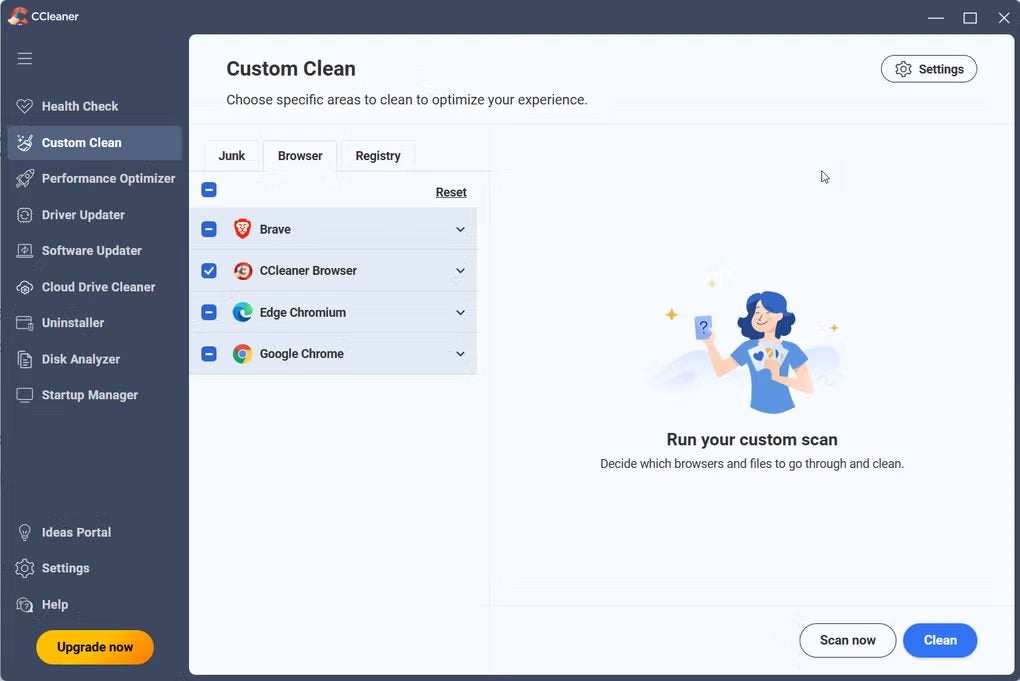
CCleaner Free: Easy smart cleaning for everyone

Developed by Avast, CCleaner Free has established itself as one of the solutions for regaining control and space on our machines. Far from being limited to emptying the recycle bin, the free version includes a set of utilities designed to help to locate where storage capacity is being lost.

1. The duplicate file finder

In its Tools menu, CCleaner Free includes the Duplicate Finder (associated with its disk analysis functions). This tool can help you scan both internal drives (SSD/HDD) and external hard drives and USB flash drives.

Unlike a simple name search, the tool lets you set rigorous matching criteria:

  • Exact match: It compares files by name, size, modification date, and actual content to help confirm that detected items are identical matches before offering the option to delete them.
  • Exclusion filters: It allows system files or zero-size files to be skipped, helping reduce the risk to system stability.
  • Custom search: It’s possible to scan entire drives or select specific folders where you suspect there’s massive data buildup (such as photo albums or project folders). At the end of the scan, the tool presents a clear breakdown of the duplicates found, allowing the user to select and remove unnecessary copies in just a couple of clicks.

2. Cleaning hidden files for optimal performance

Deleting duplicate files usually frees up a lot of space at once, but space optimization doesn’t end there. To help the machine gain space and run faster, CCleaner Free can also help to clean up in areas where Windows builds up junk that’s hard to detect:

  • Temporary system files: It can clean error logs, memory dumps, and old installers that remain forgotten after Windows updates.
  • Cache and browsing data: It helps remove temporary data from web browsers like Chrome, Edge, or Firefox that slow down startup and browsing.
  • Application leftovers: It can locate and remove the residue applications leave behind after closing or after an incomplete uninstall process.

Recover the space that’s already yours

Computer maintenance doesn’t have to be a complex task or require extensive technical knowledge. The buildup of duplicates and unnecessary files is a natural consequence of using any computer over time, but it doesn’t mean you have to live with a slow machine or one with no storage left.

CCleaner Free
CCleaner Free Download

Before considering a financial investment in new hardware, it’s worth auditing your hard drive. With specialized and free tools like Avast’s CCleaner Free, you’ll discover that, most of the time, the solution to your space problems was always there: you just needed to delete the copies you didn’t know you had.

Author: Chema Carvajal Sarabia

{ "de-DE": "Journalist, spezialisiert auf Technologie, Unterhaltung und Videospiele. Über das zu schreiben, was mich begeistert (Gadgets, Spiele und Filme), ermöglicht es mir, bei Verstand zu bleiben und mit einem Lächeln im Gesicht aufzuwachen, wenn der Wecker klingelt. PS: Das stimmt nicht 100% der Zeit.", "en-US": "Journalist specialized in technology, entertainment and video games. Writing about what I'm passionate about (gadgets, games and movies) allows me to stay sane and wake up with a smile on my face when the alarm clock goes off. PS: this is not true 100% of the time.", "es-ES": "Content Manager - Periodista especializado en tecnología, entretenimiento y videojuegos. Escribir sobre lo que me apasiona (cacharros, juegos y cine) me permite seguir cuerdo y despertarme con una sonrisa cuando suena el despertador. PD: esto no es cierto el 100 % de las veces.", "fr-FR": "Journaliste spécialisé dans la technologie, le divertissement et les jeux vidéo. Écrire sur ce qui me passionne (gadgets, jeux et films) me permet de rester sain d'esprit et de me réveiller avec le sourire aux lèvres quand le réveil sonne. PS : cela n'est pas vrai 100 % du temps.", "it-IT": "Giornalista specializzato in tecnologia, intrattenimento e videogiochi. Scrivere di ciò che mi appassiona (gadget, giochi e film) mi permette di mantenere la sanità mentale e di svegliarmi con un sorriso sul viso quando suona la sveglia. PS: questo non è vero al 100% del tempo.", "ja-JP": "", "nl-NL": "", "pl-PL": "", "pt-BR": "Jornalista especializado em tecnologia, entretenimento e videogames. Escrever sobre o que me apaixona (gadgets, jogos e filmes) me permite manter a sanidade e acordar com um sorriso no rosto quando o despertador toca. PS: isso não é verdade 100% do tempo.", "social": { "email": "chemacs91@gmail.com", "facebook": "", "twitter": "https://twitter.com/chematopetazo", "linkedin": "" } } View all posts by Chema Carvajal Sarabia

Author Chema Carvajal SarabiaPosted on September 30, 2026September 30, 2026Categories News

Post navigation

Previous Previous post: The creator of ‘Children of Blood and Bone’ hates its adaptation so much that she’ll never again allow one of her books to be adapted for film
Next Next post: US Air Force ex-members now sentenced: $2 million email scam

Recent Posts

  • Cameras, locks, and a bombshell: Apple’s latest in smart home tech brings surprises
  • This is the inside of the new Apple Watch Series 12
  • ‘Scream’ can never be fully completed: an actor from the first film believes Melissa Barrera’s firing changed everything
  • The live-action adaptation of Naruto won’t be just a movie: it’ll be a whole franchise
  • 4K images at half the price: Google launches the new Nano Banana

Archives

  • October 2026
  • September 2026
  • August 2026
  • July 2026
  • June 2026
  • May 2026
  • April 2026
  • March 2026
  • February 2026
  • January 2026
  • December 2025
  • November 2025
  • October 2025
  • September 2025
  • August 2025
  • July 2025
  • June 2025
  • May 2025
  • April 2025
  • March 2025
  • February 2025
  • January 2025
  • December 2024
  • November 2024
  • October 2024
  • September 2024
  • August 2024
  • July 2024
  • June 2024
  • May 2024
  • April 2024
  • March 2024
  • February 2024
  • January 2024
  • December 2023
  • November 2023
  • October 2023
  • September 2023
  • August 2023
  • July 2023
  • June 2023
  • May 2023
  • April 2023
  • March 2023
  • February 2023
  • January 2023
  • December 2022
  • November 2022
  • October 2022
  • September 2022
  • August 2022
  • July 2022
  • June 2022
  • May 2022
  • April 2022
  • March 2022
  • February 2022
  • January 2022
  • December 2021
  • November 2021
  • October 2021
  • September 2021
  • August 2021
  • July 2021
  • June 2021
  • May 2021
  • April 2021
  • March 2021
  • February 2021
  • January 2021
  • December 2020
  • November 2020
  • October 2020
  • September 2020
  • August 2020
  • July 2020
  • June 2020
  • May 2020
  • April 2020
  • March 2020
  • February 2020
  • January 2020
  • December 2019
  • November 2019
  • October 2019
  • September 2019
  • August 2019
  • July 2019
  • June 2019
  • May 2019
  • April 2019
  • March 2019
  • February 2019
  • January 2019
  • December 2018
  • November 2018
  • October 2018
  • September 2018
  • August 2018
  • July 2018
  • June 2018
  • May 2018
  • April 2018
  • March 2018
  • February 2018
  • January 2018
  • December 2017
  • November 2017
  • October 2017
  • September 2017
  • August 2017
  • July 2017
  • June 2017
  • May 2017
  • April 2017
  • March 2017
  • February 2017
  • January 2017
  • December 2016
  • November 2016
  • October 2016
  • September 2016
  • August 2016
  • July 2016
  • June 2016
  • May 2016
  • April 2016
  • March 2016
  • February 2016
  • January 2016
  • December 2015
  • November 2015
  • October 2015
  • September 2015
  • August 2015
  • July 2015
  • June 2015
  • May 2015
  • April 2015
  • March 2015
  • February 2015
  • January 2015
  • December 2014
  • November 2014
  • October 2014
  • September 2014
  • August 2014
  • July 2014
  • June 2014
  • May 2014
  • April 2014
  • March 2014
  • February 2014
  • January 2014
  • December 2013
  • November 2013
  • October 2013
  • September 2013
  • August 2013
  • July 2013
  • June 2013
  • May 2013
  • April 2013
  • March 2013
  • February 2013
  • January 2013
  • December 2012
  • November 2012
  • October 2012
  • September 2012
  • August 2012
  • July 2012
  • June 2012
  • May 2012
  • April 2012
  • March 2012
  • February 2012
  • January 2012
  • December 2011
  • November 2011
  • October 2011
  • September 2011
  • August 2011
  • July 2011
  • June 2011
  • May 2011
  • April 2011
  • March 2011
  • February 2011
  • January 2011
  • December 2010
  • November 2010
  • October 2010
  • September 2010
  • August 2010
  • July 2010
  • June 2010
  • May 2010
  • April 2010
  • March 2010
  • February 2010
  • January 2010
  • December 2009
  • November 2009
  • October 2009
  • September 2009
  • August 2009
  • July 2009
  • June 2009
  • May 2009
  • April 2009
  • March 2009
  • February 2009
  • January 2009
  • December 2008
  • November 2008
  • October 2008
  • September 2008
  • August 2008
  • July 2008
  • June 2008
  • May 2008
  • April 2008
  • March 2008
  • February 2008
  • January 2008
  • December 2007
  • November 2007
  • October 2007
  • September 2007
  • August 2007
  • July 2007
  • June 2007
  • May 2007
  • April 2007
  • March 2007
  • February 2007
  • January 2007
  • December 2006
  • November 2006
  • September 2006
  • August 2006
  • June 2006
  • May 2006
  • July 2001
  • January 2001
  • November 2000
  • September 2000
  • August 2000
  • July 2000
  • April 2000
  • March 2000

Categories

  • Affiliate post
  • Expert Review
  • Gaming
  • Guides
  • How to
  • Legacy how To
  • News
  • Noticias
  • Software>Security
  • Sponsored
  • Trucos y Consejos
  • Uncategorized
  • Windows software

Meta

  • Log in
  • Entries feed
  • Comments feed
  • WordPress.org
Softonic English Proudly powered by WordPress