
Skip to content

Softonic English

Just another Softonic Sites site

Adobe After Effects: Rotoscope: Extract objects faster and more accurately

Rotoscoping is primarily an animation technique where artists trace over still frames to create realistic animation sequences. This method, which has evolved significantly over time, is now used in digital post-production to separate and isolate objects in videos.

Within After Effects, the rotoscope brush is a tool that allows us to do precisely that. We can draw directly on our projects to accurately separate any element from the background. This technique is especially useful for creating complex visual effects, such as changing the background of a scene, for example.

If you want to learn how to use the rotoscope brush, stay with us and find out in the following paragraphs.

Adobe After Effects
Adobe After Effects Download

How to Use the Roto Brush

The new Rotoscope Brush is the most advanced variant included in After Effects, thanks to the use of artificial intelligence. It is more precise in identifying and tracking objects, far surpassing the Rotoscope Brush 2.0. It facilitates and speeds up the process of masking complex elements like limbs, hair, and overlapping transparent items. Using it is as easy as selecting 3.0 in the Version tab.

The new Rotoscope Brush is the most advanced variant included in After Effects, thanks to the use of artificial intelligence. It is more precise in identifying and tracking objects, far surpassing the Rotoscope Brush 2.0. It facilitates and speeds up the process of masking complex elements like limbs, hair, and overlapping transparent items. Using it is as easy as selecting 3.0 in the Version tab.

You can also use version 2.0 if you want a faster option (though less precise). Here you can choose the brush quality, with options being Standard and Best.
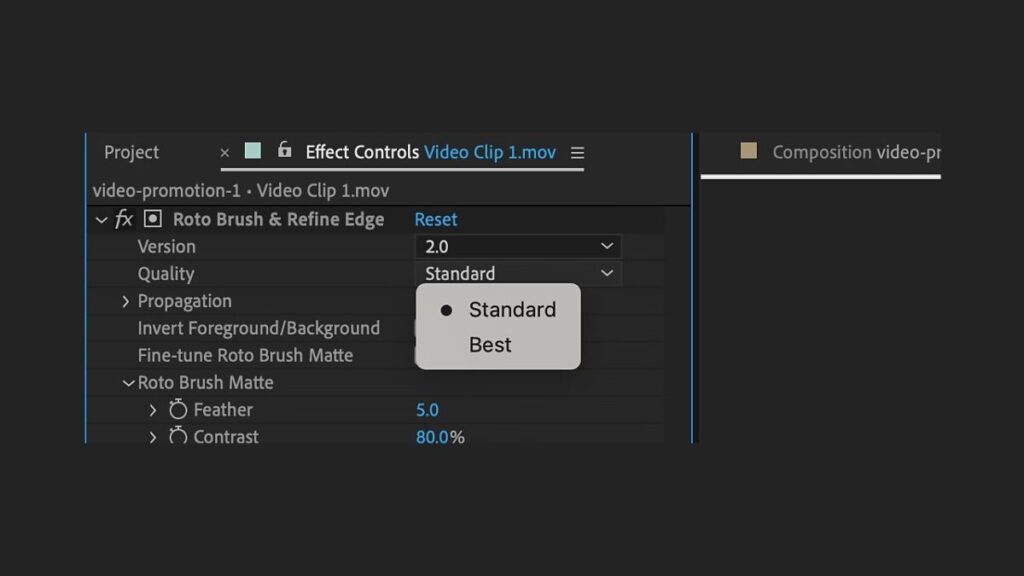
If you don’t know where the tool is, don’t worry. Go to the toolbar at the top of After Effects and select the Roto Brush. If you can’t find it, you can also use the keyboard shortcut Option/Alt+W.

Can you use Roto Brush 1.0? Technically yes, but it’s ideal for older projects. In fact, if one of your videos uses this function, Roto Brush 1.0 will be set automatically.

Now, hold down Command/Control while clicking and dragging the mouse: this will control the brush size. Then, paint with the Roto Brush over the main subject you want to isolate from the scene.

Although it may seem logical, do not draw the contour or edges. On the contrary, it is important to start by drawing a stroke that cuts through the element. Now, it’s time to adjust the selection. To remove parts of the selection, keep tracing while holding the Alt or Option key.

When we draw over a frame with the Roto Brush, it becomes the base frame. Once you have defined the element in your base frame, we can continue. Now, press the space bar to activate matte propagation to the next frame in your project.

When we talk about matte propagation in After Effects, we refer to how the tool applies the rotoscope effects you define in one frame to the subsequent ones in the video. In short, what you define in one clip will serve as the basis for trimming the following ones.

If you need to adjust the rotoscoping precision to the maximum, you can move frame by frame to check it using Command + left/right arrow (on macOS) or Ctrl + left/right arrow.

When you want to stop the selection propagation at a specific frame, just click the Freeze button. If you don’t see it, you will find it at the bottom of the Layer panel. The final result can be further refined from the Effect Controls panel, which is usually on the left. If it is not visible, go to the top of After Effects and click Effect > Effect Controls.
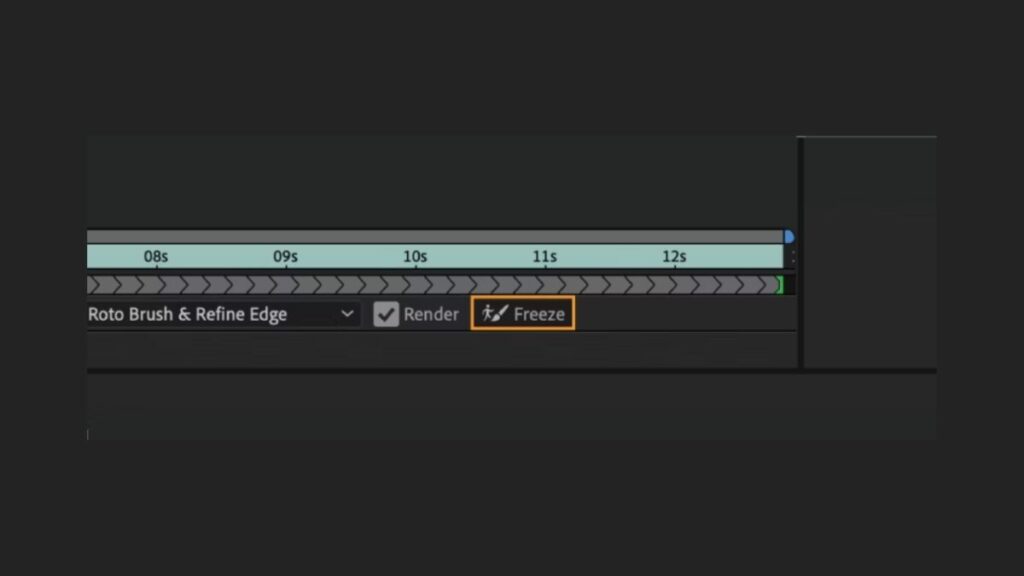
In the panel, go to Roto Brush Matte. Adjust the options there according to your needs (Feather, Contrast, Shift Edge, Reduce Chatter). If you want to adjust the selection to very fine details (like hair, for example), you can use the Refine Edge Matte tool.

Adobe After Effects
Adobe After Effects Download

Tips for Getting the Most Out of the Roto Brush

The Roto Brush integrated into After Effects is a powerful tool capable of achieving incredible results. If you want to get the most out of it, here are some tips to consider in your projects:

  • The most important thing is to optimize the material you are going to use. The Roto Brush results will be better if the clips are of the highest possible quality. It is also good to work only with the video segment that will use rotoscoping. This way, After Effects can process the clip faster and your computer will work less.
  • Adjust the base frame you use well. After Effects allows you to position yourself in the right frame with great precision.
  • When using the Roto Brush, always work in Full resolution. Quick preview modes do not work well with the Roto Brush.
  • Be precise when painting with the Roto Brush over the object you want to separate. Take the time you need, and the results will be better.
  • When you are happy with the result, use the Freeze function to stop the propagation.
  • Use the keyboard shortcuts we taught you earlier to edit faster. You can write them all down in a notepad and refer to them if you have any doubts.
  • This might be the most valuable advice on the list: NEVER forget to save your project frequently. After Effects is a very demanding program on our computers, and if we don’t manage it well, it can close unexpectedly. Save frequently to avoid losing any progress.

Author: María López

{ "de-DE": "Künstler aus Berufung und Technikliebhaber. Seit ich denken kann, habe ich gerne an allen möglichen Gadgets herumgebastelt.", "en-US": "Artist by vocation and technology lover. I have liked to tinker with all kinds of gadgets for as long as I can remember.", "es-ES": "Artista de vocación y amante de la tecnología. Me ha gustado cacharrear con todo tipo de gadgets desde que tengo uso de razón.", "fr-FR": "Artiste de vocation et amateur de technologie. J'aime bricoler avec toutes sortes de gadgets depuis que j'ai l'usage de la raison.", "it-IT": "", "ja-JP": "", "nl-NL": "", "pl-PL": "", "pt-BR": "", "social": { "email": "", "facebook": "", "twitter": "", "linkedin": "" } } View all posts by María López

Author María LópezPosted on July 3, 2024July 1, 2025Categories News

Post navigation

Previous Previous post: This will be the app that will prevent access to adult websites in Spain if you’re a minor
Next Next post: More than 3 million apps are exposed: can we defend ourselves from the CocoaPods security flaw?

Recent Posts

  • Beyond Good & Evil 2 and 4 more games still stuck after 10 years
  • Star Wars: Galactic Racer is out now: its roguelite progression started as a homemade board game
  • The Lincoln Lawyer gets a final season 5: Netflix’s franchise will go on
  • Marvel’s Midnight Spider-Man is here: a brutal new rule for Peter Parker
  • A Knight of the Seven Kingdoms already looks like HBO’s best Game of Thrones follow-up

Archives

  • October 2026
  • September 2026
  • August 2026
  • July 2026
  • June 2026
  • May 2026
  • April 2026
  • March 2026
  • February 2026
  • January 2026
  • December 2025
  • November 2025
  • October 2025
  • September 2025
  • August 2025
  • July 2025
  • June 2025
  • May 2025
  • April 2025
  • March 2025
  • February 2025
  • January 2025
  • December 2024
  • November 2024
  • October 2024
  • September 2024
  • August 2024
  • July 2024
  • June 2024
  • May 2024
  • April 2024
  • March 2024
  • February 2024
  • January 2024
  • December 2023
  • November 2023
  • October 2023
  • September 2023
  • August 2023
  • July 2023
  • June 2023
  • May 2023
  • April 2023
  • March 2023
  • February 2023
  • January 2023
  • December 2022
  • November 2022
  • October 2022
  • September 2022
  • August 2022
  • July 2022
  • June 2022
  • May 2022
  • April 2022
  • March 2022
  • February 2022
  • January 2022
  • December 2021
  • November 2021
  • October 2021
  • September 2021
  • August 2021
  • July 2021
  • June 2021
  • May 2021
  • April 2021
  • March 2021
  • February 2021
  • January 2021
  • December 2020
  • November 2020
  • October 2020
  • September 2020
  • August 2020
  • July 2020
  • June 2020
  • May 2020
  • April 2020
  • March 2020
  • February 2020
  • January 2020
  • December 2019
  • November 2019
  • October 2019
  • September 2019
  • August 2019
  • July 2019
  • June 2019
  • May 2019
  • April 2019
  • March 2019
  • February 2019
  • January 2019
  • December 2018
  • November 2018
  • October 2018
  • September 2018
  • August 2018
  • July 2018
  • June 2018
  • May 2018
  • April 2018
  • March 2018
  • February 2018
  • January 2018
  • December 2017
  • November 2017
  • October 2017
  • September 2017
  • August 2017
  • July 2017
  • June 2017
  • May 2017
  • April 2017
  • March 2017
  • February 2017
  • January 2017
  • December 2016
  • November 2016
  • October 2016
  • September 2016
  • August 2016
  • July 2016
  • June 2016
  • May 2016
  • April 2016
  • March 2016
  • February 2016
  • January 2016
  • December 2015
  • November 2015
  • October 2015
  • September 2015
  • August 2015
  • July 2015
  • June 2015
  • May 2015
  • April 2015
  • March 2015
  • February 2015
  • January 2015
  • December 2014
  • November 2014
  • October 2014
  • September 2014
  • August 2014
  • July 2014
  • June 2014
  • May 2014
  • April 2014
  • March 2014
  • February 2014
  • January 2014
  • December 2013
  • November 2013
  • October 2013
  • September 2013
  • August 2013
  • July 2013
  • June 2013
  • May 2013
  • April 2013
  • March 2013
  • February 2013
  • January 2013
  • December 2012
  • November 2012
  • October 2012
  • September 2012
  • August 2012
  • July 2012
  • June 2012
  • May 2012
  • April 2012
  • March 2012
  • February 2012
  • January 2012
  • December 2011
  • November 2011
  • October 2011
  • September 2011
  • August 2011
  • July 2011
  • June 2011
  • May 2011
  • April 2011
  • March 2011
  • February 2011
  • January 2011
  • December 2010
  • November 2010
  • October 2010
  • September 2010
  • August 2010
  • July 2010
  • June 2010
  • May 2010
  • April 2010
  • March 2010
  • February 2010
  • January 2010
  • December 2009
  • November 2009
  • October 2009
  • September 2009
  • August 2009
  • July 2009
  • June 2009
  • May 2009
  • April 2009
  • March 2009
  • February 2009
  • January 2009
  • December 2008
  • November 2008
  • October 2008
  • September 2008
  • August 2008
  • July 2008
  • June 2008
  • May 2008
  • April 2008
  • March 2008
  • February 2008
  • January 2008
  • December 2007
  • November 2007
  • October 2007
  • September 2007
  • August 2007
  • July 2007
  • June 2007
  • May 2007
  • April 2007
  • March 2007
  • February 2007
  • January 2007
  • December 2006
  • November 2006
  • September 2006
  • August 2006
  • June 2006
  • May 2006
  • July 2001
  • January 2001
  • November 2000
  • September 2000
  • August 2000
  • July 2000
  • April 2000
  • March 2000

Categories

  • Affiliate post
  • Expert Review
  • Gaming
  • Guides
  • How to
  • Legacy how To
  • News
  • Noticias
  • Software>Security
  • Sponsored
  • Trucos y Consejos
  • Uncategorized
  • Windows software

Meta

  • Log in
  • Entries feed
  • Comments feed
  • WordPress.org
Softonic English Proudly powered by WordPress