
Skip to content

Softonic English

Just another Softonic Sites site

Adobe Firefly Image Model 3: the power in your hands to unleash your imagination

Adobe continues to race ahead in developing and enhancing its generative artificial intelligence technology. Its new model, Adobe Firefly Image 3, represents the company’s latest endeavor to revolutionize the way we conceive and edit images.

Adobe Photoshop
Adobe Photoshop Download

For professional designers, artists, or simply digital art enthusiasts, having powerful and accessible tools is crucial. That’s why Firefly AI‘s features are integrated into a multitude of applications, such as Adobe Photoshop. If you want to know how it works and how you can make the most of it, stay with us.

What is Adobe Firefly Image 3?

The new Adobe Firefly Image 3 model is an advanced artificial intelligence tool designed primarily for generating and manipulating images. This technology has been trained on millions of images to understand and recreate a wide variety of styles, themes, and compositions. Like other generative models, it helps bring our ideas to life in visual form.

The first version of Adobe Firefly was released in 2023, primarily focused on “image and text effect creation.” Since then, Adobe has continuously improved the model, leading to the current version. Compared to its previous iterations, Firefly Image 3 is better at understanding our instructions, generating higher-quality images, and offering more varied alternatives.

How Adobe Firefly Image 3 Works

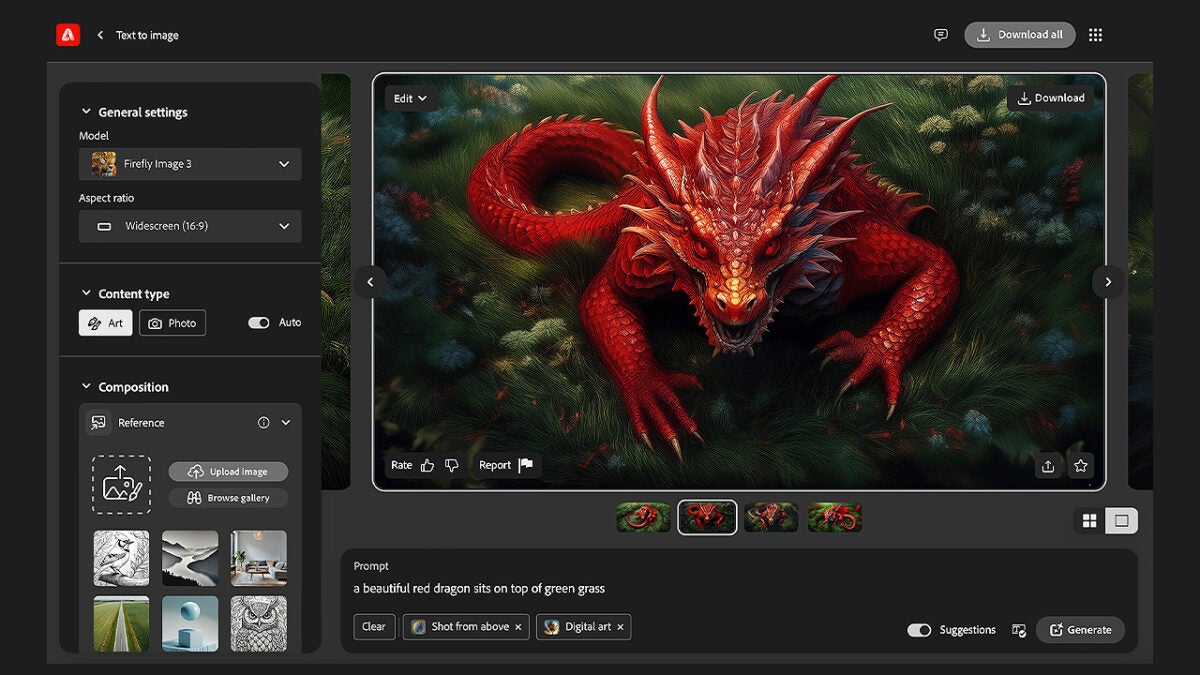
Adobe Firefly can help you design social media posts, brochures, illustrations, and much more thanks to its Text-to-Image function. You can create prototypes, graphics, or even memes if you wish. If you’re unsure how to start, don’t worry: we’ll first explain how to generate images using the Firefly web app.

  • Go to the web app and click on “Text to Image.” This link will take you directly to the Text to Image feature..
  • Here, you can go to the text box labeled “Prompt,” where you need to describe in your own words how you want the image to look.
  • Firefly will generate four variations. From there, you can go to “General” (found just below) and change the generative model, choosing between Firefly Image 2 or Firefly Image 3.
  • You can also specify the type of content you’re looking for, whether something more artistic or a photo-like image. To change it, go to “Content Type” and select between “Art” or “Photo”.
  • In “Composition,” you can upload a reference image or use one of the suggestions provided by Firefly.
  • Lastly, in “Styles,” you can adjust the intensity of the visual attributes of the image.
  • The “Reference” option allows you to create a new image based on an existing one. The reference you upload will not be used to train Adobe Firefly.

You can apply one or more effects from the “Effects” section, where you can choose from options like Beautiful, Bohemian, Eclectic, Futuristic, and many more. You can also tweak other options such as “Color and Tone,” “Lighting,” and “Camera Angle.”
Use Suggestions to Your Advantage

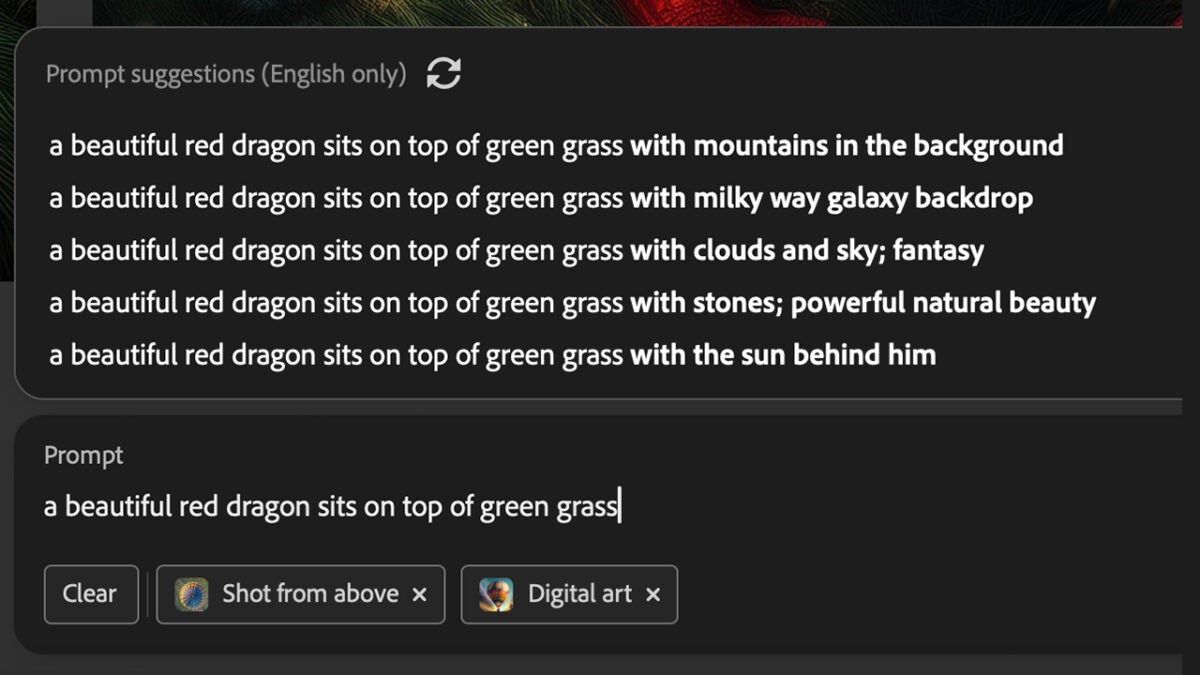
Sometimes, you might get stuck and not know how to communicate what you want to generate with Firefly. To help, you’ll have the “Prompt Suggestions,” a feature that provides recommendations to help you “improve” your prompts.

To use it, first ensure that the “Prompt Suggestions” option is activated (otherwise, you won’t see anything). After that, the process is simple:

  • Write at least two words. This will help the system better understand what you want to convey and offer more relevant options based on that.
  • After writing the initial words, the system will automatically generate a list of suggestions.
  • Choose the suggestion you like best. If none appeal to you, select the “Refresh” icon to see more.

Once you have your prompt ready, click “Generate”; Firefly will do the rest. If you don’t like what you see, you can always try again with different phrases. Once you’ve created your desired image, you have several options: you can edit it, download it, save it as a favorite, or share it on social media. You can also report the result to Adobe if it is offensive.

Remember, to improve your prompts, it’s best to use very simple language and include at least three words. Avoid using words like “generate” and try to be as descriptive as possible. Additionally, you can always work on the results in other Adobe programs, such as Photoshop, Illustrator, or Lightroom.
Adobe Photoshop
Adobe Photoshop Download

Generative Fill: How It Works

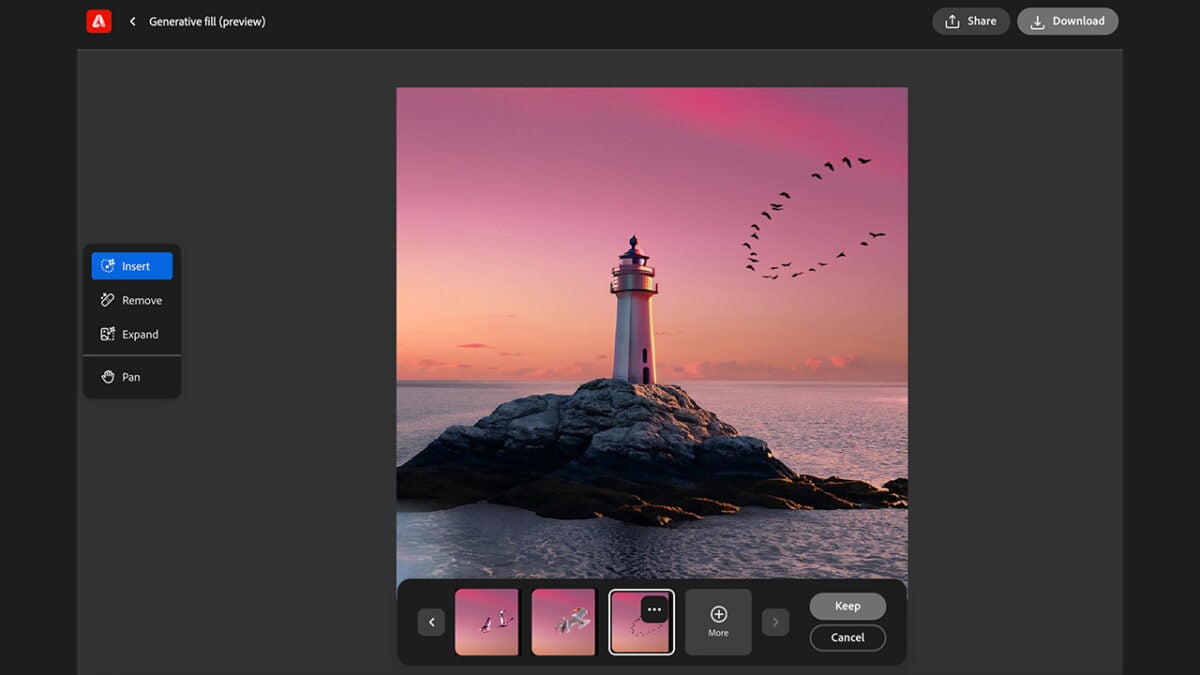
As you can see, Adobe Firefly offers many uses and possibilities. Besides converting text into images, Firefly has another interesting feature: Generative Fill. This allows you to remove objects from images or, conversely, add them.

  • As before, use the Generative Fill feature from the Firefly web app. From there, upload an image or select one from the sample gallery.
  • Select “Remove” and paint over the elements you want to eliminate from the image. Then, click “Remove” again.
  • Firefly will then offer several image options without the objects you’ve chosen to remove. If you’re not satisfied, select “More” to create additional variations.
Author: María López

{ "de-DE": "Künstler aus Berufung und Technikliebhaber. Seit ich denken kann, habe ich gerne an allen möglichen Gadgets herumgebastelt.", "en-US": "Artist by vocation and technology lover. I have liked to tinker with all kinds of gadgets for as long as I can remember.", "es-ES": "Artista de vocación y amante de la tecnología. Me ha gustado cacharrear con todo tipo de gadgets desde que tengo uso de razón.", "fr-FR": "Artiste de vocation et amateur de technologie. J'aime bricoler avec toutes sortes de gadgets depuis que j'ai l'usage de la raison.", "it-IT": "", "ja-JP": "", "nl-NL": "", "pl-PL": "", "pt-BR": "", "social": { "email": "", "facebook": "", "twitter": "", "linkedin": "" } } View all posts by María López

Author María LópezPosted on August 11, 2024July 1, 2025Categories Uncategorized

Post navigation

Previous Previous post: Which cloud gaming service best suits your needs?
Next Next post: 3 little-known games from the Like a Dragon saga that need a remake like eating

Recent Posts

  • Halloween: The Game is out now: Laurie Strode gets a new voice
  • Halo: Parasite’s Wake gets October 20 release date: pre-orders are live
  • Hidari is back on the market: seeks new U.S. partner after deal talks collapse
  • Kim Sung-soo reveals a generative-filmmaking shift at Busan: Worm Train marks the change
  • Fender rolling can fix tire rub: but it comes with risks

Archives

  • October 2026
  • September 2026
  • August 2026
  • July 2026
  • June 2026
  • May 2026
  • April 2026
  • March 2026
  • February 2026
  • January 2026
  • December 2025
  • November 2025
  • October 2025
  • September 2025
  • August 2025
  • July 2025
  • June 2025
  • May 2025
  • April 2025
  • March 2025
  • February 2025
  • January 2025
  • December 2024
  • November 2024
  • October 2024
  • September 2024
  • August 2024
  • July 2024
  • June 2024
  • May 2024
  • April 2024
  • March 2024
  • February 2024
  • January 2024
  • December 2023
  • November 2023
  • October 2023
  • September 2023
  • August 2023
  • July 2023
  • June 2023
  • May 2023
  • April 2023
  • March 2023
  • February 2023
  • January 2023
  • December 2022
  • November 2022
  • October 2022
  • September 2022
  • August 2022
  • July 2022
  • June 2022
  • May 2022
  • April 2022
  • March 2022
  • February 2022
  • January 2022
  • December 2021
  • November 2021
  • October 2021
  • September 2021
  • August 2021
  • July 2021
  • June 2021
  • May 2021
  • April 2021
  • March 2021
  • February 2021
  • January 2021
  • December 2020
  • November 2020
  • October 2020
  • September 2020
  • August 2020
  • July 2020
  • June 2020
  • May 2020
  • April 2020
  • March 2020
  • February 2020
  • January 2020
  • December 2019
  • November 2019
  • October 2019
  • September 2019
  • August 2019
  • July 2019
  • June 2019
  • May 2019
  • April 2019
  • March 2019
  • February 2019
  • January 2019
  • December 2018
  • November 2018
  • October 2018
  • September 2018
  • August 2018
  • July 2018
  • June 2018
  • May 2018
  • April 2018
  • March 2018
  • February 2018
  • January 2018
  • December 2017
  • November 2017
  • October 2017
  • September 2017
  • August 2017
  • July 2017
  • June 2017
  • May 2017
  • April 2017
  • March 2017
  • February 2017
  • January 2017
  • December 2016
  • November 2016
  • October 2016
  • September 2016
  • August 2016
  • July 2016
  • June 2016
  • May 2016
  • April 2016
  • March 2016
  • February 2016
  • January 2016
  • December 2015
  • November 2015
  • October 2015
  • September 2015
  • August 2015
  • July 2015
  • June 2015
  • May 2015
  • April 2015
  • March 2015
  • February 2015
  • January 2015
  • December 2014
  • November 2014
  • October 2014
  • September 2014
  • August 2014
  • July 2014
  • June 2014
  • May 2014
  • April 2014
  • March 2014
  • February 2014
  • January 2014
  • December 2013
  • November 2013
  • October 2013
  • September 2013
  • August 2013
  • July 2013
  • June 2013
  • May 2013
  • April 2013
  • March 2013
  • February 2013
  • January 2013
  • December 2012
  • November 2012
  • October 2012
  • September 2012
  • August 2012
  • July 2012
  • June 2012
  • May 2012
  • April 2012
  • March 2012
  • February 2012
  • January 2012
  • December 2011
  • November 2011
  • October 2011
  • September 2011
  • August 2011
  • July 2011
  • June 2011
  • May 2011
  • April 2011
  • March 2011
  • February 2011
  • January 2011
  • December 2010
  • November 2010
  • October 2010
  • September 2010
  • August 2010
  • July 2010
  • June 2010
  • May 2010
  • April 2010
  • March 2010
  • February 2010
  • January 2010
  • December 2009
  • November 2009
  • October 2009
  • September 2009
  • August 2009
  • July 2009
  • June 2009
  • May 2009
  • April 2009
  • March 2009
  • February 2009
  • January 2009
  • December 2008
  • November 2008
  • October 2008
  • September 2008
  • August 2008
  • July 2008
  • June 2008
  • May 2008
  • April 2008
  • March 2008
  • February 2008
  • January 2008
  • December 2007
  • November 2007
  • October 2007
  • September 2007
  • August 2007
  • July 2007
  • June 2007
  • May 2007
  • April 2007
  • March 2007
  • February 2007
  • January 2007
  • December 2006
  • November 2006
  • September 2006
  • August 2006
  • June 2006
  • May 2006
  • July 2001
  • January 2001
  • November 2000
  • September 2000
  • August 2000
  • July 2000
  • April 2000
  • March 2000

Categories

  • Affiliate post
  • Expert Review
  • Gaming
  • Guides
  • How to
  • Legacy how To
  • News
  • Noticias
  • Software>Security
  • Sponsored
  • Trucos y Consejos
  • Uncategorized
  • Windows software

Meta

  • Log in
  • Entries feed
  • Comments feed
  • WordPress.org
Softonic English Proudly powered by WordPress