
Skip to content

Softonic English

Just another Softonic Sites site

All Apple Intelligence image tools explained

With the arrival of iOS 18.2, Apple has prepared a series of tools that will change the way we interact with images and emojis. Similar to the Apple Intelligence Text Tools that come with iOS 18.1, in this second update, we will encounter a completely new way of creating visual content directly from our devices. Among these tools, three stand out: Image Playground, Genmoji, and Image Wand. Let’s take a closer look at each of them and how they will change our use of the Apple ecosystem. Image Playground: The power of graphic creation at everyone’s fingertips Image Playground […]

With the arrival of iOS 18.2, Apple has prepared a series of tools that will change the way we interact with images and emojis. Similar to the Apple Intelligence Text Tools that come with iOS 18.1, in this second update we will be faced with a completely new way of creating visual content directly from our devices. Among these tools, three stand out: Image Playground, Genmoji, and Image Wand. Let’s take a detailed look at each of them and how they will change our use of the Apple ecosystem.

Apple TV+
Apple TV+ SUBSCRIBE

Image Playground: the power of graphic creation within everyone’s reach

Image Playground will be the first of the major new features in iOS 18.2, and its goal is the creation of original images from the iPhone or iPad. The tool will be available both as a standalone application and integrated into existing applications, from both Apple and third parties.
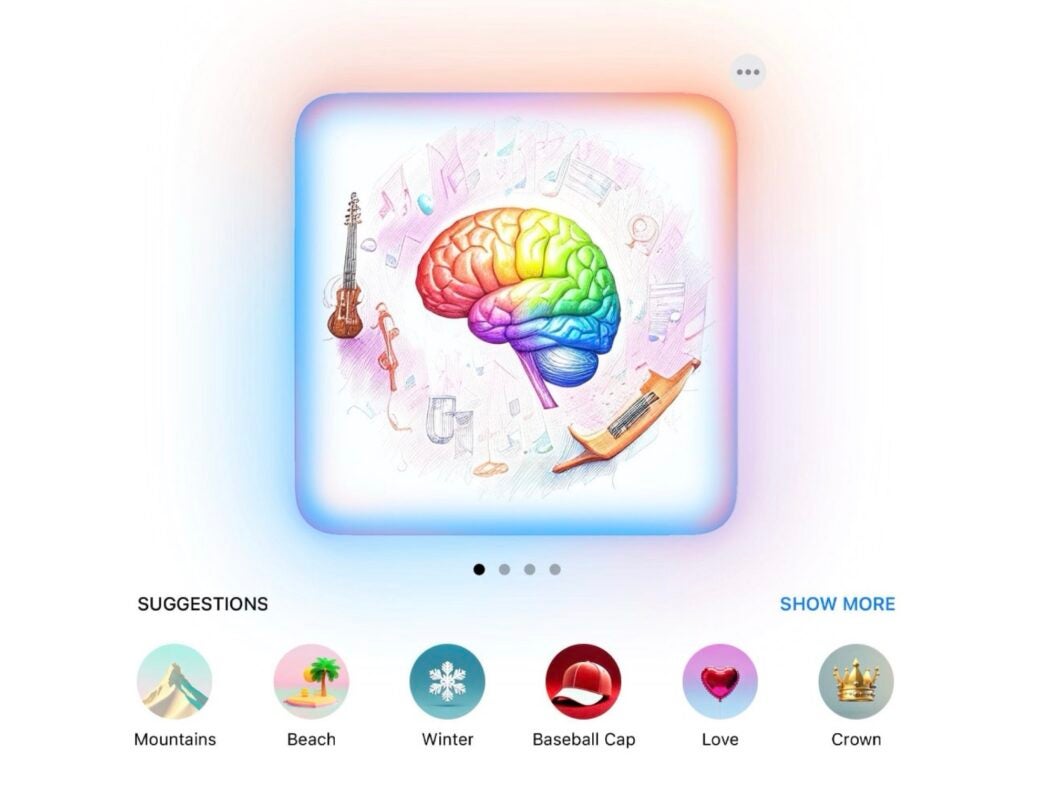
With Image Playground, we will be able to generate images from scratch simply by describing what we need. For example, if we have a specific idea in mind, it will be enough to write a description or several keywords that represent it, and Apple Intelligence will take care of creating an image based on our request.

If we are not clear about what we want exactly or what variables to give to a less concrete idea, Image Playground offers us the possibility to create images step by step through a series of suggestions of themes, elements, accessories, seasons, locations, and more.

Once the theme is chosen, we can experiment and customize the images by choosing from three visual styles: animation, illustration, and sketch. Apple has decided to limit, at least initially, the styles to these options to prevent potential misuse, such as the creation of images that appear realistic or could be mistaken for deepfakes.

Image Playground will be integrated into applications such as Messages, Keynote, Pages, and Freeform, for example, and will be available to third-party developers through an API. With this integration, wherever we are, we can create original images without needing to leave the app.

Genmoji: the future of emojis lies in personalization

The second new feature is Genmoji, a tool for creating personalized emojis. With iOS 18.2, Apple’s intelligence will allow us to create original emojis that better suit our conversations and expressions.
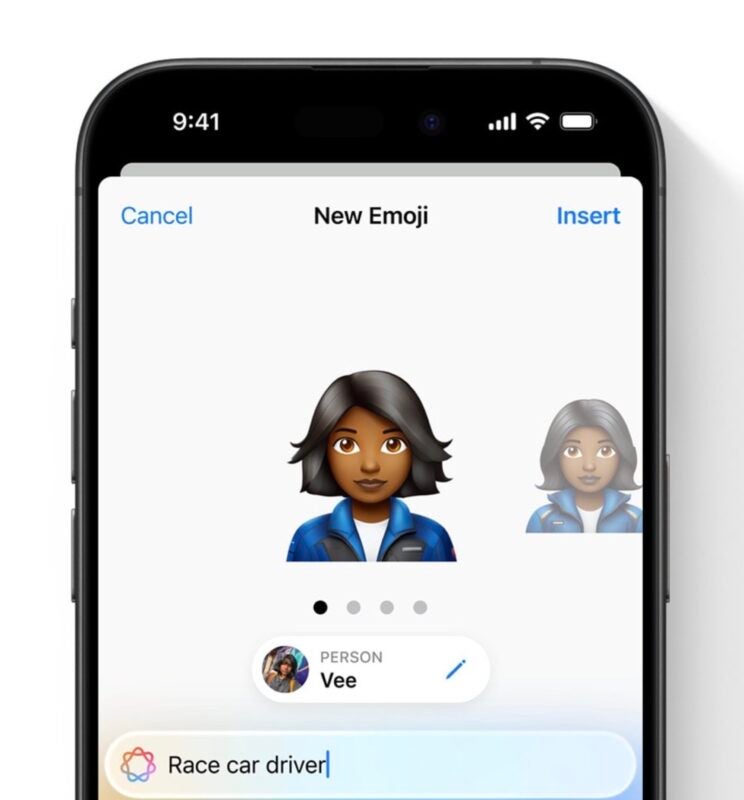
The Genmoji feature will be directly integrated into the emoji keyboard we already know. When we are looking for an emoji that doesn’t exist, Apple will offer us the option to “Create a new emoji” based on our description. The process is simple: we enter a brief description of what we are looking for, and Apple Intelligence will generate up to four different options for us to choose the one we like the most. From that moment, the new emoji will be automatically added to our keyboard and will be available for use in any app.

Something very interesting about Genmoji is the ability to create emojis that represent us, our friends, or family members. We can turn anyone into a superhero, an animal, or anything else we can think of, all in a matter of seconds.

Image Wand: the magic of illustration for our notes

The third image tool that will arrive with iOS 18.2 is Image Wand, designed to take our annotations in the Notes app further. If we use an Apple Pencil (or even with a finger), Image Wand will allow us to transform our sketches and drawings.
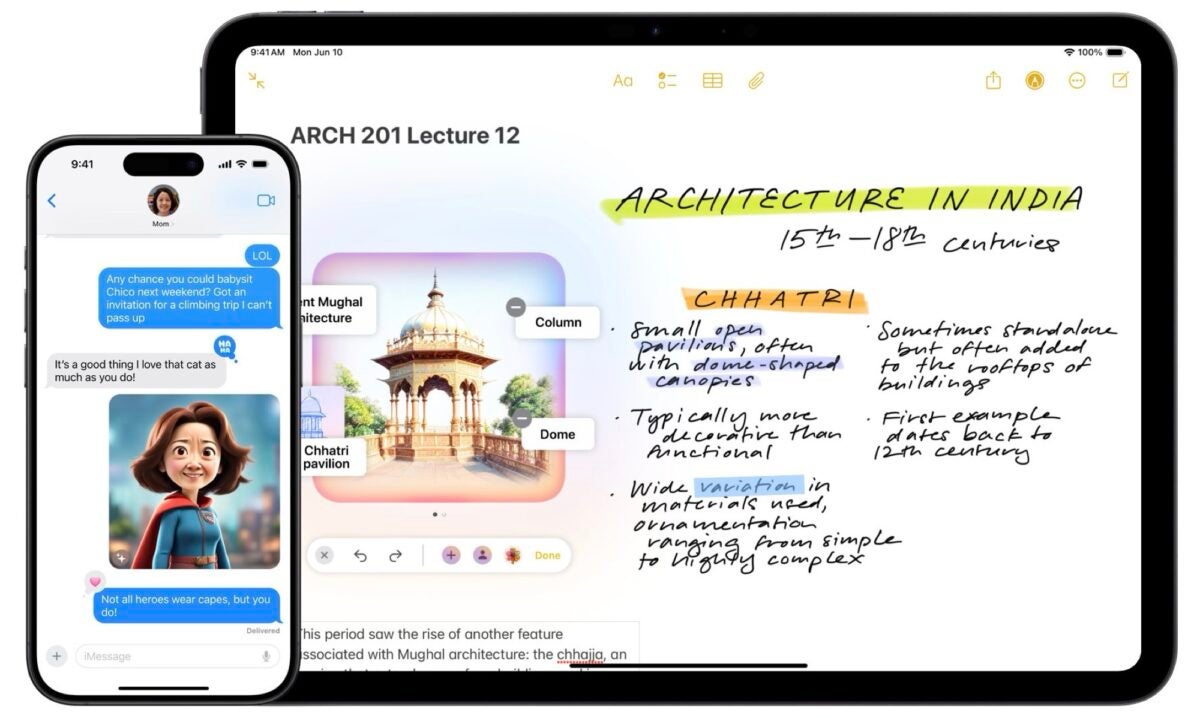
Image Wand will be integrated into the Notes tool menu for a unique functionality: by drawing a circle around an existing sketch, the tool will convert it into a complete image. Even if we haven’t drawn anything yet, we can actually use Image Wand to select an empty area of the note and Apple’s intelligence will suggest images based on the surrounding content.

First writing tools, now image tools

With the inclusion of these three tools, Apple fully enters the world of imagery through artificial intelligence. Image Playground, Genmoji, and Image Wand will allow us to add a touch of originality to our conversations, presentations, or notes.

With iOS 18.2 just around the corner, as it should arrive before the end of the year, the anticipation for these new features grows day by day. While we have seen the first image generated by Apple Intelligence, Craig Federighi’s puppy, there is a world to discover. A world that, although it will not change Apple’s most ambitious project in any way, will completely change how we use our devices.

Author: David Bernal Raspall

{ "de-DE": "Architekt | Gründer von hanaringo.com | Trainer für Apple-Technologien | Autor bei Softonic und iDoo_tech, zuvor bei Applesfera", "en-US": "Architect | Founder of hanaringo.com | Apple Technologies Trainer | Writer at Softonic and iDoo_tech, formerly at Applesfera", "es-ES": "Arquitecto | Creador de hanaringo.com | Formador en tecnologías Apple | Redactor en Softonic y iDoo_tech y anteriormente en Applesfera", "fr-FR": "Architecte | Créateur de hanaringo.com | Formateur en technologies Apple | Rédacteur chez Softonic et iDoo_tech, précédemment chez Applesfera", "it-IT": "Architetto | Fondatore di hanaringo.com | Formatore in tecnologie Apple | Scrittore per Softonic e iDoo_tech, precedentemente su Applesfera", "ja-JP": "建築家 | hanaringo.comの創設者 | アップル技術のトレーナー | SoftonicおよびiDoo_techのライター、以前はApplesferaで", "nl-NL": "Architect | Oprichter van hanaringo.com | Trainer in Apple-technologieën | Schrijver bij Softonic en iDoo_tech, voorheen bij Applesfera", "pl-PL": "Architekt | Założyciel hanaringo.com | Trener technologii Apple | Pisarz w Softonic i iDoo_tech, wcześniej w Applesfera", "pt-BR": "Arquiteto | Fundador do hanaringo.com | Instrutor em tecnologias Apple | Escritor na Softonic e iDoo_tech, anteriormente na Applesfera", "social": { "email": "races_provost0x@icloud.com", "facebook": "", "twitter": "https://twitter.com/david_br8", "linkedin": "https://www.linkedin.com/in/davidbernalraspall/" } } View all posts by David Bernal Raspall

Author David Bernal RaspallPosted on October 15, 2024July 1, 2025Categories News

Post navigation

Previous Previous post: Artificial intelligence does not reason, according to Apple, but is there a solution?
Next Next post: The silo protects us, the silo keeps us safe, the silo already has a trailer for the second season

Recent Posts

  • God of War is official at Prime Video: Amazon orders series
  • Street Fighter’s Justin Wong cameo: director says the film is for fans first
  • Final Porta wireless headphones are now up for preorder: just 40g
  • Slow Horses season 7 adds five new cast members on Apple TV+
  • Elon Musk says every US child will get a SpaceX share next year: about a $10.5 billion giveaway

Archives

  • October 2026
  • September 2026
  • August 2026
  • July 2026
  • June 2026
  • May 2026
  • April 2026
  • March 2026
  • February 2026
  • January 2026
  • December 2025
  • November 2025
  • October 2025
  • September 2025
  • August 2025
  • July 2025
  • June 2025
  • May 2025
  • April 2025
  • March 2025
  • February 2025
  • January 2025
  • December 2024
  • November 2024
  • October 2024
  • September 2024
  • August 2024
  • July 2024
  • June 2024
  • May 2024
  • April 2024
  • March 2024
  • February 2024
  • January 2024
  • December 2023
  • November 2023
  • October 2023
  • September 2023
  • August 2023
  • July 2023
  • June 2023
  • May 2023
  • April 2023
  • March 2023
  • February 2023
  • January 2023
  • December 2022
  • November 2022
  • October 2022
  • September 2022
  • August 2022
  • July 2022
  • June 2022
  • May 2022
  • April 2022
  • March 2022
  • February 2022
  • January 2022
  • December 2021
  • November 2021
  • October 2021
  • September 2021
  • August 2021
  • July 2021
  • June 2021
  • May 2021
  • April 2021
  • March 2021
  • February 2021
  • January 2021
  • December 2020
  • November 2020
  • October 2020
  • September 2020
  • August 2020
  • July 2020
  • June 2020
  • May 2020
  • April 2020
  • March 2020
  • February 2020
  • January 2020
  • December 2019
  • November 2019
  • October 2019
  • September 2019
  • August 2019
  • July 2019
  • June 2019
  • May 2019
  • April 2019
  • March 2019
  • February 2019
  • January 2019
  • December 2018
  • November 2018
  • October 2018
  • September 2018
  • August 2018
  • July 2018
  • June 2018
  • May 2018
  • April 2018
  • March 2018
  • February 2018
  • January 2018
  • December 2017
  • November 2017
  • October 2017
  • September 2017
  • August 2017
  • July 2017
  • June 2017
  • May 2017
  • April 2017
  • March 2017
  • February 2017
  • January 2017
  • December 2016
  • November 2016
  • October 2016
  • September 2016
  • August 2016
  • July 2016
  • June 2016
  • May 2016
  • April 2016
  • March 2016
  • February 2016
  • January 2016
  • December 2015
  • November 2015
  • October 2015
  • September 2015
  • August 2015
  • July 2015
  • June 2015
  • May 2015
  • April 2015
  • March 2015
  • February 2015
  • January 2015
  • December 2014
  • November 2014
  • October 2014
  • September 2014
  • August 2014
  • July 2014
  • June 2014
  • May 2014
  • April 2014
  • March 2014
  • February 2014
  • January 2014
  • December 2013
  • November 2013
  • October 2013
  • September 2013
  • August 2013
  • July 2013
  • June 2013
  • May 2013
  • April 2013
  • March 2013
  • February 2013
  • January 2013
  • December 2012
  • November 2012
  • October 2012
  • September 2012
  • August 2012
  • July 2012
  • June 2012
  • May 2012
  • April 2012
  • March 2012
  • February 2012
  • January 2012
  • December 2011
  • November 2011
  • October 2011
  • September 2011
  • August 2011
  • July 2011
  • June 2011
  • May 2011
  • April 2011
  • March 2011
  • February 2011
  • January 2011
  • December 2010
  • November 2010
  • October 2010
  • September 2010
  • August 2010
  • July 2010
  • June 2010
  • May 2010
  • April 2010
  • March 2010
  • February 2010
  • January 2010
  • December 2009
  • November 2009
  • October 2009
  • September 2009
  • August 2009
  • July 2009
  • June 2009
  • May 2009
  • April 2009
  • March 2009
  • February 2009
  • January 2009
  • December 2008
  • November 2008
  • October 2008
  • September 2008
  • August 2008
  • July 2008
  • June 2008
  • May 2008
  • April 2008
  • March 2008
  • February 2008
  • January 2008
  • December 2007
  • November 2007
  • October 2007
  • September 2007
  • August 2007
  • July 2007
  • June 2007
  • May 2007
  • April 2007
  • March 2007
  • February 2007
  • January 2007
  • December 2006
  • November 2006
  • September 2006
  • August 2006
  • June 2006
  • May 2006
  • July 2001
  • January 2001
  • November 2000
  • September 2000
  • August 2000
  • July 2000
  • April 2000
  • March 2000

Categories

  • Affiliate post
  • Expert Review
  • Gaming
  • Guides
  • How to
  • Legacy how To
  • News
  • Noticias
  • Software>Security
  • Sponsored
  • Trucos y Consejos
  • Uncategorized
  • Windows software

Meta

  • Log in
  • Entries feed
  • Comments feed
  • WordPress.org
Softonic English Proudly powered by WordPress