App of the Week: Grand Theft Auto V

Softonic’s App of the Week highlights some of the coolest, most unique, and popular apps that have been released for Android, iOS, Windows, and Mac. This week, our patience finally has been rewarded as the hugely anticipated Grand Theft Auto V arrives on PC.

It has been a long journey. A wait of two years followed Rockstar’s first announcement of the game before its PS3 and Xbox 360 launch in 2013, and then another 20 months had to pass before its final PC incarnation.

The bottom line is that most people interested in GTA V will already have played it, so what does the PC version add to this open-world, crime-fiction epic? Well, quite a lot it turns out.

Default player


brightcove.createExperiences();

Visual improvements are a given of course, with the high resolution graphics seen in the PS4 and Xbox One versions, further improved upon, allowing resolutions up to a staggering 4K running at 60fps (providing you have the PC to run it). Other carry overs from the recent console release include the first-person camera view and improved online options, such as the fantastic Heist mode that lets you pull off dramatic bank jobs with your friends.

There are features completely unique to the PC version too. The most important of these is the Rockstar Editor, which lets you create your own movies from the in-game action. With the ability to edit all of the footage recorded around your character, change camera angles, depth of field, focus, and the type of camera you use – this tool lets you create beautiful videos to upload and share. There is also a Director mode that enables you to manipulate your character and environment to ensure you have complete creative freedom.

This version of GTA V also includes two new radio stations, FM Lab and Radio Self – the latter of which lets you add your own mp3 so you can listen to your favorite music as you cruise the city of Los Santos.

Finally we have the definitive version of GTA V, letting you relive this fantastic game again in the best way possible – download it for PC now.

Related Stories

Rockstar Editor: Making movies is easy

Grand Theft Auto V Review

App of the Week: Battlefield Hardline

Follow me on Twitter: @DoFuss

Five Apps to Try This Weekend – April 3rd 2015 (kind of)

Hi and welcome to back to Softonic’s Five Apps to Try This Weekend for April 3rd. Yes, April 3rd. There is a small chance that we made a little mistake and had this prepared before our short vacation and then forgot to post it. Anyway, we actually had something a little different prepared for the hiatus, moving our focus from the newest and freshest apps to look at five fantastic and safe games to keep your kids busy.

This week, we have games that encourage imagination. Minecraft (iOSAndroid) is unquestionably top of class here, so we have dutifully included it in all of its open-world, discovery, and creation glory. But it is not alone, with Playworld Super Heroes (iOS) is also on hand to encourage your kids to build and design their own superheroes with whom to save the world.

If you want something a little more sedate to calm you little ones down, then we recommend either the charming The Snowman and the Snowdog (iOS | Android | Windows Phone), or the colorful Sago Mini Ocean Swimmer (iOS | Android | Windows Phone). Finally, if you want something more focused on learning then there is the captivating Metamorphabet (iOS), a wonderful tool to teach the alphabet and build vocabulary.

Sorry again for the confusion with this video, and we will be resuming our usual schedule this Friday (that’s the 17th of April). If you don’t want to miss an episode, be sure to subscribe.

Related Stories

Best mobile games that are safe for kids

Five Apps to Try This Weekend – March 27th 2015

Five Apps to Try This Weekend – March 20th 2015

Follow me on Twitter: @DoFuss

Diary of a fat man – Fitivity (sometimes walls get in the way)

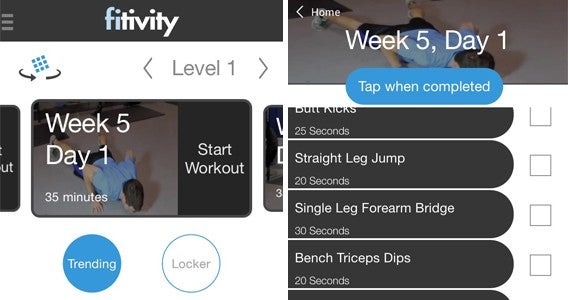
For last seven days I have been trying out Fitivity (Android|iOS), and it has been a great week. The bodyweight focused exercise programs is far more closely matched with my interests and usual workouts than my previous trials – which may explain why I found it so successful.

If you are unaware of bodyweight training as a concept it is quite simple, you use your body’s natural (in my case considerable) bulk… to provide the resistance for training. Some common examples of these are push-ups, crunches, and planking, but these are just a tiny selection of the exercises that can be included in a routine.

Easy layout and menus

For me this was perfect because – bar one or two exercises – I knew all of the exercises listed (at least in the Home Bodyweight Program that I selected). With most of the routines being fairly simple circuits of five or six repeating exercises, each with a fixed duration. This meant all I had to do was look down to remind myself of the exercises and the timing, and away I went.

You may remember that my last physical training tool was Daily Yoga (Android|iOS), and I think it is only fair that I revisit a point I made there. One of my big problems with this app was that I didn’t know the positions, a fact that made it difficult for to follow each stage of a routine. However, the spoken explanation that ran throughout meant a lot was done to accommodate the less experienced.

Easy examples

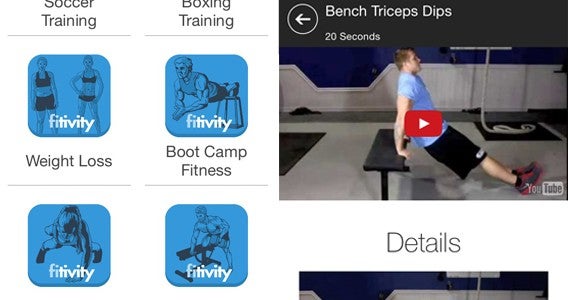
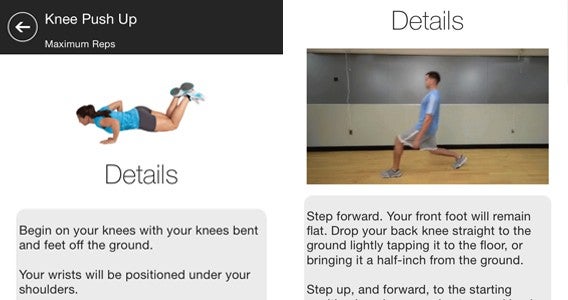
By comparison Fitivity’s app comes up short. When I didn’t know a specific exercise I had to tap on it to bring up an explanation – not a hard process thanks to the easy to navigate menus – but enough to break the flow of the routine. This is a real issue as the point of the training is to maintain a high heart rate for short periods, tough if you are constantly stopping. This never proved an issue for me, but I can imagine it would for newcomers.

Even knowing the exercises proved to be problematic, however. While timings for each exercise were listed, there was no in-app timer. My only method of actually measuring time (at least where I exercise) is on my phone. This led to an odd situation for me of having to write out exercises and timings on a sheet of paper and then timing them from a stopwatch app.

Tricky exercises for me

For me, the best thing about the Fitivity is that the routines are good. The app features quick hitting exercises that never get boring and most of which can be done with ease at home. I say “most” because I did find a few issues with certain exercise. The first issue was space, with exercises like the Walking Lunge having me across my apartment before I’d even taken two steps (I am 193cm). The other problem I hit was the term “to exhaustion” for the Knee Push Ups exercise because my knees began to hurt long before I reached exhaustion.

Push it

Fitivity sets a good routine, with a good interface and explanations of exercise. As someone who knows most of the routines, it would be near perfect with the simple inclusion of an in-app timer.

I am out of the office for the next two weeks, so my diary is about to take a short hiatus, but I will be back on the 16th with how Noom Coach (Android|iOS) has helped me out. And who knows, I may even keep on with my Fitivity training while I am away.

Related Stories

Diary of a fat man – MyPlate (sometimes life gets in the way)

Diary of a fat man – Daily Yoga

Diary of a fat man – Mango

Follow me on Twitter: @DoFuss

Five Apps to Try This Weekend – March 27th 2015

It is Friday the 27th of March, and we are back with another Five Apps to Try This Weekend.

This week we have Makeup Genius (Android|iOS), the app from L’Oreal that lets you apply make-up digitally to try out their products. It’s a funny little thing, but underlying the process is some impressive facial recognition tech.

We have two options for photo buffs this week. First up we have Enlight, the incredibly versatile photo editing tool that allows you to edit and touch up your photos with dozens of options. We also have Layout from Instagram, the app that lets you easily create collages – although as this is only available on iOS, Android users my want to give Photo Grid a try… So, I guess we technically have 3 photo apps this week.

Finally we have two very different games for you. Cities: Skylines is a city management sim that invites you to build your very own metropolis, while Battlefield Hardline is a first person shooter that asks you blow a city up as you fight crime on the streets of Miami.

That’s it for this week, do let us know if you enjoyed our recommendations in the comments. We will be back next week with another five apps, and it you want to be sure you never miss an episode just subscribe.

Related Stories

5 Apps to Try This Weekend – March 20th 2015

Five Apps to Try This Weekend – March 13th 2015

Five Apps to Try This Weekend – March 6th 2015

Follow me on Twitter: @DoFuss

App of the Week: Battlefield Hardline

Softonic’s App of the Week highlights some of the coolest, most unique, and popular apps that have been released for Android, iOS, Windows, and Mac. This week we are looking at Battlefield Hardline, EA’s spin-off to their popular shooter franchise.

Unlike previous Battlefield games, the latest installment moves away from a military setting. Instead, Hardline throws you onto the streets of Miami to fight crime as police officer Nicholas Mendoza through its single-player campaign. Broken into 10 “episodes” the story plays out almost like a TV mini-series and adds significantly more depth to its characters than previous games in the franchise.

Despite this new focus on single player story, the multiplayer has not been ignored. The new setting provides a new look to the environments and maps to explore.

This is defiantly one for shooter fans looking for something a little different to check out.

Download Battlefield Hardline

Related Stories

App of the Week: Avast Grimefighter

App of the Week: Office 2016 for Mac

App of the Week: YouTube Kids

Follow me on Twitter: @DoFuss

5 Apps to Try This Weekend – March 20th 2015

Today is International Happiness Day, and we are here to brighten up your weekend with five recommendation of apps to try.

We have a particularly cheery game to start with, the gleefully colorful rhythm game Planet Quest. However, for gamers who prefer a slower build to their joy, we also have Ori and the Blind Forest. Providing you can get past this exploration platformer’s Bambi-esq beginning, you are in for a real treat.

If games aren’t your thing we have Meerkat, a service that lets you live stream straight from your iPhone to Twitter. Don’t worry though Android users, we have Stre.am (Android | iOS) for you, which offers a similarly intriguing service.

If you find joy in using your time more productively, our last apps this week are Office 2016 for Windows Preview to improve your own efficiency, and Avast GrimeFighter (PC | Android) to improve your computer’s efficiency.

I hope all these apps make your day a happy one. Remember to subscribe and to check back next week for another 5 apps.

Related Stories

Five Apps to Try This Weekend – March 13th 2015

Five Apps to Try This Weekend – March 6th 2015

Five Apps to Try This Weekend – February 27th 2015

Follow me on Twitter: @DoFuss

App of the Week: Avast GrimeFighter

Softonic’s App of the Week highlights some of the coolest, most unique, and popular apps that have been released for Android, iOS, Windows, and Mac. This week we are having a look at Avast GrimeFighter, a handy tool to give your Android device a spring clean.

Avast GrimeFighter is the official mobile app version of the famous Windows antivirus program, designed to clean your phone’s memory and improve performance. By scanning your device, this lightweight app is able to remove unused and junk files to clear out precious space in its virtual brain.

“Advanced Cleaning” options offer you additional control over the process, letting you intelligently target specific information to remove, and even select data to sync with Dropbox before deletion – letting you keep treasured memories while still clearing space on your device.

Default player

<!–
By use of this code snippet, I agree to the Brightcove Publisher T and C
found at https://accounts.brightcove.com/en/terms-and-conditions/.
–>

<!–
This script tag will cause the Brightcove Players defined above it to be created as soon
as the line is read by the browser. If you wish to have the player instantiated only after
the rest of the HTML is processed and the page load is complete, remove the line.
–>
brightcove.createExperiences();

Avast GrimeFighter is a great option for those looking for an easy way to clean their phone.

Related Stories

App of the Week: Office 2016 for Mac

App of the Week: YouTube Kids

App of the Week: Pushbullet

Follow me on Twitter: @DoFuss

Diary of a fat man – MyPlate (sometimes life gets in the way)

It is an unfortunate truth that sometimes, despite a true desire to improve yourself, life can get in the way of diets. So, while this last fortnight has seen me looking at MyPlate (iOSAndroid), let’s not expect it to have had any real impact on my weight.

What went wrong? Well, unexpected visits and St. Patrick’s Day happened, all of which saw MyPlate tracking my failures in wonderfully approximated detail.

The most damaging of my issues was my friends’ (very welcome) visit from the UK. It has been eight months since I last saw them, and I owed them a good time, which meant lots of rum, paella, and cheese. None of which proved helpful in keeping me to the 2456 Cal diet recommended by MyPlate.

Post bar evening snack

Let’s have a look at Saturday night, or more importantly the post-paella cocktails. Six mixed drinks left me struggling to follow exactly how much alcohol (and thus calories) was in each – especially living in a country that doesn’t seem to adhere to strict measures (this is not a complaint).

If I were to guess, the zombies we drank (pictured) were close to half of a pint of near neat spirits. I used MyPlate to create a rough translation of this in calories, a staggering  450 Cal. And I had two. On top of this there was red wine, a Missionary’s Downfall, a White Russian, a Negroni, and a Bloody Mary (feel free to be impressed that I remember all that).

Zombie

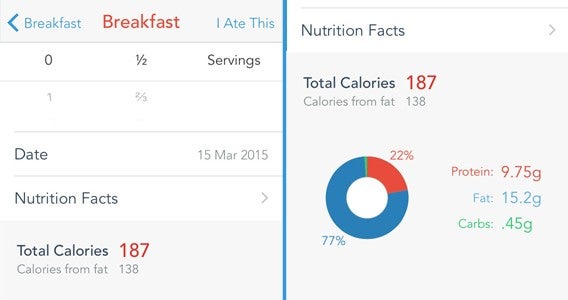
What really impressed me was that, even when drunk, approximating all of this was simple. MyPlate offered good “natural” options that allowed me to estimate the amount I consumed, even when lacking in formal measures. I could measure rum by the measure, the ounce, the milliliter, or the glass – and sometimes was even offered the ability to choose between brands. Once I had selected my unit of measurement, I could then choose the number of servings to be added. Easy to understand, even when drunk.

This was far more natural than my previous attempts with Mango, allowing me to assess my eating without the need to carry scales everywhere I went. Plus, with more foods incorporated in the base app, it also felt easier to find a match for what I was eating.

Adding your food

The bottom line, however, is that in one night I had a calorific intake of 4802 Cal. That’s nearly two times the prescribed calories suggested for weight loss. Not a great result for my diet, but a pretty good one for the usability of MyPlate.

Exercise was similarly streamlined, and utilized my iPhone’s gyroscope to measure the energy I burned passively throughout the day. This was another massive advantage over Mango because I walk a lot but don’t think to count it as exercise.

Check your progress

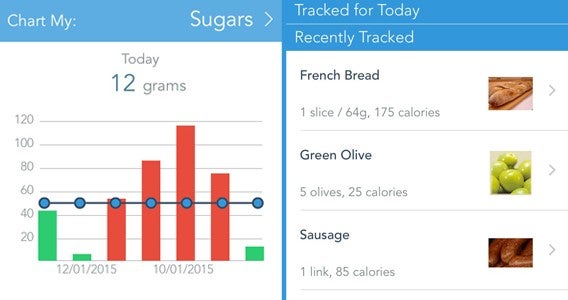
MyPlate certainly felt more suited to what I wanted than Mango. While offering a similar feature set, this week’s app gave a tighter calorie restriction that I (generally) managed to be comfortably within 50 cal of. It also gave a clearer view of my progress, with clean bar graphs instead of more stylized illustrations.

Not a good week for me then, but MyPlate certainly stands out as a great calorie tracking app. Next week I will be back on training apps, with Fitivity Home Exercise Program (iOSAndroid) while also getting to grips with Noom Coach (iOSAndroid) to keep my eating on track.

Related Stories

Diary of a fat man – Daily Yoga

Diary of a fat man – Mango

Diary of a fat man – weight loss and fitness apps

Follow me on Twitter: @DoFuss

Plan the perfect St. Patrick’s Day

This Tuesday will see everybody turning Irish to celebrate St. Patrick Day, 24 hours of celebration that encourages people to drink like I do every day. Being well practiced in the art of surviving self-inflicted liver punishment, I thought I would share a few hints on how to (safely) enjoy your party.

And, in case you don’t know already, always remember to drink responsibly.

1. Never on an empty stomach

That’s right, if there is one thing the Irish know it is how to cook mouthwatering but heavy food. From champ to soda farls, these starchy munchables will ensure your belly is ready for almost anything you can throw at it.
Evernote Food

If you don’t know what these delicious dishes are, or how to make them, then Evernote Food (AndroidiOS) is on hand to help. While it may not offer all the recipes you are after in-app (this one for champ is good), it does let you easily create notes to refer back to while you are shopping and cooking.

Great, now I’m hungry.

2. Meeting up

There is no fun in drinking alone, and figuring out where to meeting up can often be a chore – especially when St. Patrick’s Day is on a weekday and people are planning to join you at different times after work. This is when Citymaps (AndroidiOS) comes into its own.

Citymaps

This map app will let you see all of the points of interest around your current location. More importantly, it allows you to filter out unwanted noise – removing restaurants, shops, and gyms in order to focus on bars. You can also crate maps and routes that can be shared with friends who are logged in, helping you easily meet up without having to constantly explain which bars you are intending to visit.

3. Waiting alone

If you have the day free, you may find yourself with some time to burn while waiting for others to find you. Once you have fully exhausted all your bar man’s stories, Ku: Shroud of the Morrigan (Android iOS) is the game to keep you entertained.

Ku: Shroud of the Morrigan

I am sure you have plenty of games on your phone already, so why am I suggesting you get another – especially one you have to pay for (you may notice that this is the only app on this list that demands you part with drinking money). Well, there are two reasons. The first that it is set in Ireland and based around Celtic mythology, all of which is shown in a beautiful watercolor style. The second, and perhaps more importantly, is that it will support the Irish game development studio bitSimth continue to do fantastic work.

4. The beer

Clearly an important part of the day will be beering yourself into blissful intoxication. But, if you don’t feel like filling up on the Guinness for the whole day (and as big of a fan as I am off the black stuff I struggle after four), you may want to start looking for other places to find a good bevy.

Untappd
While it may not be perfect, a great starting place for this is Untappd (AndroidiOS). This social network of beer drinkers lets you search for nearby beers and bars, and see what others think of them. As it is community driven, your area will dictated the success of the app for you. For example, I am currently still struggling to find Wild Beer’s Madness IPA in the local area, but in London I could find what I was after every time.

5. When it hits “that time” of the evening

Once my Irish uncle starts singing Danny Boy (a troublingly accurate stereotype) I know the time for beer is done. Fortunately, this doesn’t mean an end to the drinking, simply a shift in gear. Next on the agenda is of course whisky.

Whisky drinkers will no doubt know their favorite tipple, but those looking for a recommendation could do worse than having a look at Distiller (Android | iOS). The search function on this app asks you some simple questions to work out your tastes, including your level of knowledge, the nationality of whisky you want, where you intend to enjoy it, and price.

Distiller

Oddly, I filled in everything to see where it would take me and it took me to my favorite whisky – the Japanese 12 year old Hibiki (I know, not very Irish) – so I guess there is something to it.

If you just want a taste of Ireland though, just go for Bushmills the oldest Pot Still on the Emerald Isle.

6. Get home safe

Okay, I know it’s a boring one, but as I said at the start drink responsibly and get home safe. For this, I recommend Uber (AndroidiOS), the private car / taxi app. This simple app lets you quickly and easily book a ride home for yourself (or a friend) even if you have no money left in your pocket because all payments are made through the app.

Uber

Uber isn’t in every city at the moment, but a great many are served. Check if you are, and if not make alternate plans for your return journey – even if that is just having the number of a local taxi firm.

Bottom line, don’t be tempted to drink and drive.

7. The morning after

Finally the morning after, and if you have been following my advice up to this point I hope you have taken the day off.

You do have a few options here, and staying in bed with a good dose of painkillers is certainly one of them. However, if you want to continue enjoying yourself then you could always try a little hair of the dog. Cocktail Flow (Android | iOS) is a good free cocktail recipe app to reveal the mystical healing properties of a Bloody Mary.

Cocktail Flow

This tomato and vodka based drink is actually far more present than it sounds, and can be made as spicy as you like. Usually the heat is added with a chilly sauce, but I prefer to use horseradish which adds a far more palatable kick when you are feeling fragile.

Alternately you could revisit step one. Soda farls, bacon, and fried eggs will cure most hangovers.

Related Stories

World Cup 2014: Organize your World Cup party with these apps

iPhone essentials: Super Bowl Survival kit

The best travel and transport apps of 2014

Follow me on Twitter: @DoFuss

5 Apps to Try This Weekend – March 13th 2015

Default player


brightcove.createExperiences();

Nothing planned for your days off? Then why not check out our 5 recommendations for apps you should try this weekend.

With St. Patrick’s just a handful of days away, we are starting off with an app for beer lovers, Untappd (Android, iOS). It may have been around for a while, but if you are looking for a specific tipple this Tuesday then this craft beer social network should be able to find it near you. And, if you are planning your drinks with friends, we also have Citymaps (Android, iOS) for you to check out – a handy tool to help you plan and share routes to destinations around your local area.

Our games this week are also of a more grown-up nature. Hotline Miami 2: Wrong Number is an interesting blend of ultra-violence and twitch puzzler. Retro fun, but not for the squeamish. Also not for those easily upset is White Night, a creepy black and white survival horror experience. With a fantastic 1930 noire theme, this is a flawed gem that I highly recommend.

Finally this week, once all your fun is over, you can get back to work with the preview version of Office 2016 for Mac, which brings Microsoft’s productivity suite for Mac up to date with its Windows counterpart.

Be sure to subscribe, and check back next week for another five apps to try.

Related Stories

Five Apps to Try This Weekend – March 6th 2015

Five Apps to Try This Weekend – February 27th 2015

Five Apps to Try This Weekend – February 20th 2015

Follow me on Twitter: @DoFuss