Diary of a fat man – Daily Yoga

I know myself, and previous attempts to get back in shape after lapses in training have consistently resulted in some form or injury. So, rather than hitting the gym day one and trying to bench press and squat my “default” weight, I wanted to ease myself back in. Starting with a two week regimen of the Daily Yoga app (Android, iOS), I planned to reintroduce myself to the importance of stretching and hopefully add a little extra tone to my out of practice muscles.

Daily Yoga

I was incredibly hopeful for my first session. A clear, blue interface offered a selection of tabs providing easy access to all of Daily Yoga’s different options. Skirting over most of these, I jumped straight to Start Training, where I was met by another well-designed interface. Two columns contained all of the exercises on offer and clearly marked which were free and which required a subscription to access – important, as I had no intention of paying.

Poking around the screen I soon discovered a handy drop down menu to filter sessions by type. I looked down the list; all sessions, yoga skills, therapy… weight loss! – we have a winner. Selecting this was introduced seven possible exercise sets, each and every one required a subscription. Downhearted, I flicked around the other options, worried that I would be restricted to a handful of options without paying. Fortunately this was not the case, with multiple session available in all of the other categories for free.

Not even close

Selecting Sun Salutation, and setting it to a 15 minute session, I assumed the first position. Each action was clearly explained through audio, while a clear picture of the trainer demonstrated the action onscreen. Just a few movements in I discovered the first of my two problems with Daily Yoga: on a phone it is impossible to see the screen while contorting yourself into position. I imagine with a decent sized tablet and stand, this issue could be mitigated, but due to my set up I found myself struggling.

Having to refer back to my phone had me constantly breaking the current stretch and losing time as I rewound to video to see what I’d missed. The upshot was that my 15 minute session ended up taking closer to 25.

Painful Lotus

That said, the actual content of the session was good. As I stated in a previous article, I trade a lot on past fitness, which stood me in good stead for Daily Yoga. If my stomach didn’t get in the way, my head could happily touch my knees, and I can still sit in the lotus position if absolutely necessary (though you would be surprised how infrequently this comes up).

But, while the contortions were comfortable, my surrounds were not. A lack of mats (at home or the office) left me putting my boney knees down on hard floors, and I was unwilling to purchase a mat for this two week experiment. I soon found this discomfort more than distracting while performing the Downward Dog, and fact that saw me finding excuses to skip a day (Not-so-Daily Yoga).

Owchward Dog

When I was in the mood, Daily Yoga was fantastic despite the limitations of my set up. Everything was explained clearly and executed at a good pace, with fitting background music. As with all such fitness apps, I did occasionally question whether I was performing the motions accurately, but at least my mistakes were unlikely to cause lasting harm.

As for my weight it still seems unchanged, though thanks for those following me on Twitter who suggested this could be due to the yoga adding muscle to that 125 kg total. More importantly, I feel better – and stretchier – about myself, which is a good start.

Next week I will be looking at how MyPlate is working out for me, while switching my exercise regime over to Fitivity’s Home Exercise Program (Android, iOS) – which I anticipate will build up more of a sweat (so, less training in the office).

Related Stories

Diary of a fat man – Mango

Diary of a fat man – weight loss and fitness apps

The best health and fitness app of 2014

Follow me on Twitter: @DoFuss

App of the Week: Office 2016 for Mac

Softonic’s App of the Week highlights some of the coolest, most unique, and popular apps that have been released for Android, iOS, Windows, and Mac. This week we are looking at Microsoft’s long awaited update to their productivity suite, Office 2016 for Mac.

The last Office release for Mac was back in 2010, meaning many of the features Windows users take for granted were notable absent on Apple machines. This recent preview release of Office 2016 for Mac redresses this balance, bring Word, PowerPoint, Outlook, and Excel up to date with a new interface, while also adding OneDrive and SharePoint functionality to aid collaborative projects.

Also joining the classic list of apps in the productivity suite is OneNote, the digital notebook that lets you easily take and organize your notes. It may not be a deal breaker, but it is a nice addition to the package nonetheless.

Mac users should definitely give this early build of Office 2016 a try.

Default player


brightcove.createExperiences();

You can sign up for the preview version of Office 2016 for Mac here.

Related Stories

Office 2016 for Mac feels like the Windows version and that’s a good thing

App of the Week: YouTube Kids

App of the Week: Pushbullet

App of the Week: Microsoft Outlook for Mobile

App of the Week: Retrica

Five Apps to Try This Weekend – March 6th 2015

Default player


brightcove.createExperiences();

Despite a hectic week at the Mobile World Congress, we are back again to recommend five apps for you to try this weekend.

This week we have three games for you to try out. All you mobile gamers out there should be giving the new Zeptolab (of Cut the Rope fame) game, King of Thieves (Android, iOS), a try. This cute puzzle platformer will test your brain and your reactions as you try to collect all of its lovely loot.

PC players have a bit more choices this week, with both the classic space real-time strategy game Homeworld Remastered Collection, and the terrifying Five Nights at Freddy’s 3.

We also have a look at Flirtie (Android, iOS), a new rival to Tinder that offers a slightly more bespoke selection of suitors. And finally we wrap up with AVG Zen, the Android security app that will protect all of your family’s devices.

Be sure to subscribe, and check back next week for five more apps.

Related Stories

Five Apps to Try This Weekend – February 27th 2015

Five Apps to Try This Weekend – February 20th 2015

Five Apps to Try This Weekend – February 13th 2015

Follow me on Twitter: @DoFuss

Diary of a fat man – Mango

Last week I set out to begin a new lifestyle of healthy diet and exercise with the aid of apps. My first choice for dietary aid is Mango – Calories Counter & Diet Tracker. My selection method for this first app was rigorous, by which I mean it was the first diet app I saw in the Lifestyle section of the App Store.

Day one with Mango was a bit of an eye opener, as it asked me for my vital statistics. The whole process was nice and straightforward thanks to the clean and colorful interface: age 35, height 194 cm (6’4”)… nothing new there. Right, weight – I have some scales somewhere. 125 kg (275 lb)! When did that happen? Just four years ago I was 90 kg (198 lb). I suppose trading a life as a kindergarten teacher for a desk job was going to take its toll, but that is nearly a whole other person that I’m carrying around.

125 kg?

The upshot of my horror was that Mango decided I should be able to consume nearly 3500 calories a day to maintain my weight. This baffled me, as I am certain I currently eat less than this, but who am I to argue? However, as my aim is to slim down, so I set a target weight of 85kg (it’s good to dream) and Mango decided that it would take me 50 weeks of eating 2964 calories a day to reach my goal. That’s a lot by the way, 2500 is the average for a man – but I figured it would at least be easy to stick to.

Despite my doubts about how successful this “diet” would be, my first impression of Mango was strong. Five tabs at the base of the screen gave me access to my profile, exercise input, consumption, tracking of my day so far, and a calendar of my time with the app.

Most of my time was to be spent on the food entry pages, as it turns out I consume a lot when you include coffee. It felt constant, but somehow I never seemed to cross the magic 2964 calorie limit.

Select your food.

Or so I think, because my biggest issue with Mango is that it demands you know the weight of everything. This isn’t just a problem when eating out. Just take my lunch time routine, I tend to make a large stew (or similar) on Sunday which I portion and freeze for the rest of the week. Even if I measured everything I added to the pot, I would still be left approximating the individual ingredients in any given meal – a painstaking and inaccurate task.

It was an issue that persisted for the whole week. Every item I added food or drink, the measurement started at 100g, leaving me to dial it to (or guess) the right measurement. All of this is done through use of a slider, but it feels infuriatingly fiddly. For example I take sugar in my coffee, no real idea how much but let’s say 6g, so I have to dial it back 100g (imagine 100g of sugar in your coffee) to five then use a button to fine-tune it up a gram. It is all just a little too… scientific. It needs natural measures (cups or spoons) or at least a default its measure that could be considered a standard portion.

Input exercise

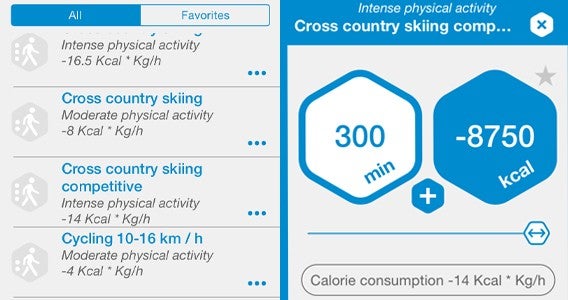
Exercise is tracked in a similar fashion, but somehow feels more rounded. Each choice has estimates for the calories burned for each minute of an exercise. For instance, Mango predicts that a nice 3 km/hour walk will use 2.5 cal/min, while competitive cross country skiing burns a whopping 14 cal/min. Unfortunately, Mango doesn’t seem to adjust to your body size, and I am pretty sure my 125 kg frame running burns more than it did when it was 90 kg.

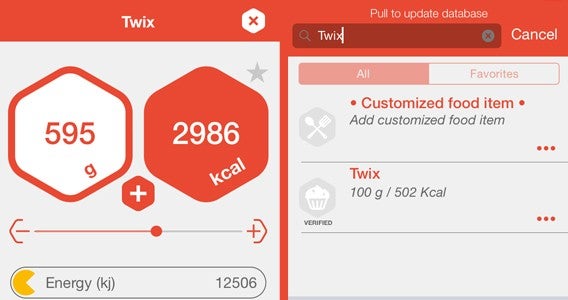
All of my data was tracked on a single main page in a mesh of stylish hexagons alongside a nice illustration of a character that filled with red as I used my day’s calories. This screen also gives  access to a nutritional breakdown of day’s food but never offers any advice to improve diet – meaning if I wanted to I could just eat 600g of Twix a day.

Track your calories.

I spent a week adhering to Mango calorific limits and was expecting to see some effect as I stepped back on to the scales – especially as the first week of dieting is usually the most impactful. Not this time, however, as my scales told me that, if anything, I had gained a little weight.

So it seems that, even with careful monitoring of my eating habits and my regular use of the Daily Yoga app, I have become no healthier this week… hopefully my next two weeks with MyPlate will prove more successful.

Related Stories

Diary of a fat man – weight loss and fitness apps

The best health and fitness app of 2014

Comparison: Health & fitness apps for your smartphone

Follow me on Twitter: @DoFuss

Five Apps to Try This Weekend – February 27th 2015

Welcome back to Softonic’s Five Apps to Try This Weekend, the show where we offer up a handful of apps to keep you distracted on your days off.

This week we have cheated a little, as we have included the “Do” series of apps from IFTTT – Do Button, Do Note, and Do Camera (iOS, Android) – as a single choice. These convenient tools let you set up command shortcuts for everyday tasks, such as creating a single button that lets you take a photo and post it directly to Facebook with a single press.

Default player


brightcove.createExperiences();

We also have two very different games for you to check out. Bus Simulator 2015 (iOS, Android) lets you live your live long dream of being a bus driver on your mobile phone. However, if for some reason this isn’t your ambition, you may want to try out Resident Evil Revelations 2 – the latest installment in the popular zombie slaying franchise.

Looking for something a little more relaxing? You can try out Kodi. The fantastic, open-source media manager that packages all of your media and entertainment services together in one place. And for all you parents with young kids out there, we have YouTube Kids (iOS, Android) to keep the little ones happy while you chilling out with your own choice of movie.

Be sure to check back next week for a special Mobile World Congress episode of Five Apps to Try This Weekend.

Related Stories

Five Apps to Try This Weekend – February 20th 2015

Five Apps to Try This Weekend – February 13th 2015

App of the Week: YouTube Kids

Follow me on Twitter: @DoFuss

App of the Week: YouTube Kids

Softonic’s App of the Week highlights some of the coolest, most unique, and popular apps that have been released for Android, iOS, Windows, and Mac. This week’s pick is YouTube Kids, Google’s first app designed specifically for children.

Default player


brightcove.createExperiences();

While YouTube has the potential to be the perfect child distraction, it is filled with so much unpoliced connect that it is impossible to safely unleash your offspring on the service. What YouTube Kids offers is a curated app, with approved channels/videos, a simple interface, and parental controls to provide a safe environment for your kids to explore.

YouTube Kids is the perfect distraction for your sugar fueled bundles of joy when you need a break.

Download YouTube Kids for iOS and Android.

Related Stories

App of the Week: Pushbullet

App of the Week: Microsoft Outlook for Mobile

App of the Week: Retrica

Follow me on Twitter: @DoFuss

Diary of a fat man – weight loss and fitness apps

Welcome to my weekly column in which I  make use of diet and fitness apps to try and get (back) in shape. Each week will alternate between a diet and an exercise app, and you can follow my progress on Twitter @DoFuss. Also, please keep in mind that I have previously had a high fitness level, if you are just starting out please take it slowly and see a doctor before making any major changes.

I have always struggled with my weight. Even as a baby, I was big. It never really bothered me until I turned 15 and my mum joined a popular weight loss club, at which point I decided that I wasn’t going to let her be thinner than me. As a young male the weight melted off, and before long I was playing rugby, weightlifting, and rowing in a body none would have guessed had once been XXXL.

But time and lifestyle changes have taken their toll (who would have though a life in tech journalism would be bad for one’s health). For a time this seemed okay, as my general well being seemed to hold strong thanks to my previously active lifestyle. Now, at 35, life has caught up with me. The health credit I built up when I was young has all been spent, and I am starting to feel it – even when I’m only climbing the six floors to my apartment.

And so my mind turns to apps, the solution to (and often cause of) many of my life’s problems. There are hundreds of programs out there that provide advice and help track your eating and activity habits. I intend to cycle through these to find the best, and get myself back in shape.

My first two apps are Mango – Calories Counter & Diet Tracker (iOS), and Daily Yoga – Lose Weight, Get Relief (Android and iOS) – 8 fit (Android and iOS).

Mango is designed to track calorie consumption, and could well be an app that I stick with across all of my subsequent diet apps. As a starter for the first week, this seemed like the ideal way to see just how far I have strayed.

Daily Yoga is quite self-explanatory, but I have chosen it because it provides low impact daily exercises that will ease me back into the more rigorous regime I hope to eventually return to. I will give this two weeks before I revisit it.

Check back next week to see how scared Mango has made me.

Related Stories

The best health and fitness app of 2014

Comparison: Health & fitness apps for your smartphone

What can I do with my tablet: cook

Follow me on Twitter: @DoFuss

5 Ways to Breathe New Life into Dying Light

While Dying Light’s popularity was undoubtedly buoyed by it being the only big budget titles released in January, that didn’t stop it being a fantastical entertaining mash up of parkour and zombie smashing action. But while the story and its quests are certainly entertaining, I found messing about in the world making my own fun the best part of the game. So, in case you haven’t discovered them already, here are my hints to getting the most out of Dying Light.

2ombies

The first tip, and the one that proves the foundation to nearly everything that follows, is playing the game co-op with a friend. Yes, I know, you have lots of acquaintances online, but Dying Light only really come into its own when you are getting down and dirty with a buddy. Get your headset on and within moments you will find yourself laughing out loud at the game’s idiosyncrasies -including the ability of smashing a zombie’s face straight through your partner’s field of view and hearing them cry out in fright.

Leap for it!

At this point the chances are you have no doubt already discovered the joys of diving from a great height onto dumpsters, bin bags, and car roofs. What is wonderful about this that it doesn’t matter how tall the building or tower you dive from you will survive – just so long as you hit the mark.

With friends there are two ways you can really capitalize on this high-flying mix of accuracy and terror. The first is a straight up race; set a single point on top of a car or dumpster next to a tower – the first person to get to the very top and jump down safely wins. The pressure of racing regularly had my friends and me messing up even simple jumps, resulting in us smashing unceremoniously into the sidewalk. Which brings me to the second method of enjoying this daredevil action… standing at the target of a friend’s leap and watching them miss.

Keep doing what you are doing… usually

One of the best things about Dying Light is that doing what you enjoy makes you better at it. There are three upgrade paths, and actions related to any of them grants experience in that area. So, the more you engage in the free-running the better you become, allowing you to move more fluidly around the world.

The one exception to this are the Survivor Skill points that you get from doing specific missions and quests. Thus – while you should just enjoy the open-world, zombie-slaying sandbox that is Dying Light – you really need to focus on getting this up to level twelve as fast as possible to unlock the grappling hook. With this new ability in your possession the whole game opens up, allowing you to rapidly ascend all of the games buildings with ease. It is just a shame that it is only for climbing buildings, so you can’t hook zombies towards you like Mortal Kombat’s Scorpion.

Challenges

Once you have another player in the game, Dying Light automatically gives you opportunities to take part in randomly generated challenges. You should always jump at these opportunities. Primarily this is because they offer good experience boosts, allowing you to level up faster and unlock those all-important high level abilities. What makes this even better is that the challenges are often comically broken, with some just having you run a few meters to the goal or kill a solitary zombie. Easy XP for one player, infuriating for the other.

Use it and lose it

In my opinion, Dying Light’s combat is one of its weaker elements. When you get bogged down by enemies, the game’s pace dramatically slows, robbing it of the fluid action that makes it so much fun. To help with this you have a huge range of weapons available to purchase or scavenge as you move through the game. All of these can be leveled up with different abilities and upgrades, but with each weapon having its own durability and a set number of repairs eventually you will lose them.

The thing is, whether you are going out of your way to find hidden EXPCalibur sword, or simply finding a legendary French wrench, there is no point being precious about using them. Use everything. Attach upgrades. Burn through your arsenal like its stats don’t matter because, ultimately, they don’t – you will always find a worthy replacement. Enjoy weapons as you get them because they make the game more fun at that moment. Simple.

And few extras

It doesn’t end there of course, there is plenty more undead entertainment to keep Dying Light shambling on. I loved smearing myself in zombie juice (the “Camouflage” perk) and joining a pack of zombies as they attacked my friend while chanting “one of us”, not technically part of the game but fun none the less. Plus there are dozens of secrets and videogame references littered throughout the world to you exploring and enjoying.

If you have any other tips for players to get the most out of Dying Light put them in the comments below.

Related Stories

Dying Light Review

Dying Light Gamescom Trailer Shows Co-op

Dead Island 2 Trailer is Full of Zombie Gore

Follow me on Twitter: @DoFuss

Five Apps to Try This Weekend – February 20th 2015

Welcome back to Five Apps to Try This Weekend, Softonic’s weekly show that casts an eye over the last seven day’s digital downloads and gives you our experts’ top picks.

This week our line up contains not one, but two connectivity apps designed to further blur the every fuzzy divide between PC and mobile. The first of these is Pushbullet (Android | iPhone), which allows you to easily share data between devices. This is followed by Chrome Remote Desktop, a plugin that lets you access your home computer on the move.

Default player

<!–
By use of this code snippet, I agree to the Brightcove Publisher T and C
found at https://accounts.brightcove.com/en/terms-and-conditions/.
–>

<!–
This script tag will cause the Brightcove Players defined above it to be created as soon
as the line is read by the browser. If you wish to have the player instantiated only after
the rest of the HTML is processed and the page load is complete, remove the line.
–>
brightcove.createExperiences();

If you want a little more levity for your weekend, we also have two games to try. Both Harold and Evoland are titles that look simple at first glance, but quickly grow in complexity as you move through their increasingly challenging worlds.

Finally, we have a preview of Skype Translator. Still in development, this app now has the ability to translate English and Spanish audio on the fly. It is far from perfect, but does prove an exciting first step towards a Star Trek future. Watch the video for a chance to win one of three preview keys.

Let us know what you think of our recommendations in the comments below, and be sure to check back next Friday for another five apps.

Related Stories

App of the Week: Pushbullet

Five Apps to Try This Weekend – February 13th 2015

Best free Android games

App of the Week: Pushbullet

Softonic’s App of the Week highlights some of the coolest, most unique, and popular apps that have been released for Android, iOS, Windows, and Mac. This week we look at Pushbullet, the app that is breaking down barriers between PCs and mobile devices.

Though it has been out for a while now, Pushbullet is still topping the download charts thanks to its ability to remotely link phones, tablets, and computers.

Pushbullet offers numerous convenient functions that are designed to make your life just that little bit easier. These include easily sharing files between devices and pushing notifications from your phone to your PC. The most recent update even lets you respond to WhatsApp, Telegram, and other messaging apps that you receive on your Android phone from your PC.

When we first saw it we didn’t think we would need Pushbullet in our lives, but now that we’ve used it, we can’t live without it.

Default player


brightcove.createExperiences();

Download Pushbullet for iOS, Android, and Windows PC.