The five best free music apps

There has never been a better time for music lovers, with services like YouTube Music, Jay-Z’s Tidal, Apple Music, and Spotify giving you access to all the tracks and artists you love. But there are some great lesser-known alternatives, and here five best free music apps we think you should try.

TuneIn (Android|iOS|Windows Phone|Windows)

TuneIn is the perfect service if you just want to put on some carefully selected background music. This online radio service that gives you access to stations around the world, all you have to do is search for stations by content type, format, and musical genre. There are even options to follow specific stations and users to make sure there is always something playing that you want.

Deezer (Android|Windows Phone|Web)

Deezer is a music streaming app with a model very similar to the all-conquering Spotify. But despite the competition, this French app has remained popular thanks to its wide range of features. Among its many options you can upload your own music, discover playlists, and find new releases or popular mixes to match your tastes. And yes, you can do all this for free – only having to pay to remove the ads or to play saved music offline.

Humm (Android)

If you have ever used YouTube as your mobile music player, you know that when the screen goes off, so does the music. Here is where you should try Humm, an app that offers many of YouTube’s features in an easily accessible format. After telling it what kind of music you like, Humm recommends music for you, even curating you some default playlists. You can also create stations from the available tracks. iOS users can try Musi (iOS) for a similar experience.

VEVO (Android|iOS|Windows Phone)

Music is even better with images, and if you want music videos there really is only once choice: VEVO. Thanks to a distribution agreement between some of the biggest names in music – including Sony, Universal, EMI, and Google – this great app provides instant access to the latest releases. That’s right, with VEVO you can see popular music videos when and where you want to. Create playlists, share videos, and enjoy hours of content.

Google Play Music (Android|iOS)

But, if you have been paying attention, you may have noticed that every app up to this point has basically been a streaming service in its free form. That is not the case for our final pick which lets you play your music offline: Google Play Music. The premise is wonderfully simple, after setting up an account, you can sync up to 50,000 tracks from your tablet, mobile phone, and PC to the cloud. You can then easily download and share this music with any of your devices to be played at your leisure offline.

Were there any music apps missing? Let me know in the comments. I’ll be back next week with five apps to create a customized speaking avatar. See you in seven days.

Related Stories

Five apps to learn a second language

Five voice changing apps

5G and why we need it

VR is here to stay

Follow me on Twitter: @DoFuss

Batman vs. Superman: videogame showdown

This week we finally get to enjoy two iconic heroes coming together on the silver screen for the first time in Batman vs Superman: Dawn of Justice. While this is the first time the two will meet on celluloid, they have been battling each other for years in games – and today we are going to compare their digital personas to discover who is the most powerful.

Round 1 – Lego Batman 2 (Windows)

While it may focus its attention on Batman, Lego Batman 2 also features the rest of DC’s roster of characters. This offers us the chance to see both the Caped Crusader and the Kryptonian in action together.

Honestly, in this game, things do not go well for Gotham’s hero. While you may start as the Dark Knight, once Superman is added to your roster his sheer range of incredible powers make him easily able to dominate his broody counterpart. While these abilities are muted during the story, thanks to some cunning use of Kryptonite, once in free roam Superman simply cannot be beat.

Superman wins round 1

To make things worse, if you are playing with a friend who is controlling The Last Son of Krypton, you can expect to be blasted into block by his heat vision on a regular basis by “accident”. Superman takes Round 1.

Round 2 – Injustice: Gods Among Us (Windows)

Injustice: Gods Among Us turns Superman into a Super-Villain, and then forces Batman to try and defeat his old friend in a one-on-one brawl.

Fortunately, thanks to some wonderful leaps in technology, a pill grants the full cast of DC characters their own super strength. This enables the Dark Knight to battle this crazed Superman on almost equal footing… except without freeze breath, heat visions, and flight. I guess the Kryptonian still has an advantage really.

Round two goes to Batman

In fact, thanks to Batman’s various gadgets, the two are a fairly evenly matched – and even in tournament competition, they are both considered top tier fighters. However, given that in the story Bats comes out on top, we are going to give Round 2 to the Dark Knight.

Round 3 – Their games

As two of pop-culture’s most familiar faces, Batman and Superman have both had numerous games made about them over the years. However, one hero always emerges victorious.

Pulling up the rear, we have the infamous 1999 Superman for the N64. Filled with collision issues and a host of other bugs, this game was nearly unplayable. Unfortunately, things never get much better for Superman – with the sheer range and level of his powers making it seemingly impossible for developers to make a compelling game.

Hardly seems fair

Batman, on the other hand, has not only had a more prolific gaming career but also a far more successful one. Nowhere is this clearer than in the Arkham series (Windows). These titles set a new standard in hero games by brilliantly encapsulating everything Batman: from the stunning Gothic architecture to a chilling Joker performance by Mark Hamill.

Yup, Batman drives him into the ground for the win

Yeah, Batman takes the final round – making him the overall winner.

I’ll be back in a week with more games. Until then remember to like, share, subscribe, and let us know if you think we picked the right winner in the comments.

Related Stories

Three alternatives to Nintendo’s Mario games on mobile

The three best card strategy games

The three best driving simulators

2016’s most anticipated games

Follow me on Twitter: @DoFuss

Five voice changing apps

Be it too squeaky, too deep, too slow, or just plain weird, there is something inherently amusing about distorted voices. But as a man who has tried to do a Batman impression for more than a minute, I can tell you that they can quickly start to hurt. Fortunately technology is here to help, so here is my list of the best five voice changing apps.

MorphVOX Pro (Windows|Mac)

There are few programs better than MorphVOX Pro if you want to change your voice on a desktop machine. Its simple interface makes it incredibly easy to use, so within seconds you can make yourself sound like a child, robot, demon, and even a dog. It also features the ability to alter the intensity of every one of its effects.

Skype Voice Changer Pro (Windows)

Altering your recordings is good, but the best time to morph your voice is when the other person is right there listening to you. Skype Voice Changer Pro excels at this, allowing you to easily distort your voice while making free Skype calls. So don’t be alarmed if you call me and discover I sound like a chipmunk. The full version also lets you record calls.

Voice Changer with Effects (Android)

Voice Changer with Effects enables you to change your voice in just two steps. Step one, record your voice. Step two, pick a filter from the many available. Perhaps most excitingly this app also features a piano style keyboard so you can “play” your recording like some amazing 80’s synth hit.

Call Voice Changer (Android|iOS)

Yes, the dirty secret of voice changers is that many people want them to prank their friends, something Call Voice Changer makes simple. This app alters your voice live while you make calls, just pick an effect and add sound effects on the fly.

Voicemod (iOS)

Voicemod is full featured, beautifully designed, and effective. Can you tell it’s my favorite on the list? It includes loads of free voices and modes, including Darth Vader complete with lightsaber effects. There are audio emoji and environmental effects to set the scene, and the option to record and share on social media.

Next week I’ll be back with the best apps to listen to music for free. Until then like, share, comment, and subscribe.

Related Stories

Five apps to learn a second language

Five apps to create VR video and images

5G and why we need it

VR is here to stay

Follow me on Twitter: @DoFuss

Mobile alternatives to Mario

For as long as I can remember Nintendo has been synonymous with gaming. For an adult wanting to play games on the go, and not lug around an additional device, this made their aversion to making phone versions of their classic franchises particularly frustrating. Fortunately, they have finally acquiesced, and very soon the Japanese gaming giant’s first mobile titles are to hit app stores.

But, until then, there are loads of fantastic iOS and Android Mario-style games. Whether you are looking to play Super Mario Bros, Mario Kart, or Mario Party, here is our list of alternatives.

Super Mario Bros. = All three Rayman games

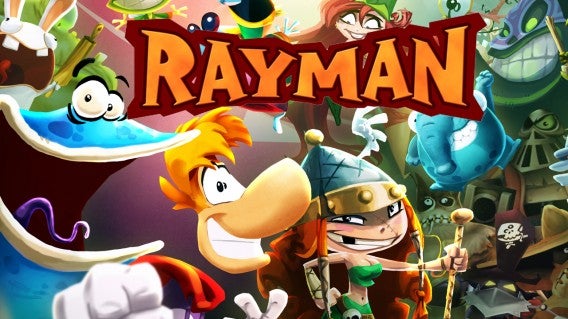
Ubisoft’s recent Rayman games are stuffed with a contagious sense of exuberance, with beautiful 2D animation and the toe-tapping music that fills you with joy. They encapsulate everything the Super Mario Bros. franchise means to me, at times even surpassing it.

The three mobile installments – Rayman Jungle Run (iOS|Android), Rayman Fiesta Run (iOS|Android), and Rayman Adventures (iOS|Android) – continue this trend. Their intelligent use of touch controls let you guide all of Rayman’s jumps, wall bounces, slides, kicks, and punches to keep the action fluid. This makes every level feel like a wonderfully satisfying sprint as you chain from one move into the next on your way to the goal.

Mario Kart = Sonic Racing Transformed (iOS|Android|Windows)

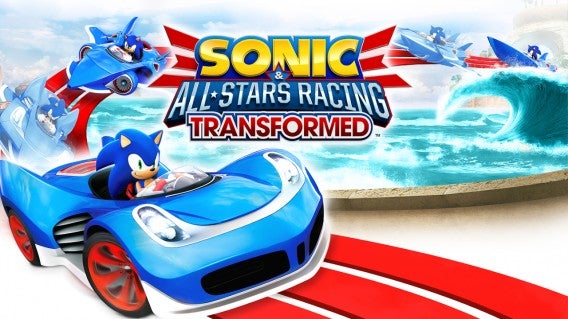
Need a not-Mario Kart, Mario Kart game? You would be hard pressed to find a better choice than Sonic Racing Transformed. Take control of one of Sega’s classic cast and their custom car, before starting to race around classic arcade game environments on your quest for the checkered flag. Whether you are racing Sonic himself around After Burner’s aircraft carriers or Space Channel 5’s Ulala around the world of Golden Axe, you can be sure of fast and intense action.

In an extra twist, Sega has brought to this formula the ability to transform your car into a boat or an aircraft by passing through rings on the course, allowing for different kinds of racing mid-track. Add some car combat, with a range of wacky power-ups, and you have a great racer for all ages.

Mario Party = Mucho Party (iOS|Android)

Playing with friends has always been core to the Nintendo experience, something Mario Party perfectly encapsulated. But here too, there is an amazing mobile alternative – Mucho Party. This mini-game collection removes any board game element, making things far more fast paced: think multiplayer WarioWare.

Mixing in shrunk down versions of classic gaming experiences like Track and Field, Soccer, Flappy Bird, and Breakout – Mucho Party’s responsive touch interface ensures that everything feels tight as you face-off against your friend on the same device. Layer into this a range of game modes that control how you move between each round, and you have a fun competitive experience that keeps you on your toes.

Can you think of any others? Let us know in the comments. See you next week.

Related Stories

The three best card strategy games

The three best driving simulators

Three games that prove 2016 is going to be best year yet for videogames

2016’s most anticipated games

Follow me on Twitter: @DoFuss

VR is here to stay

It is time to stop thinking about Virtual Reality as future technology. It’s already here. At the low end you probably have a way to start enjoying it in your pocket right now, and at the high end the prices are set and pre-orders are being taken.

Nowhere was this clearer than at this year’s Mobile World Congress. The conference was dominated by this exciting new trend. Almost every hardware manufacturer had something to showcase featuring VR, while software companies were keen to demonstrate how they intended to use the technology beyond simple entertainment.

Can’t see the full video? Try here.

HTC Vive and SteamVR

Before the show even began HTC was making waves as it announced the price of its VR solution, the HTC Vive. With a price set at $799 the Vive certainly registers on the high end of what consumers could be expecting to spend on virtual reality. That said, if you have the money and a PC powerful enough to run it, it is certainly looks like one of the best options.

The head set provides a 110° field of view, with 32 sensors to track your head movement, and a resolution of 2160 x 1200 to ensure images remain crisp when pressed up to your face. It also includes two wall mounted sensors to scan your room and track your movement within it, and two controllers, one for each hand. In combination these allow you to move around a 3D space without colliding with anything in the real world while also letting you reach out and touch things in its virtual world.

Samsung’s Oculus Rift

Having been purchased by Facebook, Samsung’s Oculus Rift if probably the most famous VR tech. Much like the HTC Vive this bit of kit demands a powerful PC to be enjoyed, but it is justified because strapping on its googles the effect is undeniably powerful as it transports you into an immersive digital 3D world.

Boasting a similar set of features and specs to the main competition, the Rift has the distinct advantage of being $200 cheaper at “just” $599. That said it is currently lacking bespoke controllers, instead simply coming packaged with an Xbox One pad.

Samsung Gear VR

If paying upwards of $599 for a headset – plus the price of a powerful PC – seems a little too expensive to get on the VR bandwagon, then Samsung do have another alternative: Gear VR. These headset-shells let you mount any of the company’s recent phone models into their fixtures. This then enables you to have a more mobile VR experience that utilizes the phone’s accelerometer and camera to track movement. It also supports the Samsung Galaxy s7, with some retailers including the headset as a pre-order bonus for the phone.

Samsung Gear 360 is another part of this series of products, a camera that lets you shoot videos and stills in a full 360.

Qualcomm

Qualcomm had their own VR solution at the show also, in the form of their powerful SnapDragon 820 processor. True this is just another mobile solution, but watching video rendered on this chip certainly looked impressive – particularly as you tracked the images moving around you.

Intel

Not to be left out, Intel had their own VR tech in the form of the Intel Real Sense Smartphone Developer Kit. This was a little less visually impressive, but this phone technology utilized outward facing sensors, cameras, and an accelerometer to track your movement in the world. Take a step forward in the real world, and you also move forward in the digital world. Even more impressive, the camera was able to detect flesh tones and map them into the world, allowing you to interact with the digital environment around you without the need of any peripherals.

It’s here

Virtual reality has definitely arrived. It is great for games and entertainment, which is how many of us are going to use it – but its possible applications in healthcare, therapy, real estate, architecture, social networks, and virtual malls ensure that this trend is be here to stay.

We are excited to see what the future brings.

Related Stories

5G and why you will need it

An online toothbrush?

Five apps to learn a second language on your mobile

Follow me on Twitter: @DoFuss

It is time to stop thinking about Virtual Reality as future technology. It’s ready. At the low end you probably have a way to start enjoying it in your pocket right now, and at the high end the prices are set and preorders are being taken.

Nowhere what this clearer than at this year’s Mobile World Congress. The conference was dominated by this exciting new trend. Almost every hardware manufacturers had something to showcase featuring some kind of VR, while software companies were demonstrating how they intended to use the technology beyond simple entertainment.

HTCVive and SteamVR

Before the show even began, HTC was making waves as it announced the price of its VR solution, the HTCVive. With a price set at $799 the Vive certainly registers on the high end of what consumers could be expecting to spend on virtual reality. On the plus side, providing you have a PC powerful enough to run it, it is certainly looks like one of the best.

The head set provides a 110° field of view, with 32 sensors to let it track head movement, and a resolution of 2160×1200 to ensure images remain crisp when pressed up to your face. It also includes two wall mounted sensors to scan your room and track your movement within it, and two controllers, one for each hand. In combination these allow you to move around a 3D space without colliding with anything in the real world while also letting you reach out and touch things in the virtual world.

Samsung’s Oculus Rift

Having been purchased by Facebook, Samsung’s Oculus Rift if probably the most famous VR tech. Much like the HTCVive these demand a pretty powerful PC to be enjoyed, but strapping on these powerful googles transport you into an immersive virtual world.

Boasting a similar set of features and specs to the competition, the Rift has the distinct advantage of being $200 cheaper at “just” $599. That said it, it is currently lacking bespoke controllers, instead simply coming packaged with an Xbox One controller.

Samsung Gear VR

If you find the idea of paying upwards of $599 for a headset plus the price of a powerful PC a little much to get on that VR bandwagon then Samsung do have other alternatives in their Gear VR. These headset-shells let you mount any of the company’s recent phone models to get a more mobile VR experience that uses the phone’s accelerometer and camera to track movement. It also supports the Samsung Galaxy s7, and some retailers are including the headset as a pre-order bonus for the phone.

Samsung Gear 360 is another part of this series of products, a camera that lets you shoot videos and stills in a full 360.

Qualcomm

Qualcomm had their own VR solution, in the form of their powerful SnapDragon 820  processor. True this is another mobile solution but watching video rendered on this chip certainly looked impressive, particularly as you tracked the image as is moved around you.

Intel

Not to be left out, Intel had their own VR tech in the form of the Intel Real Sense Smartphone Developer Kit. Perhaps this was less visually impressive, but this phone technology utilized outward facing sensors, cameras, and an accelerometer to track your movement in the world. Take a step forward, and you also move forward in the game. Even more impressive, the camera was able to detect flesh tones and map them into the world, allowing you to interact with the digital environment around you.

Its here

Virtual reality has definitely arrived. It is great for games and entertainment, which is how many of us are going to use it – but its possible applications in Healthcare, therapy, Real Estate, architecture, social networks, and Virtual Malls ensure that this trend is be here to stay.

We are excited to see what the future brings.

Five apps to learn a second language on your mobile

Studying a language is a great way to stretch your mental muscles and make new friends. But, while many of us want to learn, finding the time can be really tough. Fortunately, there are lots of mobile apps to help you study on the move and make the most of your free moments – here are the five of the best.

Busuu (iOS|Android)

Applying modern learning techniques to a traditional class structure, Busuu divides its lessons into different themes for you to study. Every class includes vocabulary and pronunciation with examples of use and explanations. Plus it offers lots of quizzes to test your progress and digital flashcards for revision.

Memrise (iOS|Android)

One of the greatest difficulties of learning a second language is committing all of the vocabulary to memory, which is exactly what Memrise aims to help with. After selecting whether you want to learn 5, 15, or 30 words a day, the app roots the word in your head and regularly feeds it until it grows into a strong tree.

HelloTalk (iOS|Android)

The best way to practice a language is to use it with a native speaker. Sounds like a job for HelloTalk, a WhatsApp style messaging app for language learners. Just set your native language, the language you are learning, and tell it your interests, then HelloTalk finds you friends to chat to. It includes text, audio messaging, and voice calls, as well as a built-in translator in case you get stuck.

FluentU (iOS)

Pick a language, sit back, and watch videos recorded in the dialect of your choice. That is the service FluentU offers, and it’s a lot of fun. Each word is shown on screen, allowing you to read them as they are spoken. You can even reference the meaning of any words you don’t understand in-app to help you review and memorize it.

Duolingo (iOS|Android|Windows Phone|Web)

Finally, perhaps the most popular language tool, Duolingo. The mobile app works in conjunction with its online service to offer a comprehensive learning platform in 15 languages – all for free. Each lesson is complimented by the app’s bite-sized games that train your pronunciation, comprehension, grammar, and vocabulary retention. And it is this gamification that makes Duolingo so effective.

There you go, proof that all you need to learn a language is a mobile phone… and some perseverance.

Next week we will be back with 5 voice changing apps. Until then, remember to like, share, and subscribe.

Related Stories

Five fantastic face changing apps

Five apps to create VR video and images

5G and why we need it

An online toothbrush?

Follow me on Twitter: @DoFuss

The three best free strategy card games – courtesy of Clash Royale

Clash Royale has me absolutely hooked at the moment. It’s a fantastic little competitive experience that has reignited my interest in strategy card games. Because of this, I have been diving back into some recent classics in the genre. Here are my three picks of the best.

Hearthstone (Window|Mac|iOS|Android)

Hearthstone belongs on any list of card games. Taking the formula popularized by the physical collectible card game (CCG) Magic the Gathering, developer Blizzard perfectly translated the action into a streamlined digital format using their popular World of Warcraft (WoW) universe for inspiration.

The aim is to attack your opponent with various minions and spells that you summon using mana. Before entering the arena you must build your deck, this is then drawn randomly to create your hand as the battle unfurls. This means you must balance weaker cards with a low mana cost, like Murloc Raider, with more powerful but costly ones, such as the Molten Giant, to ensure you always have cards to play.

But perhaps Hearthstone’s greatest victory is in using the WoW license rather than building a new lore. This provides a shorthand for their huge fan base to enter an entirely new genre, by giving them a clear foundation for cards’ abilities without the need of extensive explanation.

With more cards, multiplayer, and single player content constantly being added through downloadable content, Hearthstone is sure to remain on any list of CCGs for years.

Star Wars: Galaxy of Heroes (iOS|Android)

It may not look like a card game, but to unlock new characters and abilities in Star Wars: Galaxy of Heroes you need Data Cards, so it is making this list – plus it’s great. The action in Galaxy of Heroes is similar to Final Fantasy’s classic combat system. After picking the squad you want to take into a mission or multiplayer arena, you enter into turn-based combat. Your characters determine your abilities, such as Count Dooku’s skill of attacking multiple enemies at once and Chewbacca ability to absorb huge amounts of damage. Characters take it in turns to act.

A simple interface, enables you to easily select who to target next and which ability to use. Here is where the game’s strategy comes into play. Powers take time to recharge, so you must use special techniques carefully or you may find yourself without them at a crucial moment. What makes Galaxy of Heroes moreish is that it offers plenty of missions and daily challenges to help you constantly unlock classic Star Wars characters to add to your roster – all without having to pay.

Clash Royale (iOS|Android)

Finally, the game that inspired this article, Clash Royale. This new Supercell app is an interesting blend of tower defense and card game, that has you warring against an opposing king across a river.

You do this with a hand of cards that are dealt to you at regular intervals while the action unfurls. These can be area attacks that can deal large amounts of damage to structures, or units that march across the arena’s bridges to attack anything in sight.

Cards draw on Clash of Clans (iOS|Android) characters. Ranging between Archers to Giants, everyone has their own unique skills that must be considered when building your deck.

Playing cards costs Elixir – an energy that refills during combat. This keeps the action balanced as cards cost a varying amounts of this to use. As a result, if you build a powerful deck, you could be left constantly waiting for your Elixir to recharge while your opponent floods the field with cheaper units.

Clash Royale is very deserving of its popularity and I recommend downloading today to make sure you are refining your strategies and deck starting day one.

I know, I say this every time, but this week more than ever I know I’ve missed dozens of amazing card games. If your favorite is not here, let me know what it is and why you love it in the comments.

I’ll be back with another Click-Swipe-Play next week, until then remember to like, share, and subscribe.

Related Stories

The three best driving simulators

Three games that prove 2016 is going to be best year yet for videogames

2016’s most anticipated games

A unique take on the first-person shooter – SUPERHOT review

Follow me on Twitter: @DoFuss

Five apps to create VR video and images

Yes, Softonic is currently completely obsessed with Virtual Reality. This week though we are going to have a slightly different look at this increasingly popular trend, with five apps that can help you make your own images and videos to enjoy in VR.

FullDive Camera (Android)

A fairly straight forward camera app, FullDive Camera allows you to take pictures with your mobile’s single camera that can then be experienced in VR. The results don’t actually offer a 360 degree perspective, but it all looks pretty convincing when viewed from a headset.

Cardboard Camera (Android)

The next pick probably won’t be a huge surprise, Google’s Cardboard Camera. With this 360 camera you can easily record images and video from all around you, plus you can include audio to really compete the immersive experience. Just don’t look up or down when viewing the results – there is nothing there.

Google Street View (iOS|Android)

Yup, its Google again with another great 360 image capture app. This one is integrated into Street View and lets you upload your images directly to the service, allowing others enjoy them with or without a VR headset. This was once a separate app called Photo Sphere, but its integration with Street View makes it even easier to use.

Video Stitch (Windows|Mac)

Making professional-quality 360 degree video for Virtual Reality demands some pretty dramatic post-production to synchronize all your different footage, which is not easy. To help, you can try out Video Stitch, which automatically calibrates, stabilizes, and enhances images for VR viewing. If that doesn’t work for you, Autopano Video is a great alternative.

360cam (iOS|Android)

Beside the post production, one of the big challenges in VR video production is hiding yourself – and where relevant your crew – from the shot if you are using a normal camera. Which is where the Samsung Gear 360 and the 360cam come in. These record everything around them with no need for any other equipment – providing you can afford them. You can watch the results of 360cam by downloading the app.

It is true that making your own photos and videos for VR may not be as instantly entertaining as playing a game – but it is incredibly rewarding, so we recommend giving it a go.

Next week, we will be back with the best five foreign language learning apps. Subscribe so you do not miss that, and I will see you then.

Related Stories

Five fantastic face changing apps

The 5 Global Mobile Award nominees

Five awesome things to do with Google Cardboard

The three best driving simulators

Follow me on Twitter: @DoFuss

The three best driving simulators

Simulators allow you experience a huge range of activities that you may never otherwise have the opportunity to experience. You can fly jets, drive a tank, or even go to space.

However, there are other more grounded simulators out there. But just because they don’t launch you into the stratosphere doesn’t make them any less fun. To prove it, here is my list of the best three down-to-earth simulators.

Farming Simulator 15 (PC|Mac) Farming Simulator 16 (iOS|Android)

It might look like a lot of hard work, but that doesn’t stop the Farming Simulator series from being incredibly rewarding. Building your small farm from just a few squares of dirt with only a handful of machines to your name, you must manage every aspect of the business. So, prepare to get dirty sowing your crops and then put on a suit to head to the bank for a loan to get that tractor you need.

The other surprise is just how well it is put together. From its visuals to its controls, you can almost smell the manure as you plow your fields.

I am constantly amazed at how much I enjoy my time with Farming Simulator. And even if it’s not your thing, it’s always fun to jump into a friends game and tear up their crops.

American Truck Simulator (PC|Mac) Euro Truck Simulator 2 (PC|Mac)

American Truck Simulator – and its predecessor Euro Truck Simulator 2 – are relaxing, almost Zen experiences when you are cruising the open highway of their oddly shrunk down world. Following your GPS, your only worry becomes keeping an eye on your fuel.

There is some tension though. In towns and cities, avoiding roadside items can be a struggle in your massive machine. Then of course there are the other road users and the rules of the road, which require careful monitoring when you are steering up to 75 feet of truck. Where I find things get really tricky though, is when I have maneuver my client’s goods to where they want them. Never have I has so much respect for truck drivers.

Unfortunately, American Truck Simulator is currently quite light on content, so Euro Truck Simulator 2 is the better choice for newcomers.

Trainz: A New Era (PC|Mac)

Trainz: A New Era lets you take control locomotives of all types and eras from all over the world making it perfect for railfans of all ages. Plus, it has just undergone a huge overhaul to make it look and feel better than ever.

Now you may think that controlling a train would easier than the other options on this list, after all you can only go backwards and forwards, right? But there so much more to it. You have to keep constant tabs on your speed, accounting for bends, inclines, and the carriages you are pulling. This while contending with the realistic physics and weather engine to reach your destination on time.

The only downside is the DLC. While there is a lot for free, if you want the full 26 pieces of additional paid content you can expect the price to quickly add up.

That’s it for this week. As always, remember to like, share, and subscribe if you liked this video – and let us know in the comments if you can think of any other types of simulator experiences you would like me to cover in a future show.

Related Stories

Three games that prove 2016 is going to be best year yet for videogames

2016’s most anticipated games

A unique take on the first-person shooter – SUPERHOT review

An essential sequel for strategy fans – XCOM 2

Follow me on Twitter: @DoFuss

Five fantastic face changing apps

Even the most narcissistic of us fancy a little change from the person in the mirror occasionally. So whether you fancy a face-lift, want to try out a new look, or just feel like a laugh, we have five face changing apps for you.

Face Changer (Android|iOS)

Perhaps the most obvious pick this week is Face Changer. This app lets you morph, add silly accessories, and make modifications to your face or anyone else you can find pictures of. Add a pair of sunglasses and a scar, then get ready to share with your friends online.

Snapchat (Android|iOS)

The chances are that you already know Snapchat, but perhaps you are not aware of all of its face altering abilities. You can add filters before recording a video or taking a picture, than add objects and play with Snapchat Lenses to create an expressive image to share over the social networks.

YouCam Makeup (Android|iOS)

Just need a little touch up? Then YouCam Makeup can make you look fabulous for your photos. Add eyeshadow, lashes, lipstick, foundation… any and everything you need to find the ideal look or take the perfect selfie. It’s even better than L’Oreal Makeup Genius (Android|iOS) which we have previously featured.

FaceSwap (iOS)

Next up we have our creepiest pick, FaceSwap. Letting you swap the face of two people live on camera, this app can create some truly terrifying results. Well, I say terrifying, but really we have not stopped laughing since we tried it. You can even use it with photographs.

MSQRD (iOS)

MSQRD is probably the most entertaining and reliable of our list. This app lets you add a range of amazing masks to your face, all of which react and move with your expression. With this you can become famous people, fictional characters, or iconic creatures. Then just record and share your new look from within the app.

Next week we will be back with 5 apps to record in a full 360 degrees so you can make your own VR photos and videos. Until then, remember to like, share, and subscribe.

Related Stories

The 5 Global Mobile Award nominees

Five awesome things to do with Google Cardboard

Three games that prove 2016 is going to be best year yet for gamers

Follow me on Twitter: @DoFuss