How to get the most from UC Browser: hotkeys and keyboard shortcuts

Originally launching on mobile devices (Android|iOS|Windows Phone), UC Browser is a powerful browser with a dedicated and growing user base. The PC version is just as solid and (because based on the open-source browser Chromium) incredibly versatile due to it being able to use Extensions from Google’s Chrome Web Store.

UC Browser is thus a fantastic choice for all of your devices. But, if you want to get the most from the Windows version, then you need to learn all of the keyboard shortcuts it offers.

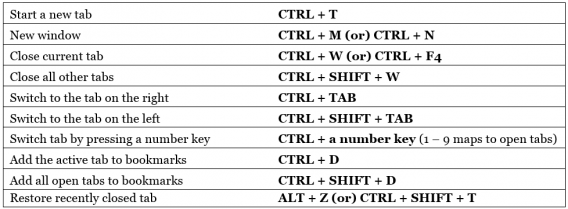
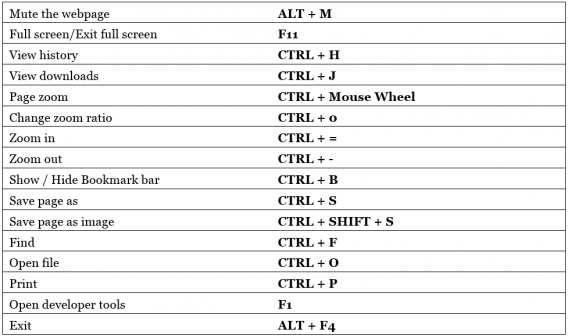
With over 30 of these hotkeys available, it can be difficult to memorize them all. Do not worry though, because we have the full list right here to show you how to be more efficient in UC Browser:

Navigation controls

address bar, forward, back, homepage, stop loading, refresh, reload, restore

Tab controls

open, close, restore, switch, add to bookmarks, tab

General controls

mute, full screen, exit, open, zoom, find, save, print

There you go, a comprehensive list of every UC Browser hotkey to speed up your web surfing.

Related Stories

3 Productivity Hacks for Office 2007

How to clear the cache on Safari for Windows

Windows 10: The 45 most useful keyboard shortcuts

How to delete your browsing history and protect privacy in UC Browser

Reenergize your profile and get more likes with this new Facebook feature

Among all of the mind-boggling, impossible to penetrate tech that was revealed at the F8 global developers conference last Tuesday (Source: Adweek), Facebook snuck in one fun little nugget: more news about animated profile pictures.

Get some pretty sweet Facebook likes with this apps!

This was actually announced back in September 2015. Then, Facebook rolled out the new feature allowing you to upload short, seven seconds videos to use for your profile image – that is providing you were using an Android or iOS device to upload the video and lived in the US or the UK.

Well, those limitations still exist, but Facebook has added its Profile Expression Kit to the list of features on iOS. This tool allows third-party developers to add a button into their apps that allows users to upload videos directly to their profile image.

Currently in beta, the confirmed partners are MSQRD (iOS|Android), Boomerang from Instagram (iOS|Android), Lollicam, BeautyPlus, Cinemagraph, Pro from Flixel, and – predictably given the seven second time limit – Vine (iOS|Android).

The one that has us most excited is the chance to use our MSQRD alter egos for our profile images – after all who doesn’t want to be Iron Man on their profile page?

In a post on the Facebook for Developers site, Aigerim Shorman outlined the reasons behind the Profile Expression Kit’s development with some compelling numbers:

With more than 4.5 billion views and nearly 30 million profile picture updates every day, Facebook profiles have become the best place to curate your own identity and learn about others.

By offering more creativity Facebook is sure to increase interaction between its users. Expect your friends and acquaintances rush to click on your latest profile creations – the perfect way to get more likes and start new conversations.

Related Stories

The five best VPNs

Five apps to create your own digital avatar

Three Dark Souls III alternatives

Follow me on Twitter: @DoFuss

How to clear history in UC Browser

If you’re a user of UC Browser, you might be wondering how to delete the history of the sites you’ve visited.

Actually, it’s very easy to remove your history in UC Browser. Besides deleting your browsing history in UC Browser, you can remove cookies, clear form data, and wipe the cache (or a combination of all of these). Here’s how:

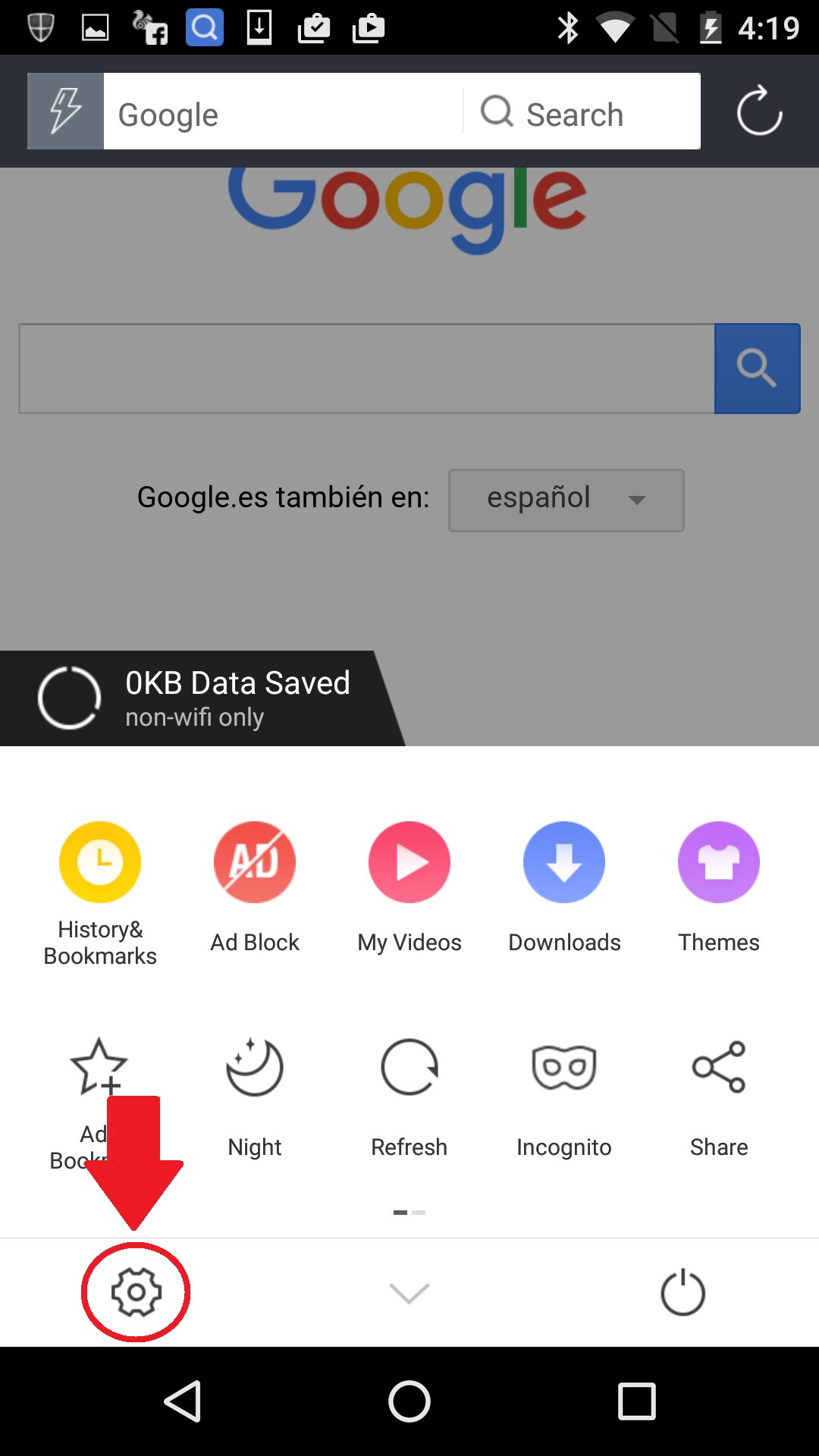
  1. First, press the Menu icon

    Menu
  2. Enter in Settings

    Click on the Settings gear icon in the UC Browser toolbar.

  3. Clear ’Records’

    Clear Records

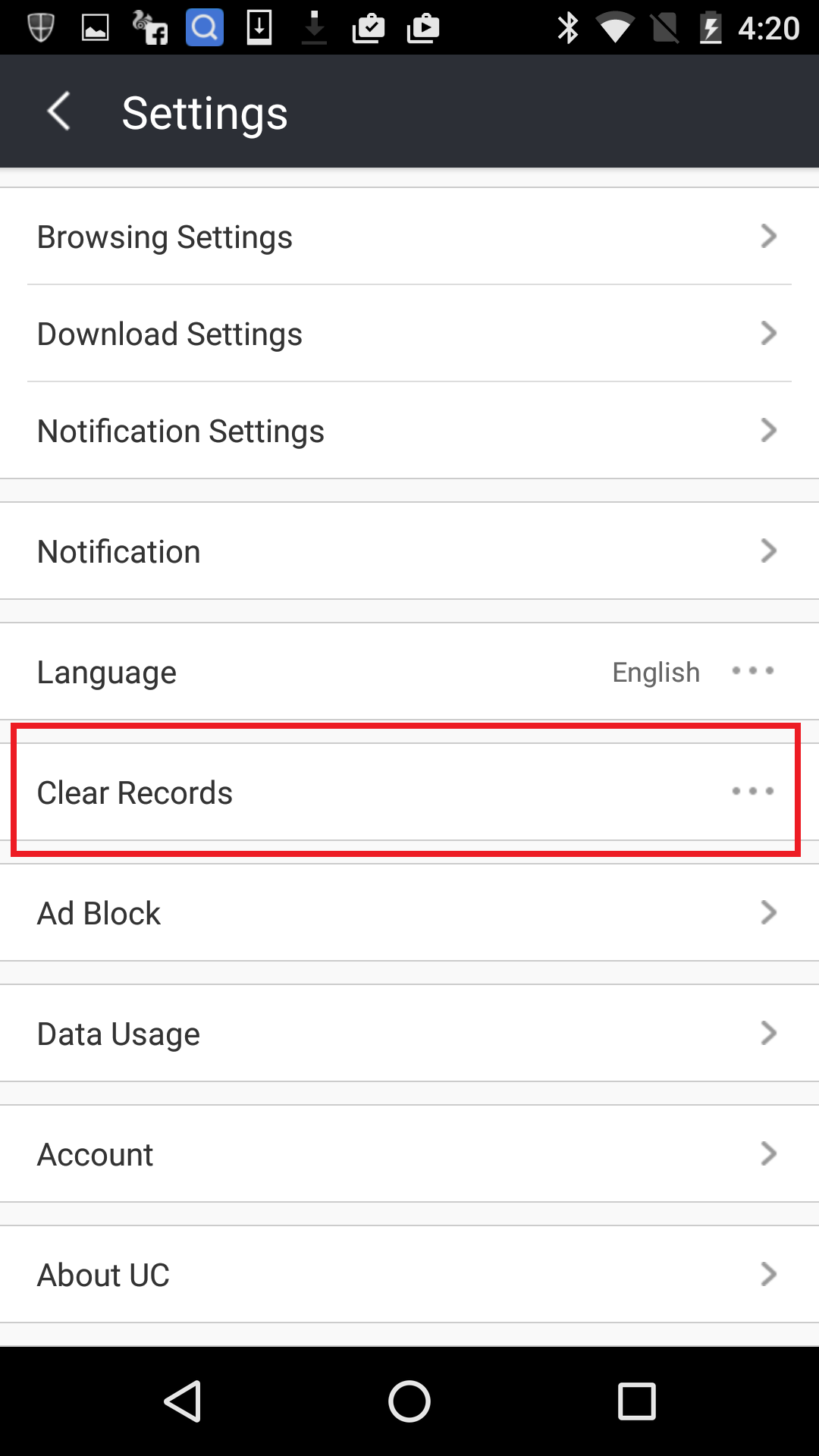
    Scroll down to ‘Clear Records’ and press it.

  4. Access ‘History’

    Clear Histroy

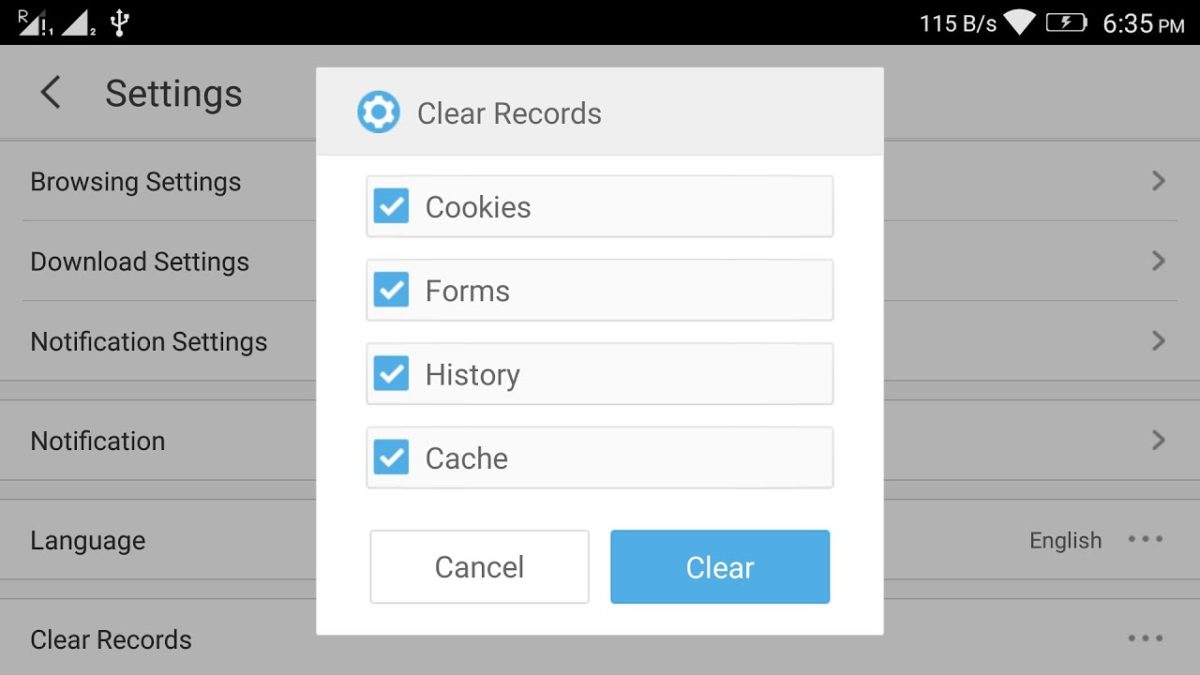
    You’re now given the option to clear Cookies, Form, History, and Cache. Make sure ‘History’ is ticked and hit the Clear button. After a couple of seconds your history will be removed from UC Browser.

Quick and simple

Now you are finished, your history gone, saving you space and protecting your privacy.

Three Dark Souls III alternatives

OMG Dark Souls III is here! What I am trying to say is, “let’s make this quick so I can get back to the finale of From Software’s Gothic styled, hack-and-slash trilogy“. The last seven days has had me so excited to play that I actually started digging through my games to find something similar in the hope they may sate my Dark Souls desires. Here are my three favorite.

Wayward Souls (iOS|Android)

If you want some Souls action on-the-go then you have a few options (none of which are Slashy Souls). My personal favorite is Wayward Souls – a 16-bit styled, top-down, action RPG that is filled with challenge and drips atmosphere.

Wayward Souls

With a range of characters to pick from, you have to edit your play style depending on class and abilities. On your quest you collect coins that can be shared between all of your characters to level them up and gain access to their unique skills and upgrades. Expect to hurl plenty of spells as a magic users and focus on sheer power as a brawler – but always keep an eye on your stamina/mana otherwise things can go bad fast.

Not quite Dark Souls to go, but close enough and a great interpretation of its vibe for the small screen.

Dragon’s Dogma: Dark Arisen (Windows)

Dragon’s Dogma: Dark Arisen is Capcom’s gritty medieval action game. The look and world design should be instantly recognizable to Souls players, with every area feeling interconnected and dripping with mood.

Dragons Dogma

But it is the combat that really resonates. In Dragon’s Dogma learning the animation of both your own attacks and those of your enemies are vital to surviving every fight. You must see your foe’s tells, and know exactly how long your own strikes are in order to duck in and out from between attacks. Again, Souls fans should find this familiar, but Capcom has added the ability to climb over the huge beasts as you fight to better target their weaknesses.

Add to this a faster pace of play, along with a more clearly explained story, and you have a game that should prove a good palate cleanser when Dark Souls III gets a bit too much.

Salt and Sanctuary (Windows)

Last this week we have a game that isn’t actually out yet on PC… but it is coming, it’s great, and it basically Dark Souls reinterpreted as a 2D platformer – right down to the HUD and controls being almost identical.

Salt and Sanctuary

The game is Salt and Sanctuary, and it is the latest game from Ska Studios. Maintaining the developers signature slapdash charcoal visual style, it instantly sets a perfect tone for its dark uncertain fiction that makes no secret of its inspiration. It is a feeling that the game embraces whole heatedly, with the writing also managing to keep the characters, story, and motivations vague until the end.

It isn’t perfect, if only because the 2D perspective makes it hard to orientate yourself, but Salt and Sanctuary will be a must.

Right, I am off to play more Dark Souls III. I’ll see you next week I’m able to peel myself out of my chair.

Related Stories

Three amazing games featuring time powers

The three best driving simulators

3 WWE games to prepare for WrestleMania

Follow me on Twitter: @DoFuss

How to sell your things and make money online, 5 apps to help

Today we are going to show you five great apps to help you sell all those things you don’t need any more. That’s right, it is time to explore your attic for that old copy of Detective Comics #27, dust off that exercise bike you never used, and get ready to find your fortune.

Wallapop (iOS|Android)

First up is Wallapop. For this service has been the go to place to resell almost anything you can think of thanks to its great service and ease of use. All you have to do is describe the object you are selling, add pictures, pick a starting price, and wait for the money to roll in.

5miles (iOS|Android)

5miles is a great app to get rid of all those things you haven’t used in forever. While 5miles is similar to Wallapop it does feature two interesting additions: you can add voice memos to better explain what you are selling, and sell services like property rentals, house cleaning, and jobs.

eBay (iOS|Android|Windows Phone)

Next comes the daddy of them all, eBay. This mobile app has a lot to offer. Along with letting you buy items of all kinds in every condition imaginable,  you can also search using barcodes, shop and sell all over the world, and let it bid for you after setting your maximum price.

DePop (iOS|Android)

As a resale app, DePop tries to be a little more exclusive by focusing solely on vintage items. Presented in a similar way to Instagram, DePop is all about aesthetics and style. It offers options to specify whether you want to pay in person with cash or use Paypal to have it shipped.

Obsso (iOS|Android)

We all have loads of things sat around our house that we don’t use but don’t know the value of. This is where Obsso comes in, a bartering app that doesn’t use money. Functioning like all the other apps on the list, this app will help you find others in your area who want to trade their stuff for yours – no money necessary.

Next week we are going to bring you the best 5 VPNs – apps that allow you to access the Internet safely. Don’t miss that, and I will see you then.

Related Stories

Five voice changing apps

Five apps to create your own digital avatar

Three amazing games featuring time powers

2016’s best technology themed April Fools’ pranks – did any get you?

Follow me on Twitter: @DoFuss

Three amazing games featuring time powers

Quantum Break is now out on Xbox One and Windows 10. As I have been excited to play Remedy’s new game for a while, I thought that this week I would celebrate by bringing you three of my favorite games with time travel powers. And yes, I do know I missed Life is Strange off the list, but that’s because we have already featured it in our games of 2015 video– rewind time to check it out.

Day of the Tentacle Remastered (Windows|Mac)

Day of the Tentacle Remastered is a re-release of the classic 1993 point-and-click adventure. Keeping all of the sharp writing and humor, Double Fine dived back into Lucas Arts’ vaults to find all of the original designs and voice acting ensuring that this game lets you travel back in time in two ways.

DoT Remaster

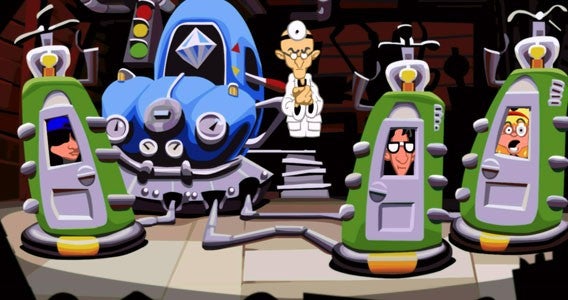
Playing as Bernard, Hoagie, and Laverne you must stop the Purple Tentacle’s plans of world domination. After being scattered through time by a faulty time machine, the three “heroes” must solve the various puzzles that are constantly thrown at them, utilizing the fact one is in the past, one is in the present, and one is in the future.

Braid (Windows|Mac)

Braid is a smart blend of puzzle and platform game. While navigating its six stages controls like a Mario platformer –  with you stomping various enemies on your way to the goal – time travel powers inject a wonderful range of paradoxical puzzles.

Suited Mario

With powers that include rewinding time, slowing events around you, and producing clones, your abilities quickly stack to allows for some incredibly challenging puzzles. Add to this levels that only move when you do for a truly chronological conundrums.

Super Time Force Ultra (Windows)

Continuing the 2D theme is Super Time Force Ultra, a title stuffed with high-octane 16-bit style and precision action. This game is hard – old-school hard – with enemies easily able to kill you with a single shot. Don’t worry though, because your team of heroes have a temporal trick to level the playing field – the ability rewind time.

super time force ultra

This allows you to use past/current/future (whatever) versions of your squad members to help you make it through levels within the tight time limit. This keeps the action fraught, but also opens up entertaining opportunities like rescuing downed squad members by taking out their killers pre-slaughter. Great fun if you have the reflexes for it.

That’s it for this show! Next week Dark Souls III is out, so you can expect me to look distracted as I take you three my favorite three Dark Souls-esq games. See you then.

Related Stories

Batman vs. Superman: videogame showdown

The three best driving simulators

3 WWE games to prepare for WrestleMania

Follow me on Twitter: @DoFuss

2016’s best technology themed April Fools’ pranks – did any get you?

April Fools’ Day has come and gone again, and if you were online at all on the April 1st then there is a good chance you spent at least a few moments trying to separate fact from fiction. So, on the off-chance that you are still pondering what was real, here are the craziest April Fools gags that caught our eye from some of the biggest tech companies.

YouTube

YouTube really pushed the boat out this year with SnoopVision, a tool that would let you enjoy all videos in 360 degrees… with Snoop Dog! Now you can watch every single clip as though you are sat in a theater with the D-O-double-G.

Google Cardboard

Google went even further with its augmented reality leg pulling by giving Google Cardboard an expansion, Google Cardboard Plastic. Yes, its just a transparent plastic box that offers a door way into a reality with breath taking visuals.

T-Mobile

Rather than offering a virtual experience, T-Mobile, has delivered a completely new way to enjoy your mobile hands free. Best of all, it looks really stylish. Seriously, if you fell for this one we are worried about you.

OneTable

If you want more than vision, then OneTable is about to take your digital experience one step further with lick-o-vision. Really don’t do this one, most phones are filthy.

Samsung

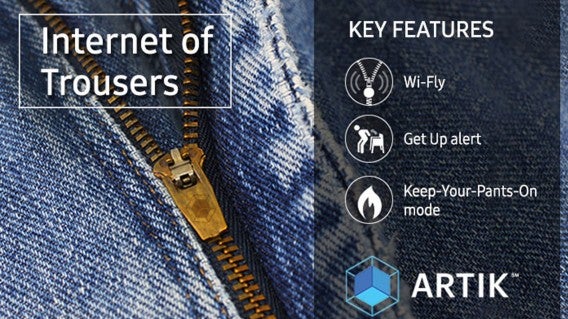
Rather than improving your digital life Samsung introduced something more real world, internet enabled pants. These make sure you always know when your flies open, which could actually be more useful than it sounds.

Samsung IoT

H&M

Still on clothing, H&M unveiled the Mark Zuckerberg collection which allows you to dress like a billionaire. Well, providing all that billionaire ever seems to wear are a pair of jeans and a gray T-shirt.

H&M Mark

Google Netherlands

With all of Google’s work on self-drive cars, Google Netherlands decided to create something far more environmentally friendly, self-driving bikes. This maybe the only video that will have you scratching your head and wondering how they did it.

Gmail

Unfortunately not every joke if appreciated, like Gmail’s Minion mic drop. Showing a GIF of one of the yellow Minions dropping a mic, this little joke would actually prevent you from replying to a message if it turned up in your inbox. Funny, but frustrating if it is something important.

Spot any other great April fool gags? Let us know in the comments!

Related Stories

See our April Fool’s Day article

How to try new features on WhatsApp before anybody else

VR is here to stay

Follow me on Twitter: @DoFuss

Five apps to create your own digital avatar

The face changing app MSQRD (iOS|Android) has been talked about a lot recently. But, if you are looking for a more complete visual overhaul, then there are lots of other great apps out there that can totally transform you into an animated avatar. Here are five of the best.

Second Life (Windows)

Second Life is the granddad of virtual worlds that offers you a digital multiverse filled with things like exhibitions, concerts, shops, and other things you may find in the real world. But to interact with all this you need an avatar, and Second Life has you covered. It lets you change anything about your digital self, and purchase them almost anything you can imagine, to ensure they look exactly how you desire.

Zoobe (iOS|Android)

One great app for creating a talking avatar is Zoobe. All you have to do is add your voice, then the app animates your chosen avatar to look like they are speaking for you. You can then select an animation to go along with it to add that little extra pazaz. Zoobe also offers social links so you can laugh at your creations with friends.

FaceRig (Windows)

Those of you wanting to chat live with your avatar should get FaceRig. This program uses facial recognition and your webcam to map your facial movements instantly onto your avatar. There are numerous masks to pick between, and – if you have enough creativity and patience – you can even make your own.

VEEMEE Avatar Creator (Android)

VEEMEE Avatar Creator is an avatar tool for people who enjoy RPG games. Just pick a base character and get modify – tweaking every detail until it is exactly how you want it. Once complete you can dress, pose, photo, and share them. If you grab VEEMEE Video Avatar (Android) it’s also possible to animate them to entertain you. Dance avatar, dance!

Miitomo (iOS|Android)

Miitomo is Nintendo’s first mobile title. It has you create your own little avatar in the Nintendo Mii style, selecting a look and personality to match your own. After this your creation can interact on a Mii Social Network. There you can answer questions that work like status updates, and visit your friends Mii’s to interact with them. If that isn’t enough, you can also play mini-games to earn rewards to further improve your avatar.

That’s it for this week, next time I’ll be back with apps to help you sell your old junk and buy other people’s desirables. See you then.

Related Stories

Five free music apps

Five voice changing apps

5G and why we need it

VR is here to stay

Follow me on Twitter: @DoFuss

Amazing! You can use Virtual Reality in Whatsapp NOW!

Whatsapp is riding the VR wave with its latest incredible update. To use it, and start enjoying the messaging app in virtual reality, all you need is a compatible phone and a Google Cardboard style headset to slip it into.

Released today on both Android and iPhone, the messaging app now allows you to enter your own virtual reality chat room. Once inside you are surrounded by messages. Active chats appear in front of you, with older conversations appearing off to the left and group chats to the right. You can swipe messages out of the way with your arms to move through them, while holding up your hand allows you to record and send audio responses (sorry, there is no Minority Report style holographic keyboard yet).

It doesn’t end there though: notifications pop-in above your head, contacts are beneath your feet, and media (such as photos and videos) can be found behind you.

To send one of these files all you have to do is move through them with more swiping motions until you find the one you want. Then by holding out both hands you can “grab” the selected file and turn around to drop it into an active chat.

No, it’s not amazingly practical – you certainly won’t see me using it on the bus – but we had great fun trying it out in the office. Plus, it is a great example of what the future of messaging may hold.

Of course there are some restrictions, the update (numbered 4.01.016) is only compatible with iOS 9.2 and 9.3, while Android users have to be using Lollipop or Marshmallow.

Unfortunately, those of you with Windows 10 Phones will have to wait for the update to hit the Windows Store later in the month.

Related Stories

WhatsApp has changed! Be sure to watch your data usage!

How to try new features on WhatsApp before anybody else

Could this mean the end for WhatsApp?

VR is here to stay

Follow me on Twitter: @DoFuss

3 WWE games to prepare for WrestleMania

WrestleMania is here, the highlight of WWE the calendar. If you are a wrestling fan, it is hard not to be excited – even if not every fight on the card fits your fantasy booking. Could this be Undertaker’s final year? Will Charlotte retain the Belt? Does Ambrose have a hope against Paul Hayman’s monster, Brook Lesner? And is Roman Reigns really going to take the Heavyweight Championship from Triple H? (I really hope not).

Anyway, while you wait for the next match on the WWE Network (iOS|Android), I have three WWE games to keep you occupied.

WWE 2K16 (Windows)

Of course, if you want to try act out the fights before they happen, you want WWE 2K16. Despite having been on consoles for over a decade, this is only the second year that WWE’s flagship game has made its way to PC. But as this year boasts the biggest roster of Superstars and Divas to date the timing seems pretty good.

WWE 2K16 - Seth Rollins and Kevin Owens

Plus, if you are picking between 2K15 and 2K16, the latest game certainly seems to have the edge. This is primarily due to the single player mode. Last year you could follow the stories of Degeneration X’s collapse or the rivalry between CM Punk and John Cena, both of which were fine but struggle to compare the this year’s offering which follows the iconic “Stone Cold” Steve Austin’s run during the Attitude Era.

It’s true that the combat engine now seems a little dated – with the canned animations of the wrestlers making everything feel a little stiff – but if you want to act out the fights of WrestleMania 32 before they happen then this is what you need.

WWE SuperCard (iOS|Android)

I had an almost unhealthy addiction to WWE’s collectible-card game, WWE SuperCard, when it was first released. I put in more than sixteen hours in a single weekend, and spent more money than I care to admit on cards. I am over that now… honest… just let me buy one more booster pack.

WWE SuperCard - is that Ryback vs Sgt Slaughter?

It’s a little embracing, because there is really very little to WWE SuperCard. Playing like a simplified Top Trumps, you take a hand of 5 to take into each fight. Cards feature a single Superstar or Diva on them, along with stats for Power, Speed, Toughness, and Charisma.

You then use these cards to fight online. Each contest lasts three rounds, and you have to beat your opponents numbers in whatever stat the round is based on. Only being able to use a card once across the three rounds, this leads to an interesting blend of strategy and luck as you try to predict what rules will be applied and what cards your opponent will play.

WWE Immortals (iOS|Android)

Immortals is perhaps the best WWE fighting experience in years. Based around the same basic premise as the Injustice: Gods Among Us mobile game (iOS|Android), this fantasy brawler replaces Superman and Batman with characters like a John Cena superhero and a stone warrior version of The Rock. By applying a stack of fantasy, sci-fi, and comic book tropes, WWE’s roster of Superstars and Diva’s Immortals makes for wonderfully ridiculous fun that works brilliant as an arcade style fighter.

WWE Immortals - Big Show vs Danial Bryant

Each three-on-three tag team match has you tap and swipe screen to unleash light and strong attacks. Once you charge up enough power, you get to unleash a special move that is in keeping with both the wrestler and their alter ego – cue Randy Orton’s Viper spitting acid before RKOing his opponent into the ground.

If you want a bit of action to pass the time between fights at this year’s WrestleMania, then WWE Immortals is perfect.

That’s it for this week, but do let me know your favorite wrestling games or your opinion on WrestleMania 32 in the comments… I need someone to talk to about it I am the only WWE fan in the office. See you next week!

Related Stories

Three alternatives to Nintendo’s Mario games on mobile

Batman vs. Superman: videogame showdown

The three best driving simulators

2016’s most anticipated games

Follow me on Twitter: @DoFuss