The Snipping Tool in Windows 11 will include visual searches like those of Google Lens

The Windows 11 Snipping Tool, one of the most practical tools for users who frequently take screenshots, is preparing an interesting improvement that will increase the potential functionality of this application: visual search by “scanning”. In this way, in addition to taking snips or screenshots, you will be able to select areas of the screen to carry out image-related searches based on the selected image.

Free Snipping Tool Download

Visual Search Clipping Tool

As Microsoft has officially announced in a recent post, the Windows 11 Snipping Tool will undergo important changes soon, thanks to the added feature of visual search in the selected area for the snip. Currently, this feature is being tested by Canary users, so it is not openly available yet, but if it is being tested in that development phase, these updates will soon arrive to the Snipping Tool.

This adds to the most recent improvements that this tool is receiving, such as emoji and QR code scanning, which often, from the screen, involve having a mobile phone to complete the scan, even though the code is on the same screen where you want to see it. Thus, with these other improvements, the Snipping Tool continues to add value to the service it offers.

More improvements for Paint

It has been a while since Microsoft was about to shut down the Paint service, and now the path is quite the opposite. With AI-based features already integrated, Paint is also undergoing certain changes, such as the name change from Cocreate, the image generator, to Image Creator, with a much simpler and more intuitive name.

Paint is not the only tool in Windows, far from it, that has been enhanced, improved or modified to offer services based on Artificial Intelligence. It is, in fact, a trend within Microsoft, which has implemented numerous Artificial Intelligence features in all kinds of applications. A clear example is in the Microsoft 365 work ecosystem, which has countless Copilot-based features in services like Teams, Excel, Word, Outlook, and many more, but it doesn’t stop there, as Microsoft Edge, the default Windows browser, also has Copilot openly available for all users.


Free Snipping Tool Download

Apple is closing its iOS Developer University Program, where it trained developers for iOS apps

Apple has decided to take a step back by canceling its developer training program, a service that it offered for different interested individuals to learn how to program in iOS in order to develop applications within its ecosystem. This news, which has caught many users by surprise, means that this program will soon stop working and developers will have to train in iOS programming using other methods.

Apple Store Download

Closing of the developer training

As some developers have reported through social networks, Apple has decided to end its Developer University Program, which allowed developers to learn programming skills focused on iOS, Apple’s operating system for mobile phones and tablets.

In fact, one of the facts that some developers regret the most is that there are very few programming courses in Spanish for iOS, which is a significant loss for many Spanish speakers who prefer to take this type of content in their native language rather than in English. So, anyone who was taking this Apple initiative, or had an interest in it, will have to look for alternative options from now on.

Apple and the current version of iOS

On the other hand, there are also positive changes within Apple regarding the final quality of the service that users receive, as it has only been a few days since the company released the iOS 17.5 update, which includes numerous improvements and new features that Apple customers will benefit from once they download and install this new patch. With this, the Operating System of iPhones and iPads receives a new change in preparation for the future iOS 18 version, which presumably will arrive with the next iPhones in autumn.

In fact, iOS version 17.5 brings highly anticipated features for users, such as advancements in mobile battery management, widgets for the Podcast application, improvements in third-party service tracking, or the enhancement of Facetime blocking against the current rise of spam calls. With these types of improvements, the new iOS version enhances the user experience at general levels.

Apple Store Download

Android 15 will allow you to hide the applications you want to hide

Android 15 continues to advance in its development and continues to reveal new features that will catch the attention of those looking for privacy improvements on their mobile phones. For example, Google has announced that one of the standout features of Android 15 will be the ability to create a “secure folder” in which to hide the applications you want from prying eyes.

Android 14 Download

Android 15 will improve privacy

As Google explains in a recent blog post, Android 15 will continue to prioritize user privacy. With this premise, the next version of Google’s Operating System for mobile phones will allow users to hide certain installed applications and services, giving users greater control over the privacy they can apply on their Android smartphones.

Thanks to this measure, any user who has sensitive, privately interesting applications, or who simply want to keep them hidden, will be able to hide from anyone who does not have permission to access that information. This is a valuable step in privacy that will allow many users to breathe easy when someone else starts looking at their mobile screen or interacting with their available applications.

Other things coming to Android

Android 15 not only thinks about user privacy, although it is one of its priorities. They have also showcased a battery of features they are working on for the release of Android 15 in the fall of 2024. Among other things, Google has emphasized these other functions that will come to Android in general:

  • Anti-theft system. If this function is activated before leaving home, the phone will detect if someone tries to snatch it and if they try to escape with a quick action, it will preemptively lock the phone.
  • Real-time AI to prevent fraud through suspicious apps. The Artificial Intelligence will proactively warn about services that pose a potential risk to the security of the mobile phone.
  • Photos in Google Wallet. Wallet will finally allow linking cards of all types by scanning them with the phone’s camera, just like other wallet services currently do.
Android 14 Download

Google launches open source tools to embed AI in applications

Artificial Intelligence, both by Google and other companies, is increasingly present in technology, and also with greater capabilities. Google is also aware that not all developers have access to tools that can help with the implementation of AI in their systems, so the Californian company has launched Firebase Genkit, an open-source system, powered by Apache 2.0, that facilitates the integration of AI into new or existing application developments.

This decision by Google is in line with everything they have revealed in recent days, where they have shown a high interest in Artificial Intelligence, everything that surrounds it, and the things that users can do with it. Thus, in this way, Google tries to universalize access to this type of tools for developers who, at first, do not have the ideal systems to carry out this action.

Gemini Download

An open tool for different models

As seen in the recent Google I/O developer keynote, Google is dedicating a great effort to strengthen its Artificial Intelligence area before the competition, but they also intend that, in addition to themselves, third-party developers can implement AI-based functions in the services they offer through other applications.

With this, Google has the possibility to continue increasing its influence in a market whose pie still has many unallocated portions. Furthermore, developers can also implement other AI models, and they wouldn’t necessarily have to use Google’s models, which provides greater freedom in these developments.

Gemini, stronger than ever

Google Gemini, the Artificial Intelligence that Google has developed for its services, is only six months old since it was officially presented to the public. However, despite the fact that its 1.0 version is so efficient that it surpasses GPT-4 in many instances, the most popular one created by OpenAI, they have already announced the 1.5 version of Google Gemini with a wide range of services and features that will encompass numerous applications of the current Google.

For example, thanks to the tools that Gemini allows to develop around it, a new search system is already being tested that is capable of summarizing content from various links in relation to the search you have carried out. Likewise, a virtual assistant for mobile devices is also on the way, capable of processing all kinds of details, both visually and audibly, to help you with all kinds of aspects in your day to day life.

Microsoft takes out the war axe against spam and malicious messages in Outlook

Microsoft Outlook, the email service provided by the company currently led by Satya Nadella, has decided to go all out against the annoying practices that flood the inboxes of hundreds of millions of users with spam messages or malicious emails. To do this, the company will start being stricter regarding the senders who carry out these types of practices, which not only generate dissatisfaction among users but also increase internet insecurity and risks.

Microsoft Outlook Download

Fight against spam and harmful emails

As Microsoft has recently stated in a blog post, certain changes will be made to the filtering of messages that users receive on a daily basis. Outlook, in fact, is a service prone to receiving many messages of this type, and that is why they are strengthening both the automatic filtering of messages and the appearance of warnings that alert recipients that these messages are controversial in terms of their reliability or security, and the intuitive improvement of manual filtering tools.

This is a positive measure if you consider that practically all users have suffered from spam messaging, or from scam or phishing attempts, among other crimes, and it remains to be seen if, in the coming months, the volume of spam is reduced through the improvements that Microsoft has implemented.

The recent improvements of Microsoft Outlook

Microsoft doesn’t just focus on fighting spam when it comes to improving the Outlook service. In fact, Microsoft Outlook itself has received a significant number of advancements and improvements in recent weeks that aim to enhance the service quality in different areas, including Artificial Intelligence, once again provided by Copilot, a Microsoft tool that boosts and enhances the functionalities of many applications in the Microsoft 365 productivity ecosystem.

With these improvements, Outlook continues to want to position itself as an email service constantly evolving and with intentions to compete against strong rivals such as Gmail, which, through the linking of smartphones, quickly obtained billions of users, who now have a great deal of trust in Gmail.

Microsoft Outlook Download

The challenge of Google Gemini at I/O 2024: to surprise after the OpenAI event

These are key days for the evolution of Artificial Intelligence, and Google knows it very well. The Californian company whose Keynote is once again key to positioning the brand in various technology markets, will once again have Gemini as one of its main commercial spearheads, especially after the expectation that has grown after the recent event held by OpenAI.

In the last few hours, OpenAI also held an event where they presented the improvement of their current iteration, GPT-4, which becomes GPT-4o, with a more than visible evolution, not only in potential but also in the ability to gather information, as this AI is capable of seeing, interpreting, and even analyzing patterns of non-verbal language.

Gemini Download

Google Gemini causes excitement

Google Gemini has only been on the market for a few months, but since it was introduced in late 2023, it became clear that the Artificial Intelligence race is taken very seriously by Google. Therefore, with the potential announcements that Google I/O 2024 may make, Google Gemini is one of the tools that generates the most interest among those who are waiting to see the announcements.

In fact, Google has already confirmed on social media that Gemini will be one of the protagonists during the conference that takes place on May 14th at 19:00 (Spain time).

The intense race of AI’s

Artificial Intelligence, although it has always been of interest to the technology industry, has never had as much weight in the world as it does today. And it is that, with the giant leaps that this type of systems has made in recent years, it is clear that, far from being a fad, AI has come to stay with us for a long season. In fact, with each passing year, progress in this area takes an increasingly exponential pace.

Companies, moreover, have not hesitated to invest a good part of their time and resources in researching this area that still, despite everything, is very underexplored both commercially and socially, which implies that it is a market with a pie that still does not have a clear owner. That is why big companies like Google, OpenAI, Microsoft, and many others are striving to have a privileged position before this market stabilizes and it becomes more difficult to expand in it.

Gemini Download

The main rumor about OpenAI: a new multichannel digital assistant

OpenAI, the company behind the popular ChatGPT Artificial Intelligence, is already working on a new event, which is rumored to include the release of a new digital assistant that takes a significant qualitative leap in terms of operational capacity, being able to detect sarcasm, analyze images in the same way it interprets dialogues with its interlocutor, and even make phone calls.

ChatGPT Download

OpenAI’s plans

According to The Information, at the event that starts from 7:00 PM on May 13th, OpenAI intends to showcase improvements in the multimodality of its Artificial Intelligence systems just like Google and other companies are currently doing. Whether as a voice assistant, tools such as the ability to make calls, visual analysis, and other elements, the company led by Sam Altman plans to stay ahead of this AI fever, a phenomenon mainly driven by OpenAI in recent years.

For now, however, if one thing seems clear, it is that the leap to a hypothetical GPT-5 would not be real yet. Therefore, it would be improvements at a general level on the current foundations that GPT-4 has, which, in reality, already provide very high capabilities to other tools from the competition driven by this same iteration.

Sam Altman CEO of OpenAI

The path marked by its advances

It is true that OpenAI, thanks to the iterations of GPT it has been developing, and also thanks to the system developed in ChatGPT, made the popularity around Artificial Intelligence grow exponentially. However, in the last year, other systems are proving to be stronger in terms of functionality, such as Microsoft Copilot (which is powered by GPT-4) or Google Gemini, whose reasoning abilities amazed everyone since its presentation at the end of 2023.

With this, OpenAI now has the challenge and the task of once again placing its Artificial Intelligence-based systems at the forefront of public opinion. The tumultuous weeks that the company’s leadership had in 2023 are now further away, and stability is once again being established in a company that, under the umbrella of Microsoft, continues to work to offer innovation in this segment of technology that is now receiving more attention than ever.

ChatGPT Download

Google I/O is approaching, and Artificial Intelligence will have a lot of prominence

The next event that Google will celebrate, its highly anticipated I/O, is about to take place. This May 14th, Google I/O will once again take place and, as expected, Artificial Intelligence will have a great prominence in the Keynote, a technology that is evolving by leaps and bounds in recent years, and that the big technology companies are applying to offer new services or improve existing ones.

Gemini Download

Google I/O, Google AI

As can be found on Google’s specific website for I/O, this event is just around the corner, and there is a lot of expectation surrounding it. Nothing has been officially revealed, but it is an open secret that, once again, Artificial Intelligence will be the protagonist in a conference where Google will announce exciting news, especially regarding new features of Gemini that will be added to its increasingly extensive catalog of services.

Google, on the other hand, has already left the access link to the Keynote and inside it has a brief trailer, which will remain until the event begins on May 14th at 19:00 Spanish time (in Pacific time, where the event takes place, it will be at 10:00). From there, you will be able to enjoy live each of the announcements that the Californian company has prepared for I/O 2024.

Gemini, the big bet

Google Gemini, the system developed by Google and presented at the end of 2023, is currently one of the Artificial Intelligences that generates the most expectation in the sector. And it is not for less, after the flashy presentation of its multiple capabilities at an event where Google made it clear that they are working in this market with more than conclusive results. Therefore, taking into account what Gemini was already capable of at the end of last year, it is more than likely that in this new I/O it will show what Gemini is capable of today.

In fact, there are many rumors about the innovations that Gemini can present. One of the most recent, for example, was about the possibility that this AI generates secure passwords for users. In addition, in recent weeks, Gemini has continued to expand rapidly; proof of this is its recent arrival to Android Studio, where it brings new features and improvements to this service.

Gemini Download

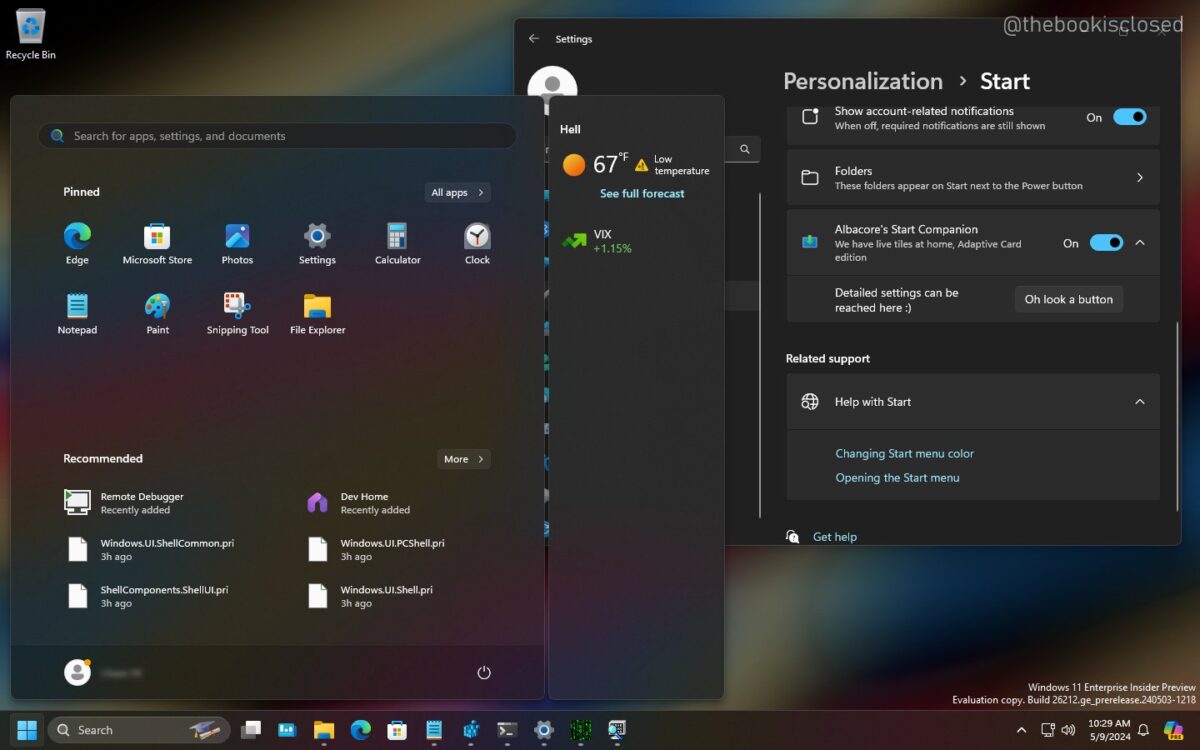
Windows 11 start menu will surprise you thanks to a completely new panel

The start menu of Windows 11, one of the most iconic tools of Microsoft operating systems, is ready to take a leap in quality. Specifically, in Windows 11, the novelty that will arrive to the start menu will be a widgets panel that, as an addition, will bring a new layer of depth to your user experience and the customization possibilities that users will have, with this change, when activating the start menu on their computers.

Windows 11 Download

A panel to customize your experience

As demonstrated by social media experts, the Start menu is poised to make a significant qualitative leap soon. If we also mention the integration of Copilot into the system customization and configuration we mentioned earlier, this would be another step in the same direction to provide users with new tools that can enhance their overall experience when using a PC in the same way as on mobile devices.

Widgets, in fact, a tool that has become popular especially since smartphones started to become popular, have the particularity that each user can decide whether to use them or not, where to place them, or what they want to see specifically, so the addition of Widgets to Home is a very positive improvement for users.

Windows 11 lags behind Windows 10

Despite all the improvements that Windows 11 is making to turn its service into a much more attractive ecosystem, the reality is that, until today, Windows 10 still represents almost 70% of the total Windows traffic, almost tripling the modest 26% of users who currently have Windows 11. For that reason, Microsoft continues to release improvements in Windows 11 that encourage the hundreds of millions of users who continue to choose to use Windows 10.

However, there is an underlying problem with having so many users on Windows 10 at the moment. And that is that in less than a year and a half (specifically, in October 2025), support for Windows 10 will cease, or at least stop being free. This puts hundreds of millions of computers in the future in a difficult situation, where, even if users want to, they will not be able to make the leap to Windows 11 because they do not meet the hardware requirements. Therefore, Microsoft’s challenge to gain momentum for Windows 11 before that date is, in turn, a race against time in which many users will no longer receive support from the company.

Windows 11 Download

Microsoft Copilot will allow you to customize and change settings in Windows 11

Microsoft Copilot, the AI-powered service, continues to expand within the Microsoft ecosystem with new tools and functionalities. In fact, the latest one will allow users to customize and make changes to the settings of Windows 11, a method that will provide many users with greater convenience to make quick adjustments or customizations.

Windows 11 Download

Customization with Copilot commands

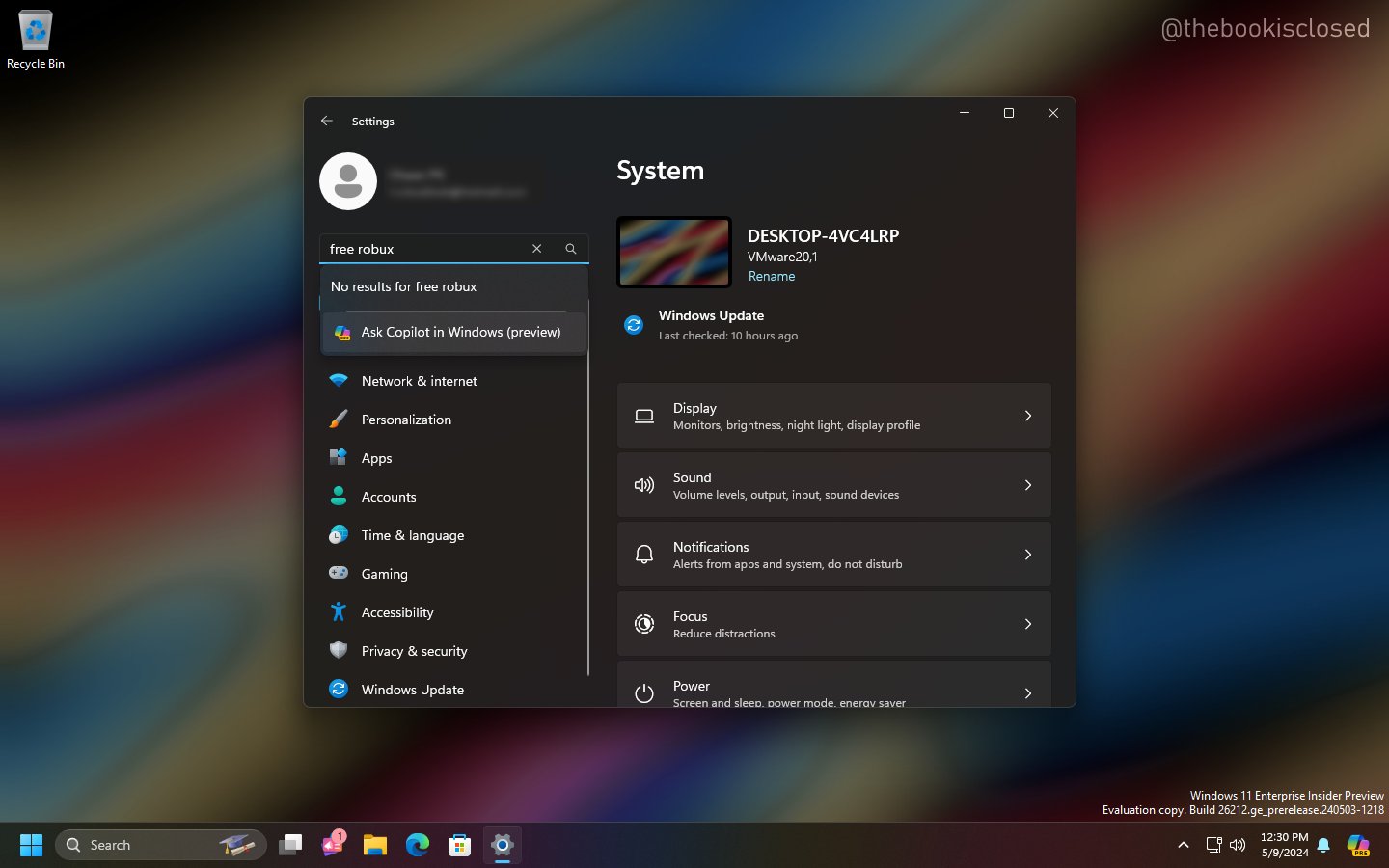
As insiders have revealed on social media, Microsoft is already testing a new navigation system for the customization and settings of Windows. It would consist of Copilot automatically making the changes that the user requests through the commands that can be asked of the Artificial Intelligence service that the company began to showcase since 2023.

Thanks to these Copilot functions implemented within the Windows system, users who want to make changes to their customization or configuration will only have to write to Copilot what they want to change, and the AI will take care of finding that configuration and modifying it according to the instructions given by the user. It may not be revolutionary, as these configurations are also available, but they save time navigating through the various menus to find the desired configuration and parameter.

The synergies of Copilot on Windows

Since 2023, Microsoft has emphasized a significant portion of its money and research resources to advance the service and functionalities that Copilot can perform. It is evident that it goes beyond being a commercial statement, as this Artificial Intelligence expands more and more into Microsoft’s applications and services. In fact, Copilot is already fully integrated into Microsoft 365 and most of the applications included in this subscription, bringing improvements in usability and features that result in increased productivity.

On the other hand, Microsoft doesn’t want Copilot to remain solely within the ecosystem focused on productivity at work. As a result, it’s fully available through Microsoft Edge, the official Windows browser, which, although has less traffic than the company would desire, has taken great strides in terms of services, openly offering Microsoft Copilot services in the system that was previously Bing Chat.

Windows 11 Download