Friday timewaster: Red Star Fall

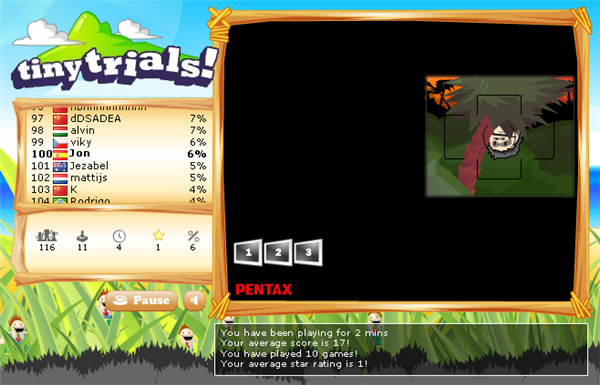
Red Star Fall is a neat game, where your objective is to bring the red star to ground level, by removing blocks underneath it. It’s all mouse controlled, and difficult to stop once you’ve started! This really is a casual game – if you can point and click with a mouse, you can play with no problems! Once completed, why not head over to the almost identical, but cuter Tumbledrop (which requires the unity plugin for your browser)? There are 20 more levels of star-saving related action there, if you need more!

Shouttr: a noisy step too far for Twitter?

We love checking out Twitter clients. From Firefox add-ons to iPhone apps, Twitter seems to be the web service that is attracting the most creative development. In fact, does anyone tweet from the Twitter homepage anymore?

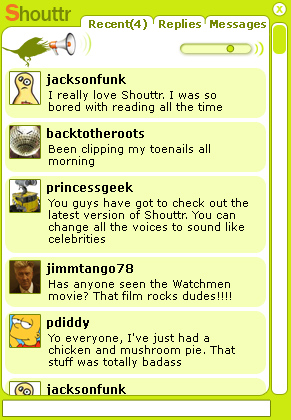
In this Twitter-frenzied world, it was only a matter of time before things went a bit too far. Shouttr, currently in an alpha-development stage, is a program that lets you post and read tweets others much like any other Twitter client. But it will also read aloud tweets for you as they arrive. You can configure voices yourself, from a selection included with the application (male, female, sexy and so on)

As well as shouting your Twitter feed, Shouttr also has an option to read out “Twitter Everyone”, which results in a cascade of never-ending tweet noise. Imagine you could hear everyone’s babble, all the time, all at once. This is a pretty good simulation – this is how it feels to be totally wired into the chatter node of human consciousness.

Whether or not it’s useful is another matter. The developer points out that by making tweets audible, you no longer need to read them, and therefore it saves you time. That’s as may be, but many people will find this massively distracting.

The iPhone version that’s apparently in the works takes things to another level. It means that soon you won’t be able to walk down the street without hearing a constant stream of consciousness being burped out of the Internet. The promotional video for Shouttr demonstrates just how far Twitter ‘enhancements’ have come. But do we really need this level of advancement of a Web service that’s made a mark because of its simplicity?

OnSoftware Daily Digest

Wikipedia running out of facts? [NY Times]

Skype coming to iPhone [CrunchGear]

Pirate bay launch Facebook app [Guardian]

Spotify signs deal for downloads [BBC]

Make your own magazines cheaply [Magcloud]

Vast online spy network stole from Dalai Lama [NY Times]


/* Style Definitions */ table.MsoNormalTable {mso-style-name:”Tabla normal”; mso-tstyle-rowband-size:0; mso-tstyle-colband-size:0; mso-style-noshow:yes; mso-style-parent:””; mso-padding-alt:0cm 5.4pt 0cm 5.4pt; mso-para-margin:0cm; mso-para-margin-bottom:.0001pt; mso-pagination:widow-orphan; font-size:10.0pt; font-family:”Times New Roman”; mso-ansi-language:#0400; mso-fareast-language:#0400; mso-bidi-language:#0400;}

Friday timewaster: You Be The Driver

Do you have what it takes to be a BMW Sauber Formula 1 driver? You’re too late for the 2009 season, which starts this Sunday, but maybe next year? With You be the Driver, you’re taken through three tests to see if you have the necessary reactions. You probably will have! Don’t worry if you’re a terrible driver – your lack of skills won’t hamper you in these tests. Maybe you can be the next Robert Kubica or Nick Heidfeld?

How to manage your social networks and media?

Juggling the ever increasing number of social networks and media sites can be a time consuming pain. Logging into lost of different accounts, you can have a very busy browser before you’ve don anything constructive. I thought I’d look at the current range of solutions to this. I’ll start with some honesty: At the moment there is no one good solution, but there are some which do a reasonable job.
alert

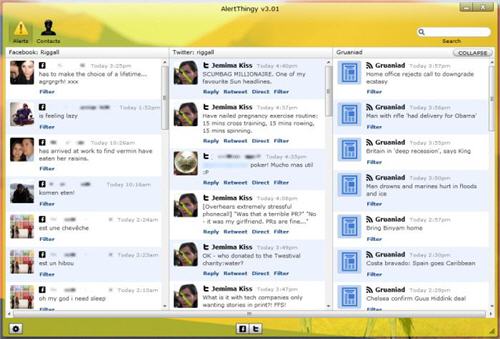
Notable stand alone applications AlertThingy, TweetDeck and Skimmer all offer to pull together your social networks. Skimmer is quite interesting, but it’s very much a beta product, and is the only one with Blogger support, but doesn’t feel finished! It’s something to keep your eye on. TweetDeck and AlertThingy are much slicker, although both are focussed on Twitter and Facbook. Both work very well for Twitter – you don’t miss any of the Twitter experience doing through either of these clients. Facebook is a mixed bag – you can’t do everything you can on the website from any of these clients. AlertThingy offers many more social networks, and they both look good, so TweetDeck loses out just by being a bit too limited.

Firefox has similar add-ons. These give you the more or less the same features as the stand alone apps, but are integrated into Firefox. The most flexible we’ve found is Yoono. It’s a bit of a monster, but can bring Facebook, Twitter, Flickr, Myspace and more into the same space. On top of that it features instant messaging from Microsoft Messenger, Google Talk and Yahoo chat, plus the option to add feeds from your favourite websites. The amount of stuff can get a bit overwhelming, but you can choose exactly what you do and don’t want. The Facebook feed also gives you your news feed, not just status updates, which is great.

ZenOnline services like Zenbe bring your email together with Facebook, Twitter and more. I found this less comfortable than using either a Firefox add-on or a stand alone application. What is clear at the moment is that no one has a perfect solution. Everything I’ve seen can handle Twitter easily, but Facebook always feels like ‘Facebook lite’, and all of these social network aggregators suffer from becoming cluttered.  I am looking forward to Skimmer’s further development, as its Blogger support could make it the most complete package, but we’ll have to wait and see.


Friday timewaster: Don’t Look Back!

What a fantastic title for a game! Terry Cavanagh’s new indie game Don’t Look Back! is a hard and atmospheric platform shooter. the basic 8-bit graphics work really well, the colors and sound effect work together to create a great sense of foreboding about… something. You have unlimited lives, and you’ll need nearly enough patience alongside some lightening quick reactions, but it’s worth it. Sign in to the site and you can register your high scores too.

Internet kills the Radio?

radio

Over on Crunch Gear, Nicholas Deleon tried to make the case that no one finds new music using commercial radio anymore, as social networks, Last.fm and so on have superseded it. He specifically targets “commercial” radio for some reason, but it doesn’t really matter. I’m really not convinced any “muso” has ever used daytime commercial music stations to discover music. But at night, when they specialist DJs came out, that was when things got interesting.

I would probably agree with Nicholas about finding commercial music radio pretty horrible – but it was horrible before the internet! If you don’t want to hear classics, or the top ten on rotation: don’t listen to those show. There’s plenty of other good stuff on the radio.

However, that’s not the point. The argument that the internet has killed radio is wrong. The sensible radio broadcasters are using the internet as their broadcast medium, so as an industry it should do just fine. BBC radio‘s listen again service is hugely popular, for example. It is true that you can use Myspace, Twitter, FaceBook, Spotify , Last.fm and so on to discover new music, but as radio stations, Last.fm and Pandora miss out the personal touch that you get with a DJ.

The best DJs can give you a constant stream of new and exciting music, often programmed so the tracks fit together well. For every shouty-trendy Portuguese act you find on the internet, listen to a good radio show and you’ll probably hear it there first.  Of course, chances are you’ll have been streaming your radio show over the internet, so I think it’s better to say that the Internet is saving the radio show. Much like MTV didn’t hail the death of radio in the 80s, it’s premature to write its obituary today.

Create 3D galleries of your photos with Sysygy Gallery Creator

Checking out photos with a slide show is getting a bit dull now, so why not liven up your pictures by putting them in a 3D environment?

Sysygy Gallery Creator is a neat piece of freeware that lets you do just that. Download and unzip the “no setup” version of the program, then run GalleryCreator.exe. Unfortunately, the three galleries on offer have fixed numbers of picture places, and for a good effect you’ll want to fill them. The two smaller galleries fit 29 pictures, and the larger one 51 – so find that many pictures! In the gallery creator, just click the add photos and don’t change the importing options. You can import photos in groups, which is much quicker than one by one. Save the file in the Galleries folder in the Sysygy folder, and close the application. Continue reading “Create 3D galleries of your photos with Sysygy Gallery Creator”